What is the "recovery partition"?

freewheeling

New member
Local time
4:08 PM
Messages
92
I did a clean install of Windows 7 Professional on a drive that originally contained Windows Vista Home Premium. This was over two months ago, and the Windows 7 installation seems to be working fine. But about 10 GB of space on the C: drive is taken up by a "recovery partition." My sense is that this was created in case I want to recover my Vista installation, in which case it's of no more use to me after thoroughly testing Windows 7. But is this what the recovery partition is, and if so how do I get rid of it to reclaim the disk space?
 

My Computer My Computer

At a glance

Windows Vista HP 64-bit, Windows 7 P 64-bit, ...Pentium(R) Dual-Core E5200 @ 2.50GHz4.00GBNVIDIA GeForce 7100 / NVIDIA nForce 630i
Computer Manufacturer/Model Number
Gateway DX4720-03
OS
Windows Vista HP 64-bit, Windows 7 P 64-bit, Leopard 10.5.8, Windows 7 P 32-bit
CPU
Pentium(R) Dual-Core E5200 @ 2.50GHz
Motherboard
ACPI x64
Memory
4.00GB
Graphics Card(s)
NVIDIA GeForce 7100 / NVIDIA nForce 630i
Sound Card
Onboard Sound
Monitor(s) Displays
Samsumg Syncmaster 2233SW, Syncmaster 205BW
Screen Resolution
1680X1050 and 1920X1080
Hard Drives
WDC WD64 00AAKS-22A7B SCSI
WDC WD50 00AAKS-00V2B SCSI
WDC WD10 EADS-00M2B0 SCSI
FUJITSU USB
SEAGATE USB
PSU
Generic (cheap) 550W
Case
Gateway
Cooling
30 W
Keyboard
Kinesis Advantage
Mouse
Trackball
Internet Speed
Cable Modem
Other Info
Hauppauge HD-PVR, USB-UIRT
Yes, it cotains the program that would restore Vista as you got it from the factory.

If you have the recovery discs, you may not need the partition as well.

Vista is a valuable part of the pc. E.G. If you want to sell it - you may want to put Vista back on.

If you still wish to remove it, use a 3rd party app. like the free Partition Wizard:

http://www.partitionwizard.com/download.html
 

My Computers My Computers

  • At a glance

    7 X64i5 84002x8gb 3200mhz
    Computer type
    PC/Desktop
    OS
    7 X64
    CPU
    i5 8400
    Motherboard
    gigabyte b365m ds3h
    Memory
    2x8gb 3200mhz
    Hard Drives
    various
    PSU
    pure power 11 400w cm
    Case
    Coolermaster
    Cooling
    cryorig m9i
  • At a glance

    7x64g54008gb ddr4 2400
    Computer type
    PC/Desktop
    OS
    7x64
    CPU
    g5400
    Motherboard
    ga b365m ds3h
    Memory
    8gb ddr4 2400
    PSU
    xfx pro 450w
In addition to the above, Some manufacturers include the use of the shipped operating system as a pre-requisite for warranty claims.

So it may be a good idea to keep this partition at least until the system is out of warranty
 

My Computers My Computers

  • At a glance

    Windows 11 Pro x64 [Latest Release and Releas...Ryzen 9 5950X, 3.8 - 5.2 MHz64GB [2 x 32GB] DDR4 3200MHz4GB NVIDIA GEFORCE GTX 1650 Ti
    Computer type
    PC/Desktop
    Computer Manufacturer/Model Number
    ChillBlast - Custom to my design
    OS
    Windows 11 Pro x64 [Latest Release and Release Preview]
    CPU
    Ryzen 9 5950X, 3.8 - 5.2 MHz
    Motherboard
    Asus Prime X570-Pro
    Memory
    64GB [2 x 32GB] DDR4 3200MHz
    Graphics Card(s)
    4GB NVIDIA GEFORCE GTX 1650 Ti
    Sound Card
    On-board SPDIF to 5.1 System + HDMI [5.1 system]
    Monitor(s) Displays
    32" UHD 32 Bit HDR Monitor + 43" UHD 4K 32Bit HDR TV
    Screen Resolution
    2 x 3840 x 2160 @60Hz
    Hard Drives
    1TB M2 SSD OS, 500GB Fast Access SSD, 2 x 8TB Data + Various Externals from 1TB to 4TB, 10TB NAS
    PSU
    NZXT C750 80 PLUS Gold 750W Modular PSU
    Case
    Workstation Case [Matt Black]
    Cooling
    NZXT Kraken X63 280mm CPU Cooler +2x Quiet Case fans
    Keyboard
    Logitech Wireless MX Keys & K400 + others
    Mouse
    Logitech Wireless MX Master 3S
    Internet Speed
    920 MB Down 50 MB Up
    Antivirus
    BitDefender Total Security Pro
    Browser
    Chrome (always run latest Non-Beta)
    Other Info
    Also run ...
    Laptop - Quad 8GB - Windows 10 Pro x64
    Nexus 7 Android tablet x2
    Samsung 10.2" tablet
    Blackview TAB 8 4G Android Tablet c/w Keyboard
    Wacom Intuos Pro Medium Pen Pad
    Wacom Intuos Pro Small Pen Pad
    Wacom Expresskeys Remote
    Loopdeck+ Graphics Controller
    Shuttle Pro v2 Control
  • At a glance

    Windows 11 Pro x64 Latest RPIntel I7 10750H 5.0GHz32GB [2x16GB] DDR4 2933 MHznVidia GTX1650Ti 4 GB GDDR6
    Computer type
    Laptop
    System Manufacturer/Model Number
    Dell XPS 17 10750H
    OS
    Windows 11 Pro x64 Latest RP
    CPU
    Intel I7 10750H 5.0GHz
    Motherboard
    Dell XPS
    Memory
    32GB [2x16GB] DDR4 2933 MHz
    Graphics Card(s)
    nVidia GTX1650Ti 4 GB GDDR6
    Sound Card
    Stock [Realtek] 4 Speaker
    Monitor(s) Displays
    17" IPS UHD+ Infinity Edge Touchscreen
    Screen Resolution
    3840 x 2400
    Hard Drives
    2TB M2 NVMe, 4TB External + various 500GB & 1TB External NVMe (also have access to spinner HDD from
    PSU
    Stock
    Case
    Stock XPS Aluminium & Carbon Fibre
    Cooling
    Stock - Active Fan Control
    Keyboard
    Backlit + Various Logitech
    Mouse
    Stock Track Pad + Logitech MX Trackball
    Internet Speed
    72 MB Down 18MB Up
    Browser
    Chrome
    Other Info
    Also run ...
    Laptop - Quad 8GB - Windows 10 Pro x64
    Nexus 7 Android tablet x2
    10.2" tablet
    Sony Z3 Android Smartphone
    Wacom Intuos Pro Medium Pen Pad
    Wacom Intuos Pro Small Pen Pad
    Wacom Expresskeys Remote
    Loopdeck+ Graphics Controller
    Shuttle Pro v2 Control Pad
    10TB NAS
Vista is a valuable part of the pc. E.G. If you want to sell it - you may want to put Vista back on.

Thanks. I created a factory install disk, so I don't really need the partition for anything.
 

My Computer My Computer

At a glance

Windows Vista HP 64-bit, Windows 7 P 64-bit, ...Pentium(R) Dual-Core E5200 @ 2.50GHz4.00GBNVIDIA GeForce 7100 / NVIDIA nForce 630i
Computer Manufacturer/Model Number
Gateway DX4720-03
OS
Windows Vista HP 64-bit, Windows 7 P 64-bit, Leopard 10.5.8, Windows 7 P 32-bit
CPU
Pentium(R) Dual-Core E5200 @ 2.50GHz
Motherboard
ACPI x64
Memory
4.00GB
Graphics Card(s)
NVIDIA GeForce 7100 / NVIDIA nForce 630i
Sound Card
Onboard Sound
Monitor(s) Displays
Samsumg Syncmaster 2233SW, Syncmaster 205BW
Screen Resolution
1680X1050 and 1920X1080
Hard Drives
WDC WD64 00AAKS-22A7B SCSI
WDC WD50 00AAKS-00V2B SCSI
WDC WD10 EADS-00M2B0 SCSI
FUJITSU USB
SEAGATE USB
PSU
Generic (cheap) 550W
Case
Gateway
Cooling
30 W
Keyboard
Kinesis Advantage
Mouse
Trackball
Internet Speed
Cable Modem
Other Info
Hauppauge HD-PVR, USB-UIRT
Yes, it cotains the program that would restore Vista as you got it from the factory.

If you have the recovery discs, you may not need the partition as well.

Vista is a valuable part of the pc. E.G. If you want to sell it - you may want to put Vista back on.

If you still wish to remove it, use a 3rd party app. like the free Partition Wizard:

Free Download Partition Wizard

I tried to boot to a Partition Wizard disk and got the warning that resizing the system partition in Windows 7 would cause the system to be unbootable. Looks like that's *not* the way to go. I mean I don't want a 10GB separate drive, I want to reclaim that partition as part of the system drive.
 

My Computer My Computer

At a glance

Windows Vista HP 64-bit, Windows 7 P 64-bit, ...Pentium(R) Dual-Core E5200 @ 2.50GHz4.00GBNVIDIA GeForce 7100 / NVIDIA nForce 630i
Computer Manufacturer/Model Number
Gateway DX4720-03
OS
Windows Vista HP 64-bit, Windows 7 P 64-bit, Leopard 10.5.8, Windows 7 P 32-bit
CPU
Pentium(R) Dual-Core E5200 @ 2.50GHz
Motherboard
ACPI x64
Memory
4.00GB
Graphics Card(s)
NVIDIA GeForce 7100 / NVIDIA nForce 630i
Sound Card
Onboard Sound
Monitor(s) Displays
Samsumg Syncmaster 2233SW, Syncmaster 205BW
Screen Resolution
1680X1050 and 1920X1080
Hard Drives
WDC WD64 00AAKS-22A7B SCSI
WDC WD50 00AAKS-00V2B SCSI
WDC WD10 EADS-00M2B0 SCSI
FUJITSU USB
SEAGATE USB
PSU
Generic (cheap) 550W
Case
Gateway
Cooling
30 W
Keyboard
Kinesis Advantage
Mouse
Trackball
Internet Speed
Cable Modem
Other Info
Hauppauge HD-PVR, USB-UIRT
Please post back a screenshot of your full Partition Wizard map so we can better advise you. Use the Snipping tool in the Start Menu, attach file using paper clip in reply box.

If Resizing Win7 partition to take in the Recov partition's deleted space causes Win7 to become unbootable, then this can be repaired by booting into the Win7 DVD repair console and running Startup Repair 3 times to repair and possibly rewrite the MBR.
 
Please post back a screenshot of your full Partition Wizard map so we can better advise you. Use the Snipping tool in the Start Menu, attach file using paper clip in reply box.

If Resizing Win7 partition to take in the Recov partition's deleted space causes Win7 to become unbootable, then this can be repaired by booting into the Win7 DVD repair console and running Startup Repair 3 times to repair and possibly rewrite the MBR.

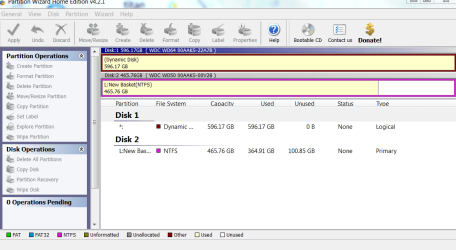
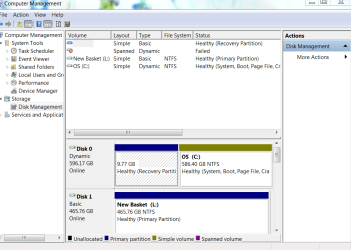
I think I uploaded the screen shots. If so, you can see that the partition listed in Disk Manager isn't even seen in Partition Wizard. What next?
 

Attachments

  • Partitions in Wizard.PNG
    Partitions in Wizard.PNG
    40.2 KB · Views: 162
  • Patitions in DM.PNG
    Patitions in DM.PNG
    33.5 KB · Views: 177

My Computer My Computer

At a glance

Windows Vista HP 64-bit, Windows 7 P 64-bit, ...Pentium(R) Dual-Core E5200 @ 2.50GHz4.00GBNVIDIA GeForce 7100 / NVIDIA nForce 630i
Computer Manufacturer/Model Number
Gateway DX4720-03
OS
Windows Vista HP 64-bit, Windows 7 P 64-bit, Leopard 10.5.8, Windows 7 P 32-bit
CPU
Pentium(R) Dual-Core E5200 @ 2.50GHz
Motherboard
ACPI x64
Memory
4.00GB
Graphics Card(s)
NVIDIA GeForce 7100 / NVIDIA nForce 630i
Sound Card
Onboard Sound
Monitor(s) Displays
Samsumg Syncmaster 2233SW, Syncmaster 205BW
Screen Resolution
1680X1050 and 1920X1080
Hard Drives
WDC WD64 00AAKS-22A7B SCSI
WDC WD50 00AAKS-00V2B SCSI
WDC WD10 EADS-00M2B0 SCSI
FUJITSU USB
SEAGATE USB
PSU
Generic (cheap) 550W
Case
Gateway
Cooling
30 W
Keyboard
Kinesis Advantage
Mouse
Trackball
Internet Speed
Cable Modem
Other Info
Hauppauge HD-PVR, USB-UIRT
Looks like PW is seeing Win7 DISK0 as DISK1 but not seeing its Recov Partition. It also is reporting that it is Logical, but I can't see the Disk Mgmt detail to confirm that. I get the feeling there is some instablity as I have never seen PW report with such variance.

An OS can be on a logical partition however it cannot be marked active. But apparently that is not a problem since it is System partition anyway. Do you have any performance issues? You could rightclick on that drive in PW and Modify>Set to Primary, but I dont know whether that would then make the Recovery Partition visible.

There are times when an accidental Logical partition must be converted to Primary, such as when it needs to be marked active to be System partition to take the MBR. However since it already is System, I am not sure I'd advise that since there can be performance compromise from converting (if there isn't already from the strange config it's got: System Logical but not Active?!)

I would be looking for a Primary partition already marked active, or which can be marked active, before advising you to go ahead and delete that Recov Partition. That way you would know for sure that resizing into the deleted Recov space would be recoverable if it should lose the boot. Startup Repair will almost always work in that scenario when run 3 times, if not then manually running bootrec and bootsect commands.

But there are multiple problems here that make it too iffy to advise you to go ahead. Perhaps converting Win7 drive to Primary as it should be to be marked active System drive, might clear things up enough to see the Recov partition in PW. Then it would be more of a sure thing to mark WIn7 active (it should already be, if it were a Primary part), delete the visible Recov partition, Resize Win7 into the deleted space, then if necessary run Startup Repair 3 times to repair the MBR in Win7.

I leave you to mull over these things, ask any questions, let others advise. I always go on performance, so you may want to go by that alone.
 
I can't make any changes to the C drive other than to assign it a different drive letter. I can't make it "active" or "primary." (Note that the drive is dynamic.) It appears that the primary partition on that drive is, in fact, the recovery partition??

The only performance problem I've noticed is a tendancy for my system to freeze lately, so that I can still see everything but the mouse is frozen, the keyboard unresponsive, and the date/time frozen. I have to just do a hard reboot. I haven't determined what's making my system freeze, but it may not have anything to do with this. I've run check disk on the C drive, and it seems OK. No bad sectors, files, or anything. The "spanned/failed" drive refers to a couple of old IDE drives that I removed from the drive bay so air can circulate better, and just haven't taken it off of the manager.

Has my system been corrupted, and if so what do I do??
 

My Computer My Computer

At a glance

Windows Vista HP 64-bit, Windows 7 P 64-bit, ...Pentium(R) Dual-Core E5200 @ 2.50GHz4.00GBNVIDIA GeForce 7100 / NVIDIA nForce 630i
Computer Manufacturer/Model Number
Gateway DX4720-03
OS
Windows Vista HP 64-bit, Windows 7 P 64-bit, Leopard 10.5.8, Windows 7 P 32-bit
CPU
Pentium(R) Dual-Core E5200 @ 2.50GHz
Motherboard
ACPI x64
Memory
4.00GB
Graphics Card(s)
NVIDIA GeForce 7100 / NVIDIA nForce 630i
Sound Card
Onboard Sound
Monitor(s) Displays
Samsumg Syncmaster 2233SW, Syncmaster 205BW
Screen Resolution
1680X1050 and 1920X1080
Hard Drives
WDC WD64 00AAKS-22A7B SCSI
WDC WD50 00AAKS-00V2B SCSI
WDC WD10 EADS-00M2B0 SCSI
FUJITSU USB
SEAGATE USB
PSU
Generic (cheap) 550W
Case
Gateway
Cooling
30 W
Keyboard
Kinesis Advantage
Mouse
Trackball
Internet Speed
Cable Modem
Other Info
Hauppauge HD-PVR, USB-UIRT
Well that is a substantial performance problem.

Can you look at the detail I cannot see in the screenshot on the C: drive in Disk Management and confirm it is logical? Normally it would say so.

It may be unformatted simple volume.

Do you get "Modify: Set to Primary" when you righclick on C: in PW?

Was your Win7 partition part of the failed Spanned drive?
 
Last edited:
Well that is a substantial performance problem.

Can you look at the detail I cannot see in the screenshot on the C: drive in Disk Management and confirm it is logical? Normally it would say so.

It doesn't say "logical" for the type, but the layout is "simple" and type is "dynamic." The same thing for the recovery partition, which is nominally part of the C drive, is layout "simple" type "dynamic." So that's for the whole drive, uncluding the "system, boot, Page File, Crash Dump" partition and the "recovery" partition.
It may be unformatted simple volume.
The color coding indicates that the recovery partition is "Primary Partition" and the system partition is "Simple Volume." So the recovery section is a partition but is not a volume.

Do you get "Modify: Set to Primary" when you righclick on C: in PW?

Was your Win7 partition part of the failed Spanned drive?
"Modify: Set Partition to Primary" or "Logical" are grayed out. No, Win 7 wasn't part of the spanned drive. I just used it to store recorded video.

It at least seems possible that the recovery partition is actually part of the Windows 7 OS, and that's just the way it sets up restore points? I'm just guessing, though.

One of the options for Disk 1 is Convert Dynamic Disk to Basic Disk, so I could undo the dynamic property, but I don't know what that would do to the system.
 

My Computer My Computer

At a glance

Windows Vista HP 64-bit, Windows 7 P 64-bit, ...Pentium(R) Dual-Core E5200 @ 2.50GHz4.00GBNVIDIA GeForce 7100 / NVIDIA nForce 630i
Computer Manufacturer/Model Number
Gateway DX4720-03
OS
Windows Vista HP 64-bit, Windows 7 P 64-bit, Leopard 10.5.8, Windows 7 P 32-bit
CPU
Pentium(R) Dual-Core E5200 @ 2.50GHz
Motherboard
ACPI x64
Memory
4.00GB
Graphics Card(s)
NVIDIA GeForce 7100 / NVIDIA nForce 630i
Sound Card
Onboard Sound
Monitor(s) Displays
Samsumg Syncmaster 2233SW, Syncmaster 205BW
Screen Resolution
1680X1050 and 1920X1080
Hard Drives
WDC WD64 00AAKS-22A7B SCSI
WDC WD50 00AAKS-00V2B SCSI
WDC WD10 EADS-00M2B0 SCSI
FUJITSU USB
SEAGATE USB
PSU
Generic (cheap) 550W
Case
Gateway
Cooling
30 W
Keyboard
Kinesis Advantage
Mouse
Trackball
Internet Speed
Cable Modem
Other Info
Hauppauge HD-PVR, USB-UIRT
A dynamic disk creates potential issues not least in a disaster recovery scenario. Dynamic disks are not appropriate for a system disk.

You would be better converting it to a basic disk.

Use a hardware controller if you must use Raid.
 

My Computers My Computers

  • At a glance

    7 X64i5 84002x8gb 3200mhz
    Computer type
    PC/Desktop
    OS
    7 X64
    CPU
    i5 8400
    Motherboard
    gigabyte b365m ds3h
    Memory
    2x8gb 3200mhz
    Hard Drives
    various
    PSU
    pure power 11 400w cm
    Case
    Coolermaster
    Cooling
    cryorig m9i
  • At a glance

    7x64g54008gb ddr4 2400
    Computer type
    PC/Desktop
    OS
    7x64
    CPU
    g5400
    Motherboard
    ga b365m ds3h
    Memory
    8gb ddr4 2400
    PSU
    xfx pro 450w
How to convert dynamic disk to basic disk with Partition Wizard?

Be sure to back up your files, perhaps to the other HD.

Afterwards let us see a screenshot to make sure you're good to delete Recov and resize C: into that space.

The recovery is not a part of Win7, that would be 100mb. It is old OS recov. Tap the F-key given for Recovery on first bootup screen to confirm it's disabled.

So, just for clarity, you're saying to use Partition Wizard to convert the C drive from dynamic to basic, and then give you a screen shot frow PW or from Disk Manager, or both?

I have an Acronis system image backed up on the 500GB hard drive, so I can presumably recover the drive using that... if I have faith in Acronis, which I've never used before.
 

My Computer My Computer

At a glance

Windows Vista HP 64-bit, Windows 7 P 64-bit, ...Pentium(R) Dual-Core E5200 @ 2.50GHz4.00GBNVIDIA GeForce 7100 / NVIDIA nForce 630i
Computer Manufacturer/Model Number
Gateway DX4720-03
OS
Windows Vista HP 64-bit, Windows 7 P 64-bit, Leopard 10.5.8, Windows 7 P 32-bit
CPU
Pentium(R) Dual-Core E5200 @ 2.50GHz
Motherboard
ACPI x64
Memory
4.00GB
Graphics Card(s)
NVIDIA GeForce 7100 / NVIDIA nForce 630i
Sound Card
Onboard Sound
Monitor(s) Displays
Samsumg Syncmaster 2233SW, Syncmaster 205BW
Screen Resolution
1680X1050 and 1920X1080
Hard Drives
WDC WD64 00AAKS-22A7B SCSI
WDC WD50 00AAKS-00V2B SCSI
WDC WD10 EADS-00M2B0 SCSI
FUJITSU USB
SEAGATE USB
PSU
Generic (cheap) 550W
Case
Gateway
Cooling
30 W
Keyboard
Kinesis Advantage
Mouse
Trackball
Internet Speed
Cable Modem
Other Info
Hauppauge HD-PVR, USB-UIRT
Sounds good.

Boot into your Acronis disk to try cueing up the backup image, just to be sure. Make sure it is discovered and ready to reimage, that's all.
 
Sounds good.

Boot into your Acronis disk to try cueing up the backup image, just to be sure. Make sure it is discovered and ready to reimage, that's all.

Acronis didn't work, and I haven't received satisfactory guidance from their tech support (such as it is) so I deleted the Acronis image and created one using the native Windows 7 Backup and Restore. Looks like that money I spent on Acronis was pretty much wasted.
 

My Computer My Computer

At a glance

Windows Vista HP 64-bit, Windows 7 P 64-bit, ...Pentium(R) Dual-Core E5200 @ 2.50GHz4.00GBNVIDIA GeForce 7100 / NVIDIA nForce 630i
Computer Manufacturer/Model Number
Gateway DX4720-03
OS
Windows Vista HP 64-bit, Windows 7 P 64-bit, Leopard 10.5.8, Windows 7 P 32-bit
CPU
Pentium(R) Dual-Core E5200 @ 2.50GHz
Motherboard
ACPI x64
Memory
4.00GB
Graphics Card(s)
NVIDIA GeForce 7100 / NVIDIA nForce 630i
Sound Card
Onboard Sound
Monitor(s) Displays
Samsumg Syncmaster 2233SW, Syncmaster 205BW
Screen Resolution
1680X1050 and 1920X1080
Hard Drives
WDC WD64 00AAKS-22A7B SCSI
WDC WD50 00AAKS-00V2B SCSI
WDC WD10 EADS-00M2B0 SCSI
FUJITSU USB
SEAGATE USB
PSU
Generic (cheap) 550W
Case
Gateway
Cooling
30 W
Keyboard
Kinesis Advantage
Mouse
Trackball
Internet Speed
Cable Modem
Other Info
Hauppauge HD-PVR, USB-UIRT
Sounds good.

Boot into your Acronis disk to try cueing up the backup image, just to be sure. Make sure it is discovered and ready to reimage, that's all.

I got the following error message in Partition Wizard:
"Partition Wizard cannot convert the specified dynamic disk to basic disk. Because Partition Wizard cannot convert any dynamic volume type except the simple or mirrored volume."
What now?

BTW, I just bought a 1TB drive and was planning to move the Windows 7 installation to that drive as soon as I got this "recovery partition" thing cleared up. Is there a way that I can clone the installation over to the other drive using Backup and Recovery without also cloning this "recovery partition" along with it? If I can do that, that would probably solve the problem. I've given up on Acronis.
 
Last edited:

My Computer My Computer

At a glance

Windows Vista HP 64-bit, Windows 7 P 64-bit, ...Pentium(R) Dual-Core E5200 @ 2.50GHz4.00GBNVIDIA GeForce 7100 / NVIDIA nForce 630i
Computer Manufacturer/Model Number
Gateway DX4720-03
OS
Windows Vista HP 64-bit, Windows 7 P 64-bit, Leopard 10.5.8, Windows 7 P 32-bit
CPU
Pentium(R) Dual-Core E5200 @ 2.50GHz
Motherboard
ACPI x64
Memory
4.00GB
Graphics Card(s)
NVIDIA GeForce 7100 / NVIDIA nForce 630i
Sound Card
Onboard Sound
Monitor(s) Displays
Samsumg Syncmaster 2233SW, Syncmaster 205BW
Screen Resolution
1680X1050 and 1920X1080
Hard Drives
WDC WD64 00AAKS-22A7B SCSI
WDC WD50 00AAKS-00V2B SCSI
WDC WD10 EADS-00M2B0 SCSI
FUJITSU USB
SEAGATE USB
PSU
Generic (cheap) 550W
Case
Gateway
Cooling
30 W
Keyboard
Kinesis Advantage
Mouse
Trackball
Internet Speed
Cable Modem
Other Info
Hauppauge HD-PVR, USB-UIRT
What is wrong with the Acronis backup? Did you try to cue it up from the booted Acronis CD? If so, it should allow you to reimage only the Win7 partition to your 1tb drive.

The only question is if it copies the dynamic format; I doubt it. You can always try anyway to see.

Otherwise, try the Win7 backup imaging app to see if it will allow you to uncheck that Recov partition when saving the image. If not, go ahead and save it, then cue it up using your Win7 DVD or Repair CD (it will offer to make) and see if it will allow you to reimage without it.
 
What is wrong with the Acronis backup? Did you try to cue it up from the booted Acronis CD? If so, it should allow you to reimage only the Win7 partition to your 1tb drive.

The only question is if it copies the dynamic format; I doubt it. You can always try anyway to see.

Otherwise, try the Win7 backup imaging app to see if it will allow you to uncheck that Recov partition when saving the image. If not, go ahead and save it, then cue it up using your Win7 DVD or Repair CD (it will offer to make) and see if it will allow you to reimage without it.

I can't get an Acronis boot disk to work, and it won't clone my system when run from the C drive. The drive is grayed out. I contacted Acronis (via online chat because they don't have phone support for lowly customers like myself) and they gave me some runaround about using a third party app to create the boot disk. (Something called Bart somethingorother.) I tried it, but it wanted to reference my install files and couldn't find them on my C drive or on my Win 7 installation disk. I spent nearly a hundred dollars on that package, and couldn't even get a customer support person on the phone. Like I said, I gave up on Acronis. I created a ticket asking for a refund, but haven't heard from them yet. It's within the 30 days.

So I created a Win7 system image on the 500GB WD drive, disconnected the 650GB WD drive (formerly my C drive), and booted to the Win7 install disk. However, when I tried to recover using my system image (which it found with no problem) it insisted on re-imaging the same drive with the system image. In other words, it wouldn't even recognize the drive I wanted to transfer *to*.

My take is that you have to create the system image on the drive that you want to transfer to, and then leave only that drive connected. But I don't know what happens when it re-images. Presumably it leaves the system image as a separate partition on the drive, so I'd end up having to fix that somehow?

Yes, it would be a lot easier if Acronis hadn't been such a pill of a company. Imagine selling backup software for that price ($70 for the basic package and then $30 for an add on to deal with dynamic disks) and then insisting that your new customers *buy* phone support?? What a nightmare!

BTW, transferring my Mac Leopard system to a new drive was child's play by comparison. That's what I'm using now because my Windows 7 system is in limbo.
 

My Computer My Computer

At a glance

Windows Vista HP 64-bit, Windows 7 P 64-bit, ...Pentium(R) Dual-Core E5200 @ 2.50GHz4.00GBNVIDIA GeForce 7100 / NVIDIA nForce 630i
Computer Manufacturer/Model Number
Gateway DX4720-03
OS
Windows Vista HP 64-bit, Windows 7 P 64-bit, Leopard 10.5.8, Windows 7 P 32-bit
CPU
Pentium(R) Dual-Core E5200 @ 2.50GHz
Motherboard
ACPI x64
Memory
4.00GB
Graphics Card(s)
NVIDIA GeForce 7100 / NVIDIA nForce 630i
Sound Card
Onboard Sound
Monitor(s) Displays
Samsumg Syncmaster 2233SW, Syncmaster 205BW
Screen Resolution
1680X1050 and 1920X1080
Hard Drives
WDC WD64 00AAKS-22A7B SCSI
WDC WD50 00AAKS-00V2B SCSI
WDC WD10 EADS-00M2B0 SCSI
FUJITSU USB
SEAGATE USB
PSU
Generic (cheap) 550W
Case
Gateway
Cooling
30 W
Keyboard
Kinesis Advantage
Mouse
Trackball
Internet Speed
Cable Modem
Other Info
Hauppauge HD-PVR, USB-UIRT
Check out Macrium Reflect which is highly recommended freeware around here. It will allow you to select which partitions you want to image, uses a simple Linux CD it will make to reimage.

Are you saying Win7 Backup Imaging requires you to copy that Recovery Partition with your Win7? Go ahead and do so if you want as you can delete it and recover the space if you can shed that Dynamic disk format.
 
Back
Top