Having it connected to the network but not internet

Cohen

New member
Member
Local time
11:05 AM
Messages
36
Location
Australia
Hey guys,

I have setup a spare computer that i have had at home as a small home server.

Now, it's not a normal home server. It's a computer that i has iTunes open all the time and shares the music as a library and then my family can connect via the network and gets songs they would like.

I want it on the network so i can access it, but has no access to the internet.

How can i do this?

Thanks,

Cohen
 

My Computer My Computer

At a glance

Windows 7 Ultimate 64 bit Signature EditionIntel Core 2 Due T85003GBNot sure
Computer Manufacturer/Model Number
Acer Aspire 6930
OS
Windows 7 Ultimate 64 bit Signature Edition
CPU
Intel Core 2 Due T8500
Motherboard
Not sure
Memory
3GB
Graphics Card(s)
Not sure
Sound Card
Not Sure
Monitor(s) Displays
16"
Screen Resolution
1366 x 768
Hard Drives
320GB
PSU
Battery / Power Pack
Case
Laptop
Cooling
Air
Keyboard
Built in
Mouse
Built in
Internet Speed
1.5MBs down.
Other Info
These are my laptop specs!
Are you using wireless for your home network? If so, your network is one that gives all your machine access via WEP/WPA authentication. Once you are able to connect to your wireless network, either all or no machine can connect to the internet (provided you haven't made any filter changes on your router).

If your home uses wired networking, and you want to create a simple network to share files and internet, it's not hard either. There are countless tutorials on how to set up a simple network...consult google.com if you don't mind.
 

My Computer My Computer

At a glance

Windows 7 Ultimate 64BitGenuineIntel Intel(R) Core(TM) DuoCore T2400 ...2.00 GBMobile Intel(R) 945 Express Chipset
Computer Manufacturer/Model Number
Lenovo ThinkPad T60
OS
Windows 7 Ultimate 64Bit
CPU
GenuineIntel Intel(R) Core(TM) DuoCore T2400 @ 1.83GHz
Motherboard
Intel(R) 82801G (ICH7 Family)
Memory
2.00 GB
Graphics Card(s)
Mobile Intel(R) 945 Express Chipset
Sound Card
SoundMAX Integrated Digital HD Audio
Monitor(s) Displays
ThinkPad Display
Screen Resolution
1400x1050
Hard Drives
100Gb SATA
Keyboard
Standard Keyboard
Mouse
HID-compliant Mouse
Internet Speed
Cable Broadband - 54Mbps
Other Info
Intel(R) PRO/1000 PL Network Connection
11a/b/g Wireless LAN Mini PCI Express Adapter
One way to have the server connected to your network without also connecting to the internet would be to use a networking protocol, such as IPX/SPX, that isn't internet-compatible. All computers accessing the "server" would need to be running the protocol and in the "server" PC, you would have to disable TCP/IP.

I know IPX/SPX can be installed in 98SE, XP & Vista (because I've done it), but might have to play about with 7 :)
 

My Computer My Computer

At a glance

Windows 7 & 8 64-bit, Mac OSX 10.8.2
OS
Windows 7 & 8 64-bit, Mac OSX 10.8.2
How do i go about IPX / SPX??

The server is on the wired network, and we have wireless which my dad & I use, as well as 2 iPod touches within the house. So i want each device / computer to be able to access the "server" via the network but not have the server connected to the internet.
 

My Computer My Computer

At a glance

Windows 7 Ultimate 64 bit Signature EditionIntel Core 2 Due T85003GBNot sure
Computer Manufacturer/Model Number
Acer Aspire 6930
OS
Windows 7 Ultimate 64 bit Signature Edition
CPU
Intel Core 2 Due T8500
Motherboard
Not sure
Memory
3GB
Graphics Card(s)
Not sure
Sound Card
Not Sure
Monitor(s) Displays
16"
Screen Resolution
1366 x 768
Hard Drives
320GB
PSU
Battery / Power Pack
Case
Laptop
Cooling
Air
Keyboard
Built in
Mouse
Built in
Internet Speed
1.5MBs down.
Other Info
These are my laptop specs!
Not knowing what router you have it maybe possible to create a firewall rule that just denies all outbound traffic from your "server", assuming your server has been setup with a static IP address.
 

My Computer My Computer

At a glance

Windows 7 Ultimate x642x AMD FX-74 @ 3GHz4GB2x BFG 8800GTX OC
OS
Windows 7 Ultimate x64
CPU
2x AMD FX-74 @ 3GHz
Motherboard
ASUS L1N64-SLI WS
Memory
4GB
Graphics Card(s)
2x BFG 8800GTX OC
Sound Card
Creative X-Fi Fatal1ty
Monitor(s) Displays
HP L2045w
Hard Drives
2x Samsung Spinpoint
PSU
Enermax 1000W
Case
Armor Extreme ATX
Cooling
Air
I can't get the firewall part to work.... maybe i am doing something wrong. I have a netcomm router.
 

My Computer My Computer

At a glance

Windows 7 Ultimate 64 bit Signature EditionIntel Core 2 Due T85003GBNot sure
Computer Manufacturer/Model Number
Acer Aspire 6930
OS
Windows 7 Ultimate 64 bit Signature Edition
CPU
Intel Core 2 Due T8500
Motherboard
Not sure
Memory
3GB
Graphics Card(s)
Not sure
Sound Card
Not Sure
Monitor(s) Displays
16"
Screen Resolution
1366 x 768
Hard Drives
320GB
PSU
Battery / Power Pack
Case
Laptop
Cooling
Air
Keyboard
Built in
Mouse
Built in
Internet Speed
1.5MBs down.
Other Info
These are my laptop specs!
I suspect you may have run into the buffers before you start. IPX/SPX can be installed in your computers, but iPods (about which I know nothing) will probably be the stumbling block. If they can only use TCP/IP protocol, it isn't going to work.

Install IPX/SPX in Windows Vista & Windows 7

[Requires: that you have Windows XP (SP2) in another PC]

1)
Create new folder named 'temp' in the root of your Vista or 7 drive ( C: ).
Copy the following files from XP (or expand from XP CD) installation:

Windows\System32\drivers\nwlnkipx.sys
Windows\System32\drivers\nwlnkflt.sys
Windows\System32\drivers\nwlnkfwd.sys
Windows\System32\drivers\nwlnknb.sys
Windows\System32\drivers\nwlnkspx.sys

Windows\System32\rtipxmib.dll
Windows\System32\wshisn.dll
Windows\System32\nwprovau.dll

(Following folder is hidden)
Windows\inf\netnwlnk.inf
Windows\inf\netnwlnk.pnf

to C:\Temp,
and to corresponding Vista or 7 folders.

2)
Go to the “Network Connections” folder (“Start > Run”, type ncpa.cpl and click OK)

Right-click your LAN connection and select Properties.

Click Install..., select Protocol and click Add...

The NWLink IPX/SPX/NetBIOS protocol may be listed on the Network Protocol list.

DO NOT SELECT IT.

Click Have Disk... Browse to C:\Temp. Select netnwlnk.inf.
Click OK.
Select NWLink IPX/SPX/NetBIOS from the list.
Vista/7 will tell you that the publisher could not be verified.
Click Install.

If all goes well, the protocol should be now installed.
Restart computer.

If necessary, I can let you have the files from XP.


My Computer My Computer

At a glance

Windows 7 & 8 64-bit, Mac OSX 10.8.2
OS
Windows 7 & 8 64-bit, Mac OSX 10.8.2
Not sure if this would work on win7 - but one thing to try is to set the default gateway on the server to itself, (127.0.0.1), this should prevent the system from accessing the internet, whilst retaining access within the local subnet.
 

My Computers My Computers

  • At a glance

    Windows 11 Pro x64 [Latest Release and Releas...Ryzen 9 5950X, 3.8 - 5.2 MHz64GB [2 x 32GB] DDR4 3200MHz4GB NVIDIA GEFORCE GTX 1650 Ti
    Computer type
    PC/Desktop
    Computer Manufacturer/Model Number
    ChillBlast - Custom to my design
    OS
    Windows 11 Pro x64 [Latest Release and Release Preview]
    CPU
    Ryzen 9 5950X, 3.8 - 5.2 MHz
    Motherboard
    Asus Prime X570-Pro
    Memory
    64GB [2 x 32GB] DDR4 3200MHz
    Graphics Card(s)
    4GB NVIDIA GEFORCE GTX 1650 Ti
    Sound Card
    On-board SPDIF to 5.1 System + HDMI [5.1 system]
    Monitor(s) Displays
    32" UHD 32 Bit HDR Monitor + 43" UHD 4K 32Bit HDR TV
    Screen Resolution
    2 x 3840 x 2160 @60Hz
    Hard Drives
    1TB M2 SSD OS, 500GB Fast Access SSD, 2 x 8TB Data + Various Externals from 1TB to 4TB, 10TB NAS
    PSU
    NZXT C750 80 PLUS Gold 750W Modular PSU
    Case
    Workstation Case [Matt Black]
    Cooling
    NZXT Kraken X63 280mm CPU Cooler +2x Quiet Case fans
    Keyboard
    Logitech Wireless MX Keys & K400 + others
    Mouse
    Logitech Wireless MX Master 3S
    Internet Speed
    920 MB Down 50 MB Up
    Antivirus
    BitDefender Total Security Pro
    Browser
    Chrome (always run latest Non-Beta)
    Other Info
    Also run ...
    Laptop - Quad 8GB - Windows 10 Pro x64
    Nexus 7 Android tablet x2
    Samsung 10.2" tablet
    Blackview TAB 8 4G Android Tablet c/w Keyboard
    Wacom Intuos Pro Medium Pen Pad
    Wacom Intuos Pro Small Pen Pad
    Wacom Expresskeys Remote
    Loopdeck+ Graphics Controller
    Shuttle Pro v2 Control
  • At a glance

    Windows 11 Pro x64 Latest RPIntel I7 10750H 5.0GHz32GB [2x16GB] DDR4 2933 MHznVidia GTX1650Ti 4 GB GDDR6
    Computer type
    Laptop
    System Manufacturer/Model Number
    Dell XPS 17 10750H
    OS
    Windows 11 Pro x64 Latest RP
    CPU
    Intel I7 10750H 5.0GHz
    Motherboard
    Dell XPS
    Memory
    32GB [2x16GB] DDR4 2933 MHz
    Graphics Card(s)
    nVidia GTX1650Ti 4 GB GDDR6
    Sound Card
    Stock [Realtek] 4 Speaker
    Monitor(s) Displays
    17" IPS UHD+ Infinity Edge Touchscreen
    Screen Resolution
    3840 x 2400
    Hard Drives
    2TB M2 NVMe, 4TB External + various 500GB & 1TB External NVMe (also have access to spinner HDD from
    PSU
    Stock
    Case
    Stock XPS Aluminium & Carbon Fibre
    Cooling
    Stock - Active Fan Control
    Keyboard
    Backlit + Various Logitech
    Mouse
    Stock Track Pad + Logitech MX Trackball
    Internet Speed
    72 MB Down 18MB Up
    Browser
    Chrome
    Other Info
    Also run ...
    Laptop - Quad 8GB - Windows 10 Pro x64
    Nexus 7 Android tablet x2
    10.2" tablet
    Sony Z3 Android Smartphone
    Wacom Intuos Pro Medium Pen Pad
    Wacom Intuos Pro Small Pen Pad
    Wacom Expresskeys Remote
    Loopdeck+ Graphics Controller
    Shuttle Pro v2 Control Pad
    10TB NAS
Not sure if this would work on win7 - but one thing to try is to set the default gateway on the server to itself, (127.0.0.1), this should prevent the system from accessing the internet, whilst retaining access within the local subnet.

That should do the trick, a nice simple workaround with no need to create rules or install software. Good thinking :)
 

My Computer My Computer

At a glance

Windows 7 Ultimate x642x AMD FX-74 @ 3GHz4GB2x BFG 8800GTX OC
OS
Windows 7 Ultimate x64
CPU
2x AMD FX-74 @ 3GHz
Motherboard
ASUS L1N64-SLI WS
Memory
4GB
Graphics Card(s)
2x BFG 8800GTX OC
Sound Card
Creative X-Fi Fatal1ty
Monitor(s) Displays
HP L2045w
Hard Drives
2x Samsung Spinpoint
PSU
Enermax 1000W
Case
Armor Extreme ATX
Cooling
Air
How do i go about IPX / SPX??

The server is on the wired network, and we have wireless which my dad & I use, as well as 2 iPod touches within the house. So i want each device / computer to be able to access the "server" via the network but not have the server connected to the internet.

Just curious how do u intend the devices to connect to the server via the network as you have stated? In all instances you will need an IP address for the server, as already mentioned you could give it a static IP, subnet and default gateway. However if you wish to connect to this server over the network and wirelessly via your router (i would assume), this could be a problem, as the router does would not have broadcasted the network that the server is configured with. Most likely you might need to configure your router to broadcast this address.
 

My Computer My Computer

At a glance

Windows 7 Ultimate 64BitGenuineIntel Intel(R) Core(TM) DuoCore T2400 ...2.00 GBMobile Intel(R) 945 Express Chipset
Computer Manufacturer/Model Number
Lenovo ThinkPad T60
OS
Windows 7 Ultimate 64Bit
CPU
GenuineIntel Intel(R) Core(TM) DuoCore T2400 @ 1.83GHz
Motherboard
Intel(R) 82801G (ICH7 Family)
Memory
2.00 GB
Graphics Card(s)
Mobile Intel(R) 945 Express Chipset
Sound Card
SoundMAX Integrated Digital HD Audio
Monitor(s) Displays
ThinkPad Display
Screen Resolution
1400x1050
Hard Drives
100Gb SATA
Keyboard
Standard Keyboard
Mouse
HID-compliant Mouse
Internet Speed
Cable Broadband - 54Mbps
Other Info
Intel(R) PRO/1000 PL Network Connection
11a/b/g Wireless LAN Mini PCI Express Adapter
Not sure if this would work on win7 - but one thing to try is to set the default gateway on the server to itself, (127.0.0.1), this should prevent the system from accessing the internet, whilst retaining access within the local subnet.

Doesn't work - it says that that address is reserved.

How do i go about IPX / SPX??

The server is on the wired network, and we have wireless which my dad & I use, as well as 2 iPod touches within the house. So i want each device / computer to be able to access the "server" via the network but not have the server connected to the internet.

Just curious how do u intend the devices to connect to the server via the network as you have stated? In all instances you will need an IP address for the server, as already mentioned you could give it a static IP, subnet and default gateway. However if you wish to connect to this server over the network and wirelessly via your router (i would assume), this could be a problem, as the router does would not have broadcasted the network that the server is configured with. Most likely you might need to configure your router to broadcast this address.

It looks for the iTunes library.... regards what the IP etc is...

And the other computers just look for the server name - Server-PC there for the address being \\Server-PC\Sharing Folder\Music

Cohen
 

My Computer My Computer

At a glance

Windows 7 Ultimate 64 bit Signature EditionIntel Core 2 Due T85003GBNot sure
Computer Manufacturer/Model Number
Acer Aspire 6930
OS
Windows 7 Ultimate 64 bit Signature Edition
CPU
Intel Core 2 Due T8500
Motherboard
Not sure
Memory
3GB
Graphics Card(s)
Not sure
Sound Card
Not Sure
Monitor(s) Displays
16"
Screen Resolution
1366 x 768
Hard Drives
320GB
PSU
Battery / Power Pack
Case
Laptop
Cooling
Air
Keyboard
Built in
Mouse
Built in
Internet Speed
1.5MBs down.
Other Info
These are my laptop specs!
You can only mapp drives/connect to shares if your machines are on the same vlan. If your server is wiredly connected to your modem/router, and your other devices are to wirelessly connected to your server, then 1) the server must have a wireless network card in it, correct? If so, you will need an access point (a.k.a, a router to broadcast the server's network) otherwise, i'm not sure how one wireless card can simply connected to another. Or 2) you must setup your router (which the server s connect to) to broadcast the network which the server is configured on inorder for your other devices to pick the network up and connect onto it.
 

My Computer My Computer

At a glance

Windows 7 Ultimate 64BitGenuineIntel Intel(R) Core(TM) DuoCore T2400 ...2.00 GBMobile Intel(R) 945 Express Chipset
Computer Manufacturer/Model Number
Lenovo ThinkPad T60
OS
Windows 7 Ultimate 64Bit
CPU
GenuineIntel Intel(R) Core(TM) DuoCore T2400 @ 1.83GHz
Motherboard
Intel(R) 82801G (ICH7 Family)
Memory
2.00 GB
Graphics Card(s)
Mobile Intel(R) 945 Express Chipset
Sound Card
SoundMAX Integrated Digital HD Audio
Monitor(s) Displays
ThinkPad Display
Screen Resolution
1400x1050
Hard Drives
100Gb SATA
Keyboard
Standard Keyboard
Mouse
HID-compliant Mouse
Internet Speed
Cable Broadband - 54Mbps
Other Info
Intel(R) PRO/1000 PL Network Connection
11a/b/g Wireless LAN Mini PCI Express Adapter
Not sure if this would work on win7 - but one thing to try is to set the default gateway on the server to itself, (127.0.0.1), this should prevent the system from accessing the internet, whilst retaining access within the local subnet.

Doesn't work - it says that that address is reserved.


Cohen

OK you can obtain the same result by using the actual manual server IP address as the default gateway.
 

My Computers My Computers

  • At a glance

    Windows 11 Pro x64 [Latest Release and Releas...Ryzen 9 5950X, 3.8 - 5.2 MHz64GB [2 x 32GB] DDR4 3200MHz4GB NVIDIA GEFORCE GTX 1650 Ti
    Computer type
    PC/Desktop
    Computer Manufacturer/Model Number
    ChillBlast - Custom to my design
    OS
    Windows 11 Pro x64 [Latest Release and Release Preview]
    CPU
    Ryzen 9 5950X, 3.8 - 5.2 MHz
    Motherboard
    Asus Prime X570-Pro
    Memory
    64GB [2 x 32GB] DDR4 3200MHz
    Graphics Card(s)
    4GB NVIDIA GEFORCE GTX 1650 Ti
    Sound Card
    On-board SPDIF to 5.1 System + HDMI [5.1 system]
    Monitor(s) Displays
    32" UHD 32 Bit HDR Monitor + 43" UHD 4K 32Bit HDR TV
    Screen Resolution
    2 x 3840 x 2160 @60Hz
    Hard Drives
    1TB M2 SSD OS, 500GB Fast Access SSD, 2 x 8TB Data + Various Externals from 1TB to 4TB, 10TB NAS
    PSU
    NZXT C750 80 PLUS Gold 750W Modular PSU
    Case
    Workstation Case [Matt Black]
    Cooling
    NZXT Kraken X63 280mm CPU Cooler +2x Quiet Case fans
    Keyboard
    Logitech Wireless MX Keys & K400 + others
    Mouse
    Logitech Wireless MX Master 3S
    Internet Speed
    920 MB Down 50 MB Up
    Antivirus
    BitDefender Total Security Pro
    Browser
    Chrome (always run latest Non-Beta)
    Other Info
    Also run ...
    Laptop - Quad 8GB - Windows 10 Pro x64
    Nexus 7 Android tablet x2
    Samsung 10.2" tablet
    Blackview TAB 8 4G Android Tablet c/w Keyboard
    Wacom Intuos Pro Medium Pen Pad
    Wacom Intuos Pro Small Pen Pad
    Wacom Expresskeys Remote
    Loopdeck+ Graphics Controller
    Shuttle Pro v2 Control
  • At a glance

    Windows 11 Pro x64 Latest RPIntel I7 10750H 5.0GHz32GB [2x16GB] DDR4 2933 MHznVidia GTX1650Ti 4 GB GDDR6
    Computer type
    Laptop
    System Manufacturer/Model Number
    Dell XPS 17 10750H
    OS
    Windows 11 Pro x64 Latest RP
    CPU
    Intel I7 10750H 5.0GHz
    Motherboard
    Dell XPS
    Memory
    32GB [2x16GB] DDR4 2933 MHz
    Graphics Card(s)
    nVidia GTX1650Ti 4 GB GDDR6
    Sound Card
    Stock [Realtek] 4 Speaker
    Monitor(s) Displays
    17" IPS UHD+ Infinity Edge Touchscreen
    Screen Resolution
    3840 x 2400
    Hard Drives
    2TB M2 NVMe, 4TB External + various 500GB & 1TB External NVMe (also have access to spinner HDD from
    PSU
    Stock
    Case
    Stock XPS Aluminium & Carbon Fibre
    Cooling
    Stock - Active Fan Control
    Keyboard
    Backlit + Various Logitech
    Mouse
    Stock Track Pad + Logitech MX Trackball
    Internet Speed
    72 MB Down 18MB Up
    Browser
    Chrome
    Other Info
    Also run ...
    Laptop - Quad 8GB - Windows 10 Pro x64
    Nexus 7 Android tablet x2
    10.2" tablet
    Sony Z3 Android Smartphone
    Wacom Intuos Pro Medium Pen Pad
    Wacom Intuos Pro Small Pen Pad
    Wacom Expresskeys Remote
    Loopdeck+ Graphics Controller
    Shuttle Pro v2 Control Pad
    10TB NAS
Is it just me or is "aem" confusing the living daylights out of you all too? :confused:
 

My Computer My Computer

At a glance

Windows 8.1 PRO3rd Generation Intel Core i7‐3612QM CPU @ 2.1...8GB DDR3NVIDIA GeForce GT 525M (128 bit), 1GB Grpahics
Computer type
PC/Desktop
Computer Manufacturer/Model Number
DELL VOSTRO 3650
OS
Windows 8.1 PRO
CPU
3rd Generation Intel Core i7‐3612QM CPU @ 2.10GHZ
Memory
8GB DDR3
Graphics Card(s)
NVIDIA GeForce GT 525M (128 bit), 1GB Grpahics
Screen Resolution
1920X1080
Hard Drives
750GB 5400RPM
aem - your wrong.... you can access files on a wired network wirelessly as long as the settings are correct.
 

My Computer My Computer

At a glance

Windows 7 Ultimate 64 bit Signature EditionIntel Core 2 Due T85003GBNot sure
Computer Manufacturer/Model Number
Acer Aspire 6930
OS
Windows 7 Ultimate 64 bit Signature Edition
CPU
Intel Core 2 Due T8500
Motherboard
Not sure
Memory
3GB
Graphics Card(s)
Not sure
Sound Card
Not Sure
Monitor(s) Displays
16"
Screen Resolution
1366 x 768
Hard Drives
320GB
PSU
Battery / Power Pack
Case
Laptop
Cooling
Air
Keyboard
Built in
Mouse
Built in
Internet Speed
1.5MBs down.
Other Info
These are my laptop specs!
aem - your wrong.... you can access files on a wired network wirelessly as long as the settings are correct.

Technically a network requires a minimun 2 pcs, If you have a server connected to a modem by wire, that to me is not a network. You may be on your ISP network but interms of your own home network, you haven't got one yet. So to be able to access your server ie connect to the shares on it, you need to connect/ping it. Right? How do you intend to do this? does your server broadcast it's IP wirelessly for your other devices to pick up?

So far we only have a server wired to the modem (i assume), and other devices which wants to connect to this server through wireless connections.
 

My Computer My Computer

At a glance

Windows 7 Ultimate 64BitGenuineIntel Intel(R) Core(TM) DuoCore T2400 ...2.00 GBMobile Intel(R) 945 Express Chipset
Computer Manufacturer/Model Number
Lenovo ThinkPad T60
OS
Windows 7 Ultimate 64Bit
CPU
GenuineIntel Intel(R) Core(TM) DuoCore T2400 @ 1.83GHz
Motherboard
Intel(R) 82801G (ICH7 Family)
Memory
2.00 GB
Graphics Card(s)
Mobile Intel(R) 945 Express Chipset
Sound Card
SoundMAX Integrated Digital HD Audio
Monitor(s) Displays
ThinkPad Display
Screen Resolution
1400x1050
Hard Drives
100Gb SATA
Keyboard
Standard Keyboard
Mouse
HID-compliant Mouse
Internet Speed
Cable Broadband - 54Mbps
Other Info
Intel(R) PRO/1000 PL Network Connection
11a/b/g Wireless LAN Mini PCI Express Adapter
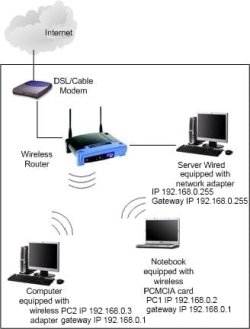
There is a network of 2 PCs connected to the broadcom router either wirelessly or wired.

the requirement is to connect a server to the existing network but to deny the server access to the network.

One example of a system that should work is this
Router IP 192.168.0.1

PC1 IP 192.168.0.2 gateway IP 192.168.0.1
PC2 IP 192.168.0.3 gateway IP 192.168.0.1

Server PC IP 192.168.0.255 Gateway IP 192.168.0.255

The two PCs may have their IP set by DHCP from the router as long as the server address is excluded from the DHCP pool
 

My Computers My Computers

  • At a glance

    Windows 11 Pro x64 [Latest Release and Releas...Ryzen 9 5950X, 3.8 - 5.2 MHz64GB [2 x 32GB] DDR4 3200MHz4GB NVIDIA GEFORCE GTX 1650 Ti
    Computer type
    PC/Desktop
    Computer Manufacturer/Model Number
    ChillBlast - Custom to my design
    OS
    Windows 11 Pro x64 [Latest Release and Release Preview]
    CPU
    Ryzen 9 5950X, 3.8 - 5.2 MHz
    Motherboard
    Asus Prime X570-Pro
    Memory
    64GB [2 x 32GB] DDR4 3200MHz
    Graphics Card(s)
    4GB NVIDIA GEFORCE GTX 1650 Ti
    Sound Card
    On-board SPDIF to 5.1 System + HDMI [5.1 system]
    Monitor(s) Displays
    32" UHD 32 Bit HDR Monitor + 43" UHD 4K 32Bit HDR TV
    Screen Resolution
    2 x 3840 x 2160 @60Hz
    Hard Drives
    1TB M2 SSD OS, 500GB Fast Access SSD, 2 x 8TB Data + Various Externals from 1TB to 4TB, 10TB NAS
    PSU
    NZXT C750 80 PLUS Gold 750W Modular PSU
    Case
    Workstation Case [Matt Black]
    Cooling
    NZXT Kraken X63 280mm CPU Cooler +2x Quiet Case fans
    Keyboard
    Logitech Wireless MX Keys & K400 + others
    Mouse
    Logitech Wireless MX Master 3S
    Internet Speed
    920 MB Down 50 MB Up
    Antivirus
    BitDefender Total Security Pro
    Browser
    Chrome (always run latest Non-Beta)
    Other Info
    Also run ...
    Laptop - Quad 8GB - Windows 10 Pro x64
    Nexus 7 Android tablet x2
    Samsung 10.2" tablet
    Blackview TAB 8 4G Android Tablet c/w Keyboard
    Wacom Intuos Pro Medium Pen Pad
    Wacom Intuos Pro Small Pen Pad
    Wacom Expresskeys Remote
    Loopdeck+ Graphics Controller
    Shuttle Pro v2 Control
  • At a glance

    Windows 11 Pro x64 Latest RPIntel I7 10750H 5.0GHz32GB [2x16GB] DDR4 2933 MHznVidia GTX1650Ti 4 GB GDDR6
    Computer type
    Laptop
    System Manufacturer/Model Number
    Dell XPS 17 10750H
    OS
    Windows 11 Pro x64 Latest RP
    CPU
    Intel I7 10750H 5.0GHz
    Motherboard
    Dell XPS
    Memory
    32GB [2x16GB] DDR4 2933 MHz
    Graphics Card(s)
    nVidia GTX1650Ti 4 GB GDDR6
    Sound Card
    Stock [Realtek] 4 Speaker
    Monitor(s) Displays
    17" IPS UHD+ Infinity Edge Touchscreen
    Screen Resolution
    3840 x 2400
    Hard Drives
    2TB M2 NVMe, 4TB External + various 500GB & 1TB External NVMe (also have access to spinner HDD from
    PSU
    Stock
    Case
    Stock XPS Aluminium & Carbon Fibre
    Cooling
    Stock - Active Fan Control
    Keyboard
    Backlit + Various Logitech
    Mouse
    Stock Track Pad + Logitech MX Trackball
    Internet Speed
    72 MB Down 18MB Up
    Browser
    Chrome
    Other Info
    Also run ...
    Laptop - Quad 8GB - Windows 10 Pro x64
    Nexus 7 Android tablet x2
    10.2" tablet
    Sony Z3 Android Smartphone
    Wacom Intuos Pro Medium Pen Pad
    Wacom Intuos Pro Small Pen Pad
    Wacom Expresskeys Remote
    Loopdeck+ Graphics Controller
    Shuttle Pro v2 Control Pad
    10TB NAS
A picture is worth a thousand words. This according to Barman's instructions. Hope this helps to clarify any confusion. Just another $0.02
 

Attachments

  • Network.jpg
    Network.jpg
    17.4 KB · Views: 6

My Computer My Computer

At a glance

Windows 7 Ultimate 64bitIntel Pentium D 3Ghz4 Gigs PC 6400Nvidia GeForce 8500 GT
Computer Manufacturer/Model Number
PartsIsParts
OS
Windows 7 Ultimate 64bit
CPU
Intel Pentium D 3Ghz
Motherboard
ASRock G31M-S
Memory
4 Gigs PC 6400
Graphics Card(s)
Nvidia GeForce 8500 GT
Sound Card
Realtek High Definition Audio Integrated
Monitor(s) Displays
AOC 19inch X2
Screen Resolution
1024 X 768 (I'm Old)
Hard Drives
Segate ST3160815AS Serial ATAII
Western Digital WD1600AAJA-75PSA0 Serial ATAII
PSU
500 watt..don't know mfg.
Case
Giant Black 4u rackmount I've had for years
Cooling
Stock CPU extra 120s in case
Keyboard
Generic Made in China
Mouse
Logitech USB Optical Scroll
Internet Speed
What ever comcast decides to give me usually 21Mbps up/5mbps
A picture is worth a thousand words. This according to Barman's instructions. Hope this helps to clarify any confusion. Just another $0.02

This is exactly what i am trying to get to.

The IPs of 192.168.x.x are part of the router's setup (Linksys IPs), they are not provided by your ISP. In other worlds, setup your router to enable DHCP, and allow your machines to auto detect IPs and you will have 192.168.x.x in your ipconfig details.

With a wireless router broadcasting the network, everything falls into place. As for restricting the server to again access to the internet. Many ways to do this, but i don't see the need to do this, why would you?

Ps I have only used static IP in a peer-to-peer networking between two PCs (with crossover cables).
 

My Computer My Computer

At a glance

Windows 7 Ultimate 64BitGenuineIntel Intel(R) Core(TM) DuoCore T2400 ...2.00 GBMobile Intel(R) 945 Express Chipset
Computer Manufacturer/Model Number
Lenovo ThinkPad T60
OS
Windows 7 Ultimate 64Bit
CPU
GenuineIntel Intel(R) Core(TM) DuoCore T2400 @ 1.83GHz
Motherboard
Intel(R) 82801G (ICH7 Family)
Memory
2.00 GB
Graphics Card(s)
Mobile Intel(R) 945 Express Chipset
Sound Card
SoundMAX Integrated Digital HD Audio
Monitor(s) Displays
ThinkPad Display
Screen Resolution
1400x1050
Hard Drives
100Gb SATA
Keyboard
Standard Keyboard
Mouse
HID-compliant Mouse
Internet Speed
Cable Broadband - 54Mbps
Other Info
Intel(R) PRO/1000 PL Network Connection
11a/b/g Wireless LAN Mini PCI Express Adapter
The reason i want it not to access the internet is i think it is using bandwidth at night.....
 

My Computer My Computer

At a glance

Windows 7 Ultimate 64 bit Signature EditionIntel Core 2 Due T85003GBNot sure
Computer Manufacturer/Model Number
Acer Aspire 6930
OS
Windows 7 Ultimate 64 bit Signature Edition
CPU
Intel Core 2 Due T8500
Motherboard
Not sure
Memory
3GB
Graphics Card(s)
Not sure
Sound Card
Not Sure
Monitor(s) Displays
16"
Screen Resolution
1366 x 768
Hard Drives
320GB
PSU
Battery / Power Pack
Case
Laptop
Cooling
Air
Keyboard
Built in
Mouse
Built in
Internet Speed
1.5MBs down.
Other Info
These are my laptop specs!
Back
Top