What is the "recovery partition"?

I don't think Macrium will do it. I recall Nick saying they don't support software Raid.

Your best bet is to convert it. Pretty sure Paragon PM10 Pro will do it - the trial won't do it tho. and it's not a free app.

If I come across something , will let you know.

They had a giveaway of Paragon HDM 9.5 SE , it is a special edition ( ie a special freebie ) so those more esoteric functions you get with the paid versions may not be included.

Greg - have a look at your HDM 2009 Pro and see what the helpfile says.
 

My Computers My Computers

  • At a glance

    7 X64i5 84002x8gb 3200mhz
    Computer type
    PC/Desktop
    OS
    7 X64
    CPU
    i5 8400
    Motherboard
    gigabyte b365m ds3h
    Memory
    2x8gb 3200mhz
    Hard Drives
    various
    PSU
    pure power 11 400w cm
    Case
    Coolermaster
    Cooling
    cryorig m9i
  • At a glance

    7x64g54008gb ddr4 2400
    Computer type
    PC/Desktop
    OS
    7x64
    CPU
    g5400
    Motherboard
    ga b365m ds3h
    Memory
    8gb ddr4 2400
    PSU
    xfx pro 450w
Greg - have a look at your HDM 2009 Pro and see what the helpfile says.

Sorry won't be home from Oahu North Shore til Monday.

Don't remember seeing conversion on there but everything else is.

So he needs to convert before reimaging or it will copy the dynamic format?
 
You should be able to convert a simple dynamic volume, spanned volume is something else.

Can't think of a free program though - that is a pretty esoteric function and usually only in the pricier apps.

Try shrinking C partition so it is smaller than the target drive to which you are going to restore.

Make an image of the now smaller partition and see if it restores - you may be lucky if the target is larger than the source - give Windows System Image a whirl, as Acronis is useless to you.

Or, you may find you can restore the Windows Sys Image you already made to the 1tb drive .

You will still have the problem of the dynamic drive tho.
 

My Computers My Computers

  • At a glance

    7 X64i5 84002x8gb 3200mhz
    Computer type
    PC/Desktop
    OS
    7 X64
    CPU
    i5 8400
    Motherboard
    gigabyte b365m ds3h
    Memory
    2x8gb 3200mhz
    Hard Drives
    various
    PSU
    pure power 11 400w cm
    Case
    Coolermaster
    Cooling
    cryorig m9i
  • At a glance

    7x64g54008gb ddr4 2400
    Computer type
    PC/Desktop
    OS
    7x64
    CPU
    g5400
    Motherboard
    ga b365m ds3h
    Memory
    8gb ddr4 2400
    PSU
    xfx pro 450w

My Computers My Computers

  • At a glance

    7 X64i5 84002x8gb 3200mhz
    Computer type
    PC/Desktop
    OS
    7 X64
    CPU
    i5 8400
    Motherboard
    gigabyte b365m ds3h
    Memory
    2x8gb 3200mhz
    Hard Drives
    various
    PSU
    pure power 11 400w cm
    Case
    Coolermaster
    Cooling
    cryorig m9i
  • At a glance

    7x64g54008gb ddr4 2400
    Computer type
    PC/Desktop
    OS
    7x64
    CPU
    g5400
    Motherboard
    ga b365m ds3h
    Memory
    8gb ddr4 2400
    PSU
    xfx pro 450w

My Computer My Computer

At a glance

Windows Vista HP 64-bit, Windows 7 P 64-bit, ...Pentium(R) Dual-Core E5200 @ 2.50GHz4.00GBNVIDIA GeForce 7100 / NVIDIA nForce 630i
Computer Manufacturer/Model Number
Gateway DX4720-03
OS
Windows Vista HP 64-bit, Windows 7 P 64-bit, Leopard 10.5.8, Windows 7 P 32-bit
CPU
Pentium(R) Dual-Core E5200 @ 2.50GHz
Motherboard
ACPI x64
Memory
4.00GB
Graphics Card(s)
NVIDIA GeForce 7100 / NVIDIA nForce 630i
Sound Card
Onboard Sound
Monitor(s) Displays
Samsumg Syncmaster 2233SW, Syncmaster 205BW
Screen Resolution
1680X1050 and 1920X1080
Hard Drives
WDC WD64 00AAKS-22A7B SCSI
WDC WD50 00AAKS-00V2B SCSI
WDC WD10 EADS-00M2B0 SCSI
FUJITSU USB
SEAGATE USB
PSU
Generic (cheap) 550W
Case
Gateway
Cooling
30 W
Keyboard
Kinesis Advantage
Mouse
Trackball
Internet Speed
Cable Modem
Other Info
Hauppauge HD-PVR, USB-UIRT
You should be able to convert a simple dynamic volume, spanned volume is something else.

Can't think of a free program though - that is a pretty esoteric function and usually only in the pricier apps.

Try shrinking C partition so it is smaller than the target drive to which you are going to restore.

Make an image of the now smaller partition and see if it restores - you may be lucky if the target is larger than the source - give Windows System Image a whirl, as Acronis is useless to you.

Or, you may find you can restore the Windows Sys Image you already made to the 1tb drive .

You will still have the problem of the dynamic drive tho.

I tried restoring from the system image I'd stored on the 500GB WD to the 1TB WD, after disconnecting the 640GB WD that was the C drive, but got the message: "No disk that can be used for recovering the system disk can be found." So I can't use Windows 7's native backup and restore, which sort of leaves Acronis as the only game in town. But I can't seem to create a boot disk that works.

It just occurred to me, is there a way to make the 1TB drive a system disk, without actually installing Windows 7? I remember we used to do that with floppies years ago, and maybe if the image restore could see the 1TB WD disk as a system disk I'd be able to re-image it? The error message seems to indicate that's what it wants?
 

My Computer My Computer

At a glance

Windows Vista HP 64-bit, Windows 7 P 64-bit, ...Pentium(R) Dual-Core E5200 @ 2.50GHz4.00GBNVIDIA GeForce 7100 / NVIDIA nForce 630i
Computer Manufacturer/Model Number
Gateway DX4720-03
OS
Windows Vista HP 64-bit, Windows 7 P 64-bit, Leopard 10.5.8, Windows 7 P 32-bit
CPU
Pentium(R) Dual-Core E5200 @ 2.50GHz
Motherboard
ACPI x64
Memory
4.00GB
Graphics Card(s)
NVIDIA GeForce 7100 / NVIDIA nForce 630i
Sound Card
Onboard Sound
Monitor(s) Displays
Samsumg Syncmaster 2233SW, Syncmaster 205BW
Screen Resolution
1680X1050 and 1920X1080
Hard Drives
WDC WD64 00AAKS-22A7B SCSI
WDC WD50 00AAKS-00V2B SCSI
WDC WD10 EADS-00M2B0 SCSI
FUJITSU USB
SEAGATE USB
PSU
Generic (cheap) 550W
Case
Gateway
Cooling
30 W
Keyboard
Kinesis Advantage
Mouse
Trackball
Internet Speed
Cable Modem
Other Info
Hauppauge HD-PVR, USB-UIRT
Doesn't the paid version of Acronis come with a WinPe recovery disc as well as the Linux one? Maybe it is a separate download.

Otherwise, you can get Testdisk in a bootable form . It is one of the apps. on Parted Magic cd ( free ) - not to be confused with partition magic , which is completely different .

News

You could try booting that , select Testdisk, and see if you get the options the author of the article got.
 

My Computers My Computers

  • At a glance

    7 X64i5 84002x8gb 3200mhz
    Computer type
    PC/Desktop
    OS
    7 X64
    CPU
    i5 8400
    Motherboard
    gigabyte b365m ds3h
    Memory
    2x8gb 3200mhz
    Hard Drives
    various
    PSU
    pure power 11 400w cm
    Case
    Coolermaster
    Cooling
    cryorig m9i
  • At a glance

    7x64g54008gb ddr4 2400
    Computer type
    PC/Desktop
    OS
    7x64
    CPU
    g5400
    Motherboard
    ga b365m ds3h
    Memory
    8gb ddr4 2400
    PSU
    xfx pro 450w
Doesn't the paid version of Acronis come with a WinPe recovery disc as well as the Linux one? Maybe it is a separate download.

Otherwise, you can get Testdisk in a bootable form . It is one of the apps. on Parted Magic cd ( free ) - not to be confused with partition magic , which is completely different .

News

You could try booting that , select Testdisk, and see if you get the options the author of the article got.

I tried TestDisk. I was able to get all the way through it and change both partitions from Dynamic to Basic, but after that when I booted all I'd get was a Gateway Vista screen asking me if I wanted to restore the system to factory defaults. When I clicked the "exit" button instead, it just hung at the cursor prompt. I couldn't boot into Windows 7 until I restored from the system image I'd created on the 500GB WD drive.

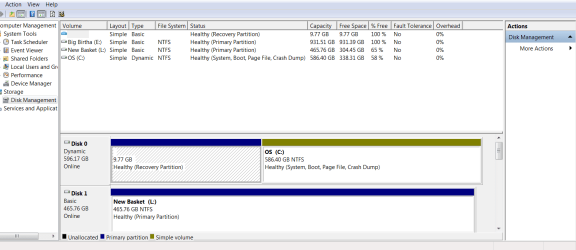
Note that according to this screen shot of the disk manager, the recovery partition shows up as 100% free space, and as simple basic. Nonetheless I can't use it or make any changes to it. Right clicking it just shows a "help" dialog, that just opens the generic windows help page.

Also, some people have mentioned RAID, but I'm not using RAID in either software or hardware form.
 

My Computer My Computer

At a glance

Windows Vista HP 64-bit, Windows 7 P 64-bit, ...Pentium(R) Dual-Core E5200 @ 2.50GHz4.00GBNVIDIA GeForce 7100 / NVIDIA nForce 630i
Computer Manufacturer/Model Number
Gateway DX4720-03
OS
Windows Vista HP 64-bit, Windows 7 P 64-bit, Leopard 10.5.8, Windows 7 P 32-bit
CPU
Pentium(R) Dual-Core E5200 @ 2.50GHz
Motherboard
ACPI x64
Memory
4.00GB
Graphics Card(s)
NVIDIA GeForce 7100 / NVIDIA nForce 630i
Sound Card
Onboard Sound
Monitor(s) Displays
Samsumg Syncmaster 2233SW, Syncmaster 205BW
Screen Resolution
1680X1050 and 1920X1080
Hard Drives
WDC WD64 00AAKS-22A7B SCSI
WDC WD50 00AAKS-00V2B SCSI
WDC WD10 EADS-00M2B0 SCSI
FUJITSU USB
SEAGATE USB
PSU
Generic (cheap) 550W
Case
Gateway
Cooling
30 W
Keyboard
Kinesis Advantage
Mouse
Trackball
Internet Speed
Cable Modem
Other Info
Hauppauge HD-PVR, USB-UIRT
Are you able to restore using the Backup image you made?

Boot into the Win7 DVD recovery console, select "Recover using an image" and see if it will reimage onto the freshly converted Basic disk.
 
Are you able to restore using the Backup image you made?

Boot into the Win7 DVD recovery console, select "Recover using an image" and see if it will reimage onto the freshly converted Basic disk.

It reimaged, but the partition is basic, not dynamic. Here's the snip I alluded to above, and forgot to include. Note that the recovery partition is basic simple, while the C volume is dynamic.
 

Attachments

  • Patitions in DM2.PNG
    Patitions in DM2.PNG
    27.1 KB · Views: 35

My Computer My Computer

At a glance

Windows Vista HP 64-bit, Windows 7 P 64-bit, ...Pentium(R) Dual-Core E5200 @ 2.50GHz4.00GBNVIDIA GeForce 7100 / NVIDIA nForce 630i
Computer Manufacturer/Model Number
Gateway DX4720-03
OS
Windows Vista HP 64-bit, Windows 7 P 64-bit, Leopard 10.5.8, Windows 7 P 32-bit
CPU
Pentium(R) Dual-Core E5200 @ 2.50GHz
Motherboard
ACPI x64
Memory
4.00GB
Graphics Card(s)
NVIDIA GeForce 7100 / NVIDIA nForce 630i
Sound Card
Onboard Sound
Monitor(s) Displays
Samsumg Syncmaster 2233SW, Syncmaster 205BW
Screen Resolution
1680X1050 and 1920X1080
Hard Drives
WDC WD64 00AAKS-22A7B SCSI
WDC WD50 00AAKS-00V2B SCSI
WDC WD10 EADS-00M2B0 SCSI
FUJITSU USB
SEAGATE USB
PSU
Generic (cheap) 550W
Case
Gateway
Cooling
30 W
Keyboard
Kinesis Advantage
Mouse
Trackball
Internet Speed
Cable Modem
Other Info
Hauppauge HD-PVR, USB-UIRT
Yes I remember the screenshot. But I understand that you have since converted the disk from dynamic to Basic, which you say caused the loss of the Win7 installation in the process.

You said you reimaged the Win7 backup image back onto the HD. Did it reimage the dynamic formatting to the Win7 partition, or does it remain basic since you converted it to that?

What is the performance of the reimaged HD?
 
Did it reimage the dynamic formatting to the Win7 partition, or does it remain basic since you converted it to that?

What is the performance of the reimaged HD?

That screen shot was taken *after* I'd converted to basic in TestDisk and then reimaged, so I guess it just reproduced the dynamic formatting.

BTW, one of the things I tried was to make the second partition "Primary bootable" in TestDisk, thinking that the problem was that it was booting to the initial Vista Recovery partition. That didn't work. It didn't boot at all. Then when I reimaged and tried to boot I got an error and Windows wouldn't boot. Then I set the initial partition back to "Bootable Primary" and converted everything to Basic again, and it wouldn't even boot into Vista Recovery. Instead I got the message: "BOOT MGR is missing". I then opened TestDisk again, and wrote the MBR to the first sector, rebooted, and reimaged the disk again *and this time Windows 7 booted OK*.

But the volume format is still dynamic, not basic.

At least I have the installation back, which I thought I had goobered up, but I'm back to square one.
 

My Computer My Computer

At a glance

Windows Vista HP 64-bit, Windows 7 P 64-bit, ...Pentium(R) Dual-Core E5200 @ 2.50GHz4.00GBNVIDIA GeForce 7100 / NVIDIA nForce 630i
Computer Manufacturer/Model Number
Gateway DX4720-03
OS
Windows Vista HP 64-bit, Windows 7 P 64-bit, Leopard 10.5.8, Windows 7 P 32-bit
CPU
Pentium(R) Dual-Core E5200 @ 2.50GHz
Motherboard
ACPI x64
Memory
4.00GB
Graphics Card(s)
NVIDIA GeForce 7100 / NVIDIA nForce 630i
Sound Card
Onboard Sound
Monitor(s) Displays
Samsumg Syncmaster 2233SW, Syncmaster 205BW
Screen Resolution
1680X1050 and 1920X1080
Hard Drives
WDC WD64 00AAKS-22A7B SCSI
WDC WD50 00AAKS-00V2B SCSI
WDC WD10 EADS-00M2B0 SCSI
FUJITSU USB
SEAGATE USB
PSU
Generic (cheap) 550W
Case
Gateway
Cooling
30 W
Keyboard
Kinesis Advantage
Mouse
Trackball
Internet Speed
Cable Modem
Other Info
Hauppauge HD-PVR, USB-UIRT
How do you feel about a clean reinstall? Perhaps to another HDD?

I wonder if zeroing the drive would take it back to basic?
 
How do you feel about a clean reinstall? Perhaps to another HDD?

I wonder if zeroing the drive would take it back to basic?

I have some pretty complex settings and software installations. I would definitely not like to do an install without transferring that stuff.
 

My Computer My Computer

At a glance

Windows Vista HP 64-bit, Windows 7 P 64-bit, ...Pentium(R) Dual-Core E5200 @ 2.50GHz4.00GBNVIDIA GeForce 7100 / NVIDIA nForce 630i
Computer Manufacturer/Model Number
Gateway DX4720-03
OS
Windows Vista HP 64-bit, Windows 7 P 64-bit, Leopard 10.5.8, Windows 7 P 32-bit
CPU
Pentium(R) Dual-Core E5200 @ 2.50GHz
Motherboard
ACPI x64
Memory
4.00GB
Graphics Card(s)
NVIDIA GeForce 7100 / NVIDIA nForce 630i
Sound Card
Onboard Sound
Monitor(s) Displays
Samsumg Syncmaster 2233SW, Syncmaster 205BW
Screen Resolution
1680X1050 and 1920X1080
Hard Drives
WDC WD64 00AAKS-22A7B SCSI
WDC WD50 00AAKS-00V2B SCSI
WDC WD10 EADS-00M2B0 SCSI
FUJITSU USB
SEAGATE USB
PSU
Generic (cheap) 550W
Case
Gateway
Cooling
30 W
Keyboard
Kinesis Advantage
Mouse
Trackball
Internet Speed
Cable Modem
Other Info
Hauppauge HD-PVR, USB-UIRT
What's "Easy Transfer"?

This won't transfer software installations? Why don't they have an engine that transfers stuff in a file format, instead of this disk image stuff? Back when I was using Windows 98 I did a transfer by just starting a clean install on another disk, erasing all the files, and then transferring all my files via copy from the old disk to the new one. Seems like systems have gotten a lot more complex and difficult to deal with, since then.
 

My Computer My Computer

At a glance

Windows Vista HP 64-bit, Windows 7 P 64-bit, ...Pentium(R) Dual-Core E5200 @ 2.50GHz4.00GBNVIDIA GeForce 7100 / NVIDIA nForce 630i
Computer Manufacturer/Model Number
Gateway DX4720-03
OS
Windows Vista HP 64-bit, Windows 7 P 64-bit, Leopard 10.5.8, Windows 7 P 32-bit
CPU
Pentium(R) Dual-Core E5200 @ 2.50GHz
Motherboard
ACPI x64
Memory
4.00GB
Graphics Card(s)
NVIDIA GeForce 7100 / NVIDIA nForce 630i
Sound Card
Onboard Sound
Monitor(s) Displays
Samsumg Syncmaster 2233SW, Syncmaster 205BW
Screen Resolution
1680X1050 and 1920X1080
Hard Drives
WDC WD64 00AAKS-22A7B SCSI
WDC WD50 00AAKS-00V2B SCSI
WDC WD10 EADS-00M2B0 SCSI
FUJITSU USB
SEAGATE USB
PSU
Generic (cheap) 550W
Case
Gateway
Cooling
30 W
Keyboard
Kinesis Advantage
Mouse
Trackball
Internet Speed
Cable Modem
Other Info
Hauppauge HD-PVR, USB-UIRT
As a last ditch effort I tried to create a WinPE disk using Acronis Plus Pack for True Image Home, thinking that if I could at least get that done I'd cancel the refund request. So the first thing it asks me for is the folder where the WinPE files are located. What the heck? How would I know where they're located? I did a Google search, and wouldn't you know that everything on the Web is completely inscrutable regarding *where* the WinPE files might be located, or even *if* they located *anywhere* on a Windows 7 Pro installation. There was some talk about building a "technician computer" but how am I supposed to know what that is, or how to do it? So once again Acronis proves to be basically unusable. You'd think it'd be slightly clearer about what the deuce is going on.

But I doubt that Acronis can clone a system that's on a dynamic drive anyway, so I was really just doing it to see if there's anything redeeming in this software at all. And there isn't.
 

My Computer My Computer

At a glance

Windows Vista HP 64-bit, Windows 7 P 64-bit, ...Pentium(R) Dual-Core E5200 @ 2.50GHz4.00GBNVIDIA GeForce 7100 / NVIDIA nForce 630i
Computer Manufacturer/Model Number
Gateway DX4720-03
OS
Windows Vista HP 64-bit, Windows 7 P 64-bit, Leopard 10.5.8, Windows 7 P 32-bit
CPU
Pentium(R) Dual-Core E5200 @ 2.50GHz
Motherboard
ACPI x64
Memory
4.00GB
Graphics Card(s)
NVIDIA GeForce 7100 / NVIDIA nForce 630i
Sound Card
Onboard Sound
Monitor(s) Displays
Samsumg Syncmaster 2233SW, Syncmaster 205BW
Screen Resolution
1680X1050 and 1920X1080
Hard Drives
WDC WD64 00AAKS-22A7B SCSI
WDC WD50 00AAKS-00V2B SCSI
WDC WD10 EADS-00M2B0 SCSI
FUJITSU USB
SEAGATE USB
PSU
Generic (cheap) 550W
Case
Gateway
Cooling
30 W
Keyboard
Kinesis Advantage
Mouse
Trackball
Internet Speed
Cable Modem
Other Info
Hauppauge HD-PVR, USB-UIRT
So, any ideas beyond a clean install? If I do that is there some way to easily transfer my apps and data to the other system?

The system I have is still "freezing" periodically, about once a day.
 

My Computer My Computer

At a glance

Windows Vista HP 64-bit, Windows 7 P 64-bit, ...Pentium(R) Dual-Core E5200 @ 2.50GHz4.00GBNVIDIA GeForce 7100 / NVIDIA nForce 630i
Computer Manufacturer/Model Number
Gateway DX4720-03
OS
Windows Vista HP 64-bit, Windows 7 P 64-bit, Leopard 10.5.8, Windows 7 P 32-bit
CPU
Pentium(R) Dual-Core E5200 @ 2.50GHz
Motherboard
ACPI x64
Memory
4.00GB
Graphics Card(s)
NVIDIA GeForce 7100 / NVIDIA nForce 630i
Sound Card
Onboard Sound
Monitor(s) Displays
Samsumg Syncmaster 2233SW, Syncmaster 205BW
Screen Resolution
1680X1050 and 1920X1080
Hard Drives
WDC WD64 00AAKS-22A7B SCSI
WDC WD50 00AAKS-00V2B SCSI
WDC WD10 EADS-00M2B0 SCSI
FUJITSU USB
SEAGATE USB
PSU
Generic (cheap) 550W
Case
Gateway
Cooling
30 W
Keyboard
Kinesis Advantage
Mouse
Trackball
Internet Speed
Cable Modem
Other Info
Hauppauge HD-PVR, USB-UIRT
OK, I guess I'll have to do a clean install.

I created one of those "Easy Transfer" files on the 0.5TB drive. Do I now just do a clean install to the 1TB drive, then set that as the primary boot drive in bios, and then import all of my stuff from the Easy Transfer file? Do I have to set any switches to ensure that the 1TB drive becomes the new "C" drive? Should I change the drive letters in the disk manager before exiting for the last time from the current intallation, to do a clean install on the 1TB drive? Will I have to reinstall all of my applications, enter the activation keys, etc.? Since I'm doing a transfer from Win7 Pro to Win7 Pro I thought maybe it would transfer my apps too. The transfer file is certainly big enough, or does it just transfer the data and not the apps themselves?

My system is still freezing, so it looks like I have no choice but to do a clean install. I'm just trying to minimize the workload, and chances of failure.

Can anyone help?
 

My Computer My Computer

At a glance

Windows Vista HP 64-bit, Windows 7 P 64-bit, ...Pentium(R) Dual-Core E5200 @ 2.50GHz4.00GBNVIDIA GeForce 7100 / NVIDIA nForce 630i
Computer Manufacturer/Model Number
Gateway DX4720-03
OS
Windows Vista HP 64-bit, Windows 7 P 64-bit, Leopard 10.5.8, Windows 7 P 32-bit
CPU
Pentium(R) Dual-Core E5200 @ 2.50GHz
Motherboard
ACPI x64
Memory
4.00GB
Graphics Card(s)
NVIDIA GeForce 7100 / NVIDIA nForce 630i
Sound Card
Onboard Sound
Monitor(s) Displays
Samsumg Syncmaster 2233SW, Syncmaster 205BW
Screen Resolution
1680X1050 and 1920X1080
Hard Drives
WDC WD64 00AAKS-22A7B SCSI
WDC WD50 00AAKS-00V2B SCSI
WDC WD10 EADS-00M2B0 SCSI
FUJITSU USB
SEAGATE USB
PSU
Generic (cheap) 550W
Case
Gateway
Cooling
30 W
Keyboard
Kinesis Advantage
Mouse
Trackball
Internet Speed
Cable Modem
Other Info
Hauppauge HD-PVR, USB-UIRT
Unplug all other drives before doing the install, making sure it is set to boot After DVD in BIOS.

Suggest you check your Easy Transfer files to see that all saved files are there. I don't use ET since it copies settings back which is a potential corruption path and lessens the freshness of a Clean Install.

Boot from the DVD, keep ethernet plugged and select "Connect to internet during install" to get latest drivers/updates into installer, then Custom install, use Advanced drive tools to partition the HD as you wish, making sure to format at least first partition before installing Win7.

Upon connecting to the internet, activate using link at Computer>Properties, then get Windows Updates for newer drivers. Check Device Manager for any missing drivers, which can be obtained from the Support Downloads page for your model computer. You can also back up the Windows/System32/Drivers and /driverstore file to find any missing drivers.

Yes, you'll need to reinstall your programs. Take your time. If you need any keys, audit them first from your current install using Belarc Advisor. Some apps should be available on your model's Downloads page. Adobe reader/flash and Java runtime/free Ofc suite are available on their sites.
 
Back
Top