Clean Install of Win7 doesnt find HD Drivers

thanotosq

New member
Local time
2:32 PM
Messages
22
Hello,

This is my first thread here...so be gentle. I am not entirely inexperienced in building PCs (i've built 2: 1 mid-range and 1 gaming/workstation), but i have NEVER had this many issues with either the XP or Vista machines that I built.

Ok, i built a "whitebox" for a friend at work and they wanted to windows 7 64bit. So, i built the machine and have been trying to figure out how to get it to recognize the HD for the past 4 hours... mainly thanks to Samsung for making impossible to find drivers on their website for the Spinpoint F1 HD102UJ 1TB hard drive and i am also having problems finding drivers from the Gigabyte website... Anyway, suggestions? I gone through all the suggestions about checking the BIOS for RAID settings, but there is only 1 drive in this machine.

Furthermore, after trying to find the drivers online for about 2 hours...i ended up reformatting the drive from the utility disk that samsung had on their website....

The specs are:
Gigabyte GA-MA78LM-S2H (AM3/DDR2)OCZ StealthXStream OCZ700SXS 700W
AMD Athalon II x2 250 Regor
4g OCZ Reaper DDR2-800
LG DVD+/-RW (SATAII)
Samsung Spinpoint F1 HD102UJ 1TB


Thanks for the help!!
 

My Computer My Computer

At a glance

windows7 64-bitamdoczintegrated
Computer Manufacturer/Model Number
me
OS
windows7 64-bit
CPU
amd
Motherboard
gigabyte
Memory
ocz
Graphics Card(s)
integrated
Sound Card
integrated
Monitor(s) Displays
acer
Hard Drives
SAMSUNG Spinpoint F1 HD102UJ 1TB
PSU
ocz
Case
cooler master
Cooling
air

My Computer My Computer

At a glance

Windows 7 Ultimate 64 bitIntel(R) Core(TM)2 Quad CPU Q8200 @ 2.33GHz8 GB KingstonNvidia GeForce 9600GT
Computer Manufacturer/Model Number
Custom Hack job
OS
Windows 7 Ultimate 64 bit
CPU
Intel(R) Core(TM)2 Quad CPU Q8200 @ 2.33GHz
Motherboard
GigaByte EP45-UD3
Memory
8 GB Kingston
Graphics Card(s)
Nvidia GeForce 9600GT
Sound Card
Soundblaster Audigy
Monitor(s) Displays
AOC x2 22"
Hard Drives
2 x Samsung 500GB (RAID)
2 x Samsung 2TB
1 x WD Green 2TB
1 x Seagate 1TB
1 x Samsung 500GB
PSU
Thermaltake QFan 750W
Case
CM Scout Gaming
Cooling
Coolermaster V10
Keyboard
Microsoft Wireless Keyboard 1000
Mouse
Microsoft Wireless Optical 2000
Internet Speed
320
Other Info
Winfast PVR2000CP
LG DVD-RAM DVD/RW/DL Super Multi
Linksys WMP300Nx2 Wireless Adapter
So just to clarify, what happens when you start the computer? Also, are you sure all the cables are completely connected, like the S-ATA and the power one. In BIOS, does the disk just not show or show as unusable etc.?
 

My Computer My Computer

At a glance

Win 7 pro 64-bit, Ubuntu 9.10 64-bitIntel Core 2 Duo 2.60 Ghz4 gb ddr2 667 MhzNVidia Geforce 9400 GS 1 gb ddr2 550 mhz GPU
Computer Manufacturer/Model Number
Acer Veriton m261 (modded)
OS
Win 7 pro 64-bit, Ubuntu 9.10 64-bit
CPU
Intel Core 2 Duo 2.60 Ghz
Motherboard
Whatever came with the system
Memory
4 gb ddr2 667 Mhz
Graphics Card(s)
NVidia Geforce 9400 GS 1 gb ddr2 550 mhz GPU
Sound Card
Intergrated
Monitor(s) Displays
samsung SyncMaster 2494 24"
Screen Resolution
1080p
Hard Drives
80gb - IDE
750gb - SATA II
PSU
whatever came with the system
Case
whatever came with the system
Cooling
whatever came with the system
Keyboard
Apple Aluminium (Awesome)
Mouse
Some awesome Dell mouse, really good.
Internet Speed
100mbps
If you can get to the Custom drives map screen in the booted installer, then you can put the SATA controller drivers in.

Make sure you have the latest BIOS update and all settings are correct for SATA controllers.
 
TimStitt- Thanks man, i'll give that a shot.

Coolness- Thanks for the reply. The drive does show up in the BIOS. I get through the initial stages of the setup and i get to the part where you select the drive to load the OS on and there is nothing there. I tried to make a disk with the drivers on the website above. I think that i am going to try to put it on a thumb drive and load it that way. I have not reflash the BIOS version (i have rev. 1.0 and there is a newer version)

gregrocker- Thanks for the reply! I think that the above addresses your suggestion. This weekend was very busy so i was unable to try the SATA driver update.


I will update this thread tonight about what happens.
 

My Computer My Computer

At a glance

windows7 64-bitamdoczintegrated
Computer Manufacturer/Model Number
me
OS
windows7 64-bit
CPU
amd
Motherboard
gigabyte
Memory
ocz
Graphics Card(s)
integrated
Sound Card
integrated
Monitor(s) Displays
acer
Hard Drives
SAMSUNG Spinpoint F1 HD102UJ 1TB
PSU
ocz
Case
cooler master
Cooling
air
I would def Update the BIOS, then if necessary unzip the SATA controller driver on a flash stick and insert into installer at Custom Drives screen.
 
I have downloaded the driver update and am currently unable to get win7 to recognize it at the point where i am supposed to "select drivers to be installed"...WTF?

I have never updated BIOS before, so.... there is some hesitation for me in that regard.

Furthermore, i dont have an extra floppy drive or any floppy disks...only hd's, dvd, and flash drives...

Suggestions?
 

My Computer My Computer

At a glance

windows7 64-bitamdoczintegrated
Computer Manufacturer/Model Number
me
OS
windows7 64-bit
CPU
amd
Motherboard
gigabyte
Memory
ocz
Graphics Card(s)
integrated
Sound Card
integrated
Monitor(s) Displays
acer
Hard Drives
SAMSUNG Spinpoint F1 HD102UJ 1TB
PSU
ocz
Case
cooler master
Cooling
air
You said the HD is not showing up in the BIOS. If so, then you need to check the connections at all ends, change the ribbon cable, make sure the jumpers are set correctly to Master with no other drives on cable. The HD needs to register in BIOS before installer can even be used.

You also said you checked the BIOS for SATA settings. Which was the setting: AHCI, IDE or RAID?
 
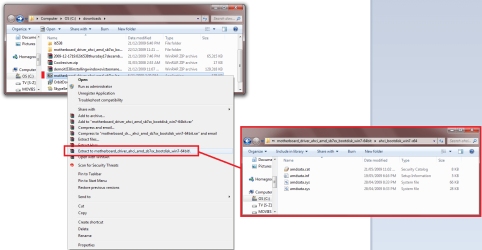
See if you can extract the drivers to their own folder and install them manually.
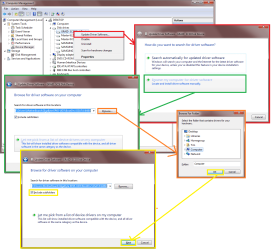
The pics show the SATA driver installation.
  • Unzip the downloaded drivers using WinRAR or your favourite compression software.
  • Open Device Manager
  • Install Manually per the screen prints.
 

Attachments

  • extract_to_own_folder.png
    extract_to_own_folder.png
    89.5 KB · Views: 72
  • driver_install manually.png
    driver_install manually.png
    94.3 KB · Views: 80

My Computer My Computer

At a glance

Windows 7 Ultimate 64 bitIntel(R) Core(TM)2 Quad CPU Q8200 @ 2.33GHz8 GB KingstonNvidia GeForce 9600GT
Computer Manufacturer/Model Number
Custom Hack job
OS
Windows 7 Ultimate 64 bit
CPU
Intel(R) Core(TM)2 Quad CPU Q8200 @ 2.33GHz
Motherboard
GigaByte EP45-UD3
Memory
8 GB Kingston
Graphics Card(s)
Nvidia GeForce 9600GT
Sound Card
Soundblaster Audigy
Monitor(s) Displays
AOC x2 22"
Hard Drives
2 x Samsung 500GB (RAID)
2 x Samsung 2TB
1 x WD Green 2TB
1 x Seagate 1TB
1 x Samsung 500GB
PSU
Thermaltake QFan 750W
Case
CM Scout Gaming
Cooling
Coolermaster V10
Keyboard
Microsoft Wireless Keyboard 1000
Mouse
Microsoft Wireless Optical 2000
Internet Speed
320
Other Info
Winfast PVR2000CP
LG DVD-RAM DVD/RW/DL Super Multi
Linksys WMP300Nx2 Wireless Adapter
Just a thought,
You are using the on-board SATA, not an add-in card?
Is it enabled in the bios?
 

My Computer My Computer

At a glance

Windows 7 Ultimate 64 bitIntel(R) Core(TM)2 Quad CPU Q8200 @ 2.33GHz8 GB KingstonNvidia GeForce 9600GT
Computer Manufacturer/Model Number
Custom Hack job
OS
Windows 7 Ultimate 64 bit
CPU
Intel(R) Core(TM)2 Quad CPU Q8200 @ 2.33GHz
Motherboard
GigaByte EP45-UD3
Memory
8 GB Kingston
Graphics Card(s)
Nvidia GeForce 9600GT
Sound Card
Soundblaster Audigy
Monitor(s) Displays
AOC x2 22"
Hard Drives
2 x Samsung 500GB (RAID)
2 x Samsung 2TB
1 x WD Green 2TB
1 x Seagate 1TB
1 x Samsung 500GB
PSU
Thermaltake QFan 750W
Case
CM Scout Gaming
Cooling
Coolermaster V10
Keyboard
Microsoft Wireless Keyboard 1000
Mouse
Microsoft Wireless Optical 2000
Internet Speed
320
Other Info
Winfast PVR2000CP
LG DVD-RAM DVD/RW/DL Super Multi
Linksys WMP300Nx2 Wireless Adapter
gregrocker - the HD is picked up in the BIOS, but is not in the installer. the bios are set to IDE because there is only one HD.

timstitt - i would update the drivers/BIOS that way without much problem, but i cant windows to load...so flashing the drivers/BIOS is not possible through that means unless i'm missing something...

So far i have been completely unable to find BIOS/drivers that will launch/run without windows being installed and i can not get windows to recognize them on a CD or thumb drive...WTF?!?! This is a royal pain...

Do you guys think that i will have better luck loading WindowsXP, then upgrading to 7?
 

My Computer My Computer

At a glance

windows7 64-bitamdoczintegrated
Computer Manufacturer/Model Number
me
OS
windows7 64-bit
CPU
amd
Motherboard
gigabyte
Memory
ocz
Graphics Card(s)
integrated
Sound Card
integrated
Monitor(s) Displays
acer
Hard Drives
SAMSUNG Spinpoint F1 HD102UJ 1TB
PSU
ocz
Case
cooler master
Cooling
air
Try booting the installer with SATA controller set to AHCI in BIOS.

Slipstream your mobo drivers into the Win7 installer using Vlite.

Here is the basic tutorial, though you will add Drivers tab at beginning to insert drivers, then recompile ISO and burn to DVD: http://www.sevenforums.com/tutorials/32055-bootable-iso-create-installation-files.html

Start by copying the DVD files to your desktop, then load into Vlite, select Drivers and Create ISO tabs, insert mobo drivers (you need to get the IDE?SATA controller driver into installer) then recompile and burn ISO to DVD.
 
Last edited:
timstitt - i would update the drivers/BIOS that way without much problem, but i cant windows to load...so flashing the drivers/BIOS is not possible through that means unless i'm missing something...

Sorry thanotosq I didn't read your post correctly,
What you can do is extract them on another pc, then load them during windows isntall on the pc you are installing. On some systems, my gigabyte mobo fr example, you defiantly need to have the bios set for SATA (not IDE) for windows to recognise the drivers during set-up, this should also enable AHCI.

So change yours and try again

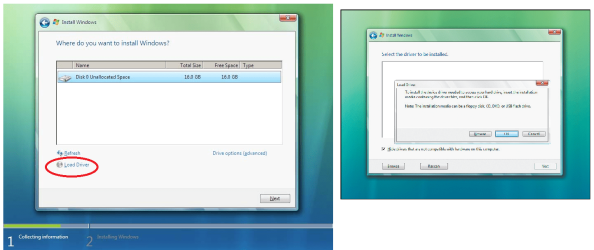
With SATA enabled, hopefully greg's bios-driver-install suggestion will work or my install suggestion will find the drivers, I will shortly post up a screen-print of where the drivers should be installed during windows installation.

Do you guys think that i will have better luck loading WindowsXP, then upgrading to 7?
It's a possibility, however if the driver problem is OS related, the earlier drivers won't work.
 

My Computer My Computer

At a glance

Windows 7 Ultimate 64 bitIntel(R) Core(TM)2 Quad CPU Q8200 @ 2.33GHz8 GB KingstonNvidia GeForce 9600GT
Computer Manufacturer/Model Number
Custom Hack job
OS
Windows 7 Ultimate 64 bit
CPU
Intel(R) Core(TM)2 Quad CPU Q8200 @ 2.33GHz
Motherboard
GigaByte EP45-UD3
Memory
8 GB Kingston
Graphics Card(s)
Nvidia GeForce 9600GT
Sound Card
Soundblaster Audigy
Monitor(s) Displays
AOC x2 22"
Hard Drives
2 x Samsung 500GB (RAID)
2 x Samsung 2TB
1 x WD Green 2TB
1 x Seagate 1TB
1 x Samsung 500GB
PSU
Thermaltake QFan 750W
Case
CM Scout Gaming
Cooling
Coolermaster V10
Keyboard
Microsoft Wireless Keyboard 1000
Mouse
Microsoft Wireless Optical 2000
Internet Speed
320
Other Info
Winfast PVR2000CP
LG DVD-RAM DVD/RW/DL Super Multi
Linksys WMP300Nx2 Wireless Adapter
Try booting the installer with SATA controller set to AHCI in BIOS.

@thanotosq - Yes, what GregRocker has written above is succinctly what I meant in my post also.

EDIT: I've attached some pics to show you.
 

Attachments

  • adding drive drivers.png
    adding drive drivers.png
    151.9 KB · Views: 149
Last edited:

My Computer My Computer

At a glance

Windows 7 Ultimate 64 bitIntel(R) Core(TM)2 Quad CPU Q8200 @ 2.33GHz8 GB KingstonNvidia GeForce 9600GT
Computer Manufacturer/Model Number
Custom Hack job
OS
Windows 7 Ultimate 64 bit
CPU
Intel(R) Core(TM)2 Quad CPU Q8200 @ 2.33GHz
Motherboard
GigaByte EP45-UD3
Memory
8 GB Kingston
Graphics Card(s)
Nvidia GeForce 9600GT
Sound Card
Soundblaster Audigy
Monitor(s) Displays
AOC x2 22"
Hard Drives
2 x Samsung 500GB (RAID)
2 x Samsung 2TB
1 x WD Green 2TB
1 x Seagate 1TB
1 x Samsung 500GB
PSU
Thermaltake QFan 750W
Case
CM Scout Gaming
Cooling
Coolermaster V10
Keyboard
Microsoft Wireless Keyboard 1000
Mouse
Microsoft Wireless Optical 2000
Internet Speed
320
Other Info
Winfast PVR2000CP
LG DVD-RAM DVD/RW/DL Super Multi
Linksys WMP300Nx2 Wireless Adapter
Thanks guys!! I dont know why i didnt think about adding the drivers to an ISO burnt disk!!

I will give these things a try tonight around 6-7pm when i get home from work
 

My Computer My Computer

At a glance

windows7 64-bitamdoczintegrated
Computer Manufacturer/Model Number
me
OS
windows7 64-bit
CPU
amd
Motherboard
gigabyte
Memory
ocz
Graphics Card(s)
integrated
Sound Card
integrated
Monitor(s) Displays
acer
Hard Drives
SAMSUNG Spinpoint F1 HD102UJ 1TB
PSU
ocz
Case
cooler master
Cooling
air
Try booting the installer with SATA controller set to AHCI in BIOS.

If you're running one SATA drive, then AHCI is the way to go. It will enable the Native Command Queing which is faster that IDE.

You don't have to go through the trouble of putting the drivers on a DVD installer disk. Just put them on a USB thumb drive and you'll be fine.
 

My Computer My Computer

At a glance

Windows 7 Professional X64 Build 7600.16385 (...Intel Core 2 Duo E8400 Wolfdale 3.0GHz 6MB L2...Mushkin Enhanced Blackline PC8500 DDR2 6 GB (...XFX Radeon HD 5770 1 GB DDR5
Computer Manufacturer/Model Number
Custom Build by Nibiru2008 Computer Shop
OS
Windows 7 Professional X64 Build 7600.16385 (win7_rtm.090713-1255)
CPU
Intel Core 2 Duo E8400 Wolfdale 3.0GHz 6MB L2 Cache
Motherboard
Gigabyte GA-EP45-UD3R F12 BIOS
Memory
Mushkin Enhanced Blackline PC8500 DDR2 6 GB (2x2GB & 2x1GB)
Graphics Card(s)
XFX Radeon HD 5770 1 GB DDR5
Sound Card
Onboard Realtek Azalia HD Audio
Monitor(s) Displays
ViewSonic VX2250wm 22" Widescreen LED Backlight LCD
Screen Resolution
1920 X 1080p HD
Hard Drives
OCZ Vertex 2 60GB SSD, Samsung F3 HD502HJ 500GB, Samsung F1 HD502IJ 500GB, Samsung HD102SJ 1TB, Western Digital WD500AAKS 500GB
PSU
Bgears B-Tarantula 550 watt with Pigtail Modular Cabling
Case
Lian Li PC-7F Black Anodized All Aluminum bottom PSU mount
Cooling
Xigmatek Nepartak S983 3-Pipe HDT CPU Cooler & 92mm PWM Fan
Keyboard
KeyTronic Lifetime Series Model: LT Designer Black Full Size
Mouse
Logitech Wireless Trackman Wheel
Internet Speed
30 Mbps Down 2 Mbps Up Turbo RoadRunner
Other Info
G DATA Internet Security
I'M having some what the same problem. One Sata so I try achi. But my hdd isn't shown in the post screen or the bios screen

Ga-ma785gm-us2h with windows 7 and trying clean install

Srry if I jumped on ur thread
 

My Computer My Computer

At a glance

W7 ULTIMATEAMD Athlon II X2 240 Regor 2.8GHz 2 x 1MB L2 ...G.SKILL 2GB (2 x 1GB) 240-Pin DDR2 SDRAM DDR2...on board
Computer Manufacturer/Model Number
Custom HTCP
OS
W7 ULTIMATE
CPU
AMD Athlon II X2 240 Regor 2.8GHz 2 x 1MB L2 Cache Socket AM
Motherboard
GIGABYTE GA-MA785GM-US2H AM3/AM2+/AM2 AMD 785G HDMI Micro AT
Memory
G.SKILL 2GB (2 x 1GB) 240-Pin DDR2 SDRAM DDR2 800 (PC2 6400)
Graphics Card(s)
on board
Sound Card
on board
Monitor(s) Displays
UN55C6500 Led
Screen Resolution
1080p
Hard Drives
Western Digital Caviar Blue WD6400AAKS 640GB 7200 RPM 16MB Cache SATA 3.0Gb/s
PSU
Antec 80 PLUS Certified 350W
Case
Antec Black M FusionRemote 350 Micro ATX Media Center
Cooling
Stock
Keyboard
logitech mx 5000 bluetooth
Mouse
logitech mx 5000 bluetooth
I'M having some what the same problem. One Sata so I try achi. But my hdd isn't shown in the post screen or the bios screen

Ga-ma785gm-us2h with windows 7 and trying clean install

Srry if I jumped on ur thread

Please open a new thread if your problem persists beyond checking your cables, connections and jumpers (master with only HD on ribbon).

You need to get HD showing in BIOS before it can even be diagnosed using maker's diagnostics/repair DOS disk. Try it in another machine if it persists.
 
Thanks guys!! I dont know why i didnt think about adding the drivers to an ISO burnt disk!!

I will give these things a try tonight around 6-7pm when i get home from work

If you can get to the Custom drives screen to add Drivers at the link Tim shows above the screenshot, then there is no need to vLite them into the installer.

That would be necessary only if you can't get to the Custom drives screen.

Be sure to unzip them onto the flash or CD so the installer will detect them while browsing each folder there.
 
I'M having some what the same problem. One Sata so I try achi. But my hdd isn't shown in the post screen or the bios screen

Ga-ma785gm-us2h with windows 7 and trying clean install

Srry if I jumped on ur thread


I tried to run ACHI too and had problems. I would make sure that you have your SATA config set to IDE (there is also an IDE cable/connection...its different). There are three settings for the SATA...IDE, RAID, and ACHI....

Hope that helps some.
 

My Computer My Computer

At a glance

windows7 64-bitamdoczintegrated
Computer Manufacturer/Model Number
me
OS
windows7 64-bit
CPU
amd
Motherboard
gigabyte
Memory
ocz
Graphics Card(s)
integrated
Sound Card
integrated
Monitor(s) Displays
acer
Hard Drives
SAMSUNG Spinpoint F1 HD102UJ 1TB
PSU
ocz
Case
cooler master
Cooling
air
Back
Top