I bought an Intel SSD (160GB) and used Acronis TrueImage to clone my system disk (Win 7 Ultimate x64, WD Caviar) to it. I've done this many times before, without a problem. This time, the PC (Asus P5B-Deluxe, Intel E6700) would not boot from the SSD - just gave me the flashing cursor.
I booted the Windows install DVD and ran the Repair tool. It said it fixed the boot record but when I restarted it still would not boot. When I reran repair, it said it could not find a Windows installation.
I then put back the WD disk and it would not boot from that either. Repair said it could not find anything to fix. I also tried the more detailed repair option, but it just spun for hours.
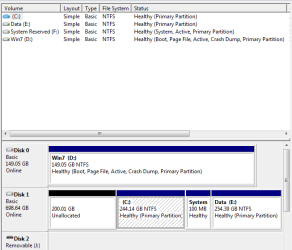
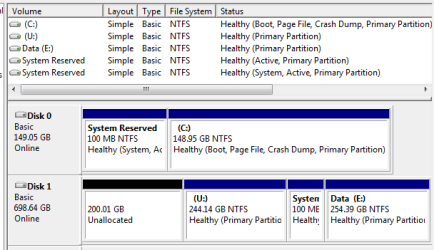
Eventually I did a new install of Win7 onto another partition, installed EasyBCD and created a configuration to boot from the SSD. That worked - sort of. I expected it to show the SSD as C: and to use that for everything, but what I got was that C: was the old install on the WD disk, the repair had added a new 100MB "System Reserved" partition on the WD drive, but it was booted from the SSD now D: - except that Program Files and the User folder were being referenced from C. I had created a Frankenstein's monster - not what I was aiming for.
Any clues as to how I can unravel this would be welcomed. I want to have the SSD be both the boot and Program Files/User partition.
I booted the Windows install DVD and ran the Repair tool. It said it fixed the boot record but when I restarted it still would not boot. When I reran repair, it said it could not find a Windows installation.
I then put back the WD disk and it would not boot from that either. Repair said it could not find anything to fix. I also tried the more detailed repair option, but it just spun for hours.
Eventually I did a new install of Win7 onto another partition, installed EasyBCD and created a configuration to boot from the SSD. That worked - sort of. I expected it to show the SSD as C: and to use that for everything, but what I got was that C: was the old install on the WD disk, the repair had added a new 100MB "System Reserved" partition on the WD drive, but it was booted from the SSD now D: - except that Program Files and the User folder were being referenced from C. I had created a Frankenstein's monster - not what I was aiming for.
Any clues as to how I can unravel this would be welcomed. I want to have the SSD be both the boot and Program Files/User partition.
My Computer
At a glance
Windows 7 x64 RetailIntel Core 2 Duo E6700/Intel Atom N2704GB/2GBATI Radeon HD3870/Intel GMA950
- Computer Manufacturer/Model Number
- Self-built/Dell Mini 9
- OS
- Windows 7 x64 Retail
- CPU
- Intel Core 2 Duo E6700/Intel Atom N270
- Motherboard
- Asus P5B-Deluxe/Dell
- Memory
- 4GB/2GB
- Graphics Card(s)
- ATI Radeon HD3870/Intel GMA950
- Sound Card
- Creative Audigy LE/Integrated
- Monitor(s) Displays
- Samsung 226BW/8.9" LCD
- Screen Resolution
- 1680x1050/1024x600
- Hard Drives
- WD Caviar 750GB/RunCore 64GB SSD
- PSU
- Antec TruePower
- Case
- Antec 180
- Internet Speed
- FiOS 15/2