Clone to SSD won't boot, now I have a "hybrid" system

holmes4

New member
Local time
8:50 AM
Messages
7
I bought an Intel SSD (160GB) and used Acronis TrueImage to clone my system disk (Win 7 Ultimate x64, WD Caviar) to it. I've done this many times before, without a problem. This time, the PC (Asus P5B-Deluxe, Intel E6700) would not boot from the SSD - just gave me the flashing cursor.

I booted the Windows install DVD and ran the Repair tool. It said it fixed the boot record but when I restarted it still would not boot. When I reran repair, it said it could not find a Windows installation.

I then put back the WD disk and it would not boot from that either. Repair said it could not find anything to fix. I also tried the more detailed repair option, but it just spun for hours.

Eventually I did a new install of Win7 onto another partition, installed EasyBCD and created a configuration to boot from the SSD. That worked - sort of. I expected it to show the SSD as C: and to use that for everything, but what I got was that C: was the old install on the WD disk, the repair had added a new 100MB "System Reserved" partition on the WD drive, but it was booted from the SSD now D: - except that Program Files and the User folder were being referenced from C. I had created a Frankenstein's monster - not what I was aiming for.

Any clues as to how I can unravel this would be welcomed. I want to have the SSD be both the boot and Program Files/User partition.
 

My Computer My Computer

At a glance

Windows 7 x64 RetailIntel Core 2 Duo E6700/Intel Atom N2704GB/2GBATI Radeon HD3870/Intel GMA950
Computer Manufacturer/Model Number
Self-built/Dell Mini 9
OS
Windows 7 x64 Retail
CPU
Intel Core 2 Duo E6700/Intel Atom N270
Motherboard
Asus P5B-Deluxe/Dell
Memory
4GB/2GB
Graphics Card(s)
ATI Radeon HD3870/Intel GMA950
Sound Card
Creative Audigy LE/Integrated
Monitor(s) Displays
Samsung 226BW/8.9" LCD
Screen Resolution
1680x1050/1024x600
Hard Drives
WD Caviar 750GB/RunCore 64GB SSD
PSU
Antec TruePower
Case
Antec 180
Internet Speed
FiOS 15/2
You'll be better off sadly starting a fresh install to the SSD.

Disconnect all Spinning drives leaving only the SSd connected, and in SATA port 0 or 1, however your MOBO lists the 1st one.

Let Win 7 create the partitions and everything wuill have the correct alignment for your SSD.

Once Win7 is installed, shut down and reconnect your spinning drives.


Acronis does fine maintaining alignments for SSD's IF you Image the ENTIRE SSD drive , and not just a partition.

So once you get everything installed and good to go, just BAck up the entire SSD, including the Windows little 100MB partition, and youll have no issues with alignments.

From my understanding, imaging over to a SSD form a partition copy of a reg. HD comes with issues, and aligment problems.

i know this probably isn't what you want to hear, but fresh instal would likely be the best option. .. :(


maybe others have something more positive to share.

these are the same steps I took (and was advised to take) when I got my SSD.
 

My Computer My Computer

At a glance

Windows 7 Home Premium 64bitIntel Core i7 2700k8GB Mushkin Redline Ridgebacks @1866EVGA GTX570 SC
Computer Manufacturer/Model Number
Custom (Self Build)
OS
Windows 7 Home Premium 64bit
CPU
Intel Core i7 2700k
Motherboard
eVGA P67 SLI
Memory
8GB Mushkin Redline Ridgebacks @1866
Graphics Card(s)
EVGA GTX570 SC
Sound Card
XiFi Titanium HD
Monitor(s) Displays
LG W2453V
Screen Resolution
1920x1080
Hard Drives
Intel 320 80GB -- Intel X25-V 40GB --WD Black 1TB x2 -- WD Blue 640GB
PSU
Seasonic x750
Case
Corsair 600T SE White
Cooling
eVGA Superclocked CPU Cooler
Keyboard
Saitek Cyborg
Antivirus
Kaspersky
Browser
IE
Other Info
LG BD/DVD

My Computers My Computers

  • At a glance

    7 X64i5 84002x8gb 3200mhz
    Computer type
    PC/Desktop
    OS
    7 X64
    CPU
    i5 8400
    Motherboard
    gigabyte b365m ds3h
    Memory
    2x8gb 3200mhz
    Hard Drives
    various
    PSU
    pure power 11 400w cm
    Case
    Coolermaster
    Cooling
    cryorig m9i
  • At a glance

    7x64g54008gb ddr4 2400
    Computer type
    PC/Desktop
    OS
    7x64
    CPU
    g5400
    Motherboard
    ga b365m ds3h
    Memory
    8gb ddr4 2400
    PSU
    xfx pro 450w
You'll be better off sadly starting a fresh install to the SSD.

Disconnect all Spinning drives leaving only the SSd connected, and in SATA port 0 or 1, however your MOBO lists the 1st one.

Let Win 7 create the partitions and everything wuill have the correct alignment for your SSD.

Once Win7 is installed, shut down and reconnect your spinning drives.


Acronis does fine maintaining alignments for SSD's IF you Image the ENTIRE SSD drive , and not just a partition.

So once you get everything installed and good to go, just BAck up the entire SSD, including the Windows little 100MB partition, and youll have no issues with alignments.

From my understanding, imaging over to a SSD form a partition copy of a reg. HD comes with issues, and aligment problems.

i know this probably isn't what you want to hear, but fresh instal would likely be the best option. .. :(


maybe others have something more positive to share.

these are the same steps I took (and was advised to take) when I got my SSD.


Absolutely agree. Disconnecting the HDD is the way to go. Once it's installed, you don't even have to do anything extra. Just change the boot sequence in the BIOS - just as easy as double boot. I have done it that way and it is the cleanest installation - no messing with boot records etc.
I kept my Vista on the HDD, created a seperate partition for the data, moved all my data to that partition (from Vista with Properties > Location tab). Then I just included the folders into the Win7 libraries. Now I have no data sync problems either.
 

My Computer My Computer

At a glance

Vista, Windows7, Mint Mate, Zorin, Windows 8from 1.6GHz Duo to i7
Computer Manufacturer/Model Number
HP, Dell, Gateway, Toshiba - 4 laptops and 2 desktops
OS
Vista, Windows7, Mint Mate, Zorin, Windows 8
CPU
from 1.6GHz Duo to i7
Monitor(s) Displays
2x HP w2207
Hard Drives
5x HDD, 7x SSD, 12x Externals
Keyboard
with trackball - no mices
Mouse
Trackball mice
Internet Speed
DSL 6000
I know how to do the fresh install, but I don't want to do that at this time. Maybe in a few months when I build a new system. I don't know why this clone should have worked any differently from the many I have done in the past. I know about alignment and don't care about that right now.

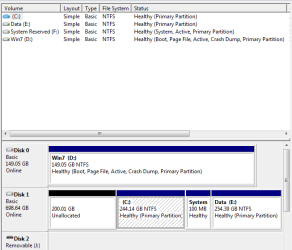
Here's a screenshot of the disk management display:

Capture.png

Disk 0 is the SSD. At the time I did the clone, partition C was the only thing on the hard drive.
 

My Computer My Computer

At a glance

Windows 7 x64 RetailIntel Core 2 Duo E6700/Intel Atom N2704GB/2GBATI Radeon HD3870/Intel GMA950
Computer Manufacturer/Model Number
Self-built/Dell Mini 9
OS
Windows 7 x64 Retail
CPU
Intel Core 2 Duo E6700/Intel Atom N270
Motherboard
Asus P5B-Deluxe/Dell
Memory
4GB/2GB
Graphics Card(s)
ATI Radeon HD3870/Intel GMA950
Sound Card
Creative Audigy LE/Integrated
Monitor(s) Displays
Samsung 226BW/8.9" LCD
Screen Resolution
1680x1050/1024x600
Hard Drives
WD Caviar 750GB/RunCore 64GB SSD
PSU
Antec TruePower
Case
Antec 180
Internet Speed
FiOS 15/2
I know how to do the fresh install, but I don't want to do that at this time. Maybe in a few months when I build a new system. I don't know why this clone should have worked any differently from the many I have done in the past. I know about alignment and don't care about that right now.

Disk 0 is the SSD. At the time I did the clone, partition C was the only thing on the hard drive.
Here is a thought: Go ahead and follow the suggestions already give and do a clean install of 7 with only the SSD drive connected. When finished and when booting correctly, replace it with the clone you have saved. Perhaps it will continue to boot correctly? If the clone is OK? If not then perhaps another try at creating an image?

I recommend creating the 100 MB system partition when installing 7 and here I would say your chances of ending up with a booting system would be greatly increased if you do.

Cheers!
Robert
 

My Computer My Computer

At a glance

...
OS
...
There's nothing wrong with the alignment.


Open an elevated command prompt, type:

bcdboot d:\windows /s d:

then press enter.

close cmd.

In Disk Management , rt click D and Mark as active.

Set Disk 0 first in Bios boot order.

Have fun.
 

My Computers My Computers

  • At a glance

    7 X64i5 84002x8gb 3200mhz
    Computer type
    PC/Desktop
    OS
    7 X64
    CPU
    i5 8400
    Motherboard
    gigabyte b365m ds3h
    Memory
    2x8gb 3200mhz
    Hard Drives
    various
    PSU
    pure power 11 400w cm
    Case
    Coolermaster
    Cooling
    cryorig m9i
  • At a glance

    7x64g54008gb ddr4 2400
    Computer type
    PC/Desktop
    OS
    7x64
    CPU
    g5400
    Motherboard
    ga b365m ds3h
    Memory
    8gb ddr4 2400
    PSU
    xfx pro 450w
Thanks for the suggestions - I'll try them out.
 

My Computer My Computer

At a glance

Windows 7 x64 RetailIntel Core 2 Duo E6700/Intel Atom N2704GB/2GBATI Radeon HD3870/Intel GMA950
Computer Manufacturer/Model Number
Self-built/Dell Mini 9
OS
Windows 7 x64 Retail
CPU
Intel Core 2 Duo E6700/Intel Atom N270
Motherboard
Asus P5B-Deluxe/Dell
Memory
4GB/2GB
Graphics Card(s)
ATI Radeon HD3870/Intel GMA950
Sound Card
Creative Audigy LE/Integrated
Monitor(s) Displays
Samsung 226BW/8.9" LCD
Screen Resolution
1680x1050/1024x600
Hard Drives
WD Caviar 750GB/RunCore 64GB SSD
PSU
Antec TruePower
Case
Antec 180
Internet Speed
FiOS 15/2
If you didn't restore the mbr with the image - you may also need to write the disk code.

May as well do it anyway - assuming you are booted into D :

Extract bootsect.exe and copy it into D:\Windows\System 32:

View attachment bootsect.zip

Open an elevated cmd and type:

bootsect /nt60 d: / mbr

then press enter.

close cmd.

Now you should be good to restart - go into Bios , set Disk 0 as first in HD boot order.

That's it.
 

My Computers My Computers

  • At a glance

    7 X64i5 84002x8gb 3200mhz
    Computer type
    PC/Desktop
    OS
    7 X64
    CPU
    i5 8400
    Motherboard
    gigabyte b365m ds3h
    Memory
    2x8gb 3200mhz
    Hard Drives
    various
    PSU
    pure power 11 400w cm
    Case
    Coolermaster
    Cooling
    cryorig m9i
  • At a glance

    7x64g54008gb ddr4 2400
    Computer type
    PC/Desktop
    OS
    7x64
    CPU
    g5400
    Motherboard
    ga b365m ds3h
    Memory
    8gb ddr4 2400
    PSU
    xfx pro 450w
I tried SIW2's suggestions, but they made no difference in the behavior. I then tried Robert's (iseeuu) idea of a fresh install on the SSD and then restoring the previous image. When I did this with the image of the SSD, I got to a strange state where it booted and let me log in, but then brought me to a blank blue desktop with "This copy of Windows is not genuine" in the lower right. Nothing else appeared on the screen and all I could do was shut down. Finally I restored a copy of the original WD image, the one that had shown as C in my "Frankenstein" mode, and that worked just fine.

One curious thing I noted was that in the Frankenstein mode, while the system appeared to be running properly, deep down it was very conflicted. This was evidenced by my getting Windows Installer errors any time I tried to install or uninstall a product.

Thank you all - I now have Windows installed properly on the SSD - my hard disk WEI rating went from 5.9 to 7.2 - and the system feels much snappier.

I do have one residual question. When I did the new install as Robert suggested, the System Reserved partition was created as I expected. What I didn't expect was that it would have a drive letter assigned to it - I had not seen that in my past installs on an empty disk. Is there any harm to removing the drive letter for that partition, or should I just leave it alone?
 

My Computer My Computer

At a glance

Windows 7 x64 RetailIntel Core 2 Duo E6700/Intel Atom N2704GB/2GBATI Radeon HD3870/Intel GMA950
Computer Manufacturer/Model Number
Self-built/Dell Mini 9
OS
Windows 7 x64 Retail
CPU
Intel Core 2 Duo E6700/Intel Atom N270
Motherboard
Asus P5B-Deluxe/Dell
Memory
4GB/2GB
Graphics Card(s)
ATI Radeon HD3870/Intel GMA950
Sound Card
Creative Audigy LE/Integrated
Monitor(s) Displays
Samsung 226BW/8.9" LCD
Screen Resolution
1680x1050/1024x600
Hard Drives
WD Caviar 750GB/RunCore 64GB SSD
PSU
Antec TruePower
Case
Antec 180
Internet Speed
FiOS 15/2
I tried SIW2's suggestions, but they made no difference in the behavior. I then tried Robert's (iseeuu) idea of a fresh install on the SSD and then restoring the previous image. When I did this with the image of the SSD, I got to a strange state where it booted and let me log in, but then brought me to a blank blue desktop with "This copy of Windows is not genuine" in the lower right. Nothing else appeared on the screen and all I could do was shut down. Finally I restored a copy of the original WD image, the one that had shown as C in my "Frankenstein" mode, and that worked just fine.

One curious thing I noted was that in the Frankenstein mode, while the system appeared to be running properly, deep down it was very conflicted. This was evidenced by my getting Windows Installer errors any time I tried to install or uninstall a product.

Thank you all - I now have Windows installed properly on the SSD - my hard disk WEI rating went from 5.9 to 7.2 - and the system feels much snappier.

I do have one residual question. When I did the new install as Robert suggested, the System Reserved partition was created as I expected. What I didn't expect was that it would have a drive letter assigned to it - I had not seen that in my past installs on an empty disk. Is there any harm to removing the drive letter for that partition, or should I just leave it alone?
There is no harm done by removing the drive letter. Windows installs do not assign a letter to the system partition.

How a final snapshot of your working disk manager?

Cheers!
Robert
 

My Computer My Computer

At a glance

...
OS
...
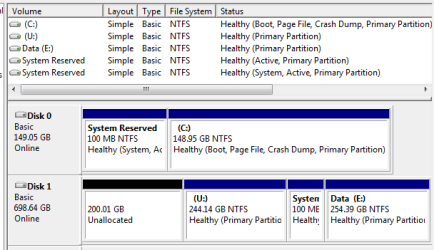
Here's the final snapshot. I moved some drive letters around to match a previous configuration. U is the old system which I will delete after I have redone my backups, and that second reserved partition was created when I installed fresh onto the WD disk. Thanks again.

Capture.png
 

My Computer My Computer

At a glance

Windows 7 x64 RetailIntel Core 2 Duo E6700/Intel Atom N2704GB/2GBATI Radeon HD3870/Intel GMA950
Computer Manufacturer/Model Number
Self-built/Dell Mini 9
OS
Windows 7 x64 Retail
CPU
Intel Core 2 Duo E6700/Intel Atom N270
Motherboard
Asus P5B-Deluxe/Dell
Memory
4GB/2GB
Graphics Card(s)
ATI Radeon HD3870/Intel GMA950
Sound Card
Creative Audigy LE/Integrated
Monitor(s) Displays
Samsung 226BW/8.9" LCD
Screen Resolution
1680x1050/1024x600
Hard Drives
WD Caviar 750GB/RunCore 64GB SSD
PSU
Antec TruePower
Case
Antec 180
Internet Speed
FiOS 15/2
Here's the final snapshot. I moved some drive letters around to match a previous configuration. U is the old system which I will delete after I have redone my backups, and that second reserved partition was created when I installed fresh onto the WD disk. Thanks again.

View attachment 43830
Looks good! Glad you got it nailed down!!

Happy surfing!
Robert
 

My Computer My Computer

At a glance

...
OS
...
Back
Top