Accidently Installed Win7 to Recovery \:D

drjim

New member
Local time
10:09 PM
Messages
34
I accidentally installed Win7 to Recovery \:D instead of :C. Once I caught my error, I installed Win7 no problem to :C, but :D is now almost full and I figure it shouldn't be. Plus, when I boot up, I get the black and white screen asking which Win7 I want to boot up.

Can someone tell me what I can do (preferably not involving reinstalling Win7 to :C)?

I thought of just reformatting :D, but thought it better to ask you experts.

As always, thanks and happy holidays!
 

My Computer My Computer

At a glance

Windows 7
OS
Windows 7
LMOA!!
Sorry its just a bit funny lol,something id do

Download Partition Wizard Home Edition
Free Download Partition Wizard

Format it>Apply>
Right click the Partition>Move/Resize>Shrink it>Apply
Right click the Drive with Win7 on it>Resize>Expand it>Apply

Click apply at the bottom of the page as above,this is important:)
 

My Computer My Computer

At a glance

Windows 7 Ultimate 64bitAMD Phenom II 555 Black Edition Quad Core OC'...G Skill RipJaw 1333MHz 4GBATI raideon 4250 HD/XFX ATI Radeon 1GB HD4650
Computer Manufacturer/Model Number
Blue Shards 1.0
OS
Windows 7 Ultimate 64bit
CPU
AMD Phenom II 555 Black Edition Quad Core OC'd to 4.0GHz
Motherboard
ASUS M4A88T-M
Memory
G Skill RipJaw 1333MHz 4GB
Graphics Card(s)
ATI raideon 4250 HD/XFX ATI Radeon 1GB HD4650
Sound Card
Realteck HD Audio
Monitor(s) Displays
2x 22" Widescreen HD Monitors
Hard Drives
500GB Sata 7500RPM
80GB IDE
PSU
850W OCUK Modular
Case
Antec Dark Fleet DF-30
Cooling
Titan Fenrir Pro (CPU)
Keyboard
Logitech Wireless
Mouse
Logitech Wireless
Internet Speed
24Meg
Other Info
Getting soon-
2TB 7200RPM HDD
+8GB RAM
30GB SSD
HD6950/70
I think you goofed the recovery partition depending which version the system came preinstalled with. You may not be able to see the recovery partition while in the Disk Management tool to no surprize being hidden to begin with but any 3rd party drive partitioning tool like the program there or another like GParted can remove the 5-7gb partition generally seen for that.

For removing the second entry seen on the boot screen that will take an edit of the BCD store which is easy enough once you know which is which leaving the C as default! The System>Advanced system settings>Startup & Recovery settings there can see to that.

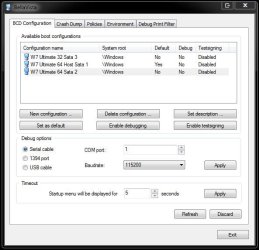
Or you see that done as well as remove the extra entry in one shot using another free stand alone executable called BellaVista(formerly BCD Editor) found at System Tools - BellaVista

Simply download the zip file and extract the two folders Win32 and 64bit from the zip file itself into the folder you download it to and open the correct one for the flavor of 7 you are running. The BellaVista.exe file is named the same in both so choose the correct folder and simply double click on the executable itself to run the editing tool.

The drive tool you use will wipe the recovery partition and expand the C primary easy enough.
 

My Computers My Computers

  • At a glance

    W7 Ultimate x64/W10 Pro x64/W11 Pro Triple Bo...AMD Phenom II X4 975 Deneb 3.6ghz - 965 2nd r...Kingston Hyper X DDR3 1600 1.5v 16gb - Hyper ...MSI HD Radeon 5750 1gb - MSI HD Radeon 6450 o...
    Computer type
    PC/Desktop
    Computer Manufacturer/Model Number
    Custom builds = 2
    OS
    W7 Ultimate x64/W10 Pro x64/W11 Pro Triple Boot - Main PC W7 Remote PC Micro ATX W7 Pro x64/W11 Pro
    CPU
    AMD Phenom II X4 975 Deneb 3.6ghz - 965 2nd remote pc
    Motherboard
    Gigabyte GA-790XTA-UD4-Gigabyte GA-880GM-D2H remote pc
    Memory
    Kingston Hyper X DDR3 1600 1.5v 16gb - Hyper X Fury 8gb 2nd
    Graphics Card(s)
    MSI HD Radeon 5750 1gb - MSI HD Radeon 6450 on mini tower
    Sound Card
    Creative Labs X-Fi Xtreme Audio P - Realtek onooard 2nd case
    Monitor(s) Displays
    ASUS VW199T-P 19" HP 2082a Main-HP 2082a 20" remote pc
    Screen Resolution
    Asus 1440x900 - HP 1600x900
    Hard Drives
    WD Black 1TB HD per OS W7, W10, and pending W11 presently on 500gb OS Drive - Pending Triple 1TB HDs for Spanned Storage/backup volume
    Single 2TB external USB enclosure, single 1TB System 7 Host/Boot drive, Pending 8TB external HD for system image b
    PSU
    Corsair 750TX - primary / Corsair CX600 - second
    Case
    Antec 900-2 - SSD compatible / NZXT Vulcan mini tower
    Cooling
    Zalman CNPS9900A
    Keyboard
    AZIO L70 Backlit Letters Gaming - ONN Cordless/USB
    Mouse
    MSI DS200 Programmable, Logitech Cordless
    Internet Speed
    30mbps upgrade - primary hard wired - mini tower usb WiFi
    Antivirus
    GFI VIPRE Internet Security 2014 on W7 2016 beta on W10,
    Browser
    Cyberfox, WaterFox 64bit FF variants, FireFox x64, Pale Moon
    Other Info
    Accomdata fan cooled usb 2.0 PIDE/Sata II, III external enclosure.
    Sambient usb/eSata PATA/Sata II, III external enclosure.
  • At a glance

    W7 Pro x64/W11 ProAMD Deneb 3.6ghz - 965Kingston Hyper X Fury 8gbMSI HD Radeon 6450 DVI Output
    Computer type
    PC/Desktop
    System Manufacturer/Model Number
    CUSTOM ASSEMBLY
    OS
    W7 Pro x64/W11 Pro
    CPU
    AMD Deneb 3.6ghz - 965
    Motherboard
    Gigabyte GA-880GM-D2H remote pc
    Memory
    Kingston Hyper X Fury 8gb
    Graphics Card(s)
    MSI HD Radeon 6450 DVI Output
    Sound Card
    Realtek onooard Creative or Other separate PENDING
    Monitor(s) Displays
    VIZIO 32" LCD TV Separate LCD Pending
    Screen Resolution
    1600x1080
    Hard Drives
    WD 500GB OS Host/Boot WD Green 1TB Storage/Backup
    PSU
    Corsair 600W - THERMALTAKE 600W spare case
    Case
    NZXT Vulcan mini tower
    Cooling
    Twin 120mm Top Fans - 240mm Side Cover
    Keyboard
    ONN Cordless/USB Logitech Cordless
    Mouse
    ONN USB/Cordless - Logitech Cordless
    Internet Speed
    DSL 5G
    Browser
    MS Edge, FireFox, WaterFox x64, FireFox Nightly
    Other Info
    OS Testing-Remote Access to Main TeamViewer
You have established a dual boot with two Win7 installs. We can fix this if you want:

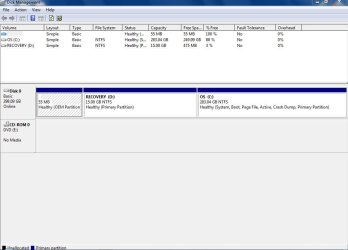
Please post back a screenshot of your full Disk Management drive map, using Snipping Tool in Start Menu, attach file using paper clip in reply box.

If you're not too attached to either install and want to start with a clean slate, boot from the WIn7 DVD, select Custom install, then Drive tools (advanced) to delete all partitions, create New partition(s) as you wish, then format before installing Win7 to the first partition.

Otherwise we can help clean up what you have as soon as you post back the screenshot.
 
Last edited:
In most cases the recovery partition is well under 10gb. However it may be at the front of the drive rather then seen at the back. If that proves to be the case nuking it and moving the existing C forward in order to expand it after will require a 3rd party program. That will take time since you have files already loaded onto it.

If the recovery is at the back that will be much easier to remove and simply expand C to fill the empty space in. First you may want to label the C primary in order to distinguish it from the recovery partition while the size is the actual giveaway to avoid accidently deleting the wrong one! :eek:

If you haven't have much experience with partitioning drives you wouldn't any mishaps since you have a working install on C now. The tool at the link there can also rename the entry in the bcd store itself so you know which one is for C. The screen here will show how 3 separate installations on 3 different hard drives can be IDed easy enough.

You won't be having any worries like that there however! :roflmao:

Happy Holidays!
 

Attachments

  • BellaVista BCD Edit 3.jpg
    BellaVista BCD Edit 3.jpg
    48.8 KB · Views: 93

My Computers My Computers

  • At a glance

    W7 Ultimate x64/W10 Pro x64/W11 Pro Triple Bo...AMD Phenom II X4 975 Deneb 3.6ghz - 965 2nd r...Kingston Hyper X DDR3 1600 1.5v 16gb - Hyper ...MSI HD Radeon 5750 1gb - MSI HD Radeon 6450 o...
    Computer type
    PC/Desktop
    Computer Manufacturer/Model Number
    Custom builds = 2
    OS
    W7 Ultimate x64/W10 Pro x64/W11 Pro Triple Boot - Main PC W7 Remote PC Micro ATX W7 Pro x64/W11 Pro
    CPU
    AMD Phenom II X4 975 Deneb 3.6ghz - 965 2nd remote pc
    Motherboard
    Gigabyte GA-790XTA-UD4-Gigabyte GA-880GM-D2H remote pc
    Memory
    Kingston Hyper X DDR3 1600 1.5v 16gb - Hyper X Fury 8gb 2nd
    Graphics Card(s)
    MSI HD Radeon 5750 1gb - MSI HD Radeon 6450 on mini tower
    Sound Card
    Creative Labs X-Fi Xtreme Audio P - Realtek onooard 2nd case
    Monitor(s) Displays
    ASUS VW199T-P 19" HP 2082a Main-HP 2082a 20" remote pc
    Screen Resolution
    Asus 1440x900 - HP 1600x900
    Hard Drives
    WD Black 1TB HD per OS W7, W10, and pending W11 presently on 500gb OS Drive - Pending Triple 1TB HDs for Spanned Storage/backup volume
    Single 2TB external USB enclosure, single 1TB System 7 Host/Boot drive, Pending 8TB external HD for system image b
    PSU
    Corsair 750TX - primary / Corsair CX600 - second
    Case
    Antec 900-2 - SSD compatible / NZXT Vulcan mini tower
    Cooling
    Zalman CNPS9900A
    Keyboard
    AZIO L70 Backlit Letters Gaming - ONN Cordless/USB
    Mouse
    MSI DS200 Programmable, Logitech Cordless
    Internet Speed
    30mbps upgrade - primary hard wired - mini tower usb WiFi
    Antivirus
    GFI VIPRE Internet Security 2014 on W7 2016 beta on W10,
    Browser
    Cyberfox, WaterFox 64bit FF variants, FireFox x64, Pale Moon
    Other Info
    Accomdata fan cooled usb 2.0 PIDE/Sata II, III external enclosure.
    Sambient usb/eSata PATA/Sata II, III external enclosure.
  • At a glance

    W7 Pro x64/W11 ProAMD Deneb 3.6ghz - 965Kingston Hyper X Fury 8gbMSI HD Radeon 6450 DVI Output
    Computer type
    PC/Desktop
    System Manufacturer/Model Number
    CUSTOM ASSEMBLY
    OS
    W7 Pro x64/W11 Pro
    CPU
    AMD Deneb 3.6ghz - 965
    Motherboard
    Gigabyte GA-880GM-D2H remote pc
    Memory
    Kingston Hyper X Fury 8gb
    Graphics Card(s)
    MSI HD Radeon 6450 DVI Output
    Sound Card
    Realtek onooard Creative or Other separate PENDING
    Monitor(s) Displays
    VIZIO 32" LCD TV Separate LCD Pending
    Screen Resolution
    1600x1080
    Hard Drives
    WD 500GB OS Host/Boot WD Green 1TB Storage/Backup
    PSU
    Corsair 600W - THERMALTAKE 600W spare case
    Case
    NZXT Vulcan mini tower
    Cooling
    Twin 120mm Top Fans - 240mm Side Cover
    Keyboard
    ONN Cordless/USB Logitech Cordless
    Mouse
    ONN USB/Cordless - Logitech Cordless
    Internet Speed
    DSL 5G
    Browser
    MS Edge, FireFox, WaterFox x64, FireFox Nightly
    Other Info
    OS Testing-Remote Access to Main TeamViewer
You have established a dual boot with two Win7 installs. We can fix this if you want:

Please post back a screenshot of your full Disk Management drive map, using Snipping Tool in Start Menu, attach file using paper clip in reply box.

If you're not too attached to either install and want to start with a clean slate, boot from the WIn7 DVD, select Custom install, then Drive tools (advanced) to delete all partitions, create New partition(s) as you wish, then format before installing Win7 to the first partition.

Otherwise we can help clean up what you have as soon as you post back the screenshot.

I'm not attached to either install and would rather not have to reinstall Win7 (I have set up the PC with programs, tweaks, etc., so would prefer to not start from scratch).

Can you tell me what you mean by my Disk Management drive map? As soon as I hear back, I'll post and look forward to your guidance.

FYI, the PC is a Dell desktop running Vista Home Premium which I am upgrading to Win7. And the :D drive is clearly identified as Recovery and has about 14GB in it (just about full now).

I really appreciate your help!
 

My Computer My Computer

At a glance

Windows 7
OS
Windows 7

My Computers My Computers

  • At a glance

    7 X64i5 84002x8gb 3200mhz
    Computer type
    PC/Desktop
    OS
    7 X64
    CPU
    i5 8400
    Motherboard
    gigabyte b365m ds3h
    Memory
    2x8gb 3200mhz
    Hard Drives
    various
    PSU
    pure power 11 400w cm
    Case
    Coolermaster
    Cooling
    cryorig m9i
  • At a glance

    7x64g54008gb ddr4 2400
    Computer type
    PC/Desktop
    OS
    7x64
    CPU
    g5400
    Motherboard
    ga b365m ds3h
    Memory
    8gb ddr4 2400
    PSU
    xfx pro 450w
I'm not attached to either install and would rather not have to reinstall Win7 (I have set up the PC with programs, tweaks, etc., so would prefer to not start from scratch).

Can you tell me what you mean by my Disk Management drive map? As soon as I hear back, I'll post and look forward to your guidance.

FYI, the PC is a Dell desktop running Vista Home Premium which I am upgrading to Win7.

I really appreciate your help!
Go to Control Panel>Set View to small/large Icons>Admin Tools>
Computer Management>Disc Management (on the left had side)

type Snype Tool into the search bar>open it>
Use it to highlight the window (disc management)>save it somewhere you can find it easy (desktop)
Then either attach it (Attachments under new post) or upload to TinyPic - Free Image Hosting, Photo Sharing & Video Hosting
Then copy the
 

My Computer My Computer

At a glance

Windows 7 Ultimate 64bitAMD Phenom II 555 Black Edition Quad Core OC'...G Skill RipJaw 1333MHz 4GBATI raideon 4250 HD/XFX ATI Radeon 1GB HD4650
Computer Manufacturer/Model Number
Blue Shards 1.0
OS
Windows 7 Ultimate 64bit
CPU
AMD Phenom II 555 Black Edition Quad Core OC'd to 4.0GHz
Motherboard
ASUS M4A88T-M
Memory
G Skill RipJaw 1333MHz 4GB
Graphics Card(s)
ATI raideon 4250 HD/XFX ATI Radeon 1GB HD4650
Sound Card
Realteck HD Audio
Monitor(s) Displays
2x 22" Widescreen HD Monitors
Hard Drives
500GB Sata 7500RPM
80GB IDE
PSU
850W OCUK Modular
Case
Antec Dark Fleet DF-30
Cooling
Titan Fenrir Pro (CPU)
Keyboard
Logitech Wireless
Mouse
Logitech Wireless
Internet Speed
24Meg
Other Info
Getting soon-
2TB 7200RPM HDD
+8GB RAM
30GB SSD
HD6950/70
Here you go. See attached.
 

Attachments

  • disk management.JPG
    disk management.JPG
    55.9 KB · Views: 134

My Computer My Computer

At a glance

Windows 7
OS
Windows 7
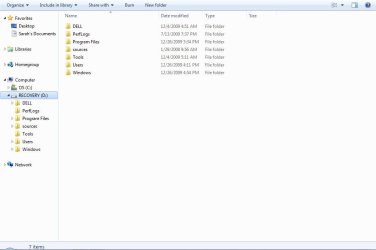
have a look on D and see what is on there - post a screenshot of the contents.

If there is a Windows.old file - post the contents of that too.

If you didn't format it during installation - you should be able to restore the recovery partition contents.
 

My Computers My Computers

  • At a glance

    7 X64i5 84002x8gb 3200mhz
    Computer type
    PC/Desktop
    OS
    7 X64
    CPU
    i5 8400
    Motherboard
    gigabyte b365m ds3h
    Memory
    2x8gb 3200mhz
    Hard Drives
    various
    PSU
    pure power 11 400w cm
    Case
    Coolermaster
    Cooling
    cryorig m9i
  • At a glance

    7x64g54008gb ddr4 2400
    Computer type
    PC/Desktop
    OS
    7x64
    CPU
    g5400
    Motherboard
    ga b365m ds3h
    Memory
    8gb ddr4 2400
    PSU
    xfx pro 450w
have a look on D and see what is on there - post a screenshot of the contents.

If there is a Windows.old file - post the contents of that too.

If you didn't format it during installation - you should be able to restore the recovery partition contents.

Here you go. Note the windows old folder is from :C because I deleted it from the :D drive (seemed like a good idea at the time), but it should be identical.
 

Attachments

  • d drive.JPG
    d drive.JPG
    37.7 KB · Views: 47
  • windows old.JPG
    windows old.JPG
    43.4 KB · Views: 36
Last edited:

My Computer My Computer

At a glance

Windows 7
OS
Windows 7
Looks like the contents of the recovery partition are still there.

Do you have the Dell installation dvd?
 

My Computers My Computers

  • At a glance

    7 X64i5 84002x8gb 3200mhz
    Computer type
    PC/Desktop
    OS
    7 X64
    CPU
    i5 8400
    Motherboard
    gigabyte b365m ds3h
    Memory
    2x8gb 3200mhz
    Hard Drives
    various
    PSU
    pure power 11 400w cm
    Case
    Coolermaster
    Cooling
    cryorig m9i
  • At a glance

    7x64g54008gb ddr4 2400
    Computer type
    PC/Desktop
    OS
    7x64
    CPU
    g5400
    Motherboard
    ga b365m ds3h
    Memory
    8gb ddr4 2400
    PSU
    xfx pro 450w
Looks like the contents of the recovery partition are still there.

Do you have the Dell installation dvd?

By Dual boot menu, you mean the B&W screen during boot-up where I have to choose which Win7 to boot up, yes I get that.

And I have Win7 on a dvd.
 
Last edited:

My Computer My Computer

At a glance

Windows 7
OS
Windows 7
I meant the original o/s that was on the machine (Vista?).

You might want to reinstall that to sell the machine, or if you want to transfer 7 to another machine.
 

My Computers My Computers

  • At a glance

    7 X64i5 84002x8gb 3200mhz
    Computer type
    PC/Desktop
    OS
    7 X64
    CPU
    i5 8400
    Motherboard
    gigabyte b365m ds3h
    Memory
    2x8gb 3200mhz
    Hard Drives
    various
    PSU
    pure power 11 400w cm
    Case
    Coolermaster
    Cooling
    cryorig m9i
  • At a glance

    7x64g54008gb ddr4 2400
    Computer type
    PC/Desktop
    OS
    7x64
    CPU
    g5400
    Motherboard
    ga b365m ds3h
    Memory
    8gb ddr4 2400
    PSU
    xfx pro 450w
I meant the original o/s that was on the machine (Vista?).

You might want to reinstall that to sell the machine, or if you want to transfer 7 to another machine.

Not sure I understand the point of your comment. I'm not concerned about Vista or selling the machine. Just want to clear up the issue of double install of Win7.

I really need more clarity from the commenters above on what the best approach is and how to do it. I don't know enough to decide on various options. Just tell me what I should do and I will obey. And a key question will any of the above suggestions save my Win7 that is installed on :C or will I need to reinstall? Another is: by getting rid of :D, will that also wipe out the Win7 installed on that drive, but keep Win7 on :C?
 

My Computer My Computer

At a glance

Windows 7
OS
Windows 7
You can delete the other boot menu entry in msconfig under the startup tab, and delete/reformat the D partition, if you like.

You will still have full use of 7 installed on C.

If you then want to include the space released from D into C - that is another question - not difficult .
 

My Computers My Computers

  • At a glance

    7 X64i5 84002x8gb 3200mhz
    Computer type
    PC/Desktop
    OS
    7 X64
    CPU
    i5 8400
    Motherboard
    gigabyte b365m ds3h
    Memory
    2x8gb 3200mhz
    Hard Drives
    various
    PSU
    pure power 11 400w cm
    Case
    Coolermaster
    Cooling
    cryorig m9i
  • At a glance

    7x64g54008gb ddr4 2400
    Computer type
    PC/Desktop
    OS
    7x64
    CPU
    g5400
    Motherboard
    ga b365m ds3h
    Memory
    8gb ddr4 2400
    PSU
    xfx pro 450w
You can delete the other boot menu entry in msconfig under the startup tab, and delete/reformat the D partition, if you like.

Now that sounds like something I can do! Is it as simple as that or do I need more detailed instructions? Is it obvious how to delete the other boot menu entry in msconfig (I'm quite familiar with msconfig)? And where do I go to delete/reformat D (just right click on D and choose delete or format? If so, what's the difference between deleting and reformatting (I assume with delete, D disappears, whereas with reformat, D is just cleaned out)?

You will still have full use of 7 installed on C.

Great!

If you then want to include the space released from D into C - that is another question - not difficult .

As I don't know enough to know, what do you suggest? I don't think I need D space released.

Your solution seems so simple compared to the others that involved downloading 3rd party software and repartitioning.

If you confirm your suggestion and instructions, I'm all over it.

Much appreciated.
 

My Computer My Computer

At a glance

Windows 7
OS
Windows 7
And where do I go to delete/reformat D (just right click on D and choose delete or format? If so, what's the difference between deleting and reformatting (I assume with delete, D disappears, whereas with reformat, D is just cleaned out)?


Yes.


Is it obvious how to delete the other boot menu entry in msconfig


Yes, type msconfig in start search- click it when it pops up - click the Boot Tab, highlight the old entry , click Delete, Click Apply, OK. Exit without restart.
 

My Computers My Computers

  • At a glance

    7 X64i5 84002x8gb 3200mhz
    Computer type
    PC/Desktop
    OS
    7 X64
    CPU
    i5 8400
    Motherboard
    gigabyte b365m ds3h
    Memory
    2x8gb 3200mhz
    Hard Drives
    various
    PSU
    pure power 11 400w cm
    Case
    Coolermaster
    Cooling
    cryorig m9i
  • At a glance

    7x64g54008gb ddr4 2400
    Computer type
    PC/Desktop
    OS
    7x64
    CPU
    g5400
    Motherboard
    ga b365m ds3h
    Memory
    8gb ddr4 2400
    PSU
    xfx pro 450w
And where do I go to delete/reformat D (just right click on D and choose delete or format? If so, what's the difference between deleting and reformatting (I assume with delete, D disappears, whereas with reformat, D is just cleaned out)?
Yes.


Is it obvious how to delete the other boot menu entry in msconfig

Yes, type msconfig in start search- click it when it pops up - click the Boot Tab, highlight the old entry , click Delete, Click Apply, OK. Exit without restart.

I'm on it. I'll report back.
 

My Computer My Computer

At a glance

Windows 7
OS
Windows 7
I just followed SIW2's instructions and all worked great.

Many thanks to all for their time and expertise.

And Happy New Year!
 

My Computer My Computer

At a glance

Windows 7
OS
Windows 7
Back
Top