Export Outlook Express XP into Outlook 2007 Windows 7?

PxTx

New member
Local time
9:05 PM
Messages
7
I've searched the forum and it seems my need is a little different than the posts which have already been made.

I have an old XP laptop which I was using Outlook Express for one of my mail accounts (a work account). I also ran regular Outlook for another (personal). I want to have both of these accounts on my new PC.

My new PC is running Windows 7 wiht Office 2007. I used the Windows transfer cable and things worked failry well. My regular Outlook files all came over well, but nothing for Outlook Express.

I really would like to take this time to somehow export my OE files into my Outlook 2007. I would really like to keep the account which imported in on Outlook seperate.

Question 1: Is there a way to import my OE files into Outlook 2007?

Question 2: Is there a way to have two seperate email accounts in Outlook without combining them? Basically I want to have a work email and a personal and keep them seperate.

If I can't have two seperate emails with Outlook, can anyone suggest something which would allow me to export my old Outlook (the old personal emails) into another program so that I can at least use my work email on Outlook 2007?

Hopefully this isn't too confusing.
 

My Computer My Computer

Computer Manufacturer/Model Number
Toshiba A505-S6980
OS
Windows 7 x64
If it's possible then I suspect it's far more likely you'd do it using an import feature in Outlook 2007 as opposed to an export feature in OE6, and I doubt the change of operating system really has much influence on this.

I'm not running Office 2007 on the machine in front of me, otherwise I'd check some of the options myself for you - but if you look at the import menu in Outlook 2007 (or if you're really stuck, the help files!) then I feel certain they'll be an answer already waiting for you :)
 

My Computer My Computer

Computer Manufacturer/Model Number
Custom built machine
OS
W7 x64
CPU
Intel Q9300 2.5Ghz Quad LGA775 (Would like Q9650)
Motherboard
Gigabyte GA-EP45T-UD3R (F6 Bios)
Memory
4Gb OCZ Gold 1,333Mhz
Graphics Card(s)
Palit HD4850 O/C Sonic 512Mb DDR3, Dual DViD's
Sound Card
Azalia to twin Samson 50w Studio Monitors
Monitor(s) Displays
Twin Dell (E-IPS) U2311H 23.6" Screens
Screen Resolution
1920 x 1080 @ 60Hz
Hard Drives
Crucial M4 SSD, archives on twin Western Digital Caviar Black WD2002FAEX, 2TB, 7200rpm HDD's, Samsung Ritemaster CD/DVD Burner...
PSU
OCZ 600w
Case
Lian-Li PC8 acoustifoamed' aluminium tower
Cooling
Scythe 140mm Zipang
Keyboard
Cherry PS/2 custom model
Mouse
Lenovo USB laser "Thinkpad" Mouse
Internet Speed
ADSL2+ @14Mbps downstream & Cat6 Gigabit Ethernet
Antivirus
NOD32
Browser
Opera
Other Info
Silicon Dust HD Homerun Dual FTA (Ethernet) TV Tuners, Dray Tek Vigor 2850Vn router and 8x HP Gigabit Switch. Lian-Li CR26 Card Reader, Canon MF4430 iSensys laser printer/scanner.
Thanks, It seems I can import the OE files, as you described. My challenge is that I don't understand if it is going to mix it in with the account I already have in Outlook.

I am now trying to figure out how to have two seperate accounts with Outlook. Thanks again for the help!
 

My Computer My Computer

Computer Manufacturer/Model Number
Toshiba A505-S6980
OS
Windows 7 x64
Outlook Express does NOT work in Win 7, Outlook does but not Express

Smitty
 

My Computer My Computer

Computer Manufacturer/Model Number
Dell XPS 730
OS
Windows 7 Home Premium 64 bit
CPU
Intel Core 2 quad Extreme Q9770 @ 3.2 GHz
Memory
4x2 GB Muskin 1600 MHz ram
Graphics Card(s)
NVidia GTX 250
Sound Card
Soundblaster X-Fi Fatality Champion
Monitor(s) Displays
2 Dell 2007WFP Ultrascans
Screen Resolution
3360 x 1050
Hard Drives
WD Black 1TB sata, 2-WD Black 500 sata, 2-Seagate 500 Go external
PSU
1000 Watt
Cooling
air
Keyboard
MS Natrual Keyboard Pro
Mouse
Logitech Wireless Trackball
Internet Speed
DSL Elite
My challenge is that I don't understand if it is going to mix it in with the account I already have in Outlook.

I'd imagine that'd be a sure bet.

However you can make a copy of the message store archive(s) first, enabling you to revert if necessary.
 

My Computer My Computer

Computer Manufacturer/Model Number
Custom built machine
OS
W7 x64
CPU
Intel Q9300 2.5Ghz Quad LGA775 (Would like Q9650)
Motherboard
Gigabyte GA-EP45T-UD3R (F6 Bios)
Memory
4Gb OCZ Gold 1,333Mhz
Graphics Card(s)
Palit HD4850 O/C Sonic 512Mb DDR3, Dual DViD's
Sound Card
Azalia to twin Samson 50w Studio Monitors
Monitor(s) Displays
Twin Dell (E-IPS) U2311H 23.6" Screens
Screen Resolution
1920 x 1080 @ 60Hz
Hard Drives
Crucial M4 SSD, archives on twin Western Digital Caviar Black WD2002FAEX, 2TB, 7200rpm HDD's, Samsung Ritemaster CD/DVD Burner...
PSU
OCZ 600w
Case
Lian-Li PC8 acoustifoamed' aluminium tower
Cooling
Scythe 140mm Zipang
Keyboard
Cherry PS/2 custom model
Mouse
Lenovo USB laser "Thinkpad" Mouse
Internet Speed
ADSL2+ @14Mbps downstream & Cat6 Gigabit Ethernet
Antivirus
NOD32
Browser
Opera
Other Info
Silicon Dust HD Homerun Dual FTA (Ethernet) TV Tuners, Dray Tek Vigor 2850Vn router and 8x HP Gigabit Switch. Lian-Li CR26 Card Reader, Canon MF4430 iSensys laser printer/scanner.
Well I am following this lead, and I will attempt to archive the account i curretnly have in Outlook (which is my personaly one). I would like to then delete the files and import the OE ones (which is the work account).

Can anyone suggest a mail program I can then open my archived Outlook (personal) files?

My challenge is that I don't understand if it is going to mix it in with the account I already have in Outlook.

I'd imagine that'd be a sure bet.

However you can make a copy of the message store archive(s) first, enabling you to revert if necessary.
 

My Computer My Computer

Computer Manufacturer/Model Number
Toshiba A505-S6980
OS
Windows 7 x64
you can have two different email accounts in outlook 2007, you just make a rule and it will dump all email from whichever account into a folder.
 

My Computer My Computer

Computer Manufacturer/Model Number
Black_Box (homebuilt)
OS
windows 7 RTM x64
CPU
Phenom II 965 Quad Core 3.4Ghz
Motherboard
Asus M4A79T Deluxe
Memory
Mushkin Blackline 8GB (4x2gb)
Graphics Card(s)
XFX Radeon 5970 Black Edition
Sound Card
onboard
Monitor(s) Displays
Dell 2408WPF-main Dell E248WFP-secondary
Screen Resolution
1920x1200-main 1920x1200-secondary
Hard Drives
OCZ Vertex Limited Edition 100GB (OS)
x1 WD Black Edition 500GB drive (Storage)
PSU
XFX 850w Black Edition (Modular)
Case
Mountian Mods H2go
Cooling
CoolITSystems ECO A.L.C.
Keyboard
Logitech MX 5500 wireless keyboard
Mouse
Razor Copperhead
Internet Speed
16Mb down/2Mb up Wowway Cable Internet
+1, just keep the two accounts seperated, inbound filters will do that job.
 

My Computer My Computer

Computer Manufacturer/Model Number
Custom built machine
OS
W7 x64
CPU
Intel Q9300 2.5Ghz Quad LGA775 (Would like Q9650)
Motherboard
Gigabyte GA-EP45T-UD3R (F6 Bios)
Memory
4Gb OCZ Gold 1,333Mhz
Graphics Card(s)
Palit HD4850 O/C Sonic 512Mb DDR3, Dual DViD's
Sound Card
Azalia to twin Samson 50w Studio Monitors
Monitor(s) Displays
Twin Dell (E-IPS) U2311H 23.6" Screens
Screen Resolution
1920 x 1080 @ 60Hz
Hard Drives
Crucial M4 SSD, archives on twin Western Digital Caviar Black WD2002FAEX, 2TB, 7200rpm HDD's, Samsung Ritemaster CD/DVD Burner...
PSU
OCZ 600w
Case
Lian-Li PC8 acoustifoamed' aluminium tower
Cooling
Scythe 140mm Zipang
Keyboard
Cherry PS/2 custom model
Mouse
Lenovo USB laser "Thinkpad" Mouse
Internet Speed
ADSL2+ @14Mbps downstream & Cat6 Gigabit Ethernet
Antivirus
NOD32
Browser
Opera
Other Info
Silicon Dust HD Homerun Dual FTA (Ethernet) TV Tuners, Dray Tek Vigor 2850Vn router and 8x HP Gigabit Switch. Lian-Li CR26 Card Reader, Canon MF4430 iSensys laser printer/scanner.
I guess that is the part I am trying to wrap my head around. I want Outlook to behave as if it was two seperate email accounts with two seperate programs. I do not have an Exchange server.

I used to do this with Outlook and Outlook express. I certainly am comlicating it by wanto to switch wich accounts I am using with each program. With everyone's help I seem to have the OE to Outlook 2007 worked out. I now need to figure out how to go Outlook 7 or Outlook 2003 (from my old PC) into another mail program.

Again, I am having a rough time with understanding how Outlook 7 with both mail programs would behave the way I am used to. I think the Rule might help split them comming in, but as far as sending from the right account, that might be a little confusing. Am I over-thinking this?
 

My Computer My Computer

Computer Manufacturer/Model Number
Toshiba A505-S6980
OS
Windows 7 x64
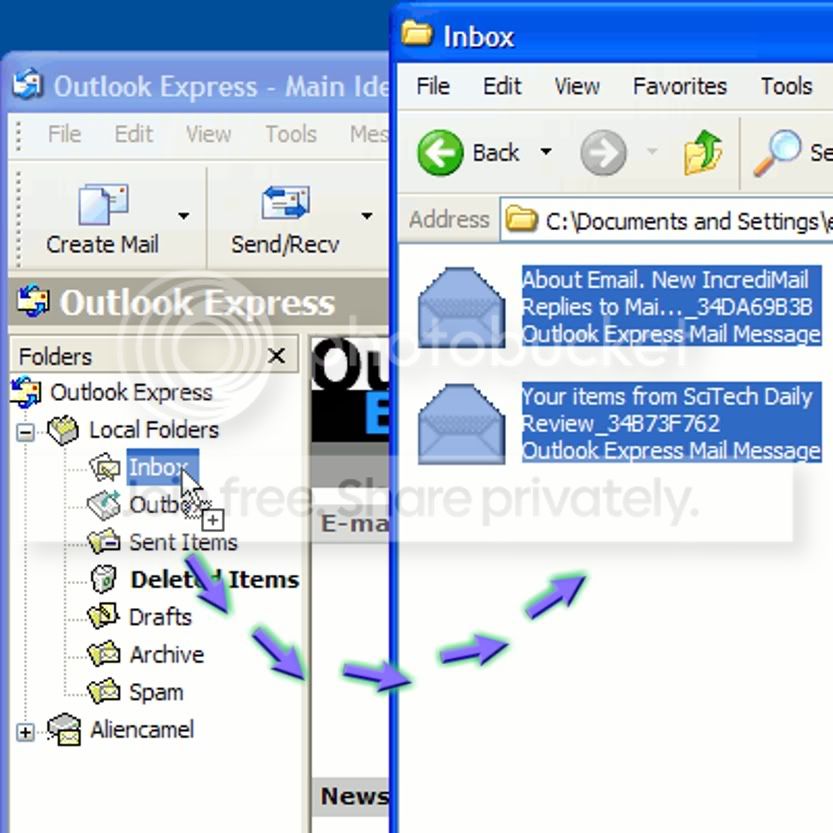
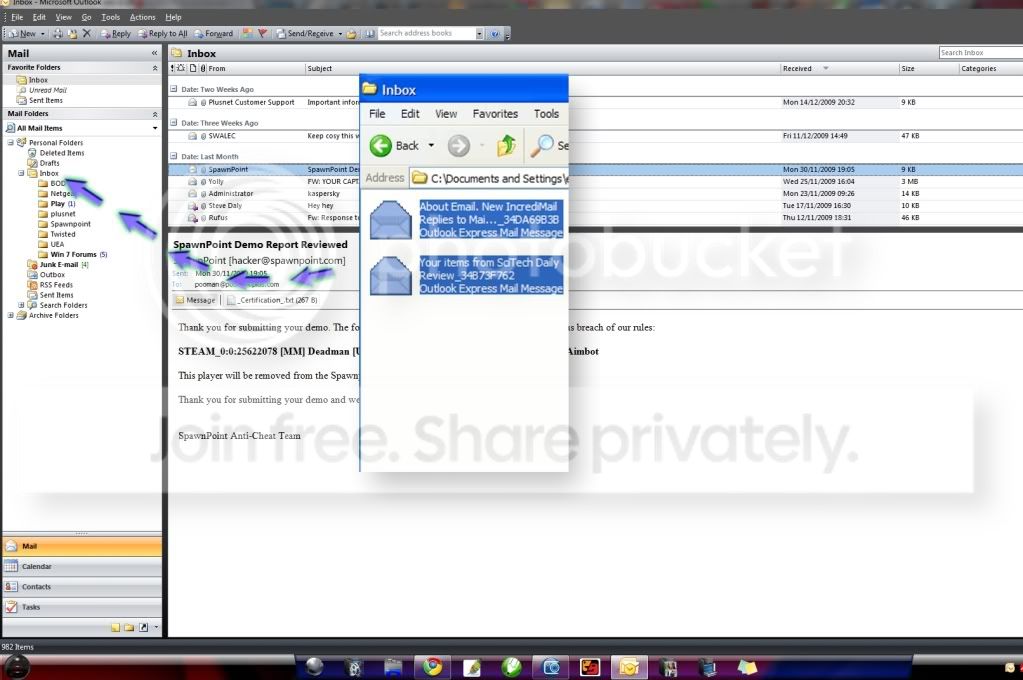
A nice easy way to copy mail from outlook express to Outlook and vice versa is to first create some folders to manage the mail. Then open Outlook Express .... copy the files to the relevant folders using drag and drop. Once completed open Outlook and then drag and drop back into the relevant folders created in Outlook.

As Qdos & ccatlett1984 says you can have multiple accounts set up with no problem. And just use filtering/rules to put the mail in the correct folders automatically as they come in.
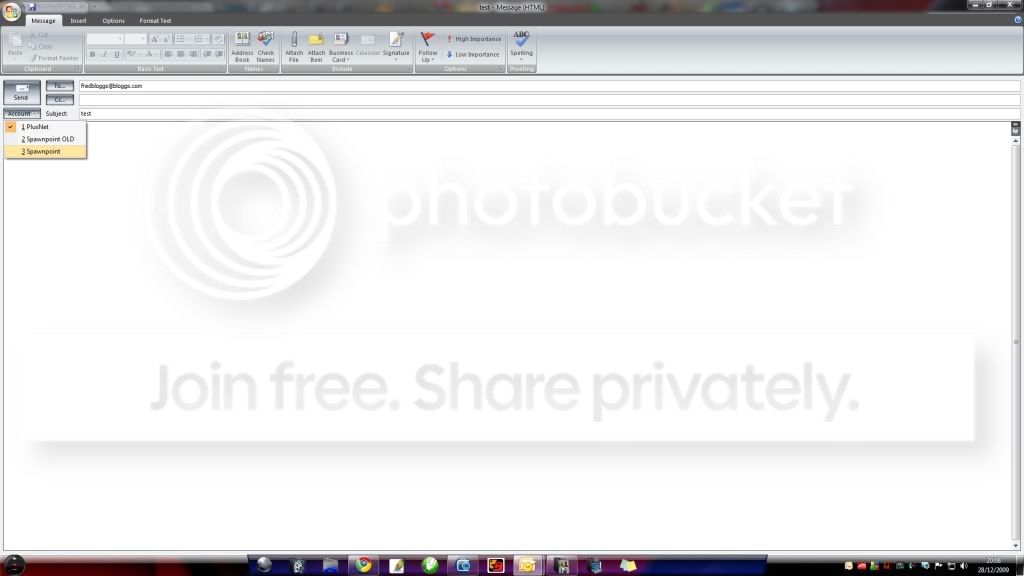
And when sending mail you can choose which account to send it from.
By default if you reply to a message that was sent to eg. [email protected] the message will be sent from the account [email protected] and the same would happen for [email protected] etc. although if you wanted you could change this to be sent from the account of your choice. But you don't need exchange for this. (image 4)

outlook2.jpg

outlook3.jpg

outlook1.jpg

outlook4.jpg
 
Last edited:

My Computer My Computer

Computer type
PC/Desktop
Computer Manufacturer/Model Number
Self Built
OS
Windows 7 Ultimate 64bit
CPU
AMD Phenom Quad core 9950 black edition
Motherboard
Gigabyte
Memory
16Gb
Graphics Card(s)
2x XFX Radeon 5850
Sound Card
PCI Express X-Fi Titanium / Logitech G35
Monitor(s) Displays
2x HP 2410i
Screen Resolution
1920x1080
Hard Drives
2x 500Gb Seagate
1x 300Gb Seagate
1x 1Tb Seagate
2x 1Tb Hitatchi
PSU
Jean Tech Storm 700W
Case
Cooler Master COSMOS S
Cooling
Akasa Evo Blue Pro
Keyboard
Logitech G15
Mouse
Mad Catz M.M.O. 7
Internet Speed
12mb
Back
Top