
[URGENT] System Restore

MitchellEve

New member
Member
VIP
Local time
5:21 AM
Messages
117
Alright, Windows Live Essentials wasn't working so I wanted to run the uninstaller. The uninstaller wasn't working so I used Revo Uninstaller to do a forced uninstall, in short form it wasn't removed it was just removed from my start menu etc..

I wanted to do a system restore but when I do it I get this...
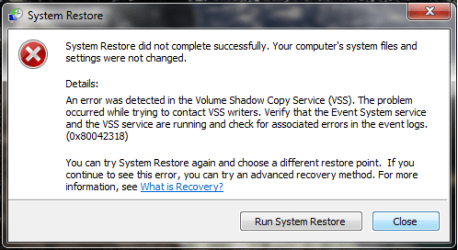

error.png

I think I'm screwed, I've made a few changes to the registry like shutdown speed but thats it.

+ Rep
 

My Computer My Computer

OS
Windows 7 Ultimate x64
Alright, Windows Live Essentials wasn't working so I wanted to run the uninstaller. The uninstaller wasn't working so I used Revo Uninstaller to do a forced uninstall, in short form it wasn't removed it was just removed from my start menu etc..

I wanted to do a system restore but when I do it I get this...


View attachment 44152

I think I'm screwed, I've made a few changes to the registry like shutdown speed but thats it.

+ Rep

Hi Mitchell Eve!

1. Go to device manager and from the View menu enable "Show Hidden Devices"

2. Go to "Storage Volume Shadow Copies" devices , then delete (uninstall) all the "Generic Volume......." devices

3. Then restart your PC and after restart go to system protection and wait for Vista to create the devices you have deleted before the boot.

Try restoring now.

Thanks,
ZeshanA
If I helped, please click the scales at the top right of my post.
 
Alright, Windows Live Essentials wasn't working so I wanted to run the uninstaller. The uninstaller wasn't working so I used Revo Uninstaller to do a forced uninstall, in short form it wasn't removed it was just removed from my start menu etc..

I wanted to do a system restore but when I do it I get this...


View attachment 44152

I think I'm screwed, I've made a few changes to the registry like shutdown speed but thats it.

+ Rep

Lets try to get SR up and running. Turn off system restore, then turn off the computer. Finally, boot up and turn on SR. It may be working. Let me know.
 

My Computer My Computer

Computer type
PC/Desktop
Computer Manufacturer/Model Number
Dell XPS 420
OS
Windows 10, Home Clean Install
CPU
Intel Core2 processsor Q8200(2.33Ghz 1333FSB) Quad Core Tech
Motherboard
Dell
Memory
6 gb
Graphics Card(s)
ATI Radeon 256MB HD3650
Sound Card
Intergrated 7.1 Channel Audio
Monitor(s) Displays
Dell SP2009W 20"
Hard Drives
640 GB Serial ATA Hard drive
Cooling
Fan
Keyboard
Dell USB Keyboard
Mouse
Dell Premium Optical USB
Internet Speed
DSL 2.85
Hi, MitchelEve. Did you try an earlier restore point, as suggested in the System Restore error message? I suggest doing that first before the other suggested steps.
 

My Computer My Computer

OS
Windows 7 & Windows Vista Ultimate
Went into start up repair, computers working now. Not sure if system restore is I'll try it now.
 

My Computer My Computer

OS
Windows 7 Ultimate x64
Alright, Windows Live Essentials wasn't working so I wanted to run the uninstaller. The uninstaller wasn't working so I used Revo Uninstaller to do a forced uninstall, in short form it wasn't removed it was just removed from my start menu etc..

I wanted to do a system restore but when I do it I get this...


View attachment 44152

I think I'm screwed, I've made a few changes to the registry like shutdown speed but thats it.

+ Rep


Lets try to get SR up and running. Turn off system restore, then turn off the computer. Finally, boot up and turn on SR. It may be working. Let me know.

Umm, you do realize that if he turns off System Restore, all restore points will be deleted and his chances of doing a restore will be zero, right?
 

My Computer My Computer

Computer Manufacturer/Model Number
Custom
OS
Windows 7 Ultimate RTM (Technet)
CPU
3.00 gigahertz Intel Core2 Duo E8400
Motherboard
ASUSTeK Computer INC. P5K/EPU Rev 1.xx
Memory
4GB
Graphics Card(s)
ATI Radeon X1950 Pro
Sound Card
Built in HD Audio
Monitor(s) Displays
22" Gateway LCD
Screen Resolution
1920 x 1200
Hard Drives
ST3160023A [Hard drive] (160.04 GB) -- drive 0, rev 8.01, ST3500630AS [Hard drive] (500.11 GB) -- drive 2, rev 3.AAK
ST3500630AS [Hard drive] (500.11 GB) -- drive 1, rev 3.AAK
Keyboard
Logitech G11
Mouse
Microsoft Wireless Laser Mouse 5000
Internet Speed
13.44 Mbps
Alright, Windows Live Essentials wasn't working so I wanted to run the uninstaller. The uninstaller wasn't working so I used Revo Uninstaller to do a forced uninstall, in short form it wasn't removed it was just removed from my start menu etc..

I wanted to do a system restore but when I do it I get this...


View attachment 44152

I think I'm screwed, I've made a few changes to the registry like shutdown speed but thats it.

+ Rep


Lets try to get SR up and running. Turn off system restore, then turn off the computer. Finally, boot up and turn on SR. It may be working. Let me know.

Umm, you do realize that if he turns off System Restore, all restore points will be deleted and his chances of doing a restore will be zero, right?

Nice save ;)

ZeshanA
 
Back
Top