ATI 4850 driver issues

winger

New member
Local time
9:28 AM
Messages
8
The following are my specs:
1.86ghz Core2Duo 6300
Intel DG965RY Motherboard
Memory 3GB DDR2
OS Windows 7 ultimate 32-bit.
GPU : ATI 4850 ( Palit )

So yeah, everything was working fine when I was in XP SP2 a month ago.

I upgraded to win7 (fresh install) and I've been having a ton of problems.


First there are screen-redraw problems in almost every application
Photoshop and illustrator are the worst affected. Sometimes when I type text, it's 'streaming'. Everything was fine under XP. Even when I drag on desktp, it kinda' lags.

Second when I play games like counter-strike, the fps keeps spiking every 2 minutes, which was not present in XP. I used to get flat 100fps on XP now it hardly touches 100.

I've updated to the latest graphic card drivers and installed hotfix etc., still no avail.

I think this is most likely a graphic card problem, so if someone could advise me or help me solve this, that'd be much appreciated.

Thanks for your time!
 

My Computer My Computer

Computer Manufacturer/Model Number
Custom
OS
Windows 7
CPU
Core2 6300
Memory
3Gigs DDR2
Graphics Card(s)
ATI 4850
Sound Card
OnBoard
Monitor(s) Displays
HP 17" TFT
I've run Windows 7 on a machine with an HD 4850 graphics card and I'm pretty sure there is nothing inherently problematic with the combination. It's likely the driver did not install completely or properly for some reason.

I'd start by removing the current driver entirely...the easiest way is to go to c:\ati\support\pacakgename\driver\

then click on setup.exe to start the ATI driver manager. Select your language of choice, then select unistall and follow the prompts from there.

When the machine reboots it should come up with the standard VGA driver in some reduced screen resolution...don't worry about that now, and if the Windows offers to update or install new drivers select no or cancel or whatever it takes to prevent it from doing so.

click start, all programs and then Windows Update. Click on check for updates. This may take a few minutes. when finished, it should present a list of suggested updates and in that list should be the driver for the ATI HD4XXX graphics adapter. Make sure there is a check in the box next to that item and allow Windows to install that update. Reboot when prompted. Windows should detect your display and automatically configure itself for the optimal screen resolution and horizontal refresh rate.

If the display and adapter appear to be working properly at that point, I would resist the urge to further update the drive unless the release notes for the new version indicate a fix for a specific problem you are experiencing. Even in that case I'd wait a couple of weeks to see if Windows Update will pickup the new version...this will ensure you receive a package where the installer has been tested and validated against Windows 7.
 

My Computer My Computer

Computer Manufacturer/Model Number
Self-built
OS
Ubuntu Lunix and Windows 7
CPU
Intel Core2Quad QX9700
Motherboard
Gigabyte GA-EP45-UD3P
Memory
8 GB Corsair Twin-X
Graphics Card(s)
Sapphire/ATI Radeon HD5850
Sound Card
Embedded or Bose Companion System V
Monitor(s) Displays
Apple 23 Inch Cinema Display
Screen Resolution
1920 X 1200
Hard Drives
1 X 120GB Intel Series 320 SSD
2 X 1TB Western Digital WD1002 FAEX internal hard drives
1 X 1Tb Seagate 7200.11 SATA (external, for backup)
PSU
Corsair 750TX
Case
Lian-Li V2120B
Cooling
Zalman CNPS ZX10C
Keyboard
CVT Avant Prime
Mouse
Logitech wireless trackman
Internet Speed
Comcast 8M/sec
Other Info
Also use MacBookPro (1st gen Intel w/ OS X 10.6) and a second desktop built upon an Intel D975XBX with Intel E6600 multi-booting Ubuntu, SuSE and Fedora Linux and 32-bit Windows 7 Home Premium..
I've run Windows 7 on a machine with an HD 4850 graphics card and I'm pretty sure there is nothing inherently problematic with the combination. It's likely the driver did not install completely or properly for some reason.

I'd start by removing the current driver entirely...the easiest way is to go to c:\ati\support\pacakgename\driver\

then click on setup.exe to start the ATI driver manager. Select your language of choice, then select unistall and follow the prompts from there.

When the machine reboots it should come up with the standard VGA driver in some reduced screen resolution...don't worry about that now, and if the Windows offers to update or install new drivers select no or cancel or whatever it takes to prevent it from doing so.

click start, all programs and then Windows Update. Click on check for updates. This may take a few minutes. when finished, it should present a list of suggested updates and in that list should be the driver for the ATI HD4XXX graphics adapter. Make sure there is a check in the box next to that item and allow Windows to install that update. Reboot when prompted. Windows should detect your display and automatically configure itself for the optimal screen resolution and horizontal refresh rate.


exactly what I did, worked perfectly.
 

My Computer My Computer

Computer Manufacturer/Model Number
My Build
OS
win7 Ult 64
CPU
i7 3930K & 3960X
Motherboard
ASUS P9X79 Deluxe
Memory
16GB G-Skill 2133MHz
Graphics Card(s)
Sapphire HD 7970
Sound Card
On-board
Monitor(s) Displays
ASUS 27 inch
Screen Resolution
1920X1080
Hard Drives
Crucial M4 256GB, 1.5TB WD Black for Data/Images
PSU
Corsair AX1200
Case
NZXT 810
Cooling
Custom Loop, Swiftech HDBlock
Keyboard
Mionix
Mouse
Mionix
Internet Speed
Cable
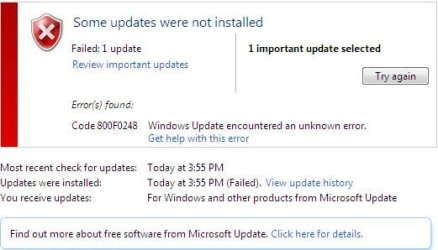
Thanks for the answer guys, I did try this and an update was downloaded, but during installation, windows update threw an error.. that looks like this
 

Attachments

  • Capture.JPG
    Capture.JPG
    29.8 KB · Views: 55

My Computer My Computer

Computer Manufacturer/Model Number
Custom
OS
Windows 7
CPU
Core2 6300
Memory
3Gigs DDR2
Graphics Card(s)
ATI 4850
Sound Card
OnBoard
Monitor(s) Displays
HP 17" TFT
It says unknown error and I cannot get any info on it. Can someone link me to the actual working drivers so I can download and install? I tried CCC 9.12 from ATI site and techpowerup, neither seems to fix the problem that I've. Any help would be appreciated, thanks!
 

My Computer My Computer

Computer Manufacturer/Model Number
Custom
OS
Windows 7
CPU
Core2 6300
Memory
3Gigs DDR2
Graphics Card(s)
ATI 4850
Sound Card
OnBoard
Monitor(s) Displays
HP 17" TFT
THe drivers work fine with an HD 4850. The problem appears to be that for some reason, they won't install properly on your machine.

This could get tedious.

Navigate to:

c:\Program Files\ATI\CIM\Reports

and find the file

report.xml

(the file may be under c:\Program Files(x86)\ATI\CIM\Reports on your machine.)

with the date/time stamp that most closely correlates with the date and time of the failed install attempt. Double click to open. Does the log indicate any errors?

One important difference between my system and yours...I'm running the 64-bit version of Windows 7. This should not make any difference here as Windows Update should be pulling the correct version for your system, but I'll look for problems with the 32-bit installer.
 

My Computer My Computer

Computer Manufacturer/Model Number
Self-built
OS
Ubuntu Lunix and Windows 7
CPU
Intel Core2Quad QX9700
Motherboard
Gigabyte GA-EP45-UD3P
Memory
8 GB Corsair Twin-X
Graphics Card(s)
Sapphire/ATI Radeon HD5850
Sound Card
Embedded or Bose Companion System V
Monitor(s) Displays
Apple 23 Inch Cinema Display
Screen Resolution
1920 X 1200
Hard Drives
1 X 120GB Intel Series 320 SSD
2 X 1TB Western Digital WD1002 FAEX internal hard drives
1 X 1Tb Seagate 7200.11 SATA (external, for backup)
PSU
Corsair 750TX
Case
Lian-Li V2120B
Cooling
Zalman CNPS ZX10C
Keyboard
CVT Avant Prime
Mouse
Logitech wireless trackman
Internet Speed
Comcast 8M/sec
Other Info
Also use MacBookPro (1st gen Intel w/ OS X 10.6) and a second desktop built upon an Intel D975XBX with Intel E6600 multi-booting Ubuntu, SuSE and Fedora Linux and 32-bit Windows 7 Home Premium..
It says unknown error and I cannot get any info on it. Can someone link me to the actual working drivers so I can download and install? I tried CCC 9.12 from ATI site and techpowerup, neither seems to fix the problem that I've. Any help would be appreciated, thanks!

Try this method:

•Download and install Driver Sweeper from:
Guru3D - Driver Sweeper

• Uninstall ATI Catalyst Install Manager from "Control Panel\Programs\Programs and Features"

( If Catalyst is not installed, then try:

Go to Control Panel\View by: Small/Large icons\Device manager. In Device manager select Display Adapters :

• In Display Adapters right-click on your device and select uninstall. Tick the box that says "Delete the driver software for this device" : )

Then:

• Re-Boot into Safe Mode and run Driver Sweeper (to ensure complete removal of items, Run Driver Sweeper as admin. "Right-click Driver Sweeper > properties > Compatibility tab tick 'Run this program as Administrator' "

• In Driver Sweeper select the ATI- Display only and then Analyse:

• Now select Clean to remove all ATI software:

Re-boot normally and install the 9.12 official drivers.
 

My Computer My Computer

Computer type
PC/Desktop
Computer Manufacturer/Model Number
Systems by SmartEyeball
OS
8 Pro x64
CPU
i7 3770K 4.6GHz
Motherboard
ASUS P8Z77 WS
Memory
16GB G.Skill Trident X 2666mhz
Graphics Card(s)
x2 EVGA 780 Ti Superclocked SLI
Sound Card
SB X-FI Surround 5.1 PRO USB / ATH-AD900 Headphones
Monitor(s) Displays
x3 Dell U2410 / 58" Samsung
Screen Resolution
5760*1200/ 1920*1200
Hard Drives
2x Intel 520 240GB (RAID 0) * 2x WD Caviar Blacks 2TB (RAID 0) * 2TB WD Caviar Black * Sony Optirac DVD
PSU
Silverstone Strider Evolution 1200W
Case
Thermaltake Level 10 GT Snow Edition
Cooling
Noctua NH-D14
Keyboard
Topre Realforce // Ducky Shine MX Black // Filco Ninja TKL
Mouse
Thermaltake Theron (Highly Recommended) + Razer Imperator
Antivirus
MSE
Browser
IE, FF, WaterFox
Other Info
GT Extreme V2 Sim Racing Cockpit + 40" LCD and K/B Mouse stand ▼
Fanatec CSR Elite Wheel + Clubsport V1 Pedals + CSR shifter/7G-H ▼Saitek X52 Pro ▼ TrackIR 5 Pro
Buttkicker v2 Seat Rumbler with Dedicated 5.1 and Sub Woofer attached to frame ▼
=
Bloody Big Grin
I have a test machine with 32-bit Windows 7 Home Premium. I replaced that machine's HD 3870 with a Sapphire/ATI HD 4850 and performed the procedure I outlined in message #2. Works fine, with no errors reported.
 

My Computer My Computer

Computer Manufacturer/Model Number
Self-built
OS
Ubuntu Lunix and Windows 7
CPU
Intel Core2Quad QX9700
Motherboard
Gigabyte GA-EP45-UD3P
Memory
8 GB Corsair Twin-X
Graphics Card(s)
Sapphire/ATI Radeon HD5850
Sound Card
Embedded or Bose Companion System V
Monitor(s) Displays
Apple 23 Inch Cinema Display
Screen Resolution
1920 X 1200
Hard Drives
1 X 120GB Intel Series 320 SSD
2 X 1TB Western Digital WD1002 FAEX internal hard drives
1 X 1Tb Seagate 7200.11 SATA (external, for backup)
PSU
Corsair 750TX
Case
Lian-Li V2120B
Cooling
Zalman CNPS ZX10C
Keyboard
CVT Avant Prime
Mouse
Logitech wireless trackman
Internet Speed
Comcast 8M/sec
Other Info
Also use MacBookPro (1st gen Intel w/ OS X 10.6) and a second desktop built upon an Intel D975XBX with Intel E6600 multi-booting Ubuntu, SuSE and Fedora Linux and 32-bit Windows 7 Home Premium..
Thanks for the help guys, however, nothing seems to fix my problem. I did follow everything you said, and everything did go fine, it all installed perfectly, but the problem still remains. Maybe it's a driver glitch. I think it's time to search for my XP CD. Thanks for your time :)
 

My Computer My Computer

Computer Manufacturer/Model Number
Custom
OS
Windows 7
CPU
Core2 6300
Memory
3Gigs DDR2
Graphics Card(s)
ATI 4850
Sound Card
OnBoard
Monitor(s) Displays
HP 17" TFT
I tried to run the same applications(illustrator and counter-strike) on another machine that I've, core2 quad with only an onboard GPU, it seems to perform better than my machine, no screen lags etc.,
 

My Computer My Computer

Computer Manufacturer/Model Number
Custom
OS
Windows 7
CPU
Core2 6300
Memory
3Gigs DDR2
Graphics Card(s)
ATI 4850
Sound Card
OnBoard
Monitor(s) Displays
HP 17" TFT
I would expect that to be the case if the Catalyst drivers are not installing properly for your HD 4850. Without the drivers you don't get any benefit from that graphics accelerator functions of the GPU...it runs pretty much as a straight VGA card.

Check the install log and event viewer for errors that might have been recorded during the driver installation attempts.
 

My Computer My Computer

Computer Manufacturer/Model Number
Self-built
OS
Ubuntu Lunix and Windows 7
CPU
Intel Core2Quad QX9700
Motherboard
Gigabyte GA-EP45-UD3P
Memory
8 GB Corsair Twin-X
Graphics Card(s)
Sapphire/ATI Radeon HD5850
Sound Card
Embedded or Bose Companion System V
Monitor(s) Displays
Apple 23 Inch Cinema Display
Screen Resolution
1920 X 1200
Hard Drives
1 X 120GB Intel Series 320 SSD
2 X 1TB Western Digital WD1002 FAEX internal hard drives
1 X 1Tb Seagate 7200.11 SATA (external, for backup)
PSU
Corsair 750TX
Case
Lian-Li V2120B
Cooling
Zalman CNPS ZX10C
Keyboard
CVT Avant Prime
Mouse
Logitech wireless trackman
Internet Speed
Comcast 8M/sec
Other Info
Also use MacBookPro (1st gen Intel w/ OS X 10.6) and a second desktop built upon an Intel D975XBX with Intel E6600 multi-booting Ubuntu, SuSE and Fedora Linux and 32-bit Windows 7 Home Premium..
It does say
Code:
<result>Success</result>
where it needs to, I think the drivers are installing fine, maybe something else is wrong? I'm not sure, anyone who has working drivers for ATI 4850 32bit Win7 , please upload somewhere and link me (I already have tried the one's from ATI's website). Thanks!
 

My Computer My Computer

Computer Manufacturer/Model Number
Custom
OS
Windows 7
CPU
Core2 6300
Memory
3Gigs DDR2
Graphics Card(s)
ATI 4850
Sound Card
OnBoard
Monitor(s) Displays
HP 17" TFT
um, should I actually run the driver setup as an administrator? I mean I was logged in as administrator but just asking if I should enable it via right click..
 

My Computer My Computer

Computer Manufacturer/Model Number
Custom
OS
Windows 7
CPU
Core2 6300
Memory
3Gigs DDR2
Graphics Card(s)
ATI 4850
Sound Card
OnBoard
Monitor(s) Displays
HP 17" TFT
Any active anti-virus running? If so you may need to disable it to get the driver to install properly.
 

My Computer My Computer

Computer type
PC/Desktop
Computer Manufacturer/Model Number
Me
OS
Win 7 Ultimate x64
CPU
FX-8350 @ 4.6 GHz so far
Motherboard
Asus M5A97 EVO
Memory
ADATA XPG V1 Series Black 8GB DDR3 1600
Graphics Card(s)
Sapphire R9 270x Dual-X
Sound Card
Xonar DGX w/ Corsair Vengence 1300
Monitor(s) Displays
Acer S232HL Abid
Screen Resolution
1920x1080
Hard Drives
120 GB OCZ Vertex 3
500 GB Seagate 7200.12
PSU
Antec Earthwatts 650W Green
Case
Antec Three Hundred
Cooling
Cooler Master 212 EVO
Keyboard
Logitech G510
Mouse
Logitech G500s
Internet Speed
35000/3000
I did disable that during the last install, after sweeping the old drivers in safe mode. Still.. nothing seems to fix it.
 

My Computer My Computer

Computer Manufacturer/Model Number
Custom
OS
Windows 7
CPU
Core2 6300
Memory
3Gigs DDR2
Graphics Card(s)
ATI 4850
Sound Card
OnBoard
Monitor(s) Displays
HP 17" TFT
What's your power supply rating?
Did you do a "clean" install?
Are you overclocking?
Did you connect the power connector to the card?

As for the video card drivers - ALWAYS get them from the manufacturer, NEVER from Windows update.
 

My Computer My Computer

Computer type
PC/Desktop
Computer Manufacturer/Model Number
Custom built by me.
OS
Windows 10 Pro
CPU
Intel Core i7-4770K (3.5Ghz)
Motherboard
Gigabyte G1 Sniper 5 (F10 Bios)
Memory
32 gig Corsair Dominator Platinum (4x8Gig)
Graphics Card(s)
Sapphire Tri-X R9 Fury
Sound Card
Soundblaster ZXR
Monitor(s) Displays
NEC PA242W 24" LCD Monitor
Screen Resolution
1920 x 1200
Hard Drives
Primary - Samsung 850 Pro (512gig), Samsung 840 Pro (256gig), 2TB WD Caviar Black.
PSU
EVGA Supernova 1000 G2
Case
Cooler Master HAF X
Cooling
Corsair H100i with Corsair Air Series SP120 Quiet Fans
Keyboard
Logitech Wireless Wave
Mouse
Logitech Performance MX
Internet Speed
High Speed Cable
Antivirus
Norton Security
Browser
IE11
Other Info
Memory Timings - 1866MHz @ 9-9-9-27-1T @ 1.5 volts
Try installing the latest Directx components.
You can get it from one of the following links. Personally I use the redistributable install.

Web Install
or
Redistributable Install

Commonly, if you don't install directx 9.0c component files, the games that use 9.0c will have problems.

I always make sure I have the latest Directx components and drivers etc.

I hope this helps ;)
 

My Computer My Computer

Computer Manufacturer/Model Number
Me
OS
Windows 7 Ultimate 64bit
CPU
AMD Phenom 9950 Black Edition
Motherboard
Gigabyte GA-MA790GP-UD4H
Memory
4GB G-Skill DDR2 1066
Graphics Card(s)
x2 ATI 4850 512mb (enabled in crossfire)
Sound Card
ONBoard HD AUDIO
Monitor(s) Displays
Acer P221w 22" Widescreen
Screen Resolution
1600 * 1050
Hard Drives
Seagate 1TB SATAII
PSU
Antec 850 Watt PSU
Case
Coolermaster CM-690 with Transparent Side
Cooling
x5 120mm fans
Keyboard
Logitech G15 Gaming Keyboard
Mouse
Razer Lachesis 4000DPI
Internet Speed
24mb * 1mb ADSL2 Extreme ( Internode, go the node! )
Try installing the latest Directx components.
You can get it from one of the following links. Personally I use the redistributable install.

Web Install
or
Redistributable Install

Commonly, if you don't install directx 9.0c component files, the games that use 9.0c will have problems.

I always make sure I have the latest Directx components and drivers etc.

I hope this helps ;)

What he said :thumbsup:
 

My Computer My Computer

Computer type
PC/Desktop
Computer Manufacturer/Model Number
Custom built by me.
OS
Windows 10 Pro
CPU
Intel Core i7-4770K (3.5Ghz)
Motherboard
Gigabyte G1 Sniper 5 (F10 Bios)
Memory
32 gig Corsair Dominator Platinum (4x8Gig)
Graphics Card(s)
Sapphire Tri-X R9 Fury
Sound Card
Soundblaster ZXR
Monitor(s) Displays
NEC PA242W 24" LCD Monitor
Screen Resolution
1920 x 1200
Hard Drives
Primary - Samsung 850 Pro (512gig), Samsung 840 Pro (256gig), 2TB WD Caviar Black.
PSU
EVGA Supernova 1000 G2
Case
Cooler Master HAF X
Cooling
Corsair H100i with Corsair Air Series SP120 Quiet Fans
Keyboard
Logitech Wireless Wave
Mouse
Logitech Performance MX
Internet Speed
High Speed Cable
Antivirus
Norton Security
Browser
IE11
Other Info
Memory Timings - 1866MHz @ 9-9-9-27-1T @ 1.5 volts
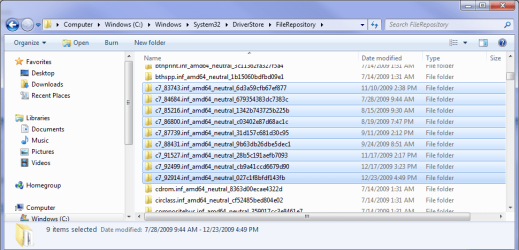
Another thing that could possibly be an issue is the folders from previous drivers in the DriverStore folder, which keeps enough info in each to be able to rollback to a previous driver. With the trouble you have been having I would go into the DriverStore folder and delete all the ones from the ATI video drivers. They will look something like the one's highlighted here (the numbers before the .inf are the number used to name the INF file in each driver version),

atidriverstore.png

Make sure to set a system restore point (or a full backup) before starting, and then with no driver installed uninstall all but the oldest folder. Then try installing the latest Catalyst from ATI's site.
 

My Computer My Computer

Computer type
PC/Desktop
Computer Manufacturer/Model Number
Me
OS
Win 7 Ultimate x64
CPU
FX-8350 @ 4.6 GHz so far
Motherboard
Asus M5A97 EVO
Memory
ADATA XPG V1 Series Black 8GB DDR3 1600
Graphics Card(s)
Sapphire R9 270x Dual-X
Sound Card
Xonar DGX w/ Corsair Vengence 1300
Monitor(s) Displays
Acer S232HL Abid
Screen Resolution
1920x1080
Hard Drives
120 GB OCZ Vertex 3
500 GB Seagate 7200.12
PSU
Antec Earthwatts 650W Green
Case
Antec Three Hundred
Cooling
Cooler Master 212 EVO
Keyboard
Logitech G510
Mouse
Logitech G500s
Internet Speed
35000/3000
As for the video card drivers - ALWAYS get them from the manufacturer, NEVER from Windows update.

That is very, very ill informed advice. The drivers available from Windows Update may not be the very latest, but they have been validated and validation is important when you're trying to troubleshoot an installation because it removes a critical variable from the process.
 

My Computer My Computer

Computer Manufacturer/Model Number
Self-built
OS
Ubuntu Lunix and Windows 7
CPU
Intel Core2Quad QX9700
Motherboard
Gigabyte GA-EP45-UD3P
Memory
8 GB Corsair Twin-X
Graphics Card(s)
Sapphire/ATI Radeon HD5850
Sound Card
Embedded or Bose Companion System V
Monitor(s) Displays
Apple 23 Inch Cinema Display
Screen Resolution
1920 X 1200
Hard Drives
1 X 120GB Intel Series 320 SSD
2 X 1TB Western Digital WD1002 FAEX internal hard drives
1 X 1Tb Seagate 7200.11 SATA (external, for backup)
PSU
Corsair 750TX
Case
Lian-Li V2120B
Cooling
Zalman CNPS ZX10C
Keyboard
CVT Avant Prime
Mouse
Logitech wireless trackman
Internet Speed
Comcast 8M/sec
Other Info
Also use MacBookPro (1st gen Intel w/ OS X 10.6) and a second desktop built upon an Intel D975XBX with Intel E6600 multi-booting Ubuntu, SuSE and Fedora Linux and 32-bit Windows 7 Home Premium..
Back
Top