deleting vista. not that easy???

theblueflash

New member
Local time
8:59 AM
Messages
29
hi all. im having some trouble with my current setup and getting conflicting answers from friends and professionals as to the remedy.

im running vista 32bit on my master C: drive. i want to upgrade to win 7 64bit. as its not possible to upgrade 32 to 64 ive installed 7 onto my 2nd hd. this will eventually be my master drive as the current is only a 320gb and will be used as backup.

ive saved all important files etc onto an external hd and have attempted an easy transfer, saving the recommended save onto the same drive as windows 7.

this is where the problems begin. firstly i cannot locate the oldwindows files. the folder appears on the drive but there is nothing in it to extract. it appear on the c: drive as well with the files but they will not extract either.

the 2nd problem is removing vista. ive spent near 2 days solid browsing the net and asking for advice with no easy answer. as windows 7 has been clean installed onto a seperate drive can i simply re format the c: drive with the old o/s on it. disk management wont let me and with all the other options like booting from vista dvd and re partitioning and copying boot files i really am stuck.

surely if 7 runs as a dual boot i dont need any program or boot files from vista so i can remove the lot and be done with it???

any help will be much apreciated. im very tempted to take my pc to a shop and have it done... at a price as im that sick of it now. or its out with the axe!

thanks
 

My Computer My Computer

At a glance

Windows 7 64 bit
OS
Windows 7 64 bit
It won't let you format C:\ because that is the master partition, where the dump files and the partition the system boots up from. Reinstall 7 over Vista (clean install (i have done 32-bit to 64-bit Windows 7 on this laptop).
 

My Computer My Computer

At a glance

Windows Seven UltimateAMD Piledriver FX 8320 @ 3.5GHzCrucial Ballistix 8GB 1600 MHz DDR3ASUS GeForce GTX 970 Strix Edition @ 1.114 GHz
Computer type
PC/Desktop
Computer Manufacturer/Model Number
The Dominator?
OS
Windows Seven Ultimate
CPU
AMD Piledriver FX 8320 @ 3.5GHz
Motherboard
ASUS M5A97 EVO R2.0
Memory
Crucial Ballistix 8GB 1600 MHz DDR3
Graphics Card(s)
ASUS GeForce GTX 970 Strix Edition @ 1.114 GHz
Sound Card
Integrated
Monitor(s) Displays
LG 23EA63V 23" IPS 1080p Monitor
Screen Resolution
1920x1080
Hard Drives
Samsung SSD 840 EVO 120 GB
1x WD GreenPower 500GB 7200RPM
1 External HDD 1TB
PSU
Corsair CX500
Case
Zalman Z9 Plus
Cooling
CPU - Corsair Hydro H80i, Case - 3x Aerocool Shark Edition
Keyboard
Xenta Backlit Keyboard (Not very good!)
Mouse
Logitech G400
Internet Speed
Download: 7 mb/s Upload: 0.76 mb/s
Antivirus
Microsoft Security Essentials
Browser
Google Chrome
Other Info
Overclockers UK Desk Pad 89 x 45 cm
1200x730x600mm Desk
Using Virtual Audio Cable to split stereo sound into Audio Technica ATH-M50 headphones and Logitech X-530 speakers.
If you are dual booting and the Vista drive is your current boot drive the windows 7 boot loader will be on that drive. If that is the case when you format the vista drive you will wipe out the windows 7 boot loader and you won't be able to boot to windows 7 anymore. If you want to test it just unplug your vista drive and see if you can get into windows 7. When I say dual boot I'm referring to the standard way it's done where you get a menu to select which OS you want when you boot your PC. You may be able to boot from your windows 7 DVD and do a repair to make it bootable. I've done it with XP but not 7.
 

My Computer My Computer

At a glance

Windows 10 Education 64 bitAMD Phenom II X4 980 Black Edition Deneb 3.7GHz8GB 4GBx2 Kingston PC10600 DDR3 1333 MemoryZotac NVIDIA Geforce GT640 2 Gig DDR3 PCIe
Computer type
PC/Desktop
Computer Manufacturer/Model Number
Home Built
OS
Windows 10 Education 64 bit
CPU
AMD Phenom II X4 980 Black Edition Deneb 3.7GHz
Motherboard
Asus M4N68T-M V2 µATX Motherboard
Memory
8GB 4GBx2 Kingston PC10600 DDR3 1333 Memory
Graphics Card(s)
Zotac NVIDIA Geforce GT640 2 Gig DDR3 PCIe
Sound Card
VIA VT1708s High Definition Audio 8-channel Onboard
Monitor(s) Displays
22" LG E2242 1080p and 2 19" I-INC AG191D
Screen Resolution
1280x1024 - 1920x1080 - 1280x1024
Hard Drives
Crucial M100 256 GB SSD and 500 GB WD Blue SATA
PSU
Thermaltake TR 620
Case
Power Up Black ATX Mid-Tower Case
Cooling
Stock heatsink and fan
Keyboard
Logitech Wireless K350 Wave
Mouse
Logitech Wireless M570 Trackman Wheel
Internet Speed
80 Mbps Down 30 Mbps Up
Antivirus
Windows Defender
Browser
Internet Explorer 11
Other Info
HP DVD1040e Lightscribe - External USB2

My Computer My Computer

At a glance

Windows 7 Ulti. x64AMD Phenom 8450 triple-core 2.10 ghz4GBATI Radion HD 3200
Computer Manufacturer/Model Number
Gateway GT5692
OS
Windows 7 Ulti. x64
CPU
AMD Phenom 8450 triple-core 2.10 ghz
Memory
4GB
Graphics Card(s)
ATI Radion HD 3200
Monitor(s) Displays
Gateway FPD1775W
Screen Resolution
1280x720
Hard Drives
465.6613 Gibibytes
It won't let you format C:\ because that is the master partition, where the dump files and the partition the system boots up from. Reinstall 7 over Vista (clean install (i have done 32-bit to 64-bit Windows 7 on this laptop).

i did think that but dont want seven on the smaller hard drive. which is why i didnt partition and clean installed it on the slave. but interesting that yours has worked despite me hearing from everyone its not possible.
 

My Computer My Computer

At a glance

Windows 7 64 bit
OS
Windows 7 64 bit
If you are dual booting and the Vista drive is your current boot drive the windows 7 boot loader will be on that drive. If that is the case when you format the vista drive you will wipe out the windows 7 boot loader and you won't be able to boot to windows 7 anymore. If you want to test it just unplug your vista drive and see if you can get into windows 7. When I say dual boot I'm referring to the standard way it's done where you get a menu to select which OS you want when you boot your PC. You may be able to boot from your windows 7 DVD and do a repair to make it bootable. I've done it with XP but not 7.

yea i get the option on startup of 7 or vista o/s. why would win 7 install boot loader on the master drive when i designate the slave for the installation?? thats just crazy. surely if i had a barebones computer with no o/s installed and stuck the disc in it would be fine??

i can try unplugging the master drive and seeing if 7 will boot. will try it now. check the horizon for fireworks..........
 

My Computer My Computer

At a glance

Windows 7 64 bit
OS
Windows 7 64 bit
It won't let you format C:\ because that is the master partition, where the dump files and the partition the system boots up from. Reinstall 7 over Vista (clean install (i have done 32-bit to 64-bit Windows 7 on this laptop).

i did think that but dont want seven on the smaller hard drive. which is why i didnt partition and clean installed it on the slave. but interesting that yours has worked despite me hearing from everyone its not possible.
What worked, 32-bit to 64-bit or Custom install?
I had bought a rip-off laptop that supports 64-bit os but it came with a 32-bit os, and i also had 4gb of RAM of which all of it couldn't be utilised. My dad got me an upgrade disk for Ultimate, when i had homebasic on vista, but he didn't know that i couldn't upgrade install. luckily, he had a 64-bit version, which was what i wanted :p. i just did a clean install over vista, copied the stuff that would go into libraries from windows.old then deleted the folder. Job done.

With your problem, i think that you can from vista download easeus partition manager, shrink the partition with 7 on it, then expand the vista os. then do a clean install over vista.
 

My Computer My Computer

At a glance

Windows Seven UltimateAMD Piledriver FX 8320 @ 3.5GHzCrucial Ballistix 8GB 1600 MHz DDR3ASUS GeForce GTX 970 Strix Edition @ 1.114 GHz
Computer type
PC/Desktop
Computer Manufacturer/Model Number
The Dominator?
OS
Windows Seven Ultimate
CPU
AMD Piledriver FX 8320 @ 3.5GHz
Motherboard
ASUS M5A97 EVO R2.0
Memory
Crucial Ballistix 8GB 1600 MHz DDR3
Graphics Card(s)
ASUS GeForce GTX 970 Strix Edition @ 1.114 GHz
Sound Card
Integrated
Monitor(s) Displays
LG 23EA63V 23" IPS 1080p Monitor
Screen Resolution
1920x1080
Hard Drives
Samsung SSD 840 EVO 120 GB
1x WD GreenPower 500GB 7200RPM
1 External HDD 1TB
PSU
Corsair CX500
Case
Zalman Z9 Plus
Cooling
CPU - Corsair Hydro H80i, Case - 3x Aerocool Shark Edition
Keyboard
Xenta Backlit Keyboard (Not very good!)
Mouse
Logitech G400
Internet Speed
Download: 7 mb/s Upload: 0.76 mb/s
Antivirus
Microsoft Security Essentials
Browser
Google Chrome
Other Info
Overclockers UK Desk Pad 89 x 45 cm
1200x730x600mm Desk
Using Virtual Audio Cable to split stereo sound into Audio Technica ATH-M50 headphones and Logitech X-530 speakers.
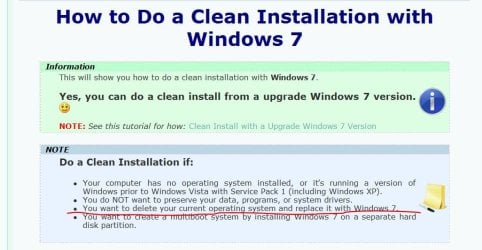
Step number 7 shows you how to go to advanced drive options, then step 8 shows you a picture of what you see when you get to drive options. click on delete it will do that then click format it will do that then click new it will do that. Then continue to install and vista will be gone.Make shure you have the vista partition highlighted when you click on delete and when you click on format. easy to wipe out the wrong thing if you are not paying attention to details. Good luck to you!
 

My Computer My Computer

At a glance

Windows 7 Ulti. x64AMD Phenom 8450 triple-core 2.10 ghz4GBATI Radion HD 3200
Computer Manufacturer/Model Number
Gateway GT5692
OS
Windows 7 Ulti. x64
CPU
AMD Phenom 8450 triple-core 2.10 ghz
Memory
4GB
Graphics Card(s)
ATI Radion HD 3200
Monitor(s) Displays
Gateway FPD1775W
Screen Resolution
1280x720
Hard Drives
465.6613 Gibibytes
hi all. im having some trouble with my current setup and getting conflicting answers from friends and professionals as to the remedy.

im running vista 32bit on my master C: drive. i want to upgrade to win 7 64bit. as its not possible to upgrade 32 to 64 ive installed 7 onto my 2nd hd. this will eventually be my master drive as the current is only a 320gb and will be used as backup.

ive saved all important files etc onto an external hd and have attempted an easy transfer, saving the recommended save onto the same drive as windows 7.

this is where the problems begin. firstly i cannot locate the oldwindows files. the folder appears on the drive but there is nothing in it to extract. it appear on the c: drive as well with the files but they will not extract either.

the 2nd problem is removing vista. ive spent near 2 days solid browsing the net and asking for advice with no easy answer. as windows 7 has been clean installed onto a seperate drive can i simply re format the c: drive with the old o/s on it. disk management wont let me and with all the other options like booting from vista dvd and re partitioning and copying boot files i really am stuck.

surely if 7 runs as a dual boot i dont need any program or boot files from vista so i can remove the lot and be done with it???

any help will be much apreciated. im very tempted to take my pc to a shop and have it done... at a price as im that sick of it now. or its out with the axe!

thanks

This is an easy solution, but may not be what you want to do. Format your D drive with Win 7, then format your C drive with Vista. Reinstall Win 7 on D drive (the large one) and that should take care of your problem. All files would be on D including boot files.

Lol, basically what i said :mad: :p
 

My Computer My Computer

At a glance

Windows Seven UltimateAMD Piledriver FX 8320 @ 3.5GHzCrucial Ballistix 8GB 1600 MHz DDR3ASUS GeForce GTX 970 Strix Edition @ 1.114 GHz
Computer type
PC/Desktop
Computer Manufacturer/Model Number
The Dominator?
OS
Windows Seven Ultimate
CPU
AMD Piledriver FX 8320 @ 3.5GHz
Motherboard
ASUS M5A97 EVO R2.0
Memory
Crucial Ballistix 8GB 1600 MHz DDR3
Graphics Card(s)
ASUS GeForce GTX 970 Strix Edition @ 1.114 GHz
Sound Card
Integrated
Monitor(s) Displays
LG 23EA63V 23" IPS 1080p Monitor
Screen Resolution
1920x1080
Hard Drives
Samsung SSD 840 EVO 120 GB
1x WD GreenPower 500GB 7200RPM
1 External HDD 1TB
PSU
Corsair CX500
Case
Zalman Z9 Plus
Cooling
CPU - Corsair Hydro H80i, Case - 3x Aerocool Shark Edition
Keyboard
Xenta Backlit Keyboard (Not very good!)
Mouse
Logitech G400
Internet Speed
Download: 7 mb/s Upload: 0.76 mb/s
Antivirus
Microsoft Security Essentials
Browser
Google Chrome
Other Info
Overclockers UK Desk Pad 89 x 45 cm
1200x730x600mm Desk
Using Virtual Audio Cable to split stereo sound into Audio Technica ATH-M50 headphones and Logitech X-530 speakers.
ok. computer wont load windows 7. as suspected 'bootmgr is missing' on startup.

ive got vista 32 and want to upgrade to 64 bit 7. for the reason you mentioned. more memory. got much more than 4gb of ram, which is wasted in a 32bit o/s.

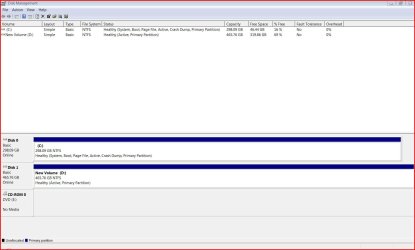
not sure that would work. my o/s's are not partitioned at all. they are on seperate hard drives and both completely open. i have 7 on the slave and want to wipe the master with vista and then switch master/.slave so the larger hd holds o/s program files etc and the smalller slave is a backup.

a screenshot as it stands at the moment......

Capture.JPG
 

My Computer My Computer

At a glance

Windows 7 64 bit
OS
Windows 7 64 bit
Ok, i honestly don't know what do with your needs :confused:
maybe its time someone with more expertise should handle this :(
 

My Computer My Computer

At a glance

Windows Seven UltimateAMD Piledriver FX 8320 @ 3.5GHzCrucial Ballistix 8GB 1600 MHz DDR3ASUS GeForce GTX 970 Strix Edition @ 1.114 GHz
Computer type
PC/Desktop
Computer Manufacturer/Model Number
The Dominator?
OS
Windows Seven Ultimate
CPU
AMD Piledriver FX 8320 @ 3.5GHz
Motherboard
ASUS M5A97 EVO R2.0
Memory
Crucial Ballistix 8GB 1600 MHz DDR3
Graphics Card(s)
ASUS GeForce GTX 970 Strix Edition @ 1.114 GHz
Sound Card
Integrated
Monitor(s) Displays
LG 23EA63V 23" IPS 1080p Monitor
Screen Resolution
1920x1080
Hard Drives
Samsung SSD 840 EVO 120 GB
1x WD GreenPower 500GB 7200RPM
1 External HDD 1TB
PSU
Corsair CX500
Case
Zalman Z9 Plus
Cooling
CPU - Corsair Hydro H80i, Case - 3x Aerocool Shark Edition
Keyboard
Xenta Backlit Keyboard (Not very good!)
Mouse
Logitech G400
Internet Speed
Download: 7 mb/s Upload: 0.76 mb/s
Antivirus
Microsoft Security Essentials
Browser
Google Chrome
Other Info
Overclockers UK Desk Pad 89 x 45 cm
1200x730x600mm Desk
Using Virtual Audio Cable to split stereo sound into Audio Technica ATH-M50 headphones and Logitech X-530 speakers.
Ok, i honestly don't know what do with your needs :confused:
maybe its time someone with more expertise should handle this :(

ok mate. thanks for the replies though. there must be someone out there who has done this. or has enough know how to overcome the problem.
 

My Computer My Computer

At a glance

Windows 7 64 bit
OS
Windows 7 64 bit
Ok, i honestly don't know what do with your needs :confused:
maybe its time someone with more expertise should handle this :(

ok mate. thanks for the replies though. there must be someone out there who has done this. or has enough know how to overcome the problem.
Ok you say you have copied to an external drive. right? Then can you take your vista disk out of your pc and put it in your external drive inclosure? If so then can you replace disc 0 with disc 1 and boot from the 7 install dvd and run start up repair 3 times to make 7 bootable? After 7 becomes system active then plug your external drive in after you have booted and see if you can delete vista.
 

My Computer My Computer

At a glance

Windows 7 Ulti. x64AMD Phenom 8450 triple-core 2.10 ghz4GBATI Radion HD 3200
Computer Manufacturer/Model Number
Gateway GT5692
OS
Windows 7 Ulti. x64
CPU
AMD Phenom 8450 triple-core 2.10 ghz
Memory
4GB
Graphics Card(s)
ATI Radion HD 3200
Monitor(s) Displays
Gateway FPD1775W
Screen Resolution
1280x720
Hard Drives
465.6613 Gibibytes
Ok, i honestly don't know what do with your needs :confused:
maybe its time someone with more expertise should handle this :(

ok mate. thanks for the replies though. there must be someone out there who has done this. or has enough know how to overcome the problem.
Ok you say you have copied to an external drive. right? Then can you take your vista disk out of your pc and put it in your external drive inclosure? If so then can you replace disc 0 with disc 1 and boot from the 7 install dvd and run start up repair 3 times to make 7 bootable? After 7 becomes system active then plug your external drive in after you have booted and see if you can delete vista.

thats just data files that are copied. and only to an external hard drive. just to make double safe i dont lose anything important while i attempt to upgrade.
 

My Computer My Computer

At a glance

Windows 7 64 bit
OS
Windows 7 64 bit
I only read a few replies, so I'll try not to be redundant. From what I can understand, you want to have two hard drives. The 320 GB Vista drive is for backup now. Vista has been backed up it seems and you have everything you need. Now you want the 320 GB drive cleaned? Thats my interpretation... I don't know if thats exactly what needs to happen but heres how to do that.

Boot into Windows 7, and launch disk management (diskmgmt.msc). Now find the logical disk with the files on it that you do not want. Right-click, "Format." Choose NTFS, and let it do its thing.

If that doesn't work, boot off of a GPARTED live disk and format it there.
 

My Computer My Computer

At a glance

Windows 7 Home Premium RTM x64AMD Turion64 X2 (2.0 Ghz)3 Gb DDR3NVidia GeForce 7150m
Computer Manufacturer/Model Number
HP dv6910us
OS
Windows 7 Home Premium RTM x64
CPU
AMD Turion64 X2 (2.0 Ghz)
Memory
3 Gb DDR3
Graphics Card(s)
NVidia GeForce 7150m
Hard Drives
1x200 Gb 7200 RPM
1x320 Gb External
2x8 Gb ReadyBoost
this isnt possible. if i right click c: drive with vista on it there is no option to format. im guessing now the more i read on the subject that i cannot format a primary drive?

if im on the right lines can somebody please tell me how to do this. im about to take a hammer to my hard drive and just buy a new one. god i hate vista!!!!!!!!!:cry:
 

My Computer My Computer

At a glance

Windows 7 64 bit
OS
Windows 7 64 bit
yea i get the option on startup of 7 or vista o/s. why would win 7 install boot loader on the master drive when i designate the slave for the installation?? thats just crazy. surely if i had a barebones computer with no o/s installed and stuck the disc in it would be fine??

i can try unplugging the master drive and seeing if 7 will boot. will try it now. check the horizon for fireworks..........

Thats the way a dual boot works if you let windows set it up. Windows 7 detected windows Vista and setup the dual boot for you. It replaces the Vista boot loader that is on your primary drive with its boot loader and adds Vista as an option. If it put its boot loader on the secondary drive your PC would have no way of finding it because the BIOS will look for the OS on the primary hard drive with the active partition. You would always boot into Vista. If you had unplugged the Vista drive then installed Windows 7 it would have put the boot loader on the same drive it was installed to. A clean install not a dual boot. You would then have to select which drive to boot to in the BIOS. I'm not experienced enough with windows 7/vista to know how to fix it. If it was me I would just start over with the one drive I wanted 7 on installed and do a clean install. After saveing any files I wanted to keep that is.
 

My Computer My Computer

At a glance

Windows 10 Education 64 bitAMD Phenom II X4 980 Black Edition Deneb 3.7GHz8GB 4GBx2 Kingston PC10600 DDR3 1333 MemoryZotac NVIDIA Geforce GT640 2 Gig DDR3 PCIe
Computer type
PC/Desktop
Computer Manufacturer/Model Number
Home Built
OS
Windows 10 Education 64 bit
CPU
AMD Phenom II X4 980 Black Edition Deneb 3.7GHz
Motherboard
Asus M4N68T-M V2 µATX Motherboard
Memory
8GB 4GBx2 Kingston PC10600 DDR3 1333 Memory
Graphics Card(s)
Zotac NVIDIA Geforce GT640 2 Gig DDR3 PCIe
Sound Card
VIA VT1708s High Definition Audio 8-channel Onboard
Monitor(s) Displays
22" LG E2242 1080p and 2 19" I-INC AG191D
Screen Resolution
1280x1024 - 1920x1080 - 1280x1024
Hard Drives
Crucial M100 256 GB SSD and 500 GB WD Blue SATA
PSU
Thermaltake TR 620
Case
Power Up Black ATX Mid-Tower Case
Cooling
Stock heatsink and fan
Keyboard
Logitech Wireless K350 Wave
Mouse
Logitech Wireless M570 Trackman Wheel
Internet Speed
80 Mbps Down 30 Mbps Up
Antivirus
Windows Defender
Browser
Internet Explorer 11
Other Info
HP DVD1040e Lightscribe - External USB2
thats clearer thanks. will reinstall 7 on the 2nd hard drive without the primary powered and adjust bios settings to boot prefered o/s. will then try formatting vista hard drive to erase it that way. cheers
 

My Computer My Computer

At a glance

Windows 7 64 bit
OS
Windows 7 64 bit
I had a brain wave overnight :p

We just need to sort out the Windows.old folder.
What does it say when you try to Copy + paste to the separate hard drive?
maybe you could take ownership (http://www.sevenforums.com/tutorials/1911-take-ownership-shortcut.html) of the windows.old folder, then copy paste the whole thing over to the slave drive. then you would extract the stuff you want on the same hdd, with no errors trying to do it over 2.

Dom.
 

My Computer My Computer

At a glance

Windows Seven UltimateAMD Piledriver FX 8320 @ 3.5GHzCrucial Ballistix 8GB 1600 MHz DDR3ASUS GeForce GTX 970 Strix Edition @ 1.114 GHz
Computer type
PC/Desktop
Computer Manufacturer/Model Number
The Dominator?
OS
Windows Seven Ultimate
CPU
AMD Piledriver FX 8320 @ 3.5GHz
Motherboard
ASUS M5A97 EVO R2.0
Memory
Crucial Ballistix 8GB 1600 MHz DDR3
Graphics Card(s)
ASUS GeForce GTX 970 Strix Edition @ 1.114 GHz
Sound Card
Integrated
Monitor(s) Displays
LG 23EA63V 23" IPS 1080p Monitor
Screen Resolution
1920x1080
Hard Drives
Samsung SSD 840 EVO 120 GB
1x WD GreenPower 500GB 7200RPM
1 External HDD 1TB
PSU
Corsair CX500
Case
Zalman Z9 Plus
Cooling
CPU - Corsair Hydro H80i, Case - 3x Aerocool Shark Edition
Keyboard
Xenta Backlit Keyboard (Not very good!)
Mouse
Logitech G400
Internet Speed
Download: 7 mb/s Upload: 0.76 mb/s
Antivirus
Microsoft Security Essentials
Browser
Google Chrome
Other Info
Overclockers UK Desk Pad 89 x 45 cm
1200x730x600mm Desk
Using Virtual Audio Cable to split stereo sound into Audio Technica ATH-M50 headphones and Logitech X-530 speakers.
Back
Top