
Deleting vista and keep 7

kevwillis

New member
Local time
3:42 AM
Messages
1
I have seen several threads about how to do this but I can't download anything to move the active as my memory is completely full. I know you have to go onto disk management but this is all I see. Can someone help (in simple English please)
 

Attachments
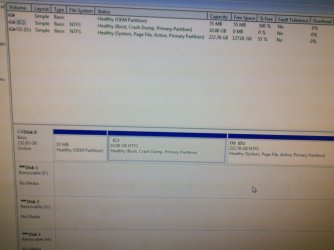
  • 1429977238431-889276409.jpg
    1429977238431-889276409.jpg
    433.2 KB · Views: 0

My Computer My Computer

Computer type
PC/Desktop
OS
Dual win7/vista
There is no reason to have an OS on a 10gb partition which is ridiculously small. You can always extend C into empty space on D using free How to extend partition easily with Partition Wizard - video help. You can also move data to D temporarily until C is made bootable on its own and you're ready to delete D.

If you want to get rid of Vista on D the easiest way to do this is to install EasyBCD to move the Bootmgr - Move to C:\ with EasyBCD - Windows 7 Forums

If you can't make even that amount of space to install EasyBCD, then move Bootmgr manually. In Disk Mgmt Mark Partition Active, restart into the Win7 installation disk or System Repair Disk to run Startup Repair - Run 3 Separate Times until Win7 starts and the System flag is on C.

You should then be able in Disk Mgmt to delete D to Extend C into the space.
Partition or Volume - Delete
Partition or Volume - Extend

If you have data on D you need to save, then you can shrink D from the left using Partition Wizard to Resize Partition - Video Help. Extend C into the space you shrink from D, move the data from D to C. Once you confirm everything is off D that you need, delete it in Disk Mgmt.

Keep in mind that it is always risky to not have your data backed up externally because hard drives can fail. You can store up to 15gb for free in the cloud using Microsoft OneDrive and have instant access to it at all times using the OneDrive app for Windows.
 
Back
Top