Visible Windows 7 System Reserved Drive

Howard08560

New member
Local time
3:39 PM
Messages
11
I recently installed Windows 7 on two PCs. The first PC had two 500GB drives and I did a clean install of Home Premium. There was a previous Vista installation on the C drive but during the install process I reformatted both drives. Everything went as expected.

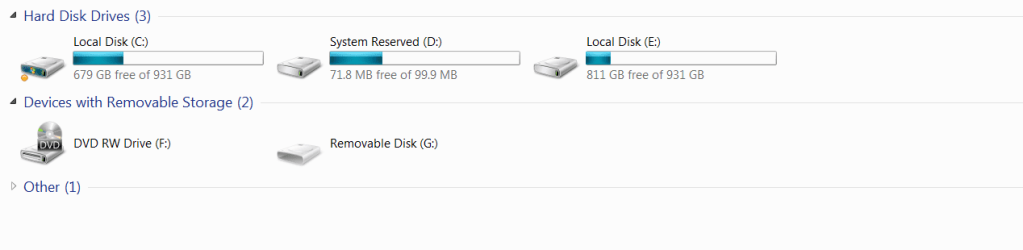
The second PC had two 1TB drives and I also did a clean install but these were brand new drives with no prior OS on them. This time I used Windows 7 Professional. the installation went fine but there was an unusual result. The two 1TB drives showed up as Drive C and E. Drive D is visible and is System Reserved and uses 71.8 of 99.9MB.

I seem to recall that Windows 7 reserves this space, but why does it show up as a separate drive on one machine but not on the other? Is this a function of Professional vs. Home Premium? Is it a function of the install process I used?

Is there any way to hide the drive and delete its drive letter?

BTW, Drive F is my DVD.

Thanks!
 

My Computer My Computer

At a glance

Windows 7
OS
Windows 7
I forgot to add that the Windows 7 Professional installation was 64 bit and the Home Premium was 32 bit.
 

My Computer My Computer

At a glance

Windows 7
OS
Windows 7
I recently installed Windows 7 on two PCs. The first PC had two 500GB drives and I did a clean install of Home Premium. There was a previous Vista installation on the C drive but during the install process I reformatted both drives. Everything went as expected.

The second PC had two 1TB drives and I also did a clean install but these were brand new drives with no prior OS on them. This time I used Windows 7 Professional. the installation went fine but there was an unusual result. The two 1TB drives showed up as Drive C and E. Drive D is visible and is System Reserved and uses 71.8 of 99.9MB.

I seem to recall that Windows 7 reserves this space, but why does it show up as a separate drive on one machine but not on the other? Is this a function of Professional vs. Home Premium? Is it a function of the install process I used?

Is there any way to hide the drive and delete its drive letter?

BTW, Drive F is my DVD.

Thanks!
Professional and ultimate have bitlocker encryption,thats the extra 100mb.:)

Go to control panel>admin tools>computer management>disc management>right click the 100mb>change drive letter>delete the drive letter from the window.

If you do this you cannot run files from here,i.e
bitlocker.
 

My Computer My Computer

At a glance

Windows 7 Ultimate 64bitAMD Phenom II 555 Black Edition Quad Core OC'...G Skill RipJaw 1333MHz 4GBATI raideon 4250 HD/XFX ATI Radeon 1GB HD4650
Computer Manufacturer/Model Number
Blue Shards 1.0
OS
Windows 7 Ultimate 64bit
CPU
AMD Phenom II 555 Black Edition Quad Core OC'd to 4.0GHz
Motherboard
ASUS M4A88T-M
Memory
G Skill RipJaw 1333MHz 4GB
Graphics Card(s)
ATI raideon 4250 HD/XFX ATI Radeon 1GB HD4650
Sound Card
Realteck HD Audio
Monitor(s) Displays
2x 22" Widescreen HD Monitors
Hard Drives
500GB Sata 7500RPM
80GB IDE
PSU
850W OCUK Modular
Case
Antec Dark Fleet DF-30
Cooling
Titan Fenrir Pro (CPU)
Keyboard
Logitech Wireless
Mouse
Logitech Wireless
Internet Speed
24Meg
Other Info
Getting soon-
2TB 7200RPM HDD
+8GB RAM
30GB SSD
HD6950/70
I knew about the 100mb reserved space, but is it supposed to be a visible or hidden drive?
 

My Computer My Computer

At a glance

Windows 7
OS
Windows 7

My Computer My Computer

At a glance

Windows 7 Ultimate 64bitAMD Phenom II 555 Black Edition Quad Core OC'...G Skill RipJaw 1333MHz 4GBATI raideon 4250 HD/XFX ATI Radeon 1GB HD4650
Computer Manufacturer/Model Number
Blue Shards 1.0
OS
Windows 7 Ultimate 64bit
CPU
AMD Phenom II 555 Black Edition Quad Core OC'd to 4.0GHz
Motherboard
ASUS M4A88T-M
Memory
G Skill RipJaw 1333MHz 4GB
Graphics Card(s)
ATI raideon 4250 HD/XFX ATI Radeon 1GB HD4650
Sound Card
Realteck HD Audio
Monitor(s) Displays
2x 22" Widescreen HD Monitors
Hard Drives
500GB Sata 7500RPM
80GB IDE
PSU
850W OCUK Modular
Case
Antec Dark Fleet DF-30
Cooling
Titan Fenrir Pro (CPU)
Keyboard
Logitech Wireless
Mouse
Logitech Wireless
Internet Speed
24Meg
Other Info
Getting soon-
2TB 7200RPM HDD
+8GB RAM
30GB SSD
HD6950/70
Any idea why mine is visible and how I can hide it and reclaim my drive letter?

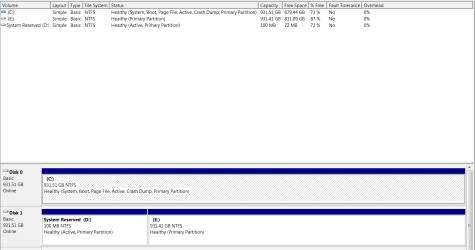
My boot drive is Disk 0 and Drive C is on that disk.

The reserved partition is Drive D on Disk 1, and it shares space with Drive E on Disk 1.
 

My Computer My Computer

At a glance

Windows 7
OS
Windows 7
Can you post back a screenshot of your full Disk Management drive map, using SNipping tool in Start Menu and attaching file using paper clip in reply box?

This sounds unusual. We only assign 100mb a letter if it isn't recognized in a dual boot. Splitting it between HD's also could be problematic if that's indeed the case.

I just checked my 100mb and it has a letter, but I added it for some other reason I can't remember now.

Incidentally, that 100mb also conveniently puts your Repair console available by tapping F8 at bootup. Nevertheless, it can be removed if you want and recovered into the Win7 partition.
 
Here are screenshots of my disk map and Windows Explorer

Disk Management.PNG
Windows Explorer Drives.PNG
 

My Computer My Computer

At a glance

Windows 7
OS
Windows 7
How very strange and annoying, if only because it makes the two drives interdependent for no good reason.

Did installer offer the 100mb on DISK1, then you formatted DISK0 for install?

I'm not sure about copying the 100mb onto DISK0 using Partition WIzard CD after making space at the first of that HD. You'd still have to recover the MBR back into it after copying, so might as well just delete it and recover the MBR into C if you are of that mind.

The 100mb Sys Reserved partition is for Bitlocker Encryption in Ultimate and conveniently puts the Repair console available by tapping F8 at bootup. You decide if that's enough reason to keep it.
 
These were both brand new Seagate 1TB drives prior to install. During the installation process I booted from the W7 CD and proceeded to install from there.

During the disk selection phase of the installation process it is likely that I requested both drives to be formatted and then to have W7 installed on Disk 0. Is it possible that if Disk 1 was formatted first that the Reserved System Drive would be placed there instead of on Disk 0 with the OS? Would that also account for it being visible since it is not on the same drive as the OS?
 

My Computer My Computer

At a glance

Windows 7
OS
Windows 7
If that is what I did, would that have resulted in it being assigned a separate drive letter and being visible in Widows Explorer?
 

My Computer My Computer

At a glance

Windows 7
OS
Windows 7
Possibly, but I can't say for sure.

It is no problem either way execept that you can't remove either drive.

So if you want to be able to do that, MBR can be recovered into Win7 partition after deleting 100mb.

Or if you want to keep Bitlocker or Repair Console available at F8, then we can move it up onto other HD and repair its MBR.
 
See what happens when you make Disk 1 the first HD in bios boot order.

You can remove the drive letter if you like. Why do you want to?

Open an elevated command , type : (press enter after each line)

Diskpart

sel vol d

remove

exi
 

My Computers My Computers

  • At a glance

    7 X64i5 84002x8gb 3200mhz
    Computer type
    PC/Desktop
    OS
    7 X64
    CPU
    i5 8400
    Motherboard
    gigabyte b365m ds3h
    Memory
    2x8gb 3200mhz
    Hard Drives
    various
    PSU
    pure power 11 400w cm
    Case
    Coolermaster
    Cooling
    cryorig m9i
  • At a glance

    7x64g54008gb ddr4 2400
    Computer type
    PC/Desktop
    OS
    7x64
    CPU
    g5400
    Motherboard
    ga b365m ds3h
    Memory
    8gb ddr4 2400
    PSU
    xfx pro 450w
Installer would prompt to let you know it is giving you the 100mb partition then place it on the highlighted drive which you had selected.

A screenshot with the warning prompt is included in this (older, when it was 200mb) tutorial on how to avoid 100mb: How to Avoid 200MB Hidden System Partition From Been Created During Windows 7 Installation My Digital Life

After installer placed it on DISK1, you must have selected DISK0 for your installation.

Link is broken now. Here is the old version, which was originally linked to:

How to Avoid 200MB Hidden System Partition From Been Created During Windows 7 Installation » My Digital Life

These steps are to avoid making it in the first place. I would doubt that a full reinstall would be worth getting rid of the erroneous partition, but it could be a reasonable practice to implement when doing new Windows 7 installs.

Some Windows 7 installs of mine have the System Reserved partition, and some others don't. That's the most confusing part to me.
 

My Computer My Computer

At a glance

Windows 7 Enterprise x64Intel Core 2 Due CPU6 GB
Computer type
PC/Desktop
Computer Manufacturer/Model Number
Dell
OS
Windows 7 Enterprise x64
CPU
Intel Core 2 Due CPU
Motherboard
0GM819
Memory
6 GB
Antivirus
AVG
Browser
Firefox
Since this thread was Active we've dealt many times with Win7 Installation or Startup Repair placing the System boot files on the first Primary partition in order even on another drive or elsewhere that's not desired.

To avoid this we recommend unplugging all other driver during install or repair, or swapping the cables so the OS drive is always in DISK0 to avoid this.

Another option is to make all data partitions preceding the OS System partition Logical which cannot receive boot files. Partition / Extended : Logical Drives - Windows 7 Forums

Although it would be best to first see a screenshot of Disk Management - Post a Screen Capture Image to advise you better, the easiest way to move the System boot files to the Win7 Primary partition is to Mark Partition Active and then run Startup Repair - Run 3 Separate Times with all other drives unplugged.

There has not been another automated method to do this completely until recently when EasyBCD added restoring the F8 System Recovery Options link to its utility that moves Bootmgr - Move to C:\ with EasyBCD - Windows 7 Forums. Be sure the target partition is marked Active first and all other drives unplugged.
 
Last edited:
Make an install partition to install windows on, unplug all other drives, no system reserved partition is made, simple as that. :D
 
Last edited:

My Computer My Computer

At a glance

Windows 10 Pro x64Intel Core i7 6700KGSkill TridentZ RGB 16GB 3600 16-16-16-36EVGA GTX 980 Ti SC x2
Computer type
PC/Desktop
Computer Manufacturer/Model Number
Skylake Special #666
OS
Windows 10 Pro x64
CPU
Intel Core i7 6700K
Motherboard
Asus Sabertooth Z170 Mark 1
Memory
GSkill TridentZ RGB 16GB 3600 16-16-16-36
Graphics Card(s)
EVGA GTX 980 Ti SC x2
Sound Card
Realtek High Definition
Monitor(s) Displays
AOC G2460PG
Screen Resolution
1920 x 1080 144Hz
Hard Drives
Samsung 860 Pro 256GB, Seagate Barracuda 4TB x2
PSU
EVGA 1000 P2, EVGA White Custom Braided Cables
Case
Corsair Vengeance C70 Gunmetal Black
Cooling
Corsair H100i v2, Corsair ML120 x2, Thermal Grizzly Kryonaut
Keyboard
Logitech G910 Orion Spectrum
Mouse
Logitech G700s
Internet Speed
Verizon Fios Quantum Gateway 75/75
Antivirus
Windows Defender, Malwarebytes Free 3.8.3
Browser
Chrome
Other Info
Corsair SP120 x4, LG Blu-ray Drive, Durabrand HT-395 100 Watt Dolby Digital Amp, Corsair H2100 Wireless 7.1 Headset
Back
Top