Win7 Loosing internet connectivity after Reboot

awjm

New member
Local time
1:44 PM
Messages
56
Linksys Wifi router Died, so i am now connecting to the internet Directly from my speedtouch ADSL modem, on every reboot i loose internet connectivity.

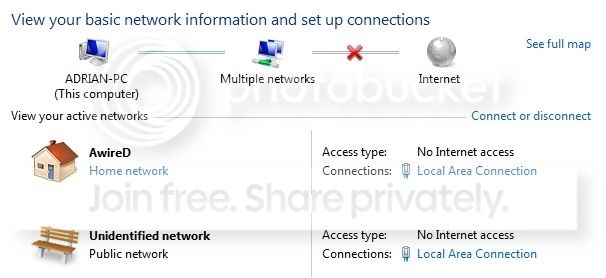
It's basically connected to my home network and it's also connected to an unidentified network, to fix i have to disable and re-enable the network card..

Any body else experience this ?
 

My Computer My Computer

At a glance

Windows 7 Ultimate2.0Ghz2GB DDR2Nvidia Go 7600
Computer Manufacturer/Model Number
HP DV9000t
OS
Windows 7 Ultimate
CPU
2.0Ghz
Memory
2GB DDR2
Graphics Card(s)
Nvidia Go 7600
Screen Resolution
1680 x 1050
Mouse
Logitech
Internet Speed
8mb
Hi awjm, can you give us more details of the issue, pls screenshot your Network and Sharing page. This will help greatly.
 

My Computer My Computer

At a glance

Windows 7 Ultimate 64BitGenuineIntel Intel(R) Core(TM) DuoCore T2400 ...2.00 GBMobile Intel(R) 945 Express Chipset
Computer Manufacturer/Model Number
Lenovo ThinkPad T60
OS
Windows 7 Ultimate 64Bit
CPU
GenuineIntel Intel(R) Core(TM) DuoCore T2400 @ 1.83GHz
Motherboard
Intel(R) 82801G (ICH7 Family)
Memory
2.00 GB
Graphics Card(s)
Mobile Intel(R) 945 Express Chipset
Sound Card
SoundMAX Integrated Digital HD Audio
Monitor(s) Displays
ThinkPad Display
Screen Resolution
1400x1050
Hard Drives
100Gb SATA
Keyboard
Standard Keyboard
Mouse
HID-compliant Mouse
Internet Speed
Cable Broadband - 54Mbps
Other Info
Intel(R) PRO/1000 PL Network Connection
11a/b/g Wireless LAN Mini PCI Express Adapter
Screen cap of Network Sharing Center .......

Network.jpg
 

My Computer My Computer

At a glance

Windows 7 Ultimate2.0Ghz2GB DDR2Nvidia Go 7600
Computer Manufacturer/Model Number
HP DV9000t
OS
Windows 7 Ultimate
CPU
2.0Ghz
Memory
2GB DDR2
Graphics Card(s)
Nvidia Go 7600
Screen Resolution
1680 x 1050
Mouse
Logitech
Internet Speed
8mb
Ok this is weird, you have TWO Local Area connections. Usually if there is a second connection, it should say Local Area Connection 2.

In your Adapter Settings, can you see if you can disable the one which has Unidentified network?
 

My Computer My Computer

At a glance

Windows 7 Ultimate 64BitGenuineIntel Intel(R) Core(TM) DuoCore T2400 ...2.00 GBMobile Intel(R) 945 Express Chipset
Computer Manufacturer/Model Number
Lenovo ThinkPad T60
OS
Windows 7 Ultimate 64Bit
CPU
GenuineIntel Intel(R) Core(TM) DuoCore T2400 @ 1.83GHz
Motherboard
Intel(R) 82801G (ICH7 Family)
Memory
2.00 GB
Graphics Card(s)
Mobile Intel(R) 945 Express Chipset
Sound Card
SoundMAX Integrated Digital HD Audio
Monitor(s) Displays
ThinkPad Display
Screen Resolution
1400x1050
Hard Drives
100Gb SATA
Keyboard
Standard Keyboard
Mouse
HID-compliant Mouse
Internet Speed
Cable Broadband - 54Mbps
Other Info
Intel(R) PRO/1000 PL Network Connection
11a/b/g Wireless LAN Mini PCI Express Adapter
Ok this is weird, you have TWO Local Area connections. Usually if there is a second connection, it should say Local Area Connection 2.

In your Adapter Settings, can you see if you can disable the one which has Unidentified network?

Where in settings would i disable that ??

I only see, Local and Wireless .. i'm going to disable the wireless and see...
 

My Computer My Computer

At a glance

Windows 7 Ultimate2.0Ghz2GB DDR2Nvidia Go 7600
Computer Manufacturer/Model Number
HP DV9000t
OS
Windows 7 Ultimate
CPU
2.0Ghz
Memory
2GB DDR2
Graphics Card(s)
Nvidia Go 7600
Screen Resolution
1680 x 1050
Mouse
Logitech
Internet Speed
8mb
wow i dont think ive ever seen that before
go to
control panel>network and internet>network and sharing center look over at left and click manage networks (or wireless if applicable) remove both of them and reboot.
configure the net correctly now.
 

My Computer My Computer

At a glance

Windows 7 Ultimate X64Intel Core 2 Quad Q9650 3.0GHz (3.6GHz 24/7) ...8GB OCZ DDR3 PC3-14400 @ 1800MHz NVIDIA SLi-R...2XBFG GeForce GTX 280 OC Edition SLi'd
Computer Manufacturer/Model Number
custom of course...built by grimreaper
OS
Windows 7 Ultimate X64
CPU
Intel Core 2 Quad Q9650 3.0GHz (3.6GHz 24/7) maxed 4.05GHz
Motherboard
EVGA 790i Ultra SLi Model#132-CK-NF79-A1 BIOS P10
Memory
8GB OCZ DDR3 PC3-14400 @ 1800MHz NVIDIA SLi-Ready
Graphics Card(s)
2XBFG GeForce GTX 280 OC Edition SLi'd
Sound Card
SoundBlaster X-Fi Titanium Fatal1ty Pro Series
Monitor(s) Displays
Samsung 52" 1080P LCD HDTV (LN52B550)
Screen Resolution
1920X1080 @ 60Hz
Hard Drives
3xWestern Digital WD1001FALS Caviar Black 1TB Hard Drive(s) RAID 0 x2 encased in 3xMasscool KuFormula SHF1 HDD Cooler(s)
PSU
ThermalTake ToughPower 1200W P/N:W0133RU Modularized
Case
ThermalTake P/N: VH6000BWS Armor Full-Tower
Cooling
ThermalTake SpinQ P/N: P0466 CPU Cooler
Keyboard
Logitech cordless Y-RAJ56A piece of ****
Mouse
Logitech G7 Laser Cordless mouse black
Internet Speed
10 Mbps DL-1Mbps UL wirelessly DWA-552 extreme N
Other Info
1XSamsung DVD burner SH-S223Q/BEBN SATA
1XSamsung DVD burner SH-S223L/BEBN SATA
1XLG GGW-H20L Blu-Ray burner
4XCooler Master 120mm Blue LED SickleFlow 2000 RPM
1XBelkin UPS F6C1500TWRK) backup power supply
wow i dont think ive ever seen that before
go to
control panel>network and internet>network and sharing center look over at left and click manage networks (or wireless if applicable) remove both of them and reboot.
configure the net correctly now.

Not both, just the one with Unidentified network associated with it.:D

And pls try disabled first.
 

My Computer My Computer

At a glance

Windows 7 Ultimate 64BitGenuineIntel Intel(R) Core(TM) DuoCore T2400 ...2.00 GBMobile Intel(R) 945 Express Chipset
Computer Manufacturer/Model Number
Lenovo ThinkPad T60
OS
Windows 7 Ultimate 64Bit
CPU
GenuineIntel Intel(R) Core(TM) DuoCore T2400 @ 1.83GHz
Motherboard
Intel(R) 82801G (ICH7 Family)
Memory
2.00 GB
Graphics Card(s)
Mobile Intel(R) 945 Express Chipset
Sound Card
SoundMAX Integrated Digital HD Audio
Monitor(s) Displays
ThinkPad Display
Screen Resolution
1400x1050
Hard Drives
100Gb SATA
Keyboard
Standard Keyboard
Mouse
HID-compliant Mouse
Internet Speed
Cable Broadband - 54Mbps
Other Info
Intel(R) PRO/1000 PL Network Connection
11a/b/g Wireless LAN Mini PCI Express Adapter
wow i dont think ive ever seen that before
go to
control panel>network and internet>network and sharing center look over at left and click manage networks (or wireless if applicable) remove both of them and reboot.
configure the net correctly now.

i only see manage wireless ... when i click i dont see anything

And this unidentified network seems to be associated with the main local connection, just puzzleing how the problem is fixed when i disable and re-enable it .. but comes back on reboot
 

My Computer My Computer

At a glance

Windows 7 Ultimate2.0Ghz2GB DDR2Nvidia Go 7600
Computer Manufacturer/Model Number
HP DV9000t
OS
Windows 7 Ultimate
CPU
2.0Ghz
Memory
2GB DDR2
Graphics Card(s)
Nvidia Go 7600
Screen Resolution
1680 x 1050
Mouse
Logitech
Internet Speed
8mb
Click in Change adapter Settings.

The unindentified network can mean a few things. Can you screenshot what you see in the Change adapter setting page?

The connection is a LAN/ethernet port not wireless.

If they are indeed two same LAN (ie Local Area Connection X 2), you may have a conflict, disabling one might allow u to troubshoot further the other.
 

My Computer My Computer

At a glance

Windows 7 Ultimate 64BitGenuineIntel Intel(R) Core(TM) DuoCore T2400 ...2.00 GBMobile Intel(R) 945 Express Chipset
Computer Manufacturer/Model Number
Lenovo ThinkPad T60
OS
Windows 7 Ultimate 64Bit
CPU
GenuineIntel Intel(R) Core(TM) DuoCore T2400 @ 1.83GHz
Motherboard
Intel(R) 82801G (ICH7 Family)
Memory
2.00 GB
Graphics Card(s)
Mobile Intel(R) 945 Express Chipset
Sound Card
SoundMAX Integrated Digital HD Audio
Monitor(s) Displays
ThinkPad Display
Screen Resolution
1400x1050
Hard Drives
100Gb SATA
Keyboard
Standard Keyboard
Mouse
HID-compliant Mouse
Internet Speed
Cable Broadband - 54Mbps
Other Info
Intel(R) PRO/1000 PL Network Connection
11a/b/g Wireless LAN Mini PCI Express Adapter
Click in Change adapter Settings.

The unindentified network can mean a few things. Can you screenshot what you see in the Change adapter setting page?

The connection is a LAN/ethernet port not wireless.

If they are indeed two same LAN (ie Local Area Connection X 2), you may have a conflict, disabling one might allow u to troubshoot further the other.

Network2.jpg
 

My Computer My Computer

At a glance

Windows 7 Ultimate2.0Ghz2GB DDR2Nvidia Go 7600
Computer Manufacturer/Model Number
HP DV9000t
OS
Windows 7 Ultimate
CPU
2.0Ghz
Memory
2GB DDR2
Graphics Card(s)
Nvidia Go 7600
Screen Resolution
1680 x 1050
Mouse
Logitech
Internet Speed
8mb
lol, i don't think we were expecting to see that. Can you change the view to Details and do another screenshot. Something is not right about all this. That said i believe your wireless connection is the unidentified network. Righ-click it and disable. If you haven't already. Then restart your machine. Screenshot both before restart and after.
 

My Computer My Computer

At a glance

Windows 7 Ultimate 64BitGenuineIntel Intel(R) Core(TM) DuoCore T2400 ...2.00 GBMobile Intel(R) 945 Express Chipset
Computer Manufacturer/Model Number
Lenovo ThinkPad T60
OS
Windows 7 Ultimate 64Bit
CPU
GenuineIntel Intel(R) Core(TM) DuoCore T2400 @ 1.83GHz
Motherboard
Intel(R) 82801G (ICH7 Family)
Memory
2.00 GB
Graphics Card(s)
Mobile Intel(R) 945 Express Chipset
Sound Card
SoundMAX Integrated Digital HD Audio
Monitor(s) Displays
ThinkPad Display
Screen Resolution
1400x1050
Hard Drives
100Gb SATA
Keyboard
Standard Keyboard
Mouse
HID-compliant Mouse
Internet Speed
Cable Broadband - 54Mbps
Other Info
Intel(R) PRO/1000 PL Network Connection
11a/b/g Wireless LAN Mini PCI Express Adapter
Now it gets more confusing

Network3.jpg
 

My Computer My Computer

At a glance

Windows 7 Ultimate2.0Ghz2GB DDR2Nvidia Go 7600
Computer Manufacturer/Model Number
HP DV9000t
OS
Windows 7 Ultimate
CPU
2.0Ghz
Memory
2GB DDR2
Graphics Card(s)
Nvidia Go 7600
Screen Resolution
1680 x 1050
Mouse
Logitech
Internet Speed
8mb
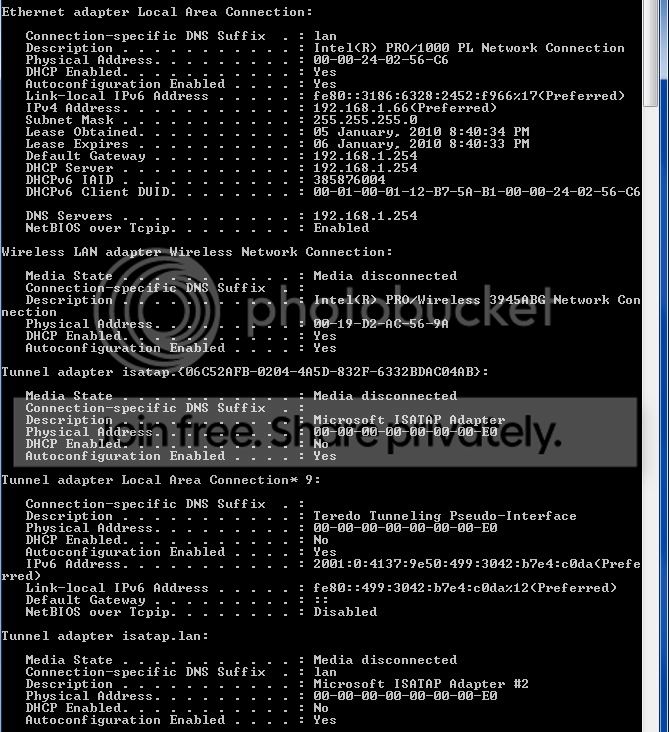
That actually looks abit better awjm. Now the LAN looks like it's not configured with the correct IP setting. what is the setup of it? auto detect IP?

Can you do a ipconfig /all and show us. I'm thinking you are missing something.
 

My Computer My Computer

At a glance

Windows 7 Ultimate 64BitGenuineIntel Intel(R) Core(TM) DuoCore T2400 ...2.00 GBMobile Intel(R) 945 Express Chipset
Computer Manufacturer/Model Number
Lenovo ThinkPad T60
OS
Windows 7 Ultimate 64Bit
CPU
GenuineIntel Intel(R) Core(TM) DuoCore T2400 @ 1.83GHz
Motherboard
Intel(R) 82801G (ICH7 Family)
Memory
2.00 GB
Graphics Card(s)
Mobile Intel(R) 945 Express Chipset
Sound Card
SoundMAX Integrated Digital HD Audio
Monitor(s) Displays
ThinkPad Display
Screen Resolution
1400x1050
Hard Drives
100Gb SATA
Keyboard
Standard Keyboard
Mouse
HID-compliant Mouse
Internet Speed
Cable Broadband - 54Mbps
Other Info
Intel(R) PRO/1000 PL Network Connection
11a/b/g Wireless LAN Mini PCI Express Adapter
That actually looks abit better awjm. Now the LAN looks like it's not configured with the correct IP setting. what is the setup of it? auto detect IP?

Can you do a ipconfig /all and show us. I'm thinking you are missing something.

yeah, its set to auto detect ip

Network4.jpg
 

My Computer My Computer

At a glance

Windows 7 Ultimate2.0Ghz2GB DDR2Nvidia Go 7600
Computer Manufacturer/Model Number
HP DV9000t
OS
Windows 7 Ultimate
CPU
2.0Ghz
Memory
2GB DDR2
Graphics Card(s)
Nvidia Go 7600
Screen Resolution
1680 x 1050
Mouse
Logitech
Internet Speed
8mb
From that it looks like you may have an issue with DNS. I'm not sure if the suffix of "lan" would work. Have you manually put in any settings at all? The DNS suffix normally is the ISP's DNS details. Do you have a third party software for this LAN adapater, if so, can you uninstall it?.

Also go into Device Manager and check if you have any drivers issues, any yellow exclamation marks. Pls do screenshot.
 

My Computer My Computer

At a glance

Windows 7 Ultimate 64BitGenuineIntel Intel(R) Core(TM) DuoCore T2400 ...2.00 GBMobile Intel(R) 945 Express Chipset
Computer Manufacturer/Model Number
Lenovo ThinkPad T60
OS
Windows 7 Ultimate 64Bit
CPU
GenuineIntel Intel(R) Core(TM) DuoCore T2400 @ 1.83GHz
Motherboard
Intel(R) 82801G (ICH7 Family)
Memory
2.00 GB
Graphics Card(s)
Mobile Intel(R) 945 Express Chipset
Sound Card
SoundMAX Integrated Digital HD Audio
Monitor(s) Displays
ThinkPad Display
Screen Resolution
1400x1050
Hard Drives
100Gb SATA
Keyboard
Standard Keyboard
Mouse
HID-compliant Mouse
Internet Speed
Cable Broadband - 54Mbps
Other Info
Intel(R) PRO/1000 PL Network Connection
11a/b/g Wireless LAN Mini PCI Express Adapter
Im almost ready to re-install windows :confused:
 

My Computer My Computer

At a glance

Windows 7 Ultimate2.0Ghz2GB DDR2Nvidia Go 7600
Computer Manufacturer/Model Number
HP DV9000t
OS
Windows 7 Ultimate
CPU
2.0Ghz
Memory
2GB DDR2
Graphics Card(s)
Nvidia Go 7600
Screen Resolution
1680 x 1050
Mouse
Logitech
Internet Speed
8mb
That would have been my last suggestion. :D
 

My Computer My Computer

At a glance

Windows 7 Ultimate 64BitGenuineIntel Intel(R) Core(TM) DuoCore T2400 ...2.00 GBMobile Intel(R) 945 Express Chipset
Computer Manufacturer/Model Number
Lenovo ThinkPad T60
OS
Windows 7 Ultimate 64Bit
CPU
GenuineIntel Intel(R) Core(TM) DuoCore T2400 @ 1.83GHz
Motherboard
Intel(R) 82801G (ICH7 Family)
Memory
2.00 GB
Graphics Card(s)
Mobile Intel(R) 945 Express Chipset
Sound Card
SoundMAX Integrated Digital HD Audio
Monitor(s) Displays
ThinkPad Display
Screen Resolution
1400x1050
Hard Drives
100Gb SATA
Keyboard
Standard Keyboard
Mouse
HID-compliant Mouse
Internet Speed
Cable Broadband - 54Mbps
Other Info
Intel(R) PRO/1000 PL Network Connection
11a/b/g Wireless LAN Mini PCI Express Adapter
That would have been my last suggestion. :D

Can the problem be based in the ADSL modem ? cause if i re-install and this still happens that would be sad :cry:
 

My Computer My Computer

At a glance

Windows 7 Ultimate2.0Ghz2GB DDR2Nvidia Go 7600
Computer Manufacturer/Model Number
HP DV9000t
OS
Windows 7 Ultimate
CPU
2.0Ghz
Memory
2GB DDR2
Graphics Card(s)
Nvidia Go 7600
Screen Resolution
1680 x 1050
Mouse
Logitech
Internet Speed
8mb
Well i'll be frank with you, i think you have an issue with your internet setup, done through either your modem or your network adapter. If you have a software that configures your adapter to connect to the internet this needs to be looked at, i preferred removed, and use the build-in w7 utility. If your adapter cannot work without this software, then you obviously need to install it BUT you will need to know the settings to configure it with. Do you have all the details from your ISP?

If it's your modem, then try do a cold reset and see if it can obtain your ISP's IP setting through DHCP.
 

My Computer My Computer

At a glance

Windows 7 Ultimate 64BitGenuineIntel Intel(R) Core(TM) DuoCore T2400 ...2.00 GBMobile Intel(R) 945 Express Chipset
Computer Manufacturer/Model Number
Lenovo ThinkPad T60
OS
Windows 7 Ultimate 64Bit
CPU
GenuineIntel Intel(R) Core(TM) DuoCore T2400 @ 1.83GHz
Motherboard
Intel(R) 82801G (ICH7 Family)
Memory
2.00 GB
Graphics Card(s)
Mobile Intel(R) 945 Express Chipset
Sound Card
SoundMAX Integrated Digital HD Audio
Monitor(s) Displays
ThinkPad Display
Screen Resolution
1400x1050
Hard Drives
100Gb SATA
Keyboard
Standard Keyboard
Mouse
HID-compliant Mouse
Internet Speed
Cable Broadband - 54Mbps
Other Info
Intel(R) PRO/1000 PL Network Connection
11a/b/g Wireless LAN Mini PCI Express Adapter
Well i'll be frank with you, i think you have an issue with your internet setup, done through either your modem or your network adapter. If you have a software that configures your adapter to connect to the internet this needs to be looked at, i preferred removed, and use the build-in w7 utility. If your adapter cannot work without this software, then you obviously need to install it BUT you will need to know the settings to configure it with. Do you have all the details from your ISP?

If it's your modem, then try do a cold reset and see if it can obtain your ISP's IP setting through DHCP.

Cold reset as in hit the reset button on the modem ? i have plugged it out for 5mins and still nuttin, i dont have anything that handles the connection.

And why was this not a problem when i was wired to my linksys
 

My Computer My Computer

At a glance

Windows 7 Ultimate2.0Ghz2GB DDR2Nvidia Go 7600
Computer Manufacturer/Model Number
HP DV9000t
OS
Windows 7 Ultimate
CPU
2.0Ghz
Memory
2GB DDR2
Graphics Card(s)
Nvidia Go 7600
Screen Resolution
1680 x 1050
Mouse
Logitech
Internet Speed
8mb
Back
Top