
New user needs help; numerous issues with Windows 7

I do apologize for not explaining my position on the email client. Although, I am not disputing the information provided to you by the serviceman, I must comment that I never heard of a situation like you described.

In addition you mention that you cannnot avail yourself to the advanced A/V provided by the cable company, because it is incompatible with Windows 7.

With all due respect, may I suggest that maybe that is not the most advantageous ISP service to use. According to them, no A/V and no email client.

Go to the Thunderbird site that I provided and try to download,again. This time with your A/V in place, that site does not have a virus.

You may also want to try to download the email client that I suggested, your serviceman, could have been in error. Before you download make a System Restore point, so that if it does not work you can go back to the point prior to installation.

Mediacom has the local broadband monopoly, and I still had the second cable line from 5 years ago. The only alternative would be to have DSL installed at extra expense and surf 8 times slower. Mediacom, for the first year, is $19.95/month; same cost as the slower DSL. Only other alternative (besides having a telephone landline installed at extra expense; and if I wanted 56k dial-up speed internet, I would just stick with my Blackberry) is wireless broadband, which is $60/month through Sprint with my mom's discount (they have a contract with the hospital where she works, so she gets 20% off), and apparently Sprint told her that they don't offer unlimited data plans, and the service is only intermitently available.

Like I said, first PC in 5 years, last used Windows 98, so I have no idea what a "system restore point" is, where to find it, or how to use it.
 

My Computer

Computer Manufacturer/Model Number
Lenovo T400 Thinkpad
OS
Windows 7 Home Premium
CPU
no idea _
Memory
2GBPC#-8500 1067MHzMem QTY - 2
Monitor(s) Displays
14.1WXGA TFT,w/LD Bcklt,Cm QTY - 1
Hard Drives
320GbHardDiskDrive,7200rpm QTY - 1
System Restore is great. If anything goes wrong, you can restore to an earlier good time.

Go to search and type in System Restore. Then you can just follow the screens to make a restore point of the present, or to bring your computer back to an earlier time. Your doucments will not be effected. Only the OS will be effected. If you do go back, you will have to reinstall all Updates, etc.
 

My Computer

Computer type
PC/Desktop
Computer Manufacturer/Model Number
Dell XPS 420
OS
Windows 10, Home Clean Install
CPU
Intel Core2 processsor Q8200(2.33Ghz 1333FSB) Quad Core Tech
Motherboard
Dell
Memory
6 gb
Graphics Card(s)
ATI Radeon 256MB HD3650
Sound Card
Intergrated 7.1 Channel Audio
Monitor(s) Displays
Dell SP2009W 20"
Hard Drives
640 GB Serial ATA Hard drive
Cooling
Fan
Keyboard
Dell USB Keyboard
Mouse
Dell Premium Optical USB
Internet Speed
DSL 2.85
Sorry, maybe my post was too long to actually convey what I was trying to say:
I had my cable company come out to set up the broadband this morning, but they couldn't set up my email because Windows Live Mail is not compatible for configuration with my local cable broadband.
I'll be blunt.. !! Your cable company service guy is a blithering idiot !!
Live Mail should not be incompatible with your local cable broadband. It's just a web based interface to manage email accounts. It may not be supported by your ISP and work with its email accounts, but that's a different issue.
Is that what you meant ?

If so, call their service folks and demand that they send out someone who knows what they are doing! Heck, my cable provider refused to support me for years, 'cus I was running a network behind the modem and always wanted me to plug a PC directly into the modem port. Blah!!
Having that type of config is now commonplace.

The Windows Live Mail that was DLed to my PC appears to be a non-web-based email program that does not open in a browser window, it appears to have some or my requirements, like providing an inbox that can consolidate mail from different addresses from different providers and store them offline, but according to the tech that came out, as well as their phone tech support, this progam is not compatible for configuring with Mediacom cable broadband service.
 

My Computer

Computer Manufacturer/Model Number
Lenovo T400 Thinkpad
OS
Windows 7 Home Premium
CPU
no idea _
Memory
2GBPC#-8500 1067MHzMem QTY - 2
Monitor(s) Displays
14.1WXGA TFT,w/LD Bcklt,Cm QTY - 1
Hard Drives
320GbHardDiskDrive,7200rpm QTY - 1
Ann, According to the specs you listed you have a Windows home premium 64 operating system. It is possible that the techs that are setting up your cable and anti virus are not aware of that. I can think of no other way it could be incompatible? Windows Live Mail is indeed a very good email program. It can be installed on your PC to run just like Outlook Express. You can and should sign up for a Windows Live Hotmail address. Yes that is web based email per say. But it also can be on your desktop. If by chance you are somewhere without your laptop and need to see an email from that account you can find it on any PC that has the INTERNET. Thats a good feature. You should ask you cable company to try to help you set this up again and ask for someone who knows the difference between 32 bit and 64 bit operating systems. That should get you going with both an email account and some free anti virus from the cable company. Good luck to you with this problem
 

My Computer

Computer Manufacturer/Model Number
Gateway GT5692
OS
Windows 7 Ulti. x64
CPU
AMD Phenom 8450 triple-core 2.10 ghz
Memory
4GB
Graphics Card(s)
ATI Radion HD 3200
Monitor(s) Displays
Gateway FPD1775W
Screen Resolution
1280x720
Hard Drives
465.6613 Gibibytes
Ann:

Restated, I guess you have 3 problems

Getting an email client that can handle multiple addresses
Proper antivirus
Getting support for your new purchase
Getting a backup disk

I'd concentrate on the first two for now.

The people on this forum can likely provide all the knowhow you need.

You have AVG installed. Does it appear to be working properly?

If yes, have you tried to download Thunderbird 3.0 from here?

Mozilla Messaging

Microsoft's own Security Essentials is probably the easiest to use and configure alternative to AVG in use by forumites if you are looking for something other than AVG.

Don't rely on whatever antivirus your ISP may provide. Run your own on your own PC.

If you think you have no virus issues at this time, I would find out why you can't download a proper copy of Thunderbird. If you can't do so from a legitimate site, you may have some sort of malware or virus on your system, despite AVG.

Concentrate on antivirus and mail first.

How much does MS Security Essentials cost?

Thunderbird was the first thing I tried to DL on my PC other than the Windows Live Mail client, so unless some of the virus snuck through when it started to try to DL on its own without me selecting run or save when I went back to try to double check the virus warning, or WLM is infected, or Lenovo has factory installed viruses and malware, I don't know how I would have any virus. Mediacom is supposed to provide CA Internet Security Suite A/V free with the service, but when I went to the download page on the Mediacom site, it specifically says that Internet Security Suite by CA is not yet Windows 7 compatible.

I am aware that free AVG is barebones A/V, without the advanced features of things like Norton's A/V or CA ISS, so until I have a more dependable and advanced A/V, I am still scared to try going back to Mozilla, since I couldn't read the virus warning details fast enough, I have no way of knowing if it is a virus that AVG could catch.
 

My Computer

Computer Manufacturer/Model Number
Lenovo T400 Thinkpad
OS
Windows 7 Home Premium
CPU
no idea _
Memory
2GBPC#-8500 1067MHzMem QTY - 2
Monitor(s) Displays
14.1WXGA TFT,w/LD Bcklt,Cm QTY - 1
Hard Drives
320GbHardDiskDrive,7200rpm QTY - 1
MS Essentials is free and its awesome.
 

My Computer

Computer type
PC/Desktop
Computer Manufacturer/Model Number
Dell XPS 420
OS
Windows 10, Home Clean Install
CPU
Intel Core2 processsor Q8200(2.33Ghz 1333FSB) Quad Core Tech
Motherboard
Dell
Memory
6 gb
Graphics Card(s)
ATI Radeon 256MB HD3650
Sound Card
Intergrated 7.1 Channel Audio
Monitor(s) Displays
Dell SP2009W 20"
Hard Drives
640 GB Serial ATA Hard drive
Cooling
Fan
Keyboard
Dell USB Keyboard
Mouse
Dell Premium Optical USB
Internet Speed
DSL 2.85
Windows Live mail should be fairly straightforward setting up ..

new Account

1st page:
email address
PW

next page ..

the server addresses (incoming POP3 & Outgoing SMPT) will be something like :
mail. <carrier> . <com or net>

least, thats how most cable services work :-/

thunderbird should be the same

Because the service tech and phone tech from Medicaom both said WLM is not compatible with Mediacom, I was unable to get a new Mediacom email address and password, or their mail server address information, to even attempt to try to set it up on my own. They said to call back after I found a Mediacom-compatible email client, but gave no info on how to find out which one that would be, telling me to call Lenovo or MS, the saga of which I have already posted.
 

My Computer

Computer Manufacturer/Model Number
Lenovo T400 Thinkpad
OS
Windows 7 Home Premium
CPU
no idea _
Memory
2GBPC#-8500 1067MHzMem QTY - 2
Monitor(s) Displays
14.1WXGA TFT,w/LD Bcklt,Cm QTY - 1
Hard Drives
320GbHardDiskDrive,7200rpm QTY - 1
Ann:

Microsoft Security Essentials is free.

It is very peculiar that you cannot go to the Thunderbird site and download without issues.

That suggests to me that you may have a malware problem.

Go here:

|MG| Malwarebytes Anti-Malware 1.43 Download

and download Malwarebytes, a free highly regarded scanner for bad critters on your PC.

Install it.

Open it.

Go to the "update" tab and update.

Go to the scanning tab and do a complete scan. It might take 20 or so minutes to complete.

Let us know what it finds. But don't let it delete anything yet. Just report back here.

If it finds nothing, then the problem with the Thunderbird download is even more mysterious.
 

My Computer

Computer type
PC/Desktop
Computer Manufacturer/Model Number
Ignatz Special; 4 speed manual gearbox; factory air conditioning; one of one
OS
Windows 7 Home Premium SP1, 64-bit
CPU
Intel Skylake i5-6600K, not overclocked
Motherboard
AsRock Z170M Extreme 4, micro ATX
Memory
8 GB HyperX DDR4-2666 (2 x 4 GB)
Graphics Card(s)
none; graphics are integrated on CPU
Sound Card
onboard: Realtek ALC1150; external: USB Behringer UF0-202
Monitor(s) Displays
Dell S2340M 23 inch IPS
Screen Resolution
1600 x 900
Hard Drives
System: Crucial MX100 series SSD, 128 GB;
Data: Samsung Spinpoint 103SJ, 1 TB;
Backup: WD Caviar Green WD30EZRX-00D8PB0, 3 TB
PSU
Rosewill SilentNight 500 watt fanless, semi-modular
Case
Antec Solo II
Cooling
Noctua NH-U12S; Noctua F12 intake, Noctua S12A exhaust
Keyboard
Microsoft 200 6JH-00001 USB
Mouse
Dell or Microsoft optical wired; USB
Antivirus
Microsoft Security Essentials and Malwarebytes Premium
Browser
Pale Moon
Other Info
All fans PWM; speeds at idle: CPU circa 500 rpm; intake circa 600 rpm; exhaust circa 600 rpm; CPU temps 27 idle and 47 C load in a warm room (27 C/81 F) when running Intel Extreme Tuning Utility stress test.
I downloaded the free AVG anti-virus this morning, but I am supposed to have access to a more advanced and featured, normally paid security software as part of my cable broadband service, but the program is not compatible with Windows 7.
I tried to download Thunderbird from Mozilla before I had installed ANY security software, and the infection messages appeared to be pop-ups coming from the site itself.


AVG is not the lean mean free AV it once was. It has been surpassed by Avast in preference by tech enthusiasts among the free AV's. And now MSE is being talked up as a real contender to Avast.

IMO paying for AV is paying for bloat in almost exact proportion to what you pay.
Either Avast or MSE give you the leanest possible no-impact AV which will not let in any infections. The Win7 firewall is perfectly optimized now to work with one of those as long as you keep your Windows Updated.

Have put Avast on over 100 machines with Win firewall without a single infection or issue to date.
 
Ann:

Microsoft Security Essentials is free.

It is very peculiar that you cannot go to the Thunderbird site and download without issues.

That suggests to me that you may have a malware problem.

Go here:

|MG| Malwarebytes Anti-Malware 1.43 Download

and download Malwarebytes, a free highly regarded scanner for bad critters on your PC.

Install it.

Open it.

Go to the "update" tab and update.

Go to the scanning tab and do a complete scan. It might take 20 or so minutes to complete.

Let us know what it finds. But don't let it delete anything yet. Just report back here.

If it finds nothing, then the problem with the Thunderbird download is even more mysterious.

I have no extra money after Christmas, and having to pay bills right after New Year's, I can't afford the $24.95 license fee listed for Malwarebytes on that page, and when I try the link to just run the scan from the page, I get redirected to a PCTools site selling a download of Registry Mechanic 9.0 for Windows.
 

My Computer

Computer Manufacturer/Model Number
Lenovo T400 Thinkpad
OS
Windows 7 Home Premium
CPU
no idea _
Memory
2GBPC#-8500 1067MHzMem QTY - 2
Monitor(s) Displays
14.1WXGA TFT,w/LD Bcklt,Cm QTY - 1
Hard Drives
320GbHardDiskDrive,7200rpm QTY - 1
There should be a freeware Malwarebytes at MajorGeeks.com
 

My Computer

Computer type
PC/Desktop
Computer Manufacturer/Model Number
Built them myself, Science Experiments !
OS
Win7 Enterprise, Win7 x86 (Ult 7600), Win7 x64 Ult 7600, TechNet RTM on AMD x64 (2.8Ghz)
CPU
AMD fx8350 4ghz, AMD-32 2400mhz, AMD-64 3200mhz, AMDx64 2.8G
Motherboard
SIS 755, ECS-K8M890M-M (Ult 7600), GigaByte & others
Memory
2gb, 4gb on the Ult 7600, 4gb on Technet RTM, 32gb on FX8350
Graphics Card(s)
Draw my own Graphics, several nVidia cards
Sound Card
on motherboard
Monitor(s) Displays
19" flat scr, 28" I-Inc widescr,22" Emprex Widescr, 23" Acer
Screen Resolution
1280 x 1024, 1440 x 900, 1920 x 1080
Hard Drives
6 pata Ide HD's & 2 Sata HD's
added 80gb external on Ult 7600 computer,
numerous extra 1tb, 2TB, 3Tb SATA HD's
A collection of ext HD Docks w/ HDs
PSU
430w, 550w, 600w, 700, 800, etc
Case
All Generic Full Towers
Cooling
Open Air & a few fans, some w/ colored LEDs
Keyboard
Compaq & Dell recycled from GoodWill
Mouse
Made in China Optical Wired Mouse
Internet Speed
Fast Cable InterNet
Antivirus
AVG Free on 24 different Desktops, NO Problems!
Browser
IE 8 is preferred, but use FireFox sometimes
Other Info
Linksys Routers, switches, & Hubs
Too Many USB Flash Drives to count, Biggest is 64GB !
Eight computers in my home network.
Sixteen computers at my business network.
Linked via TeamViewer !
Lots of old used spare computer parts everywhere!
You must be poking in the wrong place.

Poke "Major Geeks USA" right under the big yellow "Downloads" in the top middle of the page.

It is free. There is no charge. It is free.
 

My Computer

Computer type
PC/Desktop
Computer Manufacturer/Model Number
Ignatz Special; 4 speed manual gearbox; factory air conditioning; one of one
OS
Windows 7 Home Premium SP1, 64-bit
CPU
Intel Skylake i5-6600K, not overclocked
Motherboard
AsRock Z170M Extreme 4, micro ATX
Memory
8 GB HyperX DDR4-2666 (2 x 4 GB)
Graphics Card(s)
none; graphics are integrated on CPU
Sound Card
onboard: Realtek ALC1150; external: USB Behringer UF0-202
Monitor(s) Displays
Dell S2340M 23 inch IPS
Screen Resolution
1600 x 900
Hard Drives
System: Crucial MX100 series SSD, 128 GB;
Data: Samsung Spinpoint 103SJ, 1 TB;
Backup: WD Caviar Green WD30EZRX-00D8PB0, 3 TB
PSU
Rosewill SilentNight 500 watt fanless, semi-modular
Case
Antec Solo II
Cooling
Noctua NH-U12S; Noctua F12 intake, Noctua S12A exhaust
Keyboard
Microsoft 200 6JH-00001 USB
Mouse
Dell or Microsoft optical wired; USB
Antivirus
Microsoft Security Essentials and Malwarebytes Premium
Browser
Pale Moon
Other Info
All fans PWM; speeds at idle: CPU circa 500 rpm; intake circa 600 rpm; exhaust circa 600 rpm; CPU temps 27 idle and 47 C load in a warm room (27 C/81 F) when running Intel Extreme Tuning Utility stress test.
You must be poking in the wrong place.

Poke "Major Geeks USA" right under the big yellow "Downloads" in the top middle of the page.

It is free. There is no charge. It is free.

Maybe it used to be free. It looks like the info on it was most recently updated on 12/30/2009, and currently says:
Author: Malwarebytes
Date:
2009-12-30
Size: 4.82 MB
License: Shareware $24.95
Requires: Win XP/2003/Vista/Windows7
 

My Computer

Computer Manufacturer/Model Number
Lenovo T400 Thinkpad
OS
Windows 7 Home Premium
CPU
no idea _
Memory
2GBPC#-8500 1067MHzMem QTY - 2
Monitor(s) Displays
14.1WXGA TFT,w/LD Bcklt,Cm QTY - 1
Hard Drives
320GbHardDiskDrive,7200rpm QTY - 1

My Computer

Computer type
PC/Desktop
Computer Manufacturer/Model Number
Self Built
OS
Win 10 Pro x64
CPU
Intel I5-2500K @3.3GHz
Motherboard
Asrock P67 Extreme4
Memory
16GB G.Skill Ripjaws X (4x4GB)
Graphics Card(s)
EVGA GeForce 750 Ti SC 2GB
Sound Card
ASUS Xonar DG 5.1 Channels 24-bit 96KHz PCI Interface Sound
Monitor(s) Displays
auria eq2367
Screen Resolution
1920 x 1080
Hard Drives
250GB Samsung 850 EVO SSD
1TB WD Blue
1TB Hitachi
PSU
SeaSonic X 650W 80 Plus Gold
Case
Corsair Obsidian 750D
Cooling
Corsair H60, Three 140mm case fans
Keyboard
Logitech Wireless Keyboard K520
Mouse
Logitech Wireless Mouse M310
Internet Speed
Wave Broadband ~ 100 dn 5 up
Antivirus
Windows Defender, Malwarebytes Premium
Browser
Edge, IE11, Chrome
Other Info
Laptop specs: HP g7-1365dx /
CPU: AMD A6-3420M APU with Radeon(tm) HD Graphics /
RAM: Crucial 8Gb (2x4Gb) /
SSD: Crucial M4-CT128M4SSD2 ATA Device/ FW 000F /
GFX: AMD Radeon HD 6520G /
OS: Windows 10 Pro x64

My Computer

Computer type
PC/Desktop
Computer Manufacturer/Model Number
Alienware Aurora ALX R4
OS
Windows 10 Pro (x64)
CPU
Intel Core i7-3930K (3.2GHz - 4.5GHz)
Motherboard
Alienware Aurora-R4 x79
Memory
4x Samsung 4GB PC3-12800 DDR3 (16GB 1600MHz)
Graphics Card(s)
Nvidia Geforce GTX 690
Sound Card
SteelSeries Siberia Elite
Monitor(s) Displays
Dell UltraSharp U3011
Screen Resolution
2560x1600
Hard Drives
Samsung 850 Pro 256 GB, Seagate 1TB Desktop Hybrid HDD, 2x Western Digital 4TB Green HDD
PSU
875W Some Dell PSU <.<
Case
Alienware Aurora ALX
Cooling
Custom Liquid Cooling (EK CPU & GPU blocks) dual EK 480RAD
Keyboard
Logitech G710+ Mechanical
Mouse
Logitech G700s
Internet Speed
Verizon Fios (50 mbps average)
Other Info
Server: Intel NUC D54250WYK: i5-4250U, 16GB, 256 GB mSATA, Windows Server 2012 R2
Sorry, maybe my post was too long to actually convey what I was trying to say:
I'll be blunt.. !! Your cable company service guy is a blithering idiot !!
Live Mail should not be incompatible with your local cable broadband. It's just a web based interface to manage email accounts. It may not be supported by your ISP and work with its email accounts, but that's a different issue.
Is that what you meant ?

If so, call their service folks and demand that they send out someone who knows what they are doing! Heck, my cable provider refused to support me for years, 'cus I was running a network behind the modem and always wanted me to plug a PC directly into the modem port. Blah!!
Having that type of config is now commonplace.

The Windows Live Mail that was DLed to my PC appears to be a non-web-based email program that does not open in a browser window, it appears to have some or my requirements, like providing an inbox that can consolidate mail from different addresses from different providers and store them offline, but according to the tech that came out, as well as their phone tech support, this progam is not compatible for configuring with Mediacom cable broadband service.
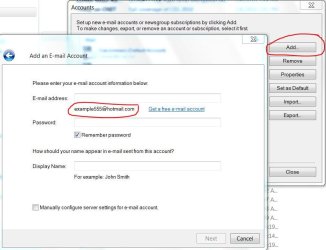
Since you have this dload installed and are familiar with it then all you need is your windows live hotmail account email to start recieving email.
Go to your mail program and click on Tools then accounts and then add. Then click on new email address. A window opens and asks for your live email address or hotmail and a password and user name thats it. click next , then finished, and start recieving mail. If you do get your isp tech to come out again then you can show that to him and he will see that he can for sure configure a isp address there also so you may have multi. inboxes in that program if you like. Good luck to you!

accounts 1.JPG

accounts add.JPG
 

My Computer

Computer Manufacturer/Model Number
Gateway GT5692
OS
Windows 7 Ulti. x64
CPU
AMD Phenom 8450 triple-core 2.10 ghz
Memory
4GB
Graphics Card(s)
ATI Radion HD 3200
Monitor(s) Displays
Gateway FPD1775W
Screen Resolution
1280x720
Hard Drives
465.6613 Gibibytes
MediaCom's email settings can be found here:

Mediacom

These settings can be used in ANY standard email client. You just have to know your password, nothing more.
 

My Computer

Computer Manufacturer/Model Number
Custom
OS
Windows 7 Ultimate RTM (Technet)
CPU
3.00 gigahertz Intel Core2 Duo E8400
Motherboard
ASUSTeK Computer INC. P5K/EPU Rev 1.xx
Memory
4GB
Graphics Card(s)
ATI Radeon X1950 Pro
Sound Card
Built in HD Audio
Monitor(s) Displays
22" Gateway LCD
Screen Resolution
1920 x 1200
Hard Drives
ST3160023A [Hard drive] (160.04 GB) -- drive 0, rev 8.01, ST3500630AS [Hard drive] (500.11 GB) -- drive 2, rev 3.AAK
ST3500630AS [Hard drive] (500.11 GB) -- drive 1, rev 3.AAK
Keyboard
Logitech G11
Mouse
Microsoft Wireless Laser Mouse 5000
Internet Speed
13.44 Mbps
>>Go to your mail program and click on Tools then accounts and then add. Then click on new email address. A window opens and asks for your live email address or hotmail and a password and user name thats it. click next , then finished, and start recieving mail. If you do get your isp tech to come out again then you can show that to him and he will see that he can for sure configure a isp address there also so you may have multi. inboxes in that program if you like. Good luck to you! >>

Please excuse my confusion; are you saying that just setting up another Windows Live account (already have 2), will somehow allow me to set up WLM with my other existing email accounts from other providers (AOL, Yahoo, Google, etc.) that I have been using on my Blackberry, as well as the up to 11 email addresses that I am supposed to have from Mediacom, including the one they already set up for me on their server without my knowledge and just found out about tonight when I called them yet again? Or are you saying that I should abandon my email requirements, and just accept that my Blackberry is capable of providing way more email features than a brand new ThinkPad with Windows 7 at one-twentieth the price?

Mediacom still swears that WLM is not compatible with their broadband monopoly, and that their service is not technically compatible with Windows 7 in general. I have been able to surf with Windows Internet Explorer, but I have noticed that between using WIE on the laptop and using BOLT browser on my Blackberry, the only differences are size display (of course), and WIE can play Flash Media and allows drag-n-drop, which are the only 2 things my BB can't do; so I don't know if there are other WIE features that I am not seeing because of an incompatibility with the broadband.
I did force Mediacom to go ahead and give me their POP3 server and port info in case I could find a compatible email client, but they stressed again that WLM was not compatible with their service. As so many posters have also stressed, this may have more to do with Mediacom's incompetence or laziness, so I do now have the info to configure an email client, but I can't find anywhere in WLM to enter the server and port info.
 
Last edited:

My Computer

Computer Manufacturer/Model Number
Lenovo T400 Thinkpad
OS
Windows 7 Home Premium
CPU
no idea _
Memory
2GBPC#-8500 1067MHzMem QTY - 2
Monitor(s) Displays
14.1WXGA TFT,w/LD Bcklt,Cm QTY - 1
Hard Drives
320GbHardDiskDrive,7200rpm QTY - 1
Well yes thats what I am saying. The part about emails on WLM Desktop Client. Not sure about Aol Yahoo and all the others. I just have one live email and one isp so I actually only use two. However I do believe it is possible. I do not have a Blackberry so not sure about that part of the question. I wish you luck with your situation.
 

My Computer

Computer Manufacturer/Model Number
Gateway GT5692
OS
Windows 7 Ulti. x64
CPU
AMD Phenom 8450 triple-core 2.10 ghz
Memory
4GB
Graphics Card(s)
ATI Radion HD 3200
Monitor(s) Displays
Gateway FPD1775W
Screen Resolution
1280x720
Hard Drives
465.6613 Gibibytes

Was able to get it from CNET, and finally run the scan. It found one virus/malware that could only have come from either DLing WLM or AVG, or it was what snuck through when the virus-infected Thunderbird started to DL without me selecting run or save; unless it was part of the factory installed software...? This is what it found:
(Sorry if I get this wrong, have to type it out, the program is only letting me see the scan results, can't copy and paste it, and all the other feature tabs like Quarantine, Log, etc. are disabled unless the license is purchased):

Vendor: Hijack.DisplayProperties
Category: Registry Data
Items: HKEY_LOCAL_MACHINE\SOFTWARE\Microsoft\Windows\CurrentVersion\Policies\Explorer\NoActiveDesktopChanges
Other: Bad: (1) Good: (0)
Action Taken: No action taken
 

My Computer

Computer Manufacturer/Model Number
Lenovo T400 Thinkpad
OS
Windows 7 Home Premium
CPU
no idea _
Memory
2GBPC#-8500 1067MHzMem QTY - 2
Monitor(s) Displays
14.1WXGA TFT,w/LD Bcklt,Cm QTY - 1
Hard Drives
320GbHardDiskDrive,7200rpm QTY - 1
Back
Top