New user needs help; numerous issues with Windows 7

Ann,
general word of advice [since its been 5 yrs since your last new PC] on obtaining "free" software. There are MANY sites that have programs like AVG, Avast and other such free [versions of] software available to install... for a FEE !!! That may be where some of your confusion is coming from.

Make sure that when you obtain these install packages, that you get them from the original vendors web site. They should be safe and virus free.. after all their reputation depends on it being so :)

This may have been your issue with Thunderbird ... only get it from Mozilla site.
for example.. the free version of AVG is here..
AVG Free - Upgrade Free Antivirus

but strangely enough NOT here !!
http://www.avg.com

Apologies if this is old news to you, but the internet world is now fraught with traps for the unwary.. like the popup window that says your machine is infected with everything under the sun [its really not] and and click here to clean.. That actually installs what we call malware... REALLY ANNOYING software that essentially forces you to their website to buy a key which will turn off those annoyances - like being unable to browse.. 'cus the site your are going to is "infected" and you are blocked for your own safety. Yeah, like microsoft.com has viruses.!!???? These programs re very difficult to remove, and the average person will NOT be successful in doing so.. requires a level of tech skill available to those who work in the industry ["geeks"] :D

I never said Microsoft had viruses. It was Mozilla. Attempting to DL Thunderbird from the Mozilla site caused virus warning pop-ups, apparently from the site itself, as I had not DLed any security software yet. And no, these pop-ups did not have any visible links that said "click here to clean," they appeared to actual legitimate warnings since the second time I went back to Mozilla, I got the warning, and then another window opened an started to DL Thunderbird all by itself, without me having selected run or save. Until I can get some clearer information on which A/V is the most advanced with the most comprehensive virus database in comparison to the normally paid CA Internet Security Suite that my broadband monopoly was supposed to provide free as part of the contract, unless you have W7, then you're screwed and left on your own, and Mediacom did not tell me until after the installation that they are not technically compatible with W7.

According to the info video for MS Security Essencials, all other A/V programs must be removed, giving the impression that MSE is not compatible with any other A/Vs; implying to me that you can only run one A/V at a time. If anyone can please tell me which *one* of the free A/Vs is the most advanced and comprehensive, I'd really appreciate it. :confused:

I am scared to go back to Mozilla, or to attempt to DL any other email clients and try to figure out which, if any, email client is compatible with W7 and Mediacom, until l I know for sure that I have an A/V that will stop Thunderbird's virus, as well as any others that might be hiding in other email clients.

I had to turn the TV off last night for a while when half of the commercials on nearly every channel were advertising either Mediacom Internet or W7, so I wouldn't end up losing my temper and end up throwing something at the TV. Mediacom kept claiming how advanced their [monopoly] service is, and how all Mediacom internet customers could log into their website to download the free security software, CA Internet Security Suite, which is not compatible with Windows 7. :(

W7 commercials: "I'm a PC and Windows 7 was my idea." Really? After all these problems, I wouldn't think that is something that they would actually want to brag about. :rolleyes:
Over 62 hours now, and without my Blackberry, the only way to check email on the Thinkpad is to keep a seperate WIE window open to one of my email providers and keep refreshing the page over and over to see if I have any new emails. I guess I got "spoiled" by AOL (1996-2005) and my Blackberry actually having an audio-visual notification every time an email came into my inbox, so I knew right when it got there, and could respond in a timely manner.
:confused::(:cry:

Seriously, does anyone know if the scaled down Windows 7 on a mini-netbook is capable of downloading and running Flash Media on websites? Since Flash is the ONLY significant feature that my Thinkpad has over my Blackberry, I just can't justify to myself allowing my mom to spend 20+ times the cost of the BB, for one feature.
Thanks
 

My Computer

Computer Manufacturer/Model Number
Lenovo T400 Thinkpad
OS
Windows 7 Home Premium
CPU
no idea _
Memory
2GBPC#-8500 1067MHzMem QTY - 2
Monitor(s) Displays
14.1WXGA TFT,w/LD Bcklt,Cm QTY - 1
Hard Drives
320GbHardDiskDrive,7200rpm QTY - 1
I think you should uninstall Avast in Programs and Features, then restart your computer and download/install again..

When it brings up the box to insert activation key, just click on Register there.

They will email you a key to cut and paste in the box. Then you can forget about it.

Already did that; second time the registration button was gone and replaced with buttons for open and cancel under the text box; please refer to the 6th post on the 6th page for further explanation.
Thanks
 

My Computer

Computer Manufacturer/Model Number
Lenovo T400 Thinkpad
OS
Windows 7 Home Premium
CPU
no idea _
Memory
2GBPC#-8500 1067MHzMem QTY - 2
Monitor(s) Displays
14.1WXGA TFT,w/LD Bcklt,Cm QTY - 1
Hard Drives
320GbHardDiskDrive,7200rpm QTY - 1
I think you should uninstall Avast in Programs and Features, then restart your computer and download/install again..

When it brings up the box to insert activation key, just click on Register there.

They will email you a key to cut and paste in the box. Then you can forget about it.

Already did that; second time the registration button was gone and replaced with buttons for open and cancel under the text box; please refer to the 6th post on the 6th page for further explanation.
Thanks

I was responding to that post, because you seemed to not be sure it was fully uninstalled.

On the main Avast control panel Tools tab schedule a boot scan for deepest possible virus scan. Restart and see what it finds.
 
Last edited:
Ann:

The fact that you get warnings when going to a known legitimate Thunderbird download site indicates to me that your system is probably already compromised.

I would concentrate on getting that resolved first.

Before email, etc.

Normally, I would suggest malwarebytes, but you apparently have problems with getting the free version to operate properly---which may be another indication that your system is compromised.

See if you can download and run Threatfire:

ThreatFire AntiVirus - Behavioral Virus and Spyware Protection

Use the big green circular button.

Have it scan for rootkits and whatever else is on its menu.

After that, try this virus scanner; download and install the 64 bit version, update it, and run a complete scan.

HouseCall - Free Antivirus Scan

Malware can prevent virus and malware scanners from running properly and that may be your problem.

If you can't get to the bottom of this, you can't progress.

If either of these applications run properly, let us know what they find.
 

My Computer

Computer type
PC/Desktop
Computer Manufacturer/Model Number
Ignatz Special; 4 speed manual gearbox; factory air conditioning; one of one
OS
Windows 7 Home Premium SP1, 64-bit
CPU
Intel Skylake i5-6600K, not overclocked
Motherboard
AsRock Z170M Extreme 4, micro ATX
Memory
8 GB HyperX DDR4-2666 (2 x 4 GB)
Graphics Card(s)
none; graphics are integrated on CPU
Sound Card
onboard: Realtek ALC1150; external: USB Behringer UF0-202
Monitor(s) Displays
Dell S2340M 23 inch IPS
Screen Resolution
1600 x 900
Hard Drives
System: Crucial MX100 series SSD, 128 GB;
Data: Samsung Spinpoint 103SJ, 1 TB;
Backup: WD Caviar Green WD30EZRX-00D8PB0, 3 TB
PSU
Rosewill SilentNight 500 watt fanless, semi-modular
Case
Antec Solo II
Cooling
Noctua NH-U12S; Noctua F12 intake, Noctua S12A exhaust
Keyboard
Microsoft 200 6JH-00001 USB
Mouse
Dell or Microsoft optical wired; USB
Antivirus
Microsoft Security Essentials and Malwarebytes Premium
Browser
Pale Moon
Other Info
All fans PWM; speeds at idle: CPU circa 500 rpm; intake circa 600 rpm; exhaust circa 600 rpm; CPU temps 27 idle and 47 C load in a warm room (27 C/81 F) when running Intel Extreme Tuning Utility stress test.
I think you should uninstall Avast in Programs and Features, then restart your computer and download/install again..

When it brings up the box to insert activation key, just click on Register there.

They will email you a key to cut and paste in the box. Then you can forget about it.

Already did that; second time the registration button was gone and replaced with buttons for open and cancel under the text box; please refer to the 6th post on the 6th page for further explanation.
Thanks

I was responding to that post, because you seemed to not be sure it was fully uninstalled.

<H2 align=left></H2>Uninstalled again, but now when now when I click on your link, I keep getting:

<<The webpage "download.cnet.com" cannot be found

DNS error occurred. Server cannot be found. The link may be broken.>>

Could this mean that someone at CNET realized that there was a problem with the Avast file, so they deleted it from their servers?
I still don't know if it actually did fully uninstall, because I didn't get the notice that the file already existed and did I want to replace it, until I tried to DL it the second time, even after restarting after finally getting a (apparently false) notice that the uninstall was successful.
 

My Computer

Computer Manufacturer/Model Number
Lenovo T400 Thinkpad
OS
Windows 7 Home Premium
CPU
no idea _
Memory
2GBPC#-8500 1067MHzMem QTY - 2
Monitor(s) Displays
14.1WXGA TFT,w/LD Bcklt,Cm QTY - 1
Hard Drives
320GbHardDiskDrive,7200rpm QTY - 1
Ann:

The fact that you get warnings when going to a known legitimate Thunderbird download site indicates to me that your system is probably already compromised.

I would concentrate on getting that resolved first.

Before email, etc.

Normally, I would suggest malwarebytes, but you apparently have problems with getting the free version to operate properly---which may be another indication that your system is compromised.

See if you can download and run Threatfire:

ThreatFire AntiVirus - Behavioral Virus and Spyware Protection

Use the big green circular button.

Have it scan for rootkits and whatever else is on its menu.

After that, try this virus scanner; download and install the 64 bit version, update it, and run a complete scan.

HouseCall - Free Antivirus Scan

Malware can prevent virus and malware scanners from running properly and that may be your problem.

If you can't get to the bottom of this, you can't progress.

If either of these applications run properly, let us know what they find.

Threatfire won't let me cut and paste the results, but it says: "24 infections were found: Cookies: Cookies may be used to track your web browsing habits or to display unwanted advertisements" and then has a long list of 24 cookies.
Sounds like another "false positive" to me. Will try Housecall and get back ASAP.
 

My Computer

Computer Manufacturer/Model Number
Lenovo T400 Thinkpad
OS
Windows 7 Home Premium
CPU
no idea _
Memory
2GBPC#-8500 1067MHzMem QTY - 2
Monitor(s) Displays
14.1WXGA TFT,w/LD Bcklt,Cm QTY - 1
Hard Drives
320GbHardDiskDrive,7200rpm QTY - 1
Housecall reports: No threats found
 

My Computer

Computer Manufacturer/Model Number
Lenovo T400 Thinkpad
OS
Windows 7 Home Premium
CPU
no idea _
Memory
2GBPC#-8500 1067MHzMem QTY - 2
Monitor(s) Displays
14.1WXGA TFT,w/LD Bcklt,Cm QTY - 1
Hard Drives
320GbHardDiskDrive,7200rpm QTY - 1
I did notice when downloadin Threatfire and Housecall, that in the folder that downloads automatically go into, there was still an Avast file in there. Need to try to figure out how to open the DL folder and delete it, since the unistaller missed it.
 

My Computer

Computer Manufacturer/Model Number
Lenovo T400 Thinkpad
OS
Windows 7 Home Premium
CPU
no idea _
Memory
2GBPC#-8500 1067MHzMem QTY - 2
Monitor(s) Displays
14.1WXGA TFT,w/LD Bcklt,Cm QTY - 1
Hard Drives
320GbHardDiskDrive,7200rpm QTY - 1
Delete all those cookies that Threatfire found. I don't expect it to resolve anything, but it can't hurt.

Go to control panel/programs and feature and uninstall malware bytes if it shows as installed.

Try again to download and install a fresh version from this known good site:

|MG| Malwarebytes Anti-Malware 1.44 Download

Poke "Major Geeks USA" just below the bright yellow "Downloads" and wait a few seconds. The download link to save should appear.

If it downloads, install it, go to update tab and update, go to scan tab and do a full scan. If it finds anything, report back.
 

My Computer

Computer type
PC/Desktop
Computer Manufacturer/Model Number
Ignatz Special; 4 speed manual gearbox; factory air conditioning; one of one
OS
Windows 7 Home Premium SP1, 64-bit
CPU
Intel Skylake i5-6600K, not overclocked
Motherboard
AsRock Z170M Extreme 4, micro ATX
Memory
8 GB HyperX DDR4-2666 (2 x 4 GB)
Graphics Card(s)
none; graphics are integrated on CPU
Sound Card
onboard: Realtek ALC1150; external: USB Behringer UF0-202
Monitor(s) Displays
Dell S2340M 23 inch IPS
Screen Resolution
1600 x 900
Hard Drives
System: Crucial MX100 series SSD, 128 GB;
Data: Samsung Spinpoint 103SJ, 1 TB;
Backup: WD Caviar Green WD30EZRX-00D8PB0, 3 TB
PSU
Rosewill SilentNight 500 watt fanless, semi-modular
Case
Antec Solo II
Cooling
Noctua NH-U12S; Noctua F12 intake, Noctua S12A exhaust
Keyboard
Microsoft 200 6JH-00001 USB
Mouse
Dell or Microsoft optical wired; USB
Antivirus
Microsoft Security Essentials and Malwarebytes Premium
Browser
Pale Moon
Other Info
All fans PWM; speeds at idle: CPU circa 500 rpm; intake circa 600 rpm; exhaust circa 600 rpm; CPU temps 27 idle and 47 C load in a warm room (27 C/81 F) when running Intel Extreme Tuning Utility stress test.
Delete all those cookies that Threatfire found. I don't expect it to resolve anything, but it can't hurt.

Go to control panel/programs and feature and uninstall malware bytes if it shows as installed.

Try again to download and install a fresh version from this known good site:

|MG| Malwarebytes Anti-Malware 1.44 Download

Poke "Major Geeks USA" just below the bright yellow "Downloads" and wait a few seconds. The download link to save should appear.

If it downloads, install it, go to update tab and update, go to scan tab and do a full scan. If it finds anything, report back.

I went back to Threatfire to try to delete the cookies it found, but I couldn't find the scan results. So I ran another scan, and this time it found no threats. So I searched in the Windows Help and Support files and used that to get to the computer's delete cookie function; but don"t know if that has the same effect as, or more or less effect, than doing it through Threatfire?

I thought I had uninstalled Malwarebytes right after uninstalling Avast, but when I was able to find the DL folder to delete the Avast file I had noticed while DLing something else, I also found a Malwarebytes file that the uninstaller had missed as well. I deleted them and restarted. Major Geeks was the first place I was told to DL Malwarebytes, but that site said it cost $24.95 for the license, so I ended up DLing it from CNET, but all the function tabs except "Scanner" were disabled unless I purchased a license. I went ahead and followed your advice, and DLed from Major Geeks anyway, ran the scan, found the exact same report that I posted previously, that I was told was a "false positive." Again, running into same issue of all the function tabs except "Scanner" being disabled, so I can't add the result to the "ignore list" as I'd been advised to do previously.
 

My Computer

Computer Manufacturer/Model Number
Lenovo T400 Thinkpad
OS
Windows 7 Home Premium
CPU
no idea _
Memory
2GBPC#-8500 1067MHzMem QTY - 2
Monitor(s) Displays
14.1WXGA TFT,w/LD Bcklt,Cm QTY - 1
Hard Drives
320GbHardDiskDrive,7200rpm QTY - 1
I never said Microsoft had viruses. It was Mozilla. Attempting to DL Thunderbird from the Mozilla site caused virus warning pop-ups, apparently from the site itself, as I had not DLed any security software yet. And no, these pop-ups did not have any visible links that said "click here to clean," they appeared to actual legitimate warnings since the second time I went back to Mozilla, I got the warning, and then another window opened an started to DL Thunderbird all by itself, without me having selected run or save. Until I can get some clearer information on which A/V is the most advanced with the most comprehensive virus database in comparison to the normally paid CA Internet Security Suite that my broadband monopoly was supposed to provide free as part of the contract, unless you have W7, then you're screwed and left on your own, and Mediacom did not tell me until after the installation that they are not technically compatible with W7.

According to the info video for MS Security Essencials, all other A/V programs must be removed, giving the impression that MSE is not compatible with any other A/Vs; implying to me that you can only run one A/V at a time. If anyone can please tell me which *one* of the free A/Vs is the most advanced and comprehensive, I'd really appreciate it. :confused:

I am scared to go back to Mozilla, or to attempt to DL any other email clients and try to figure out which, if any, email client is compatible with W7 and Mediacom, until l I know for sure that I have an A/V that will stop Thunderbird's virus, as well as any others that might be hiding in other email clients.

I had to turn the TV off last night for a while when half of the commercials on nearly every channel were advertising either Mediacom Internet or W7, so I wouldn't end up losing my temper and end up throwing something at the TV. Mediacom kept claiming how advanced their [monopoly] service is, and how all Mediacom internet customers could log into their website to download the free security software, CA Internet Security Suite, which is not compatible with Windows 7. :(

W7 commercials: "I'm a PC and Windows 7 was my idea." Really? After all these problems, I wouldn't think that is something that they would actually want to brag about. :rolleyes:
Over 62 hours now, and without my Blackberry, the only way to check email on the Thinkpad is to keep a seperate WIE window open to one of my email providers and keep refreshing the page over and over to see if I have any new emails. I guess I got "spoiled" by AOL (1996-2005) and my Blackberry actually having an audio-visual notification every time an email came into my inbox, so I knew right when it got there, and could respond in a timely manner.
:confused::(:cry:

Seriously, does anyone know if the scaled down Windows 7 on a mini-netbook is capable of downloading and running Flash Media on websites? Since Flash is the ONLY significant feature that my Thinkpad has over my Blackberry, I just can't justify to myself allowing my mom to spend 20+ times the cost of the BB, for one feature.
Thanks

Sorry,
I was using the MS site as an example.. not implying you had stated it has viruses. Prime example of the challenge in getting the message across in print :)
If you are getting those warnings when d/loading Thunderbird, my guess is [like others have already stated] that you are already infected.
NONE of the "free" software that members have suggested should cost you anything... hence my prior warning about being sure you are getting it from a legitimate site.
I'm sure we all understand the frustration you have, many of us have been thru similar situations, and not being a "techie" makes it that much more of a challenge.
Hang in there... we'll help you to get it resolved.
 

My Computer

OS
Win7 x64 Ultimate
Sorry,
I was using the MS site as an example.. not implying you had stated it has viruses. Prime example of the challenge in getting the message across in print :)
If you are getting those warnings when d/loading Thunderbird, my guess is [like others have already stated] that you are already infected.

Full scans by Housecall, Theatfire, and AVG are all reporting "No threats found." Malwarebytes finds one supposed threat that I was told was a "false positive"; I posted the exact result details earlier.
 

My Computer

Computer Manufacturer/Model Number
Lenovo T400 Thinkpad
OS
Windows 7 Home Premium
CPU
no idea _
Memory
2GBPC#-8500 1067MHzMem QTY - 2
Monitor(s) Displays
14.1WXGA TFT,w/LD Bcklt,Cm QTY - 1
Hard Drives
320GbHardDiskDrive,7200rpm QTY - 1
Ann:

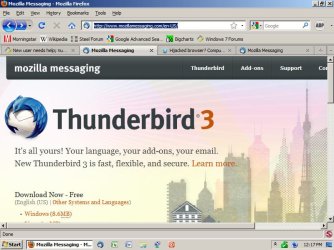
When you attempt to download Thunderbird, are you poking a link provided by someone in this thread, or are you manually typing in the URL?

The correct address is www dot mozillamessaging dot com forward slash en hyphen US forward slash

Manually enter those keystrokes into your browser and then carefully look at the URL after you are taken to that site.

Does it EXACTLY match the keystrokes I mentioned?

Do you see any warnings like you did before?

Do you see this, including the link that says "Windows 8.6 MB" in the lower left?
 

Attachments

  • Untitled-2.jpg
    Untitled-2.jpg
    77.7 KB · Views: 18

My Computer

Computer type
PC/Desktop
Computer Manufacturer/Model Number
Ignatz Special; 4 speed manual gearbox; factory air conditioning; one of one
OS
Windows 7 Home Premium SP1, 64-bit
CPU
Intel Skylake i5-6600K, not overclocked
Motherboard
AsRock Z170M Extreme 4, micro ATX
Memory
8 GB HyperX DDR4-2666 (2 x 4 GB)
Graphics Card(s)
none; graphics are integrated on CPU
Sound Card
onboard: Realtek ALC1150; external: USB Behringer UF0-202
Monitor(s) Displays
Dell S2340M 23 inch IPS
Screen Resolution
1600 x 900
Hard Drives
System: Crucial MX100 series SSD, 128 GB;
Data: Samsung Spinpoint 103SJ, 1 TB;
Backup: WD Caviar Green WD30EZRX-00D8PB0, 3 TB
PSU
Rosewill SilentNight 500 watt fanless, semi-modular
Case
Antec Solo II
Cooling
Noctua NH-U12S; Noctua F12 intake, Noctua S12A exhaust
Keyboard
Microsoft 200 6JH-00001 USB
Mouse
Dell or Microsoft optical wired; USB
Antivirus
Microsoft Security Essentials and Malwarebytes Premium
Browser
Pale Moon
Other Info
All fans PWM; speeds at idle: CPU circa 500 rpm; intake circa 600 rpm; exhaust circa 600 rpm; CPU temps 27 idle and 47 C load in a warm room (27 C/81 F) when running Intel Extreme Tuning Utility stress test.
Ann:

When you attempt to download Thunderbird, are you poking a link provided by someone in this thread, or are you manually typing in the URL?

The correct address is www dot mozillamessaging dot com forward slash en hyphen US forward slash

Manually enter those keystrokes into your browser and then carefully look at the URL after you are taken to that site.

Does it EXACTLY match the keystrokes I mentioned?

Do you see any warnings like you did before?

Do you see this, including the link that says "Windows 8.6 MB" in the lower left?

I first went to Mozilla when I was talking to Lenovo and they said it was the only email client compatible with my system, and they gave me the address. When I told them about the popup< and asked about other client options, the tech said that was the only one they knew of and couldn't suggest any others, since they supposedly don't provide software support to begin with.
I had assumed that it was the virus that caused Thunderbird to start DLing without me having selected run or save, the second time I went there. However, when I alked to my mom today, she said she had just upgraded her laptop from XP to W7, and she had noticed that there is apparently a new feature that will launch links and click button options if the mouse just hovers over it for more than a second. I thought I noticed something weird like that, like one of my posts here seemed to be sent by itself before I was done typing it, so I was afraid at first that it was from a virus or piece of one that had snuck through when Thunderbird started to DL, but all A/Vs show no threats found. So I went into the mouse options, and thought I had found the option todisable the hover function, and it seems to have fixed for some seemingly random links and buttons, but not for others. Is there another way to make sure any and all hover functions are completely disabled, so I have to click for it to work?

I have a restore point set, and several A/Vs now. Typed the address in, and the page is similar to your image and what you describe, but it is missing the "Windows 8.6 MB" link you specifically mention, so I am not clicking the DL button yet, which is when I saw the warnings before.
I am trying to take a screen print to post so you can see the exact differences, but it is looking for a URL when I try to insert the image. Do I need to upload it to something like Flickr first to get a URL to post the image here?
:confused:
 

My Computer

Computer Manufacturer/Model Number
Lenovo T400 Thinkpad
OS
Windows 7 Home Premium
CPU
no idea _
Memory
2GBPC#-8500 1067MHzMem QTY - 2
Monitor(s) Displays
14.1WXGA TFT,w/LD Bcklt,Cm QTY - 1
Hard Drives
320GbHardDiskDrive,7200rpm QTY - 1
another issue: photo quality/resolution

Another issue, not sure if it a problem with W7 or with my laptop display hardware, but pictures in my media library and on websites all seem to have a white haziness to them. It is worse in the browser on websites, like one website in particular that I have profile on, all my pictures look washed out and fuzzy (when they show up bright and clear on my Blackberry), as well as the graphics of the site, like things that should be black are dark gray. I have tried adjusting the brightness, but no difference in the white haziness. Tried to find the contrast setting, but apparently laptops don't have them. Tried the color calibration, but it didn't seem to have any effect on anything. I have my display at optimum resolution for my screen size, which is the highest resolution setting on my laptop, but photos look burry like they do when I have my BB BOLT browser set to the lowest image quality possible so that pages load faster. Is there any way to use software settings for the media library, or an alternate browser to improve photo and graphics quality on websites? Or does this sound like a hardware issue to take up with Lenovo? :confused:
Thanks
 

My Computer

Computer Manufacturer/Model Number
Lenovo T400 Thinkpad
OS
Windows 7 Home Premium
CPU
no idea _
Memory
2GBPC#-8500 1067MHzMem QTY - 2
Monitor(s) Displays
14.1WXGA TFT,w/LD Bcklt,Cm QTY - 1
Hard Drives
320GbHardDiskDrive,7200rpm QTY - 1
Typed the address in, and the page is similar to your image and what you describe, but it is missing the "Windows 8.6 MB" link you specifically mention, so I am not clicking the DL button yet, which is when I saw the warnings before.

Ann:

I am not following you.

If you cannot see the "Windows 8.6MB" link, how could you download even if you wanted to? What download button are you referring to?

My suggestion:

Give up on this thread.

Make a new thread in the security section of this forum.

Title it something like "Unable to download Thunderbird without security warnings".

Give a brief 2 or 3 paragraph description of perhaps 100 words. Keep your responses on point.

You could post in the browsers section also, but I'd guess security is preferable. More security experts might see it there.

I'm not sure why you don't see that "Windows 8.6 MB" link. It appears from your description that you have no way of downloading Thunderbird since the link is not there when you go to the download page. If you DID see that link, then perhaps your troubles are over and you could download and install without incident.

Attack one issue at at a time. After the first issue is resolved, decide on the next issue and start a thread on it in the appropriate forum.

Another option is to re-install Windows 7 from the ground up.
 
Last edited:

My Computer

Computer type
PC/Desktop
Computer Manufacturer/Model Number
Ignatz Special; 4 speed manual gearbox; factory air conditioning; one of one
OS
Windows 7 Home Premium SP1, 64-bit
CPU
Intel Skylake i5-6600K, not overclocked
Motherboard
AsRock Z170M Extreme 4, micro ATX
Memory
8 GB HyperX DDR4-2666 (2 x 4 GB)
Graphics Card(s)
none; graphics are integrated on CPU
Sound Card
onboard: Realtek ALC1150; external: USB Behringer UF0-202
Monitor(s) Displays
Dell S2340M 23 inch IPS
Screen Resolution
1600 x 900
Hard Drives
System: Crucial MX100 series SSD, 128 GB;
Data: Samsung Spinpoint 103SJ, 1 TB;
Backup: WD Caviar Green WD30EZRX-00D8PB0, 3 TB
PSU
Rosewill SilentNight 500 watt fanless, semi-modular
Case
Antec Solo II
Cooling
Noctua NH-U12S; Noctua F12 intake, Noctua S12A exhaust
Keyboard
Microsoft 200 6JH-00001 USB
Mouse
Dell or Microsoft optical wired; USB
Antivirus
Microsoft Security Essentials and Malwarebytes Premium
Browser
Pale Moon
Other Info
All fans PWM; speeds at idle: CPU circa 500 rpm; intake circa 600 rpm; exhaust circa 600 rpm; CPU temps 27 idle and 47 C load in a warm room (27 C/81 F) when running Intel Extreme Tuning Utility stress test.
I don't get a "Windows 8.6 MB" button either. What I get is a simple option to download Thunderbird 3.0 for Windows 6.4 MB in english. I click on that option and get directed to new page with instructions. A download box comes up with option to save or cancel. I save and download begins and completes with no security or other warnings. All pretty much normal.
 

My Computer

Computer Manufacturer/Model Number
HP Pavilion dv6 - 3155dx Entertainment Notebook
OS
Win 7 Professional x64
CPU
Intel i3
Motherboard
Hewlett-Packard 144C 65.35
Memory
3894 Megabytes Usable Installed Memory
Graphics Card(s)
Intel(R) HD Graphics [Display adapter]
Sound Card
IDT High Definition Audio CODEC Intel(R) Display Audio
Monitor(s) Displays
Generic PnP Monitor (15.3"vis)
Screen Resolution
1366 x 768
Hard Drives
TOSHIBA MK5056GSY [Hard drive] (500.11 GB)
SMART Status: Healthy
Typed the address in, and the page is similar to your image and what you describe, but it is missing the "Windows 8.6 MB" link you specifically mention, so I am not clicking the DL button yet, which is when I saw the warnings before.

Ann:

I am not following you.

If you cannot see the "Windows 8.6MB" link, how could you download even if you wanted to? What download button are you referring to?

My suggestion:

Give up on this thread.

Make a new thread in the security section of this forum.

Title it something like "Unable to download Thunderbird without security warnings".

Give a brief 2 or 3 paragraph description of perhaps 100 words. Keep your responses on point.

You could post in the browsers section also, but I'd guess security is preferable. More security experts might see it there.

I'm not sure why you don't see that "Windows 8.6 MB" link. It appears from your description that you have no way of downloading Thunderbird since the link is not there when you go to the download page. If you DID see that link, then perhaps your troubles are over and you could download and install without incident.

Attack one issue at at a time. After the first issue is resolved, decide on the next issue and start a thread on it in the appropriate forum.

Another option is to re-install Windows 7 from the ground up.

There is a big lavender button in the lower left corner of the page that has a little white circle with a brownish arrow pointing down in the left top of the button, and the button says:

Download Thunderbird
**
3.0 for Windows
English (US) 6.4MB

**the underline appears when you move the mouse over it, none of this other text has any links or gets underlined, and the numbers don't match what you said, and can't find any other links like you describe when I try scrolling down.

I was trying post a screen print of what I am seeing on the page, but it says I need a URL to post it. I figure visuals might help, especially if I have to start a new thread in security. Do I need to upload the screen print to Flickr, or somewhere specific, to get the URL in order to insert an image in a post here?

Since my W7 was factory installed and Lenovo apparently forgot to ship the W& backup disk that my mom ordered, I wouldn't have clue about how to reinstall W7 some other way.

Sorry, it never occured to me to post more than one thread; most "help" forums I have been on, get mad at newbies who post "too many (e.g. more than one) threads too soon", and one site in particular, you can post as little as one on-topic thread as a newbie, and still get accused of "spamming" (yes, I have argued this with actual definitions of spam, but was told by the moderator/group owner that [somehow?] a single on-topic post can be considered "spam" at their discretion), and of being an attention whore trying to drive other members to your profille or galleries or website.
So, I really do appreciate that folks here have been legitimately trying to help, and recognizing that new users are not total idiots, like so many Blackberry forums where I won't even post for help anymore after reading so many posts by newbies looking for help, and how they are usually blown-off. For example, a lot of Curve users often run into a problem trying to play mp4 video files, but if they post about it, they are simply told, your BB does play mp4s, and reset by pulling your battery. period. No attempts to actually help the newbie figure out if there is a problem preventing it from working properly, other than, on rare occassion recognizing that it actually really might not be working properly and might not be the newbie's fault, but still no attempts to help identify the actual problem.
Thanks for trying to help and not writing me off, and for treating me like a real person with a (simply inexperienced) brain, unlike so many other alledged help forums.
 

My Computer

Computer Manufacturer/Model Number
Lenovo T400 Thinkpad
OS
Windows 7 Home Premium
CPU
no idea _
Memory
2GBPC#-8500 1067MHzMem QTY - 2
Monitor(s) Displays
14.1WXGA TFT,w/LD Bcklt,Cm QTY - 1
Hard Drives
320GbHardDiskDrive,7200rpm QTY - 1
Ann:

No one is going to give you a hard time here about number of posts.

Noobies are welcomed here.

Things you should keep in mind:

Consider one problem at a time. Post in the appropriate forum for that particular problem. Otherwise, a thread can get to 100 or 200 posts and become confusing quickly with too many irons in the fire.


A typical first post should rarely be over say 150 words but should be as explicit, lucid, and well-written as possible.

Learn how to do screen shots from the above tutorial from myzr 7. You don't have to post the pictures to another site--they are uploaded directly to this forum.

Keep responses in your thread on point and pay attention to any specific questions asked of you by anyone helping.

That's about it.

Good luck. You will do OK here if you can get over the hump with this possible virus/Thunderbird thing.

Do what you have to do to get the Windows 7 disc. It may be that you have a small partition on your hard drive that is intended to help you reinstall--but that isn't your main issue now.
 

My Computer

Computer type
PC/Desktop
Computer Manufacturer/Model Number
Ignatz Special; 4 speed manual gearbox; factory air conditioning; one of one
OS
Windows 7 Home Premium SP1, 64-bit
CPU
Intel Skylake i5-6600K, not overclocked
Motherboard
AsRock Z170M Extreme 4, micro ATX
Memory
8 GB HyperX DDR4-2666 (2 x 4 GB)
Graphics Card(s)
none; graphics are integrated on CPU
Sound Card
onboard: Realtek ALC1150; external: USB Behringer UF0-202
Monitor(s) Displays
Dell S2340M 23 inch IPS
Screen Resolution
1600 x 900
Hard Drives
System: Crucial MX100 series SSD, 128 GB;
Data: Samsung Spinpoint 103SJ, 1 TB;
Backup: WD Caviar Green WD30EZRX-00D8PB0, 3 TB
PSU
Rosewill SilentNight 500 watt fanless, semi-modular
Case
Antec Solo II
Cooling
Noctua NH-U12S; Noctua F12 intake, Noctua S12A exhaust
Keyboard
Microsoft 200 6JH-00001 USB
Mouse
Dell or Microsoft optical wired; USB
Antivirus
Microsoft Security Essentials and Malwarebytes Premium
Browser
Pale Moon
Other Info
All fans PWM; speeds at idle: CPU circa 500 rpm; intake circa 600 rpm; exhaust circa 600 rpm; CPU temps 27 idle and 47 C load in a warm room (27 C/81 F) when running Intel Extreme Tuning Utility stress test.
Back
Top