Lots of Windows7 Problems

rudders93

New member
Local time
12:50 AM
Messages
12
Hi,

I don't really know how to group this, but recently I've been having alot of Windows7 problems. These are some of the ones I've noticed:


  • Can't see changes made to folders until I manually refresh (Ctrl R)
  • Windows Media Player crashes and doesn't load at all 90% of the time
  • Doesn't shut down properly (hangs on shutting down screen for more than 15 minutes) 1/3 of the time
  • Recently, on the taskbar nothing pops up (so no previews)
I've run a virus scan (AVG) but it comes up as negative.

What could be the cause of these various problems? My computer is powerful enough to run them all, and it ran them perfectly until I started noticing these things

Thanks!
 

My Computer My Computer

At a glance

Windows 7 32 bit
OS
Windows 7 32 bit
Just need a little more information. Did you do a clean install or an inplace upgrade?
Did you list your computer specs? I did not notice before posting.
Did the problems begin immediately or did you use the computer for a while?

If you did a clean install, one thing that you can try is this. In an administrator account, type cmd in search. In the cmd box, type sfc /scannow. If problems are found run it several times.

Get the required information and then we can proceed from the sfc
 

My Computer My Computer

At a glance

Windows 10, Home Clean InstallIntel Core2 processsor Q8200(2.33Ghz 1333FSB)...6 gbATI Radeon 256MB HD3650
Computer type
PC/Desktop
Computer Manufacturer/Model Number
Dell XPS 420
OS
Windows 10, Home Clean Install
CPU
Intel Core2 processsor Q8200(2.33Ghz 1333FSB) Quad Core Tech
Motherboard
Dell
Memory
6 gb
Graphics Card(s)
ATI Radeon 256MB HD3650
Sound Card
Intergrated 7.1 Channel Audio
Monitor(s) Displays
Dell SP2009W 20"
Hard Drives
640 GB Serial ATA Hard drive
Cooling
Fan
Keyboard
Dell USB Keyboard
Mouse
Dell Premium Optical USB
Internet Speed
DSL 2.85
Hi,

I don't really know how to group this, but recently I've been having alot of Windows7 problems. These are some of the ones I've noticed:


  • Can't see changes made to folders until I manually refresh (Ctrl R)
  • Windows Media Player crashes and doesn't load at all 90% of the time
  • Doesn't shut down properly (hangs on shutting down screen for more than 15 minutes) 1/3 of the time
  • Recently, on the taskbar nothing pops up (so no previews)
I've run a virus scan (AVG) but it comes up as negative.

What could be the cause of these various problems? My computer is powerful enough to run them all, and it ran them perfectly until I started noticing these things

Thanks!
Make sure AVG is updated with the latest virus files. You may also want to use more than one AV program, as AVG may miss some viruses.
Do you also use anti-spyware programs? If so, are they also updated with the latest files?
 

My Computer My Computer

At a glance

windows 7
OS
windows 7

My Computer My Computer

At a glance

W7x64 Pro, SuSe 12.1/** W7 x64 Pro, XP MCEPhenom II 1090T w/Noctua NH-D14 /**4400+ X2 w...2 x 2GB Patriot PGS34g1600LLKA/**4x1GB Corsai...EVGA GTX460 SC/**EVGA 8800GTS
Computer Manufacturer/Model Number
DIY
OS
W7x64 Pro, SuSe 12.1/** W7 x64 Pro, XP MCE
CPU
Phenom II 1090T w/Noctua NH-D14 /**4400+ X2 w/CM Hyper TX 3
Motherboard
ASRock 890FX Deluxe 4/**A8N-SLI
Memory
2 x 2GB Patriot PGS34g1600LLKA/**4x1GB Corsair VS
Graphics Card(s)
EVGA GTX460 SC/**EVGA 8800GTS
Sound Card
Asus Xonar D2X/**Xonar D1
Monitor(s) Displays
Acer X233H, Dell E152FPc /**LG M237-WD
Screen Resolution
1920x1080 & 1024x768/**1980x1080
Hard Drives
WDC 2TB, 1.5TB, 1TB, 500GB,Seagate 500GB , Maxtor 80GB /**500GB Seagate & WDC 1TB Black
PSU
CM RS600 w/ APC BX1000G/**Antec 500 TP w/ APC BX1000
Case
HAF922/**Antec 1040IIB
Cooling
3x200mm, 1x140 and 1x120mm/**5x80mm fans
Keyboard
Logitech Media USB/**Saitek Eclipse
Mouse
Cordless Trackman Wheel/**Ditto
Internet Speed
3.3Mbps
Other Info
SB 560 5.1 w/ Sennheiser RS140/**Creative T20 speakers, Dvico FusionHDTV7 Gold RT, Cisco E3000, HP 5510V AIO, Linksys E3000, Belkin F5U237 hub and **F5D8055 adapter
(** = 2nd rig)
Hi,

I don't really know how to group this, but recently I've been having alot of Windows7 problems. These are some of the ones I've noticed:


  • Can't see changes made to folders until I manually refresh (Ctrl R)
  • Windows Media Player crashes and doesn't load at all 90% of the time
  • Doesn't shut down properly (hangs on shutting down screen for more than 15 minutes) 1/3 of the time
  • Recently, on the taskbar nothing pops up (so no previews)
I've run a virus scan (AVG) but it comes up as negative.

What could be the cause of these various problems? My computer is powerful enough to run them all, and it ran them perfectly until I started noticing these things

Thanks!
Make sure AVG is updated with the latest virus files. You may also want to use more than one AV program, as AVG may miss some viruses.
Do you also use anti-spyware programs? If so, are they also updated with the latest files?

I suggest that you use only one A/V. Microsoft Security Essentials is all that you will need.
 

My Computer My Computer

At a glance

Windows 10, Home Clean InstallIntel Core2 processsor Q8200(2.33Ghz 1333FSB)...6 gbATI Radeon 256MB HD3650
Computer type
PC/Desktop
Computer Manufacturer/Model Number
Dell XPS 420
OS
Windows 10, Home Clean Install
CPU
Intel Core2 processsor Q8200(2.33Ghz 1333FSB) Quad Core Tech
Motherboard
Dell
Memory
6 gb
Graphics Card(s)
ATI Radeon 256MB HD3650
Sound Card
Intergrated 7.1 Channel Audio
Monitor(s) Displays
Dell SP2009W 20"
Hard Drives
640 GB Serial ATA Hard drive
Cooling
Fan
Keyboard
Dell USB Keyboard
Mouse
Dell Premium Optical USB
Internet Speed
DSL 2.85
Hi,

I got a new computer (Core i5, ATI Radeon graphics card (can't remember which - 1gig DDR5), 4 gig ram, 380 gig hard drive), and I installed Windows 7 Ultimate on it. So yes, it was a fresh install.

I started noticing these problems maybe two weeks back with Windows Media player crashing, then i started to notice computer wouldn't connect to my wireless network, then the folders, and just today the taskbar previews (I restarted and they're working, but same with wireless. Restart SOMETIMES fixes... but it is still quite annoying.

Ok results of scan are:
Code:
Windows Resource Protection did not find any integrity violations
Also, I have noticed that whilst I made my account administrator I had to do: (Enable the (Hidden) Administrator Account on Windows 7 or Vista - the How-To Geek) to run as administrator. Is that normal?
 

My Computer My Computer

At a glance

Windows 7 32 bit
OS
Windows 7 32 bit
If the computer ran well at first, with so many problems you may just want to use system restore, from a point prior to the problem. Check for Virus first, however. Run a virus scan.
 

My Computer My Computer

At a glance

Windows 10, Home Clean InstallIntel Core2 processsor Q8200(2.33Ghz 1333FSB)...6 gbATI Radeon 256MB HD3650
Computer type
PC/Desktop
Computer Manufacturer/Model Number
Dell XPS 420
OS
Windows 10, Home Clean Install
CPU
Intel Core2 processsor Q8200(2.33Ghz 1333FSB) Quad Core Tech
Motherboard
Dell
Memory
6 gb
Graphics Card(s)
ATI Radeon 256MB HD3650
Sound Card
Intergrated 7.1 Channel Audio
Monitor(s) Displays
Dell SP2009W 20"
Hard Drives
640 GB Serial ATA Hard drive
Cooling
Fan
Keyboard
Dell USB Keyboard
Mouse
Dell Premium Optical USB
Internet Speed
DSL 2.85
I suggest that you use only one A/V. Microsoft Security Essentials is all that you will need.
I agree, if you're referring to having only one primary AV program running in the background, so there are no conflicts with any other AV programs that are trying to do the same thing.
However, because exhaustive testing has shown that no single AV program is 100% efficient, it's highly recommended to use several of them to insure a more thorough virus search. This can be easily done by activating only one to run in the background with the others disabled. Then, do a manual scan with each one individually making sure that all of the others are disabled.
 

My Computer My Computer

At a glance

windows 7
OS
windows 7
I suggest that you use only one A/V. Microsoft Security Essentials is all that you will need.
I agree, if you're referring to having only one primary AV program running in the background, so there are no conflicts with any other AV programs that are trying to do the same thing.
However, because exhaustive testing has shown that no single AV program is 100% efficient, it's highly recommended to use several of them to insure a more thorough virus search. This can be easily done by activating only one to run in the background with the others disabled. Then, do a manual scan with each one individually making sure that all of the others are disabled.

I cannot say that I agree. But, I must admit this is subjective, maybe there is no right or wrong. There are many here, that I know for a fact that would disagree with using 2 A/V and I have, also, seen opinions that agree with you. I feel only one, and a little common sense is all that is needed.
 
Last edited:

My Computer My Computer

At a glance

Windows 10, Home Clean InstallIntel Core2 processsor Q8200(2.33Ghz 1333FSB)...6 gbATI Radeon 256MB HD3650
Computer type
PC/Desktop
Computer Manufacturer/Model Number
Dell XPS 420
OS
Windows 10, Home Clean Install
CPU
Intel Core2 processsor Q8200(2.33Ghz 1333FSB) Quad Core Tech
Motherboard
Dell
Memory
6 gb
Graphics Card(s)
ATI Radeon 256MB HD3650
Sound Card
Intergrated 7.1 Channel Audio
Monitor(s) Displays
Dell SP2009W 20"
Hard Drives
640 GB Serial ATA Hard drive
Cooling
Fan
Keyboard
Dell USB Keyboard
Mouse
Dell Premium Optical USB
Internet Speed
DSL 2.85
Have you ever tried running Malwarebytes before? Sometimes it will pick up things that other programs will not..

Malwarebytes.org

Good luck...

-Bill
 

My Computer My Computer

At a glance

Windows 7 Enterprise x64i7-5820K16GB DDR4ASUS 2GB Nvidia 960GTX OC'd
Computer type
PC/Desktop
Computer Manufacturer/Model Number
Custom Built
OS
Windows 7 Enterprise x64
CPU
i7-5820K
Motherboard
Asus X99 A
Memory
16GB DDR4
Graphics Card(s)
ASUS 2GB Nvidia 960GTX OC'd
Monitor(s) Displays
24"
Screen Resolution
1920x1080
Hard Drives
Samsung 1TB 840 SSD
Western Digital 1TB Black Drive
Seagate 2TB NAS Drive
PSU
Antec Earthwatts 650w
Case
Antec DF-85
Hi,

I don't really know how to group this, but recently I've been having alot of Windows7 problems. These are some of the ones I've noticed:


  • Can't see changes made to folders until I manually refresh (Ctrl R)
  • Windows Media Player crashes and doesn't load at all 90% of the time
  • Doesn't shut down properly (hangs on shutting down screen for more than 15 minutes) 1/3 of the time
  • Recently, on the taskbar nothing pops up (so no previews)
I've run a virus scan (AVG) but it comes up as negative.

What could be the cause of these various problems? My computer is powerful enough to run them all, and it ran them perfectly until I started noticing these things

Thanks!

Try running windows troubleshooter (Windows 7 features - Windows Troubleshooting - Microsoft Windows). Some of your issues are likely driver related (Update drivers: recommended links) and you should check your taskbar settings (Windows 7 features - Windows Taskbar - Microsoft Windows).

Cheers,
Tara
Windows Outreach Team
 

My Computer My Computer

At a glance

Windows 7
OS
Windows 7
I cannot say that I agree. But, I must admit this is subjective, maybe there is no right or wrong. There are many here, that I know for a fact that would disagree with using 2 A/V and I have, also, seen opinions that agree with you. I feel only one, and a little common sense is all that is needed.
Common sense is the key regarding using multiple AV programs in this thread:
- The OP said that AVG did not find any viruses.
- Numerous test results have shown that AVG is not as effective as other AV programs in finding viruses.
- Thus, my suggestion to do virus scans with AV utilities other than AVG.
 

My Computer My Computer

At a glance

windows 7
OS
windows 7
Hi. I have run both AVG and Avast scans, both on thorough. both fully updated. Both came up 100% negative.

Errors are still happening. When i tried to install a program, when trying to choose the files to install it, it hung and crashed. Not to mention all the other ones, except for the taskbar. Which has so-far been fine. Is there a way to maybe reset all settings to defaults? Because this wasn't happening at first.

I ran the troubleshooter. Said computer was fine... I don't want to update anything yet because initially everything was working 100% fine, so it was working with initial drivers. I have heard about repair installs, I know in the past on another OS that fixed things up for me, would that likely do the same here? Or is that highly unlikely?

Thanks again for replies!
 

My Computer My Computer

At a glance

Windows 7 32 bit
OS
Windows 7 32 bit
System restore to a point in time before the problems started to occur is quicker and easier than a repair install. It may or may not solve the problems. Certainly worth a try.

Likewise, a repair install may or may not fix the issues. It is also certainly worth trying if system restore doesn't work. It may, however, take quite a while to complete especially if you have many apps installed. It takes much longer than a clean install.

If you have a backup image made before the problems started, restoring that backup image might be the easiest solution if system restore doesn't solve things.

I second the suggestion to try running Malwarebytes, for anyone, not just the OP. The free version works fine as an on demand scanner and it is frequently more effective at removing malware than regular AV apps. It doesn't conflict with regular AV apps either. It's a good secondary security app to have in one's arsenal, however, it is a complement to and not a replacement for a standard AV app.
 

My Computer My Computer

At a glance

Windows 7 Ultimate x64 (Retail)i7-Q 7206 GBnVidia GeForce GT 230M (1GB)
Computer Manufacturer/Model Number
HP DV8t quad
OS
Windows 7 Ultimate x64 (Retail)
CPU
i7-Q 720
Motherboard
Motherboard Chipset Intel Ibex Peak-M PM55, Intel Lynnfield
Memory
6 GB
Graphics Card(s)
nVidia GeForce GT 230M (1GB)
Sound Card
IDT High Definition Audio CODEC
Monitor(s) Displays
18.4 inch HP Infinity FHD (Samsung 184HT03-001)
Screen Resolution
1920 x 1080
Hard Drives
Hitachi 500GB 7200 rpm (x2)
Seagate FreeAgent 1.5 TB External USB (x2)
Thermaltake BlacX eSATA/USB 2.0 3.5/2.5 HD dock
Cooling
Zalman NC-2000 notebook cooling pad
Keyboard
laptop
Mouse
Logitech VX Revolution
Other Info
Backup Unit: Lenovo T61p
Thanks again for advice.

I downloaded MalwareBytes and ran a scan (crashed twice before I actually managed to run it...) but it came up as negative. I had a look at system restores. But the oldest one, I'm still pretty sure I still had some issues then.

One thing I remember though is that I tried to install one of my older games, yet it crashed just before completing its install. Wouldn't get installed (compatibility? or old disk so might have been scratched) so i tried to uninstall it. It wasn't in add/remove, and there was no uninstall option. I so deleted all files. Perhaps this could be the cause?

I checked with Revo Uninstaller (Revo Uninstaller Pro - Uninstall Software, Remove Programs, Solve uninstall problems) but it didn't find any files assosiated with that game which I deleted. So I dunno, I think it's deleted, yet, when i search in the start menu, it still find the folder into which it installed. Yet when I try to open it I get the error message that the location is unavavilable... so dunno.

What should I try now?

Thanks!
 

My Computer My Computer

At a glance

Windows 7 32 bit
OS
Windows 7 32 bit
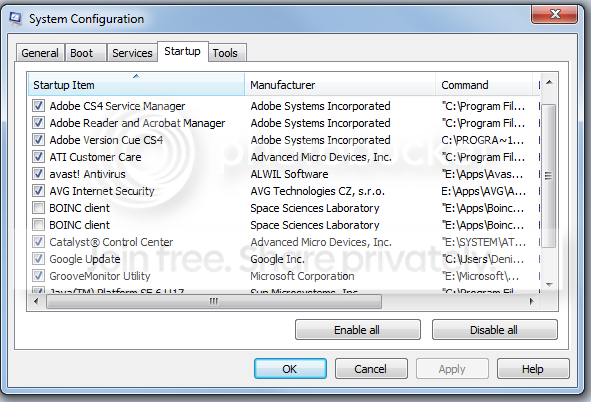
Update all your drivers with the guide in my sig. Also, post some screenshots of your mosconfig startup tab and installed apps. Have you applied any tweaks or tried a system cleaner?
 

My Computer My Computer

At a glance

Windows 7 Ultimate x86-64[email protected] 1066MHz FSB6GB DDR3 1066MHz9300M GS 256MB Dedicated (Speed) + Intel4500M...
Computer Manufacturer/Model Number
Sony Vaio Z46GDU
OS
Windows 7 Ultimate x86-64
CPU
[email protected] 1066MHz FSB
Motherboard
Sony branded
Memory
6GB DDR3 1066MHz
Graphics Card(s)
9300M GS 256MB Dedicated (Speed) + Intel4500MHD (Stamina)
Sound Card
Realtek HD Audio
Monitor(s) Displays
13.1' WXGA
Screen Resolution
1600x900
Hard Drives
320GB 7200RPM w/ 16MB cache
Internet Speed
1MB/s
All my drivers are already updated.

Untitled-5.png


The two other ones not seen are 'Java(TM) Platform SE 6 U17' and 'Windows Live Messenger' (couldn't figure out how to resize that screen).

I haven't done any tweaks or a system cleaner.

Any ideas?
 

My Computer My Computer

At a glance

Windows 7 32 bit
OS
Windows 7 32 bit
Get rid of one of the antivirus suites and Google Updater. Run a memory test with memtest86+ and then schedule chkdsk. Also, check your temperatures with HWInfo32 - link is in the drivers guide in my sig.
 

My Computer My Computer

At a glance

Windows 7 Ultimate x86-64[email protected] 1066MHz FSB6GB DDR3 1066MHz9300M GS 256MB Dedicated (Speed) + Intel4500M...
Computer Manufacturer/Model Number
Sony Vaio Z46GDU
OS
Windows 7 Ultimate x86-64
CPU
[email protected] 1066MHz FSB
Motherboard
Sony branded
Memory
6GB DDR3 1066MHz
Graphics Card(s)
9300M GS 256MB Dedicated (Speed) + Intel4500MHD (Stamina)
Sound Card
Realtek HD Audio
Monitor(s) Displays
13.1' WXGA
Screen Resolution
1600x900
Hard Drives
320GB 7200RPM w/ 16MB cache
Internet Speed
1MB/s
I don't agree with the recommendations to have more than one AntiVirus program; maybe that's where some of the problems are coming from(just a thought). I do recommend having more than one anti--spyware program; such as: Spyware Blaster, Malwarebytes, Spybot, A-Squared, SuperAntiSpyware. One of the better AntiVirus progams is NOD32(but it's not free). I'm using Microsoft Security Essentials on my HP laptop, because I didn't want to pay for a third license for NOD 32.

Steve
 

My Computer My Computer

At a glance

Windows 7 Premium
OS
Windows 7 Premium
Hi,

Thanks for replies. I try above advice. I tried to uninstall Avast (since I only installed to run a secondary virus scan) and I can't seem to be able to remove it (same as with that game).

In the start menu there is no uninstall option. Add/Remove programs nothing. Even Revo Uninstall Pro doesn't see it as installed. How can I uninstall it?

Thanks!

EDIT: Uninstalled avast with avast! uninstall utility

Also, how do i run chkdsk?
 
Last edited:

My Computer My Computer

At a glance

Windows 7 32 bit
OS
Windows 7 32 bit
Back
Top