What don't you like about Windows 7?

Status
Not open for further replies.
Wasn't Windows 7 supposed to be faster and easier to use? Then why are all the useful features of Windows XP still missing? And why do people have to search for a guru to learn how to almost hack stuff 'Mc Gyver style', in order to get something as simple as a QuickLaunch bar that has the Show Desktop shortcut right next to the Start button where it always belongs in the first place? I even start to wonder why the gurus can't be indexed instead of the files on my harddrive that I can usually find where I've put them myself, without the need to index them. Half of the new features that are claimed to make Windows 7 easier, are making it slower. And vice versa: making it faster can be difficult and results in people not finding the things that will make it easier for them, because those are the ones they have to keep disabled in order to make Windows go faster. Worse still, the things people like about XP because they are so easy, are NT — Not There. :sarc: Last but not least, if I tweak my Windows XP SP3 to the same extent you have to tweak your Windows 7 to make it go faster than a clean XP, then my tweaked XP will still be fastest. It's easier to tweak XP than 7, even: people have learnt how to tweak XP over the years, but not 7 yet. So much for 'Windows 7 is faster especially if you have an older computer'.

As a whole, all the white background hurts my eyes on my 42 inch HDTV and icons look ugly, especially the ones that were actually promised to look nice (my good old and all worn Logitech MX518 optical mouse being the sole exception, as long as I don't left-click on it that is). Config Panel is JABOI — Just A Bunch Of Icons. Last but not least, unless I lock my taskbar, Windows 7 shuffles my shortcuts on my bars almost like it's Casino Royale and it also can't align the bar's title and the '»' button with the shortcut buttons properly when Small icons is checked. I can imagine hardly anyone has even noticed you can move a bar to the left hand side of pinned programs without unpinning first, all because it takes precious time and predisposition to become the Yawning Pixel Grabber that I already am. :geek:
 

My Computer My Computer

At a glance

8.1 x64i7 4510U8GB DDR3GeForce 820M
Computer type
Laptop
Computer Manufacturer/Model Number
Asus R510L
OS
8.1 x64
CPU
i7 4510U
Memory
8GB DDR3
Graphics Card(s)
GeForce 820M
Sound Card
Eastern Electric Supreme; Emotiva UMC-200; Astell&Kern AK240
Monitor(s) Displays
LG 42LH5000
Screen Resolution
1920x1080
Hard Drives
1TB internal; 45TB external
PSU
Li-ion
Keyboard
Logitech K800
Mouse
Logitech G400
Internet Speed
20Mbit/s up, 200Mbit/s down
Browser
IE 11
Wasn't Windows 7 supposed to be faster and easier to use? Then why are all the useful features of Windows XP still missing? And why do people have to search for a guru to learn how to almost hack stuff 'Mc Gyver style', in order to get something as simple as a QuickLaunch bar that has the Show Desktop shortcut right next to the Start button where it always belongs in the first place? I even start to wonder why the gurus can't be indexed instead of the files on my harddrive that I can usually find where I've put them myself, without the need to index them. Half of the new features that are claimed to make Windows 7 easier, are making it slower. And vice versa: making it faster can be difficult and results in people not finding the things that will make it easier for them, because those are the ones they have to keep disabled in order to make Windows go faster. Worse still, the things people like about XP because they are so easy, are NT — Not There. :sarc: Last but not least, if I tweak my Windows XP SP3 to the same extent you have to tweak your Windows 7 to make it go faster than a clean XP, then my tweaked XP will still be fastest. It's easier to tweak XP than 7, even: people have learnt how to tweak XP over the years, but not 7 yet. So much for 'Windows 7 is faster especially if you have an older computer'.

As a whole, all the white background hurts my eyes on my 42 inch HDTV and icons look ugly, especially the ones that were actually promised to look nice (my good old and all worn Logitech MX518 optical mouse being the sole exception, as long as I don't left-click on it that is). Config Panel is JABOI — Just A Bunch Of Icons. Last but not least, unless I lock my taskbar, Windows 7 shuffles my shortcuts on my bars almost like it's Casino Royale and it also can't align the bar's title and the '»' button with the shortcut buttons properly when Small icons is checked. I can imagine hardly anyone has even noticed you can move a bar to the left hand side of pinned programs without unpinning first, all because it takes precious time and predisposition to become the Yawning Pixel Grabber that I already am. :geek:
Nice rant!
Xp is only faster because you don't need as much RAM to use it. And aren't all the extra features that good?
 

My Computer My Computer

At a glance

Windows Seven UltimateAMD Piledriver FX 8320 @ 3.5GHzCrucial Ballistix 8GB 1600 MHz DDR3ASUS GeForce GTX 970 Strix Edition @ 1.114 GHz
Computer type
PC/Desktop
Computer Manufacturer/Model Number
The Dominator?
OS
Windows Seven Ultimate
CPU
AMD Piledriver FX 8320 @ 3.5GHz
Motherboard
ASUS M5A97 EVO R2.0
Memory
Crucial Ballistix 8GB 1600 MHz DDR3
Graphics Card(s)
ASUS GeForce GTX 970 Strix Edition @ 1.114 GHz
Sound Card
Integrated
Monitor(s) Displays
LG 23EA63V 23" IPS 1080p Monitor
Screen Resolution
1920x1080
Hard Drives
Samsung SSD 840 EVO 120 GB
1x WD GreenPower 500GB 7200RPM
1 External HDD 1TB
PSU
Corsair CX500
Case
Zalman Z9 Plus
Cooling
CPU - Corsair Hydro H80i, Case - 3x Aerocool Shark Edition
Keyboard
Xenta Backlit Keyboard (Not very good!)
Mouse
Logitech G400
Internet Speed
Download: 7 mb/s Upload: 0.76 mb/s
Antivirus
Microsoft Security Essentials
Browser
Google Chrome
Other Info
Overclockers UK Desk Pad 89 x 45 cm
1200x730x600mm Desk
Using Virtual Audio Cable to split stereo sound into Audio Technica ATH-M50 headphones and Logitech X-530 speakers.
Nice rant!
Xp is only faster because you don't need as much RAM to use it. And aren't all the extra features that good?
Yes, of course they are. The OP asked me what I don't like. :D
 

My Computer My Computer

At a glance

8.1 x64i7 4510U8GB DDR3GeForce 820M
Computer type
Laptop
Computer Manufacturer/Model Number
Asus R510L
OS
8.1 x64
CPU
i7 4510U
Memory
8GB DDR3
Graphics Card(s)
GeForce 820M
Sound Card
Eastern Electric Supreme; Emotiva UMC-200; Astell&Kern AK240
Monitor(s) Displays
LG 42LH5000
Screen Resolution
1920x1080
Hard Drives
1TB internal; 45TB external
PSU
Li-ion
Keyboard
Logitech K800
Mouse
Logitech G400
Internet Speed
20Mbit/s up, 200Mbit/s down
Browser
IE 11

My Computer My Computer

At a glance

Windows Seven UltimateAMD Piledriver FX 8320 @ 3.5GHzCrucial Ballistix 8GB 1600 MHz DDR3ASUS GeForce GTX 970 Strix Edition @ 1.114 GHz
Computer type
PC/Desktop
Computer Manufacturer/Model Number
The Dominator?
OS
Windows Seven Ultimate
CPU
AMD Piledriver FX 8320 @ 3.5GHz
Motherboard
ASUS M5A97 EVO R2.0
Memory
Crucial Ballistix 8GB 1600 MHz DDR3
Graphics Card(s)
ASUS GeForce GTX 970 Strix Edition @ 1.114 GHz
Sound Card
Integrated
Monitor(s) Displays
LG 23EA63V 23" IPS 1080p Monitor
Screen Resolution
1920x1080
Hard Drives
Samsung SSD 840 EVO 120 GB
1x WD GreenPower 500GB 7200RPM
1 External HDD 1TB
PSU
Corsair CX500
Case
Zalman Z9 Plus
Cooling
CPU - Corsair Hydro H80i, Case - 3x Aerocool Shark Edition
Keyboard
Xenta Backlit Keyboard (Not very good!)
Mouse
Logitech G400
Internet Speed
Download: 7 mb/s Upload: 0.76 mb/s
Antivirus
Microsoft Security Essentials
Browser
Google Chrome
Other Info
Overclockers UK Desk Pad 89 x 45 cm
1200x730x600mm Desk
Using Virtual Audio Cable to split stereo sound into Audio Technica ATH-M50 headphones and Logitech X-530 speakers.
If you pin a shortcut to the taskbar, then change the icon of that shortcut the pinned version will NEVER update. You have to unpin and repin.
 

My Computer My Computer

At a glance

Windows 7 32 bit build 7600Intel 7400 2.78 GHz 3MB L2 Cache2 x 2048 PC2ATI HD 4350
Computer Manufacturer/Model Number
HP
OS
Windows 7 32 bit build 7600
CPU
Intel 7400 2.78 GHz 3MB L2 Cache
Motherboard
Some crappy chipset
Memory
2 x 2048 PC2
Graphics Card(s)
ATI HD 4350
Sound Card
See motherboard
Monitor(s) Displays
HP 2159m and AOC 2236
Hard Drives
Some hitachi thing
PSU
Bad
Case
bad
Cooling
bad
If you pin a shortcut to the taskbar, then change the icon of that shortcut the pinned version will NEVER update. You have to unpin and repin.

Because, it uses a different shortcut.
C:\Users\[username]\AppData\Roaming\Microsoft\Internet Explorer\Quick Launch\User Pinned\TaskBar
 

My Computer My Computer

At a glance

Windows 10 Pro (x64)Intel Core i7-3930K (3.2GHz - 4.5GHz)4x Samsung 4GB PC3-12800 DDR3 (16GB 1600MHz)Nvidia Geforce GTX 690
Computer type
PC/Desktop
Computer Manufacturer/Model Number
Alienware Aurora ALX R4
OS
Windows 10 Pro (x64)
CPU
Intel Core i7-3930K (3.2GHz - 4.5GHz)
Motherboard
Alienware Aurora-R4 x79
Memory
4x Samsung 4GB PC3-12800 DDR3 (16GB 1600MHz)
Graphics Card(s)
Nvidia Geforce GTX 690
Sound Card
SteelSeries Siberia Elite
Monitor(s) Displays
Dell UltraSharp U3011
Screen Resolution
2560x1600
Hard Drives
Samsung 850 Pro 256 GB, Seagate 1TB Desktop Hybrid HDD, 2x Western Digital 4TB Green HDD
PSU
875W Some Dell PSU <.<
Case
Alienware Aurora ALX
Cooling
Custom Liquid Cooling (EK CPU & GPU blocks) dual EK 480RAD
Keyboard
Logitech G710+ Mechanical
Mouse
Logitech G700s
Internet Speed
Verizon Fios (50 mbps average)
Other Info
Server: Intel NUC D54250WYK: i5-4250U, 16GB, 256 GB mSATA, Windows Server 2012 R2

My Computer My Computer

At a glance

8.1 x64i7 4510U8GB DDR3GeForce 820M
Computer type
Laptop
Computer Manufacturer/Model Number
Asus R510L
OS
8.1 x64
CPU
i7 4510U
Memory
8GB DDR3
Graphics Card(s)
GeForce 820M
Sound Card
Eastern Electric Supreme; Emotiva UMC-200; Astell&Kern AK240
Monitor(s) Displays
LG 42LH5000
Screen Resolution
1920x1080
Hard Drives
1TB internal; 45TB external
PSU
Li-ion
Keyboard
Logitech K800
Mouse
Logitech G400
Internet Speed
20Mbit/s up, 200Mbit/s down
Browser
IE 11
I don't like how if you need to type é or ™ on a us standard keyboard you either have to locate it in Character map or type in a number using the pad that not all laptops have. on the may you just type either alt+e to get the "`" then "e" again to get "é". if you wish to type "á" you just type "a" instead of a another "e".
 

My Computer My Computer

At a glance

Windows 8 Pro (32-bit)1.83GHz Intel Core Duo2GB 667MHz DDR2 SDRAM (PC2-5300) (upgrade)ATI Radeon X1600 with 128MB GDDR3 memory
Computer type
PC/Desktop
Computer Manufacturer/Model Number
Apple 17" iMac MA199LL (Early 2006)
OS
Windows 8 Pro (32-bit)
CPU
1.83GHz Intel Core Duo
Memory
2GB 667MHz DDR2 SDRAM (PC2-5300) (upgrade)
Graphics Card(s)
ATI Radeon X1600 with 128MB GDDR3 memory
Monitor(s) Displays
17-inch TFT active-matrix LCD, millions of colors
Screen Resolution
1440 x 900
Hard Drives
Hitachi 320GB HDT721032SLA360 7200RPM SATA II (upgrade)
Keyboard
Microsoft Wired Keyboard 600
Mouse
Microsoft Basic Optical Mouse v2.0
Internet Speed
4 Mbps
Antivirus
Microsoft Security Essentials
Browser
Google Chrome
Other Info
WEI:
Base Score: 3.9 Processor: 4.4 Memory 4.7
Graphics: 3.9 Gaming Graphics: 4.1 Primary HD: 5.9
hdmi - Very well said!
My rant:
The more I use Win 7, the more I run into things that frustrated me in Vista. The operating system is more stable than I remember, but a lot of the functionality I had/used in XP has been taken out. From the drift of things I have read in these threads, these functions/options/menus/utilities aren’t coming back. This thread is about what you don’t like, and the specifics of my previous statement have been addressed in this thread and others. A lot of things are small/minor. …Like the Up Arrow in Windows Explorer for example. I have been using bread crumbs for quite a while, and still miss it. Some (other) things impact my productivity heavily, and are a major grievance to me. Functions, and utilities I had in XP have been stripped out of Vista and Seven, and (like I said before) don’t look like they are coming back. I have heard Microsoft is slowly discontinuing support for XP. I believe Microsoft is making a big mistake doing that. A lot of people like XP, and are staying with it. It’s a comfortable, reliable work horse. Some things that were easy in XP have been made into a PIA, or are missing altogether in Vista/7. Don’t get me wrong… I really like a lot of the features in Win 7. It is (In my opinion) worth the horrible learning curve to get to know it. The graphics are better, the boot time quicker, and there are a bunch of new toys and added functionality XP/Vista did not have. For (Guessing here) 80 percent of the people who use it, Windows, 7 is going to be just wonderful for them. My Operating System however? I think not. Either Microsoft isn’t really listening, or (I believe) they just don’t care. Do I believe Microsoft should cater to 20 to 25 percent of their users? That’s a resounding YES! I have heard in these threads that not enough people actually use the functions/menus/utilities that were stripped, based on research. There is NO doubt in my mind that the numbers Microsoft has, are extremely accurate. What about the thousands \ millions who do/did use those Functions/menus/utilities however? Is it so hard to leave them in? They were there already! I don’t want anything new added… I want things that were stripped out, put back! The missing right click options in Slideshow for example. I sure did enjoy being able to send a photo to an editor from slide show, editing it, then continuing with slideshow. I also used to be able to select a photo and start slideshow from there. It seems to start at the beginning every time (Or am I missing something.)
Does all the new “stuff” in Win 7 work the way I want it to, or the way I feel it should? NO. Some of my questions still have not been answered. For instance; there is a new MP3 tag editor in Win 7 (Love it!), but I cannot access one of the fields I really need to edit. I need access to the Artist field. Album Artist and Artist are not the same. Some of the hardware I use relies on the Artist field, and sometimes Artist, and Album Artist differ. Is there a way to do this? I’m not the only one who has asked that, and so far, I cannot find an answer to that question. (If someone knows the answer, and can point me to it I would appreciate it.)
I understand also, that Microsoft is still working on a number of post release “fixes”. I'm waiting to see if any of my old functionality is restored. By the way; user registry hacks, work a rounds, and third party software are not repairs.

I do intend to keep 1 Win 7 machine running to keep abreast of development, and (Believe it or not) some activities are actually faster and easier in 7. My new Vista Laptop is probably going back to XP Pro. I have heard that the manufacturer does not support XP drivers for some of the newer hardware, and it will “Void my warranty”. If the stupid thing has much trouble, I’ll put 7 on it, and research manufacturers who do support XP. I’m not asking to return to the Stone Age. I just want my functionality back! Sometimes newer IS better. I don’t even mind relearning a different way to do things all that much (Although I do still miss that arrow!). When you cannot even accomplish the same tasks anymore, using the same (but different) software, SOMETHINGS WRONG!
The examples I have used are only a couple of the frustrations I have. C’mon Microsoft, How about a little give?

Discussion anyone? :)
 
Last edited:

My Computer My Computer

At a glance

XP Media Edition / Vista /Win 7 Home PremiumWin 7 Machine: Intel Core 2 Duo T5850 @ 2.16G...4GB Dual Channel DDR2 @ 333MHz 5-5-5-15Nvidia Defaul 1920X1200 256MB GeForce 9300M
Computer Manufacturer/Model Number
HP Touchsmart
OS
XP Media Edition / Vista /Win 7 Home Premium
CPU
Win 7 Machine: Intel Core 2 Duo T5850 @ 2.16GHz Merom 65nm
Motherboard
Pegatron Corp. EVE Model
Memory
4GB Dual Channel DDR2 @ 333MHz 5-5-5-15
Graphics Card(s)
Nvidia Defaul 1920X1200 256MB GeForce 9300M
Sound Card
SoundMAX Integrated Digital HD Audio
Monitor(s) Displays
HP 25" Flat Panel Touch Screen
Screen Resolution
1900X1200
Hard Drives
500 GB Seagate ST3500620as (Sata) 1.5 TB Seagate External
Keyboard
HP Model RK713A
Internet Speed
3.0Gb
hdmi - Very well said!
Does all the new “stuff” in Win 7 work the way I want it to, or the way I feel it should? NO. Some of my questions still have not been answered. For instance; there is a new MP3 tag editor in Win 7 (Love it!), but I cannot access one of the fields I really need to edit. I need access to the Artist field. Album Artist and Artist are not the same. Some of the hardware I use relies on the Artist field, and sometimes Artist, and Album Artist differ. Is there a way to do this? I’m not the only one who has asked that, and so far, I cannot find an answer to that question. (If someone knows the answer, and can point me to it I would appreciate it.)
I understand also, that Microsoft is still working on a number of post release “fixes”. I'm waiting to see if any of my old functionality is restored. By the way; user registry hacks, work a rounds, and third party software are not repairs.


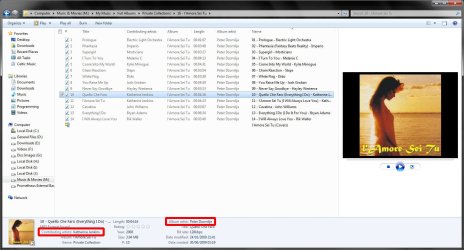
Please see the following attachment:
seven_mp3_tag.jpg
As can be seen clearly, the "Album Artist" and "Contributing Artist" field are indeed different. It's the "Contributing Artist" field that you are looking for to represent the Artist. I know this, becaue a utility that I created back in the day of XP (MP3 Media Properties Explorer), correctly writes the ID3v2 Artist tag. In Vista and Seven, this is displayed as "Contributing Artist".

Surely it could have taken you less time to figure that out than it did to rant about it?

I do intend to keep 1 Win 7 machine running to keep abreast of development, and (Believe it or not) some activities are actually faster and easier in 7. My new Vista Laptop is probably going back to XP Pro. I have heard that the manufacturer does not support XP drivers for some of the newer hardware, and it will “Void my warranty”. If the stupid thing has much trouble, I’ll put 7 on it, and research manufacturers who do support XP. I’m not asking to return to the Stone Age. I just want my functionality back! Sometimes newer IS better. I don’t even mind relearning a different way to do things all that much (Although I do still miss that arrow!). When you cannot even accomplish the same tasks anymore, using the same (but different) software, SOMETHINGS WRONG!
The examples I have used are only a couple of the frustrations I have. C’mon Microsoft, How about a little give?

Discussion anyone? :)


I am sure you will discover that seven is by far the superior operating system. You just need to give yourself a little more time to figure that out. I haven't personally used XP in 3 years (not counting the computers at work), and I stopped using Vista about 3 days after I tried Windows 7 BETA Build 7000.

But as for you not being able to accomplish the same tasks anymore, I do not believe that this is a problem with the new OS. Yes, Seven is different, and you have set yourself up to fail but not adapting to the changes. C'mon, give yourself a little credit here, and you'll eventually wonder how you ever got anything done on XP without 3rd-party utilities...
 

My Computer My Computer

At a glance

Windows 7 Professional 32-bit SP1AMD A4/A63.00GB EDOVMware SVGA 3D
Computer type
PC/Desktop
Computer Manufacturer/Model Number
Virtual Machine
OS
Windows 7 Professional 32-bit SP1
CPU
AMD A4/A6
Motherboard
Intel Corporation 440BX Desktop Reference Platform
Memory
3.00GB EDO
Graphics Card(s)
VMware SVGA 3D
Sound Card
High Definition Audio Device
Monitor(s) Displays
Generic Non-PnP Monitor on VMware SVGA 3D
Screen Resolution
1440x900
Hard Drives
1 x 60GB VMware Virtual SATA Hard Drive ATA Device
Antivirus
Kaspersky Total Security
Not everyone can be pleased. I use XP and 7 side by side every day. There is never a single function on my xp Laptop (That I have to use for work as it is joined to company domain and vpn) that I miss on my Windows 7 Desktop. Not one. Both are Dual core system boasting at least 2 gb of RAM. My Laptop is way more clunky, but of course it is running the company's somewhat bloated image. Still, I miss a considerable amount of the 7 functions, not the least of which is that if the laptop was running 7, it would be network-able with my home network, without having to break it from it's current domain. As it stands, if I want to get a file from this old XP laptop to any of the other networked computers in my house, the only way to accomplish it is with a jump drive, or to email the file to myself..

I run just as many apps on the 7 computer as I do on the xp laptop, and it is far more responsive. Some morning, I wonder if the xp laptop is going to make it out of sleep mode.. It seems to take it a good 10-15 minutes before it starts to have any snap. The 7 computer is never anything but snappy..

So far, the compatibility trouble-shooter has worked fairly well getting legacy applications to run with one big exception. I have a piece of $1400.00 medical software that will only run in XP. Reason. It requires a usb dongle, that the company decided not to create vista/7 drivers for, unless you paid $3-400 to upgrade to the next version. I get around this, by running an xp virtual machine in my 7 computer, and it runs flawless.
To be quite honest, I have actually come to prefer this method rather than run it native on 7. It feels cleaner..

Haters may want to give this a try. Install 7, and install XP as a virtual machine in 7. Then, use both side by side for a while. So far, I have yet to hear a compelling argument against 7 and I have been following this here thread for what feels like almost a year..
 

My Computer My Computer

At a glance

Windows 7 UltimateAmd 5400+ dual core overclocked to 3.0 ghz8gb 5-5-5-5-15 g-skillNvidia 9800gt 512mb
Computer Manufacturer/Model Number
Custom
OS
Windows 7 Ultimate
CPU
Amd 5400+ dual core overclocked to 3.0 ghz
Motherboard
EVGA 590 sli aM2
Memory
8gb 5-5-5-5-15 g-skill
Graphics Card(s)
Nvidia 9800gt 512mb
Sound Card
M-Audio Delta 2496
Monitor(s) Displays
Acer 22 inch lcd
Screen Resolution
1680 x 1050
Hard Drives
Hmm

4.0 terabytes total..
PSU
650 watts
Case
Antec Sonata II
Cooling
Zallmen Xpu cooler
Keyboard
some rubbish I found in my garage
Mouse
logitech
Internet Speed
caps at about 650kb down, 50kb up . Gigabit local network.
hdmi - Very well said!
My rant:
The more I use Win 7, the more I run into things that frustrated me in Vista. The operating system is more stable than I remember, but a lot of the functionality I had/used in XP has been taken out. From the drift of things I have read in these threads, these functions/options/menus/utilities aren’t coming back. This thread is about what you don’t like, and the specifics of my previous statement have been addressed in this thread and others. A lot of things are small/minor. …Like the Up Arrow in Windows Explorer for example. I have been using bread crumbs for quite a while, and still miss it. Some (other) things impact my productivity heavily, and are a major grievance to me. Functions, and utilities I had in XP have been stripped out of Vista and Seven, and (like I said before) don’t look like they are coming back. I have heard Microsoft is slowly discontinuing support for XP. I believe Microsoft is making a big mistake doing that. A lot of people like XP, and are staying with it. It’s a comfortable, reliable work horse. Some things that were easy in XP have been made into a PIA, or are missing altogether in Vista/7. Don’t get me wrong… I really like a lot of the features in Win 7. It is (In my opinion) worth the horrible learning curve to get to know it. The graphics are better, the boot time quicker, and there are a bunch of new toys and added functionality XP/Vista did not have. For (Guessing here) 80 percent of the people who use it, Windows, 7 is going to be just wonderful for them. My Operating System however? I think not. Either Microsoft isn’t really listening, or (I believe) they just don’t care. Do I believe Microsoft should cater to 20 to 25 percent of their users? That’s a resounding YES! I have heard in these threads that not enough people actually use the functions/menus/utilities that were stripped, based on research. There is NO doubt in my mind that the numbers Microsoft has, are extremely accurate. What about the thousands \ millions who do/did use those Functions/menus/utilities however? Is it so hard to leave them in? They were there already! I don’t want anything new added… I want things that were stripped out, put back! The missing right click options in Slideshow for example. I sure did enjoy being able to send a photo to an editor from slide show, editing it, then continuing with slideshow. I also used to be able to select a photo and start slideshow from there. It seems to start at the beginning every time (Or am I missing something.)
Does all the new “stuff” in Win 7 work the way I want it to, or the way I feel it should? NO. Some of my questions still have not been answered. For instance; there is a new MP3 tag editor in Win 7 (Love it!), but I cannot access one of the fields I really need to edit. I need access to the Artist field. Album Artist and Artist are not the same. Some of the hardware I use relies on the Artist field, and sometimes Artist, and Album Artist differ. Is there a way to do this? I’m not the only one who has asked that, and so far, I cannot find an answer to that question. (If someone knows the answer, and can point me to it I would appreciate it.)
I understand also, that Microsoft is still working on a number of post release “fixes”. I'm waiting to see if any of my old functionality is restored. By the way; user registry hacks, work a rounds, and third party software are not repairs.

I do intend to keep 1 Win 7 machine running to keep abreast of development, and (Believe it or not) some activities are actually faster and easier in 7. My new Vista Laptop is probably going back to XP Pro. I have heard that the manufacturer does not support XP drivers for some of the newer hardware, and it will “Void my warranty”. If the stupid thing has much trouble, I’ll put 7 on it, and research manufacturers who do support XP. I’m not asking to return to the Stone Age. I just want my functionality back! Sometimes newer IS better. I don’t even mind relearning a different way to do things all that much (Although I do still miss that arrow!). When you cannot even accomplish the same tasks anymore, using the same (but different) software, SOMETHINGS WRONG!
The examples I have used are only a couple of the frustrations I have. C’mon Microsoft, How about a little give?

Discussion anyone? :)

You allude to some MAJOR missing functionality, but the things you site are pretty minor. I would have thought it would be the other way around, you would site the major, and allude to the minor...

Mp3 tag editor ? seems to have been addressed by another in the thread. I can agree with you on the up arrow. There should be a way to put it back, and I am waiting for someone to release a hack that will. Still, the address bar at the top works pretty good for my purposes. A couple clicks can always get me where I need to go. There was just something mighty intuitive about the up arrow function that I rather miss at times, and the address bar is not quite the same.

I do not use slide show in 7, so I cannot speak to the missing right click menu. Rather, I am a pretty strict picasa user for photo organization and basics, and if I ever need to engage in serious editing (2 times a year) I use photoshop. When it comes to photo-organizing, editing, etc on any serious level, I would not recommend staying with the bundled software in 7, not when there are companies out there that specialize in precisely this, that create vastly superior software which is in many cases free.. You are just better off.. My guess, is slide show in 7, was not created for users who even have a decent grasp on the fact that they have a right mouse button, much less what it does..
 

My Computer My Computer

At a glance

Windows 7 UltimateAmd 5400+ dual core overclocked to 3.0 ghz8gb 5-5-5-5-15 g-skillNvidia 9800gt 512mb
Computer Manufacturer/Model Number
Custom
OS
Windows 7 Ultimate
CPU
Amd 5400+ dual core overclocked to 3.0 ghz
Motherboard
EVGA 590 sli aM2
Memory
8gb 5-5-5-5-15 g-skill
Graphics Card(s)
Nvidia 9800gt 512mb
Sound Card
M-Audio Delta 2496
Monitor(s) Displays
Acer 22 inch lcd
Screen Resolution
1680 x 1050
Hard Drives
Hmm

4.0 terabytes total..
PSU
650 watts
Case
Antec Sonata II
Cooling
Zallmen Xpu cooler
Keyboard
some rubbish I found in my garage
Mouse
logitech
Internet Speed
caps at about 650kb down, 50kb up . Gigabit local network.
Please see the following attachment:
As can be seen clearly, the "Album Artist" and "Contributing Artist" field are indeed different. It's the "Contributing Artist" field that you are looking for to represent the Artist. I know this, becaue a utility that I created back in the day of XP (MP3 Media Properties Explorer), correctly writes the ID3v2 Artist tag. In Vista and Seven, this is displayed as "Contributing Artist".

Surely it could have taken you less time to figure that out than it did to rant about it?

I do intend to keep 1 Win 7 machine running to keep abreast of development, and (Believe it or not) some activities are actually faster and easier in 7. My new Vista Laptop is probably going back to XP Pro. I have heard that the manufacturer does not support XP drivers for some of the newer hardware, and it will “Void my warranty”. If the stupid thing has much trouble, I’ll put 7 on it, and research manufacturers who do support XP. I’m not asking to return to the Stone Age. I just want my functionality back! Sometimes newer IS better. I don’t even mind relearning a different way to do things all that much (Although I do still miss that arrow!). When you cannot even accomplish the same tasks anymore, using the same (but different) software, SOMETHINGS WRONG!
The examples I have used are only a couple of the frustrations I have. C’mon Microsoft, How about a little give?

Discussion anyone? :)

I am sure you will discover that seven is by far the superior operating system. You just need to give yourself a little more time to figure that out. I haven't personally used XP in 3 years (not counting the computers at work), and I stopped using Vista about 3 days after I tried Windows 7 BETA Build 7000.

But as for you not being able to accomplish the same tasks anymore, I do not believe that this is a problem with the new OS. Yes, Seven is different, and you have set yourself up to fail but not adapting to the changes. C'mon, give yourself a little credit here, and you'll eventually wonder how you ever got anything done on XP without 3rd-party utilities...
:D I wasn't looking for "Album Artist" or "Contributing Artist" Simply "Artist". I had NO idea that "Contributing Artist" saves to the "Artist" field. I have all three of those fields in my tags; each of them a different field. How exactly would one figure out that the "Contributing Artist" field saves to the "Artist" field? I haven't played with this info yet. Thanks for the heads up. truly. If my hardware and software didn't rely on that field, I would just get used to using a different field. My entire library of thousands of songs is indexed by "Artist". It would take considerable work to populate another field properly.
As far as the third party options; I use em, I just don't want to pay third parties to do what was native in XP.
Time I have plenty of, and I don't mind being educated. I plan to continue to use 7. Win 7 is NOT bad at all. in fact I readily admit it does some things better than, or is not available at all in XP. It's just what is missing that bothers me. Do you know of a way to send the picture I'm viewing in slideshow to an editor, from slideshow, without leaving slideshow? I know the new OS is different. I can't find a way to do this at all in 7, and that's something I don't like. Thank you for the heads up on the Tag issue. I'll have to wait a few days to play with it. I apreciate your input.
 
Last edited:

My Computer My Computer

At a glance

XP Media Edition / Vista /Win 7 Home PremiumWin 7 Machine: Intel Core 2 Duo T5850 @ 2.16G...4GB Dual Channel DDR2 @ 333MHz 5-5-5-15Nvidia Defaul 1920X1200 256MB GeForce 9300M
Computer Manufacturer/Model Number
HP Touchsmart
OS
XP Media Edition / Vista /Win 7 Home Premium
CPU
Win 7 Machine: Intel Core 2 Duo T5850 @ 2.16GHz Merom 65nm
Motherboard
Pegatron Corp. EVE Model
Memory
4GB Dual Channel DDR2 @ 333MHz 5-5-5-15
Graphics Card(s)
Nvidia Defaul 1920X1200 256MB GeForce 9300M
Sound Card
SoundMAX Integrated Digital HD Audio
Monitor(s) Displays
HP 25" Flat Panel Touch Screen
Screen Resolution
1900X1200
Hard Drives
500 GB Seagate ST3500620as (Sata) 1.5 TB Seagate External
Keyboard
HP Model RK713A
Internet Speed
3.0Gb
You allude to some MAJOR missing functionality, but the things you site are pretty minor. I would have thought it would be the other way around, you would site the major, and allude to the minor...

Mp3 tag editor ? seems to have been addressed by another in the thread. I can agree with you on the up arrow. There should be a way to put it back, and I am waiting for someone to release a hack that will. Still, the address bar at the top works pretty good for my purposes. A couple clicks can always get me where I need to go. There was just something mighty intuitive about the up arrow function that I rather miss at times, and the address bar is not quite the same.

I do not use slide show in 7, so I cannot speak to the missing right click menu. Rather, I am a pretty strict picasa user for photo organization and basics, and if I ever need to engage in serious editing (2 times a year) I use photoshop. When it comes to photo-organizing, editing, etc on any serious level, I would not recommend staying with the bundled software in 7, not when there are companies out there that specialize in precisely this, that create vastly superior software which is in many cases free.. You are just better off.. My guess, is slide show in 7, was not created for users who even have a decent grasp on the fact that they have a right mouse button, much less what it does..
I like viewing the pictures full screen without any headers, or controls showing. Personal preference I guess. It helps me pick out flaws without distractions. Photo shop does not do this for me. I do however send the pictures to Photo Shop for editing. To each their own I guess. I'm still wondering WHY MS stripped the ability to do this. I also like the ability to click through the photos that don't need editing without opening and closing windows. I find it takes very little effort to do this in Slideshow. Speaking as a long time Vista avoider, (Hate is such a strong word.) the loss of small things like this is why I never went back. What's small for some people is a major issue for others.
I agree with you about Bread Crumbs. It is a pretty nice feature once you get used to it. It's also nice to hear someone else say they they miss the arrow. Can I do without it? Yup! It sure was usefull to me also though. I would like to see it back. :D
 
Last edited:

My Computer My Computer

At a glance

XP Media Edition / Vista /Win 7 Home PremiumWin 7 Machine: Intel Core 2 Duo T5850 @ 2.16G...4GB Dual Channel DDR2 @ 333MHz 5-5-5-15Nvidia Defaul 1920X1200 256MB GeForce 9300M
Computer Manufacturer/Model Number
HP Touchsmart
OS
XP Media Edition / Vista /Win 7 Home Premium
CPU
Win 7 Machine: Intel Core 2 Duo T5850 @ 2.16GHz Merom 65nm
Motherboard
Pegatron Corp. EVE Model
Memory
4GB Dual Channel DDR2 @ 333MHz 5-5-5-15
Graphics Card(s)
Nvidia Defaul 1920X1200 256MB GeForce 9300M
Sound Card
SoundMAX Integrated Digital HD Audio
Monitor(s) Displays
HP 25" Flat Panel Touch Screen
Screen Resolution
1900X1200
Hard Drives
500 GB Seagate ST3500620as (Sata) 1.5 TB Seagate External
Keyboard
HP Model RK713A
Internet Speed
3.0Gb
I like Windows 7 although I'll have to admit I criticised it nevertheless, and yes, I am aware of the fact nothing nor anyone can be perfect. That includes me, but it also includes Windows.

Breadcrumbs versus up arrow is not the main issue. It's the fact so many people dislike Live mail while Outlook Express is gone. It's the fact you have to either search the internet or become a clearvoyant to find out that there is indeed a shortcut for Show Desktop in "C:\Users\{username}\AppData\Roaming\Microsoft\Internet Explorer\Quick Launch" and that you can indeed put it between the Start orb and Pinned programs on your Taskbar, by copying it to a new Directory first, then pinning that directory to your taskbar as a Toolbar, then dragging that toolbar very Fast. However: if you drag it too slow it won't go there, because the new "Snap" feature will not trigger unless you do it fast enough, meaning you have to unpin all of the pinned programs and re-pin them if you happen to be a person who can't drag fast enough. Nobody can be perfect, remember? No offense, but that is not exactly what I'd call "easier to use". I hope you'll see my point after all.
 

My Computer My Computer

At a glance

8.1 x64i7 4510U8GB DDR3GeForce 820M
Computer type
Laptop
Computer Manufacturer/Model Number
Asus R510L
OS
8.1 x64
CPU
i7 4510U
Memory
8GB DDR3
Graphics Card(s)
GeForce 820M
Sound Card
Eastern Electric Supreme; Emotiva UMC-200; Astell&Kern AK240
Monitor(s) Displays
LG 42LH5000
Screen Resolution
1920x1080
Hard Drives
1TB internal; 45TB external
PSU
Li-ion
Keyboard
Logitech K800
Mouse
Logitech G400
Internet Speed
20Mbit/s up, 200Mbit/s down
Browser
IE 11
I have no idea about the missing right click functionality in Slideshow. I fear you may be out of luck with that one. Picasa is a free organizer with minimal but somewhat powerful editing functionality, that also contains the ability to view photos via slideshow. One option may be to "Star" the photos there while you view in slideshow. Doing so puts them automatically on Picasa's Selection list, or held photos. From there, you can then edit them or transfer to a new folder for editing with another app etc.. About the best I can offer. I believe the contributing artist field in Windows 7 is in fact the artist field that you are used to. For any kind of bulk mp3 tag editing, I use tagscanner: The Ultimate TagScanner: Download

It is free, has a bit of a learning curve, but once you know a few of the basics, it really makes editing lots of files much easier. I have been working through my audio-book collection which contains over 12,000 individual mp3 files using it, and have found it invaluable. Basically, 7's tag editor functionality, while a very cool idea and useful if you want to view info on a given file on the fly and change, does not help too much where bulk editing is concerned. I own a 30gb Zune that I purchased refurbished for $65. The zune software is not really great, and chokes a great deal if tags are not properly set. Tagscanner is a much needed companion to any Zune owner, or another app like it. The zune software lacks, but it is the only way of getting music, movies, audiobooks into your zune. Once they are there, the player is really a huge score, especially for the prices they tend to run at now..

Good luck to you!!
 

My Computer My Computer

At a glance

Windows 7 UltimateAmd 5400+ dual core overclocked to 3.0 ghz8gb 5-5-5-5-15 g-skillNvidia 9800gt 512mb
Computer Manufacturer/Model Number
Custom
OS
Windows 7 Ultimate
CPU
Amd 5400+ dual core overclocked to 3.0 ghz
Motherboard
EVGA 590 sli aM2
Memory
8gb 5-5-5-5-15 g-skill
Graphics Card(s)
Nvidia 9800gt 512mb
Sound Card
M-Audio Delta 2496
Monitor(s) Displays
Acer 22 inch lcd
Screen Resolution
1680 x 1050
Hard Drives
Hmm

4.0 terabytes total..
PSU
650 watts
Case
Antec Sonata II
Cooling
Zallmen Xpu cooler
Keyboard
some rubbish I found in my garage
Mouse
logitech
Internet Speed
caps at about 650kb down, 50kb up . Gigabit local network.
well one of my complaints is now void. i can get tinker for windows 7 for free. woohoo, once again productivity goes out the window to make room for mindless addiction.
 

My Computer My Computer

At a glance

Windows 7 Ultimate Signature EditionIntel Core i7 Extreme 3.33GHz12GB DDR32x EVGA 285 2GB in SLI
Computer Manufacturer/Model Number
Custom
OS
Windows 7 Ultimate Signature Edition
CPU
Intel Core i7 Extreme 3.33GHz
Motherboard
EVGA X-58 SLI Classified
Memory
12GB DDR3
Graphics Card(s)
2x EVGA 285 2GB in SLI
Sound Card
Creative Labs X-Fi ExtremeGamer
Monitor(s) Displays
30" Viewsonic
Hard Drives
2x1TB Western Digital 7200RPM in RAID 0/1TB WD My Book External HDD
PSU
Thermaltake 1000w supporting quad SLI
Case
Thermaltake Armor Full Tower
Cooling
Thermaltake V1 CPU+DIY Liquid cooling
I have no idea about the missing right click functionality in Slideshow. I fear you may be out of luck with that one. Picasa is a free organizer with minimal but somewhat powerful editing functionality, that also contains the ability to view photos via slideshow. One option may be to "Star" the photos there while you view in slideshow. Doing so puts them automatically on Picasa's Selection list, or held photos. From there, you can then edit them or transfer to a new folder for editing with another app etc.. About the best I can offer. I believe the contributing artist field in Windows 7 is in fact the artist field that you are used to. For any kind of bulk mp3 tag editing, I use tagscanner: The Ultimate TagScanner: Download

It is free, has a bit of a learning curve, but once you know a few of the basics, it really makes editing lots of files much easier. I have been working through my audio-book collection which contains over 12,000 individual mp3 files using it, and have found it invaluable. Basically, 7's tag editor functionality, while a very cool idea and useful if you want to view info on a given file on the fly and change, does not help too much where bulk editing is concerned. I own a 30gb Zune that I purchased refurbished for $65. The zune software is not really great, and chokes a great deal if tags are not properly set. Tagscanner is a much needed companion to any Zune owner, or another app like it. The zune software lacks, but it is the only way of getting music, movies, audiobooks into your zune. Once they are there, the player is really a huge score, especially for the prices they tend to run at now..

Good luck to you!!
Thanks for the heads up. I found a link that is suposed to add the up arrow, and other classic functions back into Windows 7, on a thread in this forum. It's late here. I'll try to install it to tomorrow evening, and let you know how it works. If you want to investigate it yourself, the link is below
Welcome to Classic Shell

Edit: I know I'm whistleing in the dark asking MS to put functions back. The point I'm trying to make is; tools I use that were native to the OS, are now gone. I have to replace them with 3rd party software. Grrrrr. MS has a big promo campain out right now saying they listened to the users, and gave them what they wanted. hehehehe riiiight.... Although most have good things to say about 7, people I talk with feel the same way; but we must be a minority. Quite a few (Like me), are coming directly from XP. The link above (I feel) should not be needed. I apreciate the input on good third party software that works, very much! It looks like I'm going to need it.
Thanks again
smee
 
Last edited:

My Computer My Computer

At a glance

XP Media Edition / Vista /Win 7 Home PremiumWin 7 Machine: Intel Core 2 Duo T5850 @ 2.16G...4GB Dual Channel DDR2 @ 333MHz 5-5-5-15Nvidia Defaul 1920X1200 256MB GeForce 9300M
Computer Manufacturer/Model Number
HP Touchsmart
OS
XP Media Edition / Vista /Win 7 Home Premium
CPU
Win 7 Machine: Intel Core 2 Duo T5850 @ 2.16GHz Merom 65nm
Motherboard
Pegatron Corp. EVE Model
Memory
4GB Dual Channel DDR2 @ 333MHz 5-5-5-15
Graphics Card(s)
Nvidia Defaul 1920X1200 256MB GeForce 9300M
Sound Card
SoundMAX Integrated Digital HD Audio
Monitor(s) Displays
HP 25" Flat Panel Touch Screen
Screen Resolution
1900X1200
Hard Drives
500 GB Seagate ST3500620as (Sata) 1.5 TB Seagate External
Keyboard
HP Model RK713A
Internet Speed
3.0Gb

My Computers My Computers

  • At a glance

    Windows 11 Pro x64 [Latest Release and Releas...Ryzen 9 5950X, 3.8 - 5.2 MHz64GB [2 x 32GB] DDR4 3200MHz4GB NVIDIA GEFORCE GTX 1650 Ti
    Computer type
    PC/Desktop
    Computer Manufacturer/Model Number
    ChillBlast - Custom to my design
    OS
    Windows 11 Pro x64 [Latest Release and Release Preview]
    CPU
    Ryzen 9 5950X, 3.8 - 5.2 MHz
    Motherboard
    Asus Prime X570-Pro
    Memory
    64GB [2 x 32GB] DDR4 3200MHz
    Graphics Card(s)
    4GB NVIDIA GEFORCE GTX 1650 Ti
    Sound Card
    On-board SPDIF to 5.1 System + HDMI [5.1 system]
    Monitor(s) Displays
    32" UHD 32 Bit HDR Monitor + 43" UHD 4K 32Bit HDR TV
    Screen Resolution
    2 x 3840 x 2160 @60Hz
    Hard Drives
    1TB M2 SSD OS, 500GB Fast Access SSD, 2 x 8TB Data + Various Externals from 1TB to 4TB, 10TB NAS
    PSU
    NZXT C750 80 PLUS Gold 750W Modular PSU
    Case
    Workstation Case [Matt Black]
    Cooling
    NZXT Kraken X63 280mm CPU Cooler +2x Quiet Case fans
    Keyboard
    Logitech Wireless MX Keys & K400 + others
    Mouse
    Logitech Wireless MX Master 3S
    Internet Speed
    920 MB Down 50 MB Up
    Antivirus
    BitDefender Total Security Pro
    Browser
    Chrome (always run latest Non-Beta)
    Other Info
    Also run ...
    Laptop - Quad 8GB - Windows 10 Pro x64
    Nexus 7 Android tablet x2
    Samsung 10.2" tablet
    Blackview TAB 8 4G Android Tablet c/w Keyboard
    Wacom Intuos Pro Medium Pen Pad
    Wacom Intuos Pro Small Pen Pad
    Wacom Expresskeys Remote
    Loopdeck+ Graphics Controller
    Shuttle Pro v2 Control
  • At a glance

    Windows 11 Pro x64 Latest RPIntel I7 10750H 5.0GHz32GB [2x16GB] DDR4 2933 MHznVidia GTX1650Ti 4 GB GDDR6
    Computer type
    Laptop
    System Manufacturer/Model Number
    Dell XPS 17 10750H
    OS
    Windows 11 Pro x64 Latest RP
    CPU
    Intel I7 10750H 5.0GHz
    Motherboard
    Dell XPS
    Memory
    32GB [2x16GB] DDR4 2933 MHz
    Graphics Card(s)
    nVidia GTX1650Ti 4 GB GDDR6
    Sound Card
    Stock [Realtek] 4 Speaker
    Monitor(s) Displays
    17" IPS UHD+ Infinity Edge Touchscreen
    Screen Resolution
    3840 x 2400
    Hard Drives
    2TB M2 NVMe, 4TB External + various 500GB & 1TB External NVMe (also have access to spinner HDD from
    PSU
    Stock
    Case
    Stock XPS Aluminium & Carbon Fibre
    Cooling
    Stock - Active Fan Control
    Keyboard
    Backlit + Various Logitech
    Mouse
    Stock Track Pad + Logitech MX Trackball
    Internet Speed
    72 MB Down 18MB Up
    Browser
    Chrome
    Other Info
    Also run ...
    Laptop - Quad 8GB - Windows 10 Pro x64
    Nexus 7 Android tablet x2
    10.2" tablet
    Sony Z3 Android Smartphone
    Wacom Intuos Pro Medium Pen Pad
    Wacom Intuos Pro Small Pen Pad
    Wacom Expresskeys Remote
    Loopdeck+ Graphics Controller
    Shuttle Pro v2 Control Pad
    10TB NAS
Breadcrumbs are the greatest thing since sliced "bread" in my opinion;). It has saved me zillions of clicks in the last three years.
 

My Computer My Computer

At a glance

Windows 7 RTM x86
OS
Windows 7 RTM x86
Status
Not open for further replies.
Back
Top