No audio

nexed23

New member
Local time
6:24 AM
Messages
34
I have a hp pavilion dv6-1245dx. Came with vista 64, but i installed 7 64bit. I had sounds before the install but now i do not. I redownloaded the drivers and installed with no luck. It looks the the drivers are the same for the vista 64 bit version, i was gonna try those but why would that work if they are the same drivers. Any idea? In my system/sound setting of device manager it shows that the devices are installed and working properly and i do not have any yellow ?'s. And yes my volumes are up and my mute is off... any help? Thanks
 

My Computer My Computer

OS
Win 7 Pro64
Hello!

Do you have the correct device set as default? Right-click on your preferred device and make sure.
 

My Computer My Computer

Computer Manufacturer/Model Number
Custom
OS
Windows 7 Professional x64
CPU
Intel i7 2600K OC'd @ 4620 MHz
Motherboard
Asus P8Z68-V Pro
Memory
16GB GSkill Sniper 2133 Mhz (4x4GB)
Graphics Card(s)
EVGA GeForce GTX 480 SuperClocked+
Sound Card
Realtek High Definition Audio
Monitor(s) Displays
2x Acer S273HLbmii 27"
Screen Resolution
2 x 1920x1080
Hard Drives
64GB Crucial M4 SSD

Storage: Hitachi 1TB 5400RPM, Samsung 1.5TB 5400RPM
PSU
Corsair HW Series 750w (modular)
Case
Cooler Master HAF 932 Advanced Blue Edition
Cooling
CM Hyper 212+ CPU cooler, 3x 230mm + 1x 140mm case fans
Keyboard
Logitech MK320 (wireless)
Mouse
Logitech MK320 (wireless)
Internet Speed
30 Mb/s : 2 Mb/s
What am i right clicking on and where? the devices listed in the device manager for sound? Even when i go to idt sound control panel and do things in there my windows doesnt respond and i get the loading ring and have to wait a bit.
 

My Computer My Computer

OS
Win 7 Pro64
IDT

IDT sound drivers can be a real pain in the arse
 

My Computer My Computer

Computer Manufacturer/Model Number
Custom Built
OS
Windows 7 Ultimate 32 bit
CPU
AMD Athlon 64 X2 4200+ Overclocked to 3.0Ghz
Motherboard
Biostar TF560 A2+
Memory
2 Gigs of G.Skill DDR2 800
Graphics Card(s)
HIS ATI Radeon HD 2600 Pro With IceQ cooler
Sound Card
6.1 Channel Sound Blaster Live 24 Bit
Monitor(s) Displays
Dual 20.5 " LG Flatrons W2052TO
Screen Resolution
1152x864
Hard Drives
Dual 36 Gig 10,000 RPM Raptors
PSU
430 watt Seasonic 80%+ Dual 12v Rails 2x80mm fans
Case
CHIEFMAX YA-5X
Cooling
4-80mm case fans 1-140mm case fan freezer 64 Pro CPU cooler
Keyboard
Saitek Eclipse II
Mouse
A4Tech wireless battery free optical scroll mouse
Internet Speed
1.5 meg down 384 up
Other Info
Logisys LED fan/light controller and dual 16" LED sticks mounted inside top of case all fans are LED all lighting is blue
DVD RW and CD RW both and Memory card reader

My Computer My Computer

Computer Manufacturer/Model Number
Custom Built
OS
Windows 7 Ultimate 32 bit
CPU
AMD Athlon 64 X2 4200+ Overclocked to 3.0Ghz
Motherboard
Biostar TF560 A2+
Memory
2 Gigs of G.Skill DDR2 800
Graphics Card(s)
HIS ATI Radeon HD 2600 Pro With IceQ cooler
Sound Card
6.1 Channel Sound Blaster Live 24 Bit
Monitor(s) Displays
Dual 20.5 " LG Flatrons W2052TO
Screen Resolution
1152x864
Hard Drives
Dual 36 Gig 10,000 RPM Raptors
PSU
430 watt Seasonic 80%+ Dual 12v Rails 2x80mm fans
Case
CHIEFMAX YA-5X
Cooling
4-80mm case fans 1-140mm case fan freezer 64 Pro CPU cooler
Keyboard
Saitek Eclipse II
Mouse
A4Tech wireless battery free optical scroll mouse
Internet Speed
1.5 meg down 384 up
Other Info
Logisys LED fan/light controller and dual 16" LED sticks mounted inside top of case all fans are LED all lighting is blue
DVD RW and CD RW both and Memory card reader
I do not get an error message when installing drivers. And i think they are getting sound but not surround sound, maybe not. I get nothing at all. I dont frickin get it one bit.
 

My Computer My Computer

OS
Win 7 Pro64
any other ideas? Yes i found out where i can select my default device and it is set to default for my speakers, I even click test and it says that it failed to perform sound test. Should i try different drivers? If so which ones would i try?
 

My Computer My Computer

OS
Win 7 Pro64
Try doing a sound test for a different device. Does it work, or does it error again?
 

My Computer My Computer

Computer Manufacturer/Model Number
Custom
OS
Windows 7 Professional x64
CPU
Intel i7 2600K OC'd @ 4620 MHz
Motherboard
Asus P8Z68-V Pro
Memory
16GB GSkill Sniper 2133 Mhz (4x4GB)
Graphics Card(s)
EVGA GeForce GTX 480 SuperClocked+
Sound Card
Realtek High Definition Audio
Monitor(s) Displays
2x Acer S273HLbmii 27"
Screen Resolution
2 x 1920x1080
Hard Drives
64GB Crucial M4 SSD

Storage: Hitachi 1TB 5400RPM, Samsung 1.5TB 5400RPM
PSU
Corsair HW Series 750w (modular)
Case
Cooler Master HAF 932 Advanced Blue Edition
Cooling
CM Hyper 212+ CPU cooler, 3x 230mm + 1x 140mm case fans
Keyboard
Logitech MK320 (wireless)
Mouse
Logitech MK320 (wireless)
Internet Speed
30 Mb/s : 2 Mb/s
Windows Update

have you ran windows update there is the windows high definition audio driver that is needed in addition to the hardware device driver itself if you do not have that installed you won't get sound
 

My Computer My Computer

Computer Manufacturer/Model Number
Custom Built
OS
Windows 7 Ultimate 32 bit
CPU
AMD Athlon 64 X2 4200+ Overclocked to 3.0Ghz
Motherboard
Biostar TF560 A2+
Memory
2 Gigs of G.Skill DDR2 800
Graphics Card(s)
HIS ATI Radeon HD 2600 Pro With IceQ cooler
Sound Card
6.1 Channel Sound Blaster Live 24 Bit
Monitor(s) Displays
Dual 20.5 " LG Flatrons W2052TO
Screen Resolution
1152x864
Hard Drives
Dual 36 Gig 10,000 RPM Raptors
PSU
430 watt Seasonic 80%+ Dual 12v Rails 2x80mm fans
Case
CHIEFMAX YA-5X
Cooling
4-80mm case fans 1-140mm case fan freezer 64 Pro CPU cooler
Keyboard
Saitek Eclipse II
Mouse
A4Tech wireless battery free optical scroll mouse
Internet Speed
1.5 meg down 384 up
Other Info
Logisys LED fan/light controller and dual 16" LED sticks mounted inside top of case all fans are LED all lighting is blue
DVD RW and CD RW both and Memory card reader

Attachments

  • application control of this device.PNG
    application control of this device.PNG
    34.8 KB · Views: 105

My Computer My Computer

Computer type
PC/Desktop
Computer Manufacturer/Model Number
Home built
OS
Windows 7 Ult, Windows 8.1 Pro,
CPU
Q9650-4.275GHz, E8600 4.5GHz, E6750-3.8GHz
Motherboard
Evga 780i FTW
Memory
G.Skill PC2 9600 1200Mhz 5 5 5 15 2T
Graphics Card(s)
GTX480
Sound Card
Asus Xonar D2
Monitor(s) Displays
HannsG
Screen Resolution
1680X1050
Hard Drives
GSkill Phoenix Pro 120GB SSD
PSU
ThermalTake Toughpower 1000Watt modular
Case
ThermalTake XaserV
Cooling
Xigmatek S1283
Keyboard
Logitech G15
Mouse
Logitech G9
Internet Speed
T1
Hello nexed23,

These drivers should be working for you. Select software and drivers HP Pavilion dv6-1245dx Entertainment Notebook PC - HP Customer Care (United States - English)

The Windows 7 Audio drivers are at the top of the page.

The Vista 64 audio drivers are> 6.10.6159.0 D

The Win 7 64 audio drivers are> 6.10.6225.0 A

So they aren't the same drivers.

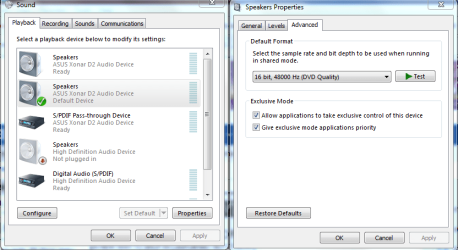
If not try this. Set to DVD quality 48000,.


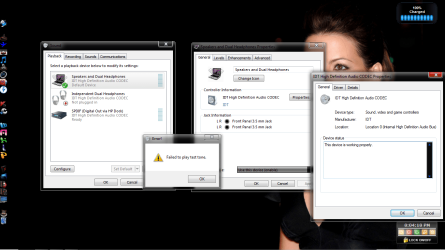
The driver link is the drivers i have reinstalled a few times and still did not work. I am redownloading and installing them now. I went to change it to dvd quality and it was already set to that setting. I clicked TEST and it gave me an error* failed to play test tone.
 

My Computer My Computer

OS
Win 7 Pro64
You might want to try going into hardware and sound then "manage audio devices" and choose the playback tab, make sure you are using the correct sound output device, try choosing something else and see if anything changes. Mine shows two sets of speakers but only one of them works.

It might also help to right click and choose "show disabled devices" .

If you have powered speakers make sure they are turned on. I forgot to do that a few times.
 

My Computer My Computer

Computer type
PC/Desktop
Computer Manufacturer/Model Number
Home built
OS
Windows 7 Ult, Windows 8.1 Pro,
CPU
Q9650-4.275GHz, E8600 4.5GHz, E6750-3.8GHz
Motherboard
Evga 780i FTW
Memory
G.Skill PC2 9600 1200Mhz 5 5 5 15 2T
Graphics Card(s)
GTX480
Sound Card
Asus Xonar D2
Monitor(s) Displays
HannsG
Screen Resolution
1680X1050
Hard Drives
GSkill Phoenix Pro 120GB SSD
PSU
ThermalTake Toughpower 1000Watt modular
Case
ThermalTake XaserV
Cooling
Xigmatek S1283
Keyboard
Logitech G15
Mouse
Logitech G9
Internet Speed
T1
You might want to try going into hardware and sound then "manage audio devices" and choose the playback tab, make sure you are using the correct sound output device, try choosing something else and see if anything changes. Mine shows two sets of speakers but only one of them works.

It might also help to right click and choose "show disabled devices" .

If you have powered speakers make sure they are turned on. I forgot to do that a few times.

I did all that. Ran test again and it said failed to play test tone. I messed around with it a bit and switched it to earphones. I heard test tones and mouse clicks through the earphones but when i went to say youtube and played a video there was no sound. volume levels are up and everything. So to summarize. I get no sound thru speakers and only the test tones play thru headset nothing else.
moz-screenshot-3.png
moz-screenshot-2.png
 

Attachments

  • doc1.png
    doc1.png
    91.8 KB · Views: 86

My Computer My Computer

OS
Win 7 Pro64

My Computer My Computer

Computer type
PC/Desktop
Computer Manufacturer/Model Number
Home built
OS
Windows 7 Ult, Windows 8.1 Pro,
CPU
Q9650-4.275GHz, E8600 4.5GHz, E6750-3.8GHz
Motherboard
Evga 780i FTW
Memory
G.Skill PC2 9600 1200Mhz 5 5 5 15 2T
Graphics Card(s)
GTX480
Sound Card
Asus Xonar D2
Monitor(s) Displays
HannsG
Screen Resolution
1680X1050
Hard Drives
GSkill Phoenix Pro 120GB SSD
PSU
ThermalTake Toughpower 1000Watt modular
Case
ThermalTake XaserV
Cooling
Xigmatek S1283
Keyboard
Logitech G15
Mouse
Logitech G9
Internet Speed
T1
Well I looked into those and those didn't do anything for me. I have no idea what the heck to do. I have reinstalled drivers several times, speakers on enabled and set to default , volume is up , mute is off. It always sasy failed to play test tone. When I go into itunes and playing music it doesnt play anything. One weird thing though is that when ever i played music in itunes you can see the movement of the song playing on that scroll bar and you can see the time counting. Well that doesnt happen now. Even when i click play it acts like it is on pause.There is no time and the little scroll bar doesnt move, like the song is not even playing. I am thinking that makybe it is not the speakers or sound card drivers and settings but somehting else. What else could it be. I re installed the chipset drivers as well and that didn;t fix anything. Would an update in BIOS have anything to do with it. I have not done anything yet, but just wondering.
 

My Computer My Computer

OS
Win 7 Pro64
Go to control panel

2. Double-Click on the Sound Icon

3. Single-click the Speakers to highlight them

4. Click on Properties (bottom right corner)

5. Go to the Enhancements Tab and Click on it

6. Now click "Disable All Sound Effects"

7. Click OK and you should be good to go!
 

My Computer My Computer

Computer Manufacturer/Model Number
Custom Built
OS
Windows 7 Ultimate 32 bit
CPU
AMD Athlon 64 X2 4200+ Overclocked to 3.0Ghz
Motherboard
Biostar TF560 A2+
Memory
2 Gigs of G.Skill DDR2 800
Graphics Card(s)
HIS ATI Radeon HD 2600 Pro With IceQ cooler
Sound Card
6.1 Channel Sound Blaster Live 24 Bit
Monitor(s) Displays
Dual 20.5 " LG Flatrons W2052TO
Screen Resolution
1152x864
Hard Drives
Dual 36 Gig 10,000 RPM Raptors
PSU
430 watt Seasonic 80%+ Dual 12v Rails 2x80mm fans
Case
CHIEFMAX YA-5X
Cooling
4-80mm case fans 1-140mm case fan freezer 64 Pro CPU cooler
Keyboard
Saitek Eclipse II
Mouse
A4Tech wireless battery free optical scroll mouse
Internet Speed
1.5 meg down 384 up
Other Info
Logisys LED fan/light controller and dual 16" LED sticks mounted inside top of case all fans are LED all lighting is blue
DVD RW and CD RW both and Memory card reader
Oh Man! I Love You!! I added to your rep!!. I have had some many tell me this and that and none of them worked. I tried everything. Who knew something so small and dumb like that would need to be checked. I Owe you. Very much appreciated!!
 

My Computer My Computer

OS
Win 7 Pro64
hey awesome glad it worked for you i have been pounding my brain trying to figure out what the problem was i knew it had to be something simple like that
 

My Computer My Computer

Computer Manufacturer/Model Number
Custom Built
OS
Windows 7 Ultimate 32 bit
CPU
AMD Athlon 64 X2 4200+ Overclocked to 3.0Ghz
Motherboard
Biostar TF560 A2+
Memory
2 Gigs of G.Skill DDR2 800
Graphics Card(s)
HIS ATI Radeon HD 2600 Pro With IceQ cooler
Sound Card
6.1 Channel Sound Blaster Live 24 Bit
Monitor(s) Displays
Dual 20.5 " LG Flatrons W2052TO
Screen Resolution
1152x864
Hard Drives
Dual 36 Gig 10,000 RPM Raptors
PSU
430 watt Seasonic 80%+ Dual 12v Rails 2x80mm fans
Case
CHIEFMAX YA-5X
Cooling
4-80mm case fans 1-140mm case fan freezer 64 Pro CPU cooler
Keyboard
Saitek Eclipse II
Mouse
A4Tech wireless battery free optical scroll mouse
Internet Speed
1.5 meg down 384 up
Other Info
Logisys LED fan/light controller and dual 16" LED sticks mounted inside top of case all fans are LED all lighting is blue
DVD RW and CD RW both and Memory card reader
Back
Top