How can I backup my DVDs for quick & easy access?

using dvd shrink when you do the back up uncheck create seperate audio and video folders
then have it save in a folder with the name you want
then in media center go to movies tab right click then add movies select folder to watch

i have a folder on my hard drive called movies then in that i have a folders for each movie

it also helps to add a picture in the folder and rename it to folder
give me a bit of time i can post some screen shots of what i have but it will take me a bit

Almost!! The best way to create a movie library. Do U know about the software "HANDBRAKE" ? Its the easiest and finest way to rip your DVds to XVID or MKV. Obviously those formats take a place much less than even a shrinked DVD, but doesnt compromise with video or audio quality. My suggestion to make a DVD library
1. Rip your DVD using handBreak (or you may try virtual dubMod)
2. Download the Album Art for that movie title, edit it as a square pixel (say 500*500)Using Nero photosnap Viewer or The GIMP or Photoshop.
3. Place the album art it the same folder as the dvdrip, rename the image as "folder" and Hide it ( it will give a nice folder view as large or extra large icon) .
4. Add to media center Movie Library , and get such a nice look.
 

My Computer My Computer

At a glance

Microsoft Windows 10 Pro Insider Preview 64-bitIntel(R) Core(TM) i3-4130 CPU @ 3.40GHzCorsair Vengence 4GB x2 (8.00GB Dual-Channel ...2047MB GeForce GTS 450 (ZOTAC International)
Computer type
PC/Desktop
Computer Manufacturer/Model Number
Self Assembled
OS
Microsoft Windows 10 Pro Insider Preview 64-bit
CPU
Intel(R) Core(TM) i3-4130 CPU @ 3.40GHz
Motherboard
Gigabyte Technology Co., Ltd. B85M-D3H
Memory
Corsair Vengence 4GB x2 (8.00GB Dual-Channel DDR3 @ 798MHz)
Graphics Card(s)
2047MB GeForce GTS 450 (ZOTAC International)
Sound Card
Onboard (Realtek High Definition Audio)
Monitor(s) Displays
LG Flatron E2040T
Screen Resolution
1600x900
Hard Drives
Western Digital 1 TB
Seagate 500 GB
PSU
Corsair VS550
Case
Cooler Master K380
Cooling
Cooler Master Seidon 120V Plus
Keyboard
Logitech MK260r
Mouse
Logitech MK260r
Internet Speed
PMPL Broadband
Antivirus
Windows Defender + MBAM
Browser
Firefox
Other Info
Dell Studio 15" Laptop
There is another software called KMPLAYER which can make movie library nicely. The library looks somehow like the coverflow view of the MAC OS X . As well as HANDBREAK, KMPLAYER is also free. It takes random snapshot of the movie title to generate thumbnail, so no need to have an album art, too.
 

My Computer My Computer

At a glance

Microsoft Windows 10 Pro Insider Preview 64-bitIntel(R) Core(TM) i3-4130 CPU @ 3.40GHzCorsair Vengence 4GB x2 (8.00GB Dual-Channel ...2047MB GeForce GTS 450 (ZOTAC International)
Computer type
PC/Desktop
Computer Manufacturer/Model Number
Self Assembled
OS
Microsoft Windows 10 Pro Insider Preview 64-bit
CPU
Intel(R) Core(TM) i3-4130 CPU @ 3.40GHz
Motherboard
Gigabyte Technology Co., Ltd. B85M-D3H
Memory
Corsair Vengence 4GB x2 (8.00GB Dual-Channel DDR3 @ 798MHz)
Graphics Card(s)
2047MB GeForce GTS 450 (ZOTAC International)
Sound Card
Onboard (Realtek High Definition Audio)
Monitor(s) Displays
LG Flatron E2040T
Screen Resolution
1600x900
Hard Drives
Western Digital 1 TB
Seagate 500 GB
PSU
Corsair VS550
Case
Cooler Master K380
Cooling
Cooler Master Seidon 120V Plus
Keyboard
Logitech MK260r
Mouse
Logitech MK260r
Internet Speed
PMPL Broadband
Antivirus
Windows Defender + MBAM
Browser
Firefox
Other Info
Dell Studio 15" Laptop
XVID or MKV

i do not want xvid or mkv
the way i have been doing it is fine it allows me to have all the dvd features that are on the disk
i used to rip them to divx
but i wanted something that i can have the entire dvd feature with

as far as how it looks the pic i took is on my gaming machine
my videos are on another computer that i watch them with and record my tv shows on
i use media browser on that one
 
Last edited:

My Computer My Computer

At a glance

Windows 7 Ultimate 64-bit (6.1, Build 7600)Intel(R) Core(TM) i7 CPU 920 @ 2.67GHz12 GB Mushkin Enhanced Blackline Frostbyte2-Asus GTX 550 Ti In SLI
OS
Windows 7 Ultimate 64-bit (6.1, Build 7600)
CPU
Intel(R) Core(TM) i7 CPU 920 @ 2.67GHz
Motherboard
EVGA 132-BL-E758-A1 X58 3-Way SLI Core i7 Motherboard
Memory
12 GB Mushkin Enhanced Blackline Frostbyte
Graphics Card(s)
2-Asus GTX 550 Ti In SLI
Sound Card
On Board
Monitor(s) Displays
HP w2207 Wide LCD Monitor
Screen Resolution
1690x1050
Hard Drives
4-OCZ Vertex Plus R2 Series 120GB 2.5in SATA II MLC SSD
running in raid 0
PSU
OCZ / GameXStream / 700-Watt / ATX / 120mm Fan / SATA R
Case
NZXT M59-001BK M59 Gaming Mid Tower Case - ATX, mATX, Baby A
Cooling
Corsair H60
Keyboard
Merc Gaming Keyboard
Mouse
Mini wireless
Internet Speed
25 meg dsl
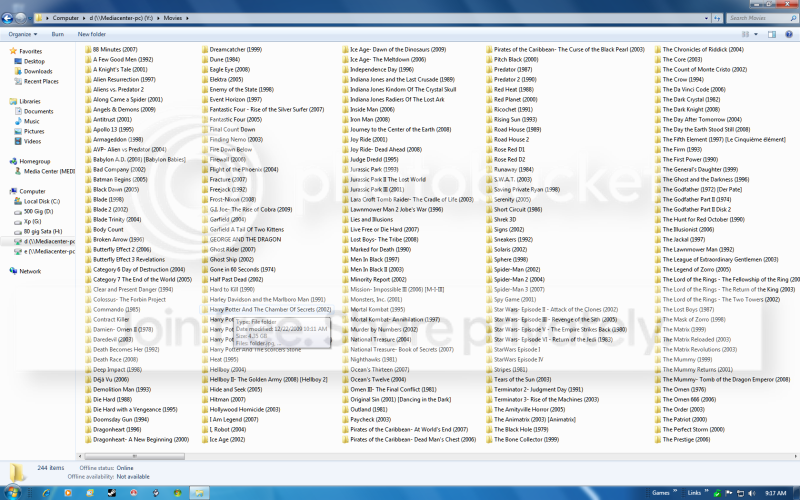
this is inside my movie folder

folder.png


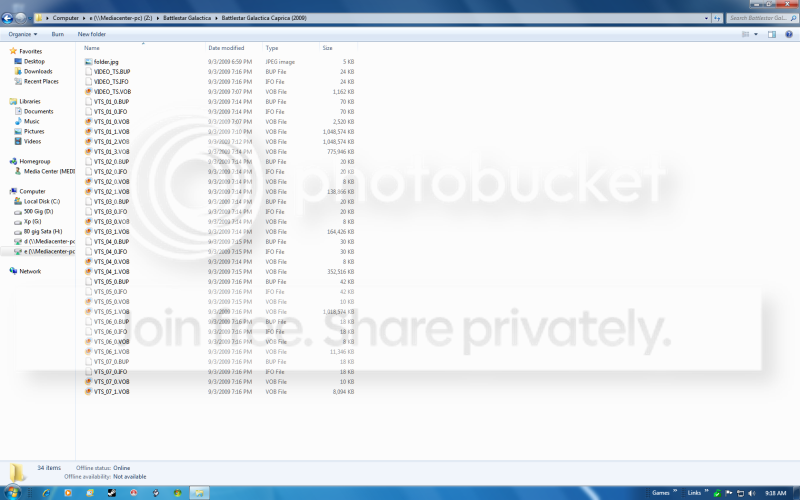
this is inside one of the movie folders

insidefolder.png


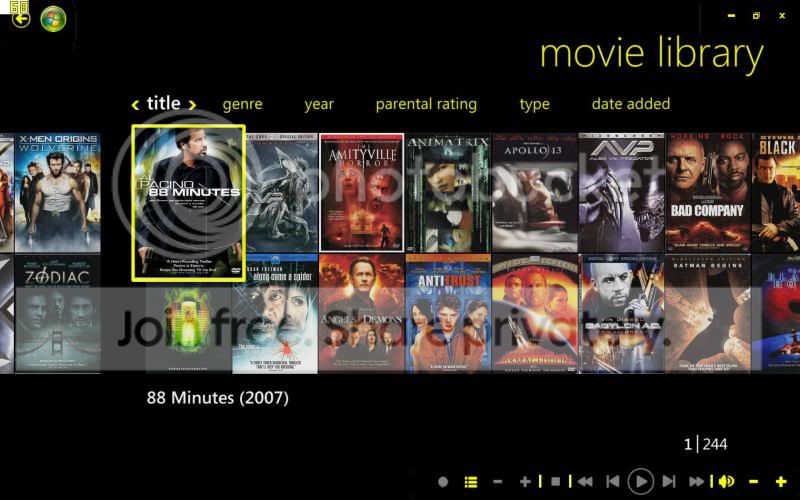
this is what i get with media center

mediacenter.jpg

That actually looks pretty sweet. I LOVE media center - but I can never use it because it locks up the screen/mouse. I have multiple monitors, so I cant be locked onto one monitor with the mouse.

Is there any way to change that?

Arc I've tried Handbrake with Ubuntu & never got it to work. Plus that sounds like a lot of work to get pictures etc.

So if I cant get media center to not lock a screen, how do I create files that will just allow me to double click ONE file & it places the movie?
 

My Computer My Computer

At a glance

Windows 7 64 & Ubuntu 64Intel Quad Core Q6600 2.40GHz8gNvidia 9600 GT & 9800 GT
Computer Manufacturer/Model Number
Built it myself
OS
Windows 7 64 & Ubuntu 64
CPU
Intel Quad Core Q6600 2.40GHz
Motherboard
Asus
Memory
8g
Graphics Card(s)
Nvidia 9600 GT & 9800 GT
Sound Card
Turtle Beach 5.1
Monitor(s) Displays
Three 19" Dell's & one 46" Samsung 750
try handbrake. store them in your video file or whatever you want to do with them. if your using 7mc point it to your directory and they will all show up. if you want posters instead of icons, find the image you want to use, put each video file into it's own folder named for the movie and add the corresponding cover art changing the files name to "foler.jpeg"
 

My Computer My Computer

At a glance

Windows 7 Ultimate Signature EditionIntel Core i7 Extreme 3.33GHz12GB DDR32x EVGA 285 2GB in SLI
Computer Manufacturer/Model Number
Custom
OS
Windows 7 Ultimate Signature Edition
CPU
Intel Core i7 Extreme 3.33GHz
Motherboard
EVGA X-58 SLI Classified
Memory
12GB DDR3
Graphics Card(s)
2x EVGA 285 2GB in SLI
Sound Card
Creative Labs X-Fi ExtremeGamer
Monitor(s) Displays
30" Viewsonic
Hard Drives
2x1TB Western Digital 7200RPM in RAID 0/1TB WD My Book External HDD
PSU
Thermaltake 1000w supporting quad SLI
Case
Thermaltake Armor Full Tower
Cooling
Thermaltake V1 CPU+DIY Liquid cooling
try handbrake. store them in your video file or whatever you want to do with them. if your using 7mc point it to your directory and they will all show up. if you want posters instead of icons, find the image you want to use, put each video file into it's own folder named for the movie and add the corresponding cover art changing the files name to "foler.jpeg"

My opinion goes with you. HandBrake works nice in windows 7. If a movie is ripped using handbrake, and not imported to media center, just double click on it.... it will begin to play. The folder view or icon view is a matter of customization. If you dont want it, no problem at all.
 

My Computer My Computer

At a glance

Microsoft Windows 10 Pro Insider Preview 64-bitIntel(R) Core(TM) i3-4130 CPU @ 3.40GHzCorsair Vengence 4GB x2 (8.00GB Dual-Channel ...2047MB GeForce GTS 450 (ZOTAC International)
Computer type
PC/Desktop
Computer Manufacturer/Model Number
Self Assembled
OS
Microsoft Windows 10 Pro Insider Preview 64-bit
CPU
Intel(R) Core(TM) i3-4130 CPU @ 3.40GHz
Motherboard
Gigabyte Technology Co., Ltd. B85M-D3H
Memory
Corsair Vengence 4GB x2 (8.00GB Dual-Channel DDR3 @ 798MHz)
Graphics Card(s)
2047MB GeForce GTS 450 (ZOTAC International)
Sound Card
Onboard (Realtek High Definition Audio)
Monitor(s) Displays
LG Flatron E2040T
Screen Resolution
1600x900
Hard Drives
Western Digital 1 TB
Seagate 500 GB
PSU
Corsair VS550
Case
Cooler Master K380
Cooling
Cooler Master Seidon 120V Plus
Keyboard
Logitech MK260r
Mouse
Logitech MK260r
Internet Speed
PMPL Broadband
Antivirus
Windows Defender + MBAM
Browser
Firefox
Other Info
Dell Studio 15" Laptop
try handbrake. store them in your video file or whatever you want to do with them. if your using 7mc point it to your directory and they will all show up. if you want posters instead of icons, find the image you want to use, put each video file into it's own folder named for the movie and add the corresponding cover art changing the files name to "foler.jpeg"

My opinion goes with you. HandBrake works nice in windows 7. If a movie is ripped using handbrake, and not imported to media center, just double click on it.... it will begin to play. The folder view or icon view is a matter of customization. If you dont want it, no problem at all.

Right but I'm not just trying to get this to play on Media center, but also all other players.

Also as I mentioned, when I tried HB on Ubuntu, I was never able to do it.

So why cant I use DVDShrink to copy the DVD into a single icon that I can double click?
 

My Computer My Computer

At a glance

Windows 7 64 & Ubuntu 64Intel Quad Core Q6600 2.40GHz8gNvidia 9600 GT & 9800 GT
Computer Manufacturer/Model Number
Built it myself
OS
Windows 7 64 & Ubuntu 64
CPU
Intel Quad Core Q6600 2.40GHz
Motherboard
Asus
Memory
8g
Graphics Card(s)
Nvidia 9600 GT & 9800 GT
Sound Card
Turtle Beach 5.1
Monitor(s) Displays
Three 19" Dell's & one 46" Samsung 750
Ok so I finally had a chance to try out DVDShrink and I'm a bit stuck.

I ran through the process to save everything to my HDD, but then I was left with an empty AUDIO_TS file & a VIDEO_TS file with a bunch of .VOB files.

I wanted to back this up so that everything was all under one file/icon that I can double click to just start automatically playing the movie.

So how do I change these files to do that?

What you have is the way the DVD format is setup. Look under the VIDEO_TS folder and look for VIDEO_TS.IFO file. Click on this file and it will play the DVD. You could make a shortcut to this file and place it where ever you want.

Jim :cool:
 

My Computer My Computer

At a glance

Windows 8.1 Pro w/Media Center 64bit, Windows...Phenom II X6 1100TCrucial Balistic 8gb DDR3-1866 CL9MSI R6850 Cyclone IGD5 PE
Computer type
PC/Desktop
Computer Manufacturer/Model Number
Home Built
OS
Windows 8.1 Pro w/Media Center 64bit, Windows 7 HP 64bit
CPU
Phenom II X6 1100T
Motherboard
ASUS M5A99X EVO
Memory
Crucial Balistic 8gb DDR3-1866 CL9
Graphics Card(s)
MSI R6850 Cyclone IGD5 PE
Sound Card
On Board
Monitor(s) Displays
ASUS VE258Q 25" LED with DVI-HDMI-DisplayPort
Screen Resolution
1920 x 1080
Hard Drives
Two WD Cavier Black 2TB Sata III, WD My Book Essential 2TB USB 3.0
PSU
Seasonic X650 80 Plus GOLD Modular
Case
Corsair 400R
Cooling
Antec Kuhler H2O 620, Two 120mm and four 140mm
Keyboard
Logitech K120
Mouse
Logitech Marble Mouse USB, Logitech Precision Game Pad
Internet Speed
15MB
Antivirus
Norton IS 2013, Malwarebytes Pro Beta 2
Browser
IE-11, FF-27
Other Info
APC UPS ES 750, Netgear WNR3500L Gigabit & Wireless N Router with SamKnows Test Program, Motorola SB6120 Gigabit Cable Modem. Brother HL-2170W Laser Printer, Epson V300 Scanner
Ok so I finally had a chance to try out DVDShrink and I'm a bit stuck.

I ran through the process to save everything to my HDD, but then I was left with an empty AUDIO_TS file & a VIDEO_TS file with a bunch of .VOB files.

I wanted to back this up so that everything was all under one file/icon that I can double click to just start automatically playing the movie.

So how do I change these files to do that?

What you have is the way the DVD format is setup. Look under the VIDEO_TS folder and look for VIDEO_TS.IFO file. Click on this file and it will play the DVD. You could make a shortcut to this file and place it where ever you want.

Jim :cool:

Isnt there a way to just combine all of the files into a single file to click on?

It seems like it would keep it more neat & organized that way too. Instead of having to search through a bunch of video files to find a single file. It just seems very time consuming & more clicks than it should.
 

My Computer My Computer

At a glance

Windows 7 64 & Ubuntu 64Intel Quad Core Q6600 2.40GHz8gNvidia 9600 GT & 9800 GT
Computer Manufacturer/Model Number
Built it myself
OS
Windows 7 64 & Ubuntu 64
CPU
Intel Quad Core Q6600 2.40GHz
Motherboard
Asus
Memory
8g
Graphics Card(s)
Nvidia 9600 GT & 9800 GT
Sound Card
Turtle Beach 5.1
Monitor(s) Displays
Three 19" Dell's & one 46" Samsung 750
In DVD format, perhaps not :(. If a movie is a very short one, you may encode it in dvd format, it may contain in a single .vob. But for a normal sized movie, usually there is more than one .vob files.

But if you can copy a movie and use a program that can join .vob files, what you want may happen ( it is more laborious than ripping a dvd) :)
 

My Computer My Computer

At a glance

Microsoft Windows 10 Pro Insider Preview 64-bitIntel(R) Core(TM) i3-4130 CPU @ 3.40GHzCorsair Vengence 4GB x2 (8.00GB Dual-Channel ...2047MB GeForce GTS 450 (ZOTAC International)
Computer type
PC/Desktop
Computer Manufacturer/Model Number
Self Assembled
OS
Microsoft Windows 10 Pro Insider Preview 64-bit
CPU
Intel(R) Core(TM) i3-4130 CPU @ 3.40GHz
Motherboard
Gigabyte Technology Co., Ltd. B85M-D3H
Memory
Corsair Vengence 4GB x2 (8.00GB Dual-Channel DDR3 @ 798MHz)
Graphics Card(s)
2047MB GeForce GTS 450 (ZOTAC International)
Sound Card
Onboard (Realtek High Definition Audio)
Monitor(s) Displays
LG Flatron E2040T
Screen Resolution
1600x900
Hard Drives
Western Digital 1 TB
Seagate 500 GB
PSU
Corsair VS550
Case
Cooler Master K380
Cooling
Cooler Master Seidon 120V Plus
Keyboard
Logitech MK260r
Mouse
Logitech MK260r
Internet Speed
PMPL Broadband
Antivirus
Windows Defender + MBAM
Browser
Firefox
Other Info
Dell Studio 15" Laptop
In DVD format, perhaps not :(. If a movie is a very short one, you may encode it in dvd format, it may contain in a single .vob. But for a normal sized movie, usually there is more than one .vob files.

But if you can copy a movie and use a program that can join .vob files, what you want may happen ( it is more laborious than ripping a dvd) :)

hmm ok.

Well obviously if I use Media center to play the files, they can stay in the .vob format

But what if I want to load a movie up on an iphone?

They wont play like normal will they?
 

My Computer My Computer

At a glance

Windows 7 64 & Ubuntu 64Intel Quad Core Q6600 2.40GHz8gNvidia 9600 GT & 9800 GT
Computer Manufacturer/Model Number
Built it myself
OS
Windows 7 64 & Ubuntu 64
CPU
Intel Quad Core Q6600 2.40GHz
Motherboard
Asus
Memory
8g
Graphics Card(s)
Nvidia 9600 GT & 9800 GT
Sound Card
Turtle Beach 5.1
Monitor(s) Displays
Three 19" Dell's & one 46" Samsung 750

My Computer My Computer

At a glance

Microsoft Windows 10 Pro Insider Preview 64-bitIntel(R) Core(TM) i3-4130 CPU @ 3.40GHzCorsair Vengence 4GB x2 (8.00GB Dual-Channel ...2047MB GeForce GTS 450 (ZOTAC International)
Computer type
PC/Desktop
Computer Manufacturer/Model Number
Self Assembled
OS
Microsoft Windows 10 Pro Insider Preview 64-bit
CPU
Intel(R) Core(TM) i3-4130 CPU @ 3.40GHz
Motherboard
Gigabyte Technology Co., Ltd. B85M-D3H
Memory
Corsair Vengence 4GB x2 (8.00GB Dual-Channel DDR3 @ 798MHz)
Graphics Card(s)
2047MB GeForce GTS 450 (ZOTAC International)
Sound Card
Onboard (Realtek High Definition Audio)
Monitor(s) Displays
LG Flatron E2040T
Screen Resolution
1600x900
Hard Drives
Western Digital 1 TB
Seagate 500 GB
PSU
Corsair VS550
Case
Cooler Master K380
Cooling
Cooler Master Seidon 120V Plus
Keyboard
Logitech MK260r
Mouse
Logitech MK260r
Internet Speed
PMPL Broadband
Antivirus
Windows Defender + MBAM
Browser
Firefox
Other Info
Dell Studio 15" Laptop
All information relating to video formats supported by iphone and the appropriate resolution of the video may be had here : The Complete Guide to iPod, Apple TV and iPhone Video Formats | iLounge Article

In this field (dont take it otherwise) , handbrake is the best option , too :D

Ok so if I want this to be possible, I need to keep two versions of the same movie?

One with a higher quality for playback on the computer & 46" lcd tv & then another version for the iphone?

Or does handbrake create a version that will work on both yet only make one file?
 

My Computer My Computer

At a glance

Windows 7 64 & Ubuntu 64Intel Quad Core Q6600 2.40GHz8gNvidia 9600 GT & 9800 GT
Computer Manufacturer/Model Number
Built it myself
OS
Windows 7 64 & Ubuntu 64
CPU
Intel Quad Core Q6600 2.40GHz
Motherboard
Asus
Memory
8g
Graphics Card(s)
Nvidia 9600 GT & 9800 GT
Sound Card
Turtle Beach 5.1
Monitor(s) Displays
Three 19" Dell's & one 46" Samsung 750
All information relating to video formats supported by iphone and the appropriate resolution of the video may be had here : The Complete Guide to iPod, Apple TV and iPhone Video Formats | iLounge Article

In this field (dont take it otherwise) , handbrake is the best option , too :D

Ok so if I want this to be possible, I need to keep two versions of the same movie?

One with a higher quality for playback on the computer & 46" lcd tv & then another version for the iphone?

Or does handbrake create a version that will work on both yet only make one file?

Its all about screen resolution. As the iphone's screen in smaller, it needs small resolutions, and as the lcd display is bigger, it needs a larger resolution.

You may play a larger resolution movie in iphone, too. But it will take a lot of unneeded space, and the video output will not be perfect. On the contrary, you may play a small resolution movie in your lcd (by clicking "videos-->fit video to player on resize), but it will be a bit hazy .

So, I think it is better to have a same movie in different resolutions for different players :(
 

My Computer My Computer

At a glance

Microsoft Windows 10 Pro Insider Preview 64-bitIntel(R) Core(TM) i3-4130 CPU @ 3.40GHzCorsair Vengence 4GB x2 (8.00GB Dual-Channel ...2047MB GeForce GTS 450 (ZOTAC International)
Computer type
PC/Desktop
Computer Manufacturer/Model Number
Self Assembled
OS
Microsoft Windows 10 Pro Insider Preview 64-bit
CPU
Intel(R) Core(TM) i3-4130 CPU @ 3.40GHz
Motherboard
Gigabyte Technology Co., Ltd. B85M-D3H
Memory
Corsair Vengence 4GB x2 (8.00GB Dual-Channel DDR3 @ 798MHz)
Graphics Card(s)
2047MB GeForce GTS 450 (ZOTAC International)
Sound Card
Onboard (Realtek High Definition Audio)
Monitor(s) Displays
LG Flatron E2040T
Screen Resolution
1600x900
Hard Drives
Western Digital 1 TB
Seagate 500 GB
PSU
Corsair VS550
Case
Cooler Master K380
Cooling
Cooler Master Seidon 120V Plus
Keyboard
Logitech MK260r
Mouse
Logitech MK260r
Internet Speed
PMPL Broadband
Antivirus
Windows Defender + MBAM
Browser
Firefox
Other Info
Dell Studio 15" Laptop
All information relating to video formats supported by iphone and the appropriate resolution of the video may be had here : The Complete Guide to iPod, Apple TV and iPhone Video Formats | iLounge Article

In this field (dont take it otherwise) , handbrake is the best option , too :D

Ok so if I want this to be possible, I need to keep two versions of the same movie?

One with a higher quality for playback on the computer & 46" lcd tv & then another version for the iphone?

Or does handbrake create a version that will work on both yet only make one file?

Its all about screen resolution. As the iphone's screen in smaller, it needs small resolutions, and as the lcd display is bigger, it needs a larger resolution.

You may play a larger resolution movie in iphone, too. But it will take a lot of unneeded space, and the video output will not be perfect. On the contrary, you may play a small resolution movie in your lcd (by clicking "videos-->fit video to player on resize), but it will be a bit hazy .

So, I think it is better to have a same movie in different resolutions for different players :(

Hmm ok.

So I can copy the dvd via dvdshrink & get a single file that can be played in Media Center/Player etc

What would I then use to format that file into an iphone friendly format if I wish to?
 

My Computer My Computer

At a glance

Windows 7 64 & Ubuntu 64Intel Quad Core Q6600 2.40GHz8gNvidia 9600 GT & 9800 GT
Computer Manufacturer/Model Number
Built it myself
OS
Windows 7 64 & Ubuntu 64
CPU
Intel Quad Core Q6600 2.40GHz
Motherboard
Asus
Memory
8g
Graphics Card(s)
Nvidia 9600 GT & 9800 GT
Sound Card
Turtle Beach 5.1
Monitor(s) Displays
Three 19" Dell's & one 46" Samsung 750

My Computer My Computer

At a glance

Microsoft Windows 10 Pro Insider Preview 64-bitIntel(R) Core(TM) i3-4130 CPU @ 3.40GHzCorsair Vengence 4GB x2 (8.00GB Dual-Channel ...2047MB GeForce GTS 450 (ZOTAC International)
Computer type
PC/Desktop
Computer Manufacturer/Model Number
Self Assembled
OS
Microsoft Windows 10 Pro Insider Preview 64-bit
CPU
Intel(R) Core(TM) i3-4130 CPU @ 3.40GHz
Motherboard
Gigabyte Technology Co., Ltd. B85M-D3H
Memory
Corsair Vengence 4GB x2 (8.00GB Dual-Channel DDR3 @ 798MHz)
Graphics Card(s)
2047MB GeForce GTS 450 (ZOTAC International)
Sound Card
Onboard (Realtek High Definition Audio)
Monitor(s) Displays
LG Flatron E2040T
Screen Resolution
1600x900
Hard Drives
Western Digital 1 TB
Seagate 500 GB
PSU
Corsair VS550
Case
Cooler Master K380
Cooling
Cooler Master Seidon 120V Plus
Keyboard
Logitech MK260r
Mouse
Logitech MK260r
Internet Speed
PMPL Broadband
Antivirus
Windows Defender + MBAM
Browser
Firefox
Other Info
Dell Studio 15" Laptop
Yeah I'm not into it if its not free.

So far I've found dvdshrink to be much easier to use than HB. I did only try HB in Ubuntu though...

I may be open to try it again if I had a really easy walk thru.

If I copy via dvdshrink, will these movies be able to be watched in Ubuntu with no issues?
 

My Computer My Computer

At a glance

Windows 7 64 & Ubuntu 64Intel Quad Core Q6600 2.40GHz8gNvidia 9600 GT & 9800 GT
Computer Manufacturer/Model Number
Built it myself
OS
Windows 7 64 & Ubuntu 64
CPU
Intel Quad Core Q6600 2.40GHz
Motherboard
Asus
Memory
8g
Graphics Card(s)
Nvidia 9600 GT & 9800 GT
Sound Card
Turtle Beach 5.1
Monitor(s) Displays
Three 19" Dell's & one 46" Samsung 750

My Computer My Computer

At a glance

Microsoft Windows 10 Pro Insider Preview 64-bitIntel(R) Core(TM) i3-4130 CPU @ 3.40GHzCorsair Vengence 4GB x2 (8.00GB Dual-Channel ...2047MB GeForce GTS 450 (ZOTAC International)
Computer type
PC/Desktop
Computer Manufacturer/Model Number
Self Assembled
OS
Microsoft Windows 10 Pro Insider Preview 64-bit
CPU
Intel(R) Core(TM) i3-4130 CPU @ 3.40GHz
Motherboard
Gigabyte Technology Co., Ltd. B85M-D3H
Memory
Corsair Vengence 4GB x2 (8.00GB Dual-Channel DDR3 @ 798MHz)
Graphics Card(s)
2047MB GeForce GTS 450 (ZOTAC International)
Sound Card
Onboard (Realtek High Definition Audio)
Monitor(s) Displays
LG Flatron E2040T
Screen Resolution
1600x900
Hard Drives
Western Digital 1 TB
Seagate 500 GB
PSU
Corsair VS550
Case
Cooler Master K380
Cooling
Cooler Master Seidon 120V Plus
Keyboard
Logitech MK260r
Mouse
Logitech MK260r
Internet Speed
PMPL Broadband
Antivirus
Windows Defender + MBAM
Browser
Firefox
Other Info
Dell Studio 15" Laptop
Yeah I'm not into it if its not free.

So far I've found dvdshrink to be much easier to use than HB. I did only try HB in Ubuntu though...

I may be open to try it again if I had a really easy walk thru.

If I copy via dvdshrink, will these movies be able to be watched in Ubuntu with no issues?

Obviously not(I mean they will play in linux with no problem) :D . And believe me, handbrake is most easy to work with. Have a try it windows 7, if there is any problem, then what for the forum is? :D
 

My Computer My Computer

At a glance

Microsoft Windows 10 Pro Insider Preview 64-bitIntel(R) Core(TM) i3-4130 CPU @ 3.40GHzCorsair Vengence 4GB x2 (8.00GB Dual-Channel ...2047MB GeForce GTS 450 (ZOTAC International)
Computer type
PC/Desktop
Computer Manufacturer/Model Number
Self Assembled
OS
Microsoft Windows 10 Pro Insider Preview 64-bit
CPU
Intel(R) Core(TM) i3-4130 CPU @ 3.40GHz
Motherboard
Gigabyte Technology Co., Ltd. B85M-D3H
Memory
Corsair Vengence 4GB x2 (8.00GB Dual-Channel DDR3 @ 798MHz)
Graphics Card(s)
2047MB GeForce GTS 450 (ZOTAC International)
Sound Card
Onboard (Realtek High Definition Audio)
Monitor(s) Displays
LG Flatron E2040T
Screen Resolution
1600x900
Hard Drives
Western Digital 1 TB
Seagate 500 GB
PSU
Corsair VS550
Case
Cooler Master K380
Cooling
Cooler Master Seidon 120V Plus
Keyboard
Logitech MK260r
Mouse
Logitech MK260r
Internet Speed
PMPL Broadband
Antivirus
Windows Defender + MBAM
Browser
Firefox
Other Info
Dell Studio 15" Laptop
using dvd shrink when you do the back up uncheck create seperate audio and video folders
then have it save in a folder with the name you want
then in media center go to movies tab right click then add movies select folder to watch

i have a folder on my hard drive called movies then in that i have a folders for each movie

it also helps to add a picture in the folder and rename it to folder
give me a bit of time i can post some screen shots of what i have but it will take me a bit

I there no way to rip the artwork with the dvd so I dont have to worry about finding it & adding it in later manually? Seems like a lot more work than it should be.
 

My Computer My Computer

At a glance

Windows 7 64 & Ubuntu 64Intel Quad Core Q6600 2.40GHz8gNvidia 9600 GT & 9800 GT
Computer Manufacturer/Model Number
Built it myself
OS
Windows 7 64 & Ubuntu 64
CPU
Intel Quad Core Q6600 2.40GHz
Motherboard
Asus
Memory
8g
Graphics Card(s)
Nvidia 9600 GT & 9800 GT
Sound Card
Turtle Beach 5.1
Monitor(s) Displays
Three 19" Dell's & one 46" Samsung 750
Back
Top