Any good reason to use Homegroup

tedhopkins

New member
Local time
4:10 AM
Messages
5
I have 2 computers (both running Windows7) on a home network, a desktop wired to a router and a laptop connected thru a wireless connection. I have no problems seeing each other, files etc. thru the network. However, when I try to see them in "Homegroup" the laptop can see the desktop computer, but the desktop computer cannot see the laptop. Is there any benefit to continue trying to setup the Homegroup?
 

My Computer My Computer

At a glance

windows 7
Computer Manufacturer/Model Number
toshiba L505D-s5965
OS
windows 7
Yes there are many good reasons to use the Homegroup if all of your machines are Win 7. The Library sharing option with Homegroups is very useful.

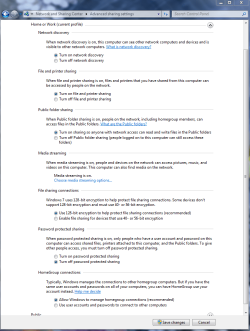
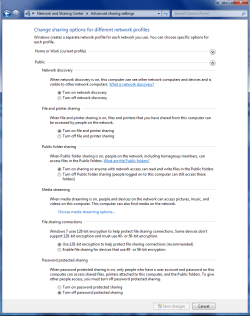
Most likely there are some settings incorrect in the Advanced Sharing settings. Find these windows under the Advanced Sharing Settings and make sure all the settings are correctly set.

The network discovery one is probably not set to discover on the laptop. Check the settings below in both Windows, there are two, Work-Home and the Public one.
 

Attachments

  • Home or work homegroup enable.PNG
    Home or work homegroup enable.PNG
    45 KB · Views: 88
  • public sharing enabled all.PNG
    public sharing enabled all.PNG
    39.7 KB · Views: 57

My Computer My Computer

At a glance

Windows 7 Ult, Windows 8.1 Pro,Q9650-4.275GHz, E8600 4.5GHz, E6750-3.8GHzG.Skill PC2 9600 1200Mhz 5 5 5 15 2TGTX480
Computer type
PC/Desktop
Computer Manufacturer/Model Number
Home built
OS
Windows 7 Ult, Windows 8.1 Pro,
CPU
Q9650-4.275GHz, E8600 4.5GHz, E6750-3.8GHz
Motherboard
Evga 780i FTW
Memory
G.Skill PC2 9600 1200Mhz 5 5 5 15 2T
Graphics Card(s)
GTX480
Sound Card
Asus Xonar D2
Monitor(s) Displays
HannsG
Screen Resolution
1680X1050
Hard Drives
GSkill Phoenix Pro 120GB SSD
PSU
ThermalTake Toughpower 1000Watt modular
Case
ThermalTake XaserV
Cooling
Xigmatek S1283
Keyboard
Logitech G15
Mouse
Logitech G9
Internet Speed
T1
The only advantage I can think of that Homegroup has is libraries sharing.
 

My Computer My Computer

At a glance

7 ProfQ95502x2 Mushkin Ascent 85004870X2
Computer Manufacturer/Model Number
SevenForums
OS
7 Prof
CPU
Q9550
Motherboard
Maximus II Formula
Memory
2x2 Mushkin Ascent 8500
Graphics Card(s)
4870X2
Sound Card
X-Fi Xtreme Gamer
Monitor(s) Displays
LN32A550
Screen Resolution
1920x1080
Hard Drives
Intel G2 80GB
5x1TB
PSU
Corsair 1000
Case
Cosmos
Cooling
Yates^13
Keyboard
G15v1
Mouse
MX518
Internet Speed
6Mbps
To:chev65, All settings as you suggested, same problem, the laptop sees the desktop, but not the reverse.
 

My Computer My Computer

At a glance

windows 7
Computer Manufacturer/Model Number
toshiba L505D-s5965
OS
windows 7
Are you running AVG anti virus by any chance?

It causes endless problems with Homegroups and needs to be uninstalled if you have it.

Are you running Windows 7 Home premium on both machines?

Is the Time and date set correctly on both your bios clock and your system clock on both machines?
 
Last edited:

My Computer My Computer

At a glance

Windows 7 Ult, Windows 8.1 Pro,Q9650-4.275GHz, E8600 4.5GHz, E6750-3.8GHzG.Skill PC2 9600 1200Mhz 5 5 5 15 2TGTX480
Computer type
PC/Desktop
Computer Manufacturer/Model Number
Home built
OS
Windows 7 Ult, Windows 8.1 Pro,
CPU
Q9650-4.275GHz, E8600 4.5GHz, E6750-3.8GHz
Motherboard
Evga 780i FTW
Memory
G.Skill PC2 9600 1200Mhz 5 5 5 15 2T
Graphics Card(s)
GTX480
Sound Card
Asus Xonar D2
Monitor(s) Displays
HannsG
Screen Resolution
1680X1050
Hard Drives
GSkill Phoenix Pro 120GB SSD
PSU
ThermalTake Toughpower 1000Watt modular
Case
ThermalTake XaserV
Cooling
Xigmatek S1283
Keyboard
Logitech G15
Mouse
Logitech G9
Internet Speed
T1
To me Homegroup is like a GPS unit on your car. You hook it up, turn it on and you're ready to go. As with the GPS, Homegroup is there to simplify what you want to do.
 

My Computer My Computer

At a glance

Windows 7 Ultimate 64BitGenuineIntel Intel(R) Core(TM) DuoCore T2400 ...2.00 GBMobile Intel(R) 945 Express Chipset
Computer Manufacturer/Model Number
Lenovo ThinkPad T60
OS
Windows 7 Ultimate 64Bit
CPU
GenuineIntel Intel(R) Core(TM) DuoCore T2400 @ 1.83GHz
Motherboard
Intel(R) 82801G (ICH7 Family)
Memory
2.00 GB
Graphics Card(s)
Mobile Intel(R) 945 Express Chipset
Sound Card
SoundMAX Integrated Digital HD Audio
Monitor(s) Displays
ThinkPad Display
Screen Resolution
1400x1050
Hard Drives
100Gb SATA
Keyboard
Standard Keyboard
Mouse
HID-compliant Mouse
Internet Speed
Cable Broadband - 54Mbps
Other Info
Intel(R) PRO/1000 PL Network Connection
11a/b/g Wireless LAN Mini PCI Express Adapter
I have 4 systems set up in my Home Group, on the main system where I keep backups of all my programs I have that folder set up to be shared with the group.

Makes it nice when working on a different system in the group that I can access the shared folder and install or move files between all of the systems.

You can share most anything between systems not limited to just the libraries.
 

My Computer My Computer

At a glance

win7 Ult 64i7 3930K & 3960X16GB G-Skill 2133MHzSapphire HD 7970
Computer Manufacturer/Model Number
My Build
OS
win7 Ult 64
CPU
i7 3930K & 3960X
Motherboard
ASUS P9X79 Deluxe
Memory
16GB G-Skill 2133MHz
Graphics Card(s)
Sapphire HD 7970
Sound Card
On-board
Monitor(s) Displays
ASUS 27 inch
Screen Resolution
1920X1080
Hard Drives
Crucial M4 256GB, 1.5TB WD Black for Data/Images
PSU
Corsair AX1200
Case
NZXT 810
Cooling
Custom Loop, Swiftech HDBlock
Keyboard
Mionix
Mouse
Mionix
Internet Speed
Cable

My Computer My Computer

At a glance

64-bit Windows 11 Pro for WorkstationsIntel i7-8700K OC'd to 5 GHz64 GB (4x16GB) G.SKILL TridentZ RGB DDR4 3600...ASUS ROG-STRIX-GTX1080TI-O11G-GAMING
Computer type
PC/Desktop
Computer Manufacturer/Model Number
Self built custom
OS
64-bit Windows 11 Pro for Workstations
CPU
Intel i7-8700K OC'd to 5 GHz
Motherboard
ASUS ROG Maximus XI Formula Z390
Memory
64 GB (4x16GB) G.SKILL TridentZ RGB DDR4 3600 MHz
Graphics Card(s)
ASUS ROG-STRIX-GTX1080TI-O11G-GAMING
Sound Card
Integrated
Monitor(s) Displays
2 x Samsung Odyssey G7 27"
Screen Resolution
2560x1440
Hard Drives
1TB Samsung 990 PRO M.2,
4TB Samsung 990 PRO PRO M.2,
TerraMaster F8 SSD Plus NAS
PSU
Seasonic Prime Titanium 850W
Case
Thermaltake Core P3
Cooling
Corsair Hydro H115i
Keyboard
Logitech wireless K800
Mouse
Logitech MX Master 4
Internet Speed
2 Gb/s Download and 100 Mb/s Upload
Antivirus
Malwarebyte Anti-Malware Premium
Browser
Google Chrome
Other Info
Logitech Z625 speaker system,
Logitech BRIO 4K Pro webcam,
HP Color LaserJet Pro MFP M477fdn,
APC SMART-UPS RT 1000 XL - SURT1000XLI,
Galaxy S23 Plus phone
To: chev65
Both computers running Win7 Home Premium, both running Norton AntiVirus, with settings to allow communication between computers (it works with standard network). I am in the dark when you refer to bios and system clocks.
 

My Computer My Computer

At a glance

windows 7
Computer Manufacturer/Model Number
toshiba L505D-s5965
OS
windows 7
Honestly Ted, Homegroups works absolutely flawlessy for me. If you are having problems after setting up Homegroups then I would suspect that Norton is causing your problems with seeing other computers. You should always set up your network and make sure it is working perfectly before installing any type of AV software.

I would also double check that list I posted earlier and make sure those settings are correct.

The clocks I refered too is simply the bios clock and the system clock which both need to be the same on both machines. I doubt that is the problem in this case.
 

My Computer My Computer

At a glance

Windows 7 Ult, Windows 8.1 Pro,Q9650-4.275GHz, E8600 4.5GHz, E6750-3.8GHzG.Skill PC2 9600 1200Mhz 5 5 5 15 2TGTX480
Computer type
PC/Desktop
Computer Manufacturer/Model Number
Home built
OS
Windows 7 Ult, Windows 8.1 Pro,
CPU
Q9650-4.275GHz, E8600 4.5GHz, E6750-3.8GHz
Motherboard
Evga 780i FTW
Memory
G.Skill PC2 9600 1200Mhz 5 5 5 15 2T
Graphics Card(s)
GTX480
Sound Card
Asus Xonar D2
Monitor(s) Displays
HannsG
Screen Resolution
1680X1050
Hard Drives
GSkill Phoenix Pro 120GB SSD
PSU
ThermalTake Toughpower 1000Watt modular
Case
ThermalTake XaserV
Cooling
Xigmatek S1283
Keyboard
Logitech G15
Mouse
Logitech G9
Internet Speed
T1
To:chev65
Thanks for your efforts. The Norton AV was running on both computers before I tried to get Homegroup working. I've decided to give up on Homegroup since my regular network works fine. What I don't understand is Microsoft developing something like Homegroup that seems to require more matching protocols to make it work than is required for a network (at least in my case). I might try again in a few months when my Norton subscription expires, I plan on switching to the freebie AV in Microsoft Essentials.
 

My Computer My Computer

At a glance

windows 7
Computer Manufacturer/Model Number
toshiba L505D-s5965
OS
windows 7
To:chev65
What I don't understand is Microsoft developing something like Homegroup that seems to require more matching protocols to make it work than is required for a network (at least in my case). I might try again in a few months when my Norton subscription expires, I plan on switching to the freebie AV in Microsoft Essentials.

Homegroup is between W7s only. When you install W7 ipv6 is installed and enabled by default is it not? It's quite simple.
 

My Computer My Computer

At a glance

Windows 7 Ultimate 64BitGenuineIntel Intel(R) Core(TM) DuoCore T2400 ...2.00 GBMobile Intel(R) 945 Express Chipset
Computer Manufacturer/Model Number
Lenovo ThinkPad T60
OS
Windows 7 Ultimate 64Bit
CPU
GenuineIntel Intel(R) Core(TM) DuoCore T2400 @ 1.83GHz
Motherboard
Intel(R) 82801G (ICH7 Family)
Memory
2.00 GB
Graphics Card(s)
Mobile Intel(R) 945 Express Chipset
Sound Card
SoundMAX Integrated Digital HD Audio
Monitor(s) Displays
ThinkPad Display
Screen Resolution
1400x1050
Hard Drives
100Gb SATA
Keyboard
Standard Keyboard
Mouse
HID-compliant Mouse
Internet Speed
Cable Broadband - 54Mbps
Other Info
Intel(R) PRO/1000 PL Network Connection
11a/b/g Wireless LAN Mini PCI Express Adapter
Windows 7 HomeGroup Norton Network Issues

After several days of working with Norton tech support, I have found a solution that works to address the conflict where Windows 7 HomeGroup is not working with Norton.

Try the following steps on each computer that has Windows 7:

1) Open Norton
2) Click "Settings" at top
3) Click "Firewall" on left
4) Click "Traffic Rules" tab in blue
5) Click "Add" button in blue at bottom
6) Click "Next" button
7) Click the third button "Connections to and from othe computers"
8) Click "Next" button
9) Click "Next" button
10) Click the "Apply this rule" box
11) Type a "2" behind the work Rule to read "Firewall Rule2"
12) Then click "Finish"

13) Now go back to the "Traffic Rules" tab and on that screen, highlight to become tan in color the new description "Firewall Rule2".
14) Click the "Move Up" tab at the bottom several times and watch the "Firewall Rule2" move up until it is at the top of the Description list.
15) Click "Apply"

Repeat these steps on every computer running Windows 7 for which you wish to include in the HomeGroup.

Now, depending on your router set-up, you might also need to take the following action if the HomeGroup is not being recognized by "all" of the computers in the Network.

Go back to Norton page

1) Click "Settings" at top
2) Click "My Network" on left
3) Click the "Configure +" on the far right of Network Security Map
4) If a Network Security Overview screen pops up, click "ok" at bottom
5) Click the down arrow next to "Trust Control" and then click on the name of your router.
6) All of your computers and systems should be listed under the grey area at the top of the screen, review each computer and look for the word "FULL TRUST" under each computer.
7) Click on any system that does not say "FULL TRUST"
8) Go down to the line that says "Trust Level:" and click the word "Edit" to the far right.
9) Click the button that says "FULL TRUST" and then click "OK"
10) Then click "Close" and repeat the step for any computer or system that does not say "FULL TRUST".

You should now have all computers running "Windows 7" as apart of the Network, (Note: I found that my one Vista Computer was linking to the HomeGroup without going through all of this).

Final note: It is also important to make sure that all of the computers have the same date and time before setting up the HomeGroup (I believe it is a security feature) and also make sure that each computer has the same "Password". If you need to "Change the Password" on each system, make sure it is the same on every computer. This is all done on the HomeGroup settings page.

Hope this helps, it was hell for me to figure this out..............:geek:
 

My Computer My Computer

At a glance

Windows 7 64 bit
OS
Windows 7 64 bit
Back
Top