Can't connect to homegroup via wireless router on laptop.

SpeedyED

New member
Local time
7:54 AM
Messages
9
Problem is as stated, and I swear I have just about tried everything.

Our network is pretty simple, our internet goes into our Modem/Router, which we have our main computer hooked up to, and then we have a second Wireless Router connected to that giving me wifi access to the internet.

I have also had a good read of this link and tried everything as stated in there to no avail: Ultimate Troubleshooting Guide for Windows 7 HomeGroup Connection Issues

There was one thing I saw within these forums I have tried but HAVEN'T succeeded in doing, there was a mention of accessing C:\Windows\ServiceProfiles\LocalService\AppData\Roaming\PeerNetworking and clear all the files from within that folder, but when I get to \localService I seem to be looking at everything that's inside my documents I THINK, well at the very least I don't see \AppData.

Now interestingly enough I do have internet connectivity going to the laptop, but when I go into the network tab within computer I can only see the laptop computer itself and not the other computer, the same goes for looking at the same screen on the desktop computer, can't see the laptop computer.

Now I have isolated the problem and it is definitely the wireless router, as I have gotten out an ethernet cable and hooked the laptop up directly to the Modem/Router and both computers can be seen on the network diagram screen. The firewall inside the router is turned off too, and so is the firewall on the laptop, the firewall on the desktop isn't turned off but I've never had any issues with the firewall on litterally anything YET, and the computer can be seen on the network diagram if hooked up directly to the modem/router so I'm assuming that it won't be that.

Computer specs:

Desktop - Windows 7 Home 64bit

Laptop - Windows 7 Professional 32bit.

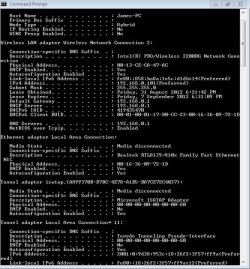
I also noticed that before posting you guy's always like a screenshot of the ipconfig/all command before posting anything that's wireless so that too is attached at the bottom of this post.

Thanks for looking! :)


Attachments

  • IPConfig.JPG
    IPConfig.JPG
    92.2 KB · Views: 25

My Computer My Computer

At a glance

Laptop - Windows Professional 32bit Desktop -...2GB
Computer Manufacturer/Model Number
Toshiba L20
OS
Laptop - Windows Professional 32bit Desktop - Windows Home 64bit
Memory
2GB
Hard Drives
Fujitsu 80gb
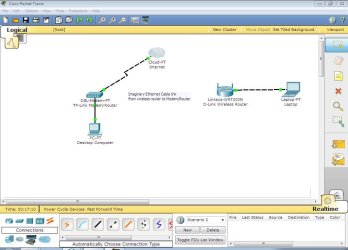
Well I thought and would go that little step further and draw our network diagram in a nifty simulation program called "Cisco Packet Tracer".

Now for those who haven't used/had much to do with packet tracer, with the DSL Modem packet tracer only has 1 Ethernet port and 1 phone line connection, rather than 4 Ethernet ports for connecting things on a wired network like you would see on most everyday modem/routers hence why there is an "imaginary cable link between wireless router and modem router".

Hope that helps.
 

Attachments

  • Packet Tracer Network Diagram.JPG
    Packet Tracer Network Diagram.JPG
    73.5 KB · Views: 44

My Computer My Computer

At a glance

Laptop - Windows Professional 32bit Desktop -...2GB
Computer Manufacturer/Model Number
Toshiba L20
OS
Laptop - Windows Professional 32bit Desktop - Windows Home 64bit
Memory
2GB
Hard Drives
Fujitsu 80gb
You'll need to enable hidden files to see the appdata folder.
Open my computer press the alt key...brings up menu at top.
Go to tools>folder options>view, then select show hidden files,folders and drives.
This will allow access to C:\Windows\ServiceProfiles\LocalService\AppData\Roaming\PeerNetworking

Now does your adsl modem handle the DHCP for your network
How do you have the router connected to the modem through the Internet port or through a LAN port?
 

My Computer My Computer

At a glance

Windows 7 Ultimate x64AMD X6 1090T16 Gig Kingston HyperXSaphire Radeon 6700
Computer Manufacturer/Model Number
Unforgiven!!
OS
Windows 7 Ultimate x64
CPU
AMD X6 1090T
Motherboard
ASUS m4a79xtd evo
Memory
16 Gig Kingston HyperX
Graphics Card(s)
Saphire Radeon 6700
Sound Card
O/B
Monitor(s) Displays
23" Acer 19"Acer
Screen Resolution
1920x1080 Native
Hard Drives
M4 64 Gig SSD
W/D Cav Black 1 T/B
W/D Scorpio Blue 500 Gig X2
PSU
OCZ 650 watt 80+ Modular
Case
Cooler Master 690 Basic
Cooling
Cooler Master Hyper 212+ Push/Pull
Keyboard
Razer Black Widow Ultimate
Mouse
Razer D/A 3500dpi
Internet Speed
Meh...it's okay
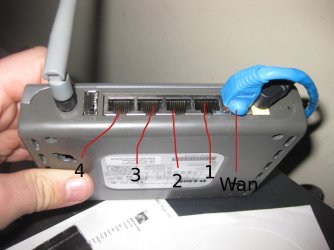
I've attached a pic showing you what port is what and how it's physically connected.

I have the wireless router connected to the WAN port, according to the user manual for my model D-Link router (DI-524UP) that's the port you connect the modem/router to, I could always change it to port 1 and see what that does?

And thanks for the tip on bring up the appdata folder too! :D

EDIT:

Missed your DHCP question for the modem router. I've just gotten into it and checked, yes it does support it and it's enabled, and I've checked the WiFi router and that too has DHCP enabled.
 

Attachments

  • WiFi Router pic.jpg
    WiFi Router pic.jpg
    370.6 KB · Views: 6
Last edited:

My Computer My Computer

At a glance

Laptop - Windows Professional 32bit Desktop -...2GB
Computer Manufacturer/Model Number
Toshiba L20
OS
Laptop - Windows Professional 32bit Desktop - Windows Home 64bit
Memory
2GB
Hard Drives
Fujitsu 80gb
There's your problem log into secondary router disable the DHCP plug your Ethernet from modem A into a LAN port not wan then power cycle your secondary router...let it boot. If both devices are working as DHCP server they will assign different IP's to the devices plugged in to them creating different LAN's.
 

My Computer My Computer

At a glance

Windows 7 Ultimate x64AMD X6 1090T16 Gig Kingston HyperXSaphire Radeon 6700
Computer Manufacturer/Model Number
Unforgiven!!
OS
Windows 7 Ultimate x64
CPU
AMD X6 1090T
Motherboard
ASUS m4a79xtd evo
Memory
16 Gig Kingston HyperX
Graphics Card(s)
Saphire Radeon 6700
Sound Card
O/B
Monitor(s) Displays
23" Acer 19"Acer
Screen Resolution
1920x1080 Native
Hard Drives
M4 64 Gig SSD
W/D Cav Black 1 T/B
W/D Scorpio Blue 500 Gig X2
PSU
OCZ 650 watt 80+ Modular
Case
Cooler Master 690 Basic
Cooling
Cooler Master Hyper 212+ Push/Pull
Keyboard
Razer Black Widow Ultimate
Mouse
Razer D/A 3500dpi
Internet Speed
Meh...it's okay
There's your problem log into secondary router disable the DHCP plug your Ethernet from modem A into a LAN port not wan then power cycle your secondary router...let it boot. If both devices are working as DHCP server they will assign different IP's to the devices plugged in to them creating different LAN's.

Well that did the trick! Thanks dude! :D

I'm still not quite out of the woods yet though, now that when looking at the network tab to see all connections I can finally see the main computer but it still won't let me join the homegroup i've created, gonna try deleting the files that I haven't been able to delete yet on both computers and power cycle both of them and see how that goes.

EDIT:

Now that I can see the other computer I have noticed something curious with the WiFi router, when I type in the IP address in my browser I now keep getting the message "connection timed out". Any reason why that would be?
 
Last edited:

My Computer My Computer

At a glance

Laptop - Windows Professional 32bit Desktop -...2GB
Computer Manufacturer/Model Number
Toshiba L20
OS
Laptop - Windows Professional 32bit Desktop - Windows Home 64bit
Memory
2GB
Hard Drives
Fujitsu 80gb
Well I just tried deleting the contents of C:\Windows\ServiceProfiles\LocalService\AppData\Roaming\PeerNetworking on both computers and rebooting them, no joy :(
 

My Computer My Computer

At a glance

Laptop - Windows Professional 32bit Desktop -...2GB
Computer Manufacturer/Model Number
Toshiba L20
OS
Laptop - Windows Professional 32bit Desktop - Windows Home 64bit
Memory
2GB
Hard Drives
Fujitsu 80gb
Have you deleted the original homegroup, and made a new one?
Are both the modem and router in the same location? (room)
If so disable DHCP on your ADSL and run the DHCP through your D-Link and plug your desktop into that.
You would have to log into your D-Link and turn on the DHCP and plug back into your WAN port and I'd reconfigure the wireless while your there.
 

My Computer My Computer

At a glance

Windows 7 Ultimate x64AMD X6 1090T16 Gig Kingston HyperXSaphire Radeon 6700
Computer Manufacturer/Model Number
Unforgiven!!
OS
Windows 7 Ultimate x64
CPU
AMD X6 1090T
Motherboard
ASUS m4a79xtd evo
Memory
16 Gig Kingston HyperX
Graphics Card(s)
Saphire Radeon 6700
Sound Card
O/B
Monitor(s) Displays
23" Acer 19"Acer
Screen Resolution
1920x1080 Native
Hard Drives
M4 64 Gig SSD
W/D Cav Black 1 T/B
W/D Scorpio Blue 500 Gig X2
PSU
OCZ 650 watt 80+ Modular
Case
Cooler Master 690 Basic
Cooling
Cooler Master Hyper 212+ Push/Pull
Keyboard
Razer Black Widow Ultimate
Mouse
Razer D/A 3500dpi
Internet Speed
Meh...it's okay
No I didn't delete the original homegroup, its a bit late during the night over here in Aus so I'll give that a go in the morning. As for the Modem/Router and WiFI/Router yes they are, I'll give that a try tomorrow too, if I have no success getting into the D-LInk Wifi router again I'll just hit the tiny reset button and quickly reconfigure it and go from there.

Thank you so much for your help mate, appreciate it heaps! :)
 

My Computer My Computer

At a glance

Laptop - Windows Professional 32bit Desktop -...2GB
Computer Manufacturer/Model Number
Toshiba L20
OS
Laptop - Windows Professional 32bit Desktop - Windows Home 64bit
Memory
2GB
Hard Drives
Fujitsu 80gb
The problem I see here is that you are using one of those router/modem combo's plus another router. This arrangement hardly ever works correctly and isn't worth the hassle of trying to make it work right.

You really need to get a regular modem then plug it into the WAN port on your regular router. This makes for a hassle free and reliable network which I'm sure is what you want. :)

And I'm wondering why your router says Linksys and also D-link?

In a nutshell, all of your problems are from setting up your network incorrectly and have nothing to do with the Homegroup at all.
 

My Computer My Computer

At a glance

Windows 7 Ult, Windows 8.1 Pro,Q9650-4.275GHz, E8600 4.5GHz, E6750-3.8GHzG.Skill PC2 9600 1200Mhz 5 5 5 15 2TGTX480
Computer type
PC/Desktop
Computer Manufacturer/Model Number
Home built
OS
Windows 7 Ult, Windows 8.1 Pro,
CPU
Q9650-4.275GHz, E8600 4.5GHz, E6750-3.8GHz
Motherboard
Evga 780i FTW
Memory
G.Skill PC2 9600 1200Mhz 5 5 5 15 2T
Graphics Card(s)
GTX480
Sound Card
Asus Xonar D2
Monitor(s) Displays
HannsG
Screen Resolution
1680X1050
Hard Drives
GSkill Phoenix Pro 120GB SSD
PSU
ThermalTake Toughpower 1000Watt modular
Case
ThermalTake XaserV
Cooling
Xigmatek S1283
Keyboard
Logitech G15
Mouse
Logitech G9
Internet Speed
T1
The problem I see here is that you are using one of those router/modem combo's plus another router. This arrangement hardly ever works correctly and isn't worth the hassle of trying to make it work right.

You really need to get a regular modem then plug it into the WAN port on your regular router. This makes for a hassle free and reliable network which I'm sure is what you want. :)

And I'm wondering why your router says Linksys and also D-link?

In a nutshell, all of your problems are from setting up your network incorrectly and have nothing to do with the Homegroup at all.

hmmmmm so are you saying ditch both routers together and just go out and buy an ADSL Modem/Router that has the wireless connectivity built into it?

In Packet Tracer that "LInksys" bit is the actual router it's trying to simulate, I can't simply just go in and delete that bit of writing (at least I don't think I can..), that's why I've written "TP-Link" underneath that bit.

When our network was setup it was setup 6 years ago and based upon a different laptop running XP Pro, at the time it also needed to be able to print on the network but wirelessly, and I think at the time you couldn't buy an ADSL Modem Router that not only had wireless connectivity but also had a print server embedded in it too. Now back in those day's I knew nothing about networking, we had a technician set that all up back in the day, Right now however I'm doing a course in Computer Assembly and Repair and naturally one of the subjects in that is networking so I am starting to get my head around it all, networking is after all the most annoying subject you have to learn because it is so complex!!! I do plan on moving up into an advanced diploma in Networking/computer systems and engineering so watch this space over the next couple of years :P
 

My Computer My Computer

At a glance

Laptop - Windows Professional 32bit Desktop -...2GB
Computer Manufacturer/Model Number
Toshiba L20
OS
Laptop - Windows Professional 32bit Desktop - Windows Home 64bit
Memory
2GB
Hard Drives
Fujitsu 80gb
The problem I see here is that you are using one of those router/modem combo's plus another router. This arrangement hardly ever works correctly and isn't worth the hassle of trying to make it work right.

You really need to get a regular modem then plug it into the WAN port on your regular router. This makes for a hassle free and reliable network which I'm sure is what you want. :)

And I'm wondering why your router says Linksys and also D-link?

In a nutshell, all of your problems are from setting up your network incorrectly and have nothing to do with the Homegroup at all.

hmmmmm so are you saying ditch both routers together and just go out and buy an ADSL Modem/Router that has the wireless connectivity built into it?

In Packet Tracer that "LInksys" bit is the actual router it's trying to simulate, I can't simply just go in and delete that bit of writing and say its a TP-Link Router (at least I don't think I can..), that's why I've written "TP-Link" underneath that bit.

When our network was setup it was setup 6 years ago and based upon a different laptop running XP Pro, at the time it also needed to be able to print on the network but wirelessly, and I think at the time you couldn't buy an ADSL Modem Router that not only had wireless connectivity but also had a print server embedded in it too. Now back in those day's I knew nothing about networking, we had a technician set that all up back in the day, Right now however I'm doing a course in Computer Assembly and Repair and naturally one of the subjects in that is networking so I am starting to get my head around it all, networking is after all the most annoying subject you have to learn because it is so complex!!! I do plan on moving up into an advanced diploma in Networking/computer systems and engineering so watch this space over the next couple of years :P

I'm saying for a reliable network, get a standard modem "not a combo unit" and plug the standard modem into your main routers WAN port, very simple. You need to ditch the combo unit for sure.

If you want to use one of your other routers "I'm assuming you have two" as a wireless access point you can do that by either choosing to use the access point mode on the secondary router or at the very least turn off DHCP on the secondary router, though other adjustments may be required.

The main router handles DHCP for all machines in the network and the A/P as well.

The A/P would be plugged into a LAN port on your main router or further down the line into a standard switch.
 

My Computer My Computer

At a glance

Windows 7 Ult, Windows 8.1 Pro,Q9650-4.275GHz, E8600 4.5GHz, E6750-3.8GHzG.Skill PC2 9600 1200Mhz 5 5 5 15 2TGTX480
Computer type
PC/Desktop
Computer Manufacturer/Model Number
Home built
OS
Windows 7 Ult, Windows 8.1 Pro,
CPU
Q9650-4.275GHz, E8600 4.5GHz, E6750-3.8GHz
Motherboard
Evga 780i FTW
Memory
G.Skill PC2 9600 1200Mhz 5 5 5 15 2T
Graphics Card(s)
GTX480
Sound Card
Asus Xonar D2
Monitor(s) Displays
HannsG
Screen Resolution
1680X1050
Hard Drives
GSkill Phoenix Pro 120GB SSD
PSU
ThermalTake Toughpower 1000Watt modular
Case
ThermalTake XaserV
Cooling
Xigmatek S1283
Keyboard
Logitech G15
Mouse
Logitech G9
Internet Speed
T1
Have you deleted the original homegroup, and made a new one?
Are both the modem and router in the same location? (room)
If so disable DHCP on your ADSL and run the DHCP through your D-Link and plug your desktop into that.
You would have to log into your D-Link and turn on the DHCP and plug back into your WAN port and I'd reconfigure the wireless while your there.

You.Are.A.Legend!!! :party:

Well I am no officially connected to our homegroup! :D

One slight snag though, I can't seem to share specific files and folders, if I right click the folder and then go share with I get 3 options: Nobody, Homegroup (read) and Homegroup (read/write). No matter if I click either homegroup it doesn't seem to share it with homegroup, if I right click the folder again and navigate to share with I find theres a padlock still on "Nobody". Any suggestions?
 

My Computer My Computer

At a glance

Laptop - Windows Professional 32bit Desktop -...2GB
Computer Manufacturer/Model Number
Toshiba L20
OS
Laptop - Windows Professional 32bit Desktop - Windows Home 64bit
Memory
2GB
Hard Drives
Fujitsu 80gb
The problem I see here is that you are using one of those router/modem combo's plus another router. This arrangement hardly ever works correctly and isn't worth the hassle of trying to make it work right.

You really need to get a regular modem then plug it into the WAN port on your regular router. This makes for a hassle free and reliable network which I'm sure is what you want. :)

And I'm wondering why your router says Linksys and also D-link?

In a nutshell, all of your problems are from setting up your network incorrectly and have nothing to do with the Homegroup at all.

hmmmmm so are you saying ditch both routers together and just go out and buy an ADSL Modem/Router that has the wireless connectivity built into it?

In Packet Tracer that "LInksys" bit is the actual router it's trying to simulate, I can't simply just go in and delete that bit of writing and say its a TP-Link Router (at least I don't think I can..), that's why I've written "TP-Link" underneath that bit.

When our network was setup it was setup 6 years ago and based upon a different laptop running XP Pro, at the time it also needed to be able to print on the network but wirelessly, and I think at the time you couldn't buy an ADSL Modem Router that not only had wireless connectivity but also had a print server embedded in it too. Now back in those day's I knew nothing about networking, we had a technician set that all up back in the day, Right now however I'm doing a course in Computer Assembly and Repair and naturally one of the subjects in that is networking so I am starting to get my head around it all, networking is after all the most annoying subject you have to learn because it is so complex!!! I do plan on moving up into an advanced diploma in Networking/computer systems and engineering so watch this space over the next couple of years :P

I'm saying for a reliable network, get a standard modem "not a combo unit" and plug the standard modem into your main routers WAN port, very simple. You need to ditch the combo unit for sure.

If you want to use one of your other routers "I'm assuming you have two" as a wireless access point you can do that by either choosing to use the access point mode on the secondary router or at the very least turn off DHCP on the secondary router, though other adjustments may be required.

The main router handles DHCP for all machines in the network and the A/P as well.

The A/P would be plugged into a LAN port on your main router or further down the line into a standard switch.

So when you say standard modem you really just mean a modem that doesn't do any form of "routing" right?

We have 2 routers - 1x ADSL modem/router - TP-Link TD-8840T
1x Wireless Router - DI-524UP
 

My Computer My Computer

At a glance

Laptop - Windows Professional 32bit Desktop -...2GB
Computer Manufacturer/Model Number
Toshiba L20
OS
Laptop - Windows Professional 32bit Desktop - Windows Home 64bit
Memory
2GB
Hard Drives
Fujitsu 80gb
Back
Top