Help with updating Asus Bios

I would highly recommend updating bios from a USB flash, or floppy as opposed to any software from within Windows.

In Windows flashing is very risky. A bad flash will "brick" your MOBO.

USB flash is the safest method. It is very easy. Why get your OS involved??

ASUSTeK Computer Inc.-Forum- EZ Flash 2 - the safest way to update BIOS

Be sure to reset your BIOS to the default settings prior to flashing and do a CMOS board reset after flashing!!

actually flashing from usb, the file being place directly in the c drive / partition, or through the asus update utility runs the same risk. plus if you are going to flash from c or an usb drive the update utility is in the bios all ready.
 

My Computer My Computer

OS
windows seven
I would highly recommend updating bios from a USB flash, or floppy as opposed to any software from within Windows.

In Windows flashing is very risky. A bad flash will "brick" your MOBO.

USB flash is the safest method. It is very easy. Why get your OS involved??

ASUSTeK Computer Inc.-Forum- EZ Flash 2 - the safest way to update BIOS

Be sure to reset your BIOS to the default settings prior to flashing and do a CMOS board reset after flashing!!

Why do a CMOS reset?
 

My Computer My Computer

OS
win 7 full retail 64....xp 32
CPU
I7 920
Motherboard
ASUS P6T Del
Memory
3gb
Graphics Card(s)
ati 4800
Hard Drives
WD Raptor X 150
WD black 500
PSU
corsair 620
Case
thermaltake
Cooling
8 case fans
Internet Speed
cable

My Computer My Computer

Computer type
PC/Desktop
Computer Manufacturer/Model Number
Me
OS
Win 7 Ultimate x64
CPU
FX-8350 @ 4.6 GHz so far
Motherboard
Asus M5A97 EVO
Memory
ADATA XPG V1 Series Black 8GB DDR3 1600
Graphics Card(s)
Sapphire R9 270x Dual-X
Sound Card
Xonar DGX w/ Corsair Vengence 1300
Monitor(s) Displays
Acer S232HL Abid
Screen Resolution
1920x1080
Hard Drives
120 GB OCZ Vertex 3
500 GB Seagate 7200.12
PSU
Antec Earthwatts 650W Green
Case
Antec Three Hundred
Cooling
Cooler Master 212 EVO
Keyboard
Logitech G510
Mouse
Logitech G500s
Internet Speed
35000/3000
ASUS offers AFUDOS, EZFlash, and ASUS update. I've had issues with the OS-based installs (ASUS Update) from ASUS, so I just use EZFlash now. It's built right into the BIOS, so it's easy to access. I honestly don't think you'll trash your board if it screws up. ASUS has some degree of recovery built into the BIOS upgrade programs. I load (and unzip) the BIOS file on a flash drive and make sure the BIOS sees the flash drive in EZFlash first before trying it. You have to know the basic settings in BIOS however, or you'll get yourself into a dilemma. You may need to set memory timings, or set the BIOS up for RAID if you are currently running it, and a handful of other things because when you load the new BIOS it may or may not carry over your current settings. On a side note, I just reflashed yesterday and it preserved all my settings. I'm using a P5P43 TDPro which probably has the same BIOS as yours.
 

My Computer My Computer

Computer Manufacturer/Model Number
homebuilt
OS
Windows 7 Ultimate 64-bit
CPU
Q9550
Motherboard
Asus P5P43TD PRO
Memory
8 GB DDR-3
Graphics Card(s)
ATI 5770
Sound Card
on MB
Monitor(s) Displays
Viewsonic LE150
Hard Drives
2 x 250 GB SATA 3GB/s in RAID 0
1 x 500 GB IDE
PSU
Corsair TX750W
Case
Raidmax
Cooling
Aftermarket air
Keyboard
MS Natural USB
Mouse
Logitech wireless USB
Internet Speed
Cell Phone. Just a notch better than dial-up
Other Info
Hauppage TV tuner
Real Issue

I seem to remember JohnnyScience in a previous post several weeks ago.
No matter, Johnny please state the nature of your Itunes issue!
Please ensure that your system specs are completed in the lower left of the screen, I need O/S 64 bit or 32, what version of Itunes, screen shots of your device manager in the area of USB drivers etc.
What happens when you attach your Iphone to your system etc.
The more detail the easier it will make our trouble shooting.
For now forget the bios updates.

Regards,
Adrian
 

My Computer My Computer

Computer Manufacturer/Model Number
Custom Build
OS
Windows 7 7600 1 X64
CPU
AMD PHENOM II X 550 PROCESSOR 3.1 ghz
Motherboard
ASUS M4A78-TE
Memory
Corsair 4 gig ddr 3
Graphics Card(s)
ati radeon 3300
Sound Card
ati hd
Monitor(s) Displays
syncmaster 2033sw
Screen Resolution
1600X900 60 hz refresh
Hard Drives
twin_seagates SATA's 1 TB & 500 Gig, hitachi_slimline 160 gig
PSU
antec_550 watt
Case
cooler master GLite
Cooling
stock_heat sink
Internet Speed
20mbs up/ 1.5mbs down
Other Info
favorite child "stewie"
favorite dog "brian"
I have owned a number of ASUS mobos and have flashed their bios many times without any problems. The best way I found is to install the ASUSUpdate applet.
Once installed, you can download the bios file from the internet using the update program, or from ASUS. Getting the update to download the file can be erratic and take a long time with busy servers, but you'll get the correct file.
If you want to download the file directly from ASUS, you have to make sure that you select the proper file for your mobo dash numbers or version. You really don't want to install the wrong bios. I also get the latest ASUSUpdate from there instead of using the one on the disk. ASUSUpdate is simple to use and so far, bulletproof.
I also flashed my laptop before I installed Win 7 and everything went just fine.
 

My Computer My Computer

OS
Win 7
CPU
Athlon Phenom II X4
Motherboard
Asus M4A78T-E
Memory
4G
PSU
CORSAIR
Usually the there is instructions from the site you download the BIOS firmware upate from. A Readme.txt perhaps?
 

My Computer My Computer

Computer Manufacturer/Model Number
Lenovo ThinkPad T60
OS
Windows 7 Ultimate 64Bit
CPU
GenuineIntel Intel(R) Core(TM) DuoCore T2400 @ 1.83GHz
Motherboard
Intel(R) 82801G (ICH7 Family)
Memory
2.00 GB
Graphics Card(s)
Mobile Intel(R) 945 Express Chipset
Sound Card
SoundMAX Integrated Digital HD Audio
Monitor(s) Displays
ThinkPad Display
Screen Resolution
1400x1050
Hard Drives
100Gb SATA
Keyboard
Standard Keyboard
Mouse
HID-compliant Mouse
Internet Speed
Cable Broadband - 54Mbps
Other Info
Intel(R) PRO/1000 PL Network Connection
11a/b/g Wireless LAN Mini PCI Express Adapter
I seem to remember JohnnyScience in a previous post several weeks ago.
No matter, Johnny please state the nature of your Itunes issue!
Please ensure that your system specs are completed in the lower left of the screen, I need O/S 64 bit or 32, what version of Itunes, screen shots of your device manager in the area of USB drivers etc.
What happens when you attach your Iphone to your system etc.
The more detail the easier it will make our trouble shooting.
For now forget the bios updates.

Regards,
Adrian
I think this is where this thread needs to get a restart from.
 

My Computer My Computer

Computer Manufacturer/Model Number
Self Built
OS
Windows 7 ultimate 64 bit / XP Home sp3
CPU
intel Core 2 Duo E8400 3.0ghz
Motherboard
Asus P5ND bios 1401
Memory
8 gigs 1066 OCZ Fata1ty
Graphics Card(s)
EVGA GTX 580 Call of Duty Black Ops Edition
Sound Card
Creative Soundblaster Audigy 2zs
Monitor(s) Displays
Asus 24in LCD's 2MS X2
Screen Resolution
1920x1080p @60Hz
Hard Drives
WD Caviar 500 Black/ WD Caviar 200 Blue
PSU
OCZ 700W GameXtreme
Case
NZXT Apollo
Cooling
Corsair H50 CPU/120mm x3 /60mm x2 /Corsair Dominator Ram
Keyboard
Logitech Bluetooth Wireless MX5000
Mouse
Logitech Bluetooth Wireless MX1000
Internet Speed
Download 19.83 Upload 0.97
Other Info
Logitech Z2300 Speakers/ Bose Noise Cancelling Headphones/Avermedia PCI-e Hybrid TV Bravo/Epson NX415 all in one/ 4 Port Powered USB Hub/ LG 10x Bluray Burner /TSST Corp DVDRW External
Bump,
Johnny you still with us?
 

My Computer My Computer

Computer Manufacturer/Model Number
Custom Build
OS
Windows 7 7600 1 X64
CPU
AMD PHENOM II X 550 PROCESSOR 3.1 ghz
Motherboard
ASUS M4A78-TE
Memory
Corsair 4 gig ddr 3
Graphics Card(s)
ati radeon 3300
Sound Card
ati hd
Monitor(s) Displays
syncmaster 2033sw
Screen Resolution
1600X900 60 hz refresh
Hard Drives
twin_seagates SATA's 1 TB & 500 Gig, hitachi_slimline 160 gig
PSU
antec_550 watt
Case
cooler master GLite
Cooling
stock_heat sink
Internet Speed
20mbs up/ 1.5mbs down
Other Info
favorite child "stewie"
favorite dog "brian"
Bump,
Johnny you still with us?

Sorry guys just been busy.

Yes still having the same problems.

I havent tried anything with the bios yet as I've had mixed reviews from you guys that it might not work & could screw some stuff up.

I'm running win7 64... I think I have all of my info correct in my profile...

I'm totally lost. Apple sucks & so does microsoft at this point.
 

My Computer My Computer

Computer Manufacturer/Model Number
Built it myself
OS
Windows 7 64 & Ubuntu 64
CPU
Intel Quad Core Q6600 2.40GHz
Motherboard
Asus
Memory
8g
Graphics Card(s)
Nvidia 9600 GT & 9800 GT
Sound Card
Turtle Beach 5.1
Monitor(s) Displays
Three 19" Dell's & one 46" Samsung 750
lets put doing anything with the bios aside for now. please make sure your spec here on the forum are current. then run itunes and take a screenshot of what ever error message(s) you get. then please try to sync your iphone and take screenshots of whatever error messages you get.

specs who makes your memory and the speed. mother which asus mobo.
 

My Computer My Computer

OS
windows seven
Hey guys just got a scoop from my apple discussion:

Hey brother it is posted all over this forum that Windows 7 and the Intel P55 chipset have USB issues.

You might want to go to your computer manufacturer's website and download and install the latest BIOS update and chipset drivers. That is the fix resolving these issues.

So how do I check which version of BIOS I'm running & lets get to the bottom of this.

Its been going on way too long.

I'm trying to work on getting more info off the apple discussions too.
 

My Computer My Computer

Computer Manufacturer/Model Number
Built it myself
OS
Windows 7 64 & Ubuntu 64
CPU
Intel Quad Core Q6600 2.40GHz
Motherboard
Asus
Memory
8g
Graphics Card(s)
Nvidia 9600 GT & 9800 GT
Sound Card
Turtle Beach 5.1
Monitor(s) Displays
Three 19" Dell's & one 46" Samsung 750
Start> Type in "msinfo32" under System Summary look for " Bios Version/Date.
 

My Computer My Computer

Computer type
PC/Desktop
OS
Win7 Home Premium x64 SP1, Archlinux x86_64. Elementary Luna
Start> Type in "msinfo32" under System Summary look for " Bios Version/Date.

Ok I didnt see anything with the exact Bios Version being mentioned

The only thing is SMBIOS Version 2.4

But I know from restarting my computer I've seen something like 1.1.18.XXX or something along those lines... never a 2.4?

Anyways I've attached a picture
 

Attachments

  • Untitled.png
    Untitled.png
    35.6 KB · Views: 47

My Computer My Computer

Computer Manufacturer/Model Number
Built it myself
OS
Windows 7 64 & Ubuntu 64
CPU
Intel Quad Core Q6600 2.40GHz
Motherboard
Asus
Memory
8g
Graphics Card(s)
Nvidia 9600 GT & 9800 GT
Sound Card
Turtle Beach 5.1
Monitor(s) Displays
Three 19" Dell's & one 46" Samsung 750
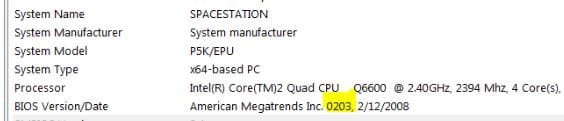
You're looking at the wrong line,

biosversion.JPG

You have the 0203 bios, it is now up to 0604, and none of them mention anything about fixing USB issues,

ASUSTeK Computer Inc.

If you want to try the new one (it contains everything from the previous ones) grab 0604 and then follow the instructions from the user manual (download the PDF if you have to) and follow it to the letter.
 

My Computer My Computer

Computer type
PC/Desktop
Computer Manufacturer/Model Number
Me
OS
Win 7 Ultimate x64
CPU
FX-8350 @ 4.6 GHz so far
Motherboard
Asus M5A97 EVO
Memory
ADATA XPG V1 Series Black 8GB DDR3 1600
Graphics Card(s)
Sapphire R9 270x Dual-X
Sound Card
Xonar DGX w/ Corsair Vengence 1300
Monitor(s) Displays
Acer S232HL Abid
Screen Resolution
1920x1080
Hard Drives
120 GB OCZ Vertex 3
500 GB Seagate 7200.12
PSU
Antec Earthwatts 650W Green
Case
Antec Three Hundred
Cooling
Cooler Master 212 EVO
Keyboard
Logitech G510
Mouse
Logitech G500s
Internet Speed
35000/3000
You're looking at the wrong line,

View attachment 48581

You have the 0203 bios, it is now up to 0604, and none of them mention anything about fixing USB issues,

ASUSTeK Computer Inc.

If you want to try the new one (it contains everything from the previous ones) grab 0604 and then follow the instructions from the user manual (download the PDF if you have to) and follow it to the letter.

OK I need to upgrade & register my 2nd copy program to back up my most recent files, so thats $30 right there & I also have to do a paragon OS backup.

Ok I've downloaded the 0604 zip, now I just need to find the manual... I know I have it some where, but it may be in storage so I'm going to need to find the pdf.

Should I be using the flash drive option to upgrade bios?
 

My Computer My Computer

Computer Manufacturer/Model Number
Built it myself
OS
Windows 7 64 & Ubuntu 64
CPU
Intel Quad Core Q6600 2.40GHz
Motherboard
Asus
Memory
8g
Graphics Card(s)
Nvidia 9600 GT & 9800 GT
Sound Card
Turtle Beach 5.1
Monitor(s) Displays
Three 19" Dell's & one 46" Samsung 750
so I'm going to need to find the pdf.

Download it from the same page you got the bios from, its under "Manuals".

OK I need to upgrade & register my 2nd copy program to back up my most recent files

You're flashing the bios, not re-installing Windows. while backing up before is always a good idea in case something goes wrong (and if you do manage to somehow brick the motherboard, you can just move the hard drive to another computer and pull off what you need), it isn't necessary.
 

My Computer My Computer

Computer type
PC/Desktop
Computer Manufacturer/Model Number
Me
OS
Win 7 Ultimate x64
CPU
FX-8350 @ 4.6 GHz so far
Motherboard
Asus M5A97 EVO
Memory
ADATA XPG V1 Series Black 8GB DDR3 1600
Graphics Card(s)
Sapphire R9 270x Dual-X
Sound Card
Xonar DGX w/ Corsair Vengence 1300
Monitor(s) Displays
Acer S232HL Abid
Screen Resolution
1920x1080
Hard Drives
120 GB OCZ Vertex 3
500 GB Seagate 7200.12
PSU
Antec Earthwatts 650W Green
Case
Antec Three Hundred
Cooling
Cooler Master 212 EVO
Keyboard
Logitech G510
Mouse
Logitech G500s
Internet Speed
35000/3000
so I'm going to need to find the pdf.

Download it from the same page you got the bios from, its under "Manuals".

OK I need to upgrade & register my 2nd copy program to back up my most recent files

You're flashing the bios, not re-installing Windows. while backing up before is always a good idea in case something goes wrong (and if you do manage to somehow brick the motherboard, you can just move the hard drive to another computer and pull off what you need), it isn't necessary.

Ok cool I want to upgrade to 2nd copy soon, but I dont really have the cash for it right now, so thats cool I dont need to worry about rebacking up my latest files.

I'll still do an OS backup through paragon since I've already got it downloaded & just need to figure out how to work it :o

I'll download the manual now & post back later today with more questions.

thanks for the help guys. I clearly have an old bios so hopefully this fixes the iphone issues.
 

My Computer My Computer

Computer Manufacturer/Model Number
Built it myself
OS
Windows 7 64 & Ubuntu 64
CPU
Intel Quad Core Q6600 2.40GHz
Motherboard
Asus
Memory
8g
Graphics Card(s)
Nvidia 9600 GT & 9800 GT
Sound Card
Turtle Beach 5.1
Monitor(s) Displays
Three 19" Dell's & one 46" Samsung 750
Back
Top