I aligned my partitions and botched Windows Recovery!

ikjadoon

New member
Power User
VIP
Local time
6:25 AM
Messages
94
Long story short: I aligned the partitions on my SSD using GParted Live. I tried to boot into Windows and got this error:

Code:
"Windows failed to start. Blah, blah, blah check your devices. 

Error: 0xc0000225
Info: The boot selection failed because a required device is inaccessible."
It told me to basically do a startup repair from my Win7 DVD. I did so and it fixed it! The startup repair said something about a partition not being found and it was going to edit some Registry entries. It also said it made this backup file, BCD.Backup.0001 in C:/Boot. Found it, it's there. :) But, it fixed it.

So, I got into Windows and good stuff: decent performance increase. BUT something has happened to that little Windows Recovery Environment that's built into Windows. Like hit F8 and see that first option, "Repair Your Computer". That one. Every time I try to boot to THAT (not Windows!) it spits the old error, the one you see above.

How can I do a startup repair on Windows Recovery Environment, lol?

Current ideas:

sfc /scannow
some partition table editor or something

Any more? :confused:

~Ibrahim~
 

My Computer My Computer

At a glance

Windows 7 Ultimate 64-biti7-720QM6GB DDR3-1.333GHzATI 4670 1GB
Computer Manufacturer/Model Number
Dell SXPS 1645
OS
Windows 7 Ultimate 64-bit
CPU
i7-720QM
Memory
6GB DDR3-1.333GHz
Graphics Card(s)
ATI 4670 1GB
Sound Card
IDT Integ.
Monitor(s) Displays
RGBLED
Screen Resolution
1920x1080
Hard Drives
Samsung PM800 256GB SSD
PSU
Dell 90W w/ 9-cell
Welcome!

Try running Startup Repair again; that may or may not work.

If it doesn't work, open up the command prompt (also on the repair disc) and type bootrec /rebuildbcd.

Hope this helps,
~JK
 

My Computer My Computer

At a glance

Windows 7 Professional x64Intel i7 2600K OC'd @ 4620 MHz16GB GSkill Sniper 2133 Mhz (4x4GB)EVGA GeForce GTX 480 SuperClocked+
Computer Manufacturer/Model Number
Custom
OS
Windows 7 Professional x64
CPU
Intel i7 2600K OC'd @ 4620 MHz
Motherboard
Asus P8Z68-V Pro
Memory
16GB GSkill Sniper 2133 Mhz (4x4GB)
Graphics Card(s)
EVGA GeForce GTX 480 SuperClocked+
Sound Card
Realtek High Definition Audio
Monitor(s) Displays
2x Acer S273HLbmii 27"
Screen Resolution
2 x 1920x1080
Hard Drives
64GB Crucial M4 SSD

Storage: Hitachi 1TB 5400RPM, Samsung 1.5TB 5400RPM
PSU
Corsair HW Series 750w (modular)
Case
Cooler Master HAF 932 Advanced Blue Edition
Cooling
CM Hyper 212+ CPU cooler, 3x 230mm + 1x 140mm case fans
Keyboard
Logitech MK320 (wireless)
Mouse
Logitech MK320 (wireless)
Internet Speed
30 Mb/s : 2 Mb/s
I tried Startup Repair again and this time it spit that error again, but this time booting into Windows. I hit "Continue" (which last time just sent it into a restart/error/restart/error loop) but this time it just booted into Windows....weird.

Tried "bootrec /rebuildbcd". It did its stuff (yet noted Total Windows Installations Found = 0) and said it completed successfully. Yet, still can't boot into the Recovery Environment: same error as noted above.

Thanks, though, highly appreciated! :D +1

Shall I try sfc /scannow? Or does that only affect Windows' files and not boot files?
 

My Computer My Computer

At a glance

Windows 7 Ultimate 64-biti7-720QM6GB DDR3-1.333GHzATI 4670 1GB
Computer Manufacturer/Model Number
Dell SXPS 1645
OS
Windows 7 Ultimate 64-bit
CPU
i7-720QM
Memory
6GB DDR3-1.333GHz
Graphics Card(s)
ATI 4670 1GB
Sound Card
IDT Integ.
Monitor(s) Displays
RGBLED
Screen Resolution
1920x1080
Hard Drives
Samsung PM800 256GB SSD
PSU
Dell 90W w/ 9-cell
Try opening a command prompt again and entering the commands

bootrec /fixmbr
and
bootrec /fixboot

Also make sure the partition is set to active. See my post here for instructions.

After you do, run Startup Repair again.
 

My Computer My Computer

At a glance

Windows 7 Professional x64Intel i7 2600K OC'd @ 4620 MHz16GB GSkill Sniper 2133 Mhz (4x4GB)EVGA GeForce GTX 480 SuperClocked+
Computer Manufacturer/Model Number
Custom
OS
Windows 7 Professional x64
CPU
Intel i7 2600K OC'd @ 4620 MHz
Motherboard
Asus P8Z68-V Pro
Memory
16GB GSkill Sniper 2133 Mhz (4x4GB)
Graphics Card(s)
EVGA GeForce GTX 480 SuperClocked+
Sound Card
Realtek High Definition Audio
Monitor(s) Displays
2x Acer S273HLbmii 27"
Screen Resolution
2 x 1920x1080
Hard Drives
64GB Crucial M4 SSD

Storage: Hitachi 1TB 5400RPM, Samsung 1.5TB 5400RPM
PSU
Corsair HW Series 750w (modular)
Case
Cooler Master HAF 932 Advanced Blue Edition
Cooling
CM Hyper 212+ CPU cooler, 3x 230mm + 1x 140mm case fans
Keyboard
Logitech MK320 (wireless)
Mouse
Logitech MK320 (wireless)
Internet Speed
30 Mb/s : 2 Mb/s
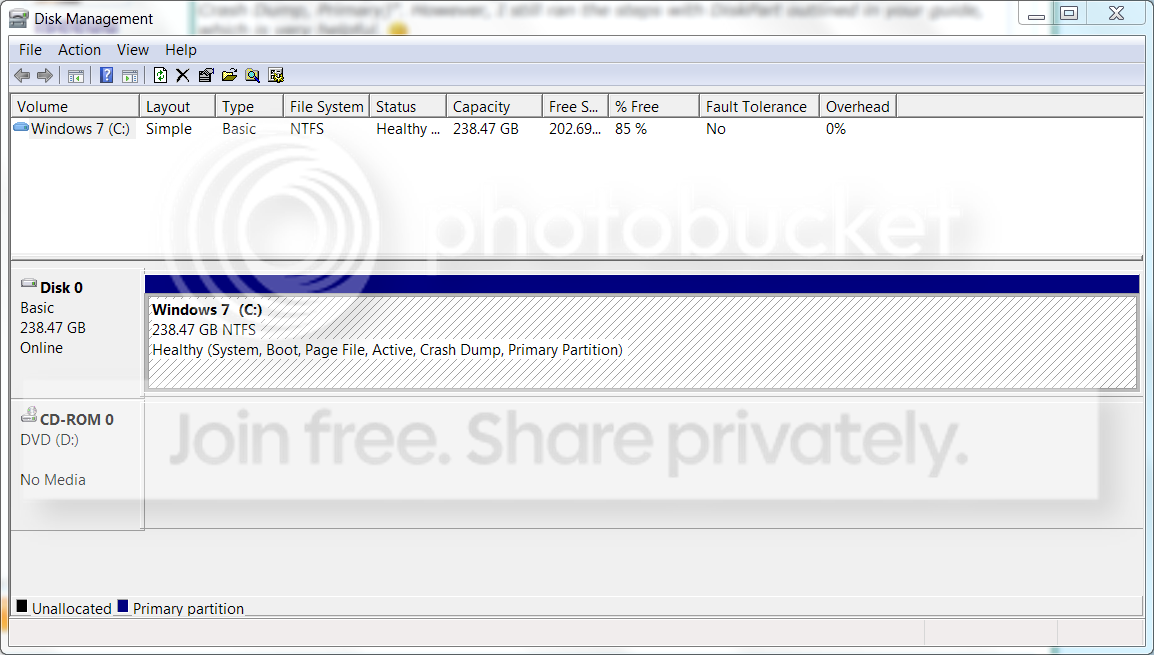
The drive, according to Disk Management, is "Healthy (System, Boot, Page File, Active, Crash Dump, Primary)". However, I still ran the steps with DiskPart outlined in your guide, which is very helpful. :)

I ran bootrec /fixmbr and bootrec /fixboot and then Startup Repair (all from Win7 DVD). However, none seemed to fix it. :( I still can't get into "Repair Your Computer": same error.
Thanks again for your help, much appreciated! :D

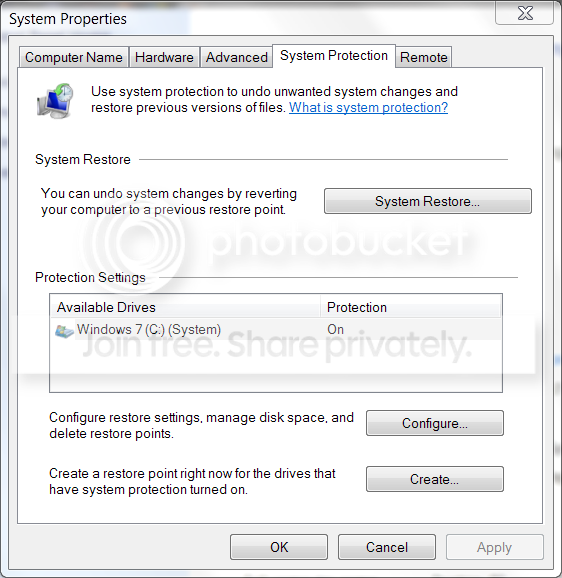
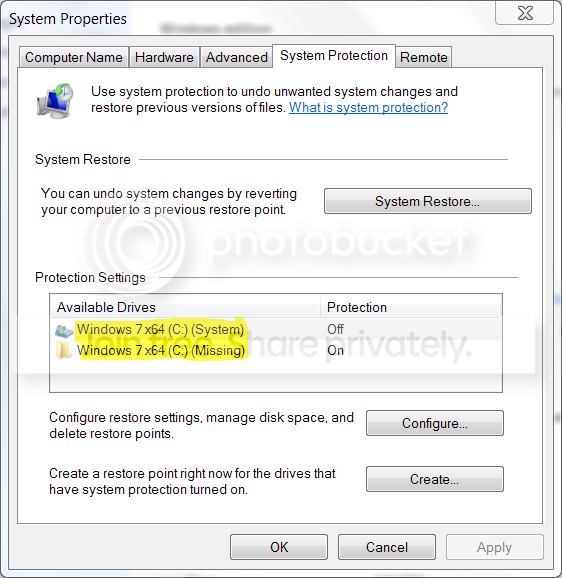
EDIT: Wanted to create a restore point before installing a program and this is what I saw:

Huh.png


Freaky. Yeah. I tried turning it on for "System" but gave some error about an incorrect label. I went to My Computer and renamed the drive from "Windows 7 x64" to just "Windows 7". That turned System Protection on for both drives. I may remove "Windows 7 x64" from that screen.....don't need any of those old backups anyways, as I made an image last night. :) Thought this might help? I will rerun bootrec /rebuildbdc /fixmbr /fixboot and Startup Repair.
 

My Computer My Computer

At a glance

Windows 7 Ultimate 64-biti7-720QM6GB DDR3-1.333GHzATI 4670 1GB
Computer Manufacturer/Model Number
Dell SXPS 1645
OS
Windows 7 Ultimate 64-bit
CPU
i7-720QM
Memory
6GB DDR3-1.333GHz
Graphics Card(s)
ATI 4670 1GB
Sound Card
IDT Integ.
Monitor(s) Displays
RGBLED
Screen Resolution
1920x1080
Hard Drives
Samsung PM800 256GB SSD
PSU
Dell 90W w/ 9-cell
Hang tight, I am out of ideas. I will post a notice for the other Gurus, and contact one of our experts on boot issues.
 

My Computer My Computer

At a glance

Windows 7 Professional x64Intel i7 2600K OC'd @ 4620 MHz16GB GSkill Sniper 2133 Mhz (4x4GB)EVGA GeForce GTX 480 SuperClocked+
Computer Manufacturer/Model Number
Custom
OS
Windows 7 Professional x64
CPU
Intel i7 2600K OC'd @ 4620 MHz
Motherboard
Asus P8Z68-V Pro
Memory
16GB GSkill Sniper 2133 Mhz (4x4GB)
Graphics Card(s)
EVGA GeForce GTX 480 SuperClocked+
Sound Card
Realtek High Definition Audio
Monitor(s) Displays
2x Acer S273HLbmii 27"
Screen Resolution
2 x 1920x1080
Hard Drives
64GB Crucial M4 SSD

Storage: Hitachi 1TB 5400RPM, Samsung 1.5TB 5400RPM
PSU
Corsair HW Series 750w (modular)
Case
Cooler Master HAF 932 Advanced Blue Edition
Cooling
CM Hyper 212+ CPU cooler, 3x 230mm + 1x 140mm case fans
Keyboard
Logitech MK320 (wireless)
Mouse
Logitech MK320 (wireless)
Internet Speed
30 Mb/s : 2 Mb/s
The drive, according to Disk Management, is "Healthy (System, Boot, Page File, Active, Crash Dump, Primary)". However, I still ran the steps with DiskPart outlined in your guide, which is very helpful. :)

I ran bootrec /fixmbr and bootrec /fixboot and then Startup Repair (all from Win7 DVD). However, none seemed to fix it. :( I still can't get into "Repair Your Computer": same error.
Thanks again for your help, much appreciated! :D
Can you post a snip of your Disk Mangement window? The Windows 7 Recovery is a 100MB partition at the formt of the hard drive. To boot from this partition and use the recovery tools this partition must be marked active. If you mark the Windows 7 partition active an do the "Startup Repair", you are bypassing the Recovery partition altogether.

Cheers!
Robert
 

My Computer My Computer

At a glance

...
OS
...
Reran bootrec /rebuildbcd /fixmbr /fixboot and Startup Repair again: still persistently there.

Is it hidden or something? I don't have this 100MB partition there at all. :confused:

diskmanagement.png


This is how I aligned the drives: Guide: How to align boot partitions without losing data

Basically: moved Windows to the right 10MB, created the correct offset in that 10MB, removed that 9.xxMB that was left. I only saw one partition in GParted (pre-alignment) and in Disk Management. Have I always just missed this?
 

My Computer My Computer

At a glance

Windows 7 Ultimate 64-biti7-720QM6GB DDR3-1.333GHzATI 4670 1GB
Computer Manufacturer/Model Number
Dell SXPS 1645
OS
Windows 7 Ultimate 64-bit
CPU
i7-720QM
Memory
6GB DDR3-1.333GHz
Graphics Card(s)
ATI 4670 1GB
Sound Card
IDT Integ.
Monitor(s) Displays
RGBLED
Screen Resolution
1920x1080
Hard Drives
Samsung PM800 256GB SSD
PSU
Dell 90W w/ 9-cell
Reran bootrec /rebuildbcd /fixmbr /fixboot and Startup Repair again: still persistently there.

Is it hidden or something? I don't have this 100MB partition there at all. :confused:

This is how I aligned the drives: Guide: How to align boot partitions without losing data

Basically: moved Windows to the right 10MB, created the correct offset in that 10MB, removed that 9.xxMB that was left. I only saw one partition in GParted (pre-alignment) and in Disk Management. Have I always just missed this?
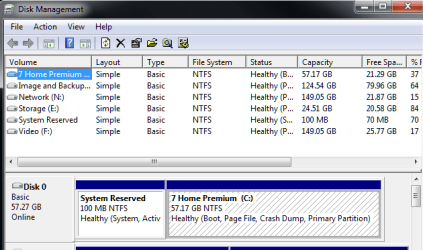
No, it is not hidden, it is not there.

Reserved_partition_01.png

You can get along with out it. It is not a requirement. You can also put it back:

http://www.sevenforums.com/installation-setup/58680-solve-dual-boot-problem-windows-7-a.html


To fix your restore point issue, I would suggest reconfigure restore point. Erase / disable it ... enable it and create a new restore point. It should be ok as long as you do not change the hard drive partition table again.

Cheers!
Robert
 

My Computer My Computer

At a glance

...
OS
...
Awesome. I will try this and see how it works! :D

OK, I did that with System Restore and it looks much cleaner now and more like it used to:

restorebetter.png


Will report back soon. :)

I'm just going to use GParted since I've already got that on a DVD. :)
 

My Computer My Computer

At a glance

Windows 7 Ultimate 64-biti7-720QM6GB DDR3-1.333GHzATI 4670 1GB
Computer Manufacturer/Model Number
Dell SXPS 1645
OS
Windows 7 Ultimate 64-bit
CPU
i7-720QM
Memory
6GB DDR3-1.333GHz
Graphics Card(s)
ATI 4670 1GB
Sound Card
IDT Integ.
Monitor(s) Displays
RGBLED
Screen Resolution
1920x1080
Hard Drives
Samsung PM800 256GB SSD
PSU
Dell 90W w/ 9-cell
Awesome. I will try this and see how it works! :D

OK, I did that with System Restore and it looks much cleaner now and more like it used to:

Will report back soon. :)

I'm just going to use GParted since I've already got that on a DVD. :)
Question: are you sure your SSD needed to be "Aligned?"

If so, and you choose to add the 100MB "System Reserved" partition at the front of the hard drive, be sure not to use any of the space you setup to "align"?

The reason I ask is the link from the site where you followed instructions said: "Yeah really should be a disclaimer in bold red or something that you only need to do this for certain SSD's and only for XP not for Vista/Win 7"

Cheers!
Robert
 

My Computer My Computer

At a glance

...
OS
...
Right. Turns out, for some wacko reason, mine was unaligned by Windows 7. :cry: I confirmed this by using AS SSD Benchmark which listed the alignment as:

31K - BAD

After aligning, it read;

64K - GOOD

See, I'm not sure exactly how do unavoid unaligning it by doing this. I may create this new 100MB and align it right there in GParted. And then boot into Windows and make it active, etc.

We'll see! Thanks again for your help.

~Ibrahim~
 

My Computer My Computer

At a glance

Windows 7 Ultimate 64-biti7-720QM6GB DDR3-1.333GHzATI 4670 1GB
Computer Manufacturer/Model Number
Dell SXPS 1645
OS
Windows 7 Ultimate 64-bit
CPU
i7-720QM
Memory
6GB DDR3-1.333GHz
Graphics Card(s)
ATI 4670 1GB
Sound Card
IDT Integ.
Monitor(s) Displays
RGBLED
Screen Resolution
1920x1080
Hard Drives
Samsung PM800 256GB SSD
PSU
Dell 90W w/ 9-cell
Right. Turns out, for some wacko reason, mine was unaligned by Windows 7. :cry: I confirmed this by using AS SSD Benchmark which listed the alignment as:

31K - BAD

After aligning, it read;

64K - GOOD

See, I'm not sure exactly how do unavoid unaligning it by doing this. I may create this new 100MB and align it right there in GParted. And then boot into Windows and make it active, etc.

We'll see! Thanks again for your help.

~Ibrahim~
Well ... you could try reversing the very last steps of the instructions: right click on the empty space and create a partition. Then shrink your Windows 7 partition by 100MB (the exact amount will vary like 101.94 or something) to create the space for the reserved partition, then make the 100MB partition. Finally delete the "Aligned partition space" as instructed and your alignment should remain unaffected?

Cheers!
Robert
 

My Computer My Computer

At a glance

...
OS
...
That's a good one. If any, you have to do the alignment before you install an OS. But for win7 that is not neccessary. It will do the alignment during the installation. If you cannot fix it, you'll have to reinstall. But first, take the alignment out.
 

My Computer My Computer

At a glance

Vista, Windows7, Mint Mate, Zorin, Windows 8from 1.6GHz Duo to i7
Computer Manufacturer/Model Number
HP, Dell, Gateway, Toshiba - 4 laptops and 2 desktops
OS
Vista, Windows7, Mint Mate, Zorin, Windows 8
CPU
from 1.6GHz Duo to i7
Monitor(s) Displays
2x HP w2207
Hard Drives
5x HDD, 7x SSD, 12x Externals
Keyboard
with trackball - no mices
Mouse
Trackball mice
Internet Speed
DSL 6000
Well, this got confusing fast. :huh:

Does the Recovery Environment need to be aligned? Or just Windows 7?

How do you remove an alignment? Is that even possible? I mean, I doubt I could reset it back to what it was before. Why exactly would I want to remove it? Shouldn't Windows 7 see it's already aligned and not mess with it? Or just scratch all the aligning already done (which seems like the smartest idea) and start fresh?

@iseeuu

:confused: Oh. So start over with the guide? Don't take this the wrong way, but I'm already feeling skeptical messing with it now.

Quick question....can I reinstall Windows (ugh), make sure it aligns the drives, and then paste an image on? Will pasting the image on mess with the alignment? I made the image with the regular "system image" thing you get with Win7 Pro/Ultimate.

Thanks,

~Ibrahim~
 

My Computer My Computer

At a glance

Windows 7 Ultimate 64-biti7-720QM6GB DDR3-1.333GHzATI 4670 1GB
Computer Manufacturer/Model Number
Dell SXPS 1645
OS
Windows 7 Ultimate 64-bit
CPU
i7-720QM
Memory
6GB DDR3-1.333GHz
Graphics Card(s)
ATI 4670 1GB
Sound Card
IDT Integ.
Monitor(s) Displays
RGBLED
Screen Resolution
1920x1080
Hard Drives
Samsung PM800 256GB SSD
PSU
Dell 90W w/ 9-cell
Well, this got confusing fast. :huh:

Does the Recovery Environment need to be aligned? Or just Windows 7?

How do you remove an alignment? Is that even possible? I mean, I doubt I could reset it back to what it was before. Why exactly would I want to remove it? Shouldn't Windows 7 see it's already aligned and not mess with it? Or just scratch all the aligning already done (which seems like the smartest idea) and start fresh?

@iseeuu

:confused: Oh. So start over with the guide? Don't take this the wrong way, but I'm already feeling skeptical messing with it now.

Quick question....can I reinstall Windows (ugh), make sure it aligns the drives, and then paste an image on? Will pasting the image on mess with the alignment? I made the image with the regular "system image" thing you get with Win7 Pro/Ultimate.

Thanks,

~Ibrahim~
Well ... I am a couple of years away from affording an SSD hard drive ... but if I had to choose between the alignment and the recovery partition, I would stay with the alignment. You can burn a recovery CD that contains the same recovery utilities as the recovery partition. As I said before, you can get along without the recovery partition.

Once the hard drive has been partitioned, restoring an image will not change the partition table so it should not affect the alignment. The only thing, as far as I can understand, that will affect the alignment is to change the partition parameters or drive table. Whether the recovery partition is comaptible with the need for the alignment is not known by me.

Cheers!
Robert
 

My Computer My Computer

At a glance

...
OS
...
Right. The only reason I want the recovery environment is to restore image backups on DVDs. The recovery environment doesn't include drivers for my media keys (obviously), but the media keys are the only way I can eject a disk. So scenario 1:

Windows dies. I put in Win7 DVD, go to Repair. I can't take out the Win7 disk (due to missing media key drivers) to put in the image DVD, so Windows can't find the image. And I don't even know if you take out the disk while in the recovery environment. Like is it in the RAM or is it still needing the Win7 disk?

Scenario 2:

Windows dies (hopefully with no disc inside!). I hit F8, go to the recovery environment, insert disk image, bam, I'm done.

But what if this happens again, where I can't get into the recovery environment of Windows? Then I'm SOL certainly! lol...

All right, I will attempt an install. I'm OCD about having everything working properly, no matter the real-world usage/benefits. A shame. :/ life would be so much easier.

Haha, no worries. I, out of sheer luck, got this one for free. I still can't afford to buy one now, lol.
 

My Computer My Computer

At a glance

Windows 7 Ultimate 64-biti7-720QM6GB DDR3-1.333GHzATI 4670 1GB
Computer Manufacturer/Model Number
Dell SXPS 1645
OS
Windows 7 Ultimate 64-bit
CPU
i7-720QM
Memory
6GB DDR3-1.333GHz
Graphics Card(s)
ATI 4670 1GB
Sound Card
IDT Integ.
Monitor(s) Displays
RGBLED
Screen Resolution
1920x1080
Hard Drives
Samsung PM800 256GB SSD
PSU
Dell 90W w/ 9-cell
Right. The only reason I want the recovery environment is to restore image backups on DVDs. The recovery environment doesn't include drivers for my media keys (obviously), but the media keys are the only way I can eject a disk. So scenario 1:

Windows dies. I put in Win7 DVD, go to Repair. I can't take out the Win7 disk (due to missing media key drivers) to put in the image DVD, so Windows can't find the image. And I don't even know if you take out the disk while in the recovery environment. Like is it in the RAM or is it still needing the Win7 disk?

Scenario 2:

Windows dies (hopefully with no disc inside!). I hit F8, go to the recovery environment, insert disk image, bam, I'm done.

But what if this happens again, where I can't get into the recovery environment of Windows? Then I'm SOL certainly! lol...

All right, I will attempt an install. I'm OCD about having everything working properly, no matter the real-world usage/benefits. A shame. :/ life would be so much easier.

Haha, no worries. I, out of sheer luck, got this one for free. I still can't afford to buy one now, lol.
Well ... based on the link to the instructions you followed, is there an issue with having two partitions on your hard drive? Doesn't the alignment represent the spot where the first partition must start? If there is a partition size requirement for the first partition, there no maximum limit to the Recovery Partition, just the 100MB minimum requirement. So if you align the recovery partition as you did the first time with your Windows 7 partition, and then locate the Windows 7 partition adjacent to the recovery partition, isn't the "Alignment" preserved? Maybe need some Googling?
 

My Computer My Computer

At a glance

...
OS
...
Please post back a screenshot of your full Disk Management drive map, using Snipping Tool in Start Menu and attaching file using paper clip in reply box.

If you had the WinRe at F8 during bootup and it is gone now, it is likely Startup Repair recovered the MBR into Win7 partition and not the 100mb Sys Reserved partition which provides the WinRE. But we cannot know this for sure until we see the screenshot.
 
Please post back a screenshot of your full Disk Management drive map, using Snipping Tool in Start Menu and attaching file using paper clip in reply box.

If you had the WinRe at F8 during bootup and it is gone now, it is likely Startup Repair recovered the MBR into Win7 partition and not the 100mb Sys Reserved partition which provides the WinRE. But we cannot know this for sure until we see the screenshot.
See post #8 http://www.sevenforums.com/performa...ions-botched-windows-recovery.html#post533155
 

My Computer My Computer

At a glance

...
OS
...
Back
Top