
Help with updating Asus Bios

Issue: Iphone No Sync

Well the only reason I'm even trying this is because itunes isnt syncing or writing data to my iphone..
As there has been a significant time line and confusion in this thread I will suggest the following to assist in resolving the real issue of "IPHONE NON SYNC"
As most of the senior forum members who have tested the various versions of Windows 7 have come to realise is that throughout the program a copious number of drivers were not catching up to the OS. This was especially true for X64 Bit versions. Apple was especially guilty of this and never provided any support for XP64 bit and installation for the Apple Installer involved a huge amount of HACK!
Now comes along Windows 7 64 bit and Apple has provided a 64 bit version installer that install all the files in the X86 legacy folder. There have been many issues with Itunes from hardware to software and are to numerous to mention. I recall the handle of Jonhnnyscience in other parts of the forum and I believe some the issues involved Itunes, no matter.
Johnny, bios updates for Assus are extremely simple as long as you follow them in suggestion. Assus provides an easy utility that you can update your bios from there website via the internet. I would caustion you very strongly to back up your existing bios and have it readily available if you have to reflash your bios in case the mobo bricks!
In the next post I will suggest a tried procedure on how to sync up your Iphone.
 

My Computer My Computer

Computer Manufacturer/Model Number
Custom Build
OS
Windows 7 7600 1 X64
CPU
AMD PHENOM II X 550 PROCESSOR 3.1 ghz
Motherboard
ASUS M4A78-TE
Memory
Corsair 4 gig ddr 3
Graphics Card(s)
ati radeon 3300
Sound Card
ati hd
Monitor(s) Displays
syncmaster 2033sw
Screen Resolution
1600X900 60 hz refresh
Hard Drives
twin_seagates SATA's 1 TB & 500 Gig, hitachi_slimline 160 gig
PSU
antec_550 watt
Case
cooler master GLite
Cooling
stock_heat sink
Internet Speed
20mbs up/ 1.5mbs down
Other Info
favorite child "stewie"
favorite dog "brian"
IPhone Non Sync

Johhny there are several ways to succesfully instal ITunes with an Iphone. I'm assuming that you are running 2nd. gen 3G and above.
Since you have a working version of Itunes x64 v9.02 working with your music and videos etc. already installed you are stable in this version. Since you either have had /not been able to sync your iphone you have 2 possible culprits causing this issue, and its an easy fix.
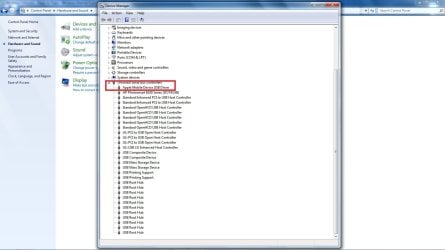
EASY FIX: Attach your Iphone to your PC, you should hear 2 audible sounds indicating that the "Apple Mobile Device driver has been activated" See the attached screenshot! If you cannot see any connection in your system then proceed with the following:
  1. Remove all Apples software from your system, this includes Quicktime and Bonjour
  2. Reboot your system and download the current Itunes version
  3. Locate the Itunes installer program and right click over it, you will next see a dropdown menu, mouse down to install as administrator and double click
  4. Itunes will install all services and drivers.
Attach your iphone and perform your sync.
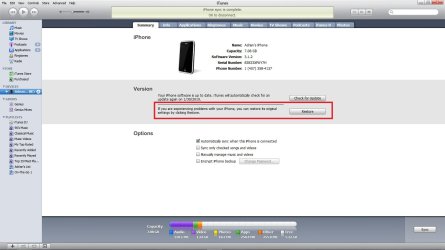
If the sync is succesful and backup hangs then we need to restore your phone to its original out of the box setting. See the screenshot I'm attaching for this procedure.
Report back and let us know how you progressed.

Regards,
Adrian
 

Attachments

  • apple_driver.jpg
    apple_driver.jpg
    104 KB · Views: 39
  • IPhone_restore.jpg
    IPhone_restore.jpg
    86.8 KB · Views: 59

My Computer My Computer

Computer Manufacturer/Model Number
Custom Build
OS
Windows 7 7600 1 X64
CPU
AMD PHENOM II X 550 PROCESSOR 3.1 ghz
Motherboard
ASUS M4A78-TE
Memory
Corsair 4 gig ddr 3
Graphics Card(s)
ati radeon 3300
Sound Card
ati hd
Monitor(s) Displays
syncmaster 2033sw
Screen Resolution
1600X900 60 hz refresh
Hard Drives
twin_seagates SATA's 1 TB & 500 Gig, hitachi_slimline 160 gig
PSU
antec_550 watt
Case
cooler master GLite
Cooling
stock_heat sink
Internet Speed
20mbs up/ 1.5mbs down
Other Info
favorite child "stewie"
favorite dog "brian"
Ok oddly enough, I am now able to sync my iphone with itunes again & I did NOT do anything to the bios yet.

So I'm good to go I suppose. I'm going to make a backup of the system as it is right now.

But should I still update my bios anyways for other reasons? Clearly I have a pretty out of date one....
 

My Computer My Computer

Computer Manufacturer/Model Number
Built it myself
OS
Windows 7 64 & Ubuntu 64
CPU
Intel Quad Core Q6600 2.40GHz
Motherboard
Asus
Memory
8g
Graphics Card(s)
Nvidia 9600 GT & 9800 GT
Sound Card
Turtle Beach 5.1
Monitor(s) Displays
Three 19" Dell's & one 46" Samsung 750
Johnny, I only flash my bios when I have an issue that a newer version corrects or the vendor's website recommends the upgrade for a specific reason. For me when it comes to the bios - if it ain't broke, don't fix it.
 

My Computer My Computer

Computer Manufacturer/Model Number
Home built
OS
Windows 7 Ultimate 32 bit
CPU
Intel(R) Pentium(R) 4 CPU 3.00GHz
Motherboard
ASUS P4P800-VM Motherboard Chipset: Intel 865G + ICH5
Memory
2.50 GB RAM
Graphics Card(s)
NVIDIA GeForce 7600 GS
Sound Card
SoundMax Integrated Digital Audio (Chip)
Monitor(s) Displays
ViewSonic VX 1962 wm
Screen Resolution
1680 X 1050
Hard Drives
Seagate Barracuda 7200.10 80 GB
ST380215A ATA Device 18.6 GB
Western Digital "My Book" external hard drive 750 GB
Cooling
Fan based
Keyboard
Microsoft Comfort Curve Keyboard 2000 v10 USB
Mouse
Logitec optic USB
Internet Speed
3.01 Mb/s download 0.64 Mb/s upload
Johnny, I only flash my bios when I have an issue that a newer version corrects or the vendor's website recommends the upgrade for a specific reason. For me when it comes to the bios - if it ain't broke, don't fix it.

Its a doubled edge sword though. Because am I then limiting myself some way with out having the most recent versions, they are updates for a reason usually, only to get better.

Its not like I have the one right before the most recent update, I have one thats already been passed up a few times. I'd have to see some benefits in my hardware no? I do have a bunch of weird little problems constantly with win7 64, maybe upgrading would help some of those?
 

My Computer My Computer

Computer Manufacturer/Model Number
Built it myself
OS
Windows 7 64 & Ubuntu 64
CPU
Intel Quad Core Q6600 2.40GHz
Motherboard
Asus
Memory
8g
Graphics Card(s)
Nvidia 9600 GT & 9800 GT
Sound Card
Turtle Beach 5.1
Monitor(s) Displays
Three 19" Dell's & one 46" Samsung 750
Johnny, I only flash my bios when I have an issue that a newer version corrects or the vendor's website recommends the upgrade for a specific reason. For me when it comes to the bios - if it ain't broke, don't fix it.

Its a doubled edge sword though. Because am I then limiting myself some way with out having the most recent versions, they are updates for a reason usually, only to get better.

Its not like I have the one right before the most recent update, I have one thats already been passed up a few times. I'd have to see some benefits in my hardware no? I do have a bunch of weird little problems constantly with win7 64, maybe upgrading would help some of those?

As I understand it, BIOS upgrades generally address specific issues with specific systems. They are not like a software or OS upgrade which include new features and improvements. Sometimes a BIOS vendor will release a new BIOS upgrade that is general in nature and will recommend that users upgrade to that version.

I have an ASUS P4P800-VM Motherboard Chipset: Intel 865G + ICH5 that is at least four years old. My BIOS version is newer that the last general update version ASUS has released. Though there are several newer versions than mine, I have none of the issues these newer versions specifically address. Therefore, I have chosen not to upgrade.

Read the release notes on each version that is newer than you current version starting with the one that is just above your current version. If you find one that addresses a specific problem you are having, by all means upgrade. Just upgrading to the latest version will not necessarily make your BIOS better. BIOS upgrades do not work that way.

This is just my opionion and the way I do things.
 

My Computer My Computer

Computer Manufacturer/Model Number
Home built
OS
Windows 7 Ultimate 32 bit
CPU
Intel(R) Pentium(R) 4 CPU 3.00GHz
Motherboard
ASUS P4P800-VM Motherboard Chipset: Intel 865G + ICH5
Memory
2.50 GB RAM
Graphics Card(s)
NVIDIA GeForce 7600 GS
Sound Card
SoundMax Integrated Digital Audio (Chip)
Monitor(s) Displays
ViewSonic VX 1962 wm
Screen Resolution
1680 X 1050
Hard Drives
Seagate Barracuda 7200.10 80 GB
ST380215A ATA Device 18.6 GB
Western Digital "My Book" external hard drive 750 GB
Cooling
Fan based
Keyboard
Microsoft Comfort Curve Keyboard 2000 v10 USB
Mouse
Logitec optic USB
Internet Speed
3.01 Mb/s download 0.64 Mb/s upload
hmm.

So all of these little weird quirks freezes & errors cant be pointed towards maybe updating the bios?

If not I guess I'll just leave it since I can sync iPhone.
 

My Computer My Computer

Computer Manufacturer/Model Number
Built it myself
OS
Windows 7 64 & Ubuntu 64
CPU
Intel Quad Core Q6600 2.40GHz
Motherboard
Asus
Memory
8g
Graphics Card(s)
Nvidia 9600 GT & 9800 GT
Sound Card
Turtle Beach 5.1
Monitor(s) Displays
Three 19" Dell's & one 46" Samsung 750
Maybe they could.

I had a portable hd that kept freezing on me when ever I tried drag an drop(large file) and I could never determine why.

I had been thinking of updating my bios for a while but because of the horror storys trawling the net I swerved it. Now a couple of days ago I decided to go for it as there was an update. It was made easier for me because my bios update from acer was actually an exe.

Since my update I have had no freezes with my portable hd so I can only assume that updating my bios was the solution.
 

My Computer My Computer

Computer Manufacturer/Model Number
Custom Build.
OS
Windows 7 Ultimate x64.
CPU
i5 760 @ 4.2Ghz. 1.18v
Motherboard
Gigabyte - H55M-USB3
Memory
4g Corsair xms3 ddr3, 1600Mhz.
Graphics Card(s)
Gigabyte GTX-560Ti soc edition
Sound Card
Asus Xonar Dx - Logitech Z5500.
Monitor(s) Displays
Acer 22" LCD Wide screen 1680-1050 -Samsung 42" Plasma....
Screen Resolution
1680/1050 -----1920/1080p.
Hard Drives
2x 2TB Seagate Go Flex,
1x 1TB Seagate,
1x 640WD Black,
x16 Gig sandisc flash drive,
1x8Gig sandisc flash drive.
PSU
XigmaTek 80plus NRP-PC702 - 700w dual 30a.
Case
Venus Gamers Midi Tower Case with LED Display
Cooling
Arctic Freezer 7 Pro Rev 2... x2 Arctic F8 case fans........
Keyboard
Logitech G15-v2 Gaming.
Mouse
Microsoft Sidewinder X8.
Internet Speed
Virgin Media - 50mb down- 8mb up.
Other Info
x2 Xbox 360 wireless controllers...

Dual layer optical disc drive...

Chrome 79million

A.V = MSE
Hmm. its hard to say what problems that I have. I just know there are weird quirks that happen all the time.

So updating a bios could help straighten some things out?
 

My Computer My Computer

Computer Manufacturer/Model Number
Built it myself
OS
Windows 7 64 & Ubuntu 64
CPU
Intel Quad Core Q6600 2.40GHz
Motherboard
Asus
Memory
8g
Graphics Card(s)
Nvidia 9600 GT & 9800 GT
Sound Card
Turtle Beach 5.1
Monitor(s) Displays
Three 19" Dell's & one 46" Samsung 750
It's very esay if download the update utility (assuming your board is supported). Once you have have that working . . . it's easy to do inside windows. Just open the app and follow the onscreen instructions.
 

My Computer My Computer

Computer Manufacturer/Model Number
Generic (my build)
OS
windows 7 (so far)
CPU
AMD Phenom II x 4 revision C2 95w
Motherboard
Asus M4A77TD-PRO
Memory
Adata ddr3 1600 Gaming Series
Graphics Card(s)
Asus Radeon ATI 4650 1 GB HDMI
Sound Card
onboard VIA and HDMI
Monitor(s) Displays
Viewsonic LCD 17" and Sharp LCD 37"
Hard Drives
2 x WD 640 GB
PSU
Thermalake 650
Case
Generic
Cooling
Onboard & Couple of case fans (Nothing special)
Back
Top