How can I backup my DVDs for quick & easy access?

one program that is good for decrypting is any dvd by slysoft

SlySoft Products | Copy Movie DVDs with AnyDVD and CloneDVD
it is a pay program but they do offer a 21 day free trial
it does keep up with current copy protection and can also make a iso of a dvd or
do them in a folder like dvd shrink only thing is any dvd does not do the compression that dvd shrink does

Hi there
Why would you use this when Alcohol 52 is FREE.

Nothing wrong per se with Slysoft but surely a decent FREE program is better.

Cheers
jimbo
 

My Computer My Computer

At a glance

Linux CENTOS 7 / various Windows OS'es and se...Intel i7 Intel i58GB, 16GBOn Motherboard
Computer type
PC/Desktop
Computer Manufacturer/Model Number
Custom built, several laptops HP/ASUS
OS
Linux CENTOS 7 / various Windows OS'es and servers
CPU
Intel i7 Intel i5
Memory
8GB, 16GB
Graphics Card(s)
On Motherboard
Sound Card
Realtek HD audio
Monitor(s) Displays
Apple Cinema display, Samsung LCD
Screen Resolution
1920 X 1080
Hard Drives
4 X 1TB SATA
Mouse
Toshiba wireless laser
Internet Speed
> 20MB up
one program that is good for decrypting is any dvd by slysoft

SlySoft Products | Copy Movie DVDs with AnyDVD and CloneDVD
it is a pay program but they do offer a 21 day free trial
it does keep up with current copy protection and can also make a iso of a dvd or
do them in a folder like dvd shrink only thing is any dvd does not do the compression that dvd shrink does

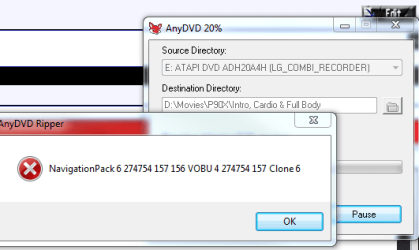
Well I got this error when trying to use this program:

Its weird, the dvd looks perfect when you look at it too. I guess I'm SOL at this point.
 

Attachments

  • Untitled20.png
    Untitled20.png
    13.4 KB · Views: 6

My Computer My Computer

At a glance

Windows 7 64 & Ubuntu 64Intel Quad Core Q6600 2.40GHz8gNvidia 9600 GT & 9800 GT
Computer Manufacturer/Model Number
Built it myself
OS
Windows 7 64 & Ubuntu 64
CPU
Intel Quad Core Q6600 2.40GHz
Motherboard
Asus
Memory
8g
Graphics Card(s)
Nvidia 9600 GT & 9800 GT
Sound Card
Turtle Beach 5.1
Monitor(s) Displays
Three 19" Dell's & one 46" Samsung 750
Ok Magic Ripper worked, kind of.

It at least prompted me to skip the bad sectors & continue to burn.

Now I just have to see if I got enough of the dvd & if it will even play.

Do I need to do anything else to this rip or is it all set now?

You should be all set as long as the whole movie is there, I've never had it ask me skip the bad sectors so make sure the entire movie is there. There may be something wrong with that dvd, that's why you were having problems before.

Why do I have an actual .avi file instead of a bunch of .vob files like when I ripped with DVDshrink?

Is there a way to turn all of the dvds I ripped with dvdshrink that have the .vob extention into a single .avi file?

Would I be better off using Magic Ripper & getting an easy .avi file to click on? (which to me seems easier, but will it play in Media Center?)

Is that a smaller file over all than what DVdshrink would give me?
 

My Computer My Computer

At a glance

Windows 7 64 & Ubuntu 64Intel Quad Core Q6600 2.40GHz8gNvidia 9600 GT & 9800 GT
Computer Manufacturer/Model Number
Built it myself
OS
Windows 7 64 & Ubuntu 64
CPU
Intel Quad Core Q6600 2.40GHz
Motherboard
Asus
Memory
8g
Graphics Card(s)
Nvidia 9600 GT & 9800 GT
Sound Card
Turtle Beach 5.1
Monitor(s) Displays
Three 19" Dell's & one 46" Samsung 750
What file do I click on to make sure that dvdshrink copied the entire dvd properly and I'm good to go?

So even with DVDshrink I need to locate the movie poster online?

Why doesnt it pull all of the posters/images that are on the dvd itself?

Why don't you reecode the files to matroska and x264/aac? The films will be tiny - 300mb+.

How much quality will I really lose? Especially for specialty HD DVD's?

What program would I use to reencode to make smaller?
 

My Computer My Computer

At a glance

Windows 7 64 & Ubuntu 64Intel Quad Core Q6600 2.40GHz8gNvidia 9600 GT & 9800 GT
Computer Manufacturer/Model Number
Built it myself
OS
Windows 7 64 & Ubuntu 64
CPU
Intel Quad Core Q6600 2.40GHz
Motherboard
Asus
Memory
8g
Graphics Card(s)
Nvidia 9600 GT & 9800 GT
Sound Card
Turtle Beach 5.1
Monitor(s) Displays
Three 19" Dell's & one 46" Samsung 750
Any ideas?
 

My Computer My Computer

At a glance

Windows 7 64 & Ubuntu 64Intel Quad Core Q6600 2.40GHz8gNvidia 9600 GT & 9800 GT
Computer Manufacturer/Model Number
Built it myself
OS
Windows 7 64 & Ubuntu 64
CPU
Intel Quad Core Q6600 2.40GHz
Motherboard
Asus
Memory
8g
Graphics Card(s)
Nvidia 9600 GT & 9800 GT
Sound Card
Turtle Beach 5.1
Monitor(s) Displays
Three 19" Dell's & one 46" Samsung 750
Ok, I'm totally new on this, and don't know any of the technical stuff....at all! I just want to copy my DVDs onto my computer so that I can watch them at a later time in Media Center. I am running windows 7. I don't want to spend alot (if any) of money, and definately need step by step help.

Can anyone please help me? I've tried alot of the recommended programs on here, but I know so little, I'm not having any luck. I've been working at it for 2 days on this, and am VERY frustrated. :(

Can someone PLEASE help me?

Thanks in advance!

Lisa
 

My Computer My Computer

At a glance

Windows 7
OS
Windows 7
We need more information. What, exactly have you done and what is happening (or not happening, as the case may be).

You also might want to consider starting your own thread, as video manipulation can get somewhat involved.
 

My Computer My Computer

At a glance

Win 7 Pro x64Intel i7-9206 GB Corsair DominatorRadeon HD 5870
Computer Manufacturer/Model Number
Rivendell Enterprises
OS
Win 7 Pro x64
CPU
Intel i7-920
Motherboard
MSI Pro-E
Memory
6 GB Corsair Dominator
Graphics Card(s)
Radeon HD 5870
Sound Card
Asus D2X
Monitor(s) Displays
Asus 25.5" LCD
Screen Resolution
1920x1200
Hard Drives
Intel 160 GB G2 SSD.
A few TBs worth of Seagate's and WD's
PSU
Corsair 750
Case
Cooler Master HAF932
Keyboard
Logitech MX-5500
Mouse
Logitech MX-5500
Internet Speed
FIOS
Ok, I'm totally new on this, and don't know any of the technical stuff....at all! I just want to copy my DVDs onto my computer so that I can watch them at a later time in Media Center. I am running windows 7. I don't want to spend alot (if any) of money, and definately need step by step help.

Can anyone please help me? I've tried alot of the recommended programs on here, but I know so little, I'm not having any luck. I've been working at it for 2 days on this, and am VERY frustrated. :(

Can someone PLEASE help me?

Thanks in advance!

Lisa

Welcome Lisa,
You said you've been working on this for two days, What have you tried?
Since this thread is already pretty long, You would get more immediate help if you start your own Here Media Center - Windows 7 Forums There's alot of help here.
Derek
 

My Computer My Computer

At a glance

Win 10 Pro x64Intel I5-2500K @3.3GHz16GB G.Skill Ripjaws X (4x4GB)EVGA GeForce 750 Ti SC 2GB
Computer type
PC/Desktop
Computer Manufacturer/Model Number
Self Built
OS
Win 10 Pro x64
CPU
Intel I5-2500K @3.3GHz
Motherboard
Asrock P67 Extreme4
Memory
16GB G.Skill Ripjaws X (4x4GB)
Graphics Card(s)
EVGA GeForce 750 Ti SC 2GB
Sound Card
ASUS Xonar DG 5.1 Channels 24-bit 96KHz PCI Interface Sound
Monitor(s) Displays
auria eq2367
Screen Resolution
1920 x 1080
Hard Drives
250GB Samsung 850 EVO SSD
1TB WD Blue
1TB Hitachi
PSU
SeaSonic X 650W 80 Plus Gold
Case
Corsair Obsidian 750D
Cooling
Corsair H60, Three 140mm case fans
Keyboard
Logitech Wireless Keyboard K520
Mouse
Logitech Wireless Mouse M310
Internet Speed
Wave Broadband ~ 100 dn 5 up
Antivirus
Windows Defender, Malwarebytes Premium
Browser
Edge, IE11, Chrome
Other Info
Laptop specs: HP g7-1365dx /
CPU: AMD A6-3420M APU with Radeon(tm) HD Graphics /
RAM: Crucial 8Gb (2x4Gb) /
SSD: Crucial M4-CT128M4SSD2 ATA Device/ FW 000F /
GFX: AMD Radeon HD 6520G /
OS: Windows 10 Pro x64
Rather than get into all the technicals of decrypting and re-coding/ re-muxing if you do not wish to learn right now,

why not give this a try:
MakeMKV - Make MKV from Blu-ray and DVD


It will take make a single MKV file, from your discs of the main movie, complete with subs, but will be the same size and qaulity as the original source was.
The good thing is:
its one step.
its Lossless
no recode/encoding necc.
fairly quick (depending on your DVD/BD drive speed)

The downside is it will start taking alot more HD space, than a compressed movie will.
especially if your decrypting Blurays which can be upwards of 25-40Gb per film.
4.3-7.5GB for DVDs

If you want to compress them to save space, youll need to to learn some encoding, such as with MeGUI.

You will also need the proper splitters to watch a MKV file. Such as in Shark007s codec pack .. Haali Splitter.
 

My Computer My Computer

At a glance

Windows 7 Home Premium 64bitIntel Core i7 2700k8GB Mushkin Redline Ridgebacks @1866EVGA GTX570 SC
Computer Manufacturer/Model Number
Custom (Self Build)
OS
Windows 7 Home Premium 64bit
CPU
Intel Core i7 2700k
Motherboard
eVGA P67 SLI
Memory
8GB Mushkin Redline Ridgebacks @1866
Graphics Card(s)
EVGA GTX570 SC
Sound Card
XiFi Titanium HD
Monitor(s) Displays
LG W2453V
Screen Resolution
1920x1080
Hard Drives
Intel 320 80GB -- Intel X25-V 40GB --WD Black 1TB x2 -- WD Blue 640GB
PSU
Seasonic x750
Case
Corsair 600T SE White
Cooling
eVGA Superclocked CPU Cooler
Keyboard
Saitek Cyborg
Antivirus
Kaspersky
Browser
IE
Other Info
LG BD/DVD
Ok, I'm totally new on this, and don't know any of the technical stuff....at all! I just want to copy my DVDs onto my computer so that I can watch them at a later time in Media Center. I am running windows 7. I don't want to spend alot (if any) of money, and definately need step by step help.

Can anyone please help me? I've tried alot of the recommended programs on here, but I know so little, I'm not having any luck. I've been working at it for 2 days on this, and am VERY frustrated. :(

Can someone PLEASE help me?

Thanks in advance!

Lisa

Read the page 2 and page 3 of this thread , I told Johney about handbrake (though he was reluctant to use it). HandBrake is a very good program to rip dvds into avi or mkv with almost minimum quality loss, comes free to use.

It will reduce your hdd cost as well, coz a dvdrip is much smaller than a dvd. There is a guideline to arrange media center movie library (in page 2 and 3), too. Try it, if still it is a problem, just inform, "step by step help" will be provided.
 

My Computer My Computer

At a glance

Microsoft Windows 10 Pro Insider Preview 64-bitIntel(R) Core(TM) i3-4130 CPU @ 3.40GHzCorsair Vengence 4GB x2 (8.00GB Dual-Channel ...2047MB GeForce GTS 450 (ZOTAC International)
Computer type
PC/Desktop
Computer Manufacturer/Model Number
Self Assembled
OS
Microsoft Windows 10 Pro Insider Preview 64-bit
CPU
Intel(R) Core(TM) i3-4130 CPU @ 3.40GHz
Motherboard
Gigabyte Technology Co., Ltd. B85M-D3H
Memory
Corsair Vengence 4GB x2 (8.00GB Dual-Channel DDR3 @ 798MHz)
Graphics Card(s)
2047MB GeForce GTS 450 (ZOTAC International)
Sound Card
Onboard (Realtek High Definition Audio)
Monitor(s) Displays
LG Flatron E2040T
Screen Resolution
1600x900
Hard Drives
Western Digital 1 TB
Seagate 500 GB
PSU
Corsair VS550
Case
Cooler Master K380
Cooling
Cooler Master Seidon 120V Plus
Keyboard
Logitech MK260r
Mouse
Logitech MK260r
Internet Speed
PMPL Broadband
Antivirus
Windows Defender + MBAM
Browser
Firefox
Other Info
Dell Studio 15" Laptop
Rather than get into all the technicals of decrypting and re-coding/ re-muxing if you do not wish to learn right now,

why not give this a try:
MakeMKV - Make MKV from Blu-ray and DVD


It will take make a single MKV file, from your discs of the main movie, complete with subs, but will be the same size and qaulity as the original source was.
The good thing is:
its one step.
its Lossless
no recode/encoding necc.
fairly quick (depending on your DVD/BD drive speed)

The downside is it will start taking alot more HD space, than a compressed movie will.
especially if your decrypting Blurays which can be upwards of 25-40Gb per film.
4.3-7.5GB for DVDs

If you want to compress them to save space, youll need to to learn some encoding, such as with MeGUI.

You will also need the proper splitters to watch a MKV file. Such as in Shark007s codec pack .. Haali Splitter.

Honestly DVD Shrink is all in one step & pretty easy.

But I'm wondering how much quality loss happens when doing the suggested method that Frostmourne mentioned about reecode the files to matroska and x264/aac? The films will be tiny - 300mb+.

Obviously saving space would be nice along with getting a single file, but at what kind of quality loss?
 

My Computer My Computer

At a glance

Windows 7 64 & Ubuntu 64Intel Quad Core Q6600 2.40GHz8gNvidia 9600 GT & 9800 GT
Computer Manufacturer/Model Number
Built it myself
OS
Windows 7 64 & Ubuntu 64
CPU
Intel Quad Core Q6600 2.40GHz
Motherboard
Asus
Memory
8g
Graphics Card(s)
Nvidia 9600 GT & 9800 GT
Sound Card
Turtle Beach 5.1
Monitor(s) Displays
Three 19" Dell's & one 46" Samsung 750
Any time recode a video theres ALWAYS quality loss. No way around it.
x264 is by far the best compression codec.

If you want to compress them, How much quality loss depends on bitrate/settings/file size.
x264 compresses by basically throwing away bits of information the human eye generally can not detect.
Therefore, if set properly, & high enough bit rates the quality loss will seem transparent.
Too low of settings, and this becomes apparent as you will see it..

MKV with AAC/AC3 or MP4 with AAC are both good choices.

If you are taking a DVD movie @ say 1hr45min, & keeping the 720x480 resolution,
300MB will be too small, and will show artifacting.
Will take some experimenting to find where it looks and sounds good to you.

For example, a 1hr45min film :
@ 1500 video bitrate and AAC stereo 192bitrate (around 1.2GB)
@ 1750 video bitrate and AAC 5.1 384bitrate (around 1.5GB)
VS 4-7GB original

Again this all depends greatly on a few factors.
Orginal Source
(some DVD/Bluray compress better than others,,depending how compressed it already is. Results will vary)
what the target resolution is
stereo or surround sound
Target Size


I recommend MeGUI. Also based on the x264 codec.
 

My Computer My Computer

At a glance

Windows 7 Home Premium 64bitIntel Core i7 2700k8GB Mushkin Redline Ridgebacks @1866EVGA GTX570 SC
Computer Manufacturer/Model Number
Custom (Self Build)
OS
Windows 7 Home Premium 64bit
CPU
Intel Core i7 2700k
Motherboard
eVGA P67 SLI
Memory
8GB Mushkin Redline Ridgebacks @1866
Graphics Card(s)
EVGA GTX570 SC
Sound Card
XiFi Titanium HD
Monitor(s) Displays
LG W2453V
Screen Resolution
1920x1080
Hard Drives
Intel 320 80GB -- Intel X25-V 40GB --WD Black 1TB x2 -- WD Blue 640GB
PSU
Seasonic x750
Case
Corsair 600T SE White
Cooling
eVGA Superclocked CPU Cooler
Keyboard
Saitek Cyborg
Antivirus
Kaspersky
Browser
IE
Other Info
LG BD/DVD
Any time recode a video theres ALWAYS quality loss. No way around it.
x264 is by far the best compression codec.

If you want to compress them, How much quality loss depends on bitrate/settings/file size.
x264 compresses by basically throwing away bits of information the human eye generally can not detect.
Therefore, if set properly, & high enough bit rates the quality loss will seem transparent.
Too low of settings, and this becomes apparent as you will see it..

MKV with AAC/AC3 or MP4 with AAC are both good choices.

If you are taking a DVD movie @ say 1hr45min, & keeping the 720x480 resolution,
300MB will be too small, and will show artifacting.
Will take some experimenting to find where it looks and sounds good to you.

For example, a 1hr45min film :
@ 1500 video bitrate and AAC stereo 192bitrate (around 1.2GB)
@ 1750 video bitrate and AAC 5.1 384bitrate (around 1.5GB)
VS 4-7GB original

Again this all depends greatly on a few factors.
Orginal Source
(some DVD/Bluray compress better than others,,depending how compressed it already is. Results will vary)
what the target resolution is
stereo or surround sound
Target Size


I recommend MeGUI. Also based on the x264 codec.

Ehh I'll think about trying it, it sounds like a little project just to figure out how to do it with all the tweaking etc. I've got the room, I'll just keep ripping them like normal for now.

But would I be better off using Magic Ripper & getting an easy single .avi file to click on? (which to me seems easier than a bunch of .vob files, but will it play in Media Center?)

Is that a smaller file over all than what DVdshrink would give me?

I just dont understand why DvdShrink isnt pulling the pictures/posters etc?
 

My Computer My Computer

At a glance

Windows 7 64 & Ubuntu 64Intel Quad Core Q6600 2.40GHz8gNvidia 9600 GT & 9800 GT
Computer Manufacturer/Model Number
Built it myself
OS
Windows 7 64 & Ubuntu 64
CPU
Intel Quad Core Q6600 2.40GHz
Motherboard
Asus
Memory
8g
Graphics Card(s)
Nvidia 9600 GT & 9800 GT
Sound Card
Turtle Beach 5.1
Monitor(s) Displays
Three 19" Dell's & one 46" Samsung 750
That will work sure.

But if its using the Xvid codec, it will be, ... blurred so to speak or softer VS the x264 codec, which some actually prefer.
But in the end, if you like the results, then thats all that matters.


Any "one-click" software that just does everything for you will not be as good as a good encoder can do.regardless what codec you choose.
They just require some manualy configuring.

If you want to try MeGUI Id be happy to give you a quick tutorial to get you started for DVD encoding

Completely up to you.

Either way, you may need something like Sharks codec package, and enable ffdshow codec in direct show players.
Youll get better encode results regardless which program you choose.
 

My Computer My Computer

At a glance

Windows 7 Home Premium 64bitIntel Core i7 2700k8GB Mushkin Redline Ridgebacks @1866EVGA GTX570 SC
Computer Manufacturer/Model Number
Custom (Self Build)
OS
Windows 7 Home Premium 64bit
CPU
Intel Core i7 2700k
Motherboard
eVGA P67 SLI
Memory
8GB Mushkin Redline Ridgebacks @1866
Graphics Card(s)
EVGA GTX570 SC
Sound Card
XiFi Titanium HD
Monitor(s) Displays
LG W2453V
Screen Resolution
1920x1080
Hard Drives
Intel 320 80GB -- Intel X25-V 40GB --WD Black 1TB x2 -- WD Blue 640GB
PSU
Seasonic x750
Case
Corsair 600T SE White
Cooling
eVGA Superclocked CPU Cooler
Keyboard
Saitek Cyborg
Antivirus
Kaspersky
Browser
IE
Other Info
LG BD/DVD
That will work sure.

But if its using the Xvid codec, it will be, ... blurred so to speak or softer VS the x264 codec, which some actually prefer.
But in the end, if you like the results, then thats all that matters.


Any "one-click" software that just does everything for you will not be as good as a good encoder can do.regardless what codec you choose.
They just require some manualy configuring.

If you want to try MeGUI Id be happy to give you a quick tutorial to get you started for DVD encoding

Completely up to you.

Either way, you may need something like Sharks codec package, and enable ffdshow codec in direct show players.
Youll get better encode results regardless which program you choose.

So how do I tell if DVDShrink is using the Xvid codec and is going to give me blurring?

But would I be better off using Magic Ripper & getting an easy single .avi file to click on? (which to me seems easier than a bunch of .vob files, but will it play in Media Center?)

Is that a smaller file over all than what DVdshrink would give me?

I just dont understand why DvdShrink isnt pulling the pictures/posters etc?
 

My Computer My Computer

At a glance

Windows 7 64 & Ubuntu 64Intel Quad Core Q6600 2.40GHz8gNvidia 9600 GT & 9800 GT
Computer Manufacturer/Model Number
Built it myself
OS
Windows 7 64 & Ubuntu 64
CPU
Intel Quad Core Q6600 2.40GHz
Motherboard
Asus
Memory
8g
Graphics Card(s)
Nvidia 9600 GT & 9800 GT
Sound Card
Turtle Beach 5.1
Monitor(s) Displays
Three 19" Dell's & one 46" Samsung 750
I just dont understand why DvdShrink isnt pulling the pictures/posters etc?

That's not part of it's functionality , never has been!

I think your worrying too much about nothing in particular .. you copy your DVD to your hard drive with DVDShrink .. you store away the master DVD for safe keeping!

It doesn't get much easier than that ...
 

My Computer My Computer

At a glance

Windows 7 64bit RTMAMD Athlon 64 X2 3800+4G Dual channelPOV GeForce 7600 GT
OS
Windows 7 64bit RTM
CPU
AMD Athlon 64 X2 3800+
Motherboard
ASUS M2N-E SLI
Memory
4G Dual channel
Graphics Card(s)
POV GeForce 7600 GT
Sound Card
USB 2.1
Monitor(s) Displays
Samsung 17 in LCD
Hard Drives
80G Western Digital
250G Western Digital
500G Buffalo Drivestation
I just dont understand why DvdShrink isnt pulling the pictures/posters etc?

That's not part of it's functionality , never has been!

I think your worrying too much about nothing in particular .. you copy your DVD to your hard drive with DVDShrink .. you store away the master DVD for safe keeping!

It doesn't get much easier than that ...

Yeah but I'd like it to pull the artwork so it shows up in Media center instead of a big green poster or something.

Will Handbrake pull the artwork?
 

My Computer My Computer

At a glance

Windows 7 64 & Ubuntu 64Intel Quad Core Q6600 2.40GHz8gNvidia 9600 GT & 9800 GT
Computer Manufacturer/Model Number
Built it myself
OS
Windows 7 64 & Ubuntu 64
CPU
Intel Quad Core Q6600 2.40GHz
Motherboard
Asus
Memory
8g
Graphics Card(s)
Nvidia 9600 GT & 9800 GT
Sound Card
Turtle Beach 5.1
Monitor(s) Displays
Three 19" Dell's & one 46" Samsung 750
That's not part of it's functionality , never has been!

I think your worrying too much about nothing in particular .. you copy your DVD to your hard drive with DVDShrink .. you store away the master DVD for safe keeping!

It doesn't get much easier than that ...

Yeah but I'd like it to pull the artwork so it shows up in Media center instead of a big green poster or something.

Will Handbrake pull the artwork?

I think you want something like this mikinhosoft: Yammm - Yet Another Media Meta Manager This isn't the updated version but it still works.
Here is a good tutorial to help you get it up and running,
http://www.sevenforums.com/tutorials/11232-media-center-setup-movie-library.html
This is what I use, every time I add a movie to my collection, YAMMM automatically adds the artwork and metadata. Don't forget to add the file2folder.bat in with your movies folder and use the recommended YAMMM settings in the tutorial and your library can look like this.
 

Attachments

  • Movie Library.JPG
    Movie Library.JPG
    55.8 KB · Views: 6

My Computer My Computer

At a glance

Win 10 Pro x64Intel I5-2500K @3.3GHz16GB G.Skill Ripjaws X (4x4GB)EVGA GeForce 750 Ti SC 2GB
Computer type
PC/Desktop
Computer Manufacturer/Model Number
Self Built
OS
Win 10 Pro x64
CPU
Intel I5-2500K @3.3GHz
Motherboard
Asrock P67 Extreme4
Memory
16GB G.Skill Ripjaws X (4x4GB)
Graphics Card(s)
EVGA GeForce 750 Ti SC 2GB
Sound Card
ASUS Xonar DG 5.1 Channels 24-bit 96KHz PCI Interface Sound
Monitor(s) Displays
auria eq2367
Screen Resolution
1920 x 1080
Hard Drives
250GB Samsung 850 EVO SSD
1TB WD Blue
1TB Hitachi
PSU
SeaSonic X 650W 80 Plus Gold
Case
Corsair Obsidian 750D
Cooling
Corsair H60, Three 140mm case fans
Keyboard
Logitech Wireless Keyboard K520
Mouse
Logitech Wireless Mouse M310
Internet Speed
Wave Broadband ~ 100 dn 5 up
Antivirus
Windows Defender, Malwarebytes Premium
Browser
Edge, IE11, Chrome
Other Info
Laptop specs: HP g7-1365dx /
CPU: AMD A6-3420M APU with Radeon(tm) HD Graphics /
RAM: Crucial 8Gb (2x4Gb) /
SSD: Crucial M4-CT128M4SSD2 ATA Device/ FW 000F /
GFX: AMD Radeon HD 6520G /
OS: Windows 10 Pro x64
Along with what derekimo has suggested theres a few others that good as well for managing your library in WMC.

myMovies is a automated one (not particularly fond of this one personally)

theres also MetaBrowser which will fetch all the artwork, actors etc and can be used alongside MediaBrowser.

Lots of info on all of these in the Media Center Setion of these forums.

Although all a bit different, they do the exact same thing, depending on which one suits your needs/preferences the best.
 

My Computer My Computer

At a glance

Windows 7 Home Premium 64bitIntel Core i7 2700k8GB Mushkin Redline Ridgebacks @1866EVGA GTX570 SC
Computer Manufacturer/Model Number
Custom (Self Build)
OS
Windows 7 Home Premium 64bit
CPU
Intel Core i7 2700k
Motherboard
eVGA P67 SLI
Memory
8GB Mushkin Redline Ridgebacks @1866
Graphics Card(s)
EVGA GTX570 SC
Sound Card
XiFi Titanium HD
Monitor(s) Displays
LG W2453V
Screen Resolution
1920x1080
Hard Drives
Intel 320 80GB -- Intel X25-V 40GB --WD Black 1TB x2 -- WD Blue 640GB
PSU
Seasonic x750
Case
Corsair 600T SE White
Cooling
eVGA Superclocked CPU Cooler
Keyboard
Saitek Cyborg
Antivirus
Kaspersky
Browser
IE
Other Info
LG BD/DVD
Yeah but I'd like it to pull the artwork so it shows up in Media center instead of a big green poster or something.

Will Handbrake pull the artwork?

No copying/encoding software can pull the movie artwork. Either you have to install a media manager in your media center (as wishmaster suggested), or you may download them manually (what I do).

I obtain the movie posters from google search, and place them in a folder where the movie is located, rename the poster as Folder.jpg, and thats all.
 

My Computer My Computer

At a glance

Microsoft Windows 10 Pro Insider Preview 64-bitIntel(R) Core(TM) i3-4130 CPU @ 3.40GHzCorsair Vengence 4GB x2 (8.00GB Dual-Channel ...2047MB GeForce GTS 450 (ZOTAC International)
Computer type
PC/Desktop
Computer Manufacturer/Model Number
Self Assembled
OS
Microsoft Windows 10 Pro Insider Preview 64-bit
CPU
Intel(R) Core(TM) i3-4130 CPU @ 3.40GHz
Motherboard
Gigabyte Technology Co., Ltd. B85M-D3H
Memory
Corsair Vengence 4GB x2 (8.00GB Dual-Channel DDR3 @ 798MHz)
Graphics Card(s)
2047MB GeForce GTS 450 (ZOTAC International)
Sound Card
Onboard (Realtek High Definition Audio)
Monitor(s) Displays
LG Flatron E2040T
Screen Resolution
1600x900
Hard Drives
Western Digital 1 TB
Seagate 500 GB
PSU
Corsair VS550
Case
Cooler Master K380
Cooling
Cooler Master Seidon 120V Plus
Keyboard
Logitech MK260r
Mouse
Logitech MK260r
Internet Speed
PMPL Broadband
Antivirus
Windows Defender + MBAM
Browser
Firefox
Other Info
Dell Studio 15" Laptop
Back
Top