
You are using an out of date browser. It may not display this or other websites correctly.
You should upgrade or use an alternative browser.
You should upgrade or use an alternative browser.
Explorer Glass
- Thread starter alexmira
- Start date


I don't know how, but I would like to know as well. Anyone?
My Computer
- Computer type
- PC/Desktop
- Computer Manufacturer/Model Number
- SuperBeast
- OS
- Windows 10 Tech Preview 9926 x64
- CPU
- AMD FX-8350
- Motherboard
- Gigabyte GA-990FXA-UD3
- Memory
- 16GB DDR3 1333
- Graphics Card(s)
- Asus R9 290 DirectCU II OC, Gigabyte Windforce R9 290 OC
- Sound Card
- Integrated w/ Creative A250 2.1 speakers
- Monitor(s) Displays
- Main: Asus VN289H 28" Secondary: Acer G246HL 24"
- Screen Resolution
- 1920x1080
- Hard Drives
- 128 GB SanDisk Ultra Plus (Windows drive)
240 GB Crucial M500 SSD (Games drive)
1 TB WDC WD10EACS 7200RPM HDD (Data drive)
2 TB Seagate Expansion Desktop external HDD (Backup drive)
- PSU
- 900w Antec HCG-900
- Case
- Raidmax Agusta Full ATX
- Cooling
- Corsair H80
- Keyboard
- Cooler Master Devastator MB24
- Mouse
- Cooler Master Devastator MS2K 1000/1600/2000 DPI
- Internet Speed
- 100Mbps cable
- Antivirus
- Avast!
- Browser
- Chrome

My Computer
- Computer Manufacturer/Model Number
- Self Assembled
- OS
- Win7 RTM, XP Pro, Arch Linux, Puppy (Quad boot)
- CPU
- Core i7 920 (OCed @ 3.8Ghz)
- Motherboard
- ASUS P6T Dlx
- Memory
- OCZ Gold 6GB DDR3-1600
- Graphics Card(s)
- Sapphire Radeon HD 5870 1GB (OCed @ 935/1300)
- Sound Card
- On-board
- Monitor(s) Displays
- Samsung 24"
- Hard Drives
- WD Caviar Black 1TB, WD Velociraptor 300GB, Maxtor 250GB
- PSU
- Corsair HX620W
- Case
- Antec 1200
- Cooling
- Noctua U12P

- Local time
- 10:52 PM
- Messages
- 524
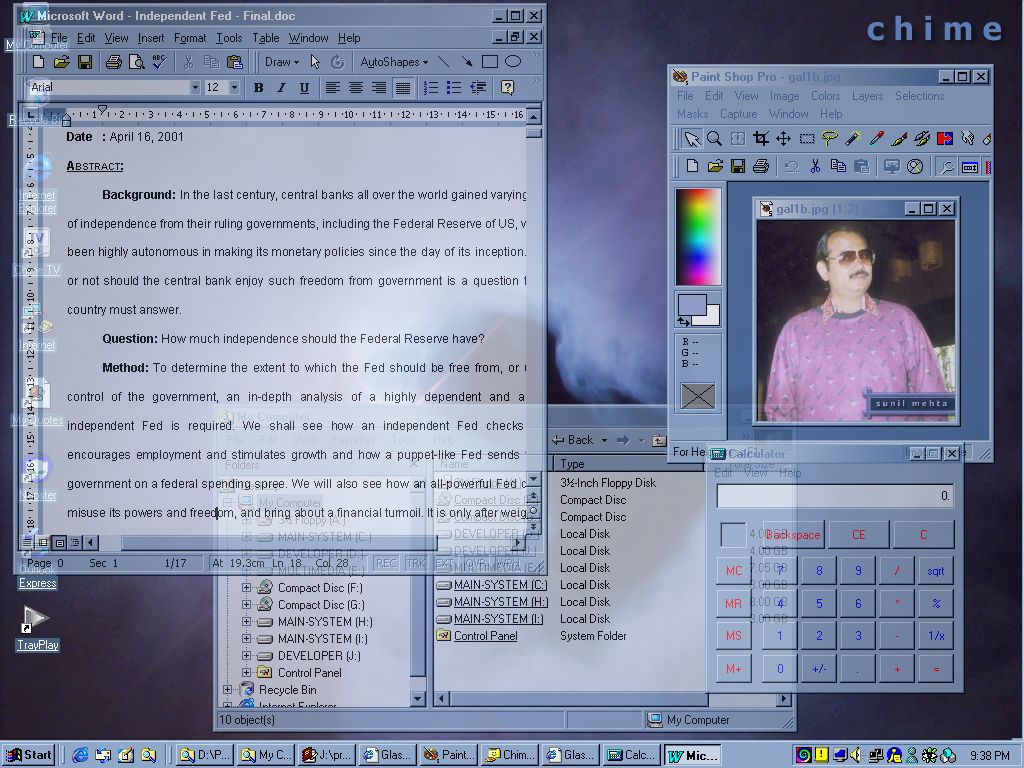
The first screenshot was from a Vista running WindowBlinds with a transparent window background(an option in the program)
My Computer
- Computer type
- PC/Desktop
- Computer Manufacturer/Model Number
- Custom
- OS
- Windows 7 SP1 x64
- CPU
- Intel E8400 3.0 GHz
- Motherboard
- Gigabyte EP45-DS3R
- Memory
- 4x1 Trascend DDR2 800 Mhz
- Graphics Card(s)
- Gainward 8800GT 512 Mb
- Sound Card
- Realtek HD Audio 889A
- Monitor(s) Displays
- LG L204WS
- Screen Resolution
- 1680x1050
- Hard Drives
- Intel 520 Series 120Gb SSD (System)
Western Digital 6400AAKS 640Gb (Data)
- PSU
- Cooler Master 650W
- Case
- Cooler Master Centurion 532
- Cooling
- 2x 12 cm fans
- Keyboard
- Logitech Wave
- Mouse
- Logitech G5
- Internet Speed
- 10 Mbit Cable Flat
- Antivirus
- NOD32 Smart Security
- Browser
- Google Chrome
- Local time
- 10:52 PM
- Messages
- 4,755
There is a theme for WindowsBlinds 7, that does this 

Nutz47
New member
glass2k it's incompatible with windows 7...
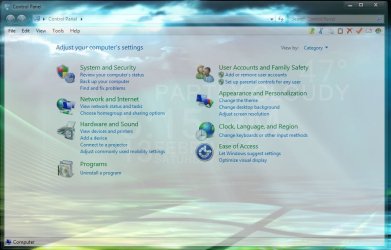
this tweak make windows explorer like linux,ubunto,fedra, because they have glass like my screenshot...
Its working fine for me...but it also makes the icons transparent though.
My Computer
- Computer Manufacturer/Model Number
- Toshiba Satellite L305-S5944
- OS
- Windows 7 Ultimate 32bit
- CPU
- Intel Pentium(R)Dual Core [email protected]
- Motherboard
- Intel
- Memory
- 2.00 GB
- Graphics Card(s)
- Intel GMA 4500
- Sound Card
- High Definition Audio
- Monitor(s) Displays
- 15.7 inch LCD (37" Visio LCD)
- Hard Drives
- Seagate 250 GB internal
Seagate 1 TB external
Hi, everyone! My name is Ivo and I,m from Bulgaria. We have a similar forum about Windows 7 ant it's great! So, it is possible to make your explorer glass. There is a program called Full Glass. But you shoud have a theme with black backgrounds EVERYWHERE in explorer. Can anybody make such theme with black backgrounds and to post it here? In our bulgarian forum nobody wants to do this  and I,m writing here.
  Have a nice day!
and I,m writing here. Have a nice day!My Computer
- OS
- Windows 7

I went and made a program that did what Glass2k did a few days ago in an attempt to do exactly what you showed in the screenshot of Control Panel. While my attempt at THAT didn't go so well...
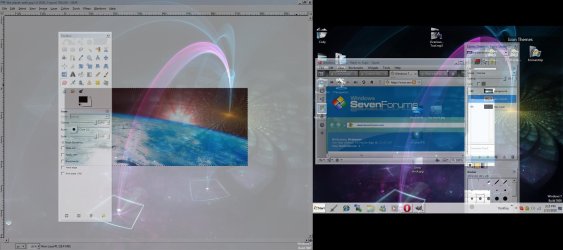
Here's what I managed with this.
And here's the program.
View attachment 53930
You can choose which windows you want transparent and you can turn the transparency on and off for each window, works for every window, so far as I have tested. And the taskbar is not affected by this program, the taskbar is a whole different program.
If you find any problems with it, tell me and i'll be happy to fix it.
EDIT: You have inspired me to keep trying with my first attempt (to make the background transparent)...So i'll get to work on that, I guess.
Here's what I managed with this.
And here's the program.
View attachment 53930
You can choose which windows you want transparent and you can turn the transparency on and off for each window, works for every window, so far as I have tested. And the taskbar is not affected by this program, the taskbar is a whole different program.
If you find any problems with it, tell me and i'll be happy to fix it.
EDIT: You have inspired me to keep trying with my first attempt (to make the background transparent)...So i'll get to work on that, I guess.
Last edited:
My Computer
- Computer type
- PC/Desktop
- Computer Manufacturer/Model Number
- Custom built
- OS
- Windows 8 Pro 64-bit
- CPU
- Intel Core i7 950 @4.4GHz
- Motherboard
- EVGA 131-GT-E767
- Memory
- 12GB DDR3 1333MHz @1400 (9-9-9-24)
- Graphics Card(s)
- 2x AMD Radeon HD 6770
- Sound Card
- Sound Blaster Audigy
- Monitor(s) Displays
- Acer S231HL + Acer E19T5W
- Screen Resolution
- 1920x1080 + 1440x900
- Hard Drives
- 128GB Samsung 840 Pro
1TB Seagate Barracuda 7200RPM 64mb
500GB Seagate Barracuda 7200RPM 16mb
- PSU
- Corsair GS800
- Case
- Custom-made
- Cooling
- CM Hyper212+, lots of fans
- Keyboard
- NMB RT8255C+
- Mouse
- Func MS-3
- Internet Speed
- 30/1.5
- Antivirus
- Microsoft Security Essentials/Spybot SD/Malwarebytes
- Browser
- Google Chrome
- Other Info
- Onkyo TX-27 receiver & two Realistic Optimus T100s.
If I'm not mistaken, WinRoll can do this by middle clicking the mouse button on the titlebar
Last edited:
My Computer
- Computer Manufacturer/Model Number
- Averatec 6130HS-20
- OS
- Windows 7 Professional 32-bit (6.1, Build 7600)
- CPU
- Intel(R) Pentium(R) 4 3.00 GHz HT
- Memory
- 2.0 GB
- Graphics Card(s)
- ATI Mobility Radeon 9600 64MB
- Sound Card
- Realtek AC'97 Audio
- Screen Resolution
- 1280 x 800
- Hard Drives
- Seagate 96023A 60GB 7200RPM -
Seagate FreeAgentDesktop 250GB
- Cooling
- 20 Inch Box Fan
- Mouse
- Targus PAWM10 Wireless Optical Laptop Mouse

That tool will only work with black themes.Hi, everyone! My name is Ivo and I,m from Bulgaria. We have a similar forum about Windows 7 ant it's great! So, it is possible to make your explorer glass. There is a program called Full Glass. But you shoud have a theme with black backgrounds EVERYWHERE in explorer. Can anybody make such theme with black backgrounds and to post it here? In our bulgarian forum nobody wants to do this
 Try searching the forum, there's some black themes floating around. You might also want to do a search at Deviant Art too. Got pretty nice themes over there.
My Computer
- Computer Manufacturer/Model Number
- D3f's Customs
- OS
- Win 7 Ultimate SP1 x64
- CPU
- Intel Pentium Dual Core E5300 OC'd @ 3GHz
- Motherboard
- Asus P5G41-M LE
- Memory
- Kingston 2x2GB DDR2-800 Dual Channel SDRAM
- Graphics Card(s)
- Integrated Intel GMA X4500
- Sound Card
- Realtek 5.1 HD Audio (ALC887)
- Monitor(s) Displays
- LG Flatron W1943S @ 60Hz
- Screen Resolution
- 1360 x 768
- Hard Drives
- Internal - WD Caviar Blue 500GB, External - WD My Passport Essential 500GB
- PSU
- Headway 450w PSU
- Case
- Pixxo Slim Black mATX Case
- Cooling
- Stock Cpu Fan, 1 x Top Case Fan
- Keyboard
- Logitech K120
- Mouse
- Logitech LS1 Laser Mouse
- Internet Speed
- 17.66Mb/s Down, 0.82Mb/s Up
- Other Info
- Creative SBS A300 2.1 Speaker System, LG GH22NS50 22x Internal Super-Multi DVD-RW, 2Wire 5012NV Wireless Modem Router

Soul02
Banned
I went and made a program that did what Glass2k did a few days ago in an attempt to do exactly what you showed in the screenshot of Control Panel. While my attempt at THAT didn't go so well...
Here's what I managed with this.
View attachment 53925
And here's the program.
View attachment 53930
You can choose which windows you want transparent and you can turn the transparency on and off for each window, works for every window, so far as I have tested. And the taskbar is not affected by this program, the taskbar is a whole different program.
If you find any problems with it, tell me and i'll be happy to fix it.
EDIT: You have inspired me to keep trying with my first attempt (to make the background transparent)...So i'll get to work on that, I guess.
Hey prisoner... thats cool man! ive just used it and its great! though keep having to press the button for it to make a window transparent gets annoying! isnt there a way to make it to do all the windows permanantly so there transparent? and an option to switch it off etc? also an option to turn the transparency from 0% to 100% ?
Thanks man.
My Computer
- Computer Manufacturer/Model Number
- Custom Built
- OS
- Windows 7 Pro 32bit
- CPU
- AMD Phenom 8650 Triple-Core
- Motherboard
- ASUS M3A78
- Memory
- Kingston 4gb DDR2
- Graphics Card(s)
- NVIDIA GeForce GTS 250 (512mb)
- Monitor(s) Displays
- Acer
- Screen Resolution
- 1440 x 900
- Hard Drives
- X2 Seagate 7200RPM 500GB h/d
- Cooling
- Cooler Master
- Keyboard
- Merc Stealth Zboard
- Mouse
- LogitechG9 Gaming Mouse

I went and made a program that did what Glass2k did a few days ago in an attempt to do exactly what you showed in the screenshot of Control Panel. While my attempt at THAT didn't go so well...
Here's what I managed with this.
View attachment 53925
And here's the program.
View attachment 53930
You can choose which windows you want transparent and you can turn the transparency on and off for each window, works for every window, so far as I have tested. And the taskbar is not affected by this program, the taskbar is a whole different program.
If you find any problems with it, tell me and i'll be happy to fix it.
EDIT: You have inspired me to keep trying with my first attempt (to make the background transparent)...So i'll get to work on that, I guess.
Nice first attempt, if you can manage to do that just for the background and have the text and icons remain the same it would be excellent.
My Computer
- Computer Manufacturer/Model Number
- Home Brew
- OS
- Windows 7 Ultimate Vista Ultimate x64
- CPU
- Core 2 Duo E8500 3.16Ghz @ 3.8Ghz
- Motherboard
- eVGA 750i FTW
- Memory
- 2x2Gigs Patriot PC2-6400 LL
- Graphics Card(s)
- Inno3D GeForce GTX260 216 SP
- Monitor(s) Displays
- ASUS VW222U 22" 2ms Response time
- Screen Resolution
- 1680x1050
- Hard Drives
- SATA 150GB
SATA II 250GB
USB IDE 750GB Ext.
- PSU
- HYTEC 600W & Thermaltake 650W Toughpower Power Exp
- Case
- Thermaltake Armor LCS (Liquid Cooling System)
- Cooling
- Liquid Cooling System
- Keyboard
- Logitech G15 Gaming Keyboard
- Mouse
- Logitech G9 Gaming Mouse
Hey prisoner... thats cool man! ive just used it and its great! though keep having to press the button for it to make a window transparent gets annoying! isnt there a way to make it to do all the windows permanantly so there transparent? and an option to switch it off etc? also an option to turn the transparency from 0% to 100% ?
Thanks man.
Nice first attempt, if you can manage to do that just for the background and have the text and icons remain the same it would be excellent.
Thanks guys, I've been working on a method to do those features....going slowly but it's going! Though I'm not that far into my scripting knowledge to know how to do this automatically, I'll continue studying to see if I can.
My Computer
- Computer type
- PC/Desktop
- Computer Manufacturer/Model Number
- Custom built
- OS
- Windows 8 Pro 64-bit
- CPU
- Intel Core i7 950 @4.4GHz
- Motherboard
- EVGA 131-GT-E767
- Memory
- 12GB DDR3 1333MHz @1400 (9-9-9-24)
- Graphics Card(s)
- 2x AMD Radeon HD 6770
- Sound Card
- Sound Blaster Audigy
- Monitor(s) Displays
- Acer S231HL + Acer E19T5W
- Screen Resolution
- 1920x1080 + 1440x900
- Hard Drives
- 128GB Samsung 840 Pro
1TB Seagate Barracuda 7200RPM 64mb
500GB Seagate Barracuda 7200RPM 16mb
- PSU
- Corsair GS800
- Case
- Custom-made
- Cooling
- CM Hyper212+, lots of fans
- Keyboard
- NMB RT8255C+
- Mouse
- Func MS-3
- Internet Speed
- 30/1.5
- Antivirus
- Microsoft Security Essentials/Spybot SD/Malwarebytes
- Browser
- Google Chrome
- Other Info
- Onkyo TX-27 receiver & two Realistic Optimus T100s.
Hey prisoner... thats cool man! ive just used it and its great! though keep having to press the button for it to make a window transparent gets annoying! isnt there a way to make it to do all the windows permanantly so there transparent? and an option to switch it off etc? also an option to turn the transparency from 0% to 100% ?
Thanks man.
Nice first attempt, if you can manage to do that just for the background and have the text and icons remain the same it would be excellent.
Thanks guys, I've been working on a method to do those features....going slowly but it's going! Though I'm not that far into my scripting knowledge to know how to do this automatically, I'll continue studying to see if I can.
hey man any updates???
My Computer
- Computer Manufacturer/Model Number
- Acer Aspire
- OS
- Windows 7 Ultimate x86 7600
- CPU
- 530 1.73GHz
- Memory
- 1gig
- Graphics Card(s)
- intel crap laptop built in
- Monitor(s) Displays
- 15.5 laptop. + Hp pavilion vx74
- Hard Drives
- 1 80gig. and numerous externals

- Local time
- 9:52 PM
- Messages
- 27
turn black explorer to glass look
http://www.sevenforums.com/customization/67456-black-glass-enhanced.html
hope this help..
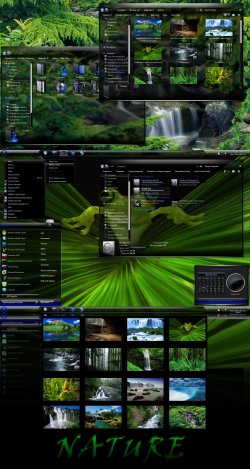
screen shot example, taken from Mr.Grim at DeviantArt.com
http://www.sevenforums.com/customization/67456-black-glass-enhanced.html
hope this help..
screen shot example, taken from Mr.Grim at DeviantArt.com
Attachments
My Computer
- OS
- Windows Seven
turn black explorer to glass look
http://www.sevenforums.com/customization/67456-black-glass-enhanced.html
hope this help..
screen shot example, taken from Mr.Grim at DeviantArt.com
where the hell do you get black explorer? lol
not really into the theme though. I like my aero theme as is just trying to make some more transparent
My Computer
- Computer Manufacturer/Model Number
- Acer Aspire
- OS
- Windows 7 Ultimate x86 7600
- CPU
- 530 1.73GHz
- Memory
- 1gig
- Graphics Card(s)
- intel crap laptop built in
- Monitor(s) Displays
- 15.5 laptop. + Hp pavilion vx74
- Hard Drives
- 1 80gig. and numerous externals
- Local time
- 9:52 PM
- Messages
- 27
a lot u can find lol,
Concave 7 by ~MrGRiM01 on deviantART
nautiKK - visual style by =DjabyTown on deviantART
Night City by ~etrifonoves on deviantART
Dynamic Black ::: by =DjabyTown on deviantART
there more to it, just search..
Concave 7 by ~MrGRiM01 on deviantART
nautiKK - visual style by =DjabyTown on deviantART
Night City by ~etrifonoves on deviantART
Dynamic Black ::: by =DjabyTown on deviantART
there more to it, just search..
My Computer
- OS
- Windows Seven

- Local time
- 2:22 AM
- Messages
- 35,002
Perhaps we are getting apart from the topic. The question was (as I understood) if it is possible to make the explorer background transparent or not (as it is done by a few windowblinds themes and by fullglass.exe for dark explorer backgrounds) Glass2k, winroll or systemtransperency (made by our beloved friend Prisoner) works well, but they makes everything transparent . Here the question is not about everything, just the explorer background.
My Computer
- Computer type
- PC/Desktop
- Computer Manufacturer/Model Number
- Self Assembled
- OS
- Microsoft Windows 10 Pro Insider Preview 64-bit
- CPU
- Intel(R) Core(TM) i3-4130 CPU @ 3.40GHz
- Motherboard
- Gigabyte Technology Co., Ltd. B85M-D3H
- Memory
- Corsair Vengence 4GB x2 (8.00GB Dual-Channel DDR3 @ 798MHz)
- Graphics Card(s)
- 2047MB GeForce GTS 450 (ZOTAC International)
- Sound Card
- Onboard (Realtek High Definition Audio)
- Monitor(s) Displays
- LG Flatron E2040T
- Screen Resolution
- 1600x900
- Hard Drives
- Western Digital 1 TB
Seagate 500 GB
- PSU
- Corsair VS550
- Case
- Cooler Master K380
- Cooling
- Cooler Master Seidon 120V Plus
- Keyboard
- Logitech MK260r
- Mouse
- Logitech MK260r
- Internet Speed
- PMPL Broadband
- Antivirus
- Windows Defender + MBAM
- Browser
- Firefox
- Other Info
- Dell Studio 15" Laptop
Similar threads

- Replies
- 1
- Views
- 2K


- Locked
- Replies
- 1
- Views
- 946

- Replies
- 0
- Views
- 1K
