Can't save to my desktop?

brubble

New member
Local time
10:18 AM
Messages
1
I feed dumb: I save everything to my desktop, manipulate it, then file where it belongs.

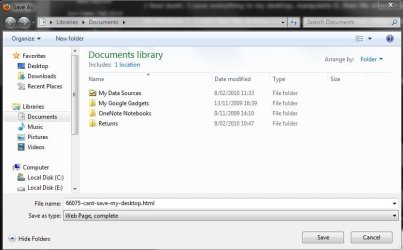
On Win7, I can't find the desktop icon from the save dialog box. When saving, I see on the left screen panel:

  • "Library" [Docs, Pics, Music, Vids]
  • "Favorites" [Downloads, recent Places]
  • "Homegroup"
  • "Computer" [HP (C), Factory Image (D), Local Disc (Q)]
  • "Network"
What am I doing wrong - I just need quick access to save to Desktop as in all previous Windows OS versions.

Thanks!

Win7 Home Premium; 64bit
 

My Computer My Computer

At a glance

Win7 Home Premium 64bitAMD Phenom II X4 925 2.80Ghz8GhzATI HD4350
Computer Manufacturer/Model Number
HP Elite 112y (HPE-112y)
OS
Win7 Home Premium 64bit
CPU
AMD Phenom II X4 925 2.80Ghz
Memory
8Ghz
Graphics Card(s)
ATI HD4350
Monitor(s) Displays
Gateway 2100 (Product No FPD2185W)
When I click "Save As" this is what I get it. I just choose Desktop on the left
 

Attachments

  • Capture.JPG
    Capture.JPG
    49.2 KB · Views: 357

My Computer My Computer

At a glance

Windows 7 Ultimate (x64) SP1Intel 3770k 4.6GHz8GB (2x 4GB) Crucial BallistixSapphire 7950 (1060/1600)
Computer Manufacturer/Model Number
tw33k
OS
Windows 7 Ultimate (x64) SP1
CPU
Intel 3770k 4.6GHz
Motherboard
ASUS Maximus V Formula
Memory
8GB (2x 4GB) Crucial Ballistix
Graphics Card(s)
Sapphire 7950 (1060/1600)
Sound Card
On Board Realtek HD Audio
Monitor(s) Displays
27" Acer B273HU (via HDMI)
Screen Resolution
2048 x 1152
Hard Drives
Crucial M4 128GB
2TB WD Black
1TB Samsung F3 SATA
1TB WD Elite External
2TB WD USB 3.0
PSU
Corsair AX750 Gold
Case
Corsair Obsidian 800DW
Cooling
Corsair H100 (2x AP-121/2x UK-3000 push/pull)
Keyboard
Microsoft Wireless 5000
Mouse
Microsoft Wireless 5000
Internet Speed
5mb/s
Other Info
Logitech z-2300 2.1 speakers
Lamptron FC-5 v2
Just create a new library "Desktop".
 

My Computer My Computer

At a glance

Vista, Windows7, Mint Mate, Zorin, Windows 8from 1.6GHz Duo to i7
Computer Manufacturer/Model Number
HP, Dell, Gateway, Toshiba - 4 laptops and 2 desktops
OS
Vista, Windows7, Mint Mate, Zorin, Windows 8
CPU
from 1.6GHz Duo to i7
Monitor(s) Displays
2x HP w2207
Hard Drives
5x HDD, 7x SSD, 12x Externals
Keyboard
with trackball - no mices
Mouse
Trackball mice
Internet Speed
DSL 6000

My Computer My Computer

At a glance

Windows 7 Ultimate (x64) SP1Intel 3770k 4.6GHz8GB (2x 4GB) Crucial BallistixSapphire 7950 (1060/1600)
Computer Manufacturer/Model Number
tw33k
OS
Windows 7 Ultimate (x64) SP1
CPU
Intel 3770k 4.6GHz
Motherboard
ASUS Maximus V Formula
Memory
8GB (2x 4GB) Crucial Ballistix
Graphics Card(s)
Sapphire 7950 (1060/1600)
Sound Card
On Board Realtek HD Audio
Monitor(s) Displays
27" Acer B273HU (via HDMI)
Screen Resolution
2048 x 1152
Hard Drives
Crucial M4 128GB
2TB WD Black
1TB Samsung F3 SATA
1TB WD Elite External
2TB WD USB 3.0
PSU
Corsair AX750 Gold
Case
Corsair Obsidian 800DW
Cooling
Corsair H100 (2x AP-121/2x UK-3000 push/pull)
Keyboard
Microsoft Wireless 5000
Mouse
Microsoft Wireless 5000
Internet Speed
5mb/s
Other Info
Logitech z-2300 2.1 speakers
Lamptron FC-5 v2

My Computer My Computer

At a glance

Vista, Windows7, Mint Mate, Zorin, Windows 8from 1.6GHz Duo to i7
Computer Manufacturer/Model Number
HP, Dell, Gateway, Toshiba - 4 laptops and 2 desktops
OS
Vista, Windows7, Mint Mate, Zorin, Windows 8
CPU
from 1.6GHz Duo to i7
Monitor(s) Displays
2x HP w2207
Hard Drives
5x HDD, 7x SSD, 12x Externals
Keyboard
with trackball - no mices
Mouse
Trackball mice
Internet Speed
DSL 6000
Here's your answer

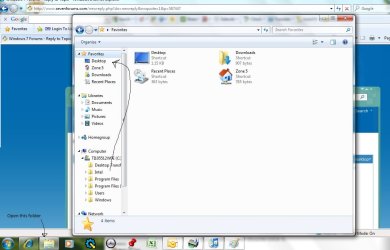
I had the same problem you've described. I was unable to get an answer at any forums. I went to justanswers.com and paid to get an answer there. Here was the answer given:

- On your task bar Click "Windows Explorer". This is the icon that looks like a folder. It is to the right of the E which is "Internet Explorer"
- In the Left hand pane, click the triangle next to Computer.
- Click the triangle next to Local Disk (C:)
- Click the triangle next to your username
-Highlight the Desktop folder
- Now scroll up in the left hand pane until you can see your favorites. Right click the word favorites and choose Add Current Location to Favorites. Upon doing this your Desktop should appear in the favorites menu.
- Close Explorer and then open Microsoft Excel or Word. See if you can now save to the desktop.:cool:

Do this and you will be HAPPY once again!!:D
 

Attachments

  • Desktop example.jpg
    Desktop example.jpg
    75.8 KB · Views: 1,118

My Computer My Computer

At a glance

Windows 7Intel Core I54 GB
Computer Manufacturer/Model Number
Toshiba Satellite E205
OS
Windows 7
CPU
Intel Core I5
Memory
4 GB
Hard Drives
520 GB
Thanks damonrd,
It's too bad you paid for that it would have been free here, but nevertheless your help is appreciated and welcome to the forum.:D
 

My Computer My Computer

At a glance

Win 10 Pro x64Intel I5-2500K @3.3GHz16GB G.Skill Ripjaws X (4x4GB)EVGA GeForce 750 Ti SC 2GB
Computer type
PC/Desktop
Computer Manufacturer/Model Number
Self Built
OS
Win 10 Pro x64
CPU
Intel I5-2500K @3.3GHz
Motherboard
Asrock P67 Extreme4
Memory
16GB G.Skill Ripjaws X (4x4GB)
Graphics Card(s)
EVGA GeForce 750 Ti SC 2GB
Sound Card
ASUS Xonar DG 5.1 Channels 24-bit 96KHz PCI Interface Sound
Monitor(s) Displays
auria eq2367
Screen Resolution
1920 x 1080
Hard Drives
250GB Samsung 850 EVO SSD
1TB WD Blue
1TB Hitachi
PSU
SeaSonic X 650W 80 Plus Gold
Case
Corsair Obsidian 750D
Cooling
Corsair H60, Three 140mm case fans
Keyboard
Logitech Wireless Keyboard K520
Mouse
Logitech Wireless Mouse M310
Internet Speed
Wave Broadband ~ 100 dn 5 up
Antivirus
Windows Defender, Malwarebytes Premium
Browser
Edge, IE11, Chrome
Other Info
Laptop specs: HP g7-1365dx /
CPU: AMD A6-3420M APU with Radeon(tm) HD Graphics /
RAM: Crucial 8Gb (2x4Gb) /
SSD: Crucial M4-CT128M4SSD2 ATA Device/ FW 000F /
GFX: AMD Radeon HD 6520G /
OS: Windows 10 Pro x64
Thank you

Damonrd,

Like derekimo, I thank you so much for your very clear instructions how to get it done. I called Microsoft because my computer is only 4 weeks old. Their 20,000 miles away non-rep would only direct me to HP. I asked him at least 5 times, "What do you guys do every day besides sell? Do you help anyone?" He was fumbing for a response because I kept asking him again and again (it was the minor thrill through the aggravating experience), but he offered no help. The flip side was over the weekend when I needed help transferring my itunes library to my new HP computer. I talked to someone from our country and she helped me at no cost. Without a doubt, this is my final Microsoft computer. Everyone deserves better than this. They have killed their golden goose. Again, Damon, you were a life-saver!
 

My Computer My Computer

At a glance

Windows 7 Home Premium
OS
Windows 7 Home Premium
Just create a new library "Desktop".

It's not supposed to be a library...it belongs under favorites and it's easy to add.
 

My Computer My Computer

At a glance

Windows 7 Ultimate RTM (Technet)3.00 gigahertz Intel Core2 Duo E84004GBATI Radeon X1950 Pro
Computer Manufacturer/Model Number
Custom
OS
Windows 7 Ultimate RTM (Technet)
CPU
3.00 gigahertz Intel Core2 Duo E8400
Motherboard
ASUSTeK Computer INC. P5K/EPU Rev 1.xx
Memory
4GB
Graphics Card(s)
ATI Radeon X1950 Pro
Sound Card
Built in HD Audio
Monitor(s) Displays
22" Gateway LCD
Screen Resolution
1920 x 1200
Hard Drives
ST3160023A [Hard drive] (160.04 GB) -- drive 0, rev 8.01, ST3500630AS [Hard drive] (500.11 GB) -- drive 2, rev 3.AAK
ST3500630AS [Hard drive] (500.11 GB) -- drive 1, rev 3.AAK
Keyboard
Logitech G11
Mouse
Microsoft Wireless Laser Mouse 5000
Internet Speed
13.44 Mbps
Thank you very much.

I had the same problem you've described. I was unable to get an answer at any forums. I went to justanswers.com and paid to get an answer there. Here was the answer given:

- On your task bar Click "Windows Explorer". This is the icon that looks like a folder. It is to the right of the E which is "Internet Explorer"
- In the Left hand pane, click the triangle next to Computer.
- Click the triangle next to Local Disk (C:)
- Click the triangle next to your username
-Highlight the Desktop folder
- Now scroll up in the left hand pane until you can see your favorites. Right click the word favorites and choose Add Current Location to Favorites. Upon doing this your Desktop should appear in the favorites menu.
- Close Explorer and then open Microsoft Excel or Word. See if you can now save to the desktop.:cool:

Do this and you will be HAPPY once again!!:D


I just followed your answer and it worked. Much thanks.
 

My Computer My Computer

At a glance

64 Bit Professional Windows 7
OS
64 Bit Professional Windows 7
Can't save to my desktop? Solved

Thanks for this information and for the generosity to share it!
 

My Computer My Computer

At a glance

windows 7 home premium
OS
windows 7 home premium
Thank you so much for this help, my frustrating Sunday is now much improved.
 

My Computer My Computer

At a glance

windows 7
OS
windows 7
Hi everyone. Have tried what was suggested but my DESKTOP folder under the LOCAL DISC is not there. I actually know what I done - I deleted it a couple of weeks ago when I was doing a clean up. How do I get this back so I can complete the last few steps and use my desktop again!? Appreciate any advice to restore this. PS I have already tried creating a new folder in this called 'Desktop' but it seems it won't acknowledge it as the actual desktop. Looks like I just need to undo the delete I did before (which I'm not even sure how or why I did this anyway although I know I was playing around and thought they were useless folders...!!)
 

My Computer My Computer

At a glance

Windows 7
OS
Windows 7
Hi there. Thank you for this and I have spent the last 1.5 hours trying the information through this part although I still have had no success. I think the problem lies between Step 4 & 7 (http://www.sevenforums.com/tutorials/18583-user-folders-restore-default-location.html). When I am in MY DESKTOP PROPERTIES under LOCATION, I click RESTORE DEFULT click OK but then nothing happens, where then in STEP 6 I do not see a dialogue box as 'have a folder under this default location' already (according to the NOTE in Step 6), but then nothing happens from here. I close out of the box (thinking it would be a 'few seconds for the location to be restored' (as said in STEP 8) but nothing happens. I have restarted my computer and still nothing. I have created new word documents to try and find my desktop as I normally would to save a document and still nothing.

I have also completely did OPTION TWO (Manual Restore) and still nothing.

Ugh!
 

My Computer My Computer

At a glance

Windows 7
OS
Windows 7
Hi there! Guess what - the simplest thing to fix it. In COMPUTER, right click on FAVOURITES on the left side bar and click RESTORE FAVOURITE LINKS! It then reappeared!!!
 

My Computer My Computer

At a glance

Windows 7
OS
Windows 7

My Computer My Computer

At a glance

Win 10 Pro x64Intel I5-2500K @3.3GHz16GB G.Skill Ripjaws X (4x4GB)EVGA GeForce 750 Ti SC 2GB
Computer type
PC/Desktop
Computer Manufacturer/Model Number
Self Built
OS
Win 10 Pro x64
CPU
Intel I5-2500K @3.3GHz
Motherboard
Asrock P67 Extreme4
Memory
16GB G.Skill Ripjaws X (4x4GB)
Graphics Card(s)
EVGA GeForce 750 Ti SC 2GB
Sound Card
ASUS Xonar DG 5.1 Channels 24-bit 96KHz PCI Interface Sound
Monitor(s) Displays
auria eq2367
Screen Resolution
1920 x 1080
Hard Drives
250GB Samsung 850 EVO SSD
1TB WD Blue
1TB Hitachi
PSU
SeaSonic X 650W 80 Plus Gold
Case
Corsair Obsidian 750D
Cooling
Corsair H60, Three 140mm case fans
Keyboard
Logitech Wireless Keyboard K520
Mouse
Logitech Wireless Mouse M310
Internet Speed
Wave Broadband ~ 100 dn 5 up
Antivirus
Windows Defender, Malwarebytes Premium
Browser
Edge, IE11, Chrome
Other Info
Laptop specs: HP g7-1365dx /
CPU: AMD A6-3420M APU with Radeon(tm) HD Graphics /
RAM: Crucial 8Gb (2x4Gb) /
SSD: Crucial M4-CT128M4SSD2 ATA Device/ FW 000F /
GFX: AMD Radeon HD 6520G /
OS: Windows 10 Pro x64
So then you had not deleted the Desktop user folder as you thought, just it's listing under Favorites?
 
Windows 7 - Can't Save To Desktop

Right click on Favorites and select Restore favorite links which should reinstate Desktop
 

My Computer My Computer

At a glance

Windows 7Intel Core Duo [email protected]4GBnVidia
Computer Manufacturer/Model Number
Sony Vaio VGN Z31
OS
Windows 7
CPU
Intel Core Duo [email protected]
Memory
4GB
Graphics Card(s)
nVidia
Back
Top