I want my saved files to default to my desktop

linda661

New member
Member
Local time
11:48 AM
Messages
80
Is there a way that everything I save can be saved on my desktop? Usually when I'm saving a file of a picture it's to use right away. I like to know how to find it and most things I save do not have an obvious destination. If they all go to the desktop I can send them where they belong later.
 

My Computer My Computer

At a glance

windows 74 GBNVIDIA
Computer Manufacturer/Model Number
HP Pavilion / AY643AA-ABA-s5310f
OS
windows 7
Memory
4 GB
Graphics Card(s)
NVIDIA
Sound Card
realtek
Monitor(s) Displays
SAMSUNG SyncMaster
Hard Drives
585 GB
Hi:

We need a bit more information....

...I presume you mean that you want to save a file from your BROWSER?

If so, which one?

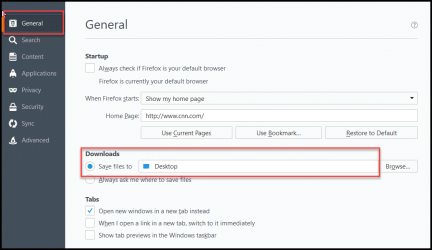
In Firefox, it's one of the settings under the General tab (see screen shot).
There would be similar settings in IE, Chrome, other browsers.

I hope that helps,
MM
 

Attachments

  • 2016-09-21_21-45-49.png
    2016-09-21_21-45-49.png
    62.5 KB · Views: 1

My Computer My Computer

At a glance

OEM Windows 7 Ult (x64) SP1Intel Core-i7 3770 @ 3.4 GHz16 GB DDR3 SDRAM @ 1333 MHzNVidia GeForce GT620 1 GB
Computer type
PC/Desktop
Computer Manufacturer/Model Number
Dell Studio XPS 8500
OS
OEM Windows 7 Ult (x64) SP1
CPU
Intel Core-i7 3770 @ 3.4 GHz
Motherboard
"Dell" branded
Memory
16 GB DDR3 SDRAM @ 1333 MHz
Graphics Card(s)
NVidia GeForce GT620 1 GB
Sound Card
THX TruStudio PC
Monitor(s) Displays
Dell U2410 Full HD
Hard Drives
2.0 TB SATA2 @ 7200 RPM
PSU
350W
Keyboard
MS 4000 Ergon - Wired
Mouse
Logitech Anywhere MX
Internet Speed
Cable HSI w/Turbo (router)
Antivirus
KIS-MBAM Premium-MBAE Premium
Browser
Fx (current version); IE
Other Info
And a Win7/64 Pro laptop; And a Win10/64 Pro desktop.
No, if I save a picture or a document anything. I'm always clicking on the desktop button and still sometimes it get s filed somewhere else and I don't know where
 

My Computer My Computer

At a glance

windows 74 GBNVIDIA
Computer Manufacturer/Model Number
HP Pavilion / AY643AA-ABA-s5310f
OS
windows 7
Memory
4 GB
Graphics Card(s)
NVIDIA
Sound Card
realtek
Monitor(s) Displays
SAMSUNG SyncMaster
Hard Drives
585 GB
The default save location (folder) depends on the application that is saving the file.

The instructions to change the default save location differ from application to application.

Some applications don't seem to have a way to change their default save location.

Let us know what applications you need help with.

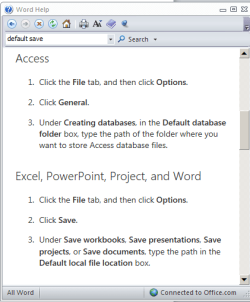
For MS Word, I opened Word and pressed F1 to get to the help file.
A search of the help file for default save led me to these steps:
Capture.PNG
 
Last edited:

My Computer My Computer

At a glance

W7 Pro SP1 64biti78GBIntel HD Graphics
Computer type
Laptop
Computer Manufacturer/Model Number
Employer provided Dell Latitude
OS
W7 Pro SP1 64bit
CPU
i7
Memory
8GB
Graphics Card(s)
Intel HD Graphics
Hard Drives
crappy SSD
Antivirus
Employer mandated Symantec Endpoint Protection
Browser
Pale Moon 64bit, IE11 64bit & Chrome 64bit
I'll try that on a few applications. Thanks!!!
 

My Computer My Computer

At a glance

windows 74 GBNVIDIA
Computer Manufacturer/Model Number
HP Pavilion / AY643AA-ABA-s5310f
OS
windows 7
Memory
4 GB
Graphics Card(s)
NVIDIA
Sound Card
realtek
Monitor(s) Displays
SAMSUNG SyncMaster
Hard Drives
585 GB
If you are offered a choice of 'save' or 'save as' take the second one and you have the choice of where it goes.
Art.
 

My Computer My Computer

At a glance

Win7 sp1 Pro 64bit / XP sp2 Pro (games only)Intel Core 2 Duo E8400 @ 3.00GHz8.00 GB Dual-Channel DDR2 @ 400MHz (5-5-5-18)1024MB GeForce GTX 560
Computer type
PC/Desktop
Computer Manufacturer/Model Number
Home built
OS
Win7 sp1 Pro 64bit / XP sp2 Pro (games only)
CPU
Intel Core 2 Duo E8400 @ 3.00GHz
Motherboard
Intel Corporation DP35DP (CPU1)
Memory
8.00 GB Dual-Channel DDR2 @ 400MHz (5-5-5-18)
Graphics Card(s)
1024MB GeForce GTX 560
Sound Card
NVIDIA High Definition Audio
Monitor(s) Displays
SyncMaster (2048x1152@60Hz)
Hard Drives
240GB Sandisc Extreme Pro SSD
244GB Seagate ST3250410AS
488GB Seagate ST500DM002-1BD142
931GB Western Digital WDC WD1003FZEX
PSU
Corsair 720
Case
ATX
Keyboard
HID Keyboard Device Logitech
Mouse
HID-compliant mouse Microsoft
Other Info
TSSTcorp CDDVDW SH-S223L

HL-DT-ST BD-RE BH12LS35
Hi:

Yep, UNI and @Wandering one have the right answer for a more global response to your inquiry.:)
The screen shot I posted was only for one program, Firefox.

Having said that, Windows has a default (built-in) folder called "My Documents", where you can create as many new folders as you want. Think of it like a filing cabinet, where you can create and organize new folders and sub-folders. There is another one called "Downloads", for which a similar structure can be created. Ditto for "Pictures", "Videos", etc.

It's not a great idea (either aesthetically or functionally) to download and save everything on your desktop.
If you want to use the desktop as your preferred download location and then move the downloaded file somewhere else, that's fine.
But I would not keep all downloaded files permanently on the desktop.

Just a friendly suggestion,

MM
 

My Computer My Computer

At a glance

OEM Windows 7 Ult (x64) SP1Intel Core-i7 3770 @ 3.4 GHz16 GB DDR3 SDRAM @ 1333 MHzNVidia GeForce GT620 1 GB
Computer type
PC/Desktop
Computer Manufacturer/Model Number
Dell Studio XPS 8500
OS
OEM Windows 7 Ult (x64) SP1
CPU
Intel Core-i7 3770 @ 3.4 GHz
Motherboard
"Dell" branded
Memory
16 GB DDR3 SDRAM @ 1333 MHz
Graphics Card(s)
NVidia GeForce GT620 1 GB
Sound Card
THX TruStudio PC
Monitor(s) Displays
Dell U2410 Full HD
Hard Drives
2.0 TB SATA2 @ 7200 RPM
PSU
350W
Keyboard
MS 4000 Ergon - Wired
Mouse
Logitech Anywhere MX
Internet Speed
Cable HSI w/Turbo (router)
Antivirus
KIS-MBAM Premium-MBAE Premium
Browser
Fx (current version); IE
Other Info
And a Win7/64 Pro laptop; And a Win10/64 Pro desktop.
Back
Top