PC reboots if someone walk by

churin

New member
Power User
Local time
5:46 AM
Messages
341
Location
California
PC reboots if someone walks by

My PC reboots if someone walks by the machine or if I touch the metal part of eSATA or USB connector(not connector contacts). It appear to have something to do with electrostatic discharge. I am using AC power connector having three pins. This never happened with my old machine.
Any suggestion for possible remedy is appreciated.
 
Last edited:

My Computer My Computer

At a glance

W7 Ult x64, W8 Pro x64 and W10 Pro x64Phenom FX630016GB DDR3 1866 G.Skill F3-1866C9D-16GWM x2Radeon R7 360
Computer type
PC/Desktop
OS
W7 Ult x64, W8 Pro x64 and W10 Pro x64
CPU
Phenom FX6300
Motherboard
Gigabyte GA-970A-UD3 rev. 1.2
Memory
16GB DDR3 1866 G.Skill F3-1866C9D-16GWM x2
Graphics Card(s)
Radeon R7 360
Sound Card
Asus Xonar DS
Monitor(s) Displays
27" x2, Dell P2715Q
Screen Resolution
3840 x 2160
Hard Drives
Samsung 850Pro 1TB SSD - system
Samsung 4TB SSD - Data
PSU
Corsair CX450M
Case
Corsair 200R
Cooling
Zalman CNPS5X Performa
Internet Speed
400Mbps/12Mbps
Other Info
2nd machine: Same as above
3rd machine: Apple MacAir with W7 Ult installed
yeah seems like the computer is not grounded properly.
 

My Computer My Computer

At a glance

Windows 8 Pro (32-bit)1.83GHz Intel Core Duo2GB 667MHz DDR2 SDRAM (PC2-5300) (upgrade)ATI Radeon X1600 with 128MB GDDR3 memory
Computer type
PC/Desktop
Computer Manufacturer/Model Number
Apple 17" iMac MA199LL (Early 2006)
OS
Windows 8 Pro (32-bit)
CPU
1.83GHz Intel Core Duo
Memory
2GB 667MHz DDR2 SDRAM (PC2-5300) (upgrade)
Graphics Card(s)
ATI Radeon X1600 with 128MB GDDR3 memory
Monitor(s) Displays
17-inch TFT active-matrix LCD, millions of colors
Screen Resolution
1440 x 900
Hard Drives
Hitachi 320GB HDT721032SLA360 7200RPM SATA II (upgrade)
Keyboard
Microsoft Wired Keyboard 600
Mouse
Microsoft Basic Optical Mouse v2.0
Internet Speed
4 Mbps
Antivirus
Microsoft Security Essentials
Browser
Google Chrome
Other Info
WEI:
Base Score: 3.9 Processor: 4.4 Memory 4.7
Graphics: 3.9 Gaming Graphics: 4.1 Primary HD: 5.9
The mobo is electrically connected to the chassis because it is fastened to the stand-offs by screws. Do you mean this is the cause of my problem? What I am suspecting is the opposite: The mobo is not electrically connected to the chassis. But I do not see how.
 

My Computer My Computer

At a glance

W7 Ult x64, W8 Pro x64 and W10 Pro x64Phenom FX630016GB DDR3 1866 G.Skill F3-1866C9D-16GWM x2Radeon R7 360
Computer type
PC/Desktop
OS
W7 Ult x64, W8 Pro x64 and W10 Pro x64
CPU
Phenom FX6300
Motherboard
Gigabyte GA-970A-UD3 rev. 1.2
Memory
16GB DDR3 1866 G.Skill F3-1866C9D-16GWM x2
Graphics Card(s)
Radeon R7 360
Sound Card
Asus Xonar DS
Monitor(s) Displays
27" x2, Dell P2715Q
Screen Resolution
3840 x 2160
Hard Drives
Samsung 850Pro 1TB SSD - system
Samsung 4TB SSD - Data
PSU
Corsair CX450M
Case
Corsair 200R
Cooling
Zalman CNPS5X Performa
Internet Speed
400Mbps/12Mbps
Other Info
2nd machine: Same as above
3rd machine: Apple MacAir with W7 Ult installed
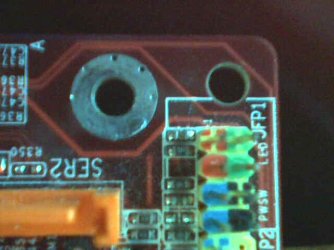
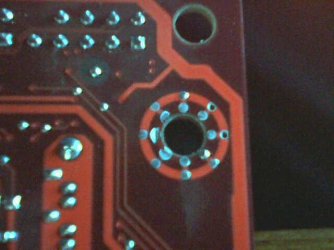
The pictures as attached below show the areas of the mobo where the stand-off or the screw touches. It indicates that the ground plane of the mobo will be electrically conductive to the stand-off and thus to the chassis.
 

Attachments

  • 20100224-0004.jpg
    20100224-0004.jpg
    30.5 KB · Views: 12
  • 20100224-0005.jpg
    20100224-0005.jpg
    33.5 KB · Views: 40

My Computer My Computer

At a glance

W7 Ult x64, W8 Pro x64 and W10 Pro x64Phenom FX630016GB DDR3 1866 G.Skill F3-1866C9D-16GWM x2Radeon R7 360
Computer type
PC/Desktop
OS
W7 Ult x64, W8 Pro x64 and W10 Pro x64
CPU
Phenom FX6300
Motherboard
Gigabyte GA-970A-UD3 rev. 1.2
Memory
16GB DDR3 1866 G.Skill F3-1866C9D-16GWM x2
Graphics Card(s)
Radeon R7 360
Sound Card
Asus Xonar DS
Monitor(s) Displays
27" x2, Dell P2715Q
Screen Resolution
3840 x 2160
Hard Drives
Samsung 850Pro 1TB SSD - system
Samsung 4TB SSD - Data
PSU
Corsair CX450M
Case
Corsair 200R
Cooling
Zalman CNPS5X Performa
Internet Speed
400Mbps/12Mbps
Other Info
2nd machine: Same as above
3rd machine: Apple MacAir with W7 Ult installed
  • Like
Reactions: Dom
The pictures as attached below show the areas of the mobo where the stand-off or the screw touches. It indicates that the ground plane of the mobo will be electrically conductive to the stand-off and thus to the chassis.

the hole there with the metal around it is most likely not one of you standoff holes. if it is you should have received paper washer with your case to be placed between the mobo and the stand off.
The hole is one of the eight holes to be used for ATX mobo. I reviewed what came with the mobo or the case and found no washer(metal nor insulation) in it. I assembled PC many times in the past and mobo always looked like this. I once used metal washer but never seen insulation washer to be used on mobo.
You indicates that the mobo's ground plane should not be conductive to the chassis through the stand-offs. I believe that for making the system more tolerant of electrostatic interference. But the mobo does not appear to be designed that way.
 

My Computer My Computer

At a glance

W7 Ult x64, W8 Pro x64 and W10 Pro x64Phenom FX630016GB DDR3 1866 G.Skill F3-1866C9D-16GWM x2Radeon R7 360
Computer type
PC/Desktop
OS
W7 Ult x64, W8 Pro x64 and W10 Pro x64
CPU
Phenom FX6300
Motherboard
Gigabyte GA-970A-UD3 rev. 1.2
Memory
16GB DDR3 1866 G.Skill F3-1866C9D-16GWM x2
Graphics Card(s)
Radeon R7 360
Sound Card
Asus Xonar DS
Monitor(s) Displays
27" x2, Dell P2715Q
Screen Resolution
3840 x 2160
Hard Drives
Samsung 850Pro 1TB SSD - system
Samsung 4TB SSD - Data
PSU
Corsair CX450M
Case
Corsair 200R
Cooling
Zalman CNPS5X Performa
Internet Speed
400Mbps/12Mbps
Other Info
2nd machine: Same as above
3rd machine: Apple MacAir with W7 Ult installed
The pictures as attached below show the areas of the mobo where the stand-off or the screw touches. It indicates that the ground plane of the mobo will be electrically conductive to the stand-off and thus to the chassis.

the hole there with the metal around it is most likely not one of you standoff holes. if it is you should have received paper washer with your case to be placed between the mobo and the stand off.
The hole is one of the eight holes to be used for ATX mobo. I reviewed what came with the mobo or the case and found no washer(metal nor insulation) in it. I assembled PC many times in the past and mobo always looked like this. I once used metal washer but never seen insulation washer to be used on mobo.
You indicates that the mobo's ground plane should not be conductive to the chassis through the stand-offs. I believe that for making the system more tolerant of electrostatic interference. But the mobo does not appear to be designed that way.

There are 10 "holes" in an ATX motherboard that fit into corresponding standoffs... each is lined as your picture above indicates. However, this metal lining is there to protect the motherboard's PCB from carelessness, not to conduct electricity.

It's possible that you may have placed a standoff behind the board where you should not have; although, since you also have an ATX case, this is very unlikely. Nevertheless, it's possible because not every case is well made.

Which brings us to my $0.02: the case may be shorting out, through no fault of your own. Just about the same thing happened to a friend of mine who decided to go cheap on his case. It was cheaper to RMA it for another model than it would have been to have it wired properly.

If the case isn't new, then I'd say to double, then triple check your wiring... because that's really the only new variable.
 

My Computer My Computer

At a glance

7 Ultimate x64i5-2500k8GB G.Skill Ripjaws X F3-12800CL7D-8GBXH 1866...EVGA GTX 570 SC
OS
7 Ultimate x64
CPU
i5-2500k
Motherboard
Asus P8P67 Pro
Memory
8GB G.Skill Ripjaws X F3-12800CL7D-8GBXH 1866MHz 8-9-8-24
Graphics Card(s)
EVGA GTX 570 SC
Sound Card
X-Fi Titanium Fatality
Monitor(s) Displays
Samsung S27A550H 27" LED
Screen Resolution
1920x1080
Hard Drives
OCZ Vertex 3 120GB.
1TB Samsung F3.
2TB Samsung F4.
PSU
PC Power & Cooling Silencer 760
Case
Lian Li Lancool K62
Cooling
Thermalright Venomous X Black/Scythe S-Flex/Shin-Etsu X23
Keyboard
MS Natural Elite 4000 Ergonomic
Mouse
Logitech G500
Internet Speed
6MB/768
Other Info
Logitech Z-5500 505 watts.
D-Link DGL-4500.
Tripp-Lite Smart Pro 1500.
The pictures as attached below show the areas of the mobo where the stand-off or the screw touches. It indicates that the ground plane of the mobo will be electrically conductive to the stand-off and thus to the chassis.
That is correct. Those are the mounting points of the motherboard, and they are designed that way so that when they are correctly mounted in the case (or on the motherboard tray if your case has one of those), they are all electrically connected together thereby creating a shield. It is important that they are all correctly mounted because the motherboard is designed in this way. Referring to your image, the mounting point appears at first glimpse to be electrically isolated. However, don't forget that modern motherboards are not just double-sided but that they are multi-layered, so these mounting points are also electrically connected to the inner layers. Note that not all of these points will be electrically connected to the circuitry on the motherboard as this depends on the motherboard design. Some are, some aren't.

The other holes (those without a ring of solder) are not mounting holes for the motherboard/chassis, but are for attaching the processor heatsink assembly (when located round the processor socket). Elsewhere, they will be due to the manufacturing process of the motherboard (reference points to aid alignment of the layers).
 

My Computer My Computer

At a glance

Windows 8.1 Pro RTM x64Intel Core-i5-3570K 4-core @ 3.4GHz (Ivy Brid...4 x 4GB DDR3-1600 Corsair Vengeance CMZ8GX3M2...MSI GeForce GTX770 Gaming OC 2GB
Computer type
PC/Desktop
Computer Manufacturer/Model Number
Dwarf Dwf/11/2012 r09/2013
OS
Windows 8.1 Pro RTM x64
CPU
Intel Core-i5-3570K 4-core @ 3.4GHz (Ivy Bridge) (OC 4.4GHz)
Motherboard
ASRock Z77 Extreme4-M
Memory
4 x 4GB DDR3-1600 Corsair Vengeance CMZ8GX3M2A1600C9B (16GB)
Graphics Card(s)
MSI GeForce GTX770 Gaming OC 2GB
Sound Card
Realtek High Definition on board solution (ALC 898)
Monitor(s) Displays
ViewSonic VA1912w Widescreen (VGA)
Screen Resolution
1440x900
Hard Drives
OCZ Agility 3 SSD 120GB SATA III x2 (RAID 0)
Samsung HD501LJ 500GB SATA II x2
Hitachi HDS721010CLA332 1TB SATA II
Iomega 1.5TB Ext USB 2.0
WD 2.0TB Ext USB 3.0
PSU
XFX Pro Series 850W Semi-Modular
Case
Gigabyte IF233
Cooling
1 x 120mm Front Inlet 1 x 120mm Rear Exhaust
Keyboard
Microsoft Comfort Curve Keyboard 3000 (USB)
Mouse
Microsoft Comfort Mouse 3000 for Business (USB)
Internet Speed
NetGear DG834Gv3 ADSL Modem/Router (Ethernet) ~4.0 Mb/s (O2)
Antivirus
Avast! 8.0.1497
Browser
IE 11
Other Info
Optical Drive: HL-DT-ST BD-RE BH10LS30 SATA Bluray
Lexmark S305 Printer/Scanner/Copier (USB)
WEI Score: 8.1/8.1/8.5/8.5/8.25
Asus Eee PC 1011PX Netbook (Windows 7 x86 Starter)
Staple Head and Fumz:
Thank you for your responses. Please misunderstand me. I am simply stating my observation which may be wrong. If so please correct me. I know there must be something wrong somewhere.
I checked by using a circuit tester the conductivity between the metal area around the mounting hole and other area on the mobo. The result is that the mounting hole area is NOT electrically isolated on the mobo or it is electrically conductive to ground plane of the mobo to which minus pin of the 24 pin power supply connector, metal enclosures of the USB connectors, the audio connectors, etc. are conductive.
It appears to me that using insulation(non-metalic) stand-offs is the only way to avoid electrical contact between the mounting holes and the chassis through the stand-offs.
 

My Computer My Computer

At a glance

W7 Ult x64, W8 Pro x64 and W10 Pro x64Phenom FX630016GB DDR3 1866 G.Skill F3-1866C9D-16GWM x2Radeon R7 360
Computer type
PC/Desktop
OS
W7 Ult x64, W8 Pro x64 and W10 Pro x64
CPU
Phenom FX6300
Motherboard
Gigabyte GA-970A-UD3 rev. 1.2
Memory
16GB DDR3 1866 G.Skill F3-1866C9D-16GWM x2
Graphics Card(s)
Radeon R7 360
Sound Card
Asus Xonar DS
Monitor(s) Displays
27" x2, Dell P2715Q
Screen Resolution
3840 x 2160
Hard Drives
Samsung 850Pro 1TB SSD - system
Samsung 4TB SSD - Data
PSU
Corsair CX450M
Case
Corsair 200R
Cooling
Zalman CNPS5X Performa
Internet Speed
400Mbps/12Mbps
Other Info
2nd machine: Same as above
3rd machine: Apple MacAir with W7 Ult installed
maybe its the PSU itself, maybe a connection is loose inside or a wire touching another wire?
 

My Computer My Computer

At a glance

Win7 Home Premium 64xIntel Core 2 Duo P7450 / 2.13 GHz (2.29 with ...4 GB PC-6400 Hyundai (2X2) at 800MhzNVIDIA GeForce GTX 260M 1GB DDR3 VRAM
Computer type
Laptop
Computer Manufacturer/Model Number
ASUS G60-RBBX05
OS
Win7 Home Premium 64x
CPU
Intel Core 2 Duo P7450 / 2.13 GHz (2.29 with Extreme Turbo)
Memory
4 GB PC-6400 Hyundai (2X2) at 800Mhz
Graphics Card(s)
NVIDIA GeForce GTX 260M 1GB DDR3 VRAM
Monitor(s) Displays
16" LED Backlit
Screen Resolution
1366 x 768 on laptop 1600x1050 max res on 22" external mon
Hard Drives
OCZ Agility 3 60GB SSD / 320 GB - Serial ATA-150 - 7200 rpm
PSU
6-cell Lithium ion { lasts 1.5 hours }
Case
ASUS G60 Laptop
Keyboard
Chicklet type back-lit (white light) keyboard
Mouse
Logitech G9 Laser Mouse 3200dpi and 1000 reports per minute
Internet Speed
Comcast 8.60mb/s up - 3.11mb/s down
Antivirus
MSE
Browser
Firefox
Other Info
General mid-budget gaming Comp. Low batterylife - High FrameRates - currently overheating problems :(

2nd Rig: Case: Rosewill BLACKHAWK Gaming ATX Mid Tower Computer Case

Mobo: GIGABYTE GA-990FXA-UD3
CPU: AMD FX-6200 Zambezi 3.8GHz (4.1GHz Turbo)
Heatsink: COOLER MASTER V8 CPU Cooler
RAM: Patriot Viper 3 8GB (2 x 4GB) 240-Pin DDR3 SDRAM 1866 (PC3 15000)
GPU: SAPPHIRE Radeon HD 6850 1GB 2
The other holes (those without a ring of solder) are not mounting holes for the motherboard/chassis, but are for attaching the processor heatsink assembly (when located round the processor socket). Elsewhere, they will be due to the manufacturing process of the motherboard (reference points to aid alignment of the layers).
The two pictures show top and bottom side views of the same hole.
 

My Computer My Computer

At a glance

W7 Ult x64, W8 Pro x64 and W10 Pro x64Phenom FX630016GB DDR3 1866 G.Skill F3-1866C9D-16GWM x2Radeon R7 360
Computer type
PC/Desktop
OS
W7 Ult x64, W8 Pro x64 and W10 Pro x64
CPU
Phenom FX6300
Motherboard
Gigabyte GA-970A-UD3 rev. 1.2
Memory
16GB DDR3 1866 G.Skill F3-1866C9D-16GWM x2
Graphics Card(s)
Radeon R7 360
Sound Card
Asus Xonar DS
Monitor(s) Displays
27" x2, Dell P2715Q
Screen Resolution
3840 x 2160
Hard Drives
Samsung 850Pro 1TB SSD - system
Samsung 4TB SSD - Data
PSU
Corsair CX450M
Case
Corsair 200R
Cooling
Zalman CNPS5X Performa
Internet Speed
400Mbps/12Mbps
Other Info
2nd machine: Same as above
3rd machine: Apple MacAir with W7 Ult installed
Those mounting points are designed to be electrically connected to the chassis, hence the ring of solder to ensure a good contact with the mounting screws.

This does seem to be a strange problem, and it would seem to point to a grounding issue. Ensure that your motherboard is correctly mounted, following my advice about mounting points and screws. Check for electrical conductivity between the chassis and the earth terminal on the PSU socket. Plug the mains lead in (do not connect to the supply) and check that you have conductivity between the chassis and the earth connection in the plug. If not, check the mains lead for conductivity on the earth lead. Repair/replace if a fault is found. If you find no fault, then it might be a fault on your house wiring GET THIS CHECKED BY A PROFESSIONAL. If you have radiators in your room, then connect a wire between the chassis of your computer to the pipework of the radiators in order to provide a ground connection. Ensure that this connection is made to bare metal.
 

My Computer My Computer

At a glance

Windows 8.1 Pro RTM x64Intel Core-i5-3570K 4-core @ 3.4GHz (Ivy Brid...4 x 4GB DDR3-1600 Corsair Vengeance CMZ8GX3M2...MSI GeForce GTX770 Gaming OC 2GB
Computer type
PC/Desktop
Computer Manufacturer/Model Number
Dwarf Dwf/11/2012 r09/2013
OS
Windows 8.1 Pro RTM x64
CPU
Intel Core-i5-3570K 4-core @ 3.4GHz (Ivy Bridge) (OC 4.4GHz)
Motherboard
ASRock Z77 Extreme4-M
Memory
4 x 4GB DDR3-1600 Corsair Vengeance CMZ8GX3M2A1600C9B (16GB)
Graphics Card(s)
MSI GeForce GTX770 Gaming OC 2GB
Sound Card
Realtek High Definition on board solution (ALC 898)
Monitor(s) Displays
ViewSonic VA1912w Widescreen (VGA)
Screen Resolution
1440x900
Hard Drives
OCZ Agility 3 SSD 120GB SATA III x2 (RAID 0)
Samsung HD501LJ 500GB SATA II x2
Hitachi HDS721010CLA332 1TB SATA II
Iomega 1.5TB Ext USB 2.0
WD 2.0TB Ext USB 3.0
PSU
XFX Pro Series 850W Semi-Modular
Case
Gigabyte IF233
Cooling
1 x 120mm Front Inlet 1 x 120mm Rear Exhaust
Keyboard
Microsoft Comfort Curve Keyboard 3000 (USB)
Mouse
Microsoft Comfort Mouse 3000 for Business (USB)
Internet Speed
NetGear DG834Gv3 ADSL Modem/Router (Ethernet) ~4.0 Mb/s (O2)
Antivirus
Avast! 8.0.1497
Browser
IE 11
Other Info
Optical Drive: HL-DT-ST BD-RE BH10LS30 SATA Bluray
Lexmark S305 Printer/Scanner/Copier (USB)
WEI Score: 8.1/8.1/8.5/8.5/8.25
Asus Eee PC 1011PX Netbook (Windows 7 x86 Starter)
  • Like
Reactions: Dom
Somethig to look at... some PSU's have a ground wire, some dont. Does yours? If so is it attached and properly grounded?

I have built hundreds of PC's over the last 17 years, usually problems like this are due to a loose nut behind the screwdriver! That is, it may be an electrical connector on the mobo not plugged in all the way, or improperly... a bent pin touching another, basically you may have missed or overlooked something.

Double and triple check every single connection, every pin, the front panel connections, usb, etc. Also look at the IO shield at the back of the PC, make sure one of the little metal "fingers" isnt grounding out a USB or Firewire connector.
 

My Computer My Computer

At a glance

Windows 7 Ultimate 64 bit Steve Ballmer Signa...Intel Core 2 Quad - Q9550 - 2.83GHz stock - O...4GB DDR2 800MHz (PC6400) OCZ ReaperNvidia GE Force 8800 GTS
Computer Manufacturer/Model Number
Homebrew PC - "Alpha_Dawg"
OS
Windows 7 Ultimate 64 bit Steve Ballmer Signature Edition
CPU
Intel Core 2 Quad - Q9550 - 2.83GHz stock - OC'd to 3.6GHz
Motherboard
Gigabyte EP45-UD3P
Memory
4GB DDR2 800MHz (PC6400) OCZ Reaper
Graphics Card(s)
Nvidia GE Force 8800 GTS
Sound Card
Asus Xonar DX
Monitor(s) Displays
Samsung SyncMaster 2333HD
Screen Resolution
1920 x 1080
Hard Drives
WD Caviar Black 750GB - 7200RPM - 32MB cache
WD Caviar Green 1.5TB - 5400RPM - 64MB cache
WD Caviar Green 2.0TB - 5400RPM - 64MB cache
PSU
PC Power & Cooling Silencer 750
Case
Gigabyte 3D Aurora
Cooling
Case is Air - 5ea. 120mm fans (mix of Arctic and Xigmatec)
Keyboard
MS Natural Wireless KB
Mouse
MS Wireless Mouse
Internet Speed
50 mbps down/5 mbps up
Other Info
AVerMedia - AVerTVHD G2 Dual Tuner Card
As a trouble shooting measure, I unplugged the reset cable and am waiting to see if the problem goes away. I have to wait for a day at least to determine if that will stop recurring the rebooting. I will post back.
 

My Computer My Computer

At a glance

W7 Ult x64, W8 Pro x64 and W10 Pro x64Phenom FX630016GB DDR3 1866 G.Skill F3-1866C9D-16GWM x2Radeon R7 360
Computer type
PC/Desktop
OS
W7 Ult x64, W8 Pro x64 and W10 Pro x64
CPU
Phenom FX6300
Motherboard
Gigabyte GA-970A-UD3 rev. 1.2
Memory
16GB DDR3 1866 G.Skill F3-1866C9D-16GWM x2
Graphics Card(s)
Radeon R7 360
Sound Card
Asus Xonar DS
Monitor(s) Displays
27" x2, Dell P2715Q
Screen Resolution
3840 x 2160
Hard Drives
Samsung 850Pro 1TB SSD - system
Samsung 4TB SSD - Data
PSU
Corsair CX450M
Case
Corsair 200R
Cooling
Zalman CNPS5X Performa
Internet Speed
400Mbps/12Mbps
Other Info
2nd machine: Same as above
3rd machine: Apple MacAir with W7 Ult installed
Please keep us informed of your progress...
 

My Computer My Computer

At a glance

Windows 7 Ultimate 64 bit Steve Ballmer Signa...Intel Core 2 Quad - Q9550 - 2.83GHz stock - O...4GB DDR2 800MHz (PC6400) OCZ ReaperNvidia GE Force 8800 GTS
Computer Manufacturer/Model Number
Homebrew PC - "Alpha_Dawg"
OS
Windows 7 Ultimate 64 bit Steve Ballmer Signature Edition
CPU
Intel Core 2 Quad - Q9550 - 2.83GHz stock - OC'd to 3.6GHz
Motherboard
Gigabyte EP45-UD3P
Memory
4GB DDR2 800MHz (PC6400) OCZ Reaper
Graphics Card(s)
Nvidia GE Force 8800 GTS
Sound Card
Asus Xonar DX
Monitor(s) Displays
Samsung SyncMaster 2333HD
Screen Resolution
1920 x 1080
Hard Drives
WD Caviar Black 750GB - 7200RPM - 32MB cache
WD Caviar Green 1.5TB - 5400RPM - 64MB cache
WD Caviar Green 2.0TB - 5400RPM - 64MB cache
PSU
PC Power & Cooling Silencer 750
Case
Gigabyte 3D Aurora
Cooling
Case is Air - 5ea. 120mm fans (mix of Arctic and Xigmatec)
Keyboard
MS Natural Wireless KB
Mouse
MS Wireless Mouse
Internet Speed
50 mbps down/5 mbps up
Other Info
AVerMedia - AVerTVHD G2 Dual Tuner Card
Please keep us informed of your progress...
I have determined that unplugging the reset cable from the header on the mobo prevents the rebooting.
Now I have plugged a reset cable on the header. The cable is not the one which is built in the case but a loose cable with a switch fitted on one end and a plug connector on the other end.
I will post back.
 

My Computer My Computer

At a glance

W7 Ult x64, W8 Pro x64 and W10 Pro x64Phenom FX630016GB DDR3 1866 G.Skill F3-1866C9D-16GWM x2Radeon R7 360
Computer type
PC/Desktop
OS
W7 Ult x64, W8 Pro x64 and W10 Pro x64
CPU
Phenom FX6300
Motherboard
Gigabyte GA-970A-UD3 rev. 1.2
Memory
16GB DDR3 1866 G.Skill F3-1866C9D-16GWM x2
Graphics Card(s)
Radeon R7 360
Sound Card
Asus Xonar DS
Monitor(s) Displays
27" x2, Dell P2715Q
Screen Resolution
3840 x 2160
Hard Drives
Samsung 850Pro 1TB SSD - system
Samsung 4TB SSD - Data
PSU
Corsair CX450M
Case
Corsair 200R
Cooling
Zalman CNPS5X Performa
Internet Speed
400Mbps/12Mbps
Other Info
2nd machine: Same as above
3rd machine: Apple MacAir with W7 Ult installed
Sounds like you may have a bad reset micro switch!

Glad to help you out!

Now you can get to enjoying Win7!
 

My Computer My Computer

At a glance

Windows 7 Ultimate 64 bit Steve Ballmer Signa...Intel Core 2 Quad - Q9550 - 2.83GHz stock - O...4GB DDR2 800MHz (PC6400) OCZ ReaperNvidia GE Force 8800 GTS
Computer Manufacturer/Model Number
Homebrew PC - "Alpha_Dawg"
OS
Windows 7 Ultimate 64 bit Steve Ballmer Signature Edition
CPU
Intel Core 2 Quad - Q9550 - 2.83GHz stock - OC'd to 3.6GHz
Motherboard
Gigabyte EP45-UD3P
Memory
4GB DDR2 800MHz (PC6400) OCZ Reaper
Graphics Card(s)
Nvidia GE Force 8800 GTS
Sound Card
Asus Xonar DX
Monitor(s) Displays
Samsung SyncMaster 2333HD
Screen Resolution
1920 x 1080
Hard Drives
WD Caviar Black 750GB - 7200RPM - 32MB cache
WD Caviar Green 1.5TB - 5400RPM - 64MB cache
WD Caviar Green 2.0TB - 5400RPM - 64MB cache
PSU
PC Power & Cooling Silencer 750
Case
Gigabyte 3D Aurora
Cooling
Case is Air - 5ea. 120mm fans (mix of Arctic and Xigmatec)
Keyboard
MS Natural Wireless KB
Mouse
MS Wireless Mouse
Internet Speed
50 mbps down/5 mbps up
Other Info
AVerMedia - AVerTVHD G2 Dual Tuner Card
Sounds like you may have a bad reset micro switch!

Glad to help you out!

Now you can get to enjoying Win7!
Unfortunately not quite yet!
The resetting does not happen if the length of the cable for the reset switch is one inch but if it is 12 inches the problem(resetting) comes back. I am testing by inducing electrostatic charge in my body and discharging it by touching outer surface of the case.
I am beginning to think that I have to settle with having no reset switch or else ditch the case and pick a different one.
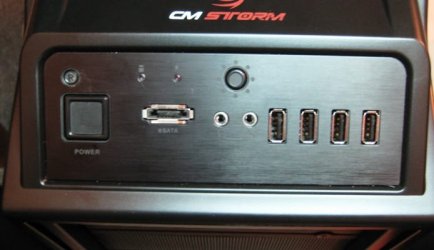
Attached are pictures of the machine:
 

Attachments

  • IMG_4501X.jpg
    IMG_4501X.jpg
    114.7 KB · Views: 35
  • IMG_4502X.jpg
    IMG_4502X.jpg
    147.1 KB · Views: 41

My Computer My Computer

At a glance

W7 Ult x64, W8 Pro x64 and W10 Pro x64Phenom FX630016GB DDR3 1866 G.Skill F3-1866C9D-16GWM x2Radeon R7 360
Computer type
PC/Desktop
OS
W7 Ult x64, W8 Pro x64 and W10 Pro x64
CPU
Phenom FX6300
Motherboard
Gigabyte GA-970A-UD3 rev. 1.2
Memory
16GB DDR3 1866 G.Skill F3-1866C9D-16GWM x2
Graphics Card(s)
Radeon R7 360
Sound Card
Asus Xonar DS
Monitor(s) Displays
27" x2, Dell P2715Q
Screen Resolution
3840 x 2160
Hard Drives
Samsung 850Pro 1TB SSD - system
Samsung 4TB SSD - Data
PSU
Corsair CX450M
Case
Corsair 200R
Cooling
Zalman CNPS5X Performa
Internet Speed
400Mbps/12Mbps
Other Info
2nd machine: Same as above
3rd machine: Apple MacAir with W7 Ult installed
Sounds like you may have a bad reset micro switch!

Glad to help you out!

Now you can get to enjoying Win7!
Unfortunately not quite yet!
The resetting does not happen if the length of the cable for the reset switch is one inch but if it is 12 inches the problem(resetting) comes back. I am testing by inducing electrostatic charge in my body and discharging it by touching outer surface of the case.
I am beginning to think that I have to settle with having no reset switch or else ditch the case and pick a different one.
Attached are pictures of the machine:

What case? contact the manufacturer... tell them you have a bad rest switch or wire harness... they should send you a new one. How old is case?
 

My Computer My Computer

At a glance

Windows 7 Ultimate 64 bit Steve Ballmer Signa...Intel Core 2 Quad - Q9550 - 2.83GHz stock - O...4GB DDR2 800MHz (PC6400) OCZ ReaperNvidia GE Force 8800 GTS
Computer Manufacturer/Model Number
Homebrew PC - "Alpha_Dawg"
OS
Windows 7 Ultimate 64 bit Steve Ballmer Signature Edition
CPU
Intel Core 2 Quad - Q9550 - 2.83GHz stock - OC'd to 3.6GHz
Motherboard
Gigabyte EP45-UD3P
Memory
4GB DDR2 800MHz (PC6400) OCZ Reaper
Graphics Card(s)
Nvidia GE Force 8800 GTS
Sound Card
Asus Xonar DX
Monitor(s) Displays
Samsung SyncMaster 2333HD
Screen Resolution
1920 x 1080
Hard Drives
WD Caviar Black 750GB - 7200RPM - 32MB cache
WD Caviar Green 1.5TB - 5400RPM - 64MB cache
WD Caviar Green 2.0TB - 5400RPM - 64MB cache
PSU
PC Power & Cooling Silencer 750
Case
Gigabyte 3D Aurora
Cooling
Case is Air - 5ea. 120mm fans (mix of Arctic and Xigmatec)
Keyboard
MS Natural Wireless KB
Mouse
MS Wireless Mouse
Internet Speed
50 mbps down/5 mbps up
Other Info
AVerMedia - AVerTVHD G2 Dual Tuner Card
A very strange one indeed. I am pleased that you have managed to narrow down the problem. What I think is happening, particularly when you say that a very short cable doesn't exhibit this phenomenom but a longer one does, is that the cable is acting like an aerial and picking up this charge somehow and causing the reset of your system. What I suggest is that you manually shield this cable by wrapping it in another wire which you connect to a good earthing point on your chassis. Try re-routing this cable away from the rest of the cables, particularly the PSU power harnesses.

Another test that you can do involves your PSU, or more specifically a certain connection. With reference to the following illustration, use a multimeter to back-probe the PWR_OK line on the main 20/24 pin ATX power connector. The connector pin numbers are 7 (black, COM) and 8 (gray, PWR_OK).

Capture.PNG

With the meter connected, power up your system. Note that the voltage shown must lie within the range 2.4V to 6.0V, with a nominal value of 5.0V. Now, do what you have done before to reset your system by electro-static discharge. What happens to the voltage on the meter? If it falls below the 2.4V threshold (or, in rare occasions, rises above the 6.0V threshold) then you are suffering what is known as a brownout where the PSU fails to maintain the correct power output. This causes a timer chip on the motherboard to hold the reset line to the processor, thus preventing it from running under bad or unstable power conditions. When this voltage returns to its correct level, the reset line is released and the processor resumes operating, effectively beginning operation as if you had just powered the system on.

Again, referring to the illustration, there is another test. This involves the PS_ON# line. Connect your multimeter to the following pins on the connector: 15 (black, COM) and 16 (green, PS_ON#) or pins 13 (black, COM) and 14 (green, PS_ON#) depending on whether you have a 20-pin or a 24-pin connector. For normal running mode, this should show a reading of <2.0V. Again, reset your system by the electro-static discharge method. What happens to the reading here? If it becomes >2.0V, then the PSU voltages are disabled, effectively powering down the system.

Consequently, it may be prudent to check the main power switch as well as what you have already found out with the reset switch and, as I suggested, manually shield the cables and route them away from the rest of the cables, in particular the PSU power harnesses.
 
Last edited:

My Computer My Computer

At a glance

Windows 8.1 Pro RTM x64Intel Core-i5-3570K 4-core @ 3.4GHz (Ivy Brid...4 x 4GB DDR3-1600 Corsair Vengeance CMZ8GX3M2...MSI GeForce GTX770 Gaming OC 2GB
Computer type
PC/Desktop
Computer Manufacturer/Model Number
Dwarf Dwf/11/2012 r09/2013
OS
Windows 8.1 Pro RTM x64
CPU
Intel Core-i5-3570K 4-core @ 3.4GHz (Ivy Bridge) (OC 4.4GHz)
Motherboard
ASRock Z77 Extreme4-M
Memory
4 x 4GB DDR3-1600 Corsair Vengeance CMZ8GX3M2A1600C9B (16GB)
Graphics Card(s)
MSI GeForce GTX770 Gaming OC 2GB
Sound Card
Realtek High Definition on board solution (ALC 898)
Monitor(s) Displays
ViewSonic VA1912w Widescreen (VGA)
Screen Resolution
1440x900
Hard Drives
OCZ Agility 3 SSD 120GB SATA III x2 (RAID 0)
Samsung HD501LJ 500GB SATA II x2
Hitachi HDS721010CLA332 1TB SATA II
Iomega 1.5TB Ext USB 2.0
WD 2.0TB Ext USB 3.0
PSU
XFX Pro Series 850W Semi-Modular
Case
Gigabyte IF233
Cooling
1 x 120mm Front Inlet 1 x 120mm Rear Exhaust
Keyboard
Microsoft Comfort Curve Keyboard 3000 (USB)
Mouse
Microsoft Comfort Mouse 3000 for Business (USB)
Internet Speed
NetGear DG834Gv3 ADSL Modem/Router (Ethernet) ~4.0 Mb/s (O2)
Antivirus
Avast! 8.0.1497
Browser
IE 11
Other Info
Optical Drive: HL-DT-ST BD-RE BH10LS30 SATA Bluray
Lexmark S305 Printer/Scanner/Copier (USB)
WEI Score: 8.1/8.1/8.5/8.5/8.25
Asus Eee PC 1011PX Netbook (Windows 7 x86 Starter)
Dwarf,
Thanks for your detailed suggestion.
I thought about shielding the reset cable and tried that but it did not solve the problem.
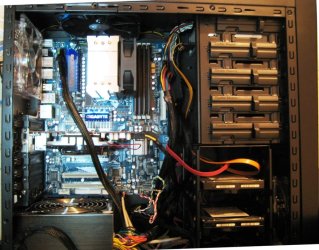
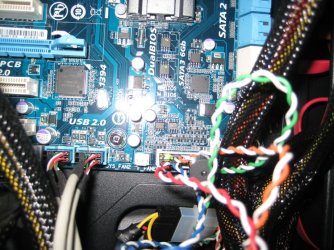
A lot of cables are run between the mobo and the front panel as shown below picture. I unplugged the audio, USB and eSATA cables from the mobo, and shielded reset, pwr and LED cables together by wrapping them by aluminum foil and grounded using a copper wire to one of the nine screws nearby. But no dice. I unplugged the reset cable from the mobo, then the resetting did not happen. Previous experiment indicated that the resetting does not occur even the rest of the cables from the front panel are connected to the mobo as long as the reset cable is unplugged.

Regarding your suggestion about checking voltage using circuit tester, is this for checking PSU if it is functioning normally or not?
I did functional test by putting all parts together on a table without using the case. It worked fine and I could install W7. At that time cable length of one inch each for the reset switch and pwr switch were used. I sometimes felt spark lightening happening when I touched the pwr or reset switch but it did not bother the system.

All those cables(reset, pwr, usb, eSata, LED, audio) are tightly bundled together which was done by vendor of the case. The main power supply cable is running reasonably away from the rest of the cable harness.
 

Attachments

  • IMG_4500X.jpg
    IMG_4500X.jpg
    39.2 KB · Views: 22

My Computer My Computer

At a glance

W7 Ult x64, W8 Pro x64 and W10 Pro x64Phenom FX630016GB DDR3 1866 G.Skill F3-1866C9D-16GWM x2Radeon R7 360
Computer type
PC/Desktop
OS
W7 Ult x64, W8 Pro x64 and W10 Pro x64
CPU
Phenom FX6300
Motherboard
Gigabyte GA-970A-UD3 rev. 1.2
Memory
16GB DDR3 1866 G.Skill F3-1866C9D-16GWM x2
Graphics Card(s)
Radeon R7 360
Sound Card
Asus Xonar DS
Monitor(s) Displays
27" x2, Dell P2715Q
Screen Resolution
3840 x 2160
Hard Drives
Samsung 850Pro 1TB SSD - system
Samsung 4TB SSD - Data
PSU
Corsair CX450M
Case
Corsair 200R
Cooling
Zalman CNPS5X Performa
Internet Speed
400Mbps/12Mbps
Other Info
2nd machine: Same as above
3rd machine: Apple MacAir with W7 Ult installed
Back
Top