MS Office 2007 Picture Problem?

bp96

New member
Local time
8:40 AM
Messages
85
I'm not having this problem, but my friend is so I want to help him out, even though it's not about Windows 7, it's about MS Office.

He is using Office 2007 running under Wine in Linux Mint. When he inserts a picture (any kind of picture), and then moves it to another place in the document/ presentation, the picture is not in the exact position where he placed it. It is a couple of centimetres above the position in which he placed it.
Please look at this video:
Video - TinyPic - Free Image Hosting, Photo Sharing & Video Hosting


Any ideas on how to solve this problem?
Has this been fixed in any service packs, maybe a certain update?
(he can't install service packs)
 

My Computer

Computer Manufacturer/Model Number
Sony VAIO VGN-NR11S
OS
Linux Mint with Windows 7 in Virtualbox
CPU
Intel® Core™ 1.5 GHz 2 Duo Processor T5250
Memory
2048 MB (2GB) RAM
Graphics Card(s)
Mobile Intel® Graphics Media Accelerator X3100
Sound Card
Realtek HD Audio
Screen Resolution
1280x800
Internet Speed
10 Mbps
first, highlight your picture in the main body of the page..
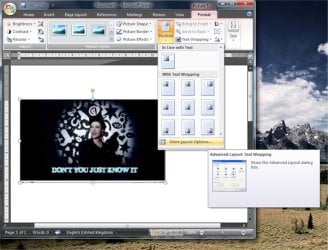
now, if you look under Format - to the right, you'll see the "Text-Wrapping" drop-down,
at the bottom of the list there's an entry for "More Layout Options.." click there..
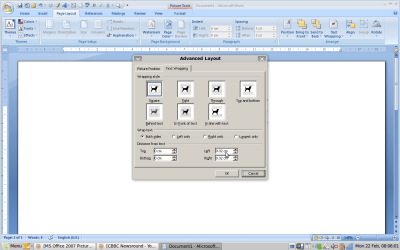
and you'll get the little doggies, as shown in this picture:
picpos.jpg

check to see if there is already a default entry there indicating the positioning and reduce it to zero, if necessary

- it should give you the freedom to put the picture anywhere on the page

watch the positioning if you intend to print, though - as you may place the picture outside the printable area..
 

My Computer

Computer type
PC/Desktop
Computer Manufacturer/Model Number
benchtec, built to personal specs
OS
Windows10 Pro - 64Bit vs.10547
CPU
i7-965 Extreme Edition (8 Cores) at 3.3GHz (no OC)
Motherboard
BloodRageX58 (Socket1366)
Memory
12G Corsair Dominator DDR3 - tripled
Graphics Card(s)
2xAMD SapphireNITRO R9 380(4G) crossfire
Sound Card
Sonar(SB)X-Fi onboard
Monitor(s) Displays
SyncMaster P2050 20"
Screen Resolution
1600x900 (widescreen)
Hard Drives
480G\OCZSolid3SSD, 64G\OCZVertex3SSD,60G\OCZVertex2SSD, 1TB\spinpointF1SATAHDD
PSU
1200w Power Station Gold
Case
ANTEC 900/2 all blue lights, etc..
Cooling
Noctua SE1366 NH-U12P - a tight fit, but a monster cooler!!
Keyboard
Logitech G19 (wired)
Mouse
Logitech G9 Laser (wired)
Internet Speed
150mb unlimited
Browser
IE11(RP)
Other Info
Xbox One, Nokia735 Windows10 mobile, LG HD/DVD/Blu-Ray r/w, CyberlinkPowerDVD15, LogitechZ5500-SS(5.1), LogitechG35Phones-SS(7.1),MSOffice 2007,CorelDrawX7,Painter2016, Wacom Intuos Pro-SE
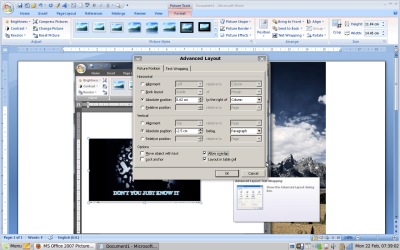
Here are the screenshots- what do I do now? BTW, this nudge happens when I put the picture anywhere on the page.
On the Microsoft website it says this but it never happened to me on Windows:
''The incremental, or nudge, distance is a 1 pixel (pixel: A single unit of measurement that your computer's display hardware uses to paint images on your screen. These units, which often appear as tiny dots, compose the pictures displayed by your screen.) increment. What 1 screen pixel represents relative to the document area depends on the zoom percentage. When your document is zoomed in to 400%, 1 screen pixel is a relatively small nudge distance on the document. When your document is zoomed out to 25%, 1 screen pixel is a relatively large nudge distance on the document.''
 

Attachments

  • Screenshot-1.png
    Screenshot-1.png
    127.9 KB · Views: 47
  • Screenshot.png
    Screenshot.png
    53.6 KB · Views: 40
Last edited:

My Computer

Computer Manufacturer/Model Number
Sony VAIO VGN-NR11S
OS
Linux Mint with Windows 7 in Virtualbox
CPU
Intel® Core™ 1.5 GHz 2 Duo Processor T5250
Memory
2048 MB (2GB) RAM
Graphics Card(s)
Mobile Intel® Graphics Media Accelerator X3100
Sound Card
Realtek HD Audio
Screen Resolution
1280x800
Internet Speed
10 Mbps
try reducing all those entries to zero..
 

My Computer

Computer type
PC/Desktop
Computer Manufacturer/Model Number
benchtec, built to personal specs
OS
Windows10 Pro - 64Bit vs.10547
CPU
i7-965 Extreme Edition (8 Cores) at 3.3GHz (no OC)
Motherboard
BloodRageX58 (Socket1366)
Memory
12G Corsair Dominator DDR3 - tripled
Graphics Card(s)
2xAMD SapphireNITRO R9 380(4G) crossfire
Sound Card
Sonar(SB)X-Fi onboard
Monitor(s) Displays
SyncMaster P2050 20"
Screen Resolution
1600x900 (widescreen)
Hard Drives
480G\OCZSolid3SSD, 64G\OCZVertex3SSD,60G\OCZVertex2SSD, 1TB\spinpointF1SATAHDD
PSU
1200w Power Station Gold
Case
ANTEC 900/2 all blue lights, etc..
Cooling
Noctua SE1366 NH-U12P - a tight fit, but a monster cooler!!
Keyboard
Logitech G19 (wired)
Mouse
Logitech G9 Laser (wired)
Internet Speed
150mb unlimited
Browser
IE11(RP)
Other Info
Xbox One, Nokia735 Windows10 mobile, LG HD/DVD/Blu-Ray r/w, CyberlinkPowerDVD15, LogitechZ5500-SS(5.1), LogitechG35Phones-SS(7.1),MSOffice 2007,CorelDrawX7,Painter2016, Wacom Intuos Pro-SE
Tried that but it doesn't work :(
Can I see screenshots of your settings please?
 

My Computer

Computer Manufacturer/Model Number
Sony VAIO VGN-NR11S
OS
Linux Mint with Windows 7 in Virtualbox
CPU
Intel® Core™ 1.5 GHz 2 Duo Processor T5250
Memory
2048 MB (2GB) RAM
Graphics Card(s)
Mobile Intel® Graphics Media Accelerator X3100
Sound Card
Realtek HD Audio
Screen Resolution
1280x800
Internet Speed
10 Mbps
- try using the "Behind Text" option in the Text Wrapping drop-down..
 

My Computer

Computer type
PC/Desktop
Computer Manufacturer/Model Number
benchtec, built to personal specs
OS
Windows10 Pro - 64Bit vs.10547
CPU
i7-965 Extreme Edition (8 Cores) at 3.3GHz (no OC)
Motherboard
BloodRageX58 (Socket1366)
Memory
12G Corsair Dominator DDR3 - tripled
Graphics Card(s)
2xAMD SapphireNITRO R9 380(4G) crossfire
Sound Card
Sonar(SB)X-Fi onboard
Monitor(s) Displays
SyncMaster P2050 20"
Screen Resolution
1600x900 (widescreen)
Hard Drives
480G\OCZSolid3SSD, 64G\OCZVertex3SSD,60G\OCZVertex2SSD, 1TB\spinpointF1SATAHDD
PSU
1200w Power Station Gold
Case
ANTEC 900/2 all blue lights, etc..
Cooling
Noctua SE1366 NH-U12P - a tight fit, but a monster cooler!!
Keyboard
Logitech G19 (wired)
Mouse
Logitech G9 Laser (wired)
Internet Speed
150mb unlimited
Browser
IE11(RP)
Other Info
Xbox One, Nokia735 Windows10 mobile, LG HD/DVD/Blu-Ray r/w, CyberlinkPowerDVD15, LogitechZ5500-SS(5.1), LogitechG35Phones-SS(7.1),MSOffice 2007,CorelDrawX7,Painter2016, Wacom Intuos Pro-SE
Still not working...
If you look closely at the video, you might notice some things:
The background goes a translucent black colour when moving
The picture shifts downwards when I just hold the picture in its position but when I let go, the picture stays where it is.
 

My Computer

Computer Manufacturer/Model Number
Sony VAIO VGN-NR11S
OS
Linux Mint with Windows 7 in Virtualbox
CPU
Intel® Core™ 1.5 GHz 2 Duo Processor T5250
Memory
2048 MB (2GB) RAM
Graphics Card(s)
Mobile Intel® Graphics Media Accelerator X3100
Sound Card
Realtek HD Audio
Screen Resolution
1280x800
Internet Speed
10 Mbps
I notice you're using cut/copy and paste
- wouldn't using the "Insert" option be easier..?
 

My Computer

Computer type
PC/Desktop
Computer Manufacturer/Model Number
benchtec, built to personal specs
OS
Windows10 Pro - 64Bit vs.10547
CPU
i7-965 Extreme Edition (8 Cores) at 3.3GHz (no OC)
Motherboard
BloodRageX58 (Socket1366)
Memory
12G Corsair Dominator DDR3 - tripled
Graphics Card(s)
2xAMD SapphireNITRO R9 380(4G) crossfire
Sound Card
Sonar(SB)X-Fi onboard
Monitor(s) Displays
SyncMaster P2050 20"
Screen Resolution
1600x900 (widescreen)
Hard Drives
480G\OCZSolid3SSD, 64G\OCZVertex3SSD,60G\OCZVertex2SSD, 1TB\spinpointF1SATAHDD
PSU
1200w Power Station Gold
Case
ANTEC 900/2 all blue lights, etc..
Cooling
Noctua SE1366 NH-U12P - a tight fit, but a monster cooler!!
Keyboard
Logitech G19 (wired)
Mouse
Logitech G9 Laser (wired)
Internet Speed
150mb unlimited
Browser
IE11(RP)
Other Info
Xbox One, Nokia735 Windows10 mobile, LG HD/DVD/Blu-Ray r/w, CyberlinkPowerDVD15, LogitechZ5500-SS(5.1), LogitechG35Phones-SS(7.1),MSOffice 2007,CorelDrawX7,Painter2016, Wacom Intuos Pro-SE
Even the 'insert' option does the problem.
 

My Computer

Computer Manufacturer/Model Number
Sony VAIO VGN-NR11S
OS
Linux Mint with Windows 7 in Virtualbox
CPU
Intel® Core™ 1.5 GHz 2 Duo Processor T5250
Memory
2048 MB (2GB) RAM
Graphics Card(s)
Mobile Intel® Graphics Media Accelerator X3100
Sound Card
Realtek HD Audio
Screen Resolution
1280x800
Internet Speed
10 Mbps
Last edited:

My Computer

Computer type
PC/Desktop
Computer Manufacturer/Model Number
benchtec, built to personal specs
OS
Windows10 Pro - 64Bit vs.10547
CPU
i7-965 Extreme Edition (8 Cores) at 3.3GHz (no OC)
Motherboard
BloodRageX58 (Socket1366)
Memory
12G Corsair Dominator DDR3 - tripled
Graphics Card(s)
2xAMD SapphireNITRO R9 380(4G) crossfire
Sound Card
Sonar(SB)X-Fi onboard
Monitor(s) Displays
SyncMaster P2050 20"
Screen Resolution
1600x900 (widescreen)
Hard Drives
480G\OCZSolid3SSD, 64G\OCZVertex3SSD,60G\OCZVertex2SSD, 1TB\spinpointF1SATAHDD
PSU
1200w Power Station Gold
Case
ANTEC 900/2 all blue lights, etc..
Cooling
Noctua SE1366 NH-U12P - a tight fit, but a monster cooler!!
Keyboard
Logitech G19 (wired)
Mouse
Logitech G9 Laser (wired)
Internet Speed
150mb unlimited
Browser
IE11(RP)
Other Info
Xbox One, Nokia735 Windows10 mobile, LG HD/DVD/Blu-Ray r/w, CyberlinkPowerDVD15, LogitechZ5500-SS(5.1), LogitechG35Phones-SS(7.1),MSOffice 2007,CorelDrawX7,Painter2016, Wacom Intuos Pro-SE
Thanks for helping anyway. :)

Out of interest, was I allowed to post this because this isn't about Windows 7?
And have you ever used Linux before and what do you think of it if you have?
 

My Computer

Computer Manufacturer/Model Number
Sony VAIO VGN-NR11S
OS
Linux Mint with Windows 7 in Virtualbox
CPU
Intel® Core™ 1.5 GHz 2 Duo Processor T5250
Memory
2048 MB (2GB) RAM
Graphics Card(s)
Mobile Intel® Graphics Media Accelerator X3100
Sound Card
Realtek HD Audio
Screen Resolution
1280x800
Internet Speed
10 Mbps
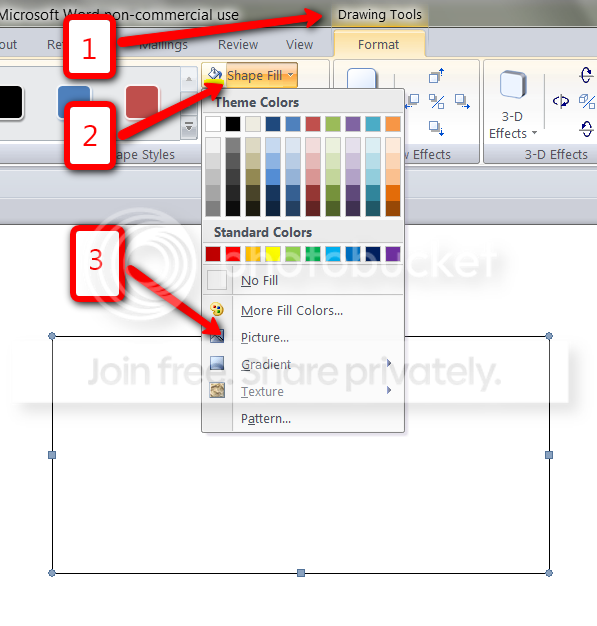
I suggest you first draw a box (Insert > Shapes > click on the rectengular box > draw box - any approximate size, you can always adjust later). Then you go to Drawing Tool > Shape fill > Picture and get the picture from there. Now you can apply the wrapping scenarios to the box. That should work - has never failed me.

PS: I have used Linux (Ubuntu and Fedora). I don't like it at all. Not very user friendly and old fashioned. And although I am a programmer by trade, I found it more difficult to navigate than Windows.
 

My Computer

Computer Manufacturer/Model Number
HP, Dell, Gateway, Toshiba - 4 laptops and 2 desktops
OS
Vista, Windows7, Mint Mate, Zorin, Windows 8
CPU
from 1.6GHz Duo to i7
Monitor(s) Displays
2x HP w2207
Hard Drives
5x HDD, 7x SSD, 12x Externals
Keyboard
with trackball - no mices
Mouse
Trackball mice
Internet Speed
DSL 6000
Thanks that works!
But what if I was inserting a lot of pictures- wouldn't this take longer?

P.S. I'm starting to like Linux after using my friend's laptop- I guess some people like it and some don't. And it's all down to opinion and I think you should feel free to use whatever OS you want.

P.S.S Does this problem occur in Office 2003 as well?
 

My Computer

Computer Manufacturer/Model Number
Sony VAIO VGN-NR11S
OS
Linux Mint with Windows 7 in Virtualbox
CPU
Intel® Core™ 1.5 GHz 2 Duo Processor T5250
Memory
2048 MB (2GB) RAM
Graphics Card(s)
Mobile Intel® Graphics Media Accelerator X3100
Sound Card
Realtek HD Audio
Screen Resolution
1280x800
Internet Speed
10 Mbps
But what if I was inserting a lot of pictures- wouldn't this take longer?

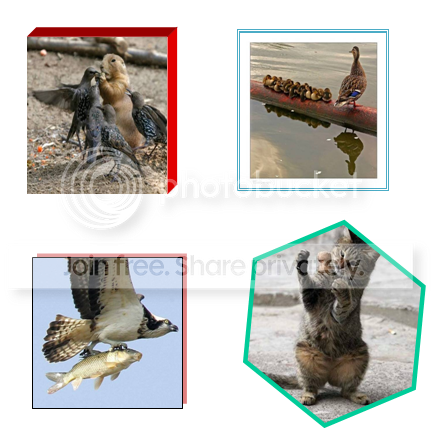
I am glad you got it to work. I guess it would take a bit extra time with the boxes. But you can do other nice things with the box - e.g. set it to 3D, set 3D the borders to different colors, make shadow effects, change the shape, etc.

Here are some examples:

2010-02-24_1452.png
 
Last edited:

My Computer

Computer Manufacturer/Model Number
HP, Dell, Gateway, Toshiba - 4 laptops and 2 desktops
OS
Vista, Windows7, Mint Mate, Zorin, Windows 8
CPU
from 1.6GHz Duo to i7
Monitor(s) Displays
2x HP w2207
Hard Drives
5x HDD, 7x SSD, 12x Externals
Keyboard
with trackball - no mices
Mouse
Trackball mice
Internet Speed
DSL 6000
That's nice but the only drawback on doing this is that you can't copy and paste- can you?
 

My Computer

Computer Manufacturer/Model Number
Sony VAIO VGN-NR11S
OS
Linux Mint with Windows 7 in Virtualbox
CPU
Intel® Core™ 1.5 GHz 2 Duo Processor T5250
Memory
2048 MB (2GB) RAM
Graphics Card(s)
Mobile Intel® Graphics Media Accelerator X3100
Sound Card
Realtek HD Audio
Screen Resolution
1280x800
Internet Speed
10 Mbps
Sure you can copy/paste (e.g. into another word file). I always do that when I develop longer documents. I write them in sections and then I copy/paste them together.
 

My Computer

Computer Manufacturer/Model Number
HP, Dell, Gateway, Toshiba - 4 laptops and 2 desktops
OS
Vista, Windows7, Mint Mate, Zorin, Windows 8
CPU
from 1.6GHz Duo to i7
Monitor(s) Displays
2x HP w2207
Hard Drives
5x HDD, 7x SSD, 12x Externals
Keyboard
with trackball - no mices
Mouse
Trackball mice
Internet Speed
DSL 6000
I mean when you copy and paste into a rectangular shape and then resize it, the picture doesn't resize with the box so you have to do it manually. Oh and the picture problem I had about the picture nudging upwards, is this only a Linux problem and why does it say on the MS website that this is normal but I do not see anyone else having this problem (e.g on YouTube)?

Thanks for the help :D
 

My Computer

Computer Manufacturer/Model Number
Sony VAIO VGN-NR11S
OS
Linux Mint with Windows 7 in Virtualbox
CPU
Intel® Core™ 1.5 GHz 2 Duo Processor T5250
Memory
2048 MB (2GB) RAM
Graphics Card(s)
Mobile Intel® Graphics Media Accelerator X3100
Sound Card
Realtek HD Audio
Screen Resolution
1280x800
Internet Speed
10 Mbps
I mean when you copy and paste into a rectangular shape and then resize it, the picture doesn't resize with the box so you have to do it manually. Oh and the picture problem I had about the picture nudging upwards, is this only a Linux problem and why does it say on the MS website that this is normal but I do not see anyone else having this problem (e.g on YouTube)?

Thanks for the help :D

You do not Copy/Paste into the shape. You get the picture from here:

2010-02-25_1136.png
 

My Computer

Computer Manufacturer/Model Number
HP, Dell, Gateway, Toshiba - 4 laptops and 2 desktops
OS
Vista, Windows7, Mint Mate, Zorin, Windows 8
CPU
from 1.6GHz Duo to i7
Monitor(s) Displays
2x HP w2207
Hard Drives
5x HDD, 7x SSD, 12x Externals
Keyboard
with trackball - no mices
Mouse
Trackball mice
Internet Speed
DSL 6000
So this isn't just a WINE problem? And this hasn't been fixed yet? And there is no bug fix patch by Microsoft?
 

My Computer

Computer Manufacturer/Model Number
Sony VAIO VGN-NR11S
OS
Linux Mint with Windows 7 in Virtualbox
CPU
Intel® Core™ 1.5 GHz 2 Duo Processor T5250
Memory
2048 MB (2GB) RAM
Graphics Card(s)
Mobile Intel® Graphics Media Accelerator X3100
Sound Card
Realtek HD Audio
Screen Resolution
1280x800
Internet Speed
10 Mbps
So this isn't just a WINE problem? And this hasn't been fixed yet? And there is no bug fix patch by Microsoft?
You lost me. I don't know what problem you are talking about. If you refer to Copy/Paste, that is just the wrong way of doing it.
 

My Computer

Computer Manufacturer/Model Number
HP, Dell, Gateway, Toshiba - 4 laptops and 2 desktops
OS
Vista, Windows7, Mint Mate, Zorin, Windows 8
CPU
from 1.6GHz Duo to i7
Monitor(s) Displays
2x HP w2207
Hard Drives
5x HDD, 7x SSD, 12x Externals
Keyboard
with trackball - no mices
Mouse
Trackball mice
Internet Speed
DSL 6000
Back
Top