HELP me correct my desktop display problem, Ati driver?

Geege

New member
Local time
2:56 PM
Messages
13
Location
U.K.
Hi,

I'm using Windows 7 64-bit and have just purchased a new Ati HD5770 graphics card to replace my old NVidia 8800GTS 512.

It worked fine and I installed the Ati drivers from the ATi website. However just recently, I've been experiencing problems with the desktop display; lock up/freezes, horizontal lines and artifacts and small dots/specs on the desktop and any webpage. I've tested just about everything and I can't figure it out. Interestingly it only started happening when I finished (exited from) a 2 hours long stint playing Dead Space game, so thought it could be an overheating problem. But when I played it previously and also Stalker, the display was fine.


SCREENPRINT-1.png


  • My RAM seems to run fine as I've stressed it and changed them over into different DIMM slots.
  • My NEC monitor is working fine as I've tested it on my television with the same problems. I also tested with DVi and HDMI cables changed over and still same problem.
  • Thinking it was an overheating problem, I've shut down the computer for a long period restrarted with the same problems and cleaned out the large Coolermaster Cosmos S case of any dust. I've even cleaned the CPU heatsink and applied new thermal pasted so can't be overheating. My temps are fine.
  • I can boot into safe mode and the problem goes away suggesting the graphics card hardware is working ok.
  • However as soon as I un-install the Ati drivers (Catalyst 10.2) and use the gerenci VGA driver the problem dissapears. So it must be a Ati driver problem right?

Remember you may recall I had similar problem with TDR messages on my old NVidia card and BSODs) but no problems with desktop artifacts / specs before.

My display is set to small text and 1920x1200 resolution, I've currently using DVI lead, although the problem persists with HDMI too.

I've tried all sorts, un-installing the driver, re-installing in safe mode, using Driver Sweeper cleaner software to ensure there is no conflict. I've also made sure Windows C++ 2008 x64 redistributable is installed and up to date.

Any suggestions?

please.gif
 

My Computer My Computer

OS
Windows 7 64-bit
CPU
Intel Core 2 Duo E8600
Motherboard
Biostar T-Power i45
Memory
4GB Crucial Ballistix Tracer 800MHz
Graphics Card(s)
NVidia 8800GTS 512MB (G92)
Monitor(s) Displays
NEC MultiSync 24WMGX3
Hard Drives
OCZ Vertex 120GB SSD
PSU
Corsair HX1000W
Case
Coolermaster Cosmos S
Hi,

I'm using Windows 7 64-bit and have just purchased a new Ati HD5770 graphics card to replace my old NVidia 8800GTS 512.

It worked fine and I installed the Ati drivers from the ATi website. However just recently, I've been experiencing problems with the desktop display; lock up/freezes, horizontal lines and artifacts and small dots/specs on the desktop and any webpage. I've tested just about everything and I can't figure it out. Interestingly it only started happening when I finished (exited from) a 2 hours long stint playing Dead Space game, so thought it could be an overheating problem. But when I played it previously and also Stalker, the display was fine.

SCREENPRINT-1.png


  • My RAM seems to run fine as I've stressed it and changed them over into different DIMM slots.
  • My NEC monitor is working fine as I've tested it on my television with the same problems. I also tested with DVi and HDMI cables changed over and still same problem.
  • Thinking it was an overheating problem, I've shut down the computer for a long period restrarted with the same problems and cleaned out the large Coolermaster Cosmos S case of any dust. I've even cleaned the CPU heatsink and applied new thermal pasted so can't be overheating. My temps are fine.
  • I can boot into safe mode and the problem goes away suggesting the graphics card hardware is working ok.
  • However as soon as I un-install the Ati drivers (Catalyst 10.2) and use the gerenci VGA driver the problem dissapears. So it must be a Ati driver problem right?
Remember you may recall I had similar problem with TDR messages on my old NVidia card and BSODs) but no problems with desktop artifacts / specs before.

My display is set to small text and 1920x1200 resolution, I've currently using DVI lead, although the problem persists with HDMI too.

I've tried all sorts, un-installing the driver, re-installing in safe mode, using Driver Sweeper cleaner software to ensure there is no conflict. I've also made sure Windows C++ 2008 x64 redistributable is installed and up to date.

Any suggestions?

please.gif


Sounds like it is a driver issue... Are you sure you had correct 64bit driver?


Who is manufacturer of card?
 

My Computer My Computer

Computer Manufacturer/Model Number
Homebrew PC - "Alpha_Dawg"
OS
Windows 7 Ultimate 64 bit Steve Ballmer Signature Edition
CPU
Intel Core 2 Quad - Q9550 - 2.83GHz stock - OC'd to 3.6GHz
Motherboard
Gigabyte EP45-UD3P
Memory
4GB DDR2 800MHz (PC6400) OCZ Reaper
Graphics Card(s)
Nvidia GE Force 8800 GTS
Sound Card
Asus Xonar DX
Monitor(s) Displays
Samsung SyncMaster 2333HD
Screen Resolution
1920 x 1080
Hard Drives
WD Caviar Black 750GB - 7200RPM - 32MB cache
WD Caviar Green 1.5TB - 5400RPM - 64MB cache
WD Caviar Green 2.0TB - 5400RPM - 64MB cache
PSU
PC Power & Cooling Silencer 750
Case
Gigabyte 3D Aurora
Cooling
Case is Air - 5ea. 120mm fans (mix of Arctic and Xigmatec)
Keyboard
MS Natural Wireless KB
Mouse
MS Wireless Mouse
Internet Speed
50 mbps down/5 mbps up
Other Info
AVerMedia - AVerTVHD G2 Dual Tuner Card
Yes, I'm pretty sure - the latest Catalyst 10.2 driver, from the offical ATi website.

Windows 7 64-bit > Radeon > 5700 series. Express install.

As I said, the problem goes away with the drivers un-installed or when I'm in safe mode. So it must be a driver issue - but no matter how many times, I un-install, re-install etc.. the problem persists.

Should I consider doing a system restore back to the restore point back when I first installed my Ati card?

It is a Sapphire Radeon HD 5770 (not vapour-X, the standard cooler) product code 11163-02-20R
 

My Computer My Computer

OS
Windows 7 64-bit
CPU
Intel Core 2 Duo E8600
Motherboard
Biostar T-Power i45
Memory
4GB Crucial Ballistix Tracer 800MHz
Graphics Card(s)
NVidia 8800GTS 512MB (G92)
Monitor(s) Displays
NEC MultiSync 24WMGX3
Hard Drives
OCZ Vertex 120GB SSD
PSU
Corsair HX1000W
Case
Coolermaster Cosmos S

My Computer My Computer

Computer Manufacturer/Model Number
Homebrew PC - "Alpha_Dawg"
OS
Windows 7 Ultimate 64 bit Steve Ballmer Signature Edition
CPU
Intel Core 2 Quad - Q9550 - 2.83GHz stock - OC'd to 3.6GHz
Motherboard
Gigabyte EP45-UD3P
Memory
4GB DDR2 800MHz (PC6400) OCZ Reaper
Graphics Card(s)
Nvidia GE Force 8800 GTS
Sound Card
Asus Xonar DX
Monitor(s) Displays
Samsung SyncMaster 2333HD
Screen Resolution
1920 x 1080
Hard Drives
WD Caviar Black 750GB - 7200RPM - 32MB cache
WD Caviar Green 1.5TB - 5400RPM - 64MB cache
WD Caviar Green 2.0TB - 5400RPM - 64MB cache
PSU
PC Power & Cooling Silencer 750
Case
Gigabyte 3D Aurora
Cooling
Case is Air - 5ea. 120mm fans (mix of Arctic and Xigmatec)
Keyboard
MS Natural Wireless KB
Mouse
MS Wireless Mouse
Internet Speed
50 mbps down/5 mbps up
Other Info
AVerMedia - AVerTVHD G2 Dual Tuner Card
ok just trying the download from Sapphire website
 

My Computer My Computer

OS
Windows 7 64-bit
CPU
Intel Core 2 Duo E8600
Motherboard
Biostar T-Power i45
Memory
4GB Crucial Ballistix Tracer 800MHz
Graphics Card(s)
NVidia 8800GTS 512MB (G92)
Monitor(s) Displays
NEC MultiSync 24WMGX3
Hard Drives
OCZ Vertex 120GB SSD
PSU
Corsair HX1000W
Case
Coolermaster Cosmos S
ok just trying the download from Sapphire website

Sometimes just because you have an ATI or Nvidia chipset there driver doesnt always work... best to use manufacturers when possible.

Good luck, and please let us know how it works!
 

My Computer My Computer

Computer Manufacturer/Model Number
Homebrew PC - "Alpha_Dawg"
OS
Windows 7 Ultimate 64 bit Steve Ballmer Signature Edition
CPU
Intel Core 2 Quad - Q9550 - 2.83GHz stock - OC'd to 3.6GHz
Motherboard
Gigabyte EP45-UD3P
Memory
4GB DDR2 800MHz (PC6400) OCZ Reaper
Graphics Card(s)
Nvidia GE Force 8800 GTS
Sound Card
Asus Xonar DX
Monitor(s) Displays
Samsung SyncMaster 2333HD
Screen Resolution
1920 x 1080
Hard Drives
WD Caviar Black 750GB - 7200RPM - 32MB cache
WD Caviar Green 1.5TB - 5400RPM - 64MB cache
WD Caviar Green 2.0TB - 5400RPM - 64MB cache
PSU
PC Power & Cooling Silencer 750
Case
Gigabyte 3D Aurora
Cooling
Case is Air - 5ea. 120mm fans (mix of Arctic and Xigmatec)
Keyboard
MS Natural Wireless KB
Mouse
MS Wireless Mouse
Internet Speed
50 mbps down/5 mbps up
Other Info
AVerMedia - AVerTVHD G2 Dual Tuner Card
Yes, I'm pretty sure - the latest Catalyst 10.2 driver, from the offical ATi website.

Windows 7 64-bit > Radeon > 5700 series. Express install.

As I said, the problem goes away with the drivers un-installed or when I'm in safe mode. So it must be a driver issue - but no matter how many times, I un-install, re-install etc.. the problem persists.

Should I consider doing a system restore back to the restore point back when I first installed my Ati card?

It is a Sapphire Radeon HD 5770 (not vapour-X, the standard cooler) product code 11163-02-20R

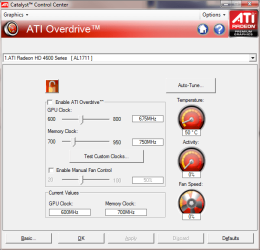
Looks like an overdrive issue
 

Attachments

  • Untitled.png
    Untitled.png
    30.3 KB · Views: 91

My Computer My Computer

Computer type
Laptop
Computer Manufacturer/Model Number
Apple
OS
El Capitan / Windows 10
CPU
i7-4980HQ
Memory
16GB
Graphics Card(s)
Iris 5200
Hey? What makes you say that?
 

My Computer My Computer

OS
Windows 7 64-bit
CPU
Intel Core 2 Duo E8600
Motherboard
Biostar T-Power i45
Memory
4GB Crucial Ballistix Tracer 800MHz
Graphics Card(s)
NVidia 8800GTS 512MB (G92)
Monitor(s) Displays
NEC MultiSync 24WMGX3
Hard Drives
OCZ Vertex 120GB SSD
PSU
Corsair HX1000W
Case
Coolermaster Cosmos S
Yes, I'm pretty sure - the latest Catalyst 10.2 driver, from the offical ATi website.

Windows 7 64-bit > Radeon > 5700 series. Express install.

As I said, the problem goes away with the drivers un-installed or when I'm in safe mode. So it must be a driver issue - but no matter how many times, I un-install, re-install etc.. the problem persists.

Should I consider doing a system restore back to the restore point back when I first installed my Ati card?

It is a Sapphire Radeon HD 5770 (not vapour-X, the standard cooler) product code 11163-02-20R

Looks like an overdrive issue

Yes Baarod... what makes you say that? Your screenie isnt even same card... ???

Geege:

Any luck with the Sapphire drivers? Did you uninstall all Ati drivers & utilities 1st?
 

My Computer My Computer

Computer Manufacturer/Model Number
Homebrew PC - "Alpha_Dawg"
OS
Windows 7 Ultimate 64 bit Steve Ballmer Signature Edition
CPU
Intel Core 2 Quad - Q9550 - 2.83GHz stock - OC'd to 3.6GHz
Motherboard
Gigabyte EP45-UD3P
Memory
4GB DDR2 800MHz (PC6400) OCZ Reaper
Graphics Card(s)
Nvidia GE Force 8800 GTS
Sound Card
Asus Xonar DX
Monitor(s) Displays
Samsung SyncMaster 2333HD
Screen Resolution
1920 x 1080
Hard Drives
WD Caviar Black 750GB - 7200RPM - 32MB cache
WD Caviar Green 1.5TB - 5400RPM - 64MB cache
WD Caviar Green 2.0TB - 5400RPM - 64MB cache
PSU
PC Power & Cooling Silencer 750
Case
Gigabyte 3D Aurora
Cooling
Case is Air - 5ea. 120mm fans (mix of Arctic and Xigmatec)
Keyboard
MS Natural Wireless KB
Mouse
MS Wireless Mouse
Internet Speed
50 mbps down/5 mbps up
Other Info
AVerMedia - AVerTVHD G2 Dual Tuner Card
Maybe it is my broadband connection but the driver download is saying 5 hours remaining:confused:
 

My Computer My Computer

OS
Windows 7 64-bit
CPU
Intel Core 2 Duo E8600
Motherboard
Biostar T-Power i45
Memory
4GB Crucial Ballistix Tracer 800MHz
Graphics Card(s)
NVidia 8800GTS 512MB (G92)
Monitor(s) Displays
NEC MultiSync 24WMGX3
Hard Drives
OCZ Vertex 120GB SSD
PSU
Corsair HX1000W
Case
Coolermaster Cosmos S
Maybe it is my broadband connection but the driver download is saying 5 hours remaining:confused:

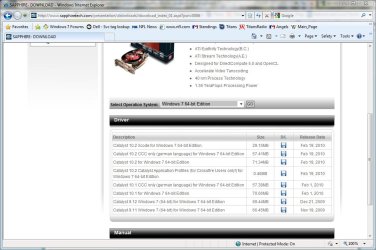
OMG!!!!!!!!!!!

sapphire driver page.JPG

The 71 MB file???
 

My Computer My Computer

Computer Manufacturer/Model Number
Homebrew PC - "Alpha_Dawg"
OS
Windows 7 Ultimate 64 bit Steve Ballmer Signature Edition
CPU
Intel Core 2 Quad - Q9550 - 2.83GHz stock - OC'd to 3.6GHz
Motherboard
Gigabyte EP45-UD3P
Memory
4GB DDR2 800MHz (PC6400) OCZ Reaper
Graphics Card(s)
Nvidia GE Force 8800 GTS
Sound Card
Asus Xonar DX
Monitor(s) Displays
Samsung SyncMaster 2333HD
Screen Resolution
1920 x 1080
Hard Drives
WD Caviar Black 750GB - 7200RPM - 32MB cache
WD Caviar Green 1.5TB - 5400RPM - 64MB cache
WD Caviar Green 2.0TB - 5400RPM - 64MB cache
PSU
PC Power & Cooling Silencer 750
Case
Gigabyte 3D Aurora
Cooling
Case is Air - 5ea. 120mm fans (mix of Arctic and Xigmatec)
Keyboard
MS Natural Wireless KB
Mouse
MS Wireless Mouse
Internet Speed
50 mbps down/5 mbps up
Other Info
AVerMedia - AVerTVHD G2 Dual Tuner Card
I never had these problems with Windows XP, maybe it is an inherent issue with Windows 7? I've read many driver problems with Vista and Windows 7 regarding drivers,

TDR problems, nvlddmkm.sys BSOD, ATi drivers stop responding issues, etc...
 

My Computer My Computer

OS
Windows 7 64-bit
CPU
Intel Core 2 Duo E8600
Motherboard
Biostar T-Power i45
Memory
4GB Crucial Ballistix Tracer 800MHz
Graphics Card(s)
NVidia 8800GTS 512MB (G92)
Monitor(s) Displays
NEC MultiSync 24WMGX3
Hard Drives
OCZ Vertex 120GB SSD
PSU
Corsair HX1000W
Case
Coolermaster Cosmos S
I'm assuming I'm downloading the correct file from the Sapphire website page:

Catalyst 10.2 for Windows 7 64-bit Edition 71.34MB
 

My Computer My Computer

OS
Windows 7 64-bit
CPU
Intel Core 2 Duo E8600
Motherboard
Biostar T-Power i45
Memory
4GB Crucial Ballistix Tracer 800MHz
Graphics Card(s)
NVidia 8800GTS 512MB (G92)
Monitor(s) Displays
NEC MultiSync 24WMGX3
Hard Drives
OCZ Vertex 120GB SSD
PSU
Corsair HX1000W
Case
Coolermaster Cosmos S
Should be... any luck in the speed?
 

My Computer My Computer

Computer Manufacturer/Model Number
Homebrew PC - "Alpha_Dawg"
OS
Windows 7 Ultimate 64 bit Steve Ballmer Signature Edition
CPU
Intel Core 2 Quad - Q9550 - 2.83GHz stock - OC'd to 3.6GHz
Motherboard
Gigabyte EP45-UD3P
Memory
4GB DDR2 800MHz (PC6400) OCZ Reaper
Graphics Card(s)
Nvidia GE Force 8800 GTS
Sound Card
Asus Xonar DX
Monitor(s) Displays
Samsung SyncMaster 2333HD
Screen Resolution
1920 x 1080
Hard Drives
WD Caviar Black 750GB - 7200RPM - 32MB cache
WD Caviar Green 1.5TB - 5400RPM - 64MB cache
WD Caviar Green 2.0TB - 5400RPM - 64MB cache
PSU
PC Power & Cooling Silencer 750
Case
Gigabyte 3D Aurora
Cooling
Case is Air - 5ea. 120mm fans (mix of Arctic and Xigmatec)
Keyboard
MS Natural Wireless KB
Mouse
MS Wireless Mouse
Internet Speed
50 mbps down/5 mbps up
Other Info
AVerMedia - AVerTVHD G2 Dual Tuner Card
Well I installed the Cat 10.2 driver from the Sapphire website and exactly the same happened! So I will check to see if it happenes in Windows XP.

I have Windows XP 32-bit installed one another hard drive. If that works perfectly with Windows XP with Ati driver, then surely it must be something that Windows 7 64-bit is conflicting with the Ati drivers.

Surely can't be a graphics hardware fault because:


  • It works perfectly in Safe Mode
  • Works perfectly with the generic Windows VGA driver
 

My Computer My Computer

OS
Windows 7 64-bit
CPU
Intel Core 2 Duo E8600
Motherboard
Biostar T-Power i45
Memory
4GB Crucial Ballistix Tracer 800MHz
Graphics Card(s)
NVidia 8800GTS 512MB (G92)
Monitor(s) Displays
NEC MultiSync 24WMGX3
Hard Drives
OCZ Vertex 120GB SSD
PSU
Corsair HX1000W
Case
Coolermaster Cosmos S
Perhaps you can contact Sapphire customer support... It sure sounds like it is the driver since both safe mode and Win7 generic driver work.

Just for giggles check that the card is fully seated... maybe even pull it and re-seat it. Also does this card get external power via the PSU? If so is it connected and tight?
 

My Computer My Computer

Computer Manufacturer/Model Number
Homebrew PC - "Alpha_Dawg"
OS
Windows 7 Ultimate 64 bit Steve Ballmer Signature Edition
CPU
Intel Core 2 Quad - Q9550 - 2.83GHz stock - OC'd to 3.6GHz
Motherboard
Gigabyte EP45-UD3P
Memory
4GB DDR2 800MHz (PC6400) OCZ Reaper
Graphics Card(s)
Nvidia GE Force 8800 GTS
Sound Card
Asus Xonar DX
Monitor(s) Displays
Samsung SyncMaster 2333HD
Screen Resolution
1920 x 1080
Hard Drives
WD Caviar Black 750GB - 7200RPM - 32MB cache
WD Caviar Green 1.5TB - 5400RPM - 64MB cache
WD Caviar Green 2.0TB - 5400RPM - 64MB cache
PSU
PC Power & Cooling Silencer 750
Case
Gigabyte 3D Aurora
Cooling
Case is Air - 5ea. 120mm fans (mix of Arctic and Xigmatec)
Keyboard
MS Natural Wireless KB
Mouse
MS Wireless Mouse
Internet Speed
50 mbps down/5 mbps up
Other Info
AVerMedia - AVerTVHD G2 Dual Tuner Card
Thanks for your help.

Interestingly I've installed the Windows XP 32-bit ATi Cat 10.2 driver from the Sapphire website and booted into Windows XP (on my other hard drive) and the problem is the same. I still get specs/dots and some horizontal lines, just the same as I did on my other drive (OCZ Vertex SSD) in Windows 7 64-bit.

I am thinking that visual artifacts could be as a result of over heating? Remember - I only got this problem after playing Dead Space for 2 hours. Could my new Graphics Card really be faulty? If the card itself has developed a fault, then why does it still work fine in Safe Mode and with the Windows VGA driver? It just doesn't work correctly with its own Ati driver.

I've re-seated the card and ensured the power PCI-E cable is plugged into it ok. It is power directly off the 12V rail from my Corsair HX1000W PSU.

Still same problem.

I've rolled back to a previous system restore point - still same problem.

Should I consider re-installing Windows 7 operating system. But that would be hassle!!!

Should I RMA the card and claim that the card is faulty?

I also have experienced the following Ati driver problems:
"Failed to load detection drivers" (so I have ensured Windows 2008 C++ is installed)
"Cataylst Control Host has stopped working" dialog box has appeared.
and when I try and de-bug I get this error:

JITdebuggerscreenprint.jpg
 

My Computer My Computer

OS
Windows 7 64-bit
CPU
Intel Core 2 Duo E8600
Motherboard
Biostar T-Power i45
Memory
4GB Crucial Ballistix Tracer 800MHz
Graphics Card(s)
NVidia 8800GTS 512MB (G92)
Monitor(s) Displays
NEC MultiSync 24WMGX3
Hard Drives
OCZ Vertex 120GB SSD
PSU
Corsair HX1000W
Case
Coolermaster Cosmos S
Any suggestions?
 

My Computer My Computer

OS
Windows 7 64-bit
CPU
Intel Core 2 Duo E8600
Motherboard
Biostar T-Power i45
Memory
4GB Crucial Ballistix Tracer 800MHz
Graphics Card(s)
NVidia 8800GTS 512MB (G92)
Monitor(s) Displays
NEC MultiSync 24WMGX3
Hard Drives
OCZ Vertex 120GB SSD
PSU
Corsair HX1000W
Case
Coolermaster Cosmos S
Hey? What makes you say that?

Artifacting and crashes as you described are indicative of VRAM and/or GPU instability. If it only occurs with CCC not Windows drivers or in safe mode then I suspect that the ATI drivers are adjusting the clock. I suggest using GPU-Z Video card GPU Information Utility to inspect the clocks and temperatures under CCC and in safe mode or with Windows drivers.
 

My Computer My Computer

Computer type
Laptop
Computer Manufacturer/Model Number
Apple
OS
El Capitan / Windows 10
CPU
i7-4980HQ
Memory
16GB
Graphics Card(s)
Iris 5200
Well you could use GPU-Z and see if during game play for 2 hours you reach a high temp. If it does get real hot, then it could be..
 

My Computer My Computer

Computer type
Laptop
Computer Manufacturer/Model Number
ASUS G60-RBBX05
OS
Win7 Home Premium 64x
CPU
Intel Core 2 Duo P7450 / 2.13 GHz (2.29 with Extreme Turbo)
Memory
4 GB PC-6400 Hyundai (2X2) at 800Mhz
Graphics Card(s)
NVIDIA GeForce GTX 260M 1GB DDR3 VRAM
Monitor(s) Displays
16" LED Backlit
Screen Resolution
1366 x 768 on laptop 1600x1050 max res on 22" external mon
Hard Drives
OCZ Agility 3 60GB SSD / 320 GB - Serial ATA-150 - 7200 rpm
PSU
6-cell Lithium ion { lasts 1.5 hours }
Case
ASUS G60 Laptop
Keyboard
Chicklet type back-lit (white light) keyboard
Mouse
Logitech G9 Laser Mouse 3200dpi and 1000 reports per minute
Internet Speed
Comcast 8.60mb/s up - 3.11mb/s down
Antivirus
MSE
Browser
Firefox
Other Info
General mid-budget gaming Comp. Low batterylife - High FrameRates - currently overheating problems :(

2nd Rig: Case: Rosewill BLACKHAWK Gaming ATX Mid Tower Computer Case

Mobo: GIGABYTE GA-990FXA-UD3
CPU: AMD FX-6200 Zambezi 3.8GHz (4.1GHz Turbo)
Heatsink: COOLER MASTER V8 CPU Cooler
RAM: Patriot Viper 3 8GB (2 x 4GB) 240-Pin DDR3 SDRAM 1866 (PC3 15000)
GPU: SAPPHIRE Radeon HD 6850 1GB 2
Back
Top