
Adobe Photoshop CS4 not Opening

friend863

New member
Member
Local time
5:20 PM
Messages
43
I just have installed Adobe Photoshop CS4 but whenever I tries to start it it opens but with only menu bar and title bar and doesn't show anything in work area (only shows grey screen) with also mouse in waiting for a long time. When I wait to Photoshop to open properly, it takes lot of time (in minutes). Even then if photoshop has opened properly when I try to close it, it again goes to waiting and I have to close with task manager. Sometimes it also gives repairing the photoshop error. I have repaired it many times, set compatibly to Window XP but still no success :(.

It was working fine on XP before I upgraded to Windows 7 32 bit. Hopefully I can find solution in this thread :)
 

My Computer My Computer

OS
Windows 7 Ultimate x86
CPU
AMD Phenom II X4 945 3.0 GHz
Motherboard
Asus M4N68T-M V2
Memory
2GB RAM DDR3
Graphics Card(s)
Nvidia 9600GT 1GB
Sound Card
VIA HD Audio Deck
Screen Resolution
1280*768
Hard Drives
Hitachi Hard Disk 500GB
PSU
450W
Keyboard
Microsoft Standard PS/2
Mouse
Microsoft USB Basic Optical Mouse 2.0
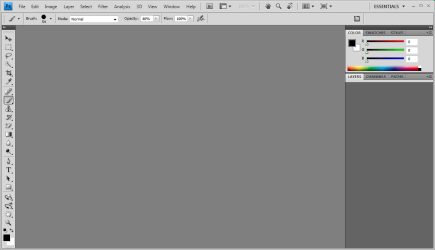
I just have installed Adobe Photoshop CS4 but whenever I tries to start it it opens but with only menu bar and title bar and doesn't show anything in work area (only shows grey screen)
Like in the attachment? Have you updated the program by running the updater?
I have repaired it many times
Have you tried reinstalling it?
 

Attachments

  • ps.PNG
    ps.PNG
    16.9 KB · Views: 77

My Computer My Computer

Computer Manufacturer/Model Number
Sony Vaio FZ21Z
OS
Windows 7 Ultimate x64 ®™
CPU
Intel Core 2 Duo (2.2 GHz)
Motherboard
Sony (Intel Chipset)
Memory
2x 2GB Corsair (667 MHz)
Graphics Card(s)
NVIDIA 8600M GS (256MB)
Sound Card
Sigmatel
Monitor(s) Displays
15.4" TFT X-Black
Screen Resolution
1280x800
Hard Drives
Western Digital 300GB Scorpio Black (7200rpm)
Mouse
Logitech Anywhere MX
Internet Speed
Sky 5MB
Here's screenshot.
2w56gx0.png


I already have tried reinstalling many times. I haven't reinstalled by first uninstalling it tough.
 

My Computer My Computer

OS
Windows 7 Ultimate x86
CPU
AMD Phenom II X4 945 3.0 GHz
Motherboard
Asus M4N68T-M V2
Memory
2GB RAM DDR3
Graphics Card(s)
Nvidia 9600GT 1GB
Sound Card
VIA HD Audio Deck
Screen Resolution
1280*768
Hard Drives
Hitachi Hard Disk 500GB
PSU
450W
Keyboard
Microsoft Standard PS/2
Mouse
Microsoft USB Basic Optical Mouse 2.0
I haven't reinstalled by first uninstalling it tough.
Might be worth trying eh. And make sure you update the program, after my last reinstall of 7, there was about 250mb to download for updating it.
 

My Computer My Computer

Computer Manufacturer/Model Number
Sony Vaio FZ21Z
OS
Windows 7 Ultimate x64 ®™
CPU
Intel Core 2 Duo (2.2 GHz)
Motherboard
Sony (Intel Chipset)
Memory
2x 2GB Corsair (667 MHz)
Graphics Card(s)
NVIDIA 8600M GS (256MB)
Sound Card
Sigmatel
Monitor(s) Displays
15.4" TFT X-Black
Screen Resolution
1280x800
Hard Drives
Western Digital 300GB Scorpio Black (7200rpm)
Mouse
Logitech Anywhere MX
Internet Speed
Sky 5MB
Tried Reinstalling after uninstalling. Yet no changes!
 

My Computer My Computer

OS
Windows 7 Ultimate x86
CPU
AMD Phenom II X4 945 3.0 GHz
Motherboard
Asus M4N68T-M V2
Memory
2GB RAM DDR3
Graphics Card(s)
Nvidia 9600GT 1GB
Sound Card
VIA HD Audio Deck
Screen Resolution
1280*768
Hard Drives
Hitachi Hard Disk 500GB
PSU
450W
Keyboard
Microsoft Standard PS/2
Mouse
Microsoft USB Basic Optical Mouse 2.0
Are your graphics drivers up to date?
 

My Computer My Computer

Computer Manufacturer/Model Number
Sony Vaio FZ21Z
OS
Windows 7 Ultimate x64 ®™
CPU
Intel Core 2 Duo (2.2 GHz)
Motherboard
Sony (Intel Chipset)
Memory
2x 2GB Corsair (667 MHz)
Graphics Card(s)
NVIDIA 8600M GS (256MB)
Sound Card
Sigmatel
Monitor(s) Displays
15.4" TFT X-Black
Screen Resolution
1280x800
Hard Drives
Western Digital 300GB Scorpio Black (7200rpm)
Mouse
Logitech Anywhere MX
Internet Speed
Sky 5MB
yeah as I said, it was working fine on xp i.e yesterday.
 

My Computer My Computer

OS
Windows 7 Ultimate x86
CPU
AMD Phenom II X4 945 3.0 GHz
Motherboard
Asus M4N68T-M V2
Memory
2GB RAM DDR3
Graphics Card(s)
Nvidia 9600GT 1GB
Sound Card
VIA HD Audio Deck
Screen Resolution
1280*768
Hard Drives
Hitachi Hard Disk 500GB
PSU
450W
Keyboard
Microsoft Standard PS/2
Mouse
Microsoft USB Basic Optical Mouse 2.0
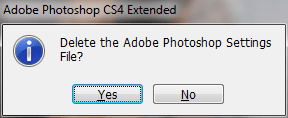
Try this, start PS, and (be quick)hold down shift + ctrl + alt, click yes on the window that appears.
 

My Computer My Computer

Computer Manufacturer/Model Number
Sony Vaio FZ21Z
OS
Windows 7 Ultimate x64 ®™
CPU
Intel Core 2 Duo (2.2 GHz)
Motherboard
Sony (Intel Chipset)
Memory
2x 2GB Corsair (667 MHz)
Graphics Card(s)
NVIDIA 8600M GS (256MB)
Sound Card
Sigmatel
Monitor(s) Displays
15.4" TFT X-Black
Screen Resolution
1280x800
Hard Drives
Western Digital 300GB Scorpio Black (7200rpm)
Mouse
Logitech Anywhere MX
Internet Speed
Sky 5MB
Nothing appears .I think it needs Photoshop to start first to make that window appear but my mouse keeps on waiting.
 

My Computer My Computer

OS
Windows 7 Ultimate x86
CPU
AMD Phenom II X4 945 3.0 GHz
Motherboard
Asus M4N68T-M V2
Memory
2GB RAM DDR3
Graphics Card(s)
Nvidia 9600GT 1GB
Sound Card
VIA HD Audio Deck
Screen Resolution
1280*768
Hard Drives
Hitachi Hard Disk 500GB
PSU
450W
Keyboard
Microsoft Standard PS/2
Mouse
Microsoft USB Basic Optical Mouse 2.0
Unstall delete all the files and make a clean install, update and it will probably work
 

My Computer My Computer

Computer Manufacturer/Model Number
Custom built
OS
Windows 7 Ultimate x64 SP1
CPU
i7 960 3.2Ghz
Motherboard
P6X58D-E
Memory
6GB of DDR3 Corsair TR3 1600
Graphics Card(s)
nVidia GTX 580
Sound Card
Onboard
Monitor(s) Displays
LG W2353V
Screen Resolution
1080p
Hard Drives
2X Seagate 2TB
1X Samsung 1TB
PSU
XFX Pro 750 80% Gold
Case
Thermaltake V3 Black Edition
Cooling
Intel standard cooling system (why I didn't overclock)
Keyboard
Kemex (I have to buy a new one, if I remember...)
Mouse
Gamer 3200DPI
Internet Speed
4MB
Other Info
Most of my games are on steam (not anymore, DTD, Games for windows, gammersgate, Origins... it's all over the place now)
Nothing appears .I think it needs Photoshop to start first to make that window appear but my mouse keeps on waiting.
You need to be quick about it, as in have your fingers hovering the keys, and as soon as you click on PS, press all 3.
 

Attachments

  • ps.PNG
    ps.PNG
    5.8 KB · Views: 304

My Computer My Computer

Computer Manufacturer/Model Number
Sony Vaio FZ21Z
OS
Windows 7 Ultimate x64 ®™
CPU
Intel Core 2 Duo (2.2 GHz)
Motherboard
Sony (Intel Chipset)
Memory
2x 2GB Corsair (667 MHz)
Graphics Card(s)
NVIDIA 8600M GS (256MB)
Sound Card
Sigmatel
Monitor(s) Displays
15.4" TFT X-Black
Screen Resolution
1280x800
Hard Drives
Western Digital 300GB Scorpio Black (7200rpm)
Mouse
Logitech Anywhere MX
Internet Speed
Sky 5MB
The window doesn't appear, I have tried many times. Anyways I have tried to delete the prefrence file manually still no changes.
 

My Computer My Computer

OS
Windows 7 Ultimate x86
CPU
AMD Phenom II X4 945 3.0 GHz
Motherboard
Asus M4N68T-M V2
Memory
2GB RAM DDR3
Graphics Card(s)
Nvidia 9600GT 1GB
Sound Card
VIA HD Audio Deck
Screen Resolution
1280*768
Hard Drives
Hitachi Hard Disk 500GB
PSU
450W
Keyboard
Microsoft Standard PS/2
Mouse
Microsoft USB Basic Optical Mouse 2.0
The window doesn't appear
As I said, you have to be quick about it.

Anyways I have tried to delete the prefrence file manually still no changes.
What does "tried to" mean, you either did or you didn't delete it?

So to recap, your day old version of Windows 7 is fully up to date, you're running the latest NVIDIA drivers, you've removed all trace of Photoshop and reinstalled it, and you're still having issues?
 

My Computer My Computer

Computer Manufacturer/Model Number
Sony Vaio FZ21Z
OS
Windows 7 Ultimate x64 ®™
CPU
Intel Core 2 Duo (2.2 GHz)
Motherboard
Sony (Intel Chipset)
Memory
2x 2GB Corsair (667 MHz)
Graphics Card(s)
NVIDIA 8600M GS (256MB)
Sound Card
Sigmatel
Monitor(s) Displays
15.4" TFT X-Black
Screen Resolution
1280x800
Hard Drives
Western Digital 300GB Scorpio Black (7200rpm)
Mouse
Logitech Anywhere MX
Internet Speed
Sky 5MB
So to recap, your day old version of Windows 7 is fully up to date, you're running the latest NVIDIA drivers, you've removed all trace of Photoshop and reinstalled it, and you're still having issues?
Yeah, Strange it only happened when I switch to Windows 7. Anyways thanks for all your suggestions and help :)

I deleted the preference file by searching CS4 prefrence file which ends with .psp (read it at a article to manually deleting prefrence file) and then deleting it.
 

My Computer My Computer

OS
Windows 7 Ultimate x86
CPU
AMD Phenom II X4 945 3.0 GHz
Motherboard
Asus M4N68T-M V2
Memory
2GB RAM DDR3
Graphics Card(s)
Nvidia 9600GT 1GB
Sound Card
VIA HD Audio Deck
Screen Resolution
1280*768
Hard Drives
Hitachi Hard Disk 500GB
PSU
450W
Keyboard
Microsoft Standard PS/2
Mouse
Microsoft USB Basic Optical Mouse 2.0
Sorry I can't help fix the issue, and I don't know what else to suggest.
 

My Computer My Computer

Computer Manufacturer/Model Number
Sony Vaio FZ21Z
OS
Windows 7 Ultimate x64 ®™
CPU
Intel Core 2 Duo (2.2 GHz)
Motherboard
Sony (Intel Chipset)
Memory
2x 2GB Corsair (667 MHz)
Graphics Card(s)
NVIDIA 8600M GS (256MB)
Sound Card
Sigmatel
Monitor(s) Displays
15.4" TFT X-Black
Screen Resolution
1280x800
Hard Drives
Western Digital 300GB Scorpio Black (7200rpm)
Mouse
Logitech Anywhere MX
Internet Speed
Sky 5MB
You have tried your best and I appreciate it. Really this is a helpful forum :)
 

My Computer My Computer

OS
Windows 7 Ultimate x86
CPU
AMD Phenom II X4 945 3.0 GHz
Motherboard
Asus M4N68T-M V2
Memory
2GB RAM DDR3
Graphics Card(s)
Nvidia 9600GT 1GB
Sound Card
VIA HD Audio Deck
Screen Resolution
1280*768
Hard Drives
Hitachi Hard Disk 500GB
PSU
450W
Keyboard
Microsoft Standard PS/2
Mouse
Microsoft USB Basic Optical Mouse 2.0
Really this is a helpful forum :)
It's the best. Maybe someone will come along shortly and suggest something else you could try, until then you'll have to sit tight, as frustrating as that is, unless you find another solution in the mean time.

What driver version is your NVIDIA drivers?
 

My Computer My Computer

Computer Manufacturer/Model Number
Sony Vaio FZ21Z
OS
Windows 7 Ultimate x64 ®™
CPU
Intel Core 2 Duo (2.2 GHz)
Motherboard
Sony (Intel Chipset)
Memory
2x 2GB Corsair (667 MHz)
Graphics Card(s)
NVIDIA 8600M GS (256MB)
Sound Card
Sigmatel
Monitor(s) Displays
15.4" TFT X-Black
Screen Resolution
1280x800
Hard Drives
Western Digital 300GB Scorpio Black (7200rpm)
Mouse
Logitech Anywhere MX
Internet Speed
Sky 5MB
8.15.11.8618

Realized my driver is very old so downloading new one now. But I doubt it will make any difference
 

My Computer My Computer

OS
Windows 7 Ultimate x86
CPU
AMD Phenom II X4 945 3.0 GHz
Motherboard
Asus M4N68T-M V2
Memory
2GB RAM DDR3
Graphics Card(s)
Nvidia 9600GT 1GB
Sound Card
VIA HD Audio Deck
Screen Resolution
1280*768
Hard Drives
Hitachi Hard Disk 500GB
PSU
450W
Keyboard
Microsoft Standard PS/2
Mouse
Microsoft USB Basic Optical Mouse 2.0

My Computer My Computer

Computer Manufacturer/Model Number
Sony Vaio FZ21Z
OS
Windows 7 Ultimate x64 ®™
CPU
Intel Core 2 Duo (2.2 GHz)
Motherboard
Sony (Intel Chipset)
Memory
2x 2GB Corsair (667 MHz)
Graphics Card(s)
NVIDIA 8600M GS (256MB)
Sound Card
Sigmatel
Monitor(s) Displays
15.4" TFT X-Black
Screen Resolution
1280x800
Hard Drives
Western Digital 300GB Scorpio Black (7200rpm)
Mouse
Logitech Anywhere MX
Internet Speed
Sky 5MB
Sadly No Success after installing driver :(
 

My Computer My Computer

OS
Windows 7 Ultimate x86
CPU
AMD Phenom II X4 945 3.0 GHz
Motherboard
Asus M4N68T-M V2
Memory
2GB RAM DDR3
Graphics Card(s)
Nvidia 9600GT 1GB
Sound Card
VIA HD Audio Deck
Screen Resolution
1280*768
Hard Drives
Hitachi Hard Disk 500GB
PSU
450W
Keyboard
Microsoft Standard PS/2
Mouse
Microsoft USB Basic Optical Mouse 2.0
Back
Top