
XP disappeared after 7 and ....

kittleboy

New member
Local time
2:42 AM
Messages
65
Location
Temporarily India - But not Indian
Hi my friends,
I had XP professional sp3 installed on C drive, then i installed 7 ultimate on D drive, after that i can't run XP anymore, I can't choose it;
As my CPU doesn't let me run Windows XP Mode feature of 7, and I am only using windows 7 these days ( I couldn't remove and format windows XP from drive C :( )
I just downloaded and installed " VMware-player-3.0.1-227600 ".
Now, how can i open my installed XP on drive C from 7 with this software?
If i can't ( even if i can ), please show me a way of removing xp.
please explain in an easy way like 1- ... 2- ... and . like that
Thanks
 

My Computer

Computer Manufacturer/Model Number
What is this, I chose every part myself
OS
7 Ultimate 32Bit
Graphics Card(s)
Onboard :(( - I love games
Hard Drives
I think 160GB
Keyboard
Microsoft
Mouse
Microsoft
Internet Speed
384kbps - Download Speed around 40kbps
insert you Windows 7 instaillion Disk, reboot your PC and do a Start up repair.

It should once done, give u the boot manger, when compelete
 

My Computer

Computer type
PC/Desktop
Computer Manufacturer/Model Number
Custom Build
OS
Windows 7 Professional 64bit
CPU
Intel Core i5 - 2500K @ 3.30GHz
Motherboard
Gigabyte Z77-HD3
Memory
4GB DDR3
Graphics Card(s)
EVGA Nvidia GeForce GT 740 2GB DDR3
Screen Resolution
1680 x 1050
Hard Drives
1T Samaung HD/ 1T toshiba external drive/ 1T western digital external drive/ 2T seagate external drive/ 250gb samaung SSD
PSU
Antec 430W
Keyboard
Microsoft Wireless Keyboard 800
Mouse
Microsoft Wireless Mouse 1000
Antivirus
AVG
Browser
Internet Explorer
In windows 7 click on start menu and in the search bar at the bottom type

"msconfig" without the quotes and then click on the "boot" tab and you should see all of the oparting system whichs you have installed or have previously installed,

go ahead and enable or disable any,

mkae sure you enable the windows xp boot entry and then reboot your computer.

You should then be able to choose which to load,

Windows 7 or Windows xp,

I hope this helped,

Regards Paul
 

My Computer

Computer Manufacturer/Model Number
Acer Aspire 5536
OS
windows 7
CPU
2.1
Motherboard
Acer
Memory
3GB
Graphics Card(s)
ATI Radeon
Sound Card
Built in 5.1 HD
Screen Resolution
15.4"
Hard Drives
250GB
Internet Speed
4MB
In windows 7 click on start menu and in the search bar at the bottom type

"msconfig" without the quotes and then click on the "boot" tab and you should see all of the oparting system whichs you have installed or have previously installed,

go ahead and enable or disable any,

mkae sure you enable the windows xp boot entry and then reboot your computer.

You should then be able to choose which to load,

Windows 7 or Windows xp,

I hope this helped,

Regards Paul

it only shows one OS, and it is windows 7
 

My Computer

Computer Manufacturer/Model Number
What is this, I chose every part myself
OS
7 Ultimate 32Bit
Graphics Card(s)
Onboard :(( - I love games
Hard Drives
I think 160GB
Keyboard
Microsoft
Mouse
Microsoft
Internet Speed
384kbps - Download Speed around 40kbps
insert you Windows 7 instaillion Disk, reboot your PC and do a Start up repair.

It should once done, give u the boot manger, when compelete

how to do a Start up repair?! what is that?
 

My Computer

Computer Manufacturer/Model Number
What is this, I chose every part myself
OS
7 Ultimate 32Bit
Graphics Card(s)
Onboard :(( - I love games
Hard Drives
I think 160GB
Keyboard
Microsoft
Mouse
Microsoft
Internet Speed
384kbps - Download Speed around 40kbps

My Computer

Computer Manufacturer/Model Number
What is this, I chose every part myself
OS
7 Ultimate 32Bit
Graphics Card(s)
Onboard :(( - I love games
Hard Drives
I think 160GB
Keyboard
Microsoft
Mouse
Microsoft
Internet Speed
384kbps - Download Speed around 40kbps
Try running a startup repair om 7. It should detect the XP and add it to the BCD.
 

My Computer

Computer Manufacturer/Model Number
Custom
OS
Windows 7 Professional x64
CPU
Intel i7 2600K OC'd @ 4620 MHz
Motherboard
Asus P8Z68-V Pro
Memory
16GB GSkill Sniper 2133 Mhz (4x4GB)
Graphics Card(s)
EVGA GeForce GTX 480 SuperClocked+
Sound Card
Realtek High Definition Audio
Monitor(s) Displays
2x Acer S273HLbmii 27"
Screen Resolution
2 x 1920x1080
Hard Drives
64GB Crucial M4 SSD

Storage: Hitachi 1TB 5400RPM, Samsung 1.5TB 5400RPM
PSU
Corsair HW Series 750w (modular)
Case
Cooler Master HAF 932 Advanced Blue Edition
Cooling
CM Hyper 212+ CPU cooler, 3x 230mm + 1x 140mm case fans
Keyboard
Logitech MK320 (wireless)
Mouse
Logitech MK320 (wireless)
Internet Speed
30 Mb/s : 2 Mb/s
Hope you got it already fixed as per Jonathan's advise .
There is another way (just an alternative) to fix that issue. Download EasyBCD 2.0 Beta and install it in win 7. then add a windows xp boot entry using it. After restarting, you will get a dual boot between win 7 and xp.
 

My Computer

Computer type
PC/Desktop
Computer Manufacturer/Model Number
Self Assembled
OS
Microsoft Windows 10 Pro Insider Preview 64-bit
CPU
Intel(R) Core(TM) i3-4130 CPU @ 3.40GHz
Motherboard
Gigabyte Technology Co., Ltd. B85M-D3H
Memory
Corsair Vengence 4GB x2 (8.00GB Dual-Channel DDR3 @ 798MHz)
Graphics Card(s)
2047MB GeForce GTS 450 (ZOTAC International)
Sound Card
Onboard (Realtek High Definition Audio)
Monitor(s) Displays
LG Flatron E2040T
Screen Resolution
1600x900
Hard Drives
Western Digital 1 TB
Seagate 500 GB
PSU
Corsair VS550
Case
Cooler Master K380
Cooling
Cooler Master Seidon 120V Plus
Keyboard
Logitech MK260r
Mouse
Logitech MK260r
Internet Speed
PMPL Broadband
Antivirus
Windows Defender + MBAM
Browser
Firefox
Other Info
Dell Studio 15" Laptop
not sure if im right when i say this but to do a start up repair i think you may to insert your windows 7 disk and then click on repair instead of install or something along them lines,

dont take my word for it though but i think i seenn this mention somehwere else,

hope it helped,

Regards Paul
 

My Computer

Computer Manufacturer/Model Number
Acer Aspire 5536
OS
windows 7
CPU
2.1
Motherboard
Acer
Memory
3GB
Graphics Card(s)
ATI Radeon
Sound Card
Built in 5.1 HD
Screen Resolution
15.4"
Hard Drives
250GB
Internet Speed
4MB
Hope you got it already fixed as per Jonathan's advise .
There is another way (just an alternative) to fix that issue. Download EasyBCD 2.0 Beta and install it in win 7. then add a windows xp boot entry using it. After restarting, you will get a dual boot between win 7 and xp.

what is windows xp boot entry, and where to add it?
I don't want to restart the computer.

Thanks my friend, hope it works.... :huh:
 

My Computer

Computer Manufacturer/Model Number
What is this, I chose every part myself
OS
7 Ultimate 32Bit
Graphics Card(s)
Onboard :(( - I love games
Hard Drives
I think 160GB
Keyboard
Microsoft
Mouse
Microsoft
Internet Speed
384kbps - Download Speed around 40kbps

My Computer

Computer Manufacturer/Model Number
What is this, I chose every part myself
OS
7 Ultimate 32Bit
Graphics Card(s)
Onboard :(( - I love games
Hard Drives
I think 160GB
Keyboard
Microsoft
Mouse
Microsoft
Internet Speed
384kbps - Download Speed around 40kbps
insert you Windows 7 instaillion Disk, reboot your PC and do a Start up repair.

It should once done, give u the boot manger, when compelete

It didn't work
 

My Computer

Computer Manufacturer/Model Number
What is this, I chose every part myself
OS
7 Ultimate 32Bit
Graphics Card(s)
Onboard :(( - I love games
Hard Drives
I think 160GB
Keyboard
Microsoft
Mouse
Microsoft
Internet Speed
384kbps - Download Speed around 40kbps
Is this on one hard drive or two? Could you attach a Disk Management Snipping tool picture?
 

My Computer

Computer Manufacturer/Model Number
Homebuilt
OS
Windows 7 x64
CPU
i7-2600K
Motherboard
Asus P8Z77-v Pro
Memory
8 G
Graphics Card(s)
GTX 480
Sound Card
Onboard
Monitor(s) Displays
LG W2753V
Screen Resolution
1920x1080
Hard Drives
Crucial M4 128 G SSD

My Computer

Computer Manufacturer/Model Number
What is this, I chose every part myself
OS
7 Ultimate 32Bit
Graphics Card(s)
Onboard :(( - I love games
Hard Drives
I think 160GB
Keyboard
Microsoft
Mouse
Microsoft
Internet Speed
384kbps - Download Speed around 40kbps
Is this on one hard drive or two? Could you attach a Disk Management Snipping tool picture?

It's on one HDD.
Yes I can connect flash memories ( pen drives ).... and no problem
I don't know what is Disk Management ..... .
 

My Computer

Computer Manufacturer/Model Number
What is this, I chose every part myself
OS
7 Ultimate 32Bit
Graphics Card(s)
Onboard :(( - I love games
Hard Drives
I think 160GB
Keyboard
Microsoft
Mouse
Microsoft
Internet Speed
384kbps - Download Speed around 40kbps
Try running a startup repair om 7. It should detect the XP and add it to the BCD.

It didn't work :confused::confused:
kittleboy;

Are comfortable with typing command line instructions in a Command Prompt?

View attachment 59448

If you want to try, we might be able to fix your dual boot easy?

Cheers!
Robert

Well,
I think i can say that I am familiar at least a bit with command prompt
what should i do, please just give your instructions step by step.

because i disappeared my 7 several times, then i went to youtube with my friend laptop, then i could bring it up again through cmd, but then again, the XP is gone.
 

My Computer

Computer Manufacturer/Model Number
What is this, I chose every part myself
OS
7 Ultimate 32Bit
Graphics Card(s)
Onboard :(( - I love games
Hard Drives
I think 160GB
Keyboard
Microsoft
Mouse
Microsoft
Internet Speed
384kbps - Download Speed around 40kbps
Try running a startup repair om 7. It should detect the XP and add it to the BCD.

It didn't work :confused::confused:
Really ? It is a process thet generally never fails in this situation.
Hope you got it already fixed as per Jonathan's advise .
There is another way (just an alternative) to fix that issue. Download EasyBCD 2.0 Beta and install it in win 7. then add a windows xp boot entry using it. After restarting, you will get a dual boot between win 7 and xp.

what is windows xp boot entry, and where to add it?
I don't want to restart the computer.

Thanks my friend, hope it works.... :huh:

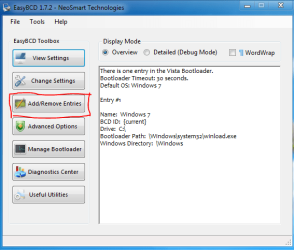
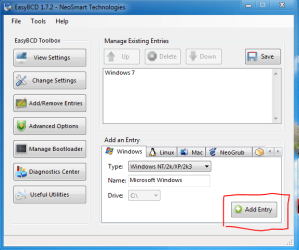
In first pic, click on the red bordered button : the 2nd pic will appear. click on the red bordered button, select win xp/nt/2k/2k3, and then in the third pic, click the red bordered button, thats all.

But my dear friend, whatever method of fixing the issue you may follow, restart/reboot is the must at the end to take the process effect. It is unavoidable.

Edit : you may try softpedia.com/EasyBCD insted of the beta if you want.
 

Attachments

  • 1.PNG
    1.PNG
    19.4 KB · Views: 6
  • 2.PNG
    2.PNG
    22.5 KB · Views: 5
  • 3.PNG
    3.PNG
    23.5 KB · Views: 5

My Computer

Computer type
PC/Desktop
Computer Manufacturer/Model Number
Self Assembled
OS
Microsoft Windows 10 Pro Insider Preview 64-bit
CPU
Intel(R) Core(TM) i3-4130 CPU @ 3.40GHz
Motherboard
Gigabyte Technology Co., Ltd. B85M-D3H
Memory
Corsair Vengence 4GB x2 (8.00GB Dual-Channel DDR3 @ 798MHz)
Graphics Card(s)
2047MB GeForce GTS 450 (ZOTAC International)
Sound Card
Onboard (Realtek High Definition Audio)
Monitor(s) Displays
LG Flatron E2040T
Screen Resolution
1600x900
Hard Drives
Western Digital 1 TB
Seagate 500 GB
PSU
Corsair VS550
Case
Cooler Master K380
Cooling
Cooler Master Seidon 120V Plus
Keyboard
Logitech MK260r
Mouse
Logitech MK260r
Internet Speed
PMPL Broadband
Antivirus
Windows Defender + MBAM
Browser
Firefox
Other Info
Dell Studio 15" Laptop
Well, I think i can say that I am familiar at least a bit with command prompt what should i do, please just give your instructions step by step.
kittleboy;

This is not a difficult thing to do, especially if you are familiar with using the command prompt. You will create the menu entry for XP manually. Hopefully, the necessary files are still there, if not, if it doesn't work the first time, we can find the correct files and move them to where the need to be.

From Windows 7 open an elevated command prompt: "Start", "All Programs", "Accessories", right click on command prompt and run as administrator.

Then type these four lines, one at a time, press enter in between.

Bcdedit /create {legacy} /d “WinXP”

Bcdedit /set {legacy} device boot

Bcdedit /set {legacy} path \ntldr

Bcdedit /displayorder {legacy} /addlast


You can look at this in more detail here: http://www.sevenforums.com/installation-setup/58188-added-xp-7-but-now-wont-boot.html

At the reboot, you should have a menu entry for your XP. If not, we need to look at your system in more detail:

You would need to attach a picture of the Drive Management Utility drive map:

http://www.sevenforums.com/tutorials/51160-screenshot-upload-using-mwsnap.html

http://www.sevenforums.com/tutorials/9717-screenshot-paint.html

http://www.sevenforums.com/tutorials/9733-how-post-screenshot-seven-forums.html

Please let us know how we may assist you best?

Cheers!
Robert
 

My Computer

OS
...
Back
Top