Solved How to change LIVE FOLDER ICON ?

Arc

New member
SF Team
Local time
10:59 PM
Messages
35,002
Hi !
Can anybody help me in changing live icons? I know an application that can do it, that is Stardock Iconackager. But I have some horrible experience with it when used it in windows 7. It messed up everything.

Is there an easy way to change them? Thanks in advance :)
 

My Computer

Computer type
PC/Desktop
Computer Manufacturer/Model Number
Self Assembled
OS
Microsoft Windows 10 Pro Insider Preview 64-bit
CPU
Intel(R) Core(TM) i3-4130 CPU @ 3.40GHz
Motherboard
Gigabyte Technology Co., Ltd. B85M-D3H
Memory
Corsair Vengence 4GB x2 (8.00GB Dual-Channel DDR3 @ 798MHz)
Graphics Card(s)
2047MB GeForce GTS 450 (ZOTAC International)
Sound Card
Onboard (Realtek High Definition Audio)
Monitor(s) Displays
LG Flatron E2040T
Screen Resolution
1600x900
Hard Drives
Western Digital 1 TB
Seagate 500 GB
PSU
Corsair VS550
Case
Cooler Master K380
Cooling
Cooler Master Seidon 120V Plus
Keyboard
Logitech MK260r
Mouse
Logitech MK260r
Internet Speed
PMPL Broadband
Antivirus
Windows Defender + MBAM
Browser
Firefox
Other Info
Dell Studio 15" Laptop
Hi Arc, can you clarify what folder icon your talking about, a screenshot of it as well?
 
You will need to edit your imageres.dll file(s). You can use Restorator 2007 for that.
 
Stardock icon packager 4 run smoothly and nice on windows 7.. for live folder, u must have the icon pack that support live folder. try search sliver vista icon pack at wincustomize.com.
 

My Computer

OS
Windows Seven
Stardock icon packager 4 run smoothly and nice on windows 7.. for live folder, u must have the icon pack that support live folder. try search sliver vista icon pack at wincustomize.com.
I used Iconpackager 4 earlier, but it was a bitter experience. Icons went mad!

You will need to edit your imageres.dll file(s). You can use Restorator 2007 for that.
I dont know how to do it. Suppotr please ?
Hi Arc, can you clarify what folder icon your talking about, a screenshot of it as well?
Hi Sergio !
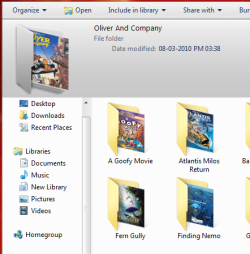
I want to Change the folders of pic 1 with the folder of pic 2.
 

Attachments

  • Pic 1.PNG
    Pic 1.PNG
    18.7 KB · Views: 184
  • Pic 2.jpg
    Pic 2.jpg
    3.7 KB · Views: 7,465

My Computer

Computer type
PC/Desktop
Computer Manufacturer/Model Number
Self Assembled
OS
Microsoft Windows 10 Pro Insider Preview 64-bit
CPU
Intel(R) Core(TM) i3-4130 CPU @ 3.40GHz
Motherboard
Gigabyte Technology Co., Ltd. B85M-D3H
Memory
Corsair Vengence 4GB x2 (8.00GB Dual-Channel DDR3 @ 798MHz)
Graphics Card(s)
2047MB GeForce GTS 450 (ZOTAC International)
Sound Card
Onboard (Realtek High Definition Audio)
Monitor(s) Displays
LG Flatron E2040T
Screen Resolution
1600x900
Hard Drives
Western Digital 1 TB
Seagate 500 GB
PSU
Corsair VS550
Case
Cooler Master K380
Cooling
Cooler Master Seidon 120V Plus
Keyboard
Logitech MK260r
Mouse
Logitech MK260r
Internet Speed
PMPL Broadband
Antivirus
Windows Defender + MBAM
Browser
Firefox
Other Info
Dell Studio 15" Laptop
icons went mad maybe because system icon cache.. i have this problem too.. change icon but not all changed, some folder become this icon and some folder become that icon.. just rebuild icon cache.. if u have TuneUp just try using TuneUp Styler to fix it..
 

My Computer

OS
Windows Seven
icons went mad maybe because system icon cache.. i have this problem too.. change icon but not all changed, some folder become this icon and some folder become that icon.. just rebuild icon cache.. if u have TuneUp just try using TuneUp Styler to fix it..

Generally I use tuneup styler to change icons ang logon screen, but in the 2010 version too, there is no option to change the live folders. Should I try the restorer option (though I dont know how to use it properly)?
 

My Computer

Computer type
PC/Desktop
Computer Manufacturer/Model Number
Self Assembled
OS
Microsoft Windows 10 Pro Insider Preview 64-bit
CPU
Intel(R) Core(TM) i3-4130 CPU @ 3.40GHz
Motherboard
Gigabyte Technology Co., Ltd. B85M-D3H
Memory
Corsair Vengence 4GB x2 (8.00GB Dual-Channel DDR3 @ 798MHz)
Graphics Card(s)
2047MB GeForce GTS 450 (ZOTAC International)
Sound Card
Onboard (Realtek High Definition Audio)
Monitor(s) Displays
LG Flatron E2040T
Screen Resolution
1600x900
Hard Drives
Western Digital 1 TB
Seagate 500 GB
PSU
Corsair VS550
Case
Cooler Master K380
Cooling
Cooler Master Seidon 120V Plus
Keyboard
Logitech MK260r
Mouse
Logitech MK260r
Internet Speed
PMPL Broadband
Antivirus
Windows Defender + MBAM
Browser
Firefox
Other Info
Dell Studio 15" Laptop
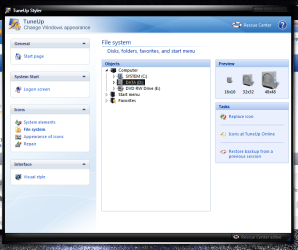
You can change those folder icons using TuneUp styler, Arc. Navigate to "file system" then locate the folder you want to change the icon. Take a look at my screenshot.
 

Attachments

  • Untitled.png
    Untitled.png
    55.4 KB · Views: 1,065

My Computer

Computer Manufacturer/Model Number
D3f's Customs
OS
Win 7 Ultimate SP1 x64
CPU
Intel Pentium Dual Core E5300 OC'd @ 3GHz
Motherboard
Asus P5G41-M LE
Memory
Kingston 2x2GB DDR2-800 Dual Channel SDRAM
Graphics Card(s)
Integrated Intel GMA X4500
Sound Card
Realtek 5.1 HD Audio (ALC887)
Monitor(s) Displays
LG Flatron W1943S @ 60Hz
Screen Resolution
1360 x 768
Hard Drives
Internal - WD Caviar Blue 500GB, External - WD My Passport Essential 500GB
PSU
Headway 450w PSU
Case
Pixxo Slim Black mATX Case
Cooling
Stock Cpu Fan, 1 x Top Case Fan
Keyboard
Logitech K120
Mouse
Logitech LS1 Laser Mouse
Internet Speed
17.66Mb/s Down, 0.82Mb/s Up
Other Info
Creative SBS A300 2.1 Speaker System, LG GH22NS50 22x Internal Super-Multi DVD-RW, 2Wire 5012NV Wireless Modem Router
You can change those folder icons using TuneUp styler, Arc. Navigate to "file system" then locate the folder you want to change the icon. Take a look at my screenshot.
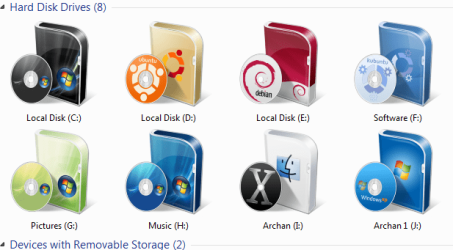
But changing an icon in file system takes effects in drive icons. I already did it (Pic 1).
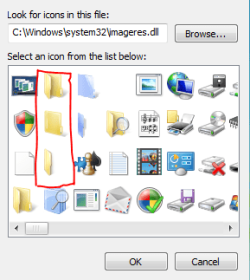
What I want to change is the "live folder" icon (pic 2,imageres.dll). In Tuneup styler>system elements > Explorer, There is the option of changing closed and open window (pic 3).If I change these, the staff inside the folder is not visible.
Then what to do exactly?
 

Attachments

  • Pic 1.PNG
    Pic 1.PNG
    42.7 KB · Views: 207
  • Pic 2.PNG
    Pic 2.PNG
    17.5 KB · Views: 7,491
  • Pic 3.PNG
    Pic 3.PNG
    48.9 KB · Views: 315

My Computer

Computer type
PC/Desktop
Computer Manufacturer/Model Number
Self Assembled
OS
Microsoft Windows 10 Pro Insider Preview 64-bit
CPU
Intel(R) Core(TM) i3-4130 CPU @ 3.40GHz
Motherboard
Gigabyte Technology Co., Ltd. B85M-D3H
Memory
Corsair Vengence 4GB x2 (8.00GB Dual-Channel DDR3 @ 798MHz)
Graphics Card(s)
2047MB GeForce GTS 450 (ZOTAC International)
Sound Card
Onboard (Realtek High Definition Audio)
Monitor(s) Displays
LG Flatron E2040T
Screen Resolution
1600x900
Hard Drives
Western Digital 1 TB
Seagate 500 GB
PSU
Corsair VS550
Case
Cooler Master K380
Cooling
Cooler Master Seidon 120V Plus
Keyboard
Logitech MK260r
Mouse
Logitech MK260r
Internet Speed
PMPL Broadband
Antivirus
Windows Defender + MBAM
Browser
Firefox
Other Info
Dell Studio 15" Laptop
1) take control of your imageres.dll file (C:/windows/system32) & (C:/windows/WoW64 if on x64 OS).
2) Get a copy of Restorator 2007
3) Drop the imageres.dll into Restorator
4) In "Icon folder" Edit #4,5,6 (3 also if you want all folder to match)

Just right click on the number in the resource tree and select "assign-->assign to" and select the .ico files for each relevant icon image file.

5) Save your updated imageres.dll and replace (make sure you backup original file 1st).
6) reboot, now your live icons are updated (mite want to clear cache also).

PS. You will need to rename the original file btw since its in use you can't direct over wright it.
 
  • Like
Reactions: Arc
But changing an icon in file system takes effects in drive icons. I already did it (Pic 1).
What I want to change is the "live folder" icon (pic 2,imageres.dll). In Tuneup styler>system elements > Explorer, There is the option of changing closed and open window (pic 3).If I change these, the staff inside the folder is not visible.
Then what to do exactly?
My bad, arc. Didn't know of that. :(
 

My Computer

Computer Manufacturer/Model Number
D3f's Customs
OS
Win 7 Ultimate SP1 x64
CPU
Intel Pentium Dual Core E5300 OC'd @ 3GHz
Motherboard
Asus P5G41-M LE
Memory
Kingston 2x2GB DDR2-800 Dual Channel SDRAM
Graphics Card(s)
Integrated Intel GMA X4500
Sound Card
Realtek 5.1 HD Audio (ALC887)
Monitor(s) Displays
LG Flatron W1943S @ 60Hz
Screen Resolution
1360 x 768
Hard Drives
Internal - WD Caviar Blue 500GB, External - WD My Passport Essential 500GB
PSU
Headway 450w PSU
Case
Pixxo Slim Black mATX Case
Cooling
Stock Cpu Fan, 1 x Top Case Fan
Keyboard
Logitech K120
Mouse
Logitech LS1 Laser Mouse
Internet Speed
17.66Mb/s Down, 0.82Mb/s Up
Other Info
Creative SBS A300 2.1 Speaker System, LG GH22NS50 22x Internal Super-Multi DVD-RW, 2Wire 5012NV Wireless Modem Router
What GothicDeath suggests is the way to go. But do you possibly have the other "types" of folders (ie: Not just the gray icon folder but the Front, Back, & Open)? Folders.png Because you're gonna need 'em for what you want. If you do have those, then you're good to go. & they'll show the stuff inside, like so Example.png

The softwares I had to use were IcoFX (to view inside the imageres.dll file & to serve as a reference) & Resource Hacker (to change the imageres.dll icons). You can achieve this too using Restorator (seems ppl like it more), but Resource Hacker is free.
 

My Computer

OS
Windows 7 x64
What GothicDeath suggests is the way to go. But do you possibly have the other "types" of folders (ie: Not just the gray icon folder but the Front, Back, & Open)? View attachment 59491 Because you're gonna need 'em for what you want. If you do have those, then you're good to go. & they'll show the stuff inside, like so View attachment 59492

The softwares I had to use were IcoFX (to view inside the imageres.dll file & to serve as a reference) & Resource Hacker (to change the imageres.dll icons). You can achieve this too using Restorator (seems ppl like it more), but Resource Hacker is free.

Hi Nextlover !
I have all the parts of the gray folder.. open, front & back. Yes, I agree that GothikDeath is perfect! But I think as I have both the IcoFX and Resource Hacker, I have a bit experience of using both of those, I may carry it out. Will you please give me a walkthrough ?
 

My Computer

Computer type
PC/Desktop
Computer Manufacturer/Model Number
Self Assembled
OS
Microsoft Windows 10 Pro Insider Preview 64-bit
CPU
Intel(R) Core(TM) i3-4130 CPU @ 3.40GHz
Motherboard
Gigabyte Technology Co., Ltd. B85M-D3H
Memory
Corsair Vengence 4GB x2 (8.00GB Dual-Channel DDR3 @ 798MHz)
Graphics Card(s)
2047MB GeForce GTS 450 (ZOTAC International)
Sound Card
Onboard (Realtek High Definition Audio)
Monitor(s) Displays
LG Flatron E2040T
Screen Resolution
1600x900
Hard Drives
Western Digital 1 TB
Seagate 500 GB
PSU
Corsair VS550
Case
Cooler Master K380
Cooling
Cooler Master Seidon 120V Plus
Keyboard
Logitech MK260r
Mouse
Logitech MK260r
Internet Speed
PMPL Broadband
Antivirus
Windows Defender + MBAM
Browser
Firefox
Other Info
Dell Studio 15" Laptop
What GothicDeath suggests is the way to go. But do you possibly have the other "types" of folders (ie: Not just the gray icon folder but the Front, Back, & Open)? View attachment 59491 Because you're gonna need 'em for what you want. If you do have those, then you're good to go. & they'll show the stuff inside, like so View attachment 59492

The softwares I had to use were IcoFX (to view inside the imageres.dll file & to serve as a reference) & Resource Hacker (to change the imageres.dll icons). You can achieve this too using Restorator (seems ppl like it more), but Resource Hacker is free.

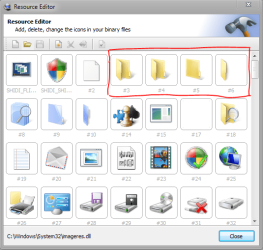
Perhaps I got the idea . I am to change the red box of pic1 with the folders of pic 2 . How to use resource hacker to do this?
 

Attachments

  • Capture.PNG
    Capture.PNG
    35.4 KB · Views: 199
  • Capture1.PNG
    Capture1.PNG
    3.5 KB · Views: 106

My Computer

Computer type
PC/Desktop
Computer Manufacturer/Model Number
Self Assembled
OS
Microsoft Windows 10 Pro Insider Preview 64-bit
CPU
Intel(R) Core(TM) i3-4130 CPU @ 3.40GHz
Motherboard
Gigabyte Technology Co., Ltd. B85M-D3H
Memory
Corsair Vengence 4GB x2 (8.00GB Dual-Channel DDR3 @ 798MHz)
Graphics Card(s)
2047MB GeForce GTS 450 (ZOTAC International)
Sound Card
Onboard (Realtek High Definition Audio)
Monitor(s) Displays
LG Flatron E2040T
Screen Resolution
1600x900
Hard Drives
Western Digital 1 TB
Seagate 500 GB
PSU
Corsair VS550
Case
Cooler Master K380
Cooling
Cooler Master Seidon 120V Plus
Keyboard
Logitech MK260r
Mouse
Logitech MK260r
Internet Speed
PMPL Broadband
Antivirus
Windows Defender + MBAM
Browser
Firefox
Other Info
Dell Studio 15" Laptop
Hi NextLover!
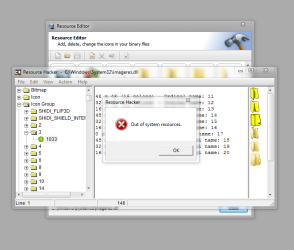
I tried to walk a few steps alone. Went to C:\windows\system32\imageres.dll in resource hacker. Opened Icon group > 3> 1033 .It says "out of system resources. the same is for 4> 1033 , 5>1033 & 6>1033.

What is the problem ? Is the step wrong ? Then where to go ?
 

Attachments

  • Capture.PNG
    Capture.PNG
    30.1 KB · Views: 149

My Computer

Computer type
PC/Desktop
Computer Manufacturer/Model Number
Self Assembled
OS
Microsoft Windows 10 Pro Insider Preview 64-bit
CPU
Intel(R) Core(TM) i3-4130 CPU @ 3.40GHz
Motherboard
Gigabyte Technology Co., Ltd. B85M-D3H
Memory
Corsair Vengence 4GB x2 (8.00GB Dual-Channel DDR3 @ 798MHz)
Graphics Card(s)
2047MB GeForce GTS 450 (ZOTAC International)
Sound Card
Onboard (Realtek High Definition Audio)
Monitor(s) Displays
LG Flatron E2040T
Screen Resolution
1600x900
Hard Drives
Western Digital 1 TB
Seagate 500 GB
PSU
Corsair VS550
Case
Cooler Master K380
Cooling
Cooler Master Seidon 120V Plus
Keyboard
Logitech MK260r
Mouse
Logitech MK260r
Internet Speed
PMPL Broadband
Antivirus
Windows Defender + MBAM
Browser
Firefox
Other Info
Dell Studio 15" Laptop
Hi NextLover!
I tried to walk a few steps alone. Went to C:\windows\system32\imageres.dll in resource hacker. Opened Icon group > 3> 1033 .It says "out of system resources. the same is for 4> 1033 , 5>1033 & 6>1033.

What is the problem ? Is the step wrong ? Then where to go ?

Don't worry about those messages. I had the same ones that kept popping up. But did you make a copy of the imageres.dll file? It's just for safety's sake. Keep changing (& ignore the popups of "out of system resources.") the icons to the gray ones. I right click on #3>1033-->click the button 'Open file with new resource-->find the gray folder (it should be the Open, Empty folder ico)-->Then hit Replace. Do the same for #s 3 (Open, Empty folder), #4 (Open, Empty folder), #5 (Back view), & #6 (Front view).

After you're done with that, save it to your desktop (save it as 'imageres.dll'), then navigate to C:\windows\system32\, find the imageres.dll file, & rename it (something like 'imageres.dll.old' or something like that). Then just drag the new imageres.dll file into the system32 folder.

Then restart the comp.

I'm not sure why your comp. & mine keeps saying that "out of system resources." It's annoying & makes your heart beat faster, but my comp's running fine after experiencing that. Who knows why the software does that :( Let us know how it went or if you need any other help.
 

My Computer

OS
Windows 7 x64
  • Like
Reactions: Arc
Don't worry about those messages. I had the same ones that kept popping up. But did you make a copy of the imageres.dll file? It's just for safety's sake. Keep changing (& ignore the popups of "out of system resources.") the icons to the gray ones. I right click on #3>1033-->click the button 'Open file with new resource-->find the gray folder (it should be the Open, Empty folder ico)-->Then hit Replace. Do the same for #s 3 (Open, Empty folder), #4 (Open, Empty folder), #5 (Back view), & #6 (Front view).

After you're done with that, save it to your desktop (save it as 'imageres.dll'), then navigate to C:\windows\system32\, find the imageres.dll file, & rename it (something like 'imageres.dll.old' or something like that). Then just drag the new imageres.dll file into the system32 folder.

Then restart the comp.

I'm not sure why your comp. & mine keeps saying that "out of system resources." It's annoying & makes your heart beat faster, but my comp's running fine after experiencing that. Who knows why the software does that :( Let us know how it went or if you need any other help.

Thanks a lot m8!
Yes, I have backed it up. And really, when it was said that it is out of system resources, I was a bit nervous , but I knew that you are there ... and so I am not alone

After completion, I will inform you how it worked.
 

My Computer

Computer type
PC/Desktop
Computer Manufacturer/Model Number
Self Assembled
OS
Microsoft Windows 10 Pro Insider Preview 64-bit
CPU
Intel(R) Core(TM) i3-4130 CPU @ 3.40GHz
Motherboard
Gigabyte Technology Co., Ltd. B85M-D3H
Memory
Corsair Vengence 4GB x2 (8.00GB Dual-Channel DDR3 @ 798MHz)
Graphics Card(s)
2047MB GeForce GTS 450 (ZOTAC International)
Sound Card
Onboard (Realtek High Definition Audio)
Monitor(s) Displays
LG Flatron E2040T
Screen Resolution
1600x900
Hard Drives
Western Digital 1 TB
Seagate 500 GB
PSU
Corsair VS550
Case
Cooler Master K380
Cooling
Cooler Master Seidon 120V Plus
Keyboard
Logitech MK260r
Mouse
Logitech MK260r
Internet Speed
PMPL Broadband
Antivirus
Windows Defender + MBAM
Browser
Firefox
Other Info
Dell Studio 15" Laptop
:( :(

It only changed the details pane icons. Not in explorer. Now what to do ?

:confused: :confused:
 

Attachments

  • Capture.PNG
    Capture.PNG
    29.8 KB · Views: 65

My Computer

Computer type
PC/Desktop
Computer Manufacturer/Model Number
Self Assembled
OS
Microsoft Windows 10 Pro Insider Preview 64-bit
CPU
Intel(R) Core(TM) i3-4130 CPU @ 3.40GHz
Motherboard
Gigabyte Technology Co., Ltd. B85M-D3H
Memory
Corsair Vengence 4GB x2 (8.00GB Dual-Channel DDR3 @ 798MHz)
Graphics Card(s)
2047MB GeForce GTS 450 (ZOTAC International)
Sound Card
Onboard (Realtek High Definition Audio)
Monitor(s) Displays
LG Flatron E2040T
Screen Resolution
1600x900
Hard Drives
Western Digital 1 TB
Seagate 500 GB
PSU
Corsair VS550
Case
Cooler Master K380
Cooling
Cooler Master Seidon 120V Plus
Keyboard
Logitech MK260r
Mouse
Logitech MK260r
Internet Speed
PMPL Broadband
Antivirus
Windows Defender + MBAM
Browser
Firefox
Other Info
Dell Studio 15" Laptop
:( :(

It only changed the details pane icons. Not in explorer. Now what to do ?

:confused: :confused:

Hmm. Lemme take a look when I get home. Don't worry. I think there were some other folders you needed to change. I remember doing this a while back LOL.
 

My Computer

OS
Windows 7 x64
Hmm. Lemme take a look when I get home. Don't worry. I think there were some other folders you needed to change. I remember doing this a while back LOL.

Repeated the process, and got everything fixed !!!

Really a nice process you explored for me , mate !! It can change any icon in windows. just voila. Thanks again, man :D :D :D :D
 

My Computer

Computer type
PC/Desktop
Computer Manufacturer/Model Number
Self Assembled
OS
Microsoft Windows 10 Pro Insider Preview 64-bit
CPU
Intel(R) Core(TM) i3-4130 CPU @ 3.40GHz
Motherboard
Gigabyte Technology Co., Ltd. B85M-D3H
Memory
Corsair Vengence 4GB x2 (8.00GB Dual-Channel DDR3 @ 798MHz)
Graphics Card(s)
2047MB GeForce GTS 450 (ZOTAC International)
Sound Card
Onboard (Realtek High Definition Audio)
Monitor(s) Displays
LG Flatron E2040T
Screen Resolution
1600x900
Hard Drives
Western Digital 1 TB
Seagate 500 GB
PSU
Corsair VS550
Case
Cooler Master K380
Cooling
Cooler Master Seidon 120V Plus
Keyboard
Logitech MK260r
Mouse
Logitech MK260r
Internet Speed
PMPL Broadband
Antivirus
Windows Defender + MBAM
Browser
Firefox
Other Info
Dell Studio 15" Laptop
Back
Top