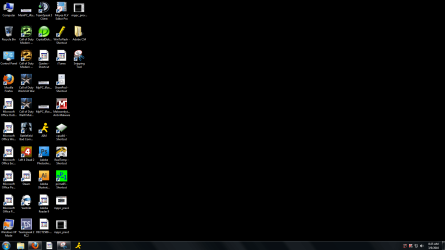
Installed adobe illustrator, icons on desktop go blank

SMOKKINU

New member
Power User
Local time
3:20 AM
Messages
83
ok so i just installed adobe illustrator, and my ms office 2007 icons went blank, as well as a few others unrelated to office? but some icons remain ok.


whats going on here?
 

My Computer My Computer

At a glance

Windows 7 Ultimate 64bitIntel Core i7 9206gb Mushkin 1866 DDR32x EVGA GTX 285
Computer Manufacturer/Model Number
Home Built
OS
Windows 7 Ultimate 64bit
CPU
Intel Core i7 920
Motherboard
ASUS P6T Deluxe
Memory
6gb Mushkin 1866 DDR3
Graphics Card(s)
2x EVGA GTX 285
Sound Card
Onboard
Monitor(s) Displays
ASUS 24inch LCD 2ms delay
Screen Resolution
1920x1080
Hard Drives
4x OCZ-Vertex 60gb in RAID0 & one 300GB Velociraptor HDD, 1TB Western Digital Caviar Black
PSU
Corsair 1000W
Case
Coolermaster HAF 932
Cooling
Water Cooling
Keyboard
Saitek Cyborg
Mouse
MS Generic w/wheel
Internet Speed
Cable - 15mbps
Other Info
None
Hello Smokkinu,

It may be the setup options that were selected when installing Adobe Illustrator that did it.

Are all of the affected icons for shortcuts? If so, then try using the LNK (lnk) download in the tutorial below to restore the default associations for shortcuts (lnk) file types to see if that may be able to fix this for you.

http://www.sevenforums.com/tutorials/19449-default-file-type-associations-restore.html

Hope this helps,
Shawn
 

My Computer My Computer

At a glance

64-bit Windows 11 Pro for WorkstationsIntel i7-8700K OC'd to 5 GHz64 GB (4x16GB) G.SKILL TridentZ RGB DDR4 3600...ASUS ROG-STRIX-GTX1080TI-O11G-GAMING
Computer type
PC/Desktop
Computer Manufacturer/Model Number
Self built custom
OS
64-bit Windows 11 Pro for Workstations
CPU
Intel i7-8700K OC'd to 5 GHz
Motherboard
ASUS ROG Maximus XI Formula Z390
Memory
64 GB (4x16GB) G.SKILL TridentZ RGB DDR4 3600 MHz
Graphics Card(s)
ASUS ROG-STRIX-GTX1080TI-O11G-GAMING
Sound Card
Integrated
Monitor(s) Displays
2 x Samsung Odyssey G7 27"
Screen Resolution
2560x1440
Hard Drives
1TB Samsung 990 PRO M.2,
4TB Samsung 990 PRO PRO M.2,
TerraMaster F8 SSD Plus NAS
PSU
Seasonic Prime Titanium 850W
Case
Thermaltake Core P3
Cooling
Corsair Hydro H115i
Keyboard
Logitech wireless K800
Mouse
Logitech MX Master 4
Internet Speed
2 Gb/s Download and 100 Mb/s Upload
Antivirus
Malwarebyte Anti-Malware Premium
Browser
Google Chrome
Other Info
Logitech Z625 speaker system,
Logitech BRIO 4K Pro webcam,
HP Color LaserJet Pro MFP M477fdn,
APC SMART-UPS RT 1000 XL - SURT1000XLI,
Galaxy S23 Plus phone
Hello Smokkinu,

It may be the setup options that were selected when installing Adobe Illustrator that did it.

Are all of the affected icons for shortcuts? If so, then try using the LNK (lnk) download in the tutorial below to restore the default associations for shortcuts (lnk) file types to see if that may be able to fix this for you.

http://www.sevenforums.com/tutorials/19449-default-file-type-associations-restore.html

Hope this helps,
Shawn


i believe they were...all of the office icons were shortcuts i sent to desktop from the start menu when i installed office.


unsure about the other icons, but i bet they were as well.


however, STEAM (The gaming program) is one of the affected icons, and it was not a shortcut i created.


i will try this in the morning hope it works.
 

My Computer My Computer

At a glance

Windows 7 Ultimate 64bitIntel Core i7 9206gb Mushkin 1866 DDR32x EVGA GTX 285
Computer Manufacturer/Model Number
Home Built
OS
Windows 7 Ultimate 64bit
CPU
Intel Core i7 920
Motherboard
ASUS P6T Deluxe
Memory
6gb Mushkin 1866 DDR3
Graphics Card(s)
2x EVGA GTX 285
Sound Card
Onboard
Monitor(s) Displays
ASUS 24inch LCD 2ms delay
Screen Resolution
1920x1080
Hard Drives
4x OCZ-Vertex 60gb in RAID0 & one 300GB Velociraptor HDD, 1TB Western Digital Caviar Black
PSU
Corsair 1000W
Case
Coolermaster HAF 932
Cooling
Water Cooling
Keyboard
Saitek Cyborg
Mouse
MS Generic w/wheel
Internet Speed
Cable - 15mbps
Other Info
None
Hello Smokkinu,

It may be the setup options that were selected when installing Adobe Illustrator that did it.

Are all of the affected icons for shortcuts? If so, then try using the LNK (lnk) download in the tutorial below to restore the default associations for shortcuts (lnk) file types to see if that may be able to fix this for you.

http://www.sevenforums.com/tutorials/19449-default-file-type-associations-restore.html

Hope this helps,
Shawn


nope...didnt work.


here is a screenshot.
 

Attachments

  • noicons.PNG
    noicons.PNG
    63.2 KB · Views: 233

My Computer My Computer

At a glance

Windows 7 Ultimate 64bitIntel Core i7 9206gb Mushkin 1866 DDR32x EVGA GTX 285
Computer Manufacturer/Model Number
Home Built
OS
Windows 7 Ultimate 64bit
CPU
Intel Core i7 920
Motherboard
ASUS P6T Deluxe
Memory
6gb Mushkin 1866 DDR3
Graphics Card(s)
2x EVGA GTX 285
Sound Card
Onboard
Monitor(s) Displays
ASUS 24inch LCD 2ms delay
Screen Resolution
1920x1080
Hard Drives
4x OCZ-Vertex 60gb in RAID0 & one 300GB Velociraptor HDD, 1TB Western Digital Caviar Black
PSU
Corsair 1000W
Case
Coolermaster HAF 932
Cooling
Water Cooling
Keyboard
Saitek Cyborg
Mouse
MS Generic w/wheel
Internet Speed
Cable - 15mbps
Other Info
None
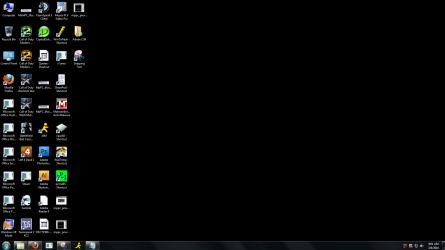
now the icons are this after attempting to rebuild the iconcache.


i even increased the cache size, but nothing.


this has never happened before previously....wth is going on here?
 

Attachments

  • Capture.PNGnoicons22222.PNG
    Capture.PNGnoicons22222.PNG
    65.7 KB · Views: 590

My Computer My Computer

At a glance

Windows 7 Ultimate 64bitIntel Core i7 9206gb Mushkin 1866 DDR32x EVGA GTX 285
Computer Manufacturer/Model Number
Home Built
OS
Windows 7 Ultimate 64bit
CPU
Intel Core i7 920
Motherboard
ASUS P6T Deluxe
Memory
6gb Mushkin 1866 DDR3
Graphics Card(s)
2x EVGA GTX 285
Sound Card
Onboard
Monitor(s) Displays
ASUS 24inch LCD 2ms delay
Screen Resolution
1920x1080
Hard Drives
4x OCZ-Vertex 60gb in RAID0 & one 300GB Velociraptor HDD, 1TB Western Digital Caviar Black
PSU
Corsair 1000W
Case
Coolermaster HAF 932
Cooling
Water Cooling
Keyboard
Saitek Cyborg
Mouse
MS Generic w/wheel
Internet Speed
Cable - 15mbps
Other Info
None
It may be a pain to do for each Icon but you could right click each one, go to properties and try using the change Icon function to fix them. I have CS4 installed and while it didn't screw up my icons ( that I know of) it does change some things "without asking" that piss me off. I don't need the toolbars added to outlook and word and wish it would just let me remove them, but on no it just keeps putting them back. :( It likes to change a lot of file associations too so pictures etc open with Adobe instead or paint or what ever the default was. Adobe = :devil:
 

My Computer My Computer

At a glance

Windows 10 Education 64 bitAMD Phenom II X4 980 Black Edition Deneb 3.7GHz8GB 4GBx2 Kingston PC10600 DDR3 1333 MemoryZotac NVIDIA Geforce GT640 2 Gig DDR3 PCIe
Computer type
PC/Desktop
Computer Manufacturer/Model Number
Home Built
OS
Windows 10 Education 64 bit
CPU
AMD Phenom II X4 980 Black Edition Deneb 3.7GHz
Motherboard
Asus M4N68T-M V2 µATX Motherboard
Memory
8GB 4GBx2 Kingston PC10600 DDR3 1333 Memory
Graphics Card(s)
Zotac NVIDIA Geforce GT640 2 Gig DDR3 PCIe
Sound Card
VIA VT1708s High Definition Audio 8-channel Onboard
Monitor(s) Displays
22" LG E2242 1080p and 2 19" I-INC AG191D
Screen Resolution
1280x1024 - 1920x1080 - 1280x1024
Hard Drives
Crucial M100 256 GB SSD and 500 GB WD Blue SATA
PSU
Thermaltake TR 620
Case
Power Up Black ATX Mid-Tower Case
Cooling
Stock heatsink and fan
Keyboard
Logitech Wireless K350 Wave
Mouse
Logitech Wireless M570 Trackman Wheel
Internet Speed
80 Mbps Down 30 Mbps Up
Antivirus
Windows Defender
Browser
Internet Explorer 11
Other Info
HP DVD1040e Lightscribe - External USB2
It may be a pain to do for each Icon but you could right click each one, go to properties and try using the change Icon function to fix them. I have CS4 installed and while it didn't screw up my icons ( that I know of) it does change some things "without asking" that piss me off. I don't need the toolbars added to outlook and word and wish it would just let me remove them, but on no it just keeps putting them back. :( It likes to change a lot of file associations too so pictures etc open with Adobe instead or paint or what ever the default was. Adobe = :devil:


the option to change the icon is greyed out :(
 

My Computer My Computer

At a glance

Windows 7 Ultimate 64bitIntel Core i7 9206gb Mushkin 1866 DDR32x EVGA GTX 285
Computer Manufacturer/Model Number
Home Built
OS
Windows 7 Ultimate 64bit
CPU
Intel Core i7 920
Motherboard
ASUS P6T Deluxe
Memory
6gb Mushkin 1866 DDR3
Graphics Card(s)
2x EVGA GTX 285
Sound Card
Onboard
Monitor(s) Displays
ASUS 24inch LCD 2ms delay
Screen Resolution
1920x1080
Hard Drives
4x OCZ-Vertex 60gb in RAID0 & one 300GB Velociraptor HDD, 1TB Western Digital Caviar Black
PSU
Corsair 1000W
Case
Coolermaster HAF 932
Cooling
Water Cooling
Keyboard
Saitek Cyborg
Mouse
MS Generic w/wheel
Internet Speed
Cable - 15mbps
Other Info
None
WOW, that sucks. Like I said, Adobe = :devil:

I'm using office 2003 and each app has a "detect and repair" option under the help menu. I don't know if it will fix the icons but you could try it. Um, maybe just delete the current ones and create new shortcuts?
 
Last edited by a moderator:

My Computer My Computer

At a glance

Windows 10 Education 64 bitAMD Phenom II X4 980 Black Edition Deneb 3.7GHz8GB 4GBx2 Kingston PC10600 DDR3 1333 MemoryZotac NVIDIA Geforce GT640 2 Gig DDR3 PCIe
Computer type
PC/Desktop
Computer Manufacturer/Model Number
Home Built
OS
Windows 10 Education 64 bit
CPU
AMD Phenom II X4 980 Black Edition Deneb 3.7GHz
Motherboard
Asus M4N68T-M V2 µATX Motherboard
Memory
8GB 4GBx2 Kingston PC10600 DDR3 1333 Memory
Graphics Card(s)
Zotac NVIDIA Geforce GT640 2 Gig DDR3 PCIe
Sound Card
VIA VT1708s High Definition Audio 8-channel Onboard
Monitor(s) Displays
22" LG E2242 1080p and 2 19" I-INC AG191D
Screen Resolution
1280x1024 - 1920x1080 - 1280x1024
Hard Drives
Crucial M100 256 GB SSD and 500 GB WD Blue SATA
PSU
Thermaltake TR 620
Case
Power Up Black ATX Mid-Tower Case
Cooling
Stock heatsink and fan
Keyboard
Logitech Wireless K350 Wave
Mouse
Logitech Wireless M570 Trackman Wheel
Internet Speed
80 Mbps Down 30 Mbps Up
Antivirus
Windows Defender
Browser
Internet Explorer 11
Other Info
HP DVD1040e Lightscribe - External USB2
Smokkinu,

You might see if rebuilding the icon cache may help if you haven't already. If it doesn't, then you might consider a system restore using a restore point dated before you installed Adobe Illustrator.
 

My Computer My Computer

At a glance

64-bit Windows 11 Pro for WorkstationsIntel i7-8700K OC'd to 5 GHz64 GB (4x16GB) G.SKILL TridentZ RGB DDR4 3600...ASUS ROG-STRIX-GTX1080TI-O11G-GAMING
Computer type
PC/Desktop
Computer Manufacturer/Model Number
Self built custom
OS
64-bit Windows 11 Pro for Workstations
CPU
Intel i7-8700K OC'd to 5 GHz
Motherboard
ASUS ROG Maximus XI Formula Z390
Memory
64 GB (4x16GB) G.SKILL TridentZ RGB DDR4 3600 MHz
Graphics Card(s)
ASUS ROG-STRIX-GTX1080TI-O11G-GAMING
Sound Card
Integrated
Monitor(s) Displays
2 x Samsung Odyssey G7 27"
Screen Resolution
2560x1440
Hard Drives
1TB Samsung 990 PRO M.2,
4TB Samsung 990 PRO PRO M.2,
TerraMaster F8 SSD Plus NAS
PSU
Seasonic Prime Titanium 850W
Case
Thermaltake Core P3
Cooling
Corsair Hydro H115i
Keyboard
Logitech wireless K800
Mouse
Logitech MX Master 4
Internet Speed
2 Gb/s Download and 100 Mb/s Upload
Antivirus
Malwarebyte Anti-Malware Premium
Browser
Google Chrome
Other Info
Logitech Z625 speaker system,
Logitech BRIO 4K Pro webcam,
HP Color LaserJet Pro MFP M477fdn,
APC SMART-UPS RT 1000 XL - SURT1000XLI,
Galaxy S23 Plus phone
Back
Top