Solved Outlook help...AGAIN...and AGAIN...and AGAIN?

  • Thread starter Thread starter MisterActorMan
  • Start date Start date
M

MisterActorMan

Guest
OKAY

So, because Outlook/GMail are too stupid to get along well, I decided to set up my Outlook with one file for GMail, and another file for my "nice" compatible emails. And I only use Outlook to keep offline availability for my GMail--any checking, receiving, etc, I do for the GMail account I use on the web browser.

WELL, Outlook just decided to be really stupid (what a surprise. Why is this stupid program so %^*$%# hard to use? Any wonder people flee from this to easy, intuitive online systems? Rant's over.) and now says I cannot update contacts. I get an error saying that my emails must be saved in [email protected] format. Well, DUH. And guess what--EVERY email is saved like. I'm not an idiot, I know how to type email addresses. What is up with this error? There seems to be no pattern to it. Contacts with only 1 email, with 2, or 3 emails, get it. No discrimination by groups, businesses, or email servers is apparent.

Last night I typed in about 300 contacts from various sources I had, to have it nice and consolidated in Outlook format for easy management. Today, I'm switching the contacts from my @gmail.com data file to my general Outlook data file, and about 30 emails are no longer, well, valid, apparently. I get that stupid error when I click "Save"

W.T.F.
 

Attachments
  • outlook idiocy 1.PNG
    outlook idiocy 1.PNG
    22 KB · Views: 20
  • outlook idiocy 2.PNG
    outlook idiocy 2.PNG
    8.2 KB · Views: 16
Last edited:
First off... please dont bash a program just because you are having difficulties with it. I have used Outlook for over 10 years, and find it to be a great email client. The business world wouldnt use it if it was as bad as you make it sound!

I'd really like to help you, but I have read this 3x and I am not understanding your issue. Apparently you were so worked up over this issue you didnt clearly and concisely state your problem. Please calm down and give it a 2nd try...

What format??? You said [email protected] format ?????

When you said "I decided to set up my Outlook with one file for GMail, and another file for my "nice" compatible emails"... did you mean you set up 2 seperate PST files or did you mean two folders within the same PST?

Again, I think your anger clouded things here....

PLEASE HELP US HELP YOU!
 

My Computer My Computer

Computer Manufacturer/Model Number
Homebrew PC - "Alpha_Dawg"
OS
Windows 7 Ultimate 64 bit Steve Ballmer Signature Edition
CPU
Intel Core 2 Quad - Q9550 - 2.83GHz stock - OC'd to 3.6GHz
Motherboard
Gigabyte EP45-UD3P
Memory
4GB DDR2 800MHz (PC6400) OCZ Reaper
Graphics Card(s)
Nvidia GE Force 8800 GTS
Sound Card
Asus Xonar DX
Monitor(s) Displays
Samsung SyncMaster 2333HD
Screen Resolution
1920 x 1080
Hard Drives
WD Caviar Black 750GB - 7200RPM - 32MB cache
WD Caviar Green 1.5TB - 5400RPM - 64MB cache
WD Caviar Green 2.0TB - 5400RPM - 64MB cache
PSU
PC Power & Cooling Silencer 750
Case
Gigabyte 3D Aurora
Cooling
Case is Air - 5ea. 120mm fans (mix of Arctic and Xigmatec)
Keyboard
MS Natural Wireless KB
Mouse
MS Wireless Mouse
Internet Speed
50 mbps down/5 mbps up
Other Info
AVerMedia - AVerTVHD G2 Dual Tuner Card
How big is the PST?
 

My Computer My Computer

OS
Windows 7
CPU
i5-750
Motherboard
Asus
Memory
4GB DDR3 1600
Graphics Card(s)
GT220
How big is the PST?

The PST size issue is over with Outlook 2003 and later... you can now have a PST up to 20GB!


Mister... which version of Outlook?
 

My Computer My Computer

Computer Manufacturer/Model Number
Homebrew PC - "Alpha_Dawg"
OS
Windows 7 Ultimate 64 bit Steve Ballmer Signature Edition
CPU
Intel Core 2 Quad - Q9550 - 2.83GHz stock - OC'd to 3.6GHz
Motherboard
Gigabyte EP45-UD3P
Memory
4GB DDR2 800MHz (PC6400) OCZ Reaper
Graphics Card(s)
Nvidia GE Force 8800 GTS
Sound Card
Asus Xonar DX
Monitor(s) Displays
Samsung SyncMaster 2333HD
Screen Resolution
1920 x 1080
Hard Drives
WD Caviar Black 750GB - 7200RPM - 32MB cache
WD Caviar Green 1.5TB - 5400RPM - 64MB cache
WD Caviar Green 2.0TB - 5400RPM - 64MB cache
PSU
PC Power & Cooling Silencer 750
Case
Gigabyte 3D Aurora
Cooling
Case is Air - 5ea. 120mm fans (mix of Arctic and Xigmatec)
Keyboard
MS Natural Wireless KB
Mouse
MS Wireless Mouse
Internet Speed
50 mbps down/5 mbps up
Other Info
AVerMedia - AVerTVHD G2 Dual Tuner Card

My Computer My Computer

OS
Windows 7
CPU
i5-750
Motherboard
Asus
Memory
4GB DDR3 1600
Graphics Card(s)
GT220
Wow.... I've never heard of that. My PST is approaching 6GB with zero issues!

Also, according to the article you posted the link to this should be taken care of with an update... so if he has MS updates turned on he should be covered!
 

My Computer My Computer

Computer Manufacturer/Model Number
Homebrew PC - "Alpha_Dawg"
OS
Windows 7 Ultimate 64 bit Steve Ballmer Signature Edition
CPU
Intel Core 2 Quad - Q9550 - 2.83GHz stock - OC'd to 3.6GHz
Motherboard
Gigabyte EP45-UD3P
Memory
4GB DDR2 800MHz (PC6400) OCZ Reaper
Graphics Card(s)
Nvidia GE Force 8800 GTS
Sound Card
Asus Xonar DX
Monitor(s) Displays
Samsung SyncMaster 2333HD
Screen Resolution
1920 x 1080
Hard Drives
WD Caviar Black 750GB - 7200RPM - 32MB cache
WD Caviar Green 1.5TB - 5400RPM - 64MB cache
WD Caviar Green 2.0TB - 5400RPM - 64MB cache
PSU
PC Power & Cooling Silencer 750
Case
Gigabyte 3D Aurora
Cooling
Case is Air - 5ea. 120mm fans (mix of Arctic and Xigmatec)
Keyboard
MS Natural Wireless KB
Mouse
MS Wireless Mouse
Internet Speed
50 mbps down/5 mbps up
Other Info
AVerMedia - AVerTVHD G2 Dual Tuner Card
Wow.... I've never heard of that. My PST is approaching 6GB with zero issues!

Also, according to the article you posted the link to this should be taken care of with an update... so if he has MS updates turned on he should be covered!

Like I said it MAY work. We have some very large PSTs at work with no issues, and some smaller ones with issues. And as far as updates, many people have Windows updates on, and many have Windows updates automatically install critical/important updates. Nowhere near as many people , however, have, Microsoft updates, or Office updates installed/enabled. So some people think they are up to date, but in reality it's only their Windows updates that are current.
 

My Computer My Computer

OS
Windows 7
CPU
i5-750
Motherboard
Asus
Memory
4GB DDR3 1600
Graphics Card(s)
GT220
Wow.... I've never heard of that. My PST is approaching 6GB with zero issues!

Also, according to the article you posted the link to this should be taken care of with an update... so if he has MS updates turned on he should be covered!

Like I said it MAY work. We have some very large PSTs at work with no issues, and some smaller ones with issues. And as far as updates, many people have Windows updates on, and many have Windows updates automatically install critical/important updates. Nowhere near as many people , however, have, Microsoft updates, or Office updates installed/enabled. So some people think they are up to date, but in reality it's only their Windows updates that are current.

Very true... also must not be too crucial to the OP. He edited his OP and didnt even give us any more info to go on...
 

My Computer My Computer

Computer Manufacturer/Model Number
Homebrew PC - "Alpha_Dawg"
OS
Windows 7 Ultimate 64 bit Steve Ballmer Signature Edition
CPU
Intel Core 2 Quad - Q9550 - 2.83GHz stock - OC'd to 3.6GHz
Motherboard
Gigabyte EP45-UD3P
Memory
4GB DDR2 800MHz (PC6400) OCZ Reaper
Graphics Card(s)
Nvidia GE Force 8800 GTS
Sound Card
Asus Xonar DX
Monitor(s) Displays
Samsung SyncMaster 2333HD
Screen Resolution
1920 x 1080
Hard Drives
WD Caviar Black 750GB - 7200RPM - 32MB cache
WD Caviar Green 1.5TB - 5400RPM - 64MB cache
WD Caviar Green 2.0TB - 5400RPM - 64MB cache
PSU
PC Power & Cooling Silencer 750
Case
Gigabyte 3D Aurora
Cooling
Case is Air - 5ea. 120mm fans (mix of Arctic and Xigmatec)
Keyboard
MS Natural Wireless KB
Mouse
MS Wireless Mouse
Internet Speed
50 mbps down/5 mbps up
Other Info
AVerMedia - AVerTVHD G2 Dual Tuner Card
OKAY

(...Rant's over.)
...There seems to be no pattern to it. Contacts with only 1 email, with 2, or 3 emails, get it. No discrimination by groups, businesses, or email servers is apparent...
Last night I typed in about 300 contacts from various sources I had, to have it nice and consolidated in Outlook format for easy management. Today, I'm switching the contacts from my @gmail.com data file to my general Outlook data file, and about 30 emails are no longer, well, valid, apparently. I get that stupid error when I click "Save"

I had to rant to get it out of my system. Outlook has been ridiculously hard to configure and I'm questioning why I should bother?

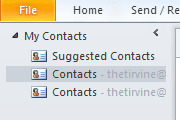
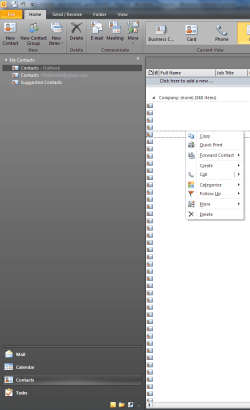
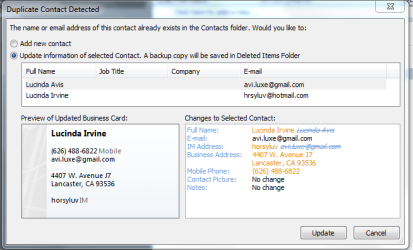
Please refer to the first screenshots, as well as the new one.

This error occurs when I am in my Contacts are of Outlook. I try and drag contacts from [email protected] Contacts and drop them into Outlook contacts. http://www.sevenbeta.com/images/styles/window7/attach/png.gif

A message occurs asking if I want to update the duplicates. I click Yes, Update.

I get an error saying that emails must be in [email protected] format. Do you get that? X @ Y (dot) Z. variable @ variable . variable. EX: tim @ microsoft . com

Clearly, common-sensically, all the contacts have emails in this format. In fact, last night when I entered them into my @gmail.com contacts, there was no error. Now, when I try and drag my contacts from my @gmail.com contacts into my Outlook contacts, I get the error saying that my email format is not correct. It only occurs with about 30 contacts. There is no apparent pattern.

My file size is pretty small, under 100 mb, I believe.

Thanks.
 

Attachments

  • outlook idiocy 3.PNG
    outlook idiocy 3.PNG
    3.2 KB · Views: 113
also: last night I typed in all the contacts and put it under my GMail file in Outlook, but I realized I just don't want to go through all the troubles of using GMail with Outlook (way slow fetching of files back and forth, failing to delete emails off of servers, spam/junk filter conflicts, other filter conflicts, the list goes on).

Since my contacts were all in my @gmail data file, I wanted to drag them over to my Outlook data file. And it worked, mostly, except for these 30 or so.

Additionally: because I've sent emails back and forth, some of the contacts are already in my Outlook data file, with the same email. Example: In Outlook data file, there is a [email protected]. that's it, just an email. In my @gmail.com data file, [email protected] has mobile, address, and a full name.

So (obviously) I want to drag the full, up-to-date contact over into the data file I'll be using, since that is faster than reentering it. However, despite the email being exactly the same ([email protected]), I get an error saying that the email is not in the correct format.

Thanks
 
Thanks friend, but I think you misunderstand.

IN OUTLOOK, I had many contacts. I also had contacts on my mobile and scattered across my PC.

Last night, I took about an hour to fully update all the contacts that were important to me. I did this in Outlook, under my default data file, an @gmail.com account. Result: about 300 updated, working contacts in Outlook under my @gmail.com data file.

Today, after GMail/Outlook failed again to effectively swap emails, I decided that I just won't use GMail in Outlook (except as backup) and changed my default data file/account in Outlook.

So, I wanted to drag my contacts that were currently under my @gmail.com account over into my Outlook account (an @live.com account). I highlighted and dragged the 300 contacts. I got an error saying my email format was incorrected.

All but about 30 contacts copied over. The remaining 30 all have appropriate email address formats ([email protected]).

They won't copy over and if I try and update them manually, then I still get the error.

It seems my remaining options are to delete them all and start over. And, if that doesn't work (which I suspect it won't, since I deleted a contact from both data files and tried to re-enter it and I got the error...despite it not occurring last night), then I guess my only option is reinstall Outlook. Again. For the third time.
 
also: last night I typed in all the contacts and put it under my GMail file in Outlook, but I realized I just don't want to go through all the troubles of using GMail with Outlook (way slow fetching of files back and forth, failing to delete emails off of servers, spam/junk filter conflicts, other filter conflicts, the list goes on).

Since my contacts were all in my @gmail data file, I wanted to drag them over to my Outlook data file. And it worked, mostly, except for these 30 or so.

Additionally: because I've sent emails back and forth, some of the contacts are already in my Outlook data file, with the same email. Example: In Outlook data file, there is a [email protected]. that's it, just an email. In my @gmail.com data file, [email protected] has mobile, address, and a full name.

So (obviously) I want to drag the full, up-to-date contact over into the data file I'll be using, since that is faster than reentering it. However, despite the email being exactly the same ([email protected]), I get an error saying that the email is not in the correct format.

Thanks

Try to copy and paste vs. dragging see what happens there!
 

My Computer My Computer

Computer Manufacturer/Model Number
Homebrew PC - "Alpha_Dawg"
OS
Windows 7 Ultimate 64 bit Steve Ballmer Signature Edition
CPU
Intel Core 2 Quad - Q9550 - 2.83GHz stock - OC'd to 3.6GHz
Motherboard
Gigabyte EP45-UD3P
Memory
4GB DDR2 800MHz (PC6400) OCZ Reaper
Graphics Card(s)
Nvidia GE Force 8800 GTS
Sound Card
Asus Xonar DX
Monitor(s) Displays
Samsung SyncMaster 2333HD
Screen Resolution
1920 x 1080
Hard Drives
WD Caviar Black 750GB - 7200RPM - 32MB cache
WD Caviar Green 1.5TB - 5400RPM - 64MB cache
WD Caviar Green 2.0TB - 5400RPM - 64MB cache
PSU
PC Power & Cooling Silencer 750
Case
Gigabyte 3D Aurora
Cooling
Case is Air - 5ea. 120mm fans (mix of Arctic and Xigmatec)
Keyboard
MS Natural Wireless KB
Mouse
MS Wireless Mouse
Internet Speed
50 mbps down/5 mbps up
Other Info
AVerMedia - AVerTVHD G2 Dual Tuner Card
Wow. Well, first of all, there is no "paste" option...see my screenshot.


Secondly, I emailed/forwarded myself all the attachments that are supposedly invalid. Can't open them on Outlook ON MY DESKTOP.

I use my laptop to access and open them and they save. Without a problem.

Great. So, I'm going to forward all of my great, up-to-date contacts to myself. Load them onto my laptop's Outlook and consolidate them there. Then save them there.

How easy, intuitive, and convenient. Sigh/grumble/bitch/moan.

Alternately, I might try and drag all the contact back from my Outlook over into my GMail Contacts, make sure they haven't spazzed / are still up-to-date, then export again somehow.

Thanks.
 

Attachments

  • outlook idiocy 4.png
    outlook idiocy 4.png
    31.9 KB · Views: 6
Wow. Well, first of all, there is no "paste" option...see my screenshot.


Secondly, I emailed/forwarded myself all the attachments that are supposedly invalid. Can't open them on Outlook ON MY DESKTOP.

I use my laptop to access and open them and they save. Without a problem.

Great. So, I'm going to forward all of my great, up-to-date contacts to myself. Load them onto my laptop's Outlook and consolidate them there. Then save them there.

How easy, intuitive, and convenient. Sigh/grumble/bitch/moan.

Alternately, I might try and drag all the contact back from my Outlook over into my GMail Contacts, make sure they haven't spazzed / are still up-to-date, then export again somehow.

Thanks.

So wait a minute...

Outlook does this fine on your lappy but not on your Desktop?
Is that correct?
Also, if above is true, are they both the same version of Outlook?

If so, get you lappy setup the way you want and then copy your PST file from lappy to DT. That should solve it!
 

My Computer My Computer

Computer Manufacturer/Model Number
Homebrew PC - "Alpha_Dawg"
OS
Windows 7 Ultimate 64 bit Steve Ballmer Signature Edition
CPU
Intel Core 2 Quad - Q9550 - 2.83GHz stock - OC'd to 3.6GHz
Motherboard
Gigabyte EP45-UD3P
Memory
4GB DDR2 800MHz (PC6400) OCZ Reaper
Graphics Card(s)
Nvidia GE Force 8800 GTS
Sound Card
Asus Xonar DX
Monitor(s) Displays
Samsung SyncMaster 2333HD
Screen Resolution
1920 x 1080
Hard Drives
WD Caviar Black 750GB - 7200RPM - 32MB cache
WD Caviar Green 1.5TB - 5400RPM - 64MB cache
WD Caviar Green 2.0TB - 5400RPM - 64MB cache
PSU
PC Power & Cooling Silencer 750
Case
Gigabyte 3D Aurora
Cooling
Case is Air - 5ea. 120mm fans (mix of Arctic and Xigmatec)
Keyboard
MS Natural Wireless KB
Mouse
MS Wireless Mouse
Internet Speed
50 mbps down/5 mbps up
Other Info
AVerMedia - AVerTVHD G2 Dual Tuner Card
yeah, that's my current plan. I'll consolidate the contacts back into my @gmail account on the desktop. So I'll have all 300 contacts setup on the @gmail account. Then I'll export them all and have all these contact files. Then I'll import them into my laptop's outlook account. Then i'll reinstall outlook on desktop.

Yes, both versions are the same: office 2010 beta. I've sent feedback with their included program.
 
yeah, that's my current plan. I'll consolidate the contacts back into my @gmail account on the desktop. So I'll have all 300 contacts setup on the @gmail account. Then I'll export them all and have all these contact files. Then I'll import them into my laptop's outlook account. Then i'll reinstall outlook on desktop.

Yes, both versions are the same: office 2010 beta. I've sent feedback with their included program.

FYI MAM:

I use a great app to sync outlook on my lappy with my desktop, and vice-a-versa... its called SyncPST and it is super easy to use. Check it out.
 

My Computer My Computer

Computer Manufacturer/Model Number
Homebrew PC - "Alpha_Dawg"
OS
Windows 7 Ultimate 64 bit Steve Ballmer Signature Edition
CPU
Intel Core 2 Quad - Q9550 - 2.83GHz stock - OC'd to 3.6GHz
Motherboard
Gigabyte EP45-UD3P
Memory
4GB DDR2 800MHz (PC6400) OCZ Reaper
Graphics Card(s)
Nvidia GE Force 8800 GTS
Sound Card
Asus Xonar DX
Monitor(s) Displays
Samsung SyncMaster 2333HD
Screen Resolution
1920 x 1080
Hard Drives
WD Caviar Black 750GB - 7200RPM - 32MB cache
WD Caviar Green 1.5TB - 5400RPM - 64MB cache
WD Caviar Green 2.0TB - 5400RPM - 64MB cache
PSU
PC Power & Cooling Silencer 750
Case
Gigabyte 3D Aurora
Cooling
Case is Air - 5ea. 120mm fans (mix of Arctic and Xigmatec)
Keyboard
MS Natural Wireless KB
Mouse
MS Wireless Mouse
Internet Speed
50 mbps down/5 mbps up
Other Info
AVerMedia - AVerTVHD G2 Dual Tuner Card
Exactly what is a gmail data file? I'm only asking because I have Outlook running fine with my gmail IMAP account, and I've never heard of a gmail data file. Looking at the screenshots, I'm guessing you have a pop gmail account set up?
 

My Computer My Computer

Computer Manufacturer/Model Number
Dell XPS 15 L502x
OS
Windows 7 Ultimate x64 SP1
CPU
Core i7-2670QM
Memory
8GB DDR3 PC3-10600
Graphics Card(s)
Intel HD Graphics 3000 + GeForce GT 540M
Screen Resolution
1920x1080
Hard Drives
1TB 5400RPM Seagate
Back
Top