Home Premium CAN'T CHANGE WALLPAPER!

CorbinDallas

New member
Local time
4:47 PM
Messages
4
ok i'm really pissed off right now. :mad:

i got a new toshiba laptop from best buy 3 days ago... has 7 home premium on it. i was able to change my wallpaper and themes just fine until i tried to change my wallpaper tonight. now it won't change. last night windows downloaded and install updates. microsoft sucks.... just like with all other operating systems... they put out all these updates and just screw stuff up. after the update, all my sound settings where all messed up and i had to figure out which one got turned on and off to get them back the way the were before the fabulous update. microsoft really Fn sucks.

when i create a new user account, i can change themes and wallpaper in that just fine. but I DON'T WANT TO START ALL OVER IN ANOTHER USER ACCOUNT. i already have files and stuff transfered from another computer... etc etc. i just want this simple Fn task to work right.... LIKE IT WAS FOR TWO WHOLE DAYS BEFORE THIS STUPID FKKIN UPDATE. thats what you get for leaving auto download and install windows updates turned on.

i've tried the patch fix mentioned in the other thread... it doesn't work for me. i've searched for about 2 Fn hours now and tried several things suggested in this forum.

when i apply a new theme... the color of the windows will change according to the theme... but not the wallpaper.

i've tried changing the name of the picture i have set as the current wallpaper to see if maybe nothing would show. didn't work. i've played with the Aero settings wherever i could find them... no affect.

again.... changing my wallpaper was no problem for the first 2 days i had this new laptop... then after the update last night... today i can't change it.

god this is so annoying. i hate microsoft.

has anyone found a solution for this yet? i don't have windows 7 starter... i have home premium.
 

My Computer My Computer

At a glance

Windows 7 Home Premium
OS
Windows 7 Home Premium
Huh. I didn't get any updates last night.
My settings for the updater are to automatically add important and recommended updates, and my wallpaper settings have never been affected, or my sounds.

I suspect you may have inadvertently changed something without realizing it.
 
Last edited:

My Computer My Computer

At a glance

Win 7 Ultimate 64-bit SP1 (desktop)Intel Core 2 Duo E84002x 2GB OCZ DDR II SDRAM PC2-6400NVIDIA GeForce 9400GT
Computer type
PC/Desktop
Computer Manufacturer/Model Number
Gigabyte Technology Co., Ltd.
OS
Win 7 Ultimate 64-bit SP1 (desktop)
CPU
Intel Core 2 Duo E8400
Motherboard
Gigabyte GA-EP35-DS3R
Memory
2x 2GB OCZ DDR II SDRAM PC2-6400
Graphics Card(s)
NVIDIA GeForce 9400GT
Monitor(s) Displays
HP 2009m(primary), Acer P191W
Screen Resolution
1600x900, 1440x900
Hard Drives
Internal:WD Caviar Black 640GB 32MB cache 7200RPM
External:Samsung Story Station 1TB HDD desktop drive
500GB Toshiba portable drive
PSU
Antec Earthwatts EA500D
Case
Antec Sonata III
Cooling
4 fans
Keyboard
Logitech Wave
Mouse
Logitech M-SBF90
Internet Speed
Slow due to home Wireless-G router
Antivirus
MSE, Hitman Pro, Malwarebytes
Browser
Chrome and Palemoon
Other Info
Laptop....Acer 5750Z-4835
15.6" HD Widescreen CineCrystal™ LED-backlit LCD Display: (1366x768 resolution, 16:9 aspect ratio)
Intel® Pentium® Processor B940 (2.0GHz, 2MB L3 cache)
Windows® 7 Home Premium,500GB Hard Drive,4GB DDR3 RAM, Intel® HD Graphics,8X DVD-Super Multi Double-Layer Drive
Multi-in-1 Digital Media Card Reader,802.11b/g/n Wi-Fi
Chrome and Palemoon, MSE, Hitman Pro
Well first off, I suggest taking a moment to calm down. Its harder to fix a problem with that sort of attitude.

Now, does your laptop have a recovery partition on it? If so you could boot up into that and restore it back to factory settings (which would essentially wipe the data and make it the same way you got it). Should fix any problems, I haven't experienced this problem nor do I know anyone that has.
 

My Computer My Computer

At a glance

Windows 7 Ultimate, OS X 10.7, Ubuntu 11.04Intel E6750 @ 3.80GHz2x2GB & 2x1GB (6GB) OCZ Reaper 1066MHz @ 1080MHzEVGA nVidia GTX 260 896mb (216 Core) FTW Edition
Computer Manufacturer/Model Number
Custom | Whitebox
OS
Windows 7 Ultimate, OS X 10.7, Ubuntu 11.04
CPU
Intel E6750 @ 3.80GHz
Motherboard
Gigabyte GA-EP45-UD3L (Revision 1.1)
Memory
2x2GB & 2x1GB (6GB) OCZ Reaper 1066MHz @ 1080MHz
Graphics Card(s)
EVGA nVidia GTX 260 896mb (216 Core) FTW Edition
Sound Card
Realtek ALC888
Monitor(s) Displays
21" VIZIO TV
Screen Resolution
1680x1050 @ 60Hz
Hard Drives
Western Digital WD6401AALS - 640GB
Hitachi HDP725016GLA380 - 160GB
PSU
Corsair 750W
Case
NZXT Nemesis Elite
Cooling
Thermaltake SpinQ
Keyboard
Logitech Wireless S520
Mouse
Logitech Wireless S520 - Microsoft Wireless Arc Mouse
Internet Speed
Download: 20mbps, Upload: 3mbps
  • Like
Reactions: JMH
Never heard of user having wallpaper problems after installing updates from MS...Weird.:confused:
 

My Computer My Computer

At a glance

Win 7 Ultimate SP1 x64Intel Pentium Dual Core E5300 OC'd @ 3GHzKingston 2x2GB DDR2-800 Dual Channel SDRAMIntegrated Intel GMA X4500
Computer Manufacturer/Model Number
D3f's Customs
OS
Win 7 Ultimate SP1 x64
CPU
Intel Pentium Dual Core E5300 OC'd @ 3GHz
Motherboard
Asus P5G41-M LE
Memory
Kingston 2x2GB DDR2-800 Dual Channel SDRAM
Graphics Card(s)
Integrated Intel GMA X4500
Sound Card
Realtek 5.1 HD Audio (ALC887)
Monitor(s) Displays
LG Flatron W1943S @ 60Hz
Screen Resolution
1360 x 768
Hard Drives
Internal - WD Caviar Blue 500GB, External - WD My Passport Essential 500GB
PSU
Headway 450w PSU
Case
Pixxo Slim Black mATX Case
Cooling
Stock Cpu Fan, 1 x Top Case Fan
Keyboard
Logitech K120
Mouse
Logitech LS1 Laser Mouse
Internet Speed
17.66Mb/s Down, 0.82Mb/s Up
Other Info
Creative SBS A300 2.1 Speaker System, LG GH22NS50 22x Internal Super-Multi DVD-RW, 2Wire 5012NV Wireless Modem Router
Here we go again. . .:cry:

It is not Microsoft's fault. Now here is the easy way to fix the problem.

Go into the start menu and navigate to "System Restore", and restore the laptop back to the day or hour before the update was installed. Usually Microsoft updates will set a restore point so you can correct any problems that may have occurred because of the update. This is usually caused by third party crap that has been put on the computer by the manufacture. Good Luck

BTW, Welcome to the Seven Forums. :thumbsup:
 

My Computer My Computer

At a glance

Win 7 Pro x64, VM Win XP, Win7 Pro Sandbox, K...AMD Athlon(tm) II X4 640 @ 3.0 Gbz12GB 1066MHz DDR3 SDRAM - 2x4GB, 2x2GBATI Radeon HD 4350 HD Graphics/Audio with 512MB
Computer Manufacturer/Model Number
HP Pavilion a4302f
OS
Win 7 Pro x64, VM Win XP, Win7 Pro Sandbox, Kubuntu 11
CPU
AMD Athlon(tm) II X4 640 @ 3.0 Gbz
Memory
12GB 1066MHz DDR3 SDRAM - 2x4GB, 2x2GB
Graphics Card(s)
ATI Radeon HD 4350 HD Graphics/Audio with 512MB
Sound Card
Realtek High Definition Audio
Monitor(s) Displays
1. Dell 23" SP2307, 2. Mitsublishi 40" HDTV, Hannspree 25"
Screen Resolution
1. 2048x1152, 2. 1920-1080, 3. 1920x1200
Hard Drives
Int: 1 120 Gig SSD i
1 - 2.5" 500 USB External HDD
1 -1 Tb USB External HDD
Case
Mid Tower
Cooling
Standard Fans - 5 fans (very quiet)
Keyboard
Microsoft Wireless 2000
Mouse
Microsoft Wireless Mouse 5000
Internet Speed
10 Mbit (realistically 500 Kbit - 1.2 Mbit)
Other Info
Speakers - Bose Desktop (Excellent Sound)
1 external CD|DVD\Blue-ray Recorders/Players (Sony)
LOL at the idea that you can't install software from other non-microsoft manufacturers without it affecting the OS. and LOL that someone would call non-microsoft software "crap". yeah manufactures put frivolous stuff on new machines... most of it you want to un-install. but the notion that non-malware software will mess up the OS is probably quite true... and another example of windows ineptness.

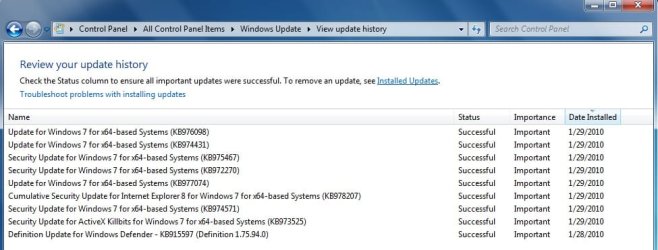
see attachment for updates installed on 1/29/2010.

i am 100% certain my sound settings were changed after the reboot from these updates. i can't be 100% sure these updates affected my wallpaper problem because i didn't try to change it until 1/30/2010.

it seems the only way to fix this annoying problem is to create a new user account and switch everything over to that account.
 

Attachments

  • updates picture.jpg
    updates picture.jpg
    58.7 KB · Views: 6,924
Last edited:

My Computer My Computer

At a glance

Windows 7 Home Premium
OS
Windows 7 Home Premium
That's the first time I've ever seen "ActiveX Killbits". I guess I have some Googling to do.:confused:
 

My Computer My Computer

At a glance

Win 7 Ultimate 64-bit SP1 (desktop)Intel Core 2 Duo E84002x 2GB OCZ DDR II SDRAM PC2-6400NVIDIA GeForce 9400GT
Computer type
PC/Desktop
Computer Manufacturer/Model Number
Gigabyte Technology Co., Ltd.
OS
Win 7 Ultimate 64-bit SP1 (desktop)
CPU
Intel Core 2 Duo E8400
Motherboard
Gigabyte GA-EP35-DS3R
Memory
2x 2GB OCZ DDR II SDRAM PC2-6400
Graphics Card(s)
NVIDIA GeForce 9400GT
Monitor(s) Displays
HP 2009m(primary), Acer P191W
Screen Resolution
1600x900, 1440x900
Hard Drives
Internal:WD Caviar Black 640GB 32MB cache 7200RPM
External:Samsung Story Station 1TB HDD desktop drive
500GB Toshiba portable drive
PSU
Antec Earthwatts EA500D
Case
Antec Sonata III
Cooling
4 fans
Keyboard
Logitech Wave
Mouse
Logitech M-SBF90
Internet Speed
Slow due to home Wireless-G router
Antivirus
MSE, Hitman Pro, Malwarebytes
Browser
Chrome and Palemoon
Other Info
Laptop....Acer 5750Z-4835
15.6" HD Widescreen CineCrystal™ LED-backlit LCD Display: (1366x768 resolution, 16:9 aspect ratio)
Intel® Pentium® Processor B940 (2.0GHz, 2MB L3 cache)
Windows® 7 Home Premium,500GB Hard Drive,4GB DDR3 RAM, Intel® HD Graphics,8X DVD-Super Multi Double-Layer Drive
Multi-in-1 Digital Media Card Reader,802.11b/g/n Wi-Fi
Chrome and Palemoon, MSE, Hitman Pro
Fixed!

OK my angry little friend, I've got something for you to try.

Delete this file:

C:\Users\<username>\AppData\Roaming\Microsoft\Windows\Themes\TranscodedWallpaper.jpg

I did this, went back to personalization and picked a wallpaper, and BANG! it worked.

It looks like this file is where windows stores the current background. If you change the background, this file changes. I think the permissions on that file got messed up, stopping Windows from reading/updating it.

It's amazing what you can achieve when you keep a level head ;)
 

My Computer My Computer

At a glance

Windows 7 Home Premium
OS
Windows 7 Home Premium
It's amazing what you can achieve when you keep a level head ;)
Keep a level head? This post is 5 weeks old... :what:
Welcome to SF...
 
Last edited:

My Computer My Computer

At a glance

Windows 7 Ultimate (64)i7-2600KG.SKILL Ripjaws X Series 8GB (2 x 4GB)ATI 5750
Computer Manufacturer/Model Number
Home Grown
OS
Windows 7 Ultimate (64)
CPU
i7-2600K
Motherboard
Asus P8P67-M Pro
Memory
G.SKILL Ripjaws X Series 8GB (2 x 4GB)
Graphics Card(s)
ATI 5750
Sound Card
On-Board
Monitor(s) Displays
LG W2486L
Screen Resolution
1920X1080
Hard Drives
Intel X-25M 80 Gig SSD | Intel X-25M 160 Gig SSD | WD Black 500MB - External eSata
PSU
Zalman ZM770-XT 770 Watts
Case
Antec 180 mini
Cooling
Cooler Master V8
Internet Speed
15MB - Cable
Other Info
Sissy OC - 4.6 @ 1.3175 24/7 | 18' Idle - 55' Load
It could be useful for others who may have the same problem. anyways, its always better to check the last post date before replying.
 

My Computer My Computer

At a glance

Windows 7 Ultimate x64 (XP, 98SE, 95, 3.11, D...Intel Core 2 Duo Processor P8600 (2.40 GHz, 3...4GB 800 MHz DDR2 SDRAMATI Mobility FireGL V5700 with 256 MB
Computer type
Laptop
Computer Manufacturer/Model Number
HP EliteBook 8530w Mobile Workstation
OS
Windows 7 Ultimate x64 (XP, 98SE, 95, 3.11, DOS 7.10 on VM) + Ubuntu 10.04 LTS Lucid Lynx
CPU
Intel Core 2 Duo Processor P8600 (2.40 GHz, 3 MB L2 cache)
Motherboard
Mobile Intel PM45 Express Chipset ICH9M-Enhanced
Memory
4GB 800 MHz DDR2 SDRAM
Graphics Card(s)
ATI Mobility FireGL V5700 with 256 MB
Sound Card
SoundMAX Integrated Digital HD Audio
Monitor(s) Displays
15.4-inch WXGA anti-glare (1280 x 800 resolution)
Screen Resolution
1280 x 800
Hard Drives
500GB + 1TB
Mouse
Synaptics PS/2 Port Touchpad, USB Mouse
Internet Speed
4 Mbps
Antivirus
MSE
Browser
Firefox, Chrome, IE
Other Info
Authentec AES2810 Fingerprint Reader
I, too have been having difficulty change my wallpaper. Thank you for letting evryone know what file to delete - it worked a treat!


Sorry for digging up a really old thread - gotta love google searches!


:D
 

My Computer My Computer

At a glance

Windows Home Premium 64bit
OS
Windows Home Premium 64bit
OK my angry little friend, I've got something for you to try.

Delete this file:

C:\Users\<username>\AppData\Roaming\Microsoft\Windows\Themes\TranscodedWallpaper.jpg

I did this, went back to personalization and picked a wallpaper, and BANG! it worked.

It looks like this file is where windows stores the current background. If you change the background, this file changes. I think the permissions on that file got messed up, stopping Windows from reading/updating it.

It's amazing what you can achieve when you keep a level head ;)

I recently did a system restore and had this same problem. After hours of searching I ended up here and joined this forum JUST to add my 2 cents.

This advice worked for me. Thank you. I would also like to add that, be advised the TranscodedWallpaper.jpg is a HIDDEN file so you will have to show hidden files in order to delete TranscodedWallpaper.jpg.

To show hidden files go to the start menu > control panel > Appearance and Personalization.

You will then see "Folder Options" in the list. Select "Show Hidden Files and Folders"
 

My Computer My Computer

At a glance

Windows Ultimate 64 bit
OS
Windows Ultimate 64 bit
Corbin buddy, I hear your pain completely. I unwrapped mine from dell with exactly the same problem. I did not even download an update.

And Samnf

Thank you sooo so much. Your solution was the only one I read that did not involve downloading 3rd party software from companies I have never heard of.

thanks again.

Dave
 

My Computer My Computer

At a glance

Windows 7 Home Premium
OS
Windows 7 Home Premium
worked like a charm!!!

thank you!!!!! i'm using a new toshiba laptop with a builtin windows 7 OS and i couldn't change my desktop background. Thanks to YOU, whoever you are,:) I was able to troubleshoot the problem! :)

OK my angry little friend, I've got something for you to try.

Delete this file:

C:\Users\<username>\AppData\Roaming\Microsoft\Windows\Themes\TranscodedWallpaper.jpg

I did this, went back to personalization and picked a wallpaper, and BANG! it worked.

It looks like this file is where windows stores the current background. If you change the background, this file changes. I think the permissions on that file got messed up, stopping Windows from reading/updating it.

It's amazing what you can achieve when you keep a level head ;)
 

My Computer My Computer

At a glance

windows 7 home preium
OS
windows 7 home preium
Replying to-->
ok i'm really pissed off right now. :mad:

Hi Dallas, I also transferred files from another computer which was windows 7 starter edition and im facing the same problem with the wallpaper not changing.. The wallpaper stays the same when i try to change it .. I think that the windows 7 starter edition file transfer to my new windows home premium edition brought the file that keeps us from changing our backgrounds.. if anyone can help us on which file to delete to keep us from changing our backgrounds please help:huh:
 

My Computer My Computer

At a glance

32-bit win 7 home premium
Computer Manufacturer/Model Number
HP
OS
32-bit win 7 home premium
samnf saved my life

OK my angry little friend, I've got something for you to try.

Delete this file:

C:\Users\<username>\AppData\Roaming\Microsoft\Windows\Themes\TranscodedWallpaper.jpg

I did this, went back to personalization and picked a wallpaper, and BANG! it worked.

It looks like this file is where windows stores the current background. If you change the background, this file changes. I think the permissions on that file got messed up, stopping Windows from reading/updating it.

It's amazing what you can achieve when you keep a level head ;)

This thread may be ancient, but i dont care. Samnf saved my brain from total collapse with this piece of advice. The only reason i registered on this forum was to post this thankyou note. Thanks mate!
 

My Computer My Computer

At a glance

windows 7 home premium
OS
windows 7 home premium
Ha!
I love this thread. Every 6 months or so a stranger pops in just to show some gratitude. Hopefully Windows 8 has the same problem so I can keep the praise train rolling.
 

My Computer My Computer

At a glance

Windows 7 Home Premium
OS
Windows 7 Home Premium
samnf ok well after reading and trying lots of different solutions to this dam annoying problem,I still have a black back ground.C:\Users\<username>\AppData\Roaming\Microsoft\Windows\Themes\TranscodedWallpaper.jpg i used the unhide hiden files and copied and pasted samnf advice in the search but cant find anything.If i just type transcoded wallpaper i get the windows logo wallpaper and thats it .Help please it use to work fine .I have home premium 7 64 bit.
 

My Computer My Computer

At a glance

windows 7 home premium 64 bitIntel Core i5 3570K 3.4GB @4200.00 MHzG.Skill F3-14900CL9D-8GBXL 8GB (2x4GB) DDR3R9 290X Radeon 4GB
Computer type
PC/Desktop
Computer Manufacturer/Model Number
hybrid
OS
windows 7 home premium 64 bit
CPU
Intel Core i5 3570K 3.4GB @4200.00 MHz
Motherboard
ASRock Z77 Extreme4 Motherboard
Memory
G.Skill F3-14900CL9D-8GBXL 8GB (2x4GB) DDR3
Graphics Card(s)
R9 290X Radeon 4GB
Sound Card
BUILT IN
Monitor(s) Displays
Dell UltraSharp U3014 30-inch Monitor with PremierColor
Screen Resolution
2560x1600
Hard Drives
SSD 256 GB PLEXTOR MS

sata 320 gig
PSU
Corsair HX-650 V2 80 PLUS Gold Power Supply
Case
COOLERMATER
Cooling
CoolerMaster H100I CPU Cooler
Keyboard
logitech
Mouse
logitech
Internet Speed
fast
This almost sounds like an activation issue ... check your activation status and see what it says ... :)
 

My Computer My Computer

At a glance

64-bit Windows 8.1 ProCore(TM) i5 CPU 4330 Haswell @ 3.20GHz12.00 GBIntel(R) HD Graphics
Computer type
PC/Desktop
Computer Manufacturer/Model Number
LENOVO K450 @3.0GHZ
OS
64-bit Windows 8.1 Pro
CPU
Core(TM) i5 CPU 4330 Haswell @ 3.20GHz
Motherboard
LENOVO
Memory
12.00 GB
Graphics Card(s)
Intel(R) HD Graphics
Sound Card
Intel HD integtrated
Monitor(s) Displays
HP 25' ISP Monitor
Screen Resolution
1900/1020
Hard Drives
(1) ST1000DM003-1CH162 (2) Generic STORAGE DEVICE USB Device (3) Generic STORAGE DEVICE USB Device
Internet Speed
100mb down/10mb up
thanks for the reply tews .sorry for the dumarse question but what is the activation..settings please and were would i find it.i also tried a system restore but no joy.
 

My Computer My Computer

At a glance

windows 7 home premium 64 bitIntel Core i5 3570K 3.4GB @4200.00 MHzG.Skill F3-14900CL9D-8GBXL 8GB (2x4GB) DDR3R9 290X Radeon 4GB
Computer type
PC/Desktop
Computer Manufacturer/Model Number
hybrid
OS
windows 7 home premium 64 bit
CPU
Intel Core i5 3570K 3.4GB @4200.00 MHz
Motherboard
ASRock Z77 Extreme4 Motherboard
Memory
G.Skill F3-14900CL9D-8GBXL 8GB (2x4GB) DDR3
Graphics Card(s)
R9 290X Radeon 4GB
Sound Card
BUILT IN
Monitor(s) Displays
Dell UltraSharp U3014 30-inch Monitor with PremierColor
Screen Resolution
2560x1600
Hard Drives
SSD 256 GB PLEXTOR MS

sata 320 gig
PSU
Corsair HX-650 V2 80 PLUS Gold Power Supply
Case
COOLERMATER
Cooling
CoolerMaster H100I CPU Cooler
Keyboard
logitech
Mouse
logitech
Internet Speed
fast
Back
Top