Dual LAN and Xbox 360

Dogfood09

New member
Local time
5:34 AM
Messages
26
Hi Guys,

1st Post sorry if its been raised before , but i tried a search and came up with nothing.

My Motherboard has Dual LAN , Port one is connected to my Modem for internet access , and the other port i have just connected my new 360 so i can access xbox live , however when i turn on my 360 it does not connect , I was told it can connect as its sharing the internet from port one , but something is not right , obviously! , I dont have a router , so this is the only way i can get it setup , what am i doing wrong? or have i been ill advised? any pointers??

Kind Regards
Dog09
 

My Computer My Computer

Computer Manufacturer/Model Number
Custom
OS
Windows 7x64
CPU
i5 2500K
Motherboard
Gigabyte GA-Z68X UD3H-B3
Memory
16GB KINGSTON HYPERX GENISIS 1600MHZ
Graphics Card(s)
XFX RADEON 7970 X2
Sound Card
XONAR 5.1 DGX
Monitor(s) Displays
DELL ULTRASHARP U2711
Screen Resolution
2560X1440
Hard Drives
CRUCIAL M4 128GB SSD
1TB SEAGATE BARACUDA
3TB SEAGATE BARACUDA
PSU
XFX PRO850W
Case
CORSAIR OBSIDIAN 800D
Cooling
CORSAIR HYDRO H100 WATER COOLING
Keyboard
RAZER BLACK WIDOW MECHANICAL
Mouse
RAZER DEATH ADDER
Internet Speed
2MB

My Computer My Computer

OS
Windows 7 Ultimate x64
CPU
Core i7 960
Motherboard
ASUS P6TD Deluxe
Memory
Corsair XMS3 DDR3-1600 - 12 GB
Graphics Card(s)
eVGA GTX 275 1792 MB
Sound Card
Onboard HD etc
Monitor(s) Displays
Dell SP2208WFP
Hard Drives
Western Digital Caviar Black 1 TB x 2 (RAID-1)
PSU
BFG EX-1200
Case
CoolerMaster HAF 922
Cooling
Thermalright Ultra 120 Extreme with Noctua NH-12 Fan
Keyboard
MS Natural (you know, like the ones you find in nature...)
Mouse
MS Intellimouse Explorer
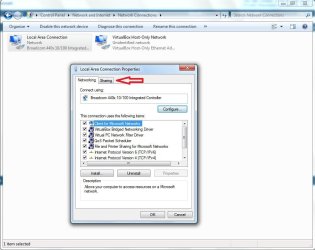
Thanks for the quick response , however when i open up the ICS , i see my network - home ( local area connection - joined ) and i see another which says unidentified network- public , but i dont have the manage connection options anywhere!! also when i right click on the local connection , there is no sharing tab. Any suggestions?
 

My Computer My Computer

Computer Manufacturer/Model Number
Custom
OS
Windows 7x64
CPU
i5 2500K
Motherboard
Gigabyte GA-Z68X UD3H-B3
Memory
16GB KINGSTON HYPERX GENISIS 1600MHZ
Graphics Card(s)
XFX RADEON 7970 X2
Sound Card
XONAR 5.1 DGX
Monitor(s) Displays
DELL ULTRASHARP U2711
Screen Resolution
2560X1440
Hard Drives
CRUCIAL M4 128GB SSD
1TB SEAGATE BARACUDA
3TB SEAGATE BARACUDA
PSU
XFX PRO850W
Case
CORSAIR OBSIDIAN 800D
Cooling
CORSAIR HYDRO H100 WATER COOLING
Keyboard
RAZER BLACK WIDOW MECHANICAL
Mouse
RAZER DEATH ADDER
Internet Speed
2MB

Attachments

  • Properties.jpg
    Properties.jpg
    63.7 KB · Views: 66

My Computer My Computer

Computer Manufacturer/Model Number
Dell C521
OS
W7 Ultimate 64bit W7 Premium 64bit W7 Premium 32bit WXP Home 32bit
CPU
Athlon 64X2 5000+
Motherboard
Dell
Memory
4GB
Graphics Card(s)
ATI X1300
Sound Card
On Board
Monitor(s) Displays
Dell 19" Flat
Screen Resolution
1280x1024
Hard Drives
500GB Western Digital Caviar Green
Mouse
Microsoft Wireless Intellimouse Explorer 2.0
Internet Speed
SBC DSL - 6Mbps
I have done the above , but still not working? is there anything i need to input on the 360 settings? if so what? and where do i get the info?

Thanks in advance
Dog09
 

My Computer My Computer

Computer Manufacturer/Model Number
Custom
OS
Windows 7x64
CPU
i5 2500K
Motherboard
Gigabyte GA-Z68X UD3H-B3
Memory
16GB KINGSTON HYPERX GENISIS 1600MHZ
Graphics Card(s)
XFX RADEON 7970 X2
Sound Card
XONAR 5.1 DGX
Monitor(s) Displays
DELL ULTRASHARP U2711
Screen Resolution
2560X1440
Hard Drives
CRUCIAL M4 128GB SSD
1TB SEAGATE BARACUDA
3TB SEAGATE BARACUDA
PSU
XFX PRO850W
Case
CORSAIR OBSIDIAN 800D
Cooling
CORSAIR HYDRO H100 WATER COOLING
Keyboard
RAZER BLACK WIDOW MECHANICAL
Mouse
RAZER DEATH ADDER
Internet Speed
2MB
If you don't have a router, how does your PC connect through the modem? Is it a cable or DSL modem? We need to get an idea of how everything fits together. Do you have PPPoE configured on the port going to the modem.

You also want to make sure that the firewall is letting traffic through both ethernet ports. I think there's a firewall setting for ICS.
 

My Computer My Computer

Computer Manufacturer/Model Number
Dell C521
OS
W7 Ultimate 64bit W7 Premium 64bit W7 Premium 32bit WXP Home 32bit
CPU
Athlon 64X2 5000+
Motherboard
Dell
Memory
4GB
Graphics Card(s)
ATI X1300
Sound Card
On Board
Monitor(s) Displays
Dell 19" Flat
Screen Resolution
1280x1024
Hard Drives
500GB Western Digital Caviar Green
Mouse
Microsoft Wireless Intellimouse Explorer 2.0
Internet Speed
SBC DSL - 6Mbps
I have a cable modem ( Virgin model vnmg300 ) I have ethernet cable from the back of the modem going into the ethernet port on the pc , i then have the other ethernet cable from my 360 going into the other ethernet port on the pc , PPoE , i have no idea what that is and how to configure , i have dual lan software which i have not installed , but from the manual it just says its for making the internet faster if i have two broadband lines and nothing about connection sharing.

Dog09
 

My Computer My Computer

Computer Manufacturer/Model Number
Custom
OS
Windows 7x64
CPU
i5 2500K
Motherboard
Gigabyte GA-Z68X UD3H-B3
Memory
16GB KINGSTON HYPERX GENISIS 1600MHZ
Graphics Card(s)
XFX RADEON 7970 X2
Sound Card
XONAR 5.1 DGX
Monitor(s) Displays
DELL ULTRASHARP U2711
Screen Resolution
2560X1440
Hard Drives
CRUCIAL M4 128GB SSD
1TB SEAGATE BARACUDA
3TB SEAGATE BARACUDA
PSU
XFX PRO850W
Case
CORSAIR OBSIDIAN 800D
Cooling
CORSAIR HYDRO H100 WATER COOLING
Keyboard
RAZER BLACK WIDOW MECHANICAL
Mouse
RAZER DEATH ADDER
Internet Speed
2MB
I have a cable modem ( Virgin model vnmg300 ) I have ethernet cable from the back of the modem going into the ethernet port on the pc , i then have the other ethernet cable from my 360 going into the other ethernet port on the pc , PPoE , i have no idea what that is and how to configure , i have dual lan software which i have not installed , but from the manual it just says its for making the internet faster if i have two broadband lines and nothing about connection sharing.

Dog09

Could you open a command prompt and type: ipconfig /all and post the results here? There's a config issue here somewhere and we need to get a good idea of how things are currently set.
 

My Computer My Computer

Computer Manufacturer/Model Number
Dell C521
OS
W7 Ultimate 64bit W7 Premium 64bit W7 Premium 32bit WXP Home 32bit
CPU
Athlon 64X2 5000+
Motherboard
Dell
Memory
4GB
Graphics Card(s)
ATI X1300
Sound Card
On Board
Monitor(s) Displays
Dell 19" Flat
Screen Resolution
1280x1024
Hard Drives
500GB Western Digital Caviar Green
Mouse
Microsoft Wireless Intellimouse Explorer 2.0
Internet Speed
SBC DSL - 6Mbps
Microsoft Windows [Version 6.1.7600]
Copyright (c) 2009 Microsoft Corporation. All rights reserved.
C:\Users\Steve>ipconfig /all
Windows IP Configuration
Host Name . . . . . . . . . . . . : Steve-PC
Primary Dns Suffix . . . . . . . :
Node Type . . . . . . . . . . . . : Hybrid
IP Routing Enabled. . . . . . . . : No
WINS Proxy Enabled. . . . . . . . : No
Ethernet adapter Bluetooth Network Connection 4:
Media State . . . . . . . . . . . : Media disconnected
Connection-specific DNS Suffix . :
Description . . . . . . . . . . . : Bluetooth Device (Personal Area Network)
#4
Physical Address. . . . . . . . . : 11-11-11-11-11-11
DHCP Enabled. . . . . . . . . . . : Yes
Autoconfiguration Enabled . . . . : Yes
Ethernet adapter Local Area Connection 2:
Media State . . . . . . . . . . . : Media disconnected
Connection-specific DNS Suffix . :
Description . . . . . . . . . . . : Realtek PCIe GBE Family Controller #2
Physical Address. . . . . . . . . : 00-24-1D-C2-01-98
DHCP Enabled. . . . . . . . . . . : Yes
Autoconfiguration Enabled . . . . : Yes
Ethernet adapter Local Area Connection:
Connection-specific DNS Suffix . :
Description . . . . . . . . . . . : Realtek PCIe GBE Family Controller
Physical Address. . . . . . . . . : 00-24-1D-C2-01-88
DHCP Enabled. . . . . . . . . . . : Yes
Autoconfiguration Enabled . . . . : Yes
Link-local IPv6 Address . . . . . : fe80::1901:f0c1:8497:6610%12(Preferred)
IPv4 Address. . . . . . . . . . . : 80.6.141.226(Preferred)
Subnet Mask . . . . . . . . . . . : 255.255.254.0
Lease Obtained. . . . . . . . . . : 06 March 2010 16:46:58
Lease Expires . . . . . . . . . . : 13 March 2010 06:32:14
Default Gateway . . . . . . . . . : 80.6.140.1
DHCP Server . . . . . . . . . . . : 62.253.131.63
DHCPv6 IAID . . . . . . . . . . . : 251667485
DHCPv6 Client DUID. . . . . . . . : 00-01-00-01-12-EB-D9-45-00-24-1D-C2-01-88
DNS Servers . . . . . . . . . . . : 194.168.4.100
194.168.8.100
NetBIOS over Tcpip. . . . . . . . : Disabled
Tunnel adapter isatap.{0FA14801-813C-409F-B556-29BF35509470}:
Media State . . . . . . . . . . . : Media disconnected
Connection-specific DNS Suffix . :
Description . . . . . . . . . . . : Microsoft ISATAP Adapter
Physical Address. . . . . . . . . : 00-00-00-00-00-00-00-E0
DHCP Enabled. . . . . . . . . . . : No
Autoconfiguration Enabled . . . . : Yes
Tunnel adapter Local Area Connection* 11:
Connection-specific DNS Suffix . :
Description . . . . . . . . . . . : Microsoft Teredo Tunneling Adapter
Physical Address. . . . . . . . . : 00-00-00-00-00-00-00-E0
DHCP Enabled. . . . . . . . . . . : No
Autoconfiguration Enabled . . . . : Yes
IPv6 Address. . . . . . . . . . . : 2001:0:5ef5:73ba:488:3a7e:aff9:721d(Prefe
rred)
Link-local IPv6 Address . . . . . : fe80::488:3a7e:aff9:721d%11(Preferred)
Default Gateway . . . . . . . . . :
NetBIOS over Tcpip. . . . . . . . : Disabled
Tunnel adapter isatap.{E093D845-E2A6-41D0-968F-DAB4DBEEE20D}:
Media State . . . . . . . . . . . : Media disconnected
Connection-specific DNS Suffix . :
Description . . . . . . . . . . . : Microsoft ISATAP Adapter #2
Physical Address. . . . . . . . . : 00-00-00-00-00-00-00-E0
DHCP Enabled. . . . . . . . . . . : No
Autoconfiguration Enabled . . . . : Yes
Tunnel adapter 6TO4 Adapter:
Connection-specific DNS Suffix . :
Description . . . . . . . . . . . : Microsoft 6to4 Adapter
Physical Address. . . . . . . . . : 00-00-00-00-00-00-00-E0
DHCP Enabled. . . . . . . . . . . : No
Autoconfiguration Enabled . . . . : Yes
IPv6 Address. . . . . . . . . . . : 2002:5006:8de2::5006:8de2(Preferred)
Default Gateway . . . . . . . . . : 2002:c058:6301::c058:6301
DNS Servers . . . . . . . . . . . : 194.168.4.100
194.168.8.100
NetBIOS over Tcpip. . . . . . . . : Disabled
Tunnel adapter isatap.{E4B3B07E-B62C-4113-8082-52C827088619}:
Media State . . . . . . . . . . . : Media disconnected
Connection-specific DNS Suffix . :
Description . . . . . . . . . . . : Microsoft ISATAP Adapter #3
Physical Address. . . . . . . . . : 00-00-00-00-00-00-00-E0
DHCP Enabled. . . . . . . . . . . : No
Autoconfiguration Enabled . . . . : Yes
C:\Users\Steve>

hope this helps
 

My Computer My Computer

Computer Manufacturer/Model Number
Custom
OS
Windows 7x64
CPU
i5 2500K
Motherboard
Gigabyte GA-Z68X UD3H-B3
Memory
16GB KINGSTON HYPERX GENISIS 1600MHZ
Graphics Card(s)
XFX RADEON 7970 X2
Sound Card
XONAR 5.1 DGX
Monitor(s) Displays
DELL ULTRASHARP U2711
Screen Resolution
2560X1440
Hard Drives
CRUCIAL M4 128GB SSD
1TB SEAGATE BARACUDA
3TB SEAGATE BARACUDA
PSU
XFX PRO850W
Case
CORSAIR OBSIDIAN 800D
Cooling
CORSAIR HYDRO H100 WATER COOLING
Keyboard
RAZER BLACK WIDOW MECHANICAL
Mouse
RAZER DEATH ADDER
Internet Speed
2MB
I noticed that ethernet connection #2 shows as media disconnected. If that's where the Xbox is attached, that's a problem.

What kind of cable are you using between the PC and the XBox? It should be an ethernet crossover cable. A straight through cable won't work.
 

My Computer My Computer

Computer Manufacturer/Model Number
Dell C521
OS
W7 Ultimate 64bit W7 Premium 64bit W7 Premium 32bit WXP Home 32bit
CPU
Athlon 64X2 5000+
Motherboard
Dell
Memory
4GB
Graphics Card(s)
ATI X1300
Sound Card
On Board
Monitor(s) Displays
Dell 19" Flat
Screen Resolution
1280x1024
Hard Drives
500GB Western Digital Caviar Green
Mouse
Microsoft Wireless Intellimouse Explorer 2.0
Internet Speed
SBC DSL - 6Mbps
oh ok , will have to get one then , thanks very much
 

My Computer My Computer

Computer Manufacturer/Model Number
Custom
OS
Windows 7x64
CPU
i5 2500K
Motherboard
Gigabyte GA-Z68X UD3H-B3
Memory
16GB KINGSTON HYPERX GENISIS 1600MHZ
Graphics Card(s)
XFX RADEON 7970 X2
Sound Card
XONAR 5.1 DGX
Monitor(s) Displays
DELL ULTRASHARP U2711
Screen Resolution
2560X1440
Hard Drives
CRUCIAL M4 128GB SSD
1TB SEAGATE BARACUDA
3TB SEAGATE BARACUDA
PSU
XFX PRO850W
Case
CORSAIR OBSIDIAN 800D
Cooling
CORSAIR HYDRO H100 WATER COOLING
Keyboard
RAZER BLACK WIDOW MECHANICAL
Mouse
RAZER DEATH ADDER
Internet Speed
2MB
Good Luck! Let me know how it goes!
 

My Computer My Computer

Computer Manufacturer/Model Number
Dell C521
OS
W7 Ultimate 64bit W7 Premium 64bit W7 Premium 32bit WXP Home 32bit
CPU
Athlon 64X2 5000+
Motherboard
Dell
Memory
4GB
Graphics Card(s)
ATI X1300
Sound Card
On Board
Monitor(s) Displays
Dell 19" Flat
Screen Resolution
1280x1024
Hard Drives
500GB Western Digital Caviar Green
Mouse
Microsoft Wireless Intellimouse Explorer 2.0
Internet Speed
SBC DSL - 6Mbps
I actually have alot of ethernet cables , so i may have a crossover one , but how can i tell the difference between a standard ethernet and a crossover
 

My Computer My Computer

Computer Manufacturer/Model Number
Custom
OS
Windows 7x64
CPU
i5 2500K
Motherboard
Gigabyte GA-Z68X UD3H-B3
Memory
16GB KINGSTON HYPERX GENISIS 1600MHZ
Graphics Card(s)
XFX RADEON 7970 X2
Sound Card
XONAR 5.1 DGX
Monitor(s) Displays
DELL ULTRASHARP U2711
Screen Resolution
2560X1440
Hard Drives
CRUCIAL M4 128GB SSD
1TB SEAGATE BARACUDA
3TB SEAGATE BARACUDA
PSU
XFX PRO850W
Case
CORSAIR OBSIDIAN 800D
Cooling
CORSAIR HYDRO H100 WATER COOLING
Keyboard
RAZER BLACK WIDOW MECHANICAL
Mouse
RAZER DEATH ADDER
Internet Speed
2MB
A crossover will have pins 1-2 and 3-6 flipped.

Here's a diagram:
 

Attachments

  • ethcablerj45cr.gif
    ethcablerj45cr.gif
    12.2 KB · Views: 1,501

My Computer My Computer

Computer Manufacturer/Model Number
Dell C521
OS
W7 Ultimate 64bit W7 Premium 64bit W7 Premium 32bit WXP Home 32bit
CPU
Athlon 64X2 5000+
Motherboard
Dell
Memory
4GB
Graphics Card(s)
ATI X1300
Sound Card
On Board
Monitor(s) Displays
Dell 19" Flat
Screen Resolution
1280x1024
Hard Drives
500GB Western Digital Caviar Green
Mouse
Microsoft Wireless Intellimouse Explorer 2.0
Internet Speed
SBC DSL - 6Mbps
Hi ,
I now have a crossover cable but its still not connecting , any ideas?
 

My Computer My Computer

Computer Manufacturer/Model Number
Custom
OS
Windows 7x64
CPU
i5 2500K
Motherboard
Gigabyte GA-Z68X UD3H-B3
Memory
16GB KINGSTON HYPERX GENISIS 1600MHZ
Graphics Card(s)
XFX RADEON 7970 X2
Sound Card
XONAR 5.1 DGX
Monitor(s) Displays
DELL ULTRASHARP U2711
Screen Resolution
2560X1440
Hard Drives
CRUCIAL M4 128GB SSD
1TB SEAGATE BARACUDA
3TB SEAGATE BARACUDA
PSU
XFX PRO850W
Case
CORSAIR OBSIDIAN 800D
Cooling
CORSAIR HYDRO H100 WATER COOLING
Keyboard
RAZER BLACK WIDOW MECHANICAL
Mouse
RAZER DEATH ADDER
Internet Speed
2MB
Ok , this is what i have done , modem connected to pc via ethernet cable , internet all fine , xbox connected to pc via crossover cable , gone into ICS , highlighted the host connection , gone to sharing tab , enabled allowed...... , restarted all my devices , but still the 360 wont connect to live or pick up my pc from within the 360?? now i am totally stumped!!
 

My Computer My Computer

Computer Manufacturer/Model Number
Custom
OS
Windows 7x64
CPU
i5 2500K
Motherboard
Gigabyte GA-Z68X UD3H-B3
Memory
16GB KINGSTON HYPERX GENISIS 1600MHZ
Graphics Card(s)
XFX RADEON 7970 X2
Sound Card
XONAR 5.1 DGX
Monitor(s) Displays
DELL ULTRASHARP U2711
Screen Resolution
2560X1440
Hard Drives
CRUCIAL M4 128GB SSD
1TB SEAGATE BARACUDA
3TB SEAGATE BARACUDA
PSU
XFX PRO850W
Case
CORSAIR OBSIDIAN 800D
Cooling
CORSAIR HYDRO H100 WATER COOLING
Keyboard
RAZER BLACK WIDOW MECHANICAL
Mouse
RAZER DEATH ADDER
Internet Speed
2MB
Ok , this is what i have done , modem connected to pc via ethernet cable , internet all fine , xbox connected to pc via crossover cable , gone into ICS , highlighted the host connection , gone to sharing tab , enabled allowed...... , restarted all my devices , but still the 360 wont connect to live or pick up my pc from within the 360?? now i am totally stumped!!

Lets's see the output from another ipconfig /all tells us.
 

My Computer My Computer

Computer Manufacturer/Model Number
Dell C521
OS
W7 Ultimate 64bit W7 Premium 64bit W7 Premium 32bit WXP Home 32bit
CPU
Athlon 64X2 5000+
Motherboard
Dell
Memory
4GB
Graphics Card(s)
ATI X1300
Sound Card
On Board
Monitor(s) Displays
Dell 19" Flat
Screen Resolution
1280x1024
Hard Drives
500GB Western Digital Caviar Green
Mouse
Microsoft Wireless Intellimouse Explorer 2.0
Internet Speed
SBC DSL - 6Mbps
Microsoft Windows [Version 6.1.7600]
Copyright (c) 2009 Microsoft Corporation. All rights reserved.
C:\Users\Steve>ipconfig /all
Windows IP Configuration
Host Name . . . . . . . . . . . . : Steve-PC
Primary Dns Suffix . . . . . . . :
Node Type . . . . . . . . . . . . : Hybrid
IP Routing Enabled. . . . . . . . : No
WINS Proxy Enabled. . . . . . . . : No
Ethernet adapter Bluetooth Network Connection 4:
Media State . . . . . . . . . . . : Media disconnected
Connection-specific DNS Suffix . :
Description . . . . . . . . . . . : Bluetooth Device (Personal Area Network)
#4
Physical Address. . . . . . . . . : 11-11-11-11-11-11
DHCP Enabled. . . . . . . . . . . : Yes
Autoconfiguration Enabled . . . . : Yes
Ethernet adapter Local Area Connection 2:
Connection-specific DNS Suffix . :
Description . . . . . . . . . . . : Realtek PCIe GBE Family Controller #2
Physical Address. . . . . . . . . : 00-24-1D-C2-01-98
DHCP Enabled. . . . . . . . . . . : Yes
Autoconfiguration Enabled . . . . : Yes
IPv6 Address. . . . . . . . . . . : 2002:5006:8de2:e:bdaa:fa8a:89f9:cc3(Prefe
rred)
Site-local IPv6 Address . . . . . : fec0::e:bdaa:fa8a:89f9:cc3%2(Preferred)
Temporary IPv6 Address. . . . . . : 2002:5006:8de2:e:e140:7a66:d9e1:302a(Pref
erred)
Link-local IPv6 Address . . . . . : fe80::bdaa:fa8a:89f9:cc3%14(Preferred)
Autoconfiguration IPv4 Address. . : 169.254.12.195(Preferred)
Subnet Mask . . . . . . . . . . . : 255.255.0.0
Default Gateway . . . . . . . . . :
DHCPv6 IAID . . . . . . . . . . . : 335553565
DHCPv6 Client DUID. . . . . . . . : 00-01-00-01-12-EB-D9-45-00-24-1D-C2-01-88
DNS Servers . . . . . . . . . . . : fec0:0:0:ffff::1%2
fec0:0:0:ffff::2%2
fec0:0:0:ffff::3%2
NetBIOS over Tcpip. . . . . . . . : Enabled
Ethernet adapter Local Area Connection:
Connection-specific DNS Suffix . :
Description . . . . . . . . . . . : Realtek PCIe GBE Family Controller
Physical Address. . . . . . . . . : 00-24-1D-C2-01-88
DHCP Enabled. . . . . . . . . . . : Yes
Autoconfiguration Enabled . . . . : Yes
Link-local IPv6 Address . . . . . : fe80::1901:f0c1:8497:6610%12(Preferred)
IPv4 Address. . . . . . . . . . . : 80.6.141.226(Preferred)
Subnet Mask . . . . . . . . . . . : 255.255.254.0
Lease Obtained. . . . . . . . . . : 11 March 2010 22:45:50
Lease Expires . . . . . . . . . . : 16 March 2010 21:38:27
Default Gateway . . . . . . . . . : 80.6.140.1
DHCP Server . . . . . . . . . . . : 62.253.131.63
DHCPv6 IAID . . . . . . . . . . . : 251667485
DHCPv6 Client DUID. . . . . . . . : 00-01-00-01-12-EB-D9-45-00-24-1D-C2-01-88
DNS Servers . . . . . . . . . . . : 194.168.4.100
194.168.8.100
NetBIOS over Tcpip. . . . . . . . : Disabled
Tunnel adapter isatap.{E093D845-E2A6-41D0-968F-DAB4DBEEE20D}:
Media State . . . . . . . . . . . : Media disconnected
Connection-specific DNS Suffix . :
Description . . . . . . . . . . . : Microsoft ISATAP Adapter
Physical Address. . . . . . . . . : 00-00-00-00-00-00-00-E0
DHCP Enabled. . . . . . . . . . . : No
Autoconfiguration Enabled . . . . : Yes
Tunnel adapter Local Area Connection* 11:
Connection-specific DNS Suffix . :
Description . . . . . . . . . . . : Microsoft Teredo Tunneling Adapter
Physical Address. . . . . . . . . : 00-00-00-00-00-00-00-E0
DHCP Enabled. . . . . . . . . . . : No
Autoconfiguration Enabled . . . . : Yes
IPv6 Address. . . . . . . . . . . : 2001:0:5ef5:73bc:2ca7:3ca:aff9:721d(Prefe
rred)
Link-local IPv6 Address . . . . . : fe80::2ca7:3ca:aff9:721d%11(Preferred)
Default Gateway . . . . . . . . . :
NetBIOS over Tcpip. . . . . . . . : Disabled
Tunnel adapter isatap.{E4B3B07E-B62C-4113-8082-52C827088619}:
Media State . . . . . . . . . . . : Media disconnected
Connection-specific DNS Suffix . :
Description . . . . . . . . . . . : Microsoft ISATAP Adapter #2
Physical Address. . . . . . . . . : 00-00-00-00-00-00-00-E0
DHCP Enabled. . . . . . . . . . . : No
Autoconfiguration Enabled . . . . : Yes
Tunnel adapter 6TO4 Adapter:
Connection-specific DNS Suffix . :
Description . . . . . . . . . . . : Microsoft 6to4 Adapter
Physical Address. . . . . . . . . : 00-00-00-00-00-00-00-E0
DHCP Enabled. . . . . . . . . . . : No
Autoconfiguration Enabled . . . . : Yes
IPv6 Address. . . . . . . . . . . : 2002:5006:8de2::5006:8de2(Preferred)
Default Gateway . . . . . . . . . : 2002:c058:6301::c058:6301
DNS Servers . . . . . . . . . . . : 194.168.4.100
194.168.8.100
NetBIOS over Tcpip. . . . . . . . : Disabled
Tunnel adapter isatap.{0FA14801-813C-409F-B556-29BF35509470}:
Media State . . . . . . . . . . . : Media disconnected
Connection-specific DNS Suffix . :
Description . . . . . . . . . . . : Microsoft ISATAP Adapter #3
Physical Address. . . . . . . . . : 00-00-00-00-00-00-00-E0
DHCP Enabled. . . . . . . . . . . : No
Autoconfiguration Enabled . . . . : Yes
C:\Users\Steve>

This is all way above my head , thanks for trying to help
 

My Computer My Computer

Computer Manufacturer/Model Number
Custom
OS
Windows 7x64
CPU
i5 2500K
Motherboard
Gigabyte GA-Z68X UD3H-B3
Memory
16GB KINGSTON HYPERX GENISIS 1600MHZ
Graphics Card(s)
XFX RADEON 7970 X2
Sound Card
XONAR 5.1 DGX
Monitor(s) Displays
DELL ULTRASHARP U2711
Screen Resolution
2560X1440
Hard Drives
CRUCIAL M4 128GB SSD
1TB SEAGATE BARACUDA
3TB SEAGATE BARACUDA
PSU
XFX PRO850W
Case
CORSAIR OBSIDIAN 800D
Cooling
CORSAIR HYDRO H100 WATER COOLING
Keyboard
RAZER BLACK WIDOW MECHANICAL
Mouse
RAZER DEATH ADDER
Internet Speed
2MB
It's looking better. Not there yet, but better.

Local Area Connection shows up and it has a public IP address. Can you confirm that you have internet access from the desktop PC?

Local Area Connection 2 also shows as connected and has a 169.254.12.195 address which is normal for an ICS connection buts also normal for a NON ICS that didn't get an address from a DHCP server. So now we need to make sure ICS is working.

Can you look at the Xbox and see what IP address it has? I know it has a screen that displays it's IP info, that's what I need to see.
 

My Computer My Computer

Computer Manufacturer/Model Number
Dell C521
OS
W7 Ultimate 64bit W7 Premium 64bit W7 Premium 32bit WXP Home 32bit
CPU
Athlon 64X2 5000+
Motherboard
Dell
Memory
4GB
Graphics Card(s)
ATI X1300
Sound Card
On Board
Monitor(s) Displays
Dell 19" Flat
Screen Resolution
1280x1024
Hard Drives
500GB Western Digital Caviar Green
Mouse
Microsoft Wireless Intellimouse Explorer 2.0
Internet Speed
SBC DSL - 6Mbps
Back
Top