Network occasionally fails to be activated on bootup

BruceUK

New member
Local time
5:02 PM
Messages
48
I have a standalone HP Windows 7 computer with internet access provided through an external cable modem via an ethernet connection.

On just a few occasions since getting the computer last month, it has failed to activate the internet connection during the bootup process. The network icon in the bottom right corner continues to show the blue circle indicating "busy" and, in that circumstance, I can't launch the browser. I have to restart the computer and invariably it boots up OK the second time.

In case this is relevant, I should mention that, as the last stage in a successful bootup, a window pops up in the bottom right corner confirming the status of the HP Wireless Assistant (either on or disabled). I obviously don't use a wireless connection but I currently have the wireless button set to "enabled"; however I have also experimented with having it set to "disabled" and the same problem has occurred with that setting, so I don't think this is particularly significant.

When the bootup fails to activate the network, the HP Wireless Assistant popup window does not appear at all. It's as if something happens (or fails to happen) that prevents this last step from being completed.

This seemingly random failure to activate the network connection is obviously irritating and puzzling. Can anyone suggest the cause and what action I should take to avoid this problem?
 

My Computer My Computer

Computer Manufacturer/Model Number
HP Pavilion DV7-2215SA
OS
Windows 7
Memory
4GB
Hard Drives
Internal 500GB
External LaCie 160GB
Hello BruceUK, welcome to Seven Forums!


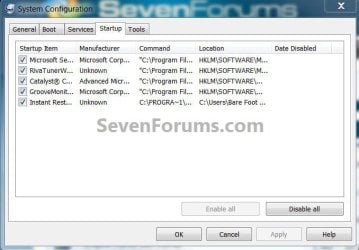
Type "msconfig" without the quotes into the start menu / search box to open the config utility, under the "startup" tab see if you can identify any entry matching "HP Wireless Assistant" and see if disabling it at startup will sort the issue.

Be sure to post back with the outcome.

msconfig.jpg
 

My Computer My Computer

Computer Manufacturer/Model Number
* BFK Customs *
OS
W 7 64-bit Ultimate
CPU
Intel Q9550 Yorkfield
Motherboard
ASUS P5Q Pro
Memory
8GB Dominator 8500C5D
Graphics Card(s)
ATI : XFX 5870
Sound Card
Realtek HD Audio 7-1
Monitor(s) Displays
1x 47" LCD HDMI & 3x 26" LCD HDMI
Screen Resolution
1920x1080P & 1920x1200
Hard Drives
1x 80GB Intel X25-M G2 SSD : 1x 500GB & 1x 640GB WD Caviar Black(s)
PSU
Corsair 620HX
Case
Cooler Master RC-690
Cooling
Tuniq Tower 120, 2x 140mm and 3x 120mm case fans
Keyboard
Microsoft 500
Mouse
Razer Diamondback 3G
Internet Speed
14 Mb/s
Other Info
1x Koutech 3Gb/s SATA HDD Hot Swap Rack
Hello BruceUK, welcome to Seven Forums!


Type "msconfig" without the quotes into the start menu / search box to open the config utility, under the "startup" tab see if you can identify any entry matching "HP Wireless Assistant" and see if disabling it at startup will sort the issue.

Be sure to post back with the outcome.

View attachment 59482

Hiya,

Thanks very much for your response. Yes there was an entry in the Startup list for the HP Wireless Assistant, which I have now disabled. The executable concerned is HPWAMain.exe. I restarted the computer, it booted up OK and all seems well. Of course I won't really know whether this has solved the problem until I've used the computer for at least a week or two without the problem recurring - but at least the change doesn't appear to have done any harm, so fingers crossed! ;)

Thanks again for your help.
 

My Computer My Computer

Computer Manufacturer/Model Number
HP Pavilion DV7-2215SA
OS
Windows 7
Memory
4GB
Hard Drives
Internal 500GB
External LaCie 160GB
I'm glad it may solve the issue, please remember to post back with the final outcome.
 

My Computer My Computer

Computer Manufacturer/Model Number
* BFK Customs *
OS
W 7 64-bit Ultimate
CPU
Intel Q9550 Yorkfield
Motherboard
ASUS P5Q Pro
Memory
8GB Dominator 8500C5D
Graphics Card(s)
ATI : XFX 5870
Sound Card
Realtek HD Audio 7-1
Monitor(s) Displays
1x 47" LCD HDMI & 3x 26" LCD HDMI
Screen Resolution
1920x1080P & 1920x1200
Hard Drives
1x 80GB Intel X25-M G2 SSD : 1x 500GB & 1x 640GB WD Caviar Black(s)
PSU
Corsair 620HX
Case
Cooler Master RC-690
Cooling
Tuniq Tower 120, 2x 140mm and 3x 120mm case fans
Keyboard
Microsoft 500
Mouse
Razer Diamondback 3G
Internet Speed
14 Mb/s
Other Info
1x Koutech 3Gb/s SATA HDD Hot Swap Rack
If that does not seem to fix the issue, please check your "system" event log for further details.
 

My Computer My Computer

OS
7 Pro
Bruce, HP wireless Assistant is, together with HP QuickLaunch Buttons, maybe the most unnecessary of all the HP apps. I have two dv7 series laptops and have never used nor installed them. BFK's advice was perfect, I would take it a step further and uninstall HPWA completely. Wireless on HP laptops works perfectly well without this app.

You know of course that in dv7, turning off the wireless also turns Bluetooth off? You mentioned you use ethernet connection, so if you don't want to connect any Bluetooth devices (mobile phones etc.) to your laptop, you can turn WiFi / Bluetooth off by pressing the WiFi button and keep off until you need WiFi / Bluetooth connection.

Kari
 

My Computer My Computer

Computer type
Laptop
Computer Manufacturer/Model Number
HP ENVY 17-1150eg
OS
Windows 10 Pro x64 EN-GB
CPU
1.6 GHz Intel Core i7-720QM Processor
Memory
6 GB
Graphics Card(s)
ATI Mobility Radeon HD 5850 Graphics
Sound Card
Beats sound system with integrated subwoofer
Monitor(s) Displays
17" laptop display, 22" LED and 32" Full HD TV through HDMI
Screen Resolution
1600*900 (1), 1920*1080 (2&3)
Hard Drives
Internal: 2 x 500 GB SATA Hard Disk Drive 7200 rpm
External: 2TB for backups, 3TB USB3 network drive for media
Cooling
As Envy runs a bit warm, I have it on a Cooler Master pad
Keyboard
Logitech diNovo Media Desktop Laser (bluetooth)
Mouse
Logitech Performance Mouse MX
Internet Speed
50/10 Mbps VDSL
Antivirus
Windows Defender 4.3.9431.0
Browser
Maxthon 3.5.2., IE11
Thanks Kari! :)
 

My Computer My Computer

Computer Manufacturer/Model Number
* BFK Customs *
OS
W 7 64-bit Ultimate
CPU
Intel Q9550 Yorkfield
Motherboard
ASUS P5Q Pro
Memory
8GB Dominator 8500C5D
Graphics Card(s)
ATI : XFX 5870
Sound Card
Realtek HD Audio 7-1
Monitor(s) Displays
1x 47" LCD HDMI & 3x 26" LCD HDMI
Screen Resolution
1920x1080P & 1920x1200
Hard Drives
1x 80GB Intel X25-M G2 SSD : 1x 500GB & 1x 640GB WD Caviar Black(s)
PSU
Corsair 620HX
Case
Cooler Master RC-690
Cooling
Tuniq Tower 120, 2x 140mm and 3x 120mm case fans
Keyboard
Microsoft 500
Mouse
Razer Diamondback 3G
Internet Speed
14 Mb/s
Other Info
1x Koutech 3Gb/s SATA HDD Hot Swap Rack
Bruce, HP wireless Assistant is, together with HP QuickLaunch Buttons, maybe the most unnecessary of all the HP apps. I have two dv7 series laptops and have never used nor installed them. BFK's advice was perfect, I would take it a step further and uninstall HPWA completely. Wireless on HP laptops works perfectly well without this app.

You know of course that in dv7, turning off the wireless also turns Bluetooth off? You mentioned you use ethernet connection, so if you don't want to connect any Bluetooth devices (mobile phones etc.) to your laptop, you can turn WiFi / Bluetooth off by pressing the WiFi button and keep off until you need WiFi / Bluetooth connection.

Thanks Kari. I may well take your advice eventually about uninstalling the Wireless Assistant - however, for now, I think I'll leave things as they are for a week or two and see whether disabling it in the startup menu has solved the problem. It may be useful for others to know whether this step on its own is sufficient to resolve it.
 

My Computer My Computer

Computer Manufacturer/Model Number
HP Pavilion DV7-2215SA
OS
Windows 7
Memory
4GB
Hard Drives
Internal 500GB
External LaCie 160GB
Hello again BruceUK.


Yes please do come back to let us know how it sorts out.
 

My Computer My Computer

Computer Manufacturer/Model Number
* BFK Customs *
OS
W 7 64-bit Ultimate
CPU
Intel Q9550 Yorkfield
Motherboard
ASUS P5Q Pro
Memory
8GB Dominator 8500C5D
Graphics Card(s)
ATI : XFX 5870
Sound Card
Realtek HD Audio 7-1
Monitor(s) Displays
1x 47" LCD HDMI & 3x 26" LCD HDMI
Screen Resolution
1920x1080P & 1920x1200
Hard Drives
1x 80GB Intel X25-M G2 SSD : 1x 500GB & 1x 640GB WD Caviar Black(s)
PSU
Corsair 620HX
Case
Cooler Master RC-690
Cooling
Tuniq Tower 120, 2x 140mm and 3x 120mm case fans
Keyboard
Microsoft 500
Mouse
Razer Diamondback 3G
Internet Speed
14 Mb/s
Other Info
1x Koutech 3Gb/s SATA HDD Hot Swap Rack
Hello again BruceUK.

Yes please do come back to let us know how it sorts out.

Will do. The problem hasn't occurred again so far since making the change.
 

My Computer My Computer

Computer Manufacturer/Model Number
HP Pavilion DV7-2215SA
OS
Windows 7
Memory
4GB
Hard Drives
Internal 500GB
External LaCie 160GB
Good, glad to hear it.
 

My Computer My Computer

Computer Manufacturer/Model Number
* BFK Customs *
OS
W 7 64-bit Ultimate
CPU
Intel Q9550 Yorkfield
Motherboard
ASUS P5Q Pro
Memory
8GB Dominator 8500C5D
Graphics Card(s)
ATI : XFX 5870
Sound Card
Realtek HD Audio 7-1
Monitor(s) Displays
1x 47" LCD HDMI & 3x 26" LCD HDMI
Screen Resolution
1920x1080P & 1920x1200
Hard Drives
1x 80GB Intel X25-M G2 SSD : 1x 500GB & 1x 640GB WD Caviar Black(s)
PSU
Corsair 620HX
Case
Cooler Master RC-690
Cooling
Tuniq Tower 120, 2x 140mm and 3x 120mm case fans
Keyboard
Microsoft 500
Mouse
Razer Diamondback 3G
Internet Speed
14 Mb/s
Other Info
1x Koutech 3Gb/s SATA HDD Hot Swap Rack
Well I was hopeful that disabling the Wireless Assistant in the startup menu had resolved the problem, but today, the same problem occurred again - the bootup appeared to go normally, but the network icon remained with the blue circle on it and I couldn't launch the browser. On restarting the computer, everything was fine.

This is obviously just an occasional thing that happens but it's very annoying when it does. Can anyone suggest any other explanation/solution?
 

My Computer My Computer

Computer Manufacturer/Model Number
HP Pavilion DV7-2215SA
OS
Windows 7
Memory
4GB
Hard Drives
Internal 500GB
External LaCie 160GB

My Computer My Computer

Computer Manufacturer/Model Number
* BFK Customs *
OS
W 7 64-bit Ultimate
CPU
Intel Q9550 Yorkfield
Motherboard
ASUS P5Q Pro
Memory
8GB Dominator 8500C5D
Graphics Card(s)
ATI : XFX 5870
Sound Card
Realtek HD Audio 7-1
Monitor(s) Displays
1x 47" LCD HDMI & 3x 26" LCD HDMI
Screen Resolution
1920x1080P & 1920x1200
Hard Drives
1x 80GB Intel X25-M G2 SSD : 1x 500GB & 1x 640GB WD Caviar Black(s)
PSU
Corsair 620HX
Case
Cooler Master RC-690
Cooling
Tuniq Tower 120, 2x 140mm and 3x 120mm case fans
Keyboard
Microsoft 500
Mouse
Razer Diamondback 3G
Internet Speed
14 Mb/s
Other Info
1x Koutech 3Gb/s SATA HDD Hot Swap Rack
Hello again BruceUK.


Have a look at "Option Two" in the tutorial that your issue prompted me to create, at the link below.

http://www.sevenforums.com/crashes-debugging/70248-troubleshooting-msconfig.html

Thanks Bare Foot Kid! I did read it but I also recall that, earlier in this thread, Kari suggested simply uninstalling the Wireless Assistant software as it's unnecessary anyway (even if I later wanted to go wireless).

Would that not be a simpler solution than editing the Registry (even though the tutorial makes it look quite straightforward)?

The other point I'm wondering about is: we seem to be assuming that the problem is being caused by the Wireless Assistant software, even though the problem has now occurred again after it has been disabled in the startup list. Is it possible that some other piece of software being launched at startup could be causing the problem? If so, any suggestions for a likely candidate?

It bothers me that this problem happens so randomly. Why would it occur only occasionally when all I've done is to switch the computer on each time? Surely the boot-up process should operate the same way every time if nothing has been changed?
 

My Computer My Computer

Computer Manufacturer/Model Number
HP Pavilion DV7-2215SA
OS
Windows 7
Memory
4GB
Hard Drives
Internal 500GB
External LaCie 160GB
Hello Bruce.


You could use "Option One" in the tutorial to see if you could pin down which program is causing the issue, though as it only happens intermittently that may be an involved process.


Using "Programs & Features" in the Control Panel will remove the app all together where if you wanted to remove the entry as a test using the reg edit you could create a http://www.sevenforums.com/tutorials/697-system-restore-point-create.html before you do the regedit that you could use to add the reg entry back later if you wanted to.


It's all up to what you want to do, I'm not sure why that didn't solve it, I assumed it had.
 

My Computer My Computer

Computer Manufacturer/Model Number
* BFK Customs *
OS
W 7 64-bit Ultimate
CPU
Intel Q9550 Yorkfield
Motherboard
ASUS P5Q Pro
Memory
8GB Dominator 8500C5D
Graphics Card(s)
ATI : XFX 5870
Sound Card
Realtek HD Audio 7-1
Monitor(s) Displays
1x 47" LCD HDMI & 3x 26" LCD HDMI
Screen Resolution
1920x1080P & 1920x1200
Hard Drives
1x 80GB Intel X25-M G2 SSD : 1x 500GB & 1x 640GB WD Caviar Black(s)
PSU
Corsair 620HX
Case
Cooler Master RC-690
Cooling
Tuniq Tower 120, 2x 140mm and 3x 120mm case fans
Keyboard
Microsoft 500
Mouse
Razer Diamondback 3G
Internet Speed
14 Mb/s
Other Info
1x Koutech 3Gb/s SATA HDD Hot Swap Rack
This could also be a router issue. I have a very good Belkin N1 Vision wireless router, I'm very pleased with it, but about once a week I have to reset it because it refuses to connect anymore. A simple reset, and everything is fine again.

One sure thing to check is what encryption you are using. Windows 7, especially x64, does not like WEP. WPA2/PSK is recommended.

And, of course, check that you are using the latest chipset and video drivers.

Kari
 

My Computer My Computer

Computer type
Laptop
Computer Manufacturer/Model Number
HP ENVY 17-1150eg
OS
Windows 10 Pro x64 EN-GB
CPU
1.6 GHz Intel Core i7-720QM Processor
Memory
6 GB
Graphics Card(s)
ATI Mobility Radeon HD 5850 Graphics
Sound Card
Beats sound system with integrated subwoofer
Monitor(s) Displays
17" laptop display, 22" LED and 32" Full HD TV through HDMI
Screen Resolution
1600*900 (1), 1920*1080 (2&3)
Hard Drives
Internal: 2 x 500 GB SATA Hard Disk Drive 7200 rpm
External: 2TB for backups, 3TB USB3 network drive for media
Cooling
As Envy runs a bit warm, I have it on a Cooler Master pad
Keyboard
Logitech diNovo Media Desktop Laser (bluetooth)
Mouse
Logitech Performance Mouse MX
Internet Speed
50/10 Mbps VDSL
Antivirus
Windows Defender 4.3.9431.0
Browser
Maxthon 3.5.2., IE11
This could also be a router issue. I have a very good Belkin N1 Vision wireless router, I'm very pleased with it, but about once a week I have to reset it because it refuses to connect anymore. A simple reset, and everything is fine again.

One sure thing to check is what encryption you are using. Windows 7, especially x64, does not like WEP. WPA2/PSK is recommended.

And, of course, check that you are using the latest chipset and video drivers.

Kari

Hi Kari,

I'm not actually using any wireless or bluetooth devices anyway, and have no plans to use them. I have the wireless touch button on the chassis set to "disabled". (Although the computer is a laptop, I'm only using it as a desktop machine.)

So in that situation, is there still any possibility that there could be a software-related issue along the lines you suggest? I'm not familiar with wireless technology and the associated use of encryption, so sorry if that's a silly question!
 

My Computer My Computer

Computer Manufacturer/Model Number
HP Pavilion DV7-2215SA
OS
Windows 7
Memory
4GB
Hard Drives
Internal 500GB
External LaCie 160GB
In an effort to get some more clues about the cause of this problem, I've listed below all the applications that remain enabled in the startup menu (the Wireless Assistant is the only one that I've disabled so far). They are listed in the following sequence:

Synaptics Pointing Device Driver (Synaptics)
HP MediaSmart Smartmenu (Unknown)
Java(TM) Platform SE 6 U14 (Sun)
RAID Event Monitor (Intel)
IDT PC Audio (IDT)
LightScribe (HP)
Calalyst Control Center (Advanced Micro Devices)
MUI StartMenu Application (Cyberlink)
HP Quick Launch Buttons (HP)
Norton Online Backup (Symantec)
MUI StartMenu Application (Cyberlink)
Adobe Acrobat (Adobe)
Easybits Recovery (Easybits Software)
hpwuSchd Application (HP)
Java(TM) Platform SE 6 U17 (Sun)
PHOTOfunSTUDIO version 2.00 (Panasonic)

The last entry (PHOTOfunSTUDIO) is the software for my digital camera. I assume I must have inadvertently told the installation program to add an entry to the startup menu when I installed it, so I can presumably disable that one. I think it launches automatically when I connect the camera via a USB port, but I have a desktop shortcut for it anyway if I need it.

The Norton Online Backup is presumably the application that has been prompting me to undertake a trial of their data backup facility. I've told it not to ask me again, so I assume I can safely disable that one?

I know Kari mentioned that the HP Quick Launch Buttons application is a waste of time, so I'll disable that one.

I'm wondering why the MUI StartMenu Application is listed twice. Any thoughts on that?

I'm not sure why Adobe Acrobat is in the list - does that need to be always active?

Regarding the other entries, are there any that you definitely consider unnecessary to have running at startup?

Again, many thanks for your continuing help on this - it's much appreciated! :)
 

My Computer My Computer

Computer Manufacturer/Model Number
HP Pavilion DV7-2215SA
OS
Windows 7
Memory
4GB
Hard Drives
Internal 500GB
External LaCie 160GB
In an effort to get some more clues about the cause of this problem, I've listed below all the applications that remain enabled in the startup menu (the Wireless Assistant is the only one that I've disabled so far). They are listed in the following sequence:

Synaptics Pointing Device Driver (Synaptics)
HP MediaSmart Smartmenu (Unknown)
Java(TM) Platform SE 6 U14 (Sun)
RAID Event Monitor (Intel)
IDT PC Audio (IDT)
LightScribe (HP)
Calalyst Control Center (Advanced Micro Devices)
MUI StartMenu Application (Cyberlink)
HP Quick Launch Buttons (HP)
Norton Online Backup (Symantec)
MUI StartMenu Application (Cyberlink)
Adobe Acrobat (Adobe)
Easybits Recovery (Easybits Software)
hpwuSchd Application (HP)
Java(TM) Platform SE 6 U17 (Sun)
PHOTOfunSTUDIO version 2.00 (Panasonic)

The last entry (PHOTOfunSTUDIO) is the software for my digital camera. I assume I must have inadvertently told the installation program to add an entry to the startup menu when I installed it, so I can presumably disable that one. I think it launches automatically when I connect the camera via a USB port, but I have a desktop shortcut for it anyway if I need it.

The Norton Online Backup is presumably the application that has been prompting me to undertake a trial of their data backup facility. I've told it not to ask me again, so I assume I can safely disable that one?

I know Kari mentioned that the HP Quick Launch Buttons application is a waste of time, so I'll disable that one.

I'm wondering why the MUI StartMenu Application is listed twice. Any thoughts on that?

I'm not sure why Adobe Acrobat is in the list - does that need to be always active?

Regarding the other entries, are there any that you definitely consider unnecessary to have running at startup?

Again, many thanks for your continuing help on this - it's much appreciated! :)


Hello Bruce.


Black, if you don't need them to start when the PC starts you should be able to disable using "Option One" RED I would remove using "Option Two" in the tutorial.
 

My Computer My Computer

Computer Manufacturer/Model Number
* BFK Customs *
OS
W 7 64-bit Ultimate
CPU
Intel Q9550 Yorkfield
Motherboard
ASUS P5Q Pro
Memory
8GB Dominator 8500C5D
Graphics Card(s)
ATI : XFX 5870
Sound Card
Realtek HD Audio 7-1
Monitor(s) Displays
1x 47" LCD HDMI & 3x 26" LCD HDMI
Screen Resolution
1920x1080P & 1920x1200
Hard Drives
1x 80GB Intel X25-M G2 SSD : 1x 500GB & 1x 640GB WD Caviar Black(s)
PSU
Corsair 620HX
Case
Cooler Master RC-690
Cooling
Tuniq Tower 120, 2x 140mm and 3x 120mm case fans
Keyboard
Microsoft 500
Mouse
Razer Diamondback 3G
Internet Speed
14 Mb/s
Other Info
1x Koutech 3Gb/s SATA HDD Hot Swap Rack
Hi Kari,

I'm not actually using any wireless or bluetooth devices anyway, and have no plans to use them. I have the wireless touch button on the chassis set to "disabled". (Although the computer is a laptop, I'm only using it as a desktop machine.)

Bruce, my need to reset the router is not a wireless issue. My laptop, also a Pavilion dv7, is at home always connected with cable, but still this occurs about once a week. I have to wait quite long and if the router finally manages to assign the laptop an IP, it is one of these 169.xxx.xxx.xxx addresses meaning there's something wrong and the router (DHCP) can not assign a working network address.

Resetting router always fixes this to me, without even rebooting the computer.

I can not believe this issue has anything to do with startup applications and services.

Kari
 

My Computer My Computer

Computer type
Laptop
Computer Manufacturer/Model Number
HP ENVY 17-1150eg
OS
Windows 10 Pro x64 EN-GB
CPU
1.6 GHz Intel Core i7-720QM Processor
Memory
6 GB
Graphics Card(s)
ATI Mobility Radeon HD 5850 Graphics
Sound Card
Beats sound system with integrated subwoofer
Monitor(s) Displays
17" laptop display, 22" LED and 32" Full HD TV through HDMI
Screen Resolution
1600*900 (1), 1920*1080 (2&3)
Hard Drives
Internal: 2 x 500 GB SATA Hard Disk Drive 7200 rpm
External: 2TB for backups, 3TB USB3 network drive for media
Cooling
As Envy runs a bit warm, I have it on a Cooler Master pad
Keyboard
Logitech diNovo Media Desktop Laser (bluetooth)
Mouse
Logitech Performance Mouse MX
Internet Speed
50/10 Mbps VDSL
Antivirus
Windows Defender 4.3.9431.0
Browser
Maxthon 3.5.2., IE11
Back
Top