
You are using an out of date browser. It may not display this or other websites correctly.
You should upgrade or use an alternative browser.
You should upgrade or use an alternative browser.
Explorer Layout change as it was before in XP
- Thread starter lauraq
- Start date

Huh? What?
My Computer
- Computer type
- PC/Desktop
- Computer Manufacturer/Model Number
- Alienware Aurora ALX R4
- OS
- Windows 10 Pro (x64)
- CPU
- Intel Core i7-3930K (3.2GHz - 4.5GHz)
- Motherboard
- Alienware Aurora-R4 x79
- Memory
- 4x Samsung 4GB PC3-12800 DDR3 (16GB 1600MHz)
- Graphics Card(s)
- Nvidia Geforce GTX 690
- Sound Card
- SteelSeries Siberia Elite
- Monitor(s) Displays
- Dell UltraSharp U3011
- Screen Resolution
- 2560x1600
- Hard Drives
- Samsung 850 Pro 256 GB, Seagate 1TB Desktop Hybrid HDD, 2x Western Digital 4TB Green HDD
- PSU
- 875W Some Dell PSU <.<
- Case
- Alienware Aurora ALX
- Cooling
- Custom Liquid Cooling (EK CPU & GPU blocks) dual EK 480RAD
- Keyboard
- Logitech G710+ Mechanical
- Mouse
- Logitech G700s
- Internet Speed
- Verizon Fios (50 mbps average)
- Other Info
- Server: Intel NUC D54250WYK: i5-4250U, 16GB, 256 GB mSATA, Windows Server 2012 R2
 Sorry my english is terrible.
I have up an image that can which can explain better than words
http://img715.imageshack.us/img715/7892/senzatitolo2a.jpg
clicking on the button lajout I want to go from first to second been displayed in the pic
Thank's
My Computer
- OS
- Win 7

- Local time
- 10:49 PM
- Messages
- 7,146
My Computer
- Computer Manufacturer/Model Number
- mickey megabyte 1234
- OS
- ultimate 64 sp1
- CPU
- i5 2500K [email protected]
- Motherboard
- MSI P67A-GD53
- Memory
- 8 gigs GSkill Ripjaws 1600
- Graphics Card(s)
- amd hd6950
- Sound Card
- creative x-fi gamer
- Monitor(s) Displays
- samsung 24"
- Screen Resolution
- 1920x1080
- Hard Drives
- ocz vertex 2e 60 gig, samsung f3 1tb, buffalo 2tb ext
- PSU
- antec 550
- Case
- antec three hundred
- Cooling
- i'm a cooling fan
- Keyboard
- saitek eclipse ii
- Mouse
- logitech g3
- Internet Speed
- about 4 Mbps
- Other Info
- i love win7
"do you want to be able to turn the folder view on and off?" No, I can't  Why I can't?
I want when I click the button layount change the display as a single folder to Explorer view, The same thing was happening in XP if you remember it
Thank's
Why I can't?I want when I click the button layount change the display as a single folder to Explorer view, The same thing was happening in XP if you remember it
Thank's
My Computer
- OS
- Win 7
- Local time
- 10:49 PM
- Messages
- 7,146
i'm sorry, but i still don't understand what you want.
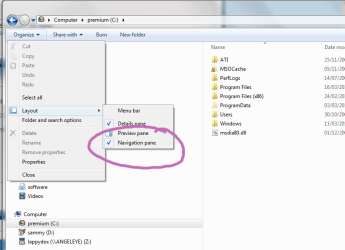
the button on your screenshot in your first post is for the preview pane. you need to use the 'organize' menu to control the explorer tree view (now called navigation pane).
the button on your screenshot in your first post is for the preview pane. you need to use the 'organize' menu to control the explorer tree view (now called navigation pane).
My Computer
- Computer Manufacturer/Model Number
- mickey megabyte 1234
- OS
- ultimate 64 sp1
- CPU
- i5 2500K [email protected]
- Motherboard
- MSI P67A-GD53
- Memory
- 8 gigs GSkill Ripjaws 1600
- Graphics Card(s)
- amd hd6950
- Sound Card
- creative x-fi gamer
- Monitor(s) Displays
- samsung 24"
- Screen Resolution
- 1920x1080
- Hard Drives
- ocz vertex 2e 60 gig, samsung f3 1tb, buffalo 2tb ext
- PSU
- antec 550
- Case
- antec three hundred
- Cooling
- i'm a cooling fan
- Keyboard
- saitek eclipse ii
- Mouse
- logitech g3
- Internet Speed
- about 4 Mbps
- Other Info
- i love win7

I want only that when I click the preview pane button the view change the display as a single folder to Explorer view
In XP there is a button named "Folders" that do exactly that
You mean like this?

My Computer
- OS
- Windows 7 Enterprise 64-bit
- CPU
- AMD Phenom II X4 3.0GHz
- Motherboard
- ASUS M5A97
- Memory
- 8GB G-Skill Ripjaws DDR3 1333
- Graphics Card(s)
- PNY GeForce 460 GTX 1GB OC - Enthusiast Edition
- Sound Card
- VIA High Definition Audio
- Monitor(s) Displays
- Dell 19"
- Screen Resolution
- 1280x1024
- Hard Drives
- 1TB - Primary
160GB - Secondary
250GB - External backup for important files
- PSU
- OCZ Fata1ty 700W Modular PSU
- Case
- ASUS
- Keyboard
- Microsoft Wireless Keyboard 2000
- Mouse
- Microsoft Wireless Mouse 2000
- Internet Speed
- 3 Mbps/768 kbps
yes.
I click on preview pane and I see like your pic
I re-click on preview pane and i see the single folder
Just click the button to the left of the preview pane button to change the view.
My Computer
- OS
- Windows 7 Enterprise 64-bit
- CPU
- AMD Phenom II X4 3.0GHz
- Motherboard
- ASUS M5A97
- Memory
- 8GB G-Skill Ripjaws DDR3 1333
- Graphics Card(s)
- PNY GeForce 460 GTX 1GB OC - Enthusiast Edition
- Sound Card
- VIA High Definition Audio
- Monitor(s) Displays
- Dell 19"
- Screen Resolution
- 1280x1024
- Hard Drives
- 1TB - Primary
160GB - Secondary
250GB - External backup for important files
- PSU
- OCZ Fata1ty 700W Modular PSU
- Case
- ASUS
- Keyboard
- Microsoft Wireless Keyboard 2000
- Mouse
- Microsoft Wireless Mouse 2000
- Internet Speed
- 3 Mbps/768 kbps
nooooooooooooooooooooo
I don't want change the icons. I want change the layout of explore. In the pic that I have post the first part of the pic have 2 rectange (the first with the list of the folder Gruppo Home, Collegamenti etc... and in the second rectangle there is the folder "Programmi") In the second part of the image that I have post the rectangle is only one. I want, when I click the preview pane ud and down from those 2 visualization
thnak's
I don't want change the icons. I want change the layout of explore. In the pic that I have post the first part of the pic have 2 rectange (the first with the list of the folder Gruppo Home, Collegamenti etc... and in the second rectangle there is the folder "Programmi") In the second part of the image that I have post the rectangle is only one. I want, when I click the preview pane ud and down from those 2 visualization
thnak's
My Computer
- OS
- Win 7
- Local time
- 10:49 PM
- Messages
- 7,146
i don't think you can get what you want...
the preview pane button only switches the preview pane on and off. you can't use the preview pane button to change your view - all it does it let you preview selected files.
maybe you need to look at alternative file managers which will work more like xp's explorer.
the preview pane button only switches the preview pane on and off. you can't use the preview pane button to change your view - all it does it let you preview selected files.
maybe you need to look at alternative file managers which will work more like xp's explorer.
My Computer
- Computer Manufacturer/Model Number
- mickey megabyte 1234
- OS
- ultimate 64 sp1
- CPU
- i5 2500K [email protected]
- Motherboard
- MSI P67A-GD53
- Memory
- 8 gigs GSkill Ripjaws 1600
- Graphics Card(s)
- amd hd6950
- Sound Card
- creative x-fi gamer
- Monitor(s) Displays
- samsung 24"
- Screen Resolution
- 1920x1080
- Hard Drives
- ocz vertex 2e 60 gig, samsung f3 1tb, buffalo 2tb ext
- PSU
- antec 550
- Case
- antec three hundred
- Cooling
- i'm a cooling fan
- Keyboard
- saitek eclipse ii
- Mouse
- logitech g3
- Internet Speed
- about 4 Mbps
- Other Info
- i love win7
Similar threads
- Replies
- 2
- Views
- 2K
- Replies
- 0
- Views
- 2K

- Replies
- 5
- Views
- 3K

- Replies
- 27
- Views
- 22K
- Replies
- 3
- Views
- 6K