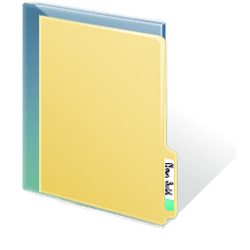
Solved How to change LIVE FOLDER ICON ?

Hmm. Lemme take a look when I get home. Don't worry. I think there were some other folders you needed to change. I remember doing this a while back LOL.

Repeated the process, and got everything fixed !!!

Really a nice process you explored for me , mate !! It can change any icon in windows. just voila. Thanks again, man :D :D :D :D

Whew! Good thing that worked. Thanks for giving us a follow up :D
 

My Computer

OS
Windows 7 x64
Whew! Good thing that worked. Thanks for giving us a follow up :D

It was my duty to give you feedback, friend. You taught me a superb lesson. :D :D
 

My Computer

Computer type
PC/Desktop
Computer Manufacturer/Model Number
Self Assembled
OS
Microsoft Windows 10 Pro Insider Preview 64-bit
CPU
Intel(R) Core(TM) i3-4130 CPU @ 3.40GHz
Motherboard
Gigabyte Technology Co., Ltd. B85M-D3H
Memory
Corsair Vengence 4GB x2 (8.00GB Dual-Channel DDR3 @ 798MHz)
Graphics Card(s)
2047MB GeForce GTS 450 (ZOTAC International)
Sound Card
Onboard (Realtek High Definition Audio)
Monitor(s) Displays
LG Flatron E2040T
Screen Resolution
1600x900
Hard Drives
Western Digital 1 TB
Seagate 500 GB
PSU
Corsair VS550
Case
Cooler Master K380
Cooling
Cooler Master Seidon 120V Plus
Keyboard
Logitech MK260r
Mouse
Logitech MK260r
Internet Speed
PMPL Broadband
Antivirus
Windows Defender + MBAM
Browser
Firefox
Other Info
Dell Studio 15" Laptop
What sizes do my .ico files need to include?

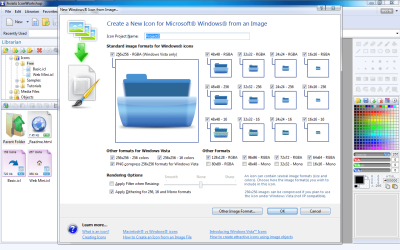
Great post thank you all for your questions and all the excellent informative answers. I have one question about making the icons, I use Axialis and IconFX, what sizes do I choose when making the .ico to put back in the file (imageres.dll)

Here is what I have been using to create and then change using Tuneup or Microangelo depending on the icon


256x256 RGBA, 128x128RGBA, 96x96RGBA, 72x72RGBA, 64x64RGBA, 48x48RGBA, 32x32RGBA, 24x24RGBA, 16x16RGBA
48x48 256, 32x32 256,24x24 256, 16x16 256
48x48 16, 32x32 16, 24x24 16, 16x16 16
PNG compress 256x256 formats for Windows Vista
Apply Dithering for 256, 16 and mono formats

Thanks again!
 

Attachments

  • Icon.png
    Icon.png
    87.7 KB · Views: 252

My Computer

Computer Manufacturer/Model Number
HP Pavilion DV6600 Laptop
OS
Windows 7 Ultimate 32bit
CPU
Intel Core Duo T5250
Great post thank you all for your questions and all the excellent informative answers. I have one question about making the icons, I use Axialis and IconFX, what sizes do I choose when making the .ico to put back in the file (imageres.dll)

Here is what I have been using to create and then change using Tuneup or Microangelo depending on the icon


256x256 RGBA, 128x128RGBA, 96x96RGBA, 72x72RGBA, 64x64RGBA, 48x48RGBA, 32x32RGBA, 24x24RGBA, 16x16RGBA
48x48 256, 32x32 256,24x24 256, 16x16 256
48x48 16, 32x32 16, 24x24 16, 16x16 16
PNG compress 256x256 formats for Windows Vista
Apply Dithering for 256, 16 and mono formats

Thanks again!
Hi ahamprema !
Actually I never built an icon, but a windows icon that supports all the view sizes and all the places for both vista and 7 includes all the checked sizes. ( once I extracted icons and converted to png to put them in dock, so I had to delete all the layers other than 256x256). All they are situated as various layers, one layer for one size. So the unchecked formats need not to be checked, and about the last line, I dont know what is this. You may try both the rendering options as trial and error :)

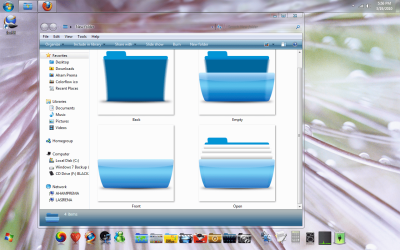
The icon you created is just nice, though it looks a bit like mac folder :D . Though it will not work as windows live folder (displaying a hint of the files contained). To create a live folder, you need to create three different icons - front, back and open (you may see an earlier screenshot posted by me, post no 14, where which is to be replaced to which is displayed). Wish you a good luck :D
 

My Computer

Computer type
PC/Desktop
Computer Manufacturer/Model Number
Self Assembled
OS
Microsoft Windows 10 Pro Insider Preview 64-bit
CPU
Intel(R) Core(TM) i3-4130 CPU @ 3.40GHz
Motherboard
Gigabyte Technology Co., Ltd. B85M-D3H
Memory
Corsair Vengence 4GB x2 (8.00GB Dual-Channel DDR3 @ 798MHz)
Graphics Card(s)
2047MB GeForce GTS 450 (ZOTAC International)
Sound Card
Onboard (Realtek High Definition Audio)
Monitor(s) Displays
LG Flatron E2040T
Screen Resolution
1600x900
Hard Drives
Western Digital 1 TB
Seagate 500 GB
PSU
Corsair VS550
Case
Cooler Master K380
Cooling
Cooler Master Seidon 120V Plus
Keyboard
Logitech MK260r
Mouse
Logitech MK260r
Internet Speed
PMPL Broadband
Antivirus
Windows Defender + MBAM
Browser
Firefox
Other Info
Dell Studio 15" Laptop
Thanks Archie for the quick response I have made the files as was listed earlier with open, empty, front and back. Is #3 & #4 meant to be the same image or is one for open folder (showing white pages) and one for empty (completely empty). They work great except like you pointed out they open on the felt except on the top like I need. Does anyone know of a way to have them open like mac on the top, in other words turned 90 counter clockwise on the top for the thumbnail view.

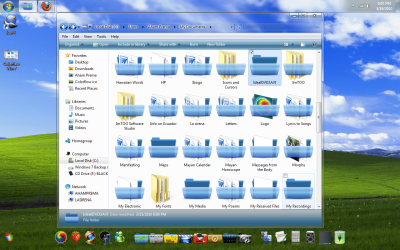
One other problem which I must be missing changing some images because some of the old folders show up in the views in the new folder aas you can see in the 2nd png image. Any thoughts which ones?

Thanks again Archie and all the great posts on this forum!
 

Attachments

  • Colorflow Win 7.png
    Colorflow Win 7.png
    320.3 KB · Views: 131
  • 3-19-2010 6-05-29 PM.png
    3-19-2010 6-05-29 PM.png
    273.3 KB · Views: 246

My Computer

Computer Manufacturer/Model Number
HP Pavilion DV6600 Laptop
OS
Windows 7 Ultimate 32bit
CPU
Intel Core Duo T5250
Fixed a few

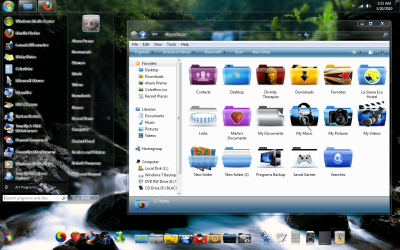
I got all the files the same and showing in all views thanks to all the posts. Still would love to know how possible it is to change the folder view to one for the mac style folders that opens from the top if anyone has any suggestions. This request may be a little out of my league and I realize I may have to settle for how the currently look but anm still hopefull that someone on here has the SKILLS!!

Here is what they look like>

Thanks again everyone. Great info on this forum some of it I could not find anywhere else.
 

Attachments

  • 3-20-2010 1-53-37 AM.png
    3-20-2010 1-53-37 AM.png
    340.4 KB · Views: 265

My Computer

Computer Manufacturer/Model Number
HP Pavilion DV6600 Laptop
OS
Windows 7 Ultimate 32bit
CPU
Intel Core Duo T5250
I got all the files the same and showing in all views thanks to all the posts. Still would love to know how possible it is to change the folder view to one for the mac style folders that opens from the top if anyone has any suggestions. This request may be a little out of my league and I realize I may have to settle for how the currently look but anm still hopefull that someone on here has the SKILLS!!

Here is what they look like>

Thanks again everyone. Great info on this forum some of it I could not find anywhere else.

Looks pretty cool! Carry on, friend. BTW, the transparent start menu is cool, too :)
I also want to get the mac style cover flow view ... but I know that is not possible (till date, who knows the future) :(
 

My Computer

Computer type
PC/Desktop
Computer Manufacturer/Model Number
Self Assembled
OS
Microsoft Windows 10 Pro Insider Preview 64-bit
CPU
Intel(R) Core(TM) i3-4130 CPU @ 3.40GHz
Motherboard
Gigabyte Technology Co., Ltd. B85M-D3H
Memory
Corsair Vengence 4GB x2 (8.00GB Dual-Channel DDR3 @ 798MHz)
Graphics Card(s)
2047MB GeForce GTS 450 (ZOTAC International)
Sound Card
Onboard (Realtek High Definition Audio)
Monitor(s) Displays
LG Flatron E2040T
Screen Resolution
1600x900
Hard Drives
Western Digital 1 TB
Seagate 500 GB
PSU
Corsair VS550
Case
Cooler Master K380
Cooling
Cooler Master Seidon 120V Plus
Keyboard
Logitech MK260r
Mouse
Logitech MK260r
Internet Speed
PMPL Broadband
Antivirus
Windows Defender + MBAM
Browser
Firefox
Other Info
Dell Studio 15" Laptop
I am using Microangelo and Tuneup 2010 as you can see in post #25 above som eof the icons are not resetting when I add the new imageres.dll. I have been restoring the icon cache and still they do not reset. I can go in and change them manually but this is very time consuming. Anyone had the same issue before and have a solution for this. I seems quite random except that the folders that are completely empty always seem to change to the new ones and the rest seem to change or not change randomly.

Thanks Arc for all your assistance and feedback!!
 

My Computer

Computer Manufacturer/Model Number
HP Pavilion DV6600 Laptop
OS
Windows 7 Ultimate 32bit
CPU
Intel Core Duo T5250
I am using Microangelo and Tuneup 2010 as you can see in post #25 above som eof the icons are not resetting when I add the new imageres.dll. I have been restoring the icon cache and still they do not reset. I can go in and change them manually but this is very time consuming. Anyone had the same issue before and have a solution for this. I seems quite random except that the folders that are completely empty always seem to change to the new ones and the rest seem to change or not change randomly.

Thanks Arc for all your assistance and feedback!!

Sorry friend. It's my guilt ! I should have adviced you to take a backup of imageres.dll. :( :confused:

However, it's a lengthy and laborious task to replace all the system icons one by one. As you are using TuneUp, You may try Windows 7 RC1 TuneUp Pack by ~Cheemster on deviantART , but it is not upto the mark.

If you dont mind, you may opt for a http://www.sevenforums.com/tutorials/3413-repair-install.html . If you dont like it, still go through the tutorial, it will bring all the system elements back, and you will be able to access your user data from windows.old .
 

My Computer

Computer type
PC/Desktop
Computer Manufacturer/Model Number
Self Assembled
OS
Microsoft Windows 10 Pro Insider Preview 64-bit
CPU
Intel(R) Core(TM) i3-4130 CPU @ 3.40GHz
Motherboard
Gigabyte Technology Co., Ltd. B85M-D3H
Memory
Corsair Vengence 4GB x2 (8.00GB Dual-Channel DDR3 @ 798MHz)
Graphics Card(s)
2047MB GeForce GTS 450 (ZOTAC International)
Sound Card
Onboard (Realtek High Definition Audio)
Monitor(s) Displays
LG Flatron E2040T
Screen Resolution
1600x900
Hard Drives
Western Digital 1 TB
Seagate 500 GB
PSU
Corsair VS550
Case
Cooler Master K380
Cooling
Cooler Master Seidon 120V Plus
Keyboard
Logitech MK260r
Mouse
Logitech MK260r
Internet Speed
PMPL Broadband
Antivirus
Windows Defender + MBAM
Browser
Firefox
Other Info
Dell Studio 15" Laptop
I think I may not have been clear in my last post the everything is working fine except not all the folders are changing to the new ones I have placed in the new imageres.dll. Some change and some do not, and doing a restore cache does not seem to add the new icons throughout Windows 7 especially in windows system files some change many do not so I have to change them manually with Microangelo if I what them to change. Microangelo just allows me to change any folder either in properties or by right clicking the file I want to chjange and choosing change icon. I am sure I have changed all the necessary icon groups but the folders still do not all change and it looks pretty random. When you have changed you icons do they all change throughout your windows?
 

My Computer

Computer Manufacturer/Model Number
HP Pavilion DV6600 Laptop
OS
Windows 7 Ultimate 32bit
CPU
Intel Core Duo T5250
I think I may not have been clear in my last post the everything is working fine except not all the folders are changing to the new ones I have placed in the new imageres.dll. Some change and some do not, and doing a restore cache does not seem to add the new icons throughout Windows 7 especially in windows system files some change many do not so I have to change them manually with Microangelo if I what them to change. Microangelo just allows me to change any folder either in properties or by right clicking the file I want to chjange and choosing change icon. I am sure I have changed all the necessary icon groups but the folders still do not all change and it looks pretty random. When you have changed you icons do they all change throughout your windows?
I may be joining this discussion a bit late but I was having the same issue with not all folders "changing" so I thought I would throw my two-pennorth worth in and joined the forum to share what I had discovered.

I've found the solution though, and (I think) what you will find is happening is that the folders that are not changing are the ones that contain sub-folders, but no files !!

What you need to do is create a folder back, with an inside, but no front similar to the attached images, or just a plain back, but then empty folders are not so easily spotted immediately.

You then need to place this in your imageres.dll file. The location to place your icon is:-
In Reshacker:- Icon Group 162
In Microangelo Librarian:- imageres 154
In Restorator:- Icon (Group) 162
In anything else:- You're on your own !!

B.T.W. The only icon sizes I create are:- 256x256 RGBA, 64x64RGBA, 48x48RGBA, 32x32RGBA, 24x24RGBA, 16x16RGBA. No problems so far.

Regards

Elmer BeFuddled
 

Attachments

  • ACTIVE Gn Back Multi.png
    ACTIVE Gn Back Multi.png
    16.9 KB · Views: 1,338
  • ACTIVE Gn Back.png
    ACTIVE Gn Back.png
    15.7 KB · Views: 1,337
Last edited:

My Computer

Computer Manufacturer/Model Number
One Man Band Build
OS
Windows 7 Home Premium O.E.M x64
CPU
DualCore Intel Pentium E5300, Wolfdale
Motherboard
ASRock G31-S
Memory
1x 2gb
Graphics Card(s)
Intel G33/G31 on board
Sound Card
Realtek ALC662 5.1 on board
Monitor(s) Displays
AOC 831S
Screen Resolution
1280x768
Hard Drives
Samsung 320gb SATA.
Maxtor 60gb Ultra ATA/100.
Maxtor 20gb Ultra ATA/100
PSU
A.N.Other 500W
Case
Misco (UK) own mark incl. PSU
Cooling
CPU + extra case fan, SpeedFan controlled.
Keyboard
Logitech wired
Mouse
Logitech Optical wired
Internet Speed
54Mbps (??) They TELL me.
Other Info
My dogs got fleas.
How to save imageres.dll & explorer.dll ?

How to save imageres.dll & explorer.dll ? When I hit save Restorator 2007 say access denied! I have full admin and take ownership. This part of the process is such a pain in the ass. My HD crashes and it has been a while since I have done this. Is there an easy way to save please can someone give me step by step to saving the imageres.dll with restorator 2007.

thanks 7F
 

My Computer

Computer Manufacturer/Model Number
HP Pavilion DV6600 Laptop
OS
Windows 7 Ultimate 32bit
CPU
Intel Core Duo T5250
same thing happened to me. forget about clearing thumb chache through command prompt. run disk clean up, be sure thumb cache is also checked in the what files to clean up directory and run it. now when you go to each folder on your disk be patient the system will need to compile a new data base for every file you open. ciao!
 

My Computer

Computer Manufacturer/Model Number
HP Mini 5101
OS
Windows 7 Ultimate 32 bit
CPU
Intel Atom Processor N280 1.66 GHz, 512kb L2 cache, 533fsb
Memory
2GB Kingston Technology HyperX DDR2 800 (PC2 6400) 200--Pin
Graphics Card(s)
Mobile Intel® Graphics Media Accelerator 950
Sound Card
AD1984 High Def Audio
Monitor(s) Displays
Samsung Syncmaster 2494 24" diagonal
Screen Resolution
1920 x 1080
Hard Drives
Western Digital 1 TB Scorpio Blue SATA 5200 RPM 8 MB Cache
Hitachi LifeStudio Desk 1TB USB 2.0 External Hard Drive
Alright guys,
So replace the icons use resource hacker.
How many pixels for the icon images?
And do I use .ico or another format?
thanks guys great thread.
 

My Computer

Computer Manufacturer/Model Number
HP DV7 CTo 3000
OS
Windows 7 Ultimate x64
CPU
Core i7 720 QM
Memory
4 GB
Graphics Card(s)
Nvidia GeForce GT 230 m
Hard Drives
OCZ Vertex 120 GB SSD
&
500 GB Seagate Momentus Hybrid 7200
Alright guys,
So replace the icons use resource hacker.
How many pixels for the icon images?
And do I use .ico or another format?
thanks guys great thread.
Hi :)

I have gathered all my learning here : http://www.sevenforums.com/tutorials/144807-folder-icon-change-default-icon.html .

You are to use only .ico format, coz only this format generates icons in a windows system .

Use IcoFX - The Free Icon Editor for making/ editing icons . Your icon should contain all the sizes of the first four colors .... to sit in different positions and different resolutions . Otherwise you may get a dialog "out of system resources" in resource hacker; but customization is not affected by that , if you have a 256x256 icon, that would be nice .
 

My Computer

Computer type
PC/Desktop
Computer Manufacturer/Model Number
Self Assembled
OS
Microsoft Windows 10 Pro Insider Preview 64-bit
CPU
Intel(R) Core(TM) i3-4130 CPU @ 3.40GHz
Motherboard
Gigabyte Technology Co., Ltd. B85M-D3H
Memory
Corsair Vengence 4GB x2 (8.00GB Dual-Channel DDR3 @ 798MHz)
Graphics Card(s)
2047MB GeForce GTS 450 (ZOTAC International)
Sound Card
Onboard (Realtek High Definition Audio)
Monitor(s) Displays
LG Flatron E2040T
Screen Resolution
1600x900
Hard Drives
Western Digital 1 TB
Seagate 500 GB
PSU
Corsair VS550
Case
Cooler Master K380
Cooling
Cooler Master Seidon 120V Plus
Keyboard
Logitech MK260r
Mouse
Logitech MK260r
Internet Speed
PMPL Broadband
Antivirus
Windows Defender + MBAM
Browser
Firefox
Other Info
Dell Studio 15" Laptop
NOOOOO! so close to chaning it :( can't save the imageres file. need permission from trustedinstaller. anyway the get by this?
 

My Computer

OS
Windows 7 Home Edition

My Computer

Computer type
PC/Desktop
Computer Manufacturer/Model Number
Self Assembled
OS
Microsoft Windows 10 Pro Insider Preview 64-bit
CPU
Intel(R) Core(TM) i3-4130 CPU @ 3.40GHz
Motherboard
Gigabyte Technology Co., Ltd. B85M-D3H
Memory
Corsair Vengence 4GB x2 (8.00GB Dual-Channel DDR3 @ 798MHz)
Graphics Card(s)
2047MB GeForce GTS 450 (ZOTAC International)
Sound Card
Onboard (Realtek High Definition Audio)
Monitor(s) Displays
LG Flatron E2040T
Screen Resolution
1600x900
Hard Drives
Western Digital 1 TB
Seagate 500 GB
PSU
Corsair VS550
Case
Cooler Master K380
Cooling
Cooler Master Seidon 120V Plus
Keyboard
Logitech MK260r
Mouse
Logitech MK260r
Internet Speed
PMPL Broadband
Antivirus
Windows Defender + MBAM
Browser
Firefox
Other Info
Dell Studio 15" Laptop
Back
Top