Show us your SSD performance

Status
Not open for further replies.
This is amazing. Over 500MB/sec transfer rate would correspond to about 5000Mb/sec - that is 5Gb/sec. I wonder how the Sata bus (3Gb/sec) handles that.

SATA bus handles it just fine as each SATA port gets 3Gb/s. So until SSD drives individually can push over 300MB/s the SATA 3.0Gb/s is more than adequate.

The entire drive controller obviously has some sort of limit, but I believe that with the Intel ICHxR controller can handle around 800MB/s in total.

I've heard that ICHR9 max is 600MB/s
 

My Computer My Computer

Computer Manufacturer/Model Number
Dell E4300
OS
Windows 7 Ultimate
CPU
Intel C2D SP9400
Motherboard
Intel GS45
Memory
2GB DDR3
Graphics Card(s)
Integrated =(
Sound Card
Integrated =(
Monitor(s) Displays
Matte LCD
Screen Resolution
1280x800
Hard Drives
Intel X25-M Gen 2 SSD
WD Caviar Black
Mouse
MX 518, V470 - Logitech
This is amazing. Over 500MB/sec transfer rate would correspond to about 5000Mb/sec - that is 5Gb/sec. I wonder how the Sata bus (3Gb/sec) handles that.

SATA bus handles it just fine as each SATA port gets 3Gb/s. So until SSD drives individually can push over 300MB/s the SATA 3.0Gb/s is more than adequate.

The entire drive controller obviously has some sort of limit, but I believe that with the Intel ICHxR controller can handle around 800MB/s in total.
Thanks for clarifying the "per port" capacity. I had genuinely forgotten that.
 

My Computer My Computer

Computer Manufacturer/Model Number
HP, Dell, Gateway, Toshiba - 4 laptops and 2 desktops
OS
Vista, Windows7, Mint Mate, Zorin, Windows 8
CPU
from 1.6GHz Duo to i7
Monitor(s) Displays
2x HP w2207
Hard Drives
5x HDD, 7x SSD, 12x Externals
Keyboard
with trackball - no mices
Mouse
Trackball mice
Internet Speed
DSL 6000
for anyone who is running two drives in raid 0, in your opinion, does the benefit of the increased speed outweigh the fact that trim support is lost by running the array? what do you do to compensate for the loss in trim support?
 

My Computer My Computer

Computer Manufacturer/Model Number
Rig 1
OS
Windows 7 Ultimate x64
CPU
AMD Phenom II X4 940 Black Edition @ 3.4GHz (AM2+)
Motherboard
Gigabyte GA-MA790X-UD4P (AM2+)
Memory
Corsair CM2X4096-8500C5 (4 X 2GB)
Graphics Card(s)
XFX Radeon HD 5770 / Diamond Radeon HD 5770 CrossFireX
Sound Card
Asus Xonar DS (PCI)
Monitor(s) Displays
Samsung SyncMaster 932bw+ (3)
Screen Resolution
4320x900
Hard Drives
OCZ Vertex 2 80 GB - Windows 7 System --
WD Caviar Black 1TB - Music, Movies, Vids, Pics --
WD Caviar Black 640GB - User Profiles & Games --
WD My Book 320GB external
PSU
Corsair CMPSU-750TX
Case
Cooler Master HAF 932
Cooling
Corsair Hydro Series H50
Keyboard
Logitech Desktop Wave
Mouse
Logitech LX8 Laser
Internet Speed
20 down / 2 up
Other Info
LG GGC-H20L Blu-Ray / HDDVD combo --
Hauppauge HVR-1250 --
Silverstone MFP-51 --
Logitech Webcam C600
for anyone who is running two drives in raid 0, in your opinion, does the benefit of the increased speed outweigh the fact that trim support is lost by running the array? what do you do to compensate for the loss in trim support?

If the Raid setup is used for the OS, I would prefer to keep my Trim. The added data transfer speed from a Raid is relatively irrelevant for the OS since it only reads small amounts of data. In fact I think, there is little to be gained with an SSD Raid setup for the OS all together. I single SSD has the same access time as the Raid - and that's what counts.
For a data disk, however, the situation might be different. But who can afford 2 SSDs large enough to accomodate masses of data.
 

My Computer My Computer

Computer Manufacturer/Model Number
HP, Dell, Gateway, Toshiba - 4 laptops and 2 desktops
OS
Vista, Windows7, Mint Mate, Zorin, Windows 8
CPU
from 1.6GHz Duo to i7
Monitor(s) Displays
2x HP w2207
Hard Drives
5x HDD, 7x SSD, 12x Externals
Keyboard
with trackball - no mices
Mouse
Trackball mice
Internet Speed
DSL 6000
For an operating system, I don't think there is much benefit to using a RAID 0 array. Of course the benchmarks and the graphs look outstanding....but the running of an operating system is mostly random reads/writes. It's really the access time improvement with SSD which makes the difference and you can get that with a single SSD drive. I guess that some will take 2 smaller SSD drives and stripe them together to make a larger capacity drive.
 

My Computer My Computer

Computer Manufacturer/Model Number
Self-Built in July 2009
OS
Windows 7 Ultimate x64
CPU
Intel Q9550 2.83Ghz OC'd to 3.40Ghz
Motherboard
Gigabyte GA-EP45-UD3R rev. 1.1, F12 BIOS
Memory
8GB G.Skill PI DDR2-800, 4-4-4-12 timings
Graphics Card(s)
EVGA 1280MB Nvidia GeForce GTX570
Sound Card
Realtek ALC899A 8 channel onboard audio
Monitor(s) Displays
23" Acer x233H
Screen Resolution
1920x1080
Hard Drives
Intel X25-M 80GB Gen 2 SSD
Western Digital 1TB Caviar Black, 32MB cache. WD1001FALS
PSU
Corsair 620HX modular
Case
Antec P182
Cooling
stock
Keyboard
ABS M1 Mechanical
Mouse
Logitech G9 Laser Mouse
Internet Speed
15/2 cable modem
Other Info
Windows and Linux enthusiast. Logitech G35 Headset.
I guess that some will take 2 smaller SSD drives and stripe them together to make a larger capacity drive.
I would not even do that in this case - unless the SSDs are puny. But a 30GB SSD is ample for the OS and a whole load of programs. If I had a second SSD, I would rather use it by itself as data partition. After nearly half a year of operation, my Win7 takes up 18GBs - and it is not a skimpy system, lots of programs installed
 

My Computer My Computer

Computer Manufacturer/Model Number
HP, Dell, Gateway, Toshiba - 4 laptops and 2 desktops
OS
Vista, Windows7, Mint Mate, Zorin, Windows 8
CPU
from 1.6GHz Duo to i7
Monitor(s) Displays
2x HP w2207
Hard Drives
5x HDD, 7x SSD, 12x Externals
Keyboard
with trackball - no mices
Mouse
Trackball mice
Internet Speed
DSL 6000
3.11.2010 6-51-18 PM.png

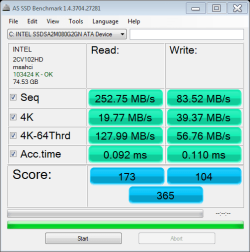
This is my new Intel X25-M 80GB, is my only drive in the system. Have two partitions on it, so far am very happy with it.
 

My Computer My Computer

Computer Manufacturer/Model Number
Custom Build
OS
Win 7 Ultimate x64
CPU
AMD x4 965 3.4 GHZ
Motherboard
MSI K9A2 Platinum
Memory
8GB Patriot Extreme Performance 6400
Graphics Card(s)
ATI Radeon HD 5750
Sound Card
Onboard 7.1 Digital Surround
Monitor(s) Displays
22" HD Viewsonic
Hard Drives
Intel X25-M 80GB
PSU
Kingwin Mach 1 800watt
Case
Antec P160W Anodized Toolless Case
Cooling
Asus Silent Knight
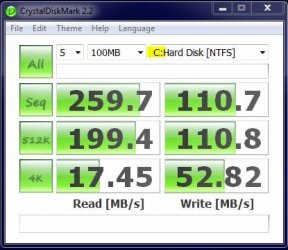
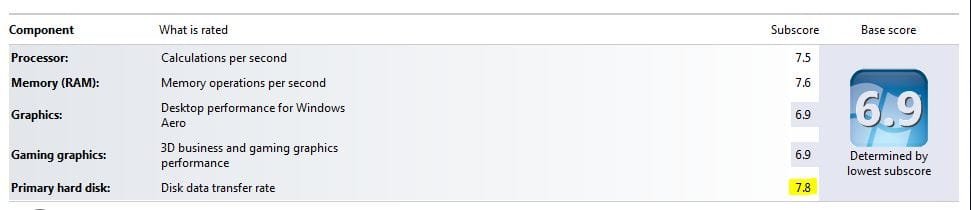
This is a CrystalDiskBenchmark immediately after installing Win7 and all my applications onto my new Intel X25-M 160GB SSD. WEI for SSD came in at 7.8.

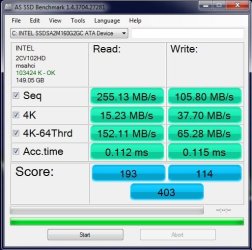
Then later ran the AS-SSD Benchmark. Haven't done enough research yet to know how these number fair with the average Intel 160GB. However, I do know it's much quicker than the old spinner! But the "4K" numbers don't look very impressive for an SSD. :( garuda.
 

Attachments

  • SSD - 1st Run.JPG
    SSD - 1st Run.JPG
    33.7 KB · Views: 7
  • SSD - 2st Run 3-21-10.JPG
    SSD - 2st Run 3-21-10.JPG
    49.4 KB · Views: 6
  • WEI for SSD.JPG
    WEI for SSD.JPG
    25.7 KB · Views: 14

My Computer My Computer

Computer type
PC/Desktop
Computer Manufacturer/Model Number
Homemade with cube tower
OS
Windows 7 Ultimate x64
CPU
2x - Xeon E5-2687W
Motherboard
ASUS Z9PE-D8 WS
Memory
128GB Kingston - (2ea kits – 4x16GB)
Graphics Card(s)
Gigabyte GTX-680 & EVGA GTX-Titan
Sound Card
Realtek ALC898 8-chan audio
Monitor(s) Displays
2ea - Samsung T260HD 25.5-Inch LCD HDTV / Monitors
Screen Resolution
1920x1200
Hard Drives
8 ea. Crucial & Samsung EVO 2TB SSDs; misc 4ea. 8TB external Seagate spinners.
PSU
Corsair AX-1200
Case
Lian-Li cube custom
Cooling
2x Dynatron R-17 - CPU Air sinks (160watts TDP)
Keyboard
HP slimline wireless
Mouse
Microsoft ARC
Internet Speed
Faster than a speeding bullet.
Antivirus
Norton Security 360 - 2020
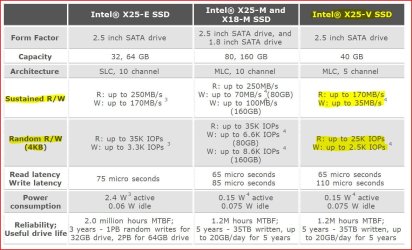
Anyone have a Intel X25-V 40GB?
I've only found benchies for the 80GB version, and they look really good.

Im curious what kind of numbers these 40GB ones are getting as I might want to pick one up.

Wishmaster,
I found this at the Intel SSD Center webpage; hope it's not too late. garuda:
 

Attachments

  • Intel X25 Specs.JPG
    Intel X25 Specs.JPG
    126 KB · Views: 87

My Computer My Computer

Computer type
PC/Desktop
Computer Manufacturer/Model Number
Homemade with cube tower
OS
Windows 7 Ultimate x64
CPU
2x - Xeon E5-2687W
Motherboard
ASUS Z9PE-D8 WS
Memory
128GB Kingston - (2ea kits – 4x16GB)
Graphics Card(s)
Gigabyte GTX-680 & EVGA GTX-Titan
Sound Card
Realtek ALC898 8-chan audio
Monitor(s) Displays
2ea - Samsung T260HD 25.5-Inch LCD HDTV / Monitors
Screen Resolution
1920x1200
Hard Drives
8 ea. Crucial & Samsung EVO 2TB SSDs; misc 4ea. 8TB external Seagate spinners.
PSU
Corsair AX-1200
Case
Lian-Li cube custom
Cooling
2x Dynatron R-17 - CPU Air sinks (160watts TDP)
Keyboard
HP slimline wireless
Mouse
Microsoft ARC
Internet Speed
Faster than a speeding bullet.
Antivirus
Norton Security 360 - 2020
for anyone who is running two drives in raid 0, in your opinion, does the benefit of the increased speed outweigh the fact that trim support is lost by running the array? what do you do to compensate for the loss in trim support?

Depends on what SSD you're using. Although Intel Rapid Storage Technology doesn't currently support TRIM in RAID (it might in the future), the Garbage Collection in the Vertex Firmware I'm running is more than sufficient to keep performance up over the 8 months or so I've been running RAID0. Complicated to set up? Not at all; I create the RAID array in the BIOS, install the OS (or restore an image) and it has run seamlessly. Nightly backups to my Windows Home Server alleviate concerns of the RAID array going sour but so far it hasn't.

I have similar W7 x64 images on a 2xVertex 30GB RAID0, a single Vertex and an Intel x25-Value drive and there is no comparison; the RAID0 array wins hands down by seat of the pants, by reboot times, and by benchmarking.
Tom
 

My Computer My Computer

Computer type
PC/Desktop
Computer Manufacturer/Model Number
Dell: XPS 420 (2), XPS M1330 (several), XPS 14z, Mini 9, Mini 10v
OS
W8 Pro, W7 Ultimate, XP Pro x64, Vista x64, Ubuntu
CPU
Q6600, Q6700, T7500, T7500, N270, N270
Motherboard
Dell
Memory
8GB, 8GB, 4GB, 4GB, 2GB, 2GB
Graphics Card(s)
ATI, nVidia, nVidia, nVidia, Intel, Intel
Monitor(s) Displays
Dell 2408WFP
Hard Drives
A drawer full. OCZ Vertex's in RAID 0. Vertex 3's, Vertex 4, Samsung 830's, Samsung 840's, Intel 330. Don't use dino drives any more except for servers.
Keyboard
Logitech Wave
Internet Speed
29 Mbps DL / .95 Mbps UL
Other Info
New project(2013)...Another low power server. Zotac H67ITX, i3-2100T, Windows Server 2012 Essentials on Samsung SSD.
Previous project...Low power (38-40 watts using Kill-a-Watt) Windows Home Server. Zotac ION (Atom 330, GeForce9400), 4GB RAM, 2x2TB WD Green, IN WIM miniITX Case. Fits on a shelf in laundry closet, practically silent.
Anyone have a Intel X25-V 40GB?
I've only found benchies for the 80GB version, and they look really good.

Im curious what kind of numbers these 40GB ones are getting as I might want to pick one up.

Wishmaster,
I found this at the Intel SSD Center webpage; hope it's not too late. garuda:


Thanks. Yes, already have it and Win7 sits on it now :)

I posted my AS SSD bench on the previous page. It feel faster than my Vertex, but the Vertex is a bit faster in Seq reads.

Im thinking the Vertex will be good for Documents and a game or 2. I think games will benefit more from the faster Seq read than the OS, but I could be wrong.

All in all, for a $120 SSD, cant really complain. They are worth it IMO.
 

My Computer My Computer

Computer Manufacturer/Model Number
Custom (Self Build)
OS
Windows 7 Home Premium 64bit
CPU
Intel Core i7 2700k
Motherboard
eVGA P67 SLI
Memory
8GB Mushkin Redline Ridgebacks @1866
Graphics Card(s)
EVGA GTX570 SC
Sound Card
XiFi Titanium HD
Monitor(s) Displays
LG W2453V
Screen Resolution
1920x1080
Hard Drives
Intel 320 80GB -- Intel X25-V 40GB --WD Black 1TB x2 -- WD Blue 640GB
PSU
Seasonic x750
Case
Corsair 600T SE White
Cooling
eVGA Superclocked CPU Cooler
Keyboard
Saitek Cyborg
Antivirus
Kaspersky
Browser
IE
Other Info
LG BD/DVD
I have similar Windows 7 x64 images on a 2xVertex 30GB RAID0, a single Vertex and an Intel x25-Value drive and there is no comparison; the RAID0 array wins hands down by seat of the pants, by reboot times, and by benchmarking.
Tom
Tom, do you have any data so that one can get a feel for the difference. E.g. my single Intel boots in under 15 seconds and I wonder how much faster that could be.
 

My Computer My Computer

Computer Manufacturer/Model Number
HP, Dell, Gateway, Toshiba - 4 laptops and 2 desktops
OS
Vista, Windows7, Mint Mate, Zorin, Windows 8
CPU
from 1.6GHz Duo to i7
Monitor(s) Displays
2x HP w2207
Hard Drives
5x HDD, 7x SSD, 12x Externals
Keyboard
with trackball - no mices
Mouse
Trackball mice
Internet Speed
DSL 6000

My Computer My Computer

Computer Manufacturer/Model Number
HP, Dell, Gateway, Toshiba - 4 laptops and 2 desktops
OS
Vista, Windows7, Mint Mate, Zorin, Windows 8
CPU
from 1.6GHz Duo to i7
Monitor(s) Displays
2x HP w2207
Hard Drives
5x HDD, 7x SSD, 12x Externals
Keyboard
with trackball - no mices
Mouse
Trackball mice
Internet Speed
DSL 6000
I have similar Windows 7 x64 images on a 2xVertex 30GB RAID0, a single Vertex and an Intel x25-Value drive and there is no comparison; the RAID0 array wins hands down by seat of the pants, by reboot times, and by benchmarking.
Tom
Tom, do you have any data so that one can get a feel for the difference. E.g. my single Intel boots in under 15 seconds and I wonder how much faster that could be.

I don't have data I can put my hands on quickly. If you're booting in 15 seconds, to coin a phrase "it don't get much better than that." You've probably reached the point of diminishing returns. Shaving even one second off that would be difficult (and unnecessary, really).
Eventually I would like to take a day and bench all three in succession. Problem is I don't know were to take the day from!!

As for boot/reboot.... the RAID0 is a bit quicker but now that I've added another eSATA card, the BIOS pauses for that so my reboot times are no longer in the 30 second range.

That's a good buy for the Vertex. They're probably making room for the next gen. Sandforce SSDs. I got one at that price when they ran a similar rebate a few weeks ago and I'm running it in a new Atom D510/Vertex 38-watt (@idle) Windows Home Server.
Tom
 

My Computer My Computer

Computer type
PC/Desktop
Computer Manufacturer/Model Number
Dell: XPS 420 (2), XPS M1330 (several), XPS 14z, Mini 9, Mini 10v
OS
W8 Pro, W7 Ultimate, XP Pro x64, Vista x64, Ubuntu
CPU
Q6600, Q6700, T7500, T7500, N270, N270
Motherboard
Dell
Memory
8GB, 8GB, 4GB, 4GB, 2GB, 2GB
Graphics Card(s)
ATI, nVidia, nVidia, nVidia, Intel, Intel
Monitor(s) Displays
Dell 2408WFP
Hard Drives
A drawer full. OCZ Vertex's in RAID 0. Vertex 3's, Vertex 4, Samsung 830's, Samsung 840's, Intel 330. Don't use dino drives any more except for servers.
Keyboard
Logitech Wave
Internet Speed
29 Mbps DL / .95 Mbps UL
Other Info
New project(2013)...Another low power server. Zotac H67ITX, i3-2100T, Windows Server 2012 Essentials on Samsung SSD.
Previous project...Low power (38-40 watts using Kill-a-Watt) Windows Home Server. Zotac ION (Atom 330, GeForce9400), 4GB RAM, 2x2TB WD Green, IN WIM miniITX Case. Fits on a shelf in laundry closet, practically silent.
I have similar W7 x64 images on a 2xVertex 30GB RAID0, a single Vertex and an Intel x25-Value drive and there is no comparison; the RAID0 array wins hands down by seat of the pants, by reboot times, and by benchmarking.
Tom
I'm guessing that if the reboot times are no comparison that the images are less similar than assumed. The true performance benefit of the SSD with regards to OS loading is fast access times...and this doesn't increase substantially with the addition of more spindles in a RAID array.


As for boot/reboot.... the RAID0 is a bit quicker
Ok, so the comment about there being "no comparison" between the single drive and the RAID 0 configuration with boot/reboot times might have been a bit of an exaggeration? :geek:
 

My Computer My Computer

Computer Manufacturer/Model Number
Self-Built in July 2009
OS
Windows 7 Ultimate x64
CPU
Intel Q9550 2.83Ghz OC'd to 3.40Ghz
Motherboard
Gigabyte GA-EP45-UD3R rev. 1.1, F12 BIOS
Memory
8GB G.Skill PI DDR2-800, 4-4-4-12 timings
Graphics Card(s)
EVGA 1280MB Nvidia GeForce GTX570
Sound Card
Realtek ALC899A 8 channel onboard audio
Monitor(s) Displays
23" Acer x233H
Screen Resolution
1920x1080
Hard Drives
Intel X25-M 80GB Gen 2 SSD
Western Digital 1TB Caviar Black, 32MB cache. WD1001FALS
PSU
Corsair 620HX modular
Case
Antec P182
Cooling
stock
Keyboard
ABS M1 Mechanical
Mouse
Logitech G9 Laser Mouse
Internet Speed
15/2 cable modem
Other Info
Windows and Linux enthusiast. Logitech G35 Headset.

My Computer My Computer

Computer Manufacturer/Model Number
Rig 1
OS
Windows 7 Ultimate x64
CPU
AMD Phenom II X4 940 Black Edition @ 3.4GHz (AM2+)
Motherboard
Gigabyte GA-MA790X-UD4P (AM2+)
Memory
Corsair CM2X4096-8500C5 (4 X 2GB)
Graphics Card(s)
XFX Radeon HD 5770 / Diamond Radeon HD 5770 CrossFireX
Sound Card
Asus Xonar DS (PCI)
Monitor(s) Displays
Samsung SyncMaster 932bw+ (3)
Screen Resolution
4320x900
Hard Drives
OCZ Vertex 2 80 GB - Windows 7 System --
WD Caviar Black 1TB - Music, Movies, Vids, Pics --
WD Caviar Black 640GB - User Profiles & Games --
WD My Book 320GB external
PSU
Corsair CMPSU-750TX
Case
Cooler Master HAF 932
Cooling
Corsair Hydro Series H50
Keyboard
Logitech Desktop Wave
Mouse
Logitech LX8 Laser
Internet Speed
20 down / 2 up
Other Info
LG GGC-H20L Blu-Ray / HDDVD combo --
Hauppauge HVR-1250 --
Silverstone MFP-51 --
Logitech Webcam C600
  • Like
Reactions: whs

My Computer My Computer

Computer Manufacturer/Model Number
HP, Dell, Gateway, Toshiba - 4 laptops and 2 desktops
OS
Vista, Windows7, Mint Mate, Zorin, Windows 8
CPU
from 1.6GHz Duo to i7
Monitor(s) Displays
2x HP w2207
Hard Drives
5x HDD, 7x SSD, 12x Externals
Keyboard
with trackball - no mices
Mouse
Trackball mice
Internet Speed
DSL 6000
Last edited:

My Computer My Computer

Computer Manufacturer/Model Number
Custom (Self Build)
OS
Windows 7 Home Premium 64bit
CPU
Intel Core i7 2700k
Motherboard
eVGA P67 SLI
Memory
8GB Mushkin Redline Ridgebacks @1866
Graphics Card(s)
EVGA GTX570 SC
Sound Card
XiFi Titanium HD
Monitor(s) Displays
LG W2453V
Screen Resolution
1920x1080
Hard Drives
Intel 320 80GB -- Intel X25-V 40GB --WD Black 1TB x2 -- WD Blue 640GB
PSU
Seasonic x750
Case
Corsair 600T SE White
Cooling
eVGA Superclocked CPU Cooler
Keyboard
Saitek Cyborg
Antivirus
Kaspersky
Browser
IE
Other Info
LG BD/DVD
Ok, so the comment about there being "no comparison" between the single drive and the RAID 0 configuration with boot/reboot times might have been a bit of an exaggeration? :geek:
Probably.....;)
 

My Computer My Computer

Computer type
PC/Desktop
Computer Manufacturer/Model Number
Dell: XPS 420 (2), XPS M1330 (several), XPS 14z, Mini 9, Mini 10v
OS
W8 Pro, W7 Ultimate, XP Pro x64, Vista x64, Ubuntu
CPU
Q6600, Q6700, T7500, T7500, N270, N270
Motherboard
Dell
Memory
8GB, 8GB, 4GB, 4GB, 2GB, 2GB
Graphics Card(s)
ATI, nVidia, nVidia, nVidia, Intel, Intel
Monitor(s) Displays
Dell 2408WFP
Hard Drives
A drawer full. OCZ Vertex's in RAID 0. Vertex 3's, Vertex 4, Samsung 830's, Samsung 840's, Intel 330. Don't use dino drives any more except for servers.
Keyboard
Logitech Wave
Internet Speed
29 Mbps DL / .95 Mbps UL
Other Info
New project(2013)...Another low power server. Zotac H67ITX, i3-2100T, Windows Server 2012 Essentials on Samsung SSD.
Previous project...Low power (38-40 watts using Kill-a-Watt) Windows Home Server. Zotac ION (Atom 330, GeForce9400), 4GB RAM, 2x2TB WD Green, IN WIM miniITX Case. Fits on a shelf in laundry closet, practically silent.
New Intel Drivers:
Intel(R) Rapid Storage Technology


They are supposed to support TRIM w/RAID.

Great news! I installed it and in the help dialog under "RAID enabled systems" it says this:

....Our application also provides support for the following features:...

Trim (Microsoft Windows 7* only)
This feature provides support for solid state disks (SSDs) that meet the ATA-8 protocol requirements. This feature optimizes write operations, helps devices reduce wear, and maintains unused storage area on devices as large as possible.

Tom​
 

My Computer My Computer

Computer type
PC/Desktop
Computer Manufacturer/Model Number
Dell: XPS 420 (2), XPS M1330 (several), XPS 14z, Mini 9, Mini 10v
OS
W8 Pro, W7 Ultimate, XP Pro x64, Vista x64, Ubuntu
CPU
Q6600, Q6700, T7500, T7500, N270, N270
Motherboard
Dell
Memory
8GB, 8GB, 4GB, 4GB, 2GB, 2GB
Graphics Card(s)
ATI, nVidia, nVidia, nVidia, Intel, Intel
Monitor(s) Displays
Dell 2408WFP
Hard Drives
A drawer full. OCZ Vertex's in RAID 0. Vertex 3's, Vertex 4, Samsung 830's, Samsung 840's, Intel 330. Don't use dino drives any more except for servers.
Keyboard
Logitech Wave
Internet Speed
29 Mbps DL / .95 Mbps UL
Other Info
New project(2013)...Another low power server. Zotac H67ITX, i3-2100T, Windows Server 2012 Essentials on Samsung SSD.
Previous project...Low power (38-40 watts using Kill-a-Watt) Windows Home Server. Zotac ION (Atom 330, GeForce9400), 4GB RAM, 2x2TB WD Green, IN WIM miniITX Case. Fits on a shelf in laundry closet, practically silent.
Status
Not open for further replies.
Back
Top