
Posted this a few days ago in the maintenance forum...probably should have been here...please review below and let me know if you can how to configure Bitdefender 2010 to run with Win 7 backups ?? No reply from BD support for going on 3 days...
Thanks, TR
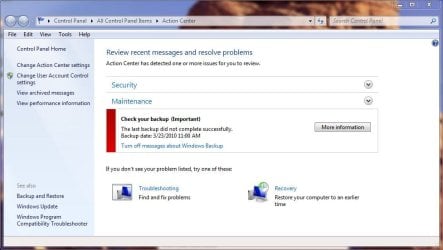
I have been unable to run basic Windows backup in my new install of Windows 7 Pro ? I keep getting repeated backup failed messages. I have attached 2 screen shots showing the errors .
Have no other backup software on this system
Any ideas on how to get the Windows 7 Pro backup system to work and/or what's causing the "access denied" message ?
Thanks guys...problem solved...partially. Also did a Google search and found a number of posts suggesting anti-virus software conflicts. I disabled my Bitdefender Internet Security 2010 AV and low and behold the manual backup went through smoothly.
However...this doesn't solve the auto backup issue which still fails if BD AV is enabled. Posted on Bitdefender site but based on other posts there...don't expect much help from BD support.
Any ideas on what or how to set an "exception" in Bitdefender (or other AV products) that might prevent the " access denied " issue when running Win 7 backup at night so I don't have to manually set up the backup process by disabling Bitdefender AV service ?
Thanks
Thanks, TR
I have been unable to run basic Windows backup in my new install of Windows 7 Pro ? I keep getting repeated backup failed messages. I have attached 2 screen shots showing the errors .
Have no other backup software on this system
Any ideas on how to get the Windows 7 Pro backup system to work and/or what's causing the "access denied" message ?
Thanks guys...problem solved...partially. Also did a Google search and found a number of posts suggesting anti-virus software conflicts. I disabled my Bitdefender Internet Security 2010 AV and low and behold the manual backup went through smoothly.
However...this doesn't solve the auto backup issue which still fails if BD AV is enabled. Posted on Bitdefender site but based on other posts there...don't expect much help from BD support.
Any ideas on what or how to set an "exception" in Bitdefender (or other AV products) that might prevent the " access denied " issue when running Win 7 backup at night so I don't have to manually set up the backup process by disabling Bitdefender AV service ?
Thanks
Attachments

My Computer
At a glance
Windows 7 Pro 64bit SP1AMD FX-6100 Six-Core Processor2ea Corsair-1333MHz-PC3-10666-240-pin-CMX4GX3...NVIDIA GeForce GT 630 - 1023MB (EVGA)
- Computer type
- PC/Desktop
- Computer Manufacturer/Model Number
- Self built
- OS
- Windows 7 Pro 64bit SP1
- CPU
- AMD FX-6100 Six-Core Processor
- Motherboard
- M5A78L-M LX PLUS
- Memory
- 2ea Corsair-1333MHz-PC3-10666-240-pin-CMX4GX3M1A1333C9
- Graphics Card(s)
- NVIDIA GeForce GT 630 - 1023MB (EVGA)
- Sound Card
- OnBoard Via High Def Audio
- Monitor(s) Displays
- Samsung 204B main - ASUS VS228 secondary
- Screen Resolution
- 1920x1080 main - 1920x1080 secondary
- Hard Drives
- Samsung SSD 840 128GB Win7 Pro 64bit - Western Digital WDC 465GB - Seagate 640GB Sata B/U - Maxtor 500GB Sata B/U - Maxtor 200GB Sata
- PSU
- Antec 650 watt
- Cooling
- Multiple case fans
- Keyboard
- MS USB dual Wireless Keyboard - IntelliType Pro
- Mouse
- MS USB dual Wireless Mouse - IntelliPoint
- Internet Speed
- Cox Cable
- Antivirus
- Bitdefender IS 2014
- Browser
- FireFox Primary - IE 11
- Other Info
- Hauppaguge Win TV HVR-1250 (Model 22xxx, Hybrid ATSC/QAM)
Samsung HD103SI USB 1TB Desktop Drive - Backup & Disk Image storage


