Location tab lost in My Pictures Properties

ustahl

New member
Member
Local time
4:48 PM
Messages
41
My picture files are in C:\Users\username\My Pictures. I want to move them to my D: drive.

I know that this should be done via the "Location" tab in "My Pictures Properties". Unfortunately this "Location" tab is missing, the existing tabs are "General, Security, Previous Versions, Customize". For comparison, the "Location" tab does exist in other the user folders, e.g. also in "Public Pictures Properties".

I have studied & tried Brink's tutorials on Changing and Restoring User Folders' Default Location, implementing his "Restore_Default_My_Pictures_Location.reg" file. Even after several (4-5) restarts the "Location" tab won't show up.

When I right-click the "Pictures" button in the Start Menu and choose "Properties->Restore Defaults", I am offered "Public Pictures (C:\Users\Public)" in Library Locations. This doesn't seem right to me. :confused:

I badly want to get the "Location" tab back for "My Pictures Properties", so it works like the other user folders, but I don't know how. :(

Pls help me.

Cheers Uffe
 

My Computer My Computer

At a glance

Win 7 x64 UltimateE8500 @ 4005 MHz4 GB Corsair 8500Geforce 275 @ 715 MHz
Computer Manufacturer/Model Number
Selfmade
OS
Win 7 x64 Ultimate
CPU
E8500 @ 4005 MHz
Motherboard
Asus Rampage Formula
Memory
4 GB Corsair 8500
Graphics Card(s)
Geforce 275 @ 715 MHz
Sound Card
X-Fi Fatal1ty Extreme Gamer
Monitor(s) Displays
LG Flatron Wide 22" LCD
Screen Resolution
1680 x 1050
Hard Drives
2 @ totally 1.75 TB internal
1 @ 1 TB external eSata
2 @ 0.9 TB external USB
PSU
BeQuiet 600W
Case
Antec P182
Cooling
5x120mm fans (3 in & 2 out), Zalman CNPS9700 NT
Keyboard
Logitech G15
Mouse
Logitech MX Revolution
Internet Speed
24 MB/s D/L

Attachments

  • copy 1.jpg
    copy 1.jpg
    212.1 KB · Views: 335
  • copy 2.jpg
    copy 2.jpg
    227.2 KB · Views: 179

My Computer My Computer

At a glance

Win 10 Pro x64Intel I5-2500K @3.3GHz16GB G.Skill Ripjaws X (4x4GB)EVGA GeForce 750 Ti SC 2GB
Computer type
PC/Desktop
Computer Manufacturer/Model Number
Self Built
OS
Win 10 Pro x64
CPU
Intel I5-2500K @3.3GHz
Motherboard
Asrock P67 Extreme4
Memory
16GB G.Skill Ripjaws X (4x4GB)
Graphics Card(s)
EVGA GeForce 750 Ti SC 2GB
Sound Card
ASUS Xonar DG 5.1 Channels 24-bit 96KHz PCI Interface Sound
Monitor(s) Displays
auria eq2367
Screen Resolution
1920 x 1080
Hard Drives
250GB Samsung 850 EVO SSD
1TB WD Blue
1TB Hitachi
PSU
SeaSonic X 650W 80 Plus Gold
Case
Corsair Obsidian 750D
Cooling
Corsair H60, Three 140mm case fans
Keyboard
Logitech Wireless Keyboard K520
Mouse
Logitech Wireless Mouse M310
Internet Speed
Wave Broadband ~ 100 dn 5 up
Antivirus
Windows Defender, Malwarebytes Premium
Browser
Edge, IE11, Chrome
Other Info
Laptop specs: HP g7-1365dx /
CPU: AMD A6-3420M APU with Radeon(tm) HD Graphics /
RAM: Crucial 8Gb (2x4Gb) /
SSD: Crucial M4-CT128M4SSD2 ATA Device/ FW 000F /
GFX: AMD Radeon HD 6520G /
OS: Windows 10 Pro x64
Derekimo, your thumbnail doesn't expand, Error 404. Pls check.

Cheers Uffe


Correction: Thumbnail working now.
 
Last edited:

My Computer My Computer

At a glance

Win 7 x64 UltimateE8500 @ 4005 MHz4 GB Corsair 8500Geforce 275 @ 715 MHz
Computer Manufacturer/Model Number
Selfmade
OS
Win 7 x64 Ultimate
CPU
E8500 @ 4005 MHz
Motherboard
Asus Rampage Formula
Memory
4 GB Corsair 8500
Graphics Card(s)
Geforce 275 @ 715 MHz
Sound Card
X-Fi Fatal1ty Extreme Gamer
Monitor(s) Displays
LG Flatron Wide 22" LCD
Screen Resolution
1680 x 1050
Hard Drives
2 @ totally 1.75 TB internal
1 @ 1 TB external eSata
2 @ 0.9 TB external USB
PSU
BeQuiet 600W
Case
Antec P182
Cooling
5x120mm fans (3 in & 2 out), Zalman CNPS9700 NT
Keyboard
Logitech G15
Mouse
Logitech MX Revolution
Internet Speed
24 MB/s D/L
Derekimo, your thumbnail doesn't expand, Error 404. Pls check.

Cheers Uffe

It's working for me, You want me to zip it up so you can d/l it?
 

My Computer My Computer

At a glance

Win 10 Pro x64Intel I5-2500K @3.3GHz16GB G.Skill Ripjaws X (4x4GB)EVGA GeForce 750 Ti SC 2GB
Computer type
PC/Desktop
Computer Manufacturer/Model Number
Self Built
OS
Win 10 Pro x64
CPU
Intel I5-2500K @3.3GHz
Motherboard
Asrock P67 Extreme4
Memory
16GB G.Skill Ripjaws X (4x4GB)
Graphics Card(s)
EVGA GeForce 750 Ti SC 2GB
Sound Card
ASUS Xonar DG 5.1 Channels 24-bit 96KHz PCI Interface Sound
Monitor(s) Displays
auria eq2367
Screen Resolution
1920 x 1080
Hard Drives
250GB Samsung 850 EVO SSD
1TB WD Blue
1TB Hitachi
PSU
SeaSonic X 650W 80 Plus Gold
Case
Corsair Obsidian 750D
Cooling
Corsair H60, Three 140mm case fans
Keyboard
Logitech Wireless Keyboard K520
Mouse
Logitech Wireless Mouse M310
Internet Speed
Wave Broadband ~ 100 dn 5 up
Antivirus
Windows Defender, Malwarebytes Premium
Browser
Edge, IE11, Chrome
Other Info
Laptop specs: HP g7-1365dx /
CPU: AMD A6-3420M APU with Radeon(tm) HD Graphics /
RAM: Crucial 8Gb (2x4Gb) /
SSD: Crucial M4-CT128M4SSD2 ATA Device/ FW 000F /
GFX: AMD Radeon HD 6520G /
OS: Windows 10 Pro x64
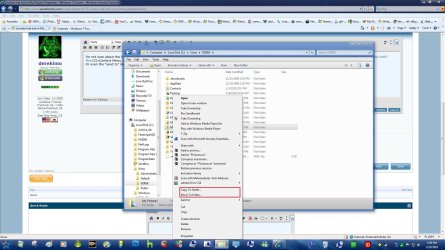
I'm not sure about the location tab, but have you tried moving them using this context menu add on http://www.sevenforums.com/tutorials/516-context-menu-add-copy-folder-move-folder.html?filter[2]=Context Menu, I use this everyday to move stuff around. You can choose exactly where you want to put them with these.
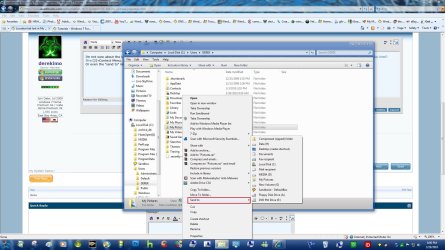
Or even the "send to" menu.
That will move the data but not adjust the path. The path adjustment you get only via the location tab.

What one can do, is move the files to a folder (e.g. in documents or any folder on D) and include that folder into the pictures library. That is not exactly the same thing, but close.

PS: just found an old thread when I had the same problem - which was solved thanks to Brink's help: http://www.vistax64.com/general-discussion/261897-lost-documents-folder-location-tab.html
 

My Computer My Computer

At a glance

Vista, Windows7, Mint Mate, Zorin, Windows 8from 1.6GHz Duo to i7
Computer Manufacturer/Model Number
HP, Dell, Gateway, Toshiba - 4 laptops and 2 desktops
OS
Vista, Windows7, Mint Mate, Zorin, Windows 8
CPU
from 1.6GHz Duo to i7
Monitor(s) Displays
2x HP w2207
Hard Drives
5x HDD, 7x SSD, 12x Externals
Keyboard
with trackball - no mices
Mouse
Trackball mice
Internet Speed
DSL 6000
@Derekimo: Thanks, but I have actually been using those context menu commands for quite some time already, but it's like WHS pointed out. Moving the data like that doesn't make the user folder path right, I need the Location tab for that to work correctly.

@WHS: I appreciate what you suggest, but it would put my pics in a "foreign" environment. OK, one could live with that, but it's not how the system is designed to work. I want to have things work as they should, although I seem to have screwn up somewhere along the line, and too long ago to get help from a restore point.:o

Gruss Uffe
 

My Computer My Computer

At a glance

Win 7 x64 UltimateE8500 @ 4005 MHz4 GB Corsair 8500Geforce 275 @ 715 MHz
Computer Manufacturer/Model Number
Selfmade
OS
Win 7 x64 Ultimate
CPU
E8500 @ 4005 MHz
Motherboard
Asus Rampage Formula
Memory
4 GB Corsair 8500
Graphics Card(s)
Geforce 275 @ 715 MHz
Sound Card
X-Fi Fatal1ty Extreme Gamer
Monitor(s) Displays
LG Flatron Wide 22" LCD
Screen Resolution
1680 x 1050
Hard Drives
2 @ totally 1.75 TB internal
1 @ 1 TB external eSata
2 @ 0.9 TB external USB
PSU
BeQuiet 600W
Case
Antec P182
Cooling
5x120mm fans (3 in & 2 out), Zalman CNPS9700 NT
Keyboard
Logitech G15
Mouse
Logitech MX Revolution
Internet Speed
24 MB/s D/L
but it's not how the system is designed to work
Well, look at it this way - we just redesigned it. LOL
 

My Computer My Computer

At a glance

Vista, Windows7, Mint Mate, Zorin, Windows 8from 1.6GHz Duo to i7
Computer Manufacturer/Model Number
HP, Dell, Gateway, Toshiba - 4 laptops and 2 desktops
OS
Vista, Windows7, Mint Mate, Zorin, Windows 8
CPU
from 1.6GHz Duo to i7
Monitor(s) Displays
2x HP w2207
Hard Drives
5x HDD, 7x SSD, 12x Externals
Keyboard
with trackball - no mices
Mouse
Trackball mice
Internet Speed
DSL 6000

My Computer My Computer

At a glance

Win 7 x64 UltimateE8500 @ 4005 MHz4 GB Corsair 8500Geforce 275 @ 715 MHz
Computer Manufacturer/Model Number
Selfmade
OS
Win 7 x64 Ultimate
CPU
E8500 @ 4005 MHz
Motherboard
Asus Rampage Formula
Memory
4 GB Corsair 8500
Graphics Card(s)
Geforce 275 @ 715 MHz
Sound Card
X-Fi Fatal1ty Extreme Gamer
Monitor(s) Displays
LG Flatron Wide 22" LCD
Screen Resolution
1680 x 1050
Hard Drives
2 @ totally 1.75 TB internal
1 @ 1 TB external eSata
2 @ 0.9 TB external USB
PSU
BeQuiet 600W
Case
Antec P182
Cooling
5x120mm fans (3 in & 2 out), Zalman CNPS9700 NT
Keyboard
Logitech G15
Mouse
Logitech MX Revolution
Internet Speed
24 MB/s D/L
You are a purist. I am already happy if it works - somehow.
 

My Computer My Computer

At a glance

Vista, Windows7, Mint Mate, Zorin, Windows 8from 1.6GHz Duo to i7
Computer Manufacturer/Model Number
HP, Dell, Gateway, Toshiba - 4 laptops and 2 desktops
OS
Vista, Windows7, Mint Mate, Zorin, Windows 8
CPU
from 1.6GHz Duo to i7
Monitor(s) Displays
2x HP w2207
Hard Drives
5x HDD, 7x SSD, 12x Externals
Keyboard
with trackball - no mices
Mouse
Trackball mice
Internet Speed
DSL 6000
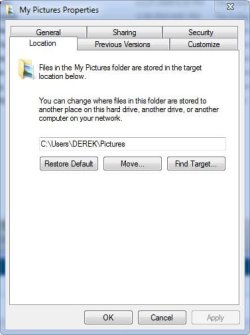
Is this the location tab you're missing?
 

Attachments

  • pic.JPG
    pic.JPG
    29.9 KB · Views: 59

My Computer My Computer

At a glance

Win 10 Pro x64Intel I5-2500K @3.3GHz16GB G.Skill Ripjaws X (4x4GB)EVGA GeForce 750 Ti SC 2GB
Computer type
PC/Desktop
Computer Manufacturer/Model Number
Self Built
OS
Win 10 Pro x64
CPU
Intel I5-2500K @3.3GHz
Motherboard
Asrock P67 Extreme4
Memory
16GB G.Skill Ripjaws X (4x4GB)
Graphics Card(s)
EVGA GeForce 750 Ti SC 2GB
Sound Card
ASUS Xonar DG 5.1 Channels 24-bit 96KHz PCI Interface Sound
Monitor(s) Displays
auria eq2367
Screen Resolution
1920 x 1080
Hard Drives
250GB Samsung 850 EVO SSD
1TB WD Blue
1TB Hitachi
PSU
SeaSonic X 650W 80 Plus Gold
Case
Corsair Obsidian 750D
Cooling
Corsair H60, Three 140mm case fans
Keyboard
Logitech Wireless Keyboard K520
Mouse
Logitech Wireless Mouse M310
Internet Speed
Wave Broadband ~ 100 dn 5 up
Antivirus
Windows Defender, Malwarebytes Premium
Browser
Edge, IE11, Chrome
Other Info
Laptop specs: HP g7-1365dx /
CPU: AMD A6-3420M APU with Radeon(tm) HD Graphics /
RAM: Crucial 8Gb (2x4Gb) /
SSD: Crucial M4-CT128M4SSD2 ATA Device/ FW 000F /
GFX: AMD Radeon HD 6520G /
OS: Windows 10 Pro x64
Is this the location tab you're missing?

Yes, Derek, that's the missing tab. I hope you have a solution for how to restore/rebuild/re-enact/reactivate/re... that missing tab.:thumbsup:

And WHS is right, I am a purist, I want my system to work smooth the right way. Even if I know how to make things work by force in undesigned ways, it disturbs me if I'm not able to get it work as designed. My system-tweaking-urge has obviously taken me too far for my own comfort.:doh:
Cheers Uffe
 

My Computer My Computer

At a glance

Win 7 x64 UltimateE8500 @ 4005 MHz4 GB Corsair 8500Geforce 275 @ 715 MHz
Computer Manufacturer/Model Number
Selfmade
OS
Win 7 x64 Ultimate
CPU
E8500 @ 4005 MHz
Motherboard
Asus Rampage Formula
Memory
4 GB Corsair 8500
Graphics Card(s)
Geforce 275 @ 715 MHz
Sound Card
X-Fi Fatal1ty Extreme Gamer
Monitor(s) Displays
LG Flatron Wide 22" LCD
Screen Resolution
1680 x 1050
Hard Drives
2 @ totally 1.75 TB internal
1 @ 1 TB external eSata
2 @ 0.9 TB external USB
PSU
BeQuiet 600W
Case
Antec P182
Cooling
5x120mm fans (3 in & 2 out), Zalman CNPS9700 NT
Keyboard
Logitech G15
Mouse
Logitech MX Revolution
Internet Speed
24 MB/s D/L

My Computer My Computer

At a glance

Win 10 Pro x64Intel I5-2500K @3.3GHz16GB G.Skill Ripjaws X (4x4GB)EVGA GeForce 750 Ti SC 2GB
Computer type
PC/Desktop
Computer Manufacturer/Model Number
Self Built
OS
Win 10 Pro x64
CPU
Intel I5-2500K @3.3GHz
Motherboard
Asrock P67 Extreme4
Memory
16GB G.Skill Ripjaws X (4x4GB)
Graphics Card(s)
EVGA GeForce 750 Ti SC 2GB
Sound Card
ASUS Xonar DG 5.1 Channels 24-bit 96KHz PCI Interface Sound
Monitor(s) Displays
auria eq2367
Screen Resolution
1920 x 1080
Hard Drives
250GB Samsung 850 EVO SSD
1TB WD Blue
1TB Hitachi
PSU
SeaSonic X 650W 80 Plus Gold
Case
Corsair Obsidian 750D
Cooling
Corsair H60, Three 140mm case fans
Keyboard
Logitech Wireless Keyboard K520
Mouse
Logitech Wireless Mouse M310
Internet Speed
Wave Broadband ~ 100 dn 5 up
Antivirus
Windows Defender, Malwarebytes Premium
Browser
Edge, IE11, Chrome
Other Info
Laptop specs: HP g7-1365dx /
CPU: AMD A6-3420M APU with Radeon(tm) HD Graphics /
RAM: Crucial 8Gb (2x4Gb) /
SSD: Crucial M4-CT128M4SSD2 ATA Device/ FW 000F /
GFX: AMD Radeon HD 6520G /
OS: Windows 10 Pro x64
Solved!

I fixed it!
Situation: I had moved my pics folder to my D:drive, where I want it to reside, along with other data folders & files, safely separate from my system drive C:, in case of a system crash. Folder D:\Pictures did not show in the Pictures Library nor did it display a Location tab. Also, the Pictures Library did not contain any folder.
With utility program EnhanceMySe7en I ran option "System Repair"(= Repair All System Components). I expected the operation to last quite some time, similar to SFC Scannow, but it took merely abt 2 minutes.:)

After this, as there still was no C:\Users\username\Pictures folder, I created that (empty) folder. Looking at this new Pictures folder's properties, the earlier missing Location tab now showed up.:D
It was now easy in the Locations tab to "move" this new empty Pictures folder to D:\Pictures, that contains my picture files. Now the Pictures Library points to D:\Pictures, as it's supposed to do.:)

Maybe my explanation is not very clear, and not sure if all described steps were really necessary, but it works now, and I consider my problem solved. I can now enjoy my purist system.;) :D (until further notice :sarc:)

Cheers Uffe
 

My Computer My Computer

At a glance

Win 7 x64 UltimateE8500 @ 4005 MHz4 GB Corsair 8500Geforce 275 @ 715 MHz
Computer Manufacturer/Model Number
Selfmade
OS
Win 7 x64 Ultimate
CPU
E8500 @ 4005 MHz
Motherboard
Asus Rampage Formula
Memory
4 GB Corsair 8500
Graphics Card(s)
Geforce 275 @ 715 MHz
Sound Card
X-Fi Fatal1ty Extreme Gamer
Monitor(s) Displays
LG Flatron Wide 22" LCD
Screen Resolution
1680 x 1050
Hard Drives
2 @ totally 1.75 TB internal
1 @ 1 TB external eSata
2 @ 0.9 TB external USB
PSU
BeQuiet 600W
Case
Antec P182
Cooling
5x120mm fans (3 in & 2 out), Zalman CNPS9700 NT
Keyboard
Logitech G15
Mouse
Logitech MX Revolution
Internet Speed
24 MB/s D/L
Thanks for the report. I had never heard of this program, but it seems to work. Is the program free - since it says "Pro" on their website.
 

My Computer My Computer

At a glance

Vista, Windows7, Mint Mate, Zorin, Windows 8from 1.6GHz Duo to i7
Computer Manufacturer/Model Number
HP, Dell, Gateway, Toshiba - 4 laptops and 2 desktops
OS
Vista, Windows7, Mint Mate, Zorin, Windows 8
CPU
from 1.6GHz Duo to i7
Monitor(s) Displays
2x HP w2207
Hard Drives
5x HDD, 7x SSD, 12x Externals
Keyboard
with trackball - no mices
Mouse
Trackball mice
Internet Speed
DSL 6000
I fixed it!
Situation: I had moved my pics folder to my D:drive, where I want it to reside, along with other data folders & files, safely separate from my system drive C:, in case of a system crash. Folder D:\Pictures did not show in the Pictures Library nor did it display a Location tab. Also, the Pictures Library did not contain any folder.
With utility program EnhanceMySe7en I ran option "System Repair"(= Repair All System Components). I expected the operation to last quite some time, similar to SFC Scannow, but it took merely abt 2 minutes.:)

After this, as there still was no C:\Users\username\Pictures folder, I created that (empty) folder. Looking at this new Pictures folder's properties, the earlier missing Location tab now showed up.:D
It was now easy in the Locations tab to "move" this new empty Pictures folder to D:\Pictures, that contains my picture files. Now the Pictures Library points to D:\Pictures, as it's supposed to do.:)

Maybe my explanation is not very clear, and not sure if all described steps were really necessary, but it works now, and I consider my problem solved. I can now enjoy my purist system.;) :D (until further notice :sarc:)

Cheers Uffe

Glad you got it. Thanks for posting your solution too, it will help in the future.
I'm gonna check out that utility you mentioned too.
You can click that red triangle in the upper right to mark this solved.
Derek
 

My Computer My Computer

At a glance

Win 10 Pro x64Intel I5-2500K @3.3GHz16GB G.Skill Ripjaws X (4x4GB)EVGA GeForce 750 Ti SC 2GB
Computer type
PC/Desktop
Computer Manufacturer/Model Number
Self Built
OS
Win 10 Pro x64
CPU
Intel I5-2500K @3.3GHz
Motherboard
Asrock P67 Extreme4
Memory
16GB G.Skill Ripjaws X (4x4GB)
Graphics Card(s)
EVGA GeForce 750 Ti SC 2GB
Sound Card
ASUS Xonar DG 5.1 Channels 24-bit 96KHz PCI Interface Sound
Monitor(s) Displays
auria eq2367
Screen Resolution
1920 x 1080
Hard Drives
250GB Samsung 850 EVO SSD
1TB WD Blue
1TB Hitachi
PSU
SeaSonic X 650W 80 Plus Gold
Case
Corsair Obsidian 750D
Cooling
Corsair H60, Three 140mm case fans
Keyboard
Logitech Wireless Keyboard K520
Mouse
Logitech Wireless Mouse M310
Internet Speed
Wave Broadband ~ 100 dn 5 up
Antivirus
Windows Defender, Malwarebytes Premium
Browser
Edge, IE11, Chrome
Other Info
Laptop specs: HP g7-1365dx /
CPU: AMD A6-3420M APU with Radeon(tm) HD Graphics /
RAM: Crucial 8Gb (2x4Gb) /
SSD: Crucial M4-CT128M4SSD2 ATA Device/ FW 000F /
GFX: AMD Radeon HD 6520G /
OS: Windows 10 Pro x64
Last edited:

My Computer My Computer

At a glance

Win 7 x64 UltimateE8500 @ 4005 MHz4 GB Corsair 8500Geforce 275 @ 715 MHz
Computer Manufacturer/Model Number
Selfmade
OS
Win 7 x64 Ultimate
CPU
E8500 @ 4005 MHz
Motherboard
Asus Rampage Formula
Memory
4 GB Corsair 8500
Graphics Card(s)
Geforce 275 @ 715 MHz
Sound Card
X-Fi Fatal1ty Extreme Gamer
Monitor(s) Displays
LG Flatron Wide 22" LCD
Screen Resolution
1680 x 1050
Hard Drives
2 @ totally 1.75 TB internal
1 @ 1 TB external eSata
2 @ 0.9 TB external USB
PSU
BeQuiet 600W
Case
Antec P182
Cooling
5x120mm fans (3 in & 2 out), Zalman CNPS9700 NT
Keyboard
Logitech G15
Mouse
Logitech MX Revolution
Internet Speed
24 MB/s D/L
Thanks Uffe, found the free version.
 

My Computer My Computer

At a glance

Vista, Windows7, Mint Mate, Zorin, Windows 8from 1.6GHz Duo to i7
Computer Manufacturer/Model Number
HP, Dell, Gateway, Toshiba - 4 laptops and 2 desktops
OS
Vista, Windows7, Mint Mate, Zorin, Windows 8
CPU
from 1.6GHz Duo to i7
Monitor(s) Displays
2x HP w2207
Hard Drives
5x HDD, 7x SSD, 12x Externals
Keyboard
with trackball - no mices
Mouse
Trackball mice
Internet Speed
DSL 6000
Back
Top