slowly maximize,minimize,opeening full screen windows?

Klnu2000

New member
Local time
7:09 PM
Messages
16
Hi all

i have aproblem in windows 7 and i dont know how to fix it

when i install a clean copy of windows 7 i notice that when i open windows in full screen its open slowly (cutting motion ) (creeper ) ?

is this normal ?

i got 9600m gt
sony vaio aw290
4 gb ram
2.6 t9550 cpu

i have the latest nvidia driver

please i need help
 

My Computer My Computer

At a glance

Windows 7
OS
Windows 7
You may have a bad torrent, I saw one yesterday that had that as a feature.
 

My Computer My Computer

At a glance

Windows 7 Ultimate Vista Ultimate x64Core 2 Duo E8500 3.16Ghz @ 3.8Ghz2x2Gigs Patriot PC2-6400 LLInno3D GeForce GTX260 216 SP
Computer Manufacturer/Model Number
Home Brew
OS
Windows 7 Ultimate Vista Ultimate x64
CPU
Core 2 Duo E8500 3.16Ghz @ 3.8Ghz
Motherboard
eVGA 750i FTW
Memory
2x2Gigs Patriot PC2-6400 LL
Graphics Card(s)
Inno3D GeForce GTX260 216 SP
Monitor(s) Displays
ASUS VW222U 22" 2ms Response time
Screen Resolution
1680x1050
Hard Drives
SATA 150GB
SATA II 250GB
USB IDE 750GB Ext.
PSU
HYTEC 600W & Thermaltake 650W Toughpower Power Exp
Case
Thermaltake Armor LCS (Liquid Cooling System)
Cooling
Liquid Cooling System
Keyboard
Logitech G15 Gaming Keyboard
Mouse
Logitech G9 Gaming Mouse
You may have a bad torrent, I saw one yesterday that had that as a feature.

please i dont understand what you mean with torrent ?

do you mean bad copy of windows that i download it buy torrent or what ?

if its a bad copy can you provide me with better one ?
 

My Computer My Computer

At a glance

Windows 7
OS
Windows 7
What build of Windows 7 have you installed? (type 'winver' in the Start menu search bar, the second line is the Version & Build) and is it x86 or x64 (32 or 64 bit)?

How did you originally get your copy of Windows 7?

If you need I can PM (Private Message) you links for a good installation.
 

My Computer My Computer

At a glance

Windows 7 Ultimate x64AMD Sempron Dual Core3GBNVIDIA GeForce 6150SE nForce 430
Computer Manufacturer/Model Number
Compaq Desktop
OS
Windows 7 Ultimate x64
CPU
AMD Sempron Dual Core
Memory
3GB
Graphics Card(s)
NVIDIA GeForce 6150SE nForce 430
Screen Resolution
1024x768
Hard Drives
150GB Sata
It's a driver issue. I have that slow-mo thing happen to me periodically. A reboot fixes it for me.
 

My Computer My Computer

At a glance

8 Pro x64i7 3770K 4.6GHz16GB G.Skill Trident X 2666mhzx2 EVGA 780 Ti Superclocked SLI
Computer type
PC/Desktop
Computer Manufacturer/Model Number
Systems by SmartEyeball
OS
8 Pro x64
CPU
i7 3770K 4.6GHz
Motherboard
ASUS P8Z77 WS
Memory
16GB G.Skill Trident X 2666mhz
Graphics Card(s)
x2 EVGA 780 Ti Superclocked SLI
Sound Card
SB X-FI Surround 5.1 PRO USB / ATH-AD900 Headphones
Monitor(s) Displays
x3 Dell U2410 / 58" Samsung
Screen Resolution
5760*1200/ 1920*1200
Hard Drives
2x Intel 520 240GB (RAID 0) * 2x WD Caviar Blacks 2TB (RAID 0) * 2TB WD Caviar Black * Sony Optirac DVD
PSU
Silverstone Strider Evolution 1200W
Case
Thermaltake Level 10 GT Snow Edition
Cooling
Noctua NH-D14
Keyboard
Topre Realforce // Ducky Shine MX Black // Filco Ninja TKL
Mouse
Thermaltake Theron (Highly Recommended) + Razer Imperator
Antivirus
MSE
Browser
IE, FF, WaterFox
Other Info
GT Extreme V2 Sim Racing Cockpit + 40" LCD and K/B Mouse stand ▼
Fanatec CSR Elite Wheel + Clubsport V1 Pedals + CSR shifter/7G-H ▼Saitek X52 Pro ▼ TrackIR 5 Pro
Buttkicker v2 Seat Rumbler with Dedicated 5.1 and Sub Woofer attached to frame ▼
=
Bloody Big Grin
windows vista 64 bit build 7077

note : this problem happen also in vista but its more in windows 7

i have post my problem every where no solve

i have read many problems like this and i wounder is this a hardware or software please mans i need serious help and if any body want me to explain what happen exactly i will do
 

My Computer My Computer

At a glance

Windows 7
OS
Windows 7
Orbital If you need I can PM (Private Message) you links for a good installation.[/quote said:
Please Do
 

My Computer My Computer

At a glance

Windows 7
OS
Windows 7
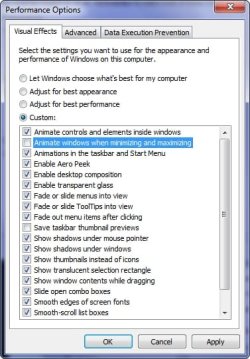
Have you tried to disable the minimise maximise animations to see how it goes?

2009-04-11_174734.jpg
 

My Computer My Computer

At a glance

Windows 7 Ultimate Vista Ultimate x64Core 2 Duo E8500 3.16Ghz @ 3.8Ghz2x2Gigs Patriot PC2-6400 LLInno3D GeForce GTX260 216 SP
Computer Manufacturer/Model Number
Home Brew
OS
Windows 7 Ultimate Vista Ultimate x64
CPU
Core 2 Duo E8500 3.16Ghz @ 3.8Ghz
Motherboard
eVGA 750i FTW
Memory
2x2Gigs Patriot PC2-6400 LL
Graphics Card(s)
Inno3D GeForce GTX260 216 SP
Monitor(s) Displays
ASUS VW222U 22" 2ms Response time
Screen Resolution
1680x1050
Hard Drives
SATA 150GB
SATA II 250GB
USB IDE 750GB Ext.
PSU
HYTEC 600W & Thermaltake 650W Toughpower Power Exp
Case
Thermaltake Armor LCS (Liquid Cooling System)
Cooling
Liquid Cooling System
Keyboard
Logitech G15 Gaming Keyboard
Mouse
Logitech G9 Gaming Mouse
It's a driver issue. I have that slow-mo thing happen to me periodically. A reboot fixes it for me.

Rely ??

Do you feel this also when maximize and when minimize and opening my computer icon in full screen

and its not apeer when you open any window in asmall screen ?

do you also feel that this thing disappear for 5 minutes when you change the refresh rate or dig any thing in nvidia control penal ?
 

My Computer My Computer

At a glance

Windows 7
OS
Windows 7
Have you tried to disable the minimise maximise animations to see how it goes?

View attachment 7891

Thank You For Responding

i will try this but way i pay a lot of money for buy a god graphic card if i will not use windows with full performance
 

My Computer My Computer

At a glance

Windows 7
OS
Windows 7
Yes I can see what you mean but to tell you the truth after I just disabled it, I think I like it, it seems allot snappier, everything is instant now.
 

My Computer My Computer

At a glance

Windows 7 Ultimate Vista Ultimate x64Core 2 Duo E8500 3.16Ghz @ 3.8Ghz2x2Gigs Patriot PC2-6400 LLInno3D GeForce GTX260 216 SP
Computer Manufacturer/Model Number
Home Brew
OS
Windows 7 Ultimate Vista Ultimate x64
CPU
Core 2 Duo E8500 3.16Ghz @ 3.8Ghz
Motherboard
eVGA 750i FTW
Memory
2x2Gigs Patriot PC2-6400 LL
Graphics Card(s)
Inno3D GeForce GTX260 216 SP
Monitor(s) Displays
ASUS VW222U 22" 2ms Response time
Screen Resolution
1680x1050
Hard Drives
SATA 150GB
SATA II 250GB
USB IDE 750GB Ext.
PSU
HYTEC 600W & Thermaltake 650W Toughpower Power Exp
Case
Thermaltake Armor LCS (Liquid Cooling System)
Cooling
Liquid Cooling System
Keyboard
Logitech G15 Gaming Keyboard
Mouse
Logitech G9 Gaming Mouse
Yes I can see what you mean but to tell you the truth after I just disabled it, I think I like it, it seems allot snappier, everything is instant now.

Mr GRiM

if this problem happens a laso in windows vista but its more in 7
do you think its normal do you think its adriver or bios updating matter

or its ahardware ?

note : i play games perfect also videos no problems
 

My Computer My Computer

At a glance

Windows 7
OS
Windows 7
I would agree with both smarteyeball & Mr GRiM. I would look mainly to try sorting out the drivers as your graphics card can clearly handle everything 7 has to offer at this stage.
 

My Computer My Computer

At a glance

Windows 7 Ultimate x64AMD Sempron Dual Core3GBNVIDIA GeForce 6150SE nForce 430
Computer Manufacturer/Model Number
Compaq Desktop
OS
Windows 7 Ultimate x64
CPU
AMD Sempron Dual Core
Memory
3GB
Graphics Card(s)
NVIDIA GeForce 6150SE nForce 430
Screen Resolution
1024x768
Hard Drives
150GB Sata
This would look to be a driver issue with both ATi & nVidia (if i read the links right :p). It would appear the only option to counter this would be as Mr GRiM suggested, altering the visual performace options. This will reduce visual effects but will add greater performance. Do ATi or nVidia actually have full Windows 7 support? (I aim this at Mr GRiM & smarteyeball).
 

My Computer My Computer

At a glance

Windows 7 Ultimate x64AMD Sempron Dual Core3GBNVIDIA GeForce 6150SE nForce 430
Computer Manufacturer/Model Number
Compaq Desktop
OS
Windows 7 Ultimate x64
CPU
AMD Sempron Dual Core
Memory
3GB
Graphics Card(s)
NVIDIA GeForce 6150SE nForce 430
Screen Resolution
1024x768
Hard Drives
150GB Sata
This would look to be a driver issue with both ATi & nVidia (if i read the links right :p). It would appear the only option to counter this would be as Mr GRiM suggested, altering the visual performace options. This will reduce visual effects but will add greater performance. Do ATi or nVidia actually have full Windows 7 support? (I aim this at Mr GRiM & smarteyeball).

Yes It both nvdia and ati
and its also both vista and windows 7

but if its way its not a general problem ? i mean way some people have the problem and some are not :sarc:

I aim this at Mr GRiM & smarteyeball
 

My Computer My Computer

At a glance

Windows 7
OS
Windows 7
I have all my drivers updated and working correctly and don't have any performance issues, maybe one of your drivers is causing the problem, maybe the chipset drivers or Video drivers are not 100% compatible, it's hard to say really without trying some different drivers and seeing if you notice any performance increase.

Is the driver you have from windows update or did you get it from the Nvidia Website?
 

My Computer My Computer

At a glance

Windows 7 Ultimate Vista Ultimate x64Core 2 Duo E8500 3.16Ghz @ 3.8Ghz2x2Gigs Patriot PC2-6400 LLInno3D GeForce GTX260 216 SP
Computer Manufacturer/Model Number
Home Brew
OS
Windows 7 Ultimate Vista Ultimate x64
CPU
Core 2 Duo E8500 3.16Ghz @ 3.8Ghz
Motherboard
eVGA 750i FTW
Memory
2x2Gigs Patriot PC2-6400 LL
Graphics Card(s)
Inno3D GeForce GTX260 216 SP
Monitor(s) Displays
ASUS VW222U 22" 2ms Response time
Screen Resolution
1680x1050
Hard Drives
SATA 150GB
SATA II 250GB
USB IDE 750GB Ext.
PSU
HYTEC 600W & Thermaltake 650W Toughpower Power Exp
Case
Thermaltake Armor LCS (Liquid Cooling System)
Cooling
Liquid Cooling System
Keyboard
Logitech G15 Gaming Keyboard
Mouse
Logitech G9 Gaming Mouse
I have all my drivers updated and working correctly and don't have any performance issues, maybe one of your drivers is causing the problem, maybe the chipset drivers or Video drivers are not 100% compatible, it's hard to say really without trying some different drivers and seeing if you notice any performance increase.

Is the driver you have from windows update or did you get it from the Nvidia Website?

will as you no i have a sony laptop that didn't accept third party drivers so when i want to use any defrent driver i must modify it i have been test three drivers

1- the nvidia driver that sony web site supprt and i think its old
2- nvidia driver from nvidia web site the newest one for desktops and laptops after modifying them
3- dox drivers they are some god drivers you can find them here

nVision -> Dox's Customized Forceware Releases

SO What you advise me to use Mr GRiM

can you give me alink for best driver for my 9600m gt graphic card

Note : Ididnt use adriver from windows update
 

My Computer My Computer

At a glance

Windows 7
OS
Windows 7
I think that the best one to use would be the 179.48 driver from Nvidia which is specifically for your card and if that doesn't work then I say uninstall all your drivers then reboot and see if windows update can find a suitable one, failing those options then maybe you will have to settle with turning those animations off.

GeForce Release 179
 

My Computer My Computer

At a glance

Windows 7 Ultimate Vista Ultimate x64Core 2 Duo E8500 3.16Ghz @ 3.8Ghz2x2Gigs Patriot PC2-6400 LLInno3D GeForce GTX260 216 SP
Computer Manufacturer/Model Number
Home Brew
OS
Windows 7 Ultimate Vista Ultimate x64
CPU
Core 2 Duo E8500 3.16Ghz @ 3.8Ghz
Motherboard
eVGA 750i FTW
Memory
2x2Gigs Patriot PC2-6400 LL
Graphics Card(s)
Inno3D GeForce GTX260 216 SP
Monitor(s) Displays
ASUS VW222U 22" 2ms Response time
Screen Resolution
1680x1050
Hard Drives
SATA 150GB
SATA II 250GB
USB IDE 750GB Ext.
PSU
HYTEC 600W & Thermaltake 650W Toughpower Power Exp
Case
Thermaltake Armor LCS (Liquid Cooling System)
Cooling
Liquid Cooling System
Keyboard
Logitech G15 Gaming Keyboard
Mouse
Logitech G9 Gaming Mouse
ok today i will format my laptop and install aclean copy of win7
and i will install the nvidia driver at the first and i will not install any else drivers and i will test if this thing happen

do you advice me another thing Mr GRiM before i format

and please Mr GRiM stay connect with me until i fix this problem
thanks for your help
 

My Computer My Computer

At a glance

Windows 7
OS
Windows 7
Back
Top