AMD Phenom 2 X4 965 Heating issues

also is it safe with it hitting 64C sometimes till i can get hold of the new heatsink also any suggested 1 would be great im looking to spen about £15-£30

Yes...you are safe
 

My Computer My Computer

At a glance

Windows 7 Ultimate (x64) SP1Intel 3770k 4.6GHz8GB (2x 4GB) Crucial BallistixSapphire 7950 (1060/1600)
Computer Manufacturer/Model Number
tw33k
OS
Windows 7 Ultimate (x64) SP1
CPU
Intel 3770k 4.6GHz
Motherboard
ASUS Maximus V Formula
Memory
8GB (2x 4GB) Crucial Ballistix
Graphics Card(s)
Sapphire 7950 (1060/1600)
Sound Card
On Board Realtek HD Audio
Monitor(s) Displays
27" Acer B273HU (via HDMI)
Screen Resolution
2048 x 1152
Hard Drives
Crucial M4 128GB
2TB WD Black
1TB Samsung F3 SATA
1TB WD Elite External
2TB WD USB 3.0
PSU
Corsair AX750 Gold
Case
Corsair Obsidian 800DW
Cooling
Corsair H100 (2x AP-121/2x UK-3000 push/pull)
Keyboard
Microsoft Wireless 5000
Mouse
Microsoft Wireless 5000
Internet Speed
5mb/s
Other Info
Logitech z-2300 2.1 speakers
Lamptron FC-5 v2
also is it safe with it hitting 64C sometimes till i can get hold of the new heatsink also any suggested 1 would be great im looking to spen about £15-£30

Like I said, 64c is no problem at all, you could spend months, maybe even years without problems.
Crysis at maximum settings is rather demanding on the system.

On the other hand, it is always better to keep temps as low as possible, to not strain your hardware too much.

The "Arctic-Cooling Freezer 7 Pro Rev.2" is a great cooler, one of the best, and it will bring the CPU temp down to approx. 44c, providing there is sufficient airflow.

How are the other temps? Mainboard?, Case? PSU?
How many fans? and how big?

Is there a fan at the top of the case?
A lot of cases are designed badly with airvents halfway at the back instead of at the top.
Hot air wants to go up, so the hot air stays trapped in the top of the case, no matter how many fans are working.

Do you have your cables all neatly tucked away or is it a cable salad inside?
Cables disrupt the airflow, creating turbulence.

The size of the case is a none issue.
I have the "Sharkoon Rush Case", a very, very small case, but airflow in it is so perfect, temperatures all around are very low.

Another advantage of being so small, is that the air has a very short distance to travel.

The heat dissipated by the graphics card is also a problem. It should find the shortest way out of the case, but many times people have a giant cooling block on it, but there is little sense in having a great cooler to dissipate the heat, while the hot air that comes from it has no where else to go but past the mainboard, past the CPU, through the PSU.

See my point?

The way the hot air travels is a crucial factor.
 

My Computer My Computer

At a glance

W7
OS
W7
If you have some spare time and change you might want to try the Arctic Cooling MX-3 thermal compound. From reviews, the MX-3 on average beats Arctic Silver 5 by 3.5 - 4.0 degrees under idle and full load. :p
 

My Computer My Computer

At a glance

Windows 7 ProfessionalIntel Core i7-2670QMSamsung 8GBNVIDIA GT 555M
OS
Windows 7 Professional
CPU
Intel Core i7-2670QM
Memory
Samsung 8GB
Graphics Card(s)
NVIDIA GT 555M
Hard Drives
Intel 525 120GB | HGST Travelstar 1TB
Mouse
CM Storm Xornet | Microsoft Sculpt Comfort
Internet Speed
25 Mbps | 600 Kbps
Other Info
Centrino 6205 | Seagate Backup Plus 1TB
If you have some spare time and change you might want to try the Arctic Cooling MX-3 thermal compound. From reviews, the MX-3 on average beats Arctic Silver 5 by 3.5 - 4.0 degrees under idle and full load. :p

Thanks for the tip. Will investigate.
 

My Computer My Computer

At a glance

W7
OS
W7
I'm a little curious as to what temperature we're talking about here...

There are two temperatures that come from a CPU as reported by most programs:

The core temperature, and the "CPU" temperature, and they are very, very different.

The core temperature is the on-die temperature, measured by a thermal diode inside the chip, and is reported by the CPU itself, and will ALWAYS be higher than the reported "CPU" temp. That is normal. The reported CPU temperature is from a sensor mounted near, or under the CPU, depending on the motherboard. The normal difference in those two temps on a Phenom II is roughly 7C to 11C, depending on the load, with the core temperature always being the higher value.

According to AMD, the maximum sustained operating temperature for a 965 BE is 62C, and that temperature is not the core temperature, it is the the temperature classified as Tcase (And it's completely different from Intel's temp rating) on a spec sheet, and it is the temperature measured on the outside of the core, on the metal part that the heat sink touches. The only way to get that temperature in the real world is to either machine a channel in the heat sink, and use a temperature probe like a thermal diode that touches the CPU case, or use an IR thermometer and measure several points on the CPU case where the heat sink doesn't touch and average them out (Not as accurate as the channel method.)

Getting Tcase up much higher than about 65C to 70C in a Phenom II will activate the throttle mechanism to reduce clock speed and power consumption, and much higher than that will activate the thermal trip and shut it down. I'm sorry, but nobody can keep a Phenom II running at 85C or higher for very long, if that is the reported (Tcase) CPU temp. Even getting the core that high isn't good.

For example, my Phenom II is a 920, 125W, and is overclocked to 3.4 GHz, so it's pretty much a 965 at stock speed. But if you do the math, my CPU is pushing 195+ Watts, and its CPU idle temp is usually 27C to 28C, and the core is roughly 34C. Under full load, running Prime95 for about 3 hours, the CPU temp gets no higher than 44C, and the core temp about 51C to 53C. That's when pushing 70 more Watts than the OP's chip! There is no way his chip should be getting in the temp range that it is. Prime95 is a lot more demanding than Crysis because the load is constant. With a stock heat sink and the temps the OP gave in the first post, I don't suggest running Prime95 to test it out until he gets a better heat sink.

We don't know what clock speed the OP is using, so it is a little hard to tell, but I think with the temps given, the problem could be:

1. Inadequate heat sink - especially if overclocking.
2. Poorly applied thermal paste
3. Inadequate case ventilation
4. HW Monitor is reporting the core temperature, rather than the CPU, or it's being misread somehow.

I would download something like Speedfan or CoreTemp to compare and verify that the temps are reading properly. Speedfan will identify the core temperature (AMD K10) separately, and the CPU temp is usually identified as Temp1. To be sure, load the CPU for a bit with the Speedfan window open and watch which temps climb fastest. It's usually Temp1 that shoots up. Using CoreTemp will give you an accurate second reading of the cores themselves. Keep in mind also that AMD's core temperature reading is done by calculations from an internal register. It is not an actual measured value, per se.

Heat is the enemy.

Edit: While I was typing that, there have been some further posts. I have to disagree with the idea that 64C on a long term basis is a good thing. If the OP is overclocking, I would suggest taking it back to stock until a new heat sink is purchased.
 

My Computer My Computer

At a glance

Win 7 Pro x64/Win 10 Pro x64 dual bootAMD FX 8350 Vishera @ 420016 GB Mushkin Blackline DDR3-2400 @ 1866 (9-1...XFX Radeon R9 280 Double D Black Edition
Computer type
PC/Desktop
Computer Manufacturer/Model Number
Mellon Labs (custom build)
OS
Win 7 Pro x64/Win 10 Pro x64 dual boot
CPU
AMD FX 8350 Vishera @ 4200
Motherboard
ASUS M5A97 R2.0
Memory
16 GB Mushkin Blackline DDR3-2400 @ 1866 (9-10-10-10-31)
Graphics Card(s)
XFX Radeon R9 280 Double D Black Edition
Sound Card
Realtek HD Audio on MB. Sounds great.
Monitor(s) Displays
Acer 24", Acer 22"
Screen Resolution
3840 x 1080
Hard Drives
1 x Mushkin Chronos 120 GB SSD (Win 10)
1 x Samsung 850 EVO 250 GB SSD (Win 7)
1 x WD 1TB SATA Blue
1 x WD 1TB SATA Green
PSU
Corsair TX-750
Case
CoolerMaster HAF 912+
Cooling
Coolermaster Seidon 240M Liquid AIO. 6 case fans
Keyboard
Logitech G710+
Mouse
Logitech G500s
Internet Speed
Much better since I got fiber, but still way overpriced.
Antivirus
MSE, Malware Bytes for scanning
Browser
Firefox
Other Info
Corsair VOID USB headphones.

A Mellon Labs X-1 - LCD Smartie driven system status display.

Brought to you by the letter E
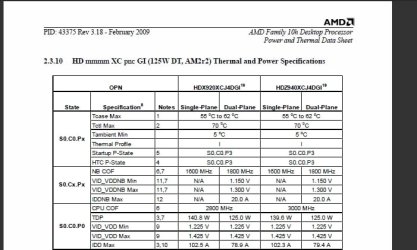
Just a little thermal information on 125 Watt Phenom II's from AMD's data sheet:

WEI006.jpg

The data refers to the 920 and 940 models, but the thermal envelope is pretty much the same for the 965 BE, as it has basically the same power dissipation at its rated clock speed, and an identical physical package. These numbers do not apply to the 140 Watt version of the 965 BE.

Tctl Max is the throttle temperature.
 

My Computer My Computer

At a glance

Win 7 Pro x64/Win 10 Pro x64 dual bootAMD FX 8350 Vishera @ 420016 GB Mushkin Blackline DDR3-2400 @ 1866 (9-1...XFX Radeon R9 280 Double D Black Edition
Computer type
PC/Desktop
Computer Manufacturer/Model Number
Mellon Labs (custom build)
OS
Win 7 Pro x64/Win 10 Pro x64 dual boot
CPU
AMD FX 8350 Vishera @ 4200
Motherboard
ASUS M5A97 R2.0
Memory
16 GB Mushkin Blackline DDR3-2400 @ 1866 (9-10-10-10-31)
Graphics Card(s)
XFX Radeon R9 280 Double D Black Edition
Sound Card
Realtek HD Audio on MB. Sounds great.
Monitor(s) Displays
Acer 24", Acer 22"
Screen Resolution
3840 x 1080
Hard Drives
1 x Mushkin Chronos 120 GB SSD (Win 10)
1 x Samsung 850 EVO 250 GB SSD (Win 7)
1 x WD 1TB SATA Blue
1 x WD 1TB SATA Green
PSU
Corsair TX-750
Case
CoolerMaster HAF 912+
Cooling
Coolermaster Seidon 240M Liquid AIO. 6 case fans
Keyboard
Logitech G710+
Mouse
Logitech G500s
Internet Speed
Much better since I got fiber, but still way overpriced.
Antivirus
MSE, Malware Bytes for scanning
Browser
Firefox
Other Info
Corsair VOID USB headphones.

A Mellon Labs X-1 - LCD Smartie driven system status display.

Brought to you by the letter E
I have to disagree with the idea that 64C on a long term basis is a good thing. If the OP is overclocking, I would suggest taking it back to stock until a new heat sink is purchased.

Nice and elaborate assessment. :thumbsup:

I agree with you it's not a good thing. Lower is better, I was just trying to point out his CPU is not in any imminent danger.
I haven't seen any mention of OC?

He should fix it, but spending a few weeks saving some money and finding the right cooler won't kill his CPU.

And again, even though the specs say 64c max, in my work as computer technician I have seen a multitude of much worse examples running for years without breaking it.

They did experience bsod's now and then, which they ofcourse blamed to Windows. :D

Every product out there has it's factory thresholds, but many people drive them outside the officially approved range.
There's always headroom.
 

My Computer My Computer

At a glance

W7
OS
W7
I haven't seen any mention of overclocking by the OP either, but my concern is that he might be, given the temps, and he might have upped the core voltage as well (or his motherboard is doing it with the CPU Vcore on Auto or something.) If so, he should really bring the chip back to stock while he saves for his new cooler.

If he isn't o/cing, he has a problem with his current cooler. We had a 965 at the office go full on overnight with all cores at 100% (still don't know why, but it's brand new, and the motherboard might be a little flaky) for hours in some kind of loop. When we got there in the morning, it was still running with the fan screaming, and the temp was about 49C. That is the stock Phenom cooler that is packaged with the CPU, and it was running about 4500 RPM, and it made a hell of a racket. I've never seen a CPU fan ever go faster than it's rated speed before, which in this case is around 3300 RPM.

If the OP's CPU is that hot, his fan must be making a lot of noise. :D

You can exceed the factory thresholds for a short time, but it drastically shortens the life of the component. AMD no doubt expects their CPUs will be pushed, and that's why there's a thermal trip in them. I spend my days dealing with ways to keep electronic components cool(er) and still get the maximum performance out of them. I've got 20+ years of designing with, and using electronic components, five of those years designing for harsh environments, so I do actually know of what I speak. Two of the best ways to kill an electronic component are too much heat, and too much voltage.

I'm not saying that the advice that was given was bad, because in a sense, you are correct. Older CPUs ran quite a bit hotter than the newer ones, and they ran for years. My old Barton core Athlon ran at about 75 to 80C all the time. Newer CPUs in the 65 and 45 nm class are pushing the envelope at their advertised specs already, due to the microscopic distances between the transistors on-die. Being able to dissipate the heat is crucial. That's the reason for the big heat spreaders on them, to make maximum thermal contact with the heat sink for better thermal transfer.

No disrespect intended, I just don't want the guy to get false hope and flame out his chip. 965's ain't cheap.

Cheers.

 

My Computer My Computer

At a glance

Win 7 Pro x64/Win 10 Pro x64 dual bootAMD FX 8350 Vishera @ 420016 GB Mushkin Blackline DDR3-2400 @ 1866 (9-1...XFX Radeon R9 280 Double D Black Edition
Computer type
PC/Desktop
Computer Manufacturer/Model Number
Mellon Labs (custom build)
OS
Win 7 Pro x64/Win 10 Pro x64 dual boot
CPU
AMD FX 8350 Vishera @ 4200
Motherboard
ASUS M5A97 R2.0
Memory
16 GB Mushkin Blackline DDR3-2400 @ 1866 (9-10-10-10-31)
Graphics Card(s)
XFX Radeon R9 280 Double D Black Edition
Sound Card
Realtek HD Audio on MB. Sounds great.
Monitor(s) Displays
Acer 24", Acer 22"
Screen Resolution
3840 x 1080
Hard Drives
1 x Mushkin Chronos 120 GB SSD (Win 10)
1 x Samsung 850 EVO 250 GB SSD (Win 7)
1 x WD 1TB SATA Blue
1 x WD 1TB SATA Green
PSU
Corsair TX-750
Case
CoolerMaster HAF 912+
Cooling
Coolermaster Seidon 240M Liquid AIO. 6 case fans
Keyboard
Logitech G710+
Mouse
Logitech G500s
Internet Speed
Much better since I got fiber, but still way overpriced.
Antivirus
MSE, Malware Bytes for scanning
Browser
Firefox
Other Info
Corsair VOID USB headphones.

A Mellon Labs X-1 - LCD Smartie driven system status display.

Brought to you by the letter E
thanks for all the good advice and suggestinos i will buy a Arctic-Cooling Freezer 7 Pro Rev.2 next week for my cpu and just to let you guys know it is not overcloked atm and is just running at stock speeds it idels at 45-50C normally but only reaches 64C when play less demanding games like MW2 for more than an hour or if i play high spec 1s like crysis for 10 mins.
 

My Computer My Computer

At a glance

Windows 7 Pro 32BitIntel Core 2 Quad Q94004GB DDR2 800MHzPoint Of View Nvidia GTX470
Computer Manufacturer/Model Number
Custom Built By Myself
OS
Windows 7 Pro 32Bit
CPU
Intel Core 2 Quad Q9400
Motherboard
ASUS P5G41C-M LX
Memory
4GB DDR2 800MHz
Graphics Card(s)
Point Of View Nvidia GTX470
Sound Card
6 Channel 5.1 VIA HD
Monitor(s) Displays
23" 1080P Samsung Sync Master 2333
Screen Resolution
1920X1080
Hard Drives
Samsung 750GB SATAII 7200RPM
PSU
XFX XXX Edition 650W
Case
Coolermaster Storm Scout Gaming Case
Cooling
Artic Cooling Pro REV 2, 3X 120MM Red Case Fans
Keyboard
Microsoft 600
Mouse
Microsoft Wireless Bluetrack 5000
Internet Speed
2MBs
I haven't seen any mention of overclocking by the OP either, but my concern is that he might be, given the temps, and he might have upped the core voltage as well (or his motherboard is doing it with the CPU Vcore on Auto or something.) If so, he should really bring the chip back to stock while he saves for his new cooler.

If he isn't o/cing, he has a problem with his current cooler. We had a 965 at the office go full on overnight with all cores at 100% (still don't know why, but it's brand new, and the motherboard might be a little flaky) for hours in some kind of loop. When we got there in the morning, it was still running with the fan screaming, and the temp was about 49C. That is the stock Phenom cooler that is packaged with the CPU, and it was running about 4500 RPM, and it made a hell of a racket. I've never seen a CPU fan ever go faster than it's rated speed before, which in this case is around 3300 RPM.

If the OP's CPU is that hot, his fan must be making a lot of noise. :D

You can exceed the factory thresholds for a short time, but it drastically shortens the life of the component. AMD no doubt expects their CPUs will be pushed, and that's why there's a thermal trip in them. I spend my days dealing with ways to keep electronic components cool(er) and still get the maximum performance out of them. I've got 20+ years of designing with, and using electronic components, five of those years designing for harsh environments, so I do actually know of what I speak. Two of the best ways to kill an electronic component are too much heat, and too much voltage.

I'm not saying that the advice that was given was bad, because in a sense, you are correct. Older CPUs ran quite a bit hotter than the newer ones, and they ran for years. My old Barton core Athlon ran at about 75 to 80C all the time. Newer CPUs in the 65 and 45 nm class are pushing the envelope at their advertised specs already, due to the microscopic distances between the transistors on-die. Being able to dissipate the heat is crucial. That's the reason for the big heat spreaders on them, to make maximum thermal contact with the heat sink for better thermal transfer.

No disrespect intended, I just don't want the guy to get false hope and flame out his chip. 965's ain't cheap.

Cheers.

No disrespect taken.:thumbsup:

I concur with everything you say.

In my initial post, I was indeed mistaking today's newest cpu's with previous generations.

At this moment I'm doing a 5hr burn-in test with Phenom X4 925 (95watts), ASUS M3N78-EM mainboard and 8GB Corsair DDR2 800mhz, and ATI Radeon 4850.
All at stock values.

All four cores are under 100% load and stay at 38c exactly.
This is the first multi-core cpu I had that has all cores at exactly the same temps.
Usually they would differ one or two degrees.

The CPU stays on 42c

Mainboard when idle was on 31c, and went only to 32 under full load, just one degree.
This means airflow is optimum.

GPU values went up around 5 degrees.

And all this in a very small case, "Sharkoon Rush Case". I love this thing.

I built a cooling block on the HDD and it never goes over 23c under stress.

The ambient temp which I measure with a probe at the warmest zone of the case reads 23c, just two degrees over the room temperature.

Best thing is that the fans are big and running slow, and almost silent.

I am very happy with this setup.
 

My Computer My Computer

At a glance

W7
OS
W7
thanks for all the good advice and suggestinos i will buy a Arctic-Cooling Freezer 7 Pro Rev.2

Hope not, that is the Intel model. You need the Freezer 64 Pro.
 

My Computer My Computer

At a glance

Win 7 Ultimate x64FX-8350 @ 4.6 GHz so farADATA XPG V1 Series Black 8GB DDR3 1600Sapphire R9 270x Dual-X
Computer type
PC/Desktop
Computer Manufacturer/Model Number
Me
OS
Win 7 Ultimate x64
CPU
FX-8350 @ 4.6 GHz so far
Motherboard
Asus M5A97 EVO
Memory
ADATA XPG V1 Series Black 8GB DDR3 1600
Graphics Card(s)
Sapphire R9 270x Dual-X
Sound Card
Xonar DGX w/ Corsair Vengence 1300
Monitor(s) Displays
Acer S232HL Abid
Screen Resolution
1920x1080
Hard Drives
120 GB OCZ Vertex 3
500 GB Seagate 7200.12
PSU
Antec Earthwatts 650W Green
Case
Antec Three Hundred
Cooling
Cooler Master 212 EVO
Keyboard
Logitech G510
Mouse
Logitech G500s
Internet Speed
35000/3000
thanks for all the good advice and suggestinos i will buy a Arctic-Cooling Freezer 7 Pro Rev.2

Hope not, that is the Intel model. You need the Freezer 64 Pro.

No you are mistaken Stormy, The Arctic-Cooling Freezer 7 Pro Rev.2 is suited for the following:

Socket 775, 939, AM2, AM2+, 1366, 1156, AM3
up to 130 Watt TDP

I am 100% sure, cause it's sitting happily on my Phenom. :D
 

My Computer My Computer

At a glance

W7
OS
W7
On a side note:

Ever notice the ridiculously thick layer of thermal paste on the stock coolers?

I always take it off, and apply one tiny drop of paste that I spread very finely with an old creditcard.

You should almost be able the see through the layer.

A slightly different POV for you...

That "thermal paste" is actually a phase change compound that softens and reflows with heat. It takes a while to settle in perfectly but it does shift it's way around and keep things cool. One of the more common production compounds of this variety is called "Thermstrate TC" and while it does take a few days of slightly higher temperatures it usually settles in within a degree or so of Arctic Silver.

I've been using Thermstrate in service work for quite some time and I find it perfectly adequate. The real nice part of this stuff is that each time the CPU gets over about 60c the compound liquifies and reflows, essentially renewing itself.

The hyper thin layer tactic many use is excellent if the heatsink and top plate mate perfectly... However, most consumer heatsinks are cut from extrusions or hot cast and the bottoms of them are antying but flat. It does take some thickness of application to ensure there are no air gaps between them. The excess is not usually a problem as it just ends up piled around the edge of the CPU top plate where it actually helps take some extra heat off the sides of the plate.

I've been at this for quite some time and as a rule I recommend phase change materials over pastes but if you are going to use paste, be sure to use more than the "ideal" recommended so that you get some gap filling ability out of it.
 

My Computer My Computer

At a glance

XP Pro SP3 X86 / Win7 Pro X86Amd 64 x2 4200 (2.4ghz)Kingston DDR2 800 2gbNvidia GF-8400
Computer Manufacturer/Model Number
Homebrew
OS
XP Pro SP3 X86 / Win7 Pro X86
CPU
Amd 64 x2 4200 (2.4ghz)
Motherboard
Asus M2N-MX SE Plus
Memory
Kingston DDR2 800 2gb
Graphics Card(s)
Nvidia GF-8400
Sound Card
Realtek on Motherboard
Monitor(s) Displays
Acer x-193bw
Screen Resolution
1440 x 900
Hard Drives
Western Digital 500g
PSU
350watt In-Win
Case
In-Win
Cooling
Air
Keyboard
yes
Mouse
yes
Internet Speed
5mpbs
Other Info
Also ASRock ION 330 as HTPC (on XP).
Acer Aspire as GP netbook (on XP).
You're right, they changed/added the bits so that one will go on AMD motherboards. If it was me i would still get the Freezer 64 Pro, if for no other reason than the mounting clip is for AMD boards only and unlike the Freezer 7 can be moved depending on which way the heatsink bracket is orientated (and the Freezer 64 is cheaper than the Freezer 7, anywhere from a couple of $$ to $12 on Newegg).
 

My Computer My Computer

At a glance

Win 7 Ultimate x64FX-8350 @ 4.6 GHz so farADATA XPG V1 Series Black 8GB DDR3 1600Sapphire R9 270x Dual-X
Computer type
PC/Desktop
Computer Manufacturer/Model Number
Me
OS
Win 7 Ultimate x64
CPU
FX-8350 @ 4.6 GHz so far
Motherboard
Asus M5A97 EVO
Memory
ADATA XPG V1 Series Black 8GB DDR3 1600
Graphics Card(s)
Sapphire R9 270x Dual-X
Sound Card
Xonar DGX w/ Corsair Vengence 1300
Monitor(s) Displays
Acer S232HL Abid
Screen Resolution
1920x1080
Hard Drives
120 GB OCZ Vertex 3
500 GB Seagate 7200.12
PSU
Antec Earthwatts 650W Green
Case
Antec Three Hundred
Cooling
Cooler Master 212 EVO
Keyboard
Logitech G510
Mouse
Logitech G500s
Internet Speed
35000/3000
i was looking round and found that some peoples stock heatsinks keep there CPU at 55C full load and my mate has the AM2 940 quad black edition on stock heatsink and runs at 56C full load just strange how some stay cool
 

My Computer My Computer

At a glance

Windows 7 Pro 32BitIntel Core 2 Quad Q94004GB DDR2 800MHzPoint Of View Nvidia GTX470
Computer Manufacturer/Model Number
Custom Built By Myself
OS
Windows 7 Pro 32Bit
CPU
Intel Core 2 Quad Q9400
Motherboard
ASUS P5G41C-M LX
Memory
4GB DDR2 800MHz
Graphics Card(s)
Point Of View Nvidia GTX470
Sound Card
6 Channel 5.1 VIA HD
Monitor(s) Displays
23" 1080P Samsung Sync Master 2333
Screen Resolution
1920X1080
Hard Drives
Samsung 750GB SATAII 7200RPM
PSU
XFX XXX Edition 650W
Case
Coolermaster Storm Scout Gaming Case
Cooling
Artic Cooling Pro REV 2, 3X 120MM Red Case Fans
Keyboard
Microsoft 600
Mouse
Microsoft Wireless Bluetrack 5000
Internet Speed
2MBs
is it worth turning off AMD cool'n Quite in bios to keep it cooler?
 

My Computer My Computer

At a glance

Windows 7 Pro 32BitIntel Core 2 Quad Q94004GB DDR2 800MHzPoint Of View Nvidia GTX470
Computer Manufacturer/Model Number
Custom Built By Myself
OS
Windows 7 Pro 32Bit
CPU
Intel Core 2 Quad Q9400
Motherboard
ASUS P5G41C-M LX
Memory
4GB DDR2 800MHz
Graphics Card(s)
Point Of View Nvidia GTX470
Sound Card
6 Channel 5.1 VIA HD
Monitor(s) Displays
23" 1080P Samsung Sync Master 2333
Screen Resolution
1920X1080
Hard Drives
Samsung 750GB SATAII 7200RPM
PSU
XFX XXX Edition 650W
Case
Coolermaster Storm Scout Gaming Case
Cooling
Artic Cooling Pro REV 2, 3X 120MM Red Case Fans
Keyboard
Microsoft 600
Mouse
Microsoft Wireless Bluetrack 5000
Internet Speed
2MBs
is it worth turning off AMD cool'n Quite in bios to keep it cooler?

That is the whole purpose of Cool and Quiet, to make the CPU run at a lower speed and voltage, saving power and running cooler.
 

My Computer My Computer

At a glance

Win 7 Ultimate x64FX-8350 @ 4.6 GHz so farADATA XPG V1 Series Black 8GB DDR3 1600Sapphire R9 270x Dual-X
Computer type
PC/Desktop
Computer Manufacturer/Model Number
Me
OS
Win 7 Ultimate x64
CPU
FX-8350 @ 4.6 GHz so far
Motherboard
Asus M5A97 EVO
Memory
ADATA XPG V1 Series Black 8GB DDR3 1600
Graphics Card(s)
Sapphire R9 270x Dual-X
Sound Card
Xonar DGX w/ Corsair Vengence 1300
Monitor(s) Displays
Acer S232HL Abid
Screen Resolution
1920x1080
Hard Drives
120 GB OCZ Vertex 3
500 GB Seagate 7200.12
PSU
Antec Earthwatts 650W Green
Case
Antec Three Hundred
Cooling
Cooler Master 212 EVO
Keyboard
Logitech G510
Mouse
Logitech G500s
Internet Speed
35000/3000
is it worth turning off AMD cool'n Quite in bios to keep it cooler?

Actually it would run a lot cooler with C&Q turned on...

I'm on a different AMD chip but with C&Q turned on my chip idles at about 900mhz ... yes that's right, under a gig... but rapidly gets up to it's full 2.5 ghz when placed under demand. It ramps up and down in about 10 steps between these two speeds. This makes at least a 10 degree temperature difference when the CPU is idling.
 

My Computer My Computer

At a glance

XP Pro SP3 X86 / Win7 Pro X86Amd 64 x2 4200 (2.4ghz)Kingston DDR2 800 2gbNvidia GF-8400
Computer Manufacturer/Model Number
Homebrew
OS
XP Pro SP3 X86 / Win7 Pro X86
CPU
Amd 64 x2 4200 (2.4ghz)
Motherboard
Asus M2N-MX SE Plus
Memory
Kingston DDR2 800 2gb
Graphics Card(s)
Nvidia GF-8400
Sound Card
Realtek on Motherboard
Monitor(s) Displays
Acer x-193bw
Screen Resolution
1440 x 900
Hard Drives
Western Digital 500g
PSU
350watt In-Win
Case
In-Win
Cooling
Air
Keyboard
yes
Mouse
yes
Internet Speed
5mpbs
Other Info
Also ASRock ION 330 as HTPC (on XP).
Acer Aspire as GP netbook (on XP).
well it is obvius that cool'n quite does wat it says but as it normally only kicks in when working hard it would keep cooler if it was off so fan spins all the time
 

My Computer My Computer

At a glance

Windows 7 Pro 32BitIntel Core 2 Quad Q94004GB DDR2 800MHzPoint Of View Nvidia GTX470
Computer Manufacturer/Model Number
Custom Built By Myself
OS
Windows 7 Pro 32Bit
CPU
Intel Core 2 Quad Q9400
Motherboard
ASUS P5G41C-M LX
Memory
4GB DDR2 800MHz
Graphics Card(s)
Point Of View Nvidia GTX470
Sound Card
6 Channel 5.1 VIA HD
Monitor(s) Displays
23" 1080P Samsung Sync Master 2333
Screen Resolution
1920X1080
Hard Drives
Samsung 750GB SATAII 7200RPM
PSU
XFX XXX Edition 650W
Case
Coolermaster Storm Scout Gaming Case
Cooling
Artic Cooling Pro REV 2, 3X 120MM Red Case Fans
Keyboard
Microsoft 600
Mouse
Microsoft Wireless Bluetrack 5000
Internet Speed
2MBs
I have a Arctic Cooling Pro Rev. 2 cooler I just purchased for my AMD Phenom II x4 940 processor and the heatsink does not cover the entire cpu. Is this normal? After I installed it the cpu temperature got up to 67 C in the bios hardware monitor before I finally turned the computer off and reinstalled the stock heatsink.

Thanks.
 

My Computer My Computer

At a glance

windows 7 Professional 64bit
OS
windows 7 Professional 64bit
Back
Top