Can't get installation past "Starting Windows"

bash

New member
Hey guys,

Pulling my hair out with this one, so figured I'd post here to see if anyone has any suggestions.

First, my setup:
Mobo: Asus A8R-MVP (BIOS 0503, last stable release)
Video: nVidia GeForce GT220
RAM: 3 GB DDR2
Main HD: 160GB IDE, with 3 partitions: [XP on #1 (20GB), Windows 7 aimed for #2 (50GB), and free space for the rest]
Other HDs: 2 x 1TB RAID1 (general storage)

If I launch the setup from a DVD, it gets past "Windows is loading files", then immediately freezes at "Starting Windows" (right before any of the coloured balloons show up...in fact, it hangs the instant the first orange pixel is displayed).

So, I tried launching the setup from Windows XP. Pointed it to the proper partition, it extracts the files, reboots, and the exact same thing happens. Can't get past the first orange pixel.

For both cases, I've tried pressing F8 on boot and selecting "safe mode" or "low resolution mode", but no dice. Safe mode seems to always get stuck on disk.sys, for what it's worth, but I understand that could even mean it's hanging on whatever the next driver is.

Other things I've tried:
-replaced nVidia video card with ATI x850, no difference
-removed all sticks of RAM except one, no difference
-removed all unused peripheral devices, no difference
-disabled all unused on-board devices, no difference

If anyone has any ideas or suggestions, I'm all ears. I've installed Windows 7 successfully so many times on different hardware, so I'm finding this completely mind-boggling.

Thanks for reading.

Bash
 

My Computer

OS
Windows 7
CPU
Pentium D 3.4ghz
Motherboard
Gigabyte GA-8N-SLI Pro
Memory
4gb DDR2 667mhz
Graphics Card(s)
ATI X1900XTX
Sound Card
onboard
Monitor(s) Displays
Dell 2007FP
Hard Drives
300gb Seagate SATAII
250gb Seagate SATAII
Case
Antec Sonata
Can you try using only 1GB (RAM) memory stick during installation, you can bring them back after the windows is installed.
 

My Computer

Computer Manufacturer/Model Number
Lenovo G450
OS
Windows 7 Ultimate 32bit (6.1, Build 7600)
CPU
Pentium R (Dual Core) T4300 2.1GHz
Memory
2GB DDR3 SDRAM
Graphics Card(s)
Intel GMA X4500
Hard Drives
320GB IDE HDD
Bash,
Just on a wild guess, Disconnect your two 1Tb drives.

Can you now install from DVD?

Remember, you can not do an "upgrade" install. You can not upgrade XP to Win7 directly but rather only by first updating to Vista SP1 and then to Win7.

Assuming you get a successful Win 7 install, do you plan to discard your XP?

I know that this will rattle a few cages (similar to when Win95 came out and people couldn't part from their beloved Win 3.51) but dual-boots to XP are a dying breed.
 

My Computer

Computer Manufacturer/Model Number
Toshiba Satellite S875D-S7239 laptop
OS
MS Windows 7 Ultimate SP1 64-bit
CPU
AMD A10-4600M
Motherboard
AMD Pumori (Socket FT1)
Memory
6.00 GB Dual-Channel DDR3 @ 798MHz (11-11-12-28)
Graphics Card(s)
AMD Radeon HD 7660G
Sound Card
High Definition Audio Device
Monitor(s) Displays
Generic PnP Monitor (1600x900@60Hz)
Screen Resolution
1600x900@60Hz
Hard Drives
SSD 119GB Corsair CSSD-V128GB2 ATA Device
Keyboard
Standard PS/2 Keyboard
Mouse
HP Wireless Optical Mobile Mouse Model FHA-3410
Internet Speed
What the local pub, local coffee shop offers.
Other Info
Optical Drive:MATSHITA BD-CMB UJ160B ATA Device


Also have an Asus ha1002xp netbook with Win 7 Ultimate installed.
Thanks for the replies!

Can you try using only 1GB (RAM) memory stick during installation, you can bring them back after the windows is installed.

Yup, tried that...still froze at the same spot.

Bash,
Just on a wild guess, Disconnect your two 1Tb drives.

Can you now install from DVD?

Remember, you can not do an "upgrade" install. You can not upgrade XP to Win7 directly but rather only by first updating to Vista SP1 and then to Win7.

Assuming you get a successful Win 7 install, do you plan to discard your XP?

I know that this will rattle a few cages (similar to when Win95 came out and people couldn't part from their beloved Win 3.51) but dual-boots to XP are a dying breed.

Question about disconnecting the two 1TB drives...that won't screw up the RAID or anything right? I'm a little raw when it comes to RAID knowledge, so I'm always paranoid about disconnecting RAID volumes and having them re-initialize or something when I hook them back up... :o

I do eventually want to get rid of XP, but since it's my main media centre right now, I just want to have something to fall back on until my Windows 7 install is 100% ready. Once that's done, I agree...no more dual-booting. XP is just to keep the wife happy until then...
 

My Computer

OS
Windows 7
CPU
Pentium D 3.4ghz
Motherboard
Gigabyte GA-8N-SLI Pro
Memory
4gb DDR2 667mhz
Graphics Card(s)
ATI X1900XTX
Sound Card
onboard
Monitor(s) Displays
Dell 2007FP
Hard Drives
300gb Seagate SATAII
250gb Seagate SATAII
Case
Antec Sonata
This has happened to me on occasion. Format the partition you are going to install on first and mark the partition as active. Also disconnect the the other hard drives you have and connect them later once you have things up and running. You need room for 2 primary partitions. Windows 7 creates a small boot partition if all goes well.

You could use gparted to format it. http://sourceforge.net/projects/gpa...ble/0.5.2-1/gparted-live-0.5.2-1.iso/download download and burn to disk and boot from it.
 

My Computer

Computer Manufacturer/Model Number
Built it myself.
OS
Main system i use is Linux Fedora. I also use Windows 7 Home Premium.
CPU
2.80 gigahertz AMD Athlon II X4 630
Motherboard
Gigabyte GA-MA770-US3
Memory
Corsair 4GIG
Graphics Card(s)
Nvidia Geforce GT 220
Sound Card
Realtek High Definition Audio
Monitor(s) Displays
Samsung SyncMaster 21.7
Hard Drives
Seagate Sata 1500 GB
SAMSUNG Sata 500GB
Hitachi Sata 320GB
Case
Coolmaster
Remove the obsolete RAID array and change SATA controller to AHCI first, then IDE mode if neccessary. Try install with a single HD.

Win7 seems to be allergic to RAID.

It is outdated technology now with built-in drive imaging, anyway.
 
Another voice saying:

Follow GregRocker's advice
 

My Computer

Computer Manufacturer/Model Number
Toshiba Satellite S875D-S7239 laptop
OS
MS Windows 7 Ultimate SP1 64-bit
CPU
AMD A10-4600M
Motherboard
AMD Pumori (Socket FT1)
Memory
6.00 GB Dual-Channel DDR3 @ 798MHz (11-11-12-28)
Graphics Card(s)
AMD Radeon HD 7660G
Sound Card
High Definition Audio Device
Monitor(s) Displays
Generic PnP Monitor (1600x900@60Hz)
Screen Resolution
1600x900@60Hz
Hard Drives
SSD 119GB Corsair CSSD-V128GB2 ATA Device
Keyboard
Standard PS/2 Keyboard
Mouse
HP Wireless Optical Mobile Mouse Model FHA-3410
Internet Speed
What the local pub, local coffee shop offers.
Other Info
Optical Drive:MATSHITA BD-CMB UJ160B ATA Device


Also have an Asus ha1002xp netbook with Win 7 Ultimate installed.
Thanks guys! I'll try this when I get home tonight and will post back.

Cheers,
Bash
 

My Computer

OS
Windows 7
CPU
Pentium D 3.4ghz
Motherboard
Gigabyte GA-8N-SLI Pro
Memory
4gb DDR2 667mhz
Graphics Card(s)
ATI X1900XTX
Sound Card
onboard
Monitor(s) Displays
Dell 2007FP
Hard Drives
300gb Seagate SATAII
250gb Seagate SATAII
Case
Antec Sonata
Well, bad news....disconnected the RAID array, leaving only the IDE drive and STILL the same problem.

I even deleted all but the one XP partition on the IDE drive, hoping to let the Windows 7 installation force me to create a new partition, but it won't even get that far.

So, unless I'm missing something, it seems that it's either related to my IDE drive or my motherboard. Everything else has been swapped or disabled, so I guess my next step is to pick up a SATA drive to try to do the install on.

Any other ideas?
 

My Computer

OS
Windows 7
CPU
Pentium D 3.4ghz
Motherboard
Gigabyte GA-8N-SLI Pro
Memory
4gb DDR2 667mhz
Graphics Card(s)
ATI X1900XTX
Sound Card
onboard
Monitor(s) Displays
Dell 2007FP
Hard Drives
300gb Seagate SATAII
250gb Seagate SATAII
Case
Antec Sonata
If u worried about u xp installation then i suggest u use a tool like true image 2009 (not 2010) to backup the windows XP partition to an external device such as a flash card or usb hard-drive so u can then delete any remaining partitions. Leave the drive unformatted and see if windows 7 will install after that.
It's a process of elimination.

How much RAM do u have?
 

My Computer

Computer Manufacturer/Model Number
Built it myself.
OS
Main system i use is Linux Fedora. I also use Windows 7 Home Premium.
CPU
2.80 gigahertz AMD Athlon II X4 630
Motherboard
Gigabyte GA-MA770-US3
Memory
Corsair 4GIG
Graphics Card(s)
Nvidia Geforce GT 220
Sound Card
Realtek High Definition Audio
Monitor(s) Displays
Samsung SyncMaster 21.7
Hard Drives
Seagate Sata 1500 GB
SAMSUNG Sata 500GB
Hitachi Sata 320GB
Case
Coolmaster
Exactly what is the fail point or error message?

Does Win7 see the HD?

Is XP booting correctly? Try running WIn7 installer from XP.
 
Exactly what is the fail point or error message?

Does Win7 see the HD?

Is XP booting correctly? Try running WIn7 installer from XP.

Fail point is before the actual installation even begins, so it doesn't even get a chance to see the HD!

Exact sequence of events (assuming Win7 install DVD is already inserted):
1) Computer powers on
2) Boot order is DVD drive first, so prompt says "Press any key to boot from CD"
3) When a key is pressed, very first screen says "Windows is loading files" with a progress bar
4) Progress bar reaches full, then screen changes to "Starting Windows"
5) First orange pixel of the famous colored ball sequence shows, but nothing else. Screen hangs on that "Starting Windows" screen with that single orange pixel. Have left it for several hours to no avail. So, I'm not even getting to the first step of installation!

XP is booting correctly, and I have tried running the installer from XP. In that case, the installer does its usual activity of copying setup files to hard drive, then begins expanding the files. Roughly 27% of the way through expansion, it says "a restart is needed". After restart, boot loader now shows "Earlier version of Windows" and "Windows Setup", and defaults to "Windows Setup" after 3 seconds. At this point, I get the same "Starting Windows" screen as described above and the same freeze at the single orange pixel.

Pretty strange, eh?
 

My Computer

OS
Windows 7
CPU
Pentium D 3.4ghz
Motherboard
Gigabyte GA-8N-SLI Pro
Memory
4gb DDR2 667mhz
Graphics Card(s)
ATI X1900XTX
Sound Card
onboard
Monitor(s) Displays
Dell 2007FP
Hard Drives
300gb Seagate SATAII
250gb Seagate SATAII
Case
Antec Sonata
1. Boot the 7 dvd to command prompt, type:

Diskpart

then press enter

Lis Vol

then press enter

make a note of what it says

EXI

Post what it says up here.

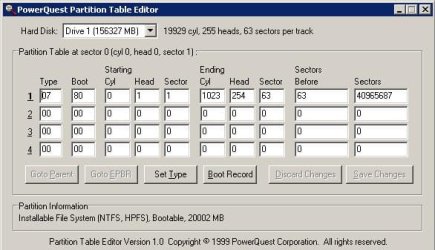
2. Boot into XP - have a look at the partition table with this: ( don't change any of the entries )

PTEDIT32.zip

post up what it says.

3. On the partition you are trying to install 7 onto, look in the $windows.~bt\Sources\Panther for setuperr.log

The last entry is usually revealing.
 
Last edited:

My Computers

System One System Two

  • Computer type
    PC/Desktop
    OS
    7 X64
    CPU
    i5 8400
    Motherboard
    gigabyte b365m ds3h
    Memory
    2x8gb 3200mhz
    Hard Drives
    various
    PSU
    pure power 11 400w cm
    Case
    Coolermaster
    Cooling
    cryorig m9i
  • Computer type
    PC/Desktop
    OS
    7x64
    CPU
    g5400
    Motherboard
    ga b365m ds3h
    Memory
    8gb ddr4 2400
    PSU
    xfx pro 450w
If u worried about u xp installation then i suggest u use a tool like true image 2009 (not 2010) to backup the windows XP partition to an external device such as a flash card or usb hard-drive so u can then delete any remaining partitions. Leave the drive unformatted and see if windows 7 will install after that.
It's a process of elimination.

How much RAM do u have?

Sorry, missed this post earlier.

I'd love to image it, but the family is so trained on the dual-boot setup (i.e. how to boot to 2nd OS if first is having issues), so I'd prefer to keep it that way if possible.

3GB of RAM in total (two 1 GB OCZ sticks, and two 512mb Corsair).
 

My Computer

OS
Windows 7
CPU
Pentium D 3.4ghz
Motherboard
Gigabyte GA-8N-SLI Pro
Memory
4gb DDR2 667mhz
Graphics Card(s)
ATI X1900XTX
Sound Card
onboard
Monitor(s) Displays
Dell 2007FP
Hard Drives
300gb Seagate SATAII
250gb Seagate SATAII
Case
Antec Sonata
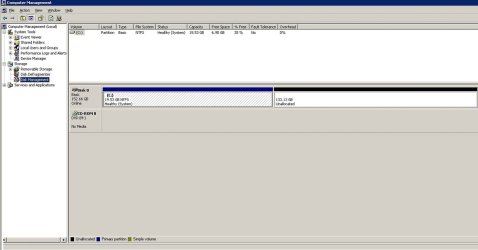
Ok, screenshots requested are below. Thoughts?

Unfortunately, I was not able to perform the "lis vol" command because I was unable to boot into safe mode w/ command prompt mode (when I tried, it hung on disk.sys again).

Re: setuperr.log, I forgot that part and I'd already blown away the partition. I'll redo that when I get home tonight and post those results.
 

Attachments

  • pic2.JPG
    pic2.JPG
    46.8 KB · Views: 16
  • pic.jpg
    pic.jpg
    106.6 KB · Views: 7

My Computer

OS
Windows 7
CPU
Pentium D 3.4ghz
Motherboard
Gigabyte GA-8N-SLI Pro
Memory
4gb DDR2 667mhz
Graphics Card(s)
ATI X1900XTX
Sound Card
onboard
Monitor(s) Displays
Dell 2007FP
Hard Drives
300gb Seagate SATAII
250gb Seagate SATAII
Case
Antec Sonata
Have you tried both methods of install (from XP and boot) since removing the RAID array? What are the differences exactly?

How is the HD recognized in BIOS setup and what settings are available for it?

Can you default to onboard graphics to try install?

Do you have another machine you can move HD to try Win7 install without booting XP? This has worked for me a dozen times when I ran out of time to troubleshoot failed install. If it will start when returned to problem machine it will swap out all of the drivers, requesting several restarts, and run normally. As long as you don't allow XP to start in other machine, it will not require a Repair Install when returned to old machine.

SIW2 (our top dual boot expert) will hopefully have other ideas if you follow his steps for info requested.
 
Have you tried both methods of install (from XP and boot) since removing the RAID array? What are the differences exactly?
Yup, have tried both methods since removing the RAID array and there are no differences at all (same freeze on same orange pixel).

How is the HD recognized in BIOS setup and what settings are available for it?
HD is recognized as Primary Master IDE #1. No real other IDE-related HD settings available in the BIOS (just a "Storage Configuration" that allows me to enable/disable the SATA controller)

Can you default to onboard graphics to try install?
Unfortunately, no onboard graphics available on this particular mobo. :(

Do you have another machine you can move HD to try Win7 install without booting XP? This has worked for me a dozen times when I ran out of time to troubleshoot failed install. If it will start when returned to problem machine it will swap out all of the drivers, requesting several restarts, and run normally. As long as you don't allow XP to start in other machine, it will not require a Repair Install when returned to old machine.

SIW2 (our top dual boot expert) will hopefully have other ideas if you follow his steps for info requested.

I do have another machine, and was thinking about this option this morning. I guess I'm just leaving this one as a last resort, so I don't have to mess up my beautiful cabling in my main PC! :p But yeah, if that's what I have to do, I'll do it.
 

My Computer

OS
Windows 7
CPU
Pentium D 3.4ghz
Motherboard
Gigabyte GA-8N-SLI Pro
Memory
4gb DDR2 667mhz
Graphics Card(s)
ATI X1900XTX
Sound Card
onboard
Monitor(s) Displays
Dell 2007FP
Hard Drives
300gb Seagate SATAII
250gb Seagate SATAII
Case
Antec Sonata
If u worried about u xp installation then i suggest u use a tool like true image 2009 (not 2010) to backup the windows XP partition to an external device such as a flash card or usb hard-drive so u can then delete any remaining partitions. Leave the drive unformatted and see if windows 7 will install after that.
It's a process of elimination.

How much RAM do u have?

Sorry, missed this post earlier.

I'd love to image it, but the family is so trained on the dual-boot setup (i.e. how to boot to 2nd OS if first is having issues), so I'd prefer to keep it that way if possible.

3GB of RAM in total (two 1 GB OCZ sticks, and two 512mb Corsair).

When u make a backup image with acronis 2009 it will also copy the boot sector as well and you can choose to reinstall the boot sector along with contents of the partition you backed up on any drive you wish.

In short the image can be installed on another hard drive if that is what concerns you. Acronis Home 2009 boot disc is very stable. Forget about 2010 as it is unreliable.
 

My Computer

Computer Manufacturer/Model Number
Built it myself.
OS
Main system i use is Linux Fedora. I also use Windows 7 Home Premium.
CPU
2.80 gigahertz AMD Athlon II X4 630
Motherboard
Gigabyte GA-MA770-US3
Memory
Corsair 4GIG
Graphics Card(s)
Nvidia Geforce GT 220
Sound Card
Realtek High Definition Audio
Monitor(s) Displays
Samsung SyncMaster 21.7
Hard Drives
Seagate Sata 1500 GB
SAMSUNG Sata 500GB
Hitachi Sata 320GB
Case
Coolmaster
Back
Top