Windows 7 install problem (Vista and XP dual boot)

canisarmani

New member
Local time
9:05 AM
Messages
1
I have a Vista laptop with xp and Vista installed because I do not want to give up xp, I enjoy it to much. I wanted to try Windows 7 so I set it up in a "triple boot" fashion. Vista and Windows 7 works great, but xp will not boot. It says I have a missing or corrupt hal.dll. When I uninstall Windows 7 and restore my backed up bootloader settings Windows xp boots up. I want to keep trying 7 but I don't want to give up xp, can this problem be fixed?
 

My Computer My Computer

OS
Vista, XP
How to solve basic Dual Boot Issues

Case 1: You have Dual Boot Win7 and XP/Vista and you lost the XP/Vista boot option at startup, but Win7 boots fine.

Solution:
1. Start Win7.

2. If you can see your XP/Vista partition in Computer, write down the drive letter (e.g. D:)

3. If you can't see the XP partition and you see all others but this one, open Control Panel - Adminstrative Tools - Computer Management -> Disk Management(left pane) and right-click the partition without a drive letter, choose "Change drive letters and paths" and assign a drive letter for the partition, e.g. D: .

4. Open an elevated command prompt and type the following lines followed by Enter for each line, changing the drive letter D: (in blue) with the one on your XP/Vista partition:

FOR RESTORING XP

Code:
[B]bcdedit /create {ntldr} /d "Windows XP"[/B]
 
[B]bcdedit /set {ntldr} device partition=D:[/B]
 
[B]bcdedit /set {ntldr} path \ntldr[/B]
 
[B]bcdedit /displayorder {ntldr} /addlast[/B]
FOR RESTORING VISTA

Code:
[B]bcdedit /copy {current} /d "Windows Vista"[/B]
(You will get a response saying that a new {UUID} was created successfully.
Write down or copy the new UUID.)

Code:
[B]bcdedit /set {[COLOR=blue]place_new_UUID_here[/COLOR]} device partition=[COLOR=blue]D:[/COLOR][/B]
 
[B]bcdedit /set {[COLOR=blue]place_new_UUID_here[/COLOR]} osdevice partition=[COLOR=blue]D:[/COLOR][/B]
5. Done

Case 2: You have Dual Boot Win7 and XP/Vista and you lost the Win7 boot option at startup, but XP/Vista boots fine.

Solution:
1. Insert the Win7 Installation DVD and boot your computer with it (as if you were making an installation).
2. At the first screen , select your language etc and press enter.
3. At the second screen, click "Repair Computer" at the bottom left.
4. Wait until startup repair is finished and reboot.
5. Done. You can now boot Win7.

Case 3: You have restored booting Win7 using the Case 2 method or other way, but now you've lost XP/VISTA .

Solution: Follow Case 1 Solution.


Case 4: You want Win7/Mac Dual Boot.

Solution: Follow these instructions: http://www.sevenforums.com/installation-setup/2774-osx-windows-7-dual-boot.html#post26210

Hope it helps.

Limneos
 
Last edited by a moderator:

My Computer My Computer

Computer Manufacturer/Model Number
ENIAC
OS
Windows 7 RC 7100 32bit/64bit
CPU
Intel Core2Duo E4500 2.20 GHz
Motherboard
ASUS P5LD2-X/1333
Memory
2x1GB Kinsgston DDR2 800MHz
Graphics Card(s)
Nvidia 8500GT
Sound Card
Onboard High Definition Audio Device
Monitor(s) Displays
Sony Bravia 42"
Case
LINKW 2222
Cooling
Standard Intel
Keyboard
Some cheap one
Mouse
Microsoft Intellimouse something
Internet Speed
24MBps ADSL
Case 2: You have Dual Boot Win7 and XP/Vista and you lost the Win7 boot option at startup, but XP/Vista boots fine.

Solution:
1. Insert the Win7 Installation DVD and boot your computer with it (as if you were making an installation).
2. At the first screen , select your language etc and press enter.
3. At the second screen, click "Repair Computer" at the bottom left.
4. Wait until startup repair is finished and reboot.
5. Done. You can now boot Win7.
I don't have DVD, help
 

My Computer My Computer

OS
windows 7

My Computer My Computer

Computer Manufacturer/Model Number
ENIAC
OS
Windows 7 RC 7100 32bit/64bit
CPU
Intel Core2Duo E4500 2.20 GHz
Motherboard
ASUS P5LD2-X/1333
Memory
2x1GB Kinsgston DDR2 800MHz
Graphics Card(s)
Nvidia 8500GT
Sound Card
Onboard High Definition Audio Device
Monitor(s) Displays
Sony Bravia 42"
Case
LINKW 2222
Cooling
Standard Intel
Keyboard
Some cheap one
Mouse
Microsoft Intellimouse something
Internet Speed
24MBps ADSL
Hello.
I have one question.
Which edition is better?
32 bit or 64 one?
 

My Computer My Computer

OS
Windows 7 7068 x86, Windows Server 2008
I have similar problem.

I am also using 3 OS. Win 7, Vista and XP. After i installed windows 7 my xp has crashed. It is showing me that \ntdlr is missing. My windows vista and seven are working fine.
Please help me.

Thank you
 

My Computer My Computer

OS
Win 7, Win Vista, and Windows XP (Triple Boot)
I am also using 3 OS. Win 7, Vista and XP. After i installed windows 7 my xp has crashed. It is showing me that \ntdlr is missing. My windows vista and seven are working fine.
Please help me.

Thank you

Well probably you cant boot you XP because boot files are located to another location, because the fact that you have three OS systems.
My advice, true to run one OS and use VMWare workstation to create virtual machines for the other ones.
 

My Computer My Computer

OS
Windows 7 7068 x86, Windows Server 2008
I am also using 3 OS. Win 7, Vista and XP. After i installed windows 7 my xp has crashed. It is showing me that \ntdlr is missing. My windows vista and seven are working fine.
Please help me.

Thank you

Scroll up the solution was given. If you don't like using command line you can use EasyBCD - Edit Boot Configuration Data (BCD) in Windows Vista | Windows Reference

Case 1: You have Dual Boot Win7 and XP/Vista and you lost the XP/Vista boot option at startup, but Win7 boots fine.

Solution:
1. Start Win7.

2. If you can see your XP/Vista partition in Computer, write down the drive letter (e.g. D:)

3. If you can't see the XP partition and you see all others but this one, open Control Panel - Adminstrative Tools - Computer Management -> Disk Management(left pane) and right-click the partition without a drive letter, choose "Change drive letters and paths" and assign a drive letter for the partition, e.g. D: .

4. Open an elevated command prompt and type the following lines followed by Enter for each line, changing the drive letter D: (in blue) with the one on your XP/Vista partition:

FOR RESTORING XP

Code:
[B]bcdedit /create {ntldr} /d "Windows XP"[/B]
 
[B]bcdedit /set {ntldr} device partition=D:[/B]
 
[B]bcdedit /set {ntldr} path \ntldr[/B]
 
[B]bcdedit /displayorder {ntldr} /addlast[/B]
 

My Computer My Computer

OS
Win 7

My Computer My Computer

OS
Win 7, Win Vista, and Windows XP (Triple Boot)
I have tried everything shown in the post. I have even tried repairing my windows xp, but when i do a startup repair for my win vista, then xp crash again. But my Vista and 7 are working fine. My windows xp keep showing me \ntdlr missing and some error x000000f.

Are you sure you did not install windows 7 to where XP was installed?
 

My Computer My Computer

OS
Win 7
Are you sure you did not install windows 7 to where XP was installed?

of course not. I have 3 separate partition for all the operating system.
 

My Computer My Computer

OS
Win 7, Win Vista, and Windows XP (Triple Boot)
of course not. I have 3 separate partition for all the operating system.

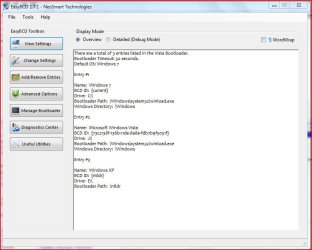
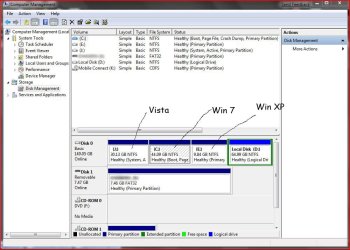
Ok can you post a screen shot of the partitions in the disk managment and the readout from bcdedit so we can get a clearer picture of what is going on.
 

My Computer My Computer

OS
Win 7
Ok can you post a screen shot of the partitions in the disk managment and the readout from bcdedit so we can get a clearer picture of what is going on.

I have attached the the screenshots. Please help me i need windows xp to play game.
 

Attachments

  • bcdedit.JPG
    bcdedit.JPG
    56.2 KB · Views: 183
  • disk management.JPG
    disk management.JPG
    108.4 KB · Views: 249

My Computer My Computer

OS
Win 7, Win Vista, and Windows XP (Triple Boot)
First i would make sure you can see hidden folders and protected OS files (in folder options), then confirm if ntdlr is missing/corrupt from E: if it is replace it from your XP disc. Did you just install all 3 Operating Systems? because typically you would want XP,Vista,7 in that order ie:XP would be the active partition containing the boot files.

P.S. can you post the same easybcd screenshot but in the detailed(debug mode).
 

My Computer My Computer

OS
Win 7
First i would make sure you can see hidden folders and protected OS files (in folder options), then confirm if ntdlr is missing/corrupt from E: if it is replace it from your XP disc. Did you just install all 3 Operating Systems? because typically you would want XP,Vista,7 in that order ie:XP would be the active partition containing the boot files.

P.S. can you post the same easybcd screenshot but in the detailed(debug mode).

I can see hidden files in my com. When i search for the ntdlr file in my win xp partition it returns with no result. But when i try to copy thentdlr file using the cd in recovery console it says accsess denied. I have already attached the the bcdedit debug mode with this post.
Thanks
 

Attachments

My Computer My Computer

OS
Win 7, Win Vista, and Windows XP (Triple Boot)
I can see hidden files in my com. When i search for the ntdlr file in my win xp partition it returns with no result.

You need to deselect "hide protected operating system files" as well as being able to see hidden files and folders. Once you can see ntldr you need to remove the "read only" attribute then you can replace it.
 

My Computer My Computer

OS
Win 7
You need to deselect "hide protected operating system files" as well as being able to see hidden files and folders. Once you can see ntldr you need to remove the "read only" attribute then you can replace it.

I have already deselect the "hide protected operating system files" but i cant still find the ntdlr file.
 

My Computer My Computer

OS
Win 7, Win Vista, and Windows XP (Triple Boot)
are you looking for ntldr or ntdlr?

You'll find the first one - but not the second.

(ntldr stands for NT Loader, so that makes it easy to remember the spelling)
 

My Computers My Computers

System One System Two

  • Computer type
    PC/Desktop
    Computer Manufacturer/Model Number
    The Beast Model A (homebrew)
    OS
    Windows 11 21H2 Current build
    CPU
    AMD Ryzen 9 3950X
    Motherboard
    MSI MEG X570 GODLIKE
    Memory
    4 * 32 GB - Corsair Vengeance 3600 MHz
    Graphics Card(s)
    EVGA GeForce RTX 3080 Ti XC3 ULTRA GAMING (12G-P5-3955-KR)
    Sound Card
    Realtek® ALC1220 Codec
    Monitor(s) Displays
    2x Eve Spectrum ES07D03 4K Gaming Monitor (Matte) | Eve Spec
    Screen Resolution
    3x 3840 x 2160
    Hard Drives
    3x Samsung 980 Pro NVMe PCIe 4 M.2 2 TB SSD (MZ-V8P2T0B/AM) } 3x Sabrent Rocket NVMe 4.0 1 TB SSD
    PSU
    PC Power & Cooling’s Silencer Series 1050 Watt, 80 Plus Plat
    Case
    Fractal Design Define 7 XL Dark ATX Full Tower Case
    Cooling
    SteelSeries Apex Pro Wired Gaming Keyboard
    Keyboard
    SteelSeries Apex Pro
    Mouse
    Logitech MX Master 3S | MX Master 3 for business
    Internet Speed
    AT&T LightSpeed Gigabit Duplex Ftth
    Antivirus
    Windows Defender + MB 3
    Browser
    Nightly (default) + Firefox (stable),Chrome, Edge
  • Computer type
    PC/Desktop
    System Manufacturer/Model Number
    Dell Latitude E5470
    OS
    ChromeOS Flex Dev Channel (current)
    CPU
    Intel(R) Core(TM) i5-6300U CPU @ 2.40GHz, 2501 Mhz, 2 Core(s), 4 Logical Processor(s)
    Motherboard
    Dell
    Memory
    16 GB
    Graphics Card(s)
    Intel(R) HD Graphics 520
    Sound Card
    Intel(R) HD Graphics 520 + RealTek Audio
    Monitor(s) Displays
    Dell laptop display 15"
    Screen Resolution
    1920 * 1080
    Hard Drives
    Toshiba 128GB M.2 22300 drive
    INTEL Cherryville 520 Series SSDSC2CW180A 180 GB SATA III SSD
    PSU
    Dell
    Case
    Dell
    Cooling
    Dell
    Keyboard
    Dell
    Mouse
    Logitech MX Master 3S (shared w. Sys 1) | Dell TouchPad
    Internet Speed
    AT&T LightSpeed Gigabit Duplex Ftth
are you looking for ntldr or ntdlr?

You'll find the first one - but not the second.

(ntldr stands for NT Loader, so that makes it easy to remember the spelling)

Which file am i supposed to replace. ntldr or ntdlr ?
 

My Computer My Computer

OS
Win 7, Win Vista, and Windows XP (Triple Boot)
There is no ntdlr.
 

My Computers My Computers

System One System Two

  • Computer type
    PC/Desktop
    Computer Manufacturer/Model Number
    The Beast Model A (homebrew)
    OS
    Windows 11 21H2 Current build
    CPU
    AMD Ryzen 9 3950X
    Motherboard
    MSI MEG X570 GODLIKE
    Memory
    4 * 32 GB - Corsair Vengeance 3600 MHz
    Graphics Card(s)
    EVGA GeForce RTX 3080 Ti XC3 ULTRA GAMING (12G-P5-3955-KR)
    Sound Card
    Realtek® ALC1220 Codec
    Monitor(s) Displays
    2x Eve Spectrum ES07D03 4K Gaming Monitor (Matte) | Eve Spec
    Screen Resolution
    3x 3840 x 2160
    Hard Drives
    3x Samsung 980 Pro NVMe PCIe 4 M.2 2 TB SSD (MZ-V8P2T0B/AM) } 3x Sabrent Rocket NVMe 4.0 1 TB SSD
    PSU
    PC Power & Cooling’s Silencer Series 1050 Watt, 80 Plus Plat
    Case
    Fractal Design Define 7 XL Dark ATX Full Tower Case
    Cooling
    SteelSeries Apex Pro Wired Gaming Keyboard
    Keyboard
    SteelSeries Apex Pro
    Mouse
    Logitech MX Master 3S | MX Master 3 for business
    Internet Speed
    AT&T LightSpeed Gigabit Duplex Ftth
    Antivirus
    Windows Defender + MB 3
    Browser
    Nightly (default) + Firefox (stable),Chrome, Edge
  • Computer type
    PC/Desktop
    System Manufacturer/Model Number
    Dell Latitude E5470
    OS
    ChromeOS Flex Dev Channel (current)
    CPU
    Intel(R) Core(TM) i5-6300U CPU @ 2.40GHz, 2501 Mhz, 2 Core(s), 4 Logical Processor(s)
    Motherboard
    Dell
    Memory
    16 GB
    Graphics Card(s)
    Intel(R) HD Graphics 520
    Sound Card
    Intel(R) HD Graphics 520 + RealTek Audio
    Monitor(s) Displays
    Dell laptop display 15"
    Screen Resolution
    1920 * 1080
    Hard Drives
    Toshiba 128GB M.2 22300 drive
    INTEL Cherryville 520 Series SSDSC2CW180A 180 GB SATA III SSD
    PSU
    Dell
    Case
    Dell
    Cooling
    Dell
    Keyboard
    Dell
    Mouse
    Logitech MX Master 3S (shared w. Sys 1) | Dell TouchPad
    Internet Speed
    AT&T LightSpeed Gigabit Duplex Ftth
Back
Top