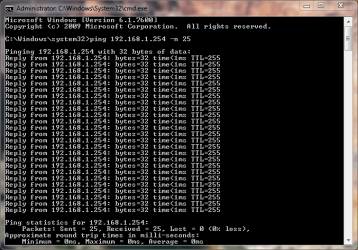
I think I have confirmed we ALL have W7, wi-fi issues

I just tired from my wireless netbook again, getting mostly 2,,4,4,4,4,6,8,8, then I got a time out, then a few 47,29,24,118,103. The wired was 1 the whole time. Currently it's on a building Cisco AP. Does similar on my home router. My iMac is wireless and has no problems with my home router.
 

My Computer My Computer

At a glance

Windows 7i5-7504GB DDR3 1600GT220
OS
Windows 7
CPU
i5-750
Motherboard
Asus
Memory
4GB DDR3 1600
Graphics Card(s)
GT220
....Just a lot of people may not notice it much or be that bothered by it. Personnaly I cant stand it.

In short, wi-fi latency has gone from consistently under 1ms on XP, and vista AFAIK, to anywhere between 2-50ms. To your own router!

I have done many tests and pretty much isolated its the OS. I have tried it at friends places as well, and their windows 7 x64 does the same, ping's are around 3-8. They dont have that initial spike, but otherwise the same as me.

Give it a go, if you are running 7 preferably 64 bit 7, find your wireless routers IP address, open cmd from the start orb, and in there type

ping "your routers IP adress" -n 100

so bassialy if yor ip is 192.1.1.10 you type

ping 192.1.1.10 -n 100

And watch the pings roll by.

Heres the aboslute best results I have gotten. Pings are worse now, about 3,4 4, 6, 4, 3 etc.

Anything over 1ms consistently is just a joke.

Pinging 192.168.1.1 with 32 bytes of data:
Reply from 192.168.1.1: bytes=32 time=44ms TTL=64
Reply from 192.168.1.1: bytes=32 time=2ms TTL=64

Ping statistics for 192.168.1.1:
Packets: Sent = 4, Received = 4, Lost = 0 (0% loss),
Approximate round trip times in milli-seconds:
Minimum = 2ms, Maximum = 44ms, Average = 12ms

check out my thread as well

Extremely poor Wi-fi performance in 7. Max signal. W7 constantly scanning wi-fi? Is it W7?

Lets try get a fix going. This is ridiculous. Is this the future of computing, laggier networking performance?

Just tried this with my machines... Win7 averaged about 40ms, XP around 17.

Now that's an eye opener.
 

My Computer My Computer

At a glance

XP Pro SP3 X86 / Win7 Pro X86Amd 64 x2 4200 (2.4ghz)Kingston DDR2 800 2gbNvidia GF-8400
Computer Manufacturer/Model Number
Homebrew
OS
XP Pro SP3 X86 / Win7 Pro X86
CPU
Amd 64 x2 4200 (2.4ghz)
Motherboard
Asus M2N-MX SE Plus
Memory
Kingston DDR2 800 2gb
Graphics Card(s)
Nvidia GF-8400
Sound Card
Realtek on Motherboard
Monitor(s) Displays
Acer x-193bw
Screen Resolution
1440 x 900
Hard Drives
Western Digital 500g
PSU
350watt In-Win
Case
In-Win
Cooling
Air
Keyboard
yes
Mouse
yes
Internet Speed
5mpbs
Other Info
Also ASRock ION 330 as HTPC (on XP).
Acer Aspire as GP netbook (on XP).
No safe mode. I have tried on two different routers within my home, with 2 different installations of win 7 on different machines. I Then try do it running xp and its 1ms always.

I then went to my freinds house who also has win 7 on his HP laptop ( high specced new lappy) and he was getting 3, 4 ,5, 4, 3, 8, etc as well. He has nothing of mine, I dont touch his comps one bit. I dont know what else to tell you.

What do you mean its just hard to see... You think I am joking around?

This is a massive problem for me, it means I may have to go back to vista and I dont want to. It might even mean I have to skip 7 altogether, and who knows if the next version will be any better.
There's a lot doing down the drain if I cant fix this. but threes no way I will put up with above 1ms ping's.

Are you be chance using homegroup? Homegroup uses a newer protocol called IPv6. some systems experience intermittent connectivity problems in IPv6. You can verify if that is the problem by creating a new network connection using workgroup. If workgourp works, you can disable IPv6 and kill the homegroup.

Let us know if you need help with any of this.

Ken
 

My Computer My Computer

At a glance

Win 8 Release candidate 8400[email protected]4 gigsNvidia 9600M
Computer Manufacturer/Model Number
HP Pavillion dv-7 1005 Tx
OS
Win 8 Release candidate 8400
CPU
[email protected]
Memory
4 gigs
Graphics Card(s)
Nvidia 9600M
Sound Card
HD built-in
Monitor(s) Displays
17" Wxga
Screen Resolution
1440x900
Cooling
none
Internet Speed
45Mb down 5Mb up
No problems here. Windows 7 Home Premium x64.
 

Attachments

  • Capture.PNG
    Capture.PNG
    19.9 KB · Views: 20

My Computer My Computer

At a glance

Windows 7 Home Premium x64AMD Turion Dual Core X2 RM-74Elpida 4.0 GB (2x2GB) DDR2 @ 399MHz 6-6-6-18ATI Mobility Radeon HD 3650
Computer Manufacturer/Model Number
HP Pavilion dv7-1261wm
OS
Windows 7 Home Premium x64
CPU
AMD Turion Dual Core X2 RM-74
Motherboard
Compal 30FD (Socket M2/S1G1)
Memory
Elpida 4.0 GB (2x2GB) DDR2 @ 399MHz 6-6-6-18
Graphics Card(s)
ATI Mobility Radeon HD 3650
Sound Card
IDT High Definition Audio
Monitor(s) Displays
17" HP LCD Display @ 1440x900
Screen Resolution
1440x900
Hard Drives
500GB Western Digital
Internet Speed
6.0 Mbps Down .5 Mbps Up
Are the people posting all 1s sure they are on wireless?
 

My Computer My Computer

At a glance

Windows 7i5-7504GB DDR3 1600GT220
OS
Windows 7
CPU
i5-750
Motherboard
Asus
Memory
4GB DDR3 1600
Graphics Card(s)
GT220
Are the people posting all 1s sure they are on wireless?

I am.

However my previous test was at home. I am now at work where we have close to 20 wireless routers setup and my results are different.
 

Attachments

  • ping.JPG
    ping.JPG
    97.2 KB · Views: 19

My Computer My Computer

At a glance

Windows 7 64xAMD Turion II Dual-Core Mobile M520 2.30 GHz4GBATI Radeon HD 4200
Computer Manufacturer/Model Number
Toshiba L505
OS
Windows 7 64x
CPU
AMD Turion II Dual-Core Mobile M520 2.30 GHz
Memory
4GB
Graphics Card(s)
ATI Radeon HD 4200
Pampum, don't give up, Win7 networking is a known problem. I think they will fix most, if not all the mechanical problems (high latency compared to XP on some systems). Probably not the interface problems (confusing and with many screens), but there will eventually be a way to make this work.
Please tell me where can I find more information about this statement, that Windows 7 networking is a known problem?

I've never heard that before. Windows 7 networking a known problem?

If you and your mate have some problems, it does not mean it's a known problem. I'm running several Seven rigs at home and at work, never met or seen a networking problem. At home, a five computer Homegroup working perfectly, at work Win7 rigs nice and easily in domain.

Are the people posting all 1s sure they are on wireless?
A question not worth answering.
 

My Computer My Computer

At a glance

Windows 10 Pro x64 EN-GB1.6 GHz Intel Core i7-720QM Processor6 GBATI Mobility Radeon HD 5850 Graphics
Computer type
Laptop
Computer Manufacturer/Model Number
HP ENVY 17-1150eg
OS
Windows 10 Pro x64 EN-GB
CPU
1.6 GHz Intel Core i7-720QM Processor
Memory
6 GB
Graphics Card(s)
ATI Mobility Radeon HD 5850 Graphics
Sound Card
Beats sound system with integrated subwoofer
Monitor(s) Displays
17" laptop display, 22" LED and 32" Full HD TV through HDMI
Screen Resolution
1600*900 (1), 1920*1080 (2&3)
Hard Drives
Internal: 2 x 500 GB SATA Hard Disk Drive 7200 rpm
External: 2TB for backups, 3TB USB3 network drive for media
Cooling
As Envy runs a bit warm, I have it on a Cooler Master pad
Keyboard
Logitech diNovo Media Desktop Laser (bluetooth)
Mouse
Logitech Performance Mouse MX
Internet Speed
50/10 Mbps VDSL
Antivirus
Windows Defender 4.3.9431.0
Browser
Maxthon 3.5.2., IE11
This is yet another compatiblity problem, either with the router or the wireless driver involved, possibly even the wlan settings but that is less likely, it also has to do with how far the laptop is from the router. This screen shot is from my wife's new Sony laptop using WPA 2 about 12 feet away in the next room. Homegroups has nothing to do with this problem.

It's easy enough to prove that it's not directly related to Windows 7 with a screen shot. So while Windows 7 isn't directly responsible for the problem, compatablity issues are the most likely cause. Try using a different router or different drivers is about all I can think of. I'm using a D-Link DIR 655, as you can see there are no latency issues here. I went with 25 pings which is good enough. Of course the further you are from the router the latency will be more.
 

Attachments

  • ping shot 25 times zero ms.PNG
    ping shot 25 times zero ms.PNG
    16.4 KB · Views: 24

My Computer My Computer

At a glance

Windows 7 Ult, Windows 8.1 Pro,Q9650-4.275GHz, E8600 4.5GHz, E6750-3.8GHzG.Skill PC2 9600 1200Mhz 5 5 5 15 2TGTX480
Computer type
PC/Desktop
Computer Manufacturer/Model Number
Home built
OS
Windows 7 Ult, Windows 8.1 Pro,
CPU
Q9650-4.275GHz, E8600 4.5GHz, E6750-3.8GHz
Motherboard
Evga 780i FTW
Memory
G.Skill PC2 9600 1200Mhz 5 5 5 15 2T
Graphics Card(s)
GTX480
Sound Card
Asus Xonar D2
Monitor(s) Displays
HannsG
Screen Resolution
1680X1050
Hard Drives
GSkill Phoenix Pro 120GB SSD
PSU
ThermalTake Toughpower 1000Watt modular
Case
ThermalTake XaserV
Cooling
Xigmatek S1283
Keyboard
Logitech G15
Mouse
Logitech G9
Internet Speed
T1
Are the people posting all 1s sure they are on wireless?
A question not worth answering.[/QUOTE]

Perhaps the question should be posed to ferret out the root cause. There are dozens of variables that could increase latency. I suspect traffic jamming on channel 11. In a densely populated area with cheap wifi routers (like a Cali subdi) you will have frequency pongs in modulation due to the variations of manufacturers and possible hysteresis with N. Most routers don't channel switch properly because the radio test conditions that warrant it are so hard to simulate for QA. Buy about 100 competing products, wire them and place them naturally about an OC neighborhood. That's a test bed.
 

My Computer My Computer

At a glance

El Capitan / Windows 10i7-4980HQ16GBIris 5200
Computer type
Laptop
Computer Manufacturer/Model Number
Apple
OS
El Capitan / Windows 10
CPU
i7-4980HQ
Memory
16GB
Graphics Card(s)
Iris 5200
Guys I wrote a comprehensive response addressing every new post this far, but when I posted I had been logged and I lost the whole thing. Cannot write that up again.

In short.
Duke of allinor, it doesn't looks like there any kind of easy fix so I probably will HAVE to give up, as this is ridiculous and no one is suggesting anything I have not tried. I am not blaming anyone but I still have the stance that something windows 7 has done is causing this, nothing else.

ZIGZAg, I have tried every kind of IPv6 setting on and off, REgistry entries
HKEY_LOCAL_MACHINE\SYSTEM\CurrentControlSet\services\TCPIP6\Parameters, DisabledComponents, blah blah, forcing IPs, this is all useless as none of this has ANYTHING to do with the problem, which I again think is the way windows 7 64 bit handles wireless networks.

it makes absolutely not a scrap of difference, none of these settings do. I have gone from a to Z of networking adjustments, they don't even affect the pings one bit.

Kari, widnows 7 networking may be able to work fine, but In my opinion they have overcomplicated the whole thing making it harder an MORE ANNOYING. Libraries, address bar locations not making sense an not know where you are, access denied, files duplicating themselves in libraries to be shared, a lot things not accessible to your OWN computes etc is ridiculously. Simple file sharing was much much better, I am in a home not a office i don't need security within my own network.
HECK windoes 7 networking dont even work out of the box. To start up a networking it keeps telling you to make a homegroup, which I do not want, I just want normal network access to all compuers like every previous OS!, So you go ok I guess I have to give this new homegroups a go, EVEN though you are left wondering if the other operating systems on the netowrk will be left out since they dont have it, but then when you try make it its oh sorry you cant make a network IPV6 is off, let me diagnose what is the case, oh yea sorry no netowork for you, so now you end up with no netowrking whatsoever! Nice! You enevuually google it and fix it.

YOU cant even anymore see what folders are being shared at a glance when browsing a directory, they took of the HAND under the folder. You now have to highlight each folder ONE BY ONE individually to see if its shared on not. NICE WORK making things HARDER and MORE ANNOYING. How stupid are these guys. I don't see how windows 7 is any kind of improvement. Extra security in my case is more a hindrance than help, since i trust the computer in my own home so i don't need it!

Chev65, there is nothing incompatible in my setup....MY intel 4965agn is a fine wireless card, and my router works fine for every other OS. I have tried every wlan settings I can think of on the planet. Please feel free to offer some suggestions I will try it.

It has absolutely nothing with how far the computer is form the router. I have already states the pings are Idential whether I am within tongue licking distance of the router, or far away i am getting only weak signal, IDENTICAL PINGS. The wireless signal travels at the speed of light, You will run out of signal before you notice a difference pings.
I have tried every channel from 1 to 12. I have tried all these things before i even contemplated making a post here!! Funnily enough this computer wont connect to channel 13. IDENTICAL PINGS on all channels. It is not congestion from channels, my friends house, has NO OTHER wireless networks around him, NONE. And his pings are still 3, 4, 3 4, 7, 4, 3, etc....


In the end I think I am on the money when i say 7 has given up a stable single connection, for super fast switching between networks and super updating and tracking of networks around you,
NONE OF WHICH I CARE about.

Remember the dude on the windows 7 add, driving around in a car from place to place seeing how fast he can connect to wireless networks before moving on to the next. WHO THE HELL DOES THAT? Unless you are trying to download stuff of other people network, it may save you a few seconds in leeching time... What ridiculous attitude to take. I'll wait an extra few seconds to connect and have as stable connectim thanks. I mean why does widnows even scan netowkr sin the background if you ar enot requetsing too see what netowokrs there are. Trust me win 7 DOES THIS!


Barrod what are you talking about? Its almost like you havent read anything said here at all or havent thought about anything

" There are dozens of variables that could increase latency." YES but they are all controlled expect for the operating system. Suddenly there is one variable. Windows 7! The rest of your post is meaningless since you speak as if latency in general is the issue, when clearly no one i know is having latency issues on non windows 7...
 
Last edited:

My Computer My Computer

At a glance

7 x64 U
OS
7 x64 U
Kari, widnows 7 networking may be able to work fine, but In my opinion they have overcomplicated the whole thing making it harder an MORE ANNOYING. Libraries, address bar locations not making sense an not know where you are, access denied, files duplicating themselves in libraries to be shared, a lot things not accessible to your OWN computes etc is ridiculously. Simple file sharing was much much better, I am in a home not a office i don't need security within my own network.
HECK windoes 7 networking dont even work out of the box. To start up a networking it keeps telling you to make a homegroup, which I do not want, I just want normal network access to all compuers like every previous OS!, So you go ok I guess I have to give this new homegroups a go, EVEN though you are left wondering if the other operating systems on the netowrk will be left out since they dont have it, but then when you try make it its oh sorry you cant make a network IPV6 is off, let me diagnose what is the case, oh yea sorry no netowork for you, so now you end up with no netowrking whatsoever! Nice! You enevuually google it and fix it.
Windows 7 networking works out of the box. For instance the rigs we have home, I've first installed Seven, then drivers and then connected to network. Simple and easy, wireless and hard wired. I created homegroup only afterwards, Seven does not require homegroup for networking to work.

Libraries and address bar locations make sense to me.
 

My Computer My Computer

At a glance

Windows 10 Pro x64 EN-GB1.6 GHz Intel Core i7-720QM Processor6 GBATI Mobility Radeon HD 5850 Graphics
Computer type
Laptop
Computer Manufacturer/Model Number
HP ENVY 17-1150eg
OS
Windows 10 Pro x64 EN-GB
CPU
1.6 GHz Intel Core i7-720QM Processor
Memory
6 GB
Graphics Card(s)
ATI Mobility Radeon HD 5850 Graphics
Sound Card
Beats sound system with integrated subwoofer
Monitor(s) Displays
17" laptop display, 22" LED and 32" Full HD TV through HDMI
Screen Resolution
1600*900 (1), 1920*1080 (2&3)
Hard Drives
Internal: 2 x 500 GB SATA Hard Disk Drive 7200 rpm
External: 2TB for backups, 3TB USB3 network drive for media
Cooling
As Envy runs a bit warm, I have it on a Cooler Master pad
Keyboard
Logitech diNovo Media Desktop Laser (bluetooth)
Mouse
Logitech Performance Mouse MX
Internet Speed
50/10 Mbps VDSL
Antivirus
Windows Defender 4.3.9431.0
Browser
Maxthon 3.5.2., IE11
Guys I wrote a comprehensive response addressing every new post this far, but when I posted I had been logged and I lost the whole thing. Cannot write that up again.

HECK windoes 7 networking dont even work out of the box. To start up a networking it keeps telling you to make a homegroup, which I do not want, I just want normal network access to all compuers like every previous OS!, So you go ok I guess I have to give this new homegroups a go, EVEN though you are left wondering if the other operating systems on the netowrk will be left out since they dont have it, but then when you try make it its oh sorry you cant make a network IPV6 is off, let me diagnose what is the case, oh yea sorry no netowork for you, so now you end up with no netowrking whatsoever! Nice! You enevuually google it and fix it.

YOU cant even anymore see what folders are being shared at a glance when browsing a directory, they took of the HAND under the folder. You now have to highlight each folder ONE BY ONE individually to see if its shared on not. NICE WORK making things HARDER and MORE ANNOYING. How stupid are these guys. I don't see how windows 7 is any kind of improvement. Extra security in my case is more a hindrance than help, since i trust the computer in my own home so i don't need it!

Chev65, there is nothing incompatible in my setup....MY intel 4965agn is a fine wireless card, and my router works fine for every other OS. I have tried every wlan settings I can think of on the planet. Please feel free to offer some suggestions I will try it.

It has absolutely nothing with how far the computer is form the router. I have already states the pings are Idential whether I am within tongue licking distance of the router, or far away i am getting only weak signal, IDENTICAL PINGS. The wireless signal travels at the speed of light, You will run out of signal before you notice a difference pings.
I have tried every channel from 1 to 12. I have tried all these things before i even contemplated making a post here!! Funnily enough this computer wont connect to channel 13. IDENTICAL PINGS on all channels. It is not congestion from channels, my friends house, has NO OTHER wireless networks around him, NONE. And his pings are still 3, 4, 3 4, 7, 4, 3, etc....


In the end I think I am on the money when i say 7 has given up a stable single connection, for super fast switching between networks and super updating and tracking of networks around you,
NONE OF WHICH I CARE about.

The fact of the matter is that, the further you are from the wireless antenna the slower the connection is, this is fact not fiction. Anyone who knows anything knows this is true beyond any shadow of a doubt. In case you weren't aware, walls and windows slow down your connection, the speed of light has nothing to do with it.

Blaming Windows 7,IPv6,Homegroups or any other part of Windows 7 networking won't get you anywhere. If it was a Win 7 problem then we would all have it. Several posts show zero ping delay with no problems at all, that pretty much proves my point and also disproves yours.

I find it amazing you can't see the logic in that. First you blame Win 7, then you defy anyone to show you a screen shot of a wireless connection with zero latency, then when you are proven wrong, you somehow stick with your original rant then tell us that were all wrong and that Win 7 still sucks... LOL.

It's best to accept the facts in the face of defeat and improve your own system rather than play the blame game which won't get you anywhere.

If you want better pings then use a new router with wireless N capabilities and also a new network adaptor that is made to work with Windows 7. The fact is that, the only thing you tried changing is the channel which is laughable. Your trying to say that you tried everything? Well not in my book.

There have been so many router comptability problems this last year I lost count. I won't get into the fact that many here are using eithernet drivers that were never made for Windows 7. Those types of things are the source of your problem, not Windows 7!

There is only so much you can fix with a driver or firmware update and a certain point you need to upgrade your hardware. This is where effort on your part is required. Ranting and raving about how terrible Win 7 is won't get you anywhere. That is simply uninformed nonsense.

Your other complaints "rant" about how terrible the networking is with Win 7 is just so far from the truth I won't even try to elaborate.
 
Last edited:

My Computer My Computer

At a glance

Windows 7 Ult, Windows 8.1 Pro,Q9650-4.275GHz, E8600 4.5GHz, E6750-3.8GHzG.Skill PC2 9600 1200Mhz 5 5 5 15 2TGTX480
Computer type
PC/Desktop
Computer Manufacturer/Model Number
Home built
OS
Windows 7 Ult, Windows 8.1 Pro,
CPU
Q9650-4.275GHz, E8600 4.5GHz, E6750-3.8GHz
Motherboard
Evga 780i FTW
Memory
G.Skill PC2 9600 1200Mhz 5 5 5 15 2T
Graphics Card(s)
GTX480
Sound Card
Asus Xonar D2
Monitor(s) Displays
HannsG
Screen Resolution
1680X1050
Hard Drives
GSkill Phoenix Pro 120GB SSD
PSU
ThermalTake Toughpower 1000Watt modular
Case
ThermalTake XaserV
Cooling
Xigmatek S1283
Keyboard
Logitech G15
Mouse
Logitech G9
Internet Speed
T1
Guys I wrote a comprehensive response addressing every new post this far, but when I posted I had been logged and I lost the whole thing. Cannot write that up again.

In short.
Duke of allinor, it doesn't looks like there any kind of easy fix so I probably will HAVE to give up, as this is ridiculous and no one is suggesting anything I have not tried. I am not blaming anyone but I still have the stance that something windows 7 has done is causing this, nothing else.

ZIGZAg, I have tried every kind of IPv6 setting on and off, REgistry entries
HKEY_LOCAL_MACHINE\SYSTEM\CurrentControlSet\services\TCPIP6\Parameters, DisabledComponents, blah blah, forcing IPs, this is all useless as none of this has ANYTHING to do with the problem, which I again think is the way windows 7 64 bit handles wireless networks.

it makes absolutely not a scrap of difference, none of these settings do. I have gone from a to Z of networking adjustments, they don't even affect the pings one bit.

Kari, widnows 7 networking may be able to work fine, but In my opinion they have overcomplicated the whole thing making it harder an MORE ANNOYING. Libraries, address bar locations not making sense an not know where you are, access denied, files duplicating themselves in libraries to be shared, a lot things not accessible to your OWN computes etc is ridiculously. Simple file sharing was much much better, I am in a home not a office i don't need security within my own network.
HECK windoes 7 networking dont even work out of the box. To start up a networking it keeps telling you to make a homegroup, which I do not want, I just want normal network access to all compuers like every previous OS!, So you go ok I guess I have to give this new homegroups a go, EVEN though you are left wondering if the other operating systems on the netowrk will be left out since they dont have it, but then when you try make it its oh sorry you cant make a network IPV6 is off, let me diagnose what is the case, oh yea sorry no netowork for you, so now you end up with no netowrking whatsoever! Nice! You enevuually google it and fix it.

YOU cant even anymore see what folders are being shared at a glance when browsing a directory, they took of the HAND under the folder. You now have to highlight each folder ONE BY ONE individually to see if its shared on not. NICE WORK making things HARDER and MORE ANNOYING. How stupid are these guys. I don't see how windows 7 is any kind of improvement. Extra security in my case is more a hindrance than help, since i trust the computer in my own home so i don't need it!

Chev65, there is nothing incompatible in my setup....MY intel 4965agn is a fine wireless card, and my router works fine for every other OS. I have tried every wlan settings I can think of on the planet. Please feel free to offer some suggestions I will try it.

It has absolutely nothing with how far the computer is form the router. I have already states the pings are Idential whether I am within tongue licking distance of the router, or far away i am getting only weak signal, IDENTICAL PINGS. The wireless signal travels at the speed of light, You will run out of signal before you notice a difference pings.
I have tried every channel from 1 to 12. I have tried all these things before i even contemplated making a post here!! Funnily enough this computer wont connect to channel 13. IDENTICAL PINGS on all channels. It is not congestion from channels, my friends house, has NO OTHER wireless networks around him, NONE. And his pings are still 3, 4, 3 4, 7, 4, 3, etc....


In the end I think I am on the money when i say
7 has given up a stable single connection, for super fast switching between networks and super updating and tracking of networks around you,
NONE OF WHICH I CARE about.


Remember the dude on the windows 7 add, driving around in a car from place to place seeing how fast he can connect to wireless networks before moving on to the next. WHO THE HELL DOES THAT? Unless you are trying to download stuff of other people network, it may save you a few seconds in leeching time... What ridiculous attitude to take. I'll wait an extra few seconds to connect and have as stable connectim thanks. I mean why does widnows even scan netowkr sin the background if you ar enot requetsing too see what netowokrs there are. Trust me win 7 DOES THIS!


Barrod what are you talking about? Its almost like you havent read anything said here at all or havent thought about anything

" There are dozens of variables that could increase latency." YES but they are all controlled expect for the operating system. Suddenly there is one variable. Windows 7! The rest of your post is meaningless since you speak as if latency in general is the issue, when clearly no one i know is having latency issues on non windows 7...

If the root cause is switching between available networks than I don't understand why your friend suffers the same issue with no other networks around.
 

My Computer My Computer

At a glance

Windows 7 64xAMD Turion II Dual-Core Mobile M520 2.30 GHz4GBATI Radeon HD 4200
Computer Manufacturer/Model Number
Toshiba L505
OS
Windows 7 64x
CPU
AMD Turion II Dual-Core Mobile M520 2.30 GHz
Memory
4GB
Graphics Card(s)
ATI Radeon HD 4200
How'd I get called out for the bashing. I was just trying to help. Sniff.
 

My Computer My Computer

At a glance

El Capitan / Windows 10i7-4980HQ16GBIris 5200
Computer type
Laptop
Computer Manufacturer/Model Number
Apple
OS
El Capitan / Windows 10
CPU
i7-4980HQ
Memory
16GB
Graphics Card(s)
Iris 5200
Simple and easy, wireless and hard wired. I created homegroup only afterwards, Seven does not require homegroup for networking to work.

Libraries and address bar locations make sense to me.

Sorry, but this is totally the wrong idea. Like the guys in the lab and the decision makers in the boardroom you are out of touch with reality. Setting up a group of Windows 7 computers is child's play. In the real world you are setting up XP, Windows 7 and a Mac or two and have to accommodate guests. Guests can be hard wired or wireless.

While all that is going on you need to maintain security, no hidden shares or automatic ones without account based password protection.

Windows fails this totally in speed, ease of setup and security.

I will gladly admit I am wrong if you can post a link where this normal activity is easily and fully supported in Win 7.

Connecting to a Mac from Windows XP is a single page that works for XP.
 

My Computer My Computer

At a glance

Win7 32 / 64 and XP 32 / 64 (on various other...Intel 920's @ 3.6 and 4.0 GHz3Gb / 6GbATI 4850 / ATI 4970
Computer Manufacturer/Model Number
Alinor Engineering
OS
Win7 32 / 64 and XP 32 / 64 (on various other computers as well)
CPU
Intel 920's @ 3.6 and 4.0 GHz
Motherboard
Asus P6T
Memory
3Gb / 6Gb
Graphics Card(s)
ATI 4850 / ATI 4970
Sound Card
onboard
Monitor(s) Displays
24 / 27"
Hard Drives
SSD, 1Tb WD
SSD, 3 Raptors raid, 2Tb WD
PSU
PC Power & Cooling 1K
Case
Antec 900 (modded)
Cooling
air / Danger Den water
Keyboard
Logitech G15
Mouse
Logitech Performance MX
Internet Speed
ATT UVerse
Simple and easy, wireless and hard wired. I created homegroup only afterwards, Seven does not require homegroup for networking to work.

Libraries and address bar locations make sense to me.

Sorry, but this is totally the wrong idea. Like the guys in the lab and the decision makers in the boardroom you are out of touch with reality. Setting up a group of Windows 7 computers is child's play. In the real world you are setting up XP, Windows 7 and a Mac or two and have to accommodate guests. Guests can be hard wired or wireless.

While all that is going on you need to maintain security, no hidden shares or automatic ones without account based password protection.

Windows fails this totally in speed, ease of setup and security.

I will gladly admit I am wrong if you can post a link where this normal activity is easily and fully supported in Win 7.

Connecting to a Mac from Windows XP is a single page that works for XP.
Duke, you messed with quotes. The quote in your post above is what I said, not what Pampum said.

That said, I would like to know what in my statement is 'totally wrong idea', as you say. How am I out of touch of reality?

My home network has two laptops, two desktops and an HTPC. All running Windows 7, two Home Premiums and three Ultimates. Two wireless, rest wired. Network setup was really the simpliest possible: I installed Win7 to all five computers and they instantly found each other. After the last rig was upgraded, I created a Homegroup, and once again all computers were able to join it, effortless.

We were talking about Windows networks, but setting up networks with PC's with Mac's and Linux rigs is also not so difficult. It's just that you have to know what you are doing.

I do not find anything in my statement you quoted that entitles you to call me a liar, not being in touch with reality.

Kari
 

My Computer My Computer

At a glance

Windows 10 Pro x64 EN-GB1.6 GHz Intel Core i7-720QM Processor6 GBATI Mobility Radeon HD 5850 Graphics
Computer type
Laptop
Computer Manufacturer/Model Number
HP ENVY 17-1150eg
OS
Windows 10 Pro x64 EN-GB
CPU
1.6 GHz Intel Core i7-720QM Processor
Memory
6 GB
Graphics Card(s)
ATI Mobility Radeon HD 5850 Graphics
Sound Card
Beats sound system with integrated subwoofer
Monitor(s) Displays
17" laptop display, 22" LED and 32" Full HD TV through HDMI
Screen Resolution
1600*900 (1), 1920*1080 (2&3)
Hard Drives
Internal: 2 x 500 GB SATA Hard Disk Drive 7200 rpm
External: 2TB for backups, 3TB USB3 network drive for media
Cooling
As Envy runs a bit warm, I have it on a Cooler Master pad
Keyboard
Logitech diNovo Media Desktop Laser (bluetooth)
Mouse
Logitech Performance Mouse MX
Internet Speed
50/10 Mbps VDSL
Antivirus
Windows Defender 4.3.9431.0
Browser
Maxthon 3.5.2., IE11
well this is mine... i know it says 2ms return time, but to be fair, my network is complicated, i have a wireless connection which feeds into a router, this router is connected to a second router via a 20M long Ethernet cable which is functioning as the gateway, so those pings are exactly what i would expect taking into account latency on both routers (eg router 1 acknowledges the ping, sends it to router 2, router 2 acknowledges the ping, sends it back to router 1 which then has to acknowledge the return ping before it sends it wirelessly to my pc) i would be willing to bet that if the pc was connected directly to the gateway via ethernet then i would see no loss at all, but to be honest i really cant be bothered with crawling around disconnecting network cables
 

Attachments

  • ping.PNG
    ping.PNG
    17.1 KB · Views: 9

My Computer My Computer

At a glance

Windows 10 Pro x64Intel Core i5 7400 @ 3.00GHz8GB 2133Mhz DDR4 (OEM supplied)Gygabyte Windforce GTX 1050Ti (Factory Overcl...
Computer type
PC/Desktop
Computer Manufacturer/Model Number
Medion Erazer (note to self: insert model number) - with custom additions
OS
Windows 10 Pro x64
CPU
Intel Core i5 7400 @ 3.00GHz
Motherboard
OEM supllied with PC
Memory
8GB 2133Mhz DDR4 (OEM supplied)
Graphics Card(s)
Gygabyte Windforce GTX 1050Ti (Factory Overclocked)
Sound Card
Realtek
Monitor(s) Displays
Acer Al1980 + HKC
Screen Resolution
1360*768(HKC) / 1280*1024(Acer)
Hard Drives
1TB Toshiba
1TB WD Caviar Green
120GB Samsung Evo 840
PSU
OEM supplied (no power rating on case)
Case
OEM Supplied
Cooling
Stock
Keyboard
Logitech Wireless
Mouse
Logitect Wireless
Internet Speed
40Mb/s Down 10Mb/s Up
Antivirus
Defender
Browser
Firefox
Very simply put Kari "all running Windows 7" is out of touch with reality. Most of us with a few computers do NOT wholesale install a new OS. It is just a really poor idea to put all your eggs in one basket. The prudent person installs a new OS on one computer, tests, proves things work and migrates the setup and data to the new OS.

I never called you a liar, I am sure you had no trouble at all.

The problems with Windows 7 networking is not with the "laboratory" case of all Windows 7. The problems are with the real world where we have to network different OS's. Windows 7 fails miserably there, and was probably designed to do so. Microsoft is forcing us to upgrade all our PC's.
 

My Computer My Computer

At a glance

Win7 32 / 64 and XP 32 / 64 (on various other...Intel 920's @ 3.6 and 4.0 GHz3Gb / 6GbATI 4850 / ATI 4970
Computer Manufacturer/Model Number
Alinor Engineering
OS
Win7 32 / 64 and XP 32 / 64 (on various other computers as well)
CPU
Intel 920's @ 3.6 and 4.0 GHz
Motherboard
Asus P6T
Memory
3Gb / 6Gb
Graphics Card(s)
ATI 4850 / ATI 4970
Sound Card
onboard
Monitor(s) Displays
24 / 27"
Hard Drives
SSD, 1Tb WD
SSD, 3 Raptors raid, 2Tb WD
PSU
PC Power & Cooling 1K
Case
Antec 900 (modded)
Cooling
air / Danger Den water
Keyboard
Logitech G15
Mouse
Logitech Performance MX
Internet Speed
ATT UVerse
What is a reasonable test period at home before 'putting all eggs in the same basket', as you say? I've used Win7 almost a year and a half now on two computers, about a year when I finally decided to install it on all rigs at home.

At work, the network has a Vista rig, two XP's, a Mandriva Linux and some Sevens. Absolutely no problems to setup and maintain. We have successfully set up computers with Seven to customer's networks using different OS's.

I still fail to understand how I am out of touch with reality.

If you have some problems, it's only your reality. When experienced users don't have problems, I wouldn't call it to be out of touch with reality.
 
Last edited:

My Computer My Computer

At a glance

Windows 10 Pro x64 EN-GB1.6 GHz Intel Core i7-720QM Processor6 GBATI Mobility Radeon HD 5850 Graphics
Computer type
Laptop
Computer Manufacturer/Model Number
HP ENVY 17-1150eg
OS
Windows 10 Pro x64 EN-GB
CPU
1.6 GHz Intel Core i7-720QM Processor
Memory
6 GB
Graphics Card(s)
ATI Mobility Radeon HD 5850 Graphics
Sound Card
Beats sound system with integrated subwoofer
Monitor(s) Displays
17" laptop display, 22" LED and 32" Full HD TV through HDMI
Screen Resolution
1600*900 (1), 1920*1080 (2&3)
Hard Drives
Internal: 2 x 500 GB SATA Hard Disk Drive 7200 rpm
External: 2TB for backups, 3TB USB3 network drive for media
Cooling
As Envy runs a bit warm, I have it on a Cooler Master pad
Keyboard
Logitech diNovo Media Desktop Laser (bluetooth)
Mouse
Logitech Performance Mouse MX
Internet Speed
50/10 Mbps VDSL
Antivirus
Windows Defender 4.3.9431.0
Browser
Maxthon 3.5.2., IE11
What is a reasonable test period at home before 'putting all eggs in the same basket', as you say? I've used Win7 almost a year and a half now on two computers, about a year when I finally decided to install it on all rigs at home.

At work, the network has a Vista rig, two XP's, a Mandriva Linux and some Sevens. Absolutely no problems to setup and maintain. We have successfully set up computers with Seven to customer's networks using different OS's.

I still fail to understand how I am out of touch with reality.

If you have some problems, it's only your reality. When experienced users don't have problems, I wouldn't call it to be out of touch with reality.

Kari,

Don't feel bad. I got slammed earlier. The best idea is just stop helping. We could modify W7 P2P and Homegroup to each other from here to Europe and I don't think it would make a difference. The OP has a bone to pick with W7 or MS and we can't help these folks!
 

My Computer My Computer

At a glance

El Capitan / Windows 10i7-4980HQ16GBIris 5200
Computer type
Laptop
Computer Manufacturer/Model Number
Apple
OS
El Capitan / Windows 10
CPU
i7-4980HQ
Memory
16GB
Graphics Card(s)
Iris 5200
Back
Top